
Every prompt in production is a guess about which axis matters. You tweak a phrase, you re-run, you shrug, you ship. Six months later, the bug report tells you the wrong axis mattered. A prompt that returned useful answers in QA returned nonsense on the first long input. A tone that felt friendly in a lab test felt condescending in production. A constraint that looked redundant in your head turned out to be the only thing that kept the answer on-topic. The post-mortem is always the same: you did not know what you were testing, so you cannot say what changed.
A controlled A/B variant test is the missing layer. You change one axis at a time, you score every variant on the same rubric, and you ship the one that wins on the metric that matters to your users. AI Prompt A/B Variant Generator at Elysia Tools is the controlled variant engine for prompts. This field guide walks through the four axes, the rubric, the three render modes, the AI refinement toggle, and the workflow that ends with a variant you can defend in a post-mortem.
AI Prompt A/B Variant Generator at Elysia Tools is a controlled variant engine for prompts. You give it a base prompt, it produces two to eight variants that each change one or more axes — persona, tone, output format, constraints — and it scores every variant on a deterministic rubric so the comparison is reproducible. This field guide walks through the four axes, the rubric, the three render modes, the AI refinement toggle, and the workflow for picking the variant you actually ship to production.
Why a “rewrite” is not the same thing as a “variant”
A rewrite is a single point. You give a model your prompt, you ask for a better version, you get back a polished string. You have no idea what changed, whether the new phrasing is better for your users, or whether you have introduced a regression on a different axis. A variant is a member of a set. Each member differs from the baseline in a documented way. You can compare them side by side, you can compute a deterministic score on the same rubric, and you can ship the one that wins on the metric that matters to you.
The mental model matters. The point of the tool is not to produce a single better prompt — it is to expose the variation space so you can see how the same intent shifts across framings. The output is a set, not a string. Pick the one that fits the production constraint, not the one that wins the heuristic.
For a more general explanation of why controlled variation is the foundation of every prompt program, see the broader AI Tools collection at Elysia Tools.
The four axes the tool varies
The generator walks four orthogonal axes. Each axis has a small library of values, and the variants you get are round-robin combinations of the values you select.
Persona (who speaks). The first line of the prompt is a role prefix. The library includes Expert practitioner, Skeptical reviewer, Beginner-friendly teacher, and Concise engineer. Each one is a 10+ year experience tweak that changes how the model reasons about the task. A skeptical reviewer probes for edge cases. A teacher explains. A concise engineer drops preamble. You usually want one of these in production.
Tone / style. The library ranges from neutral professional, to warm and encouraging, to formal academic, to playful and witty. Tone is independent of persona — a skeptical reviewer can be warm. The four values are prepended as a final instruction: Use a warm, encouraging tone.
Output format. The library includes plain prose, markdown with headings, bullet points only, structured JSON, and step-by-step numbered instructions. The format directive is the most consequential axis for production prompts. A JSON-only response in front of an end user reads as a bug; a step-by-step response in a code-completion tool reads as a wall of text. Match the format to the consumer.
Constraints. The library is No constraint, Under 100 words, Cite sources, No jargon, and Show reasoning first. Constraints are the difference between a prompt that returns something useful and a prompt that returns a wall of generic prose. The rubric scores constraints heavily; the production prompt almost always has at least one.
To see the four axes in their underlying JSON form, browse the prompt-engineering tools at Elysia Tools, where the same dimension libraries feed other prompt-shaped tools.
The four-axis rubric: specificity, structure, constraints, robustness
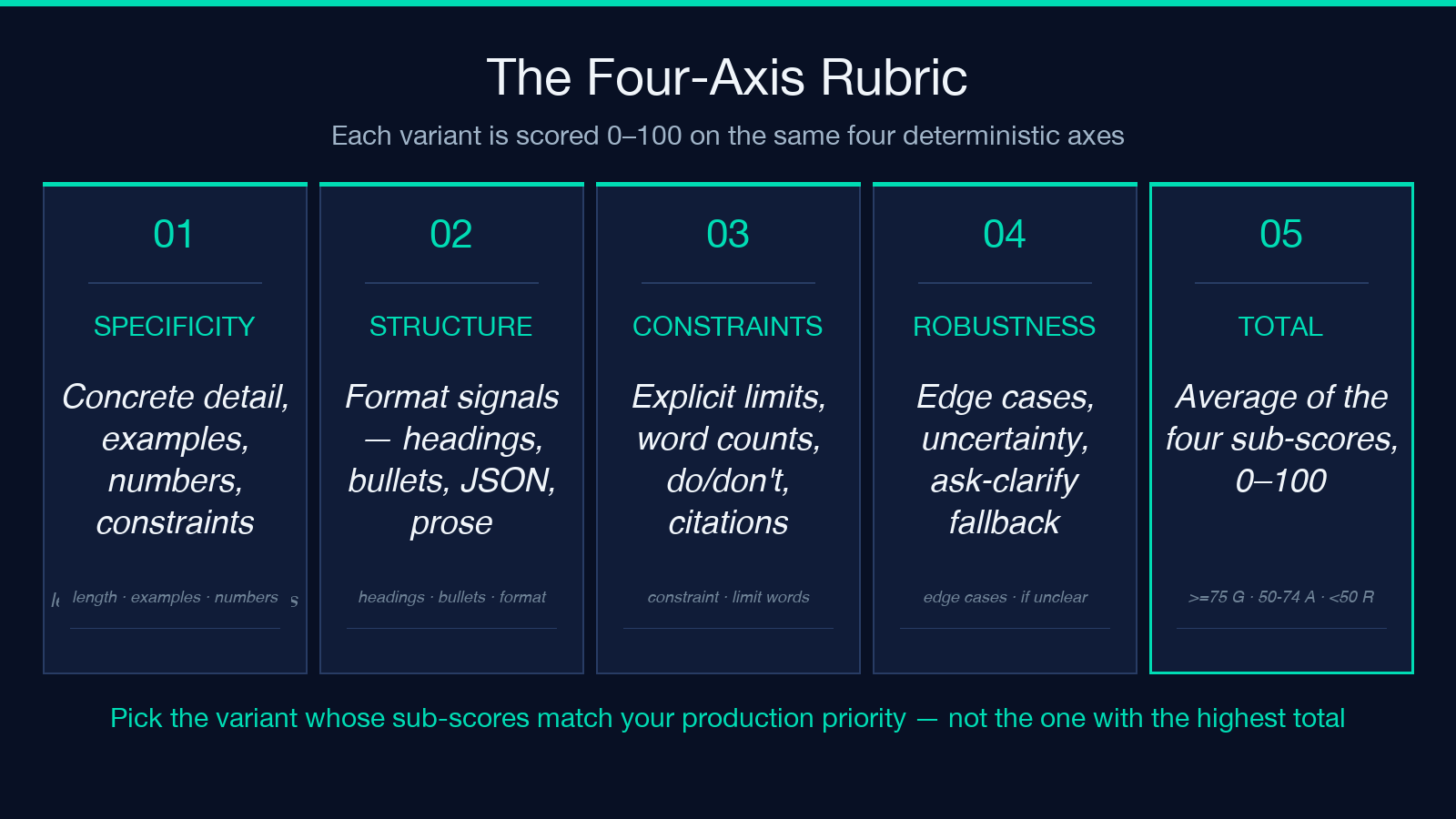
Every variant is scored on a deterministic rubric. There are no model calls in the heuristic path; the scores are reproducible for the same input, which is what makes the comparison meaningful.
Specificity (0–100) measures concrete detail. It rewards longer responses (length, scaled), the presence of examples (e.g., for example), the presence of numbers, the use of a persona, and the inclusion of a constraint. A response that says “I will summarise the document” scores low; a response that says “Summarise in under 100 words, cite the key statistic, and quote the third paragraph” scores high.
Structure measures format signals. The presence of ^#{1,6}s headings scores 30. Bullet points score 20. The words step-by-step, numbered, markdown, json, prose, bullet score 20. The words role, task, constraints, format score 10. A prompt that asks for a structured JSON response is rewarded here; a prompt that asks for prose is not penalised but does not gain.
Constraint clarity is the heaviest dimension for production prompts. The rubric checks for the literal word constraint, then for limit words (under, cite, avoid, do not, never, must), and then for a constraints-dimension selection. A prompt with no explicit constraint starts at 30 and stops there; a prompt with one constraint and a Cite sources directive lands at 100.
Robustness rewards prompts that handle edge cases and uncertainty. The words edge case, uncertain, if unclear, ask, assume score 30. The phrases if you're not sure and note when score 25. A constraints-dimension selection adds 20. Production prompts almost always need robustness; without it, a single unusual user input returns nonsense.
The four sub-scores average into a total of 0–100. A variant with total ≥ 75 is green, 50–74 is amber, and below 50 is red. The colour is the smallest signal; the four sub-scores are where the comparison lives.
For the rubric in its source form, see the Prompt A/B Variant Generator rubric section at Elysia Tools.
Render mode: cards, diff, or table
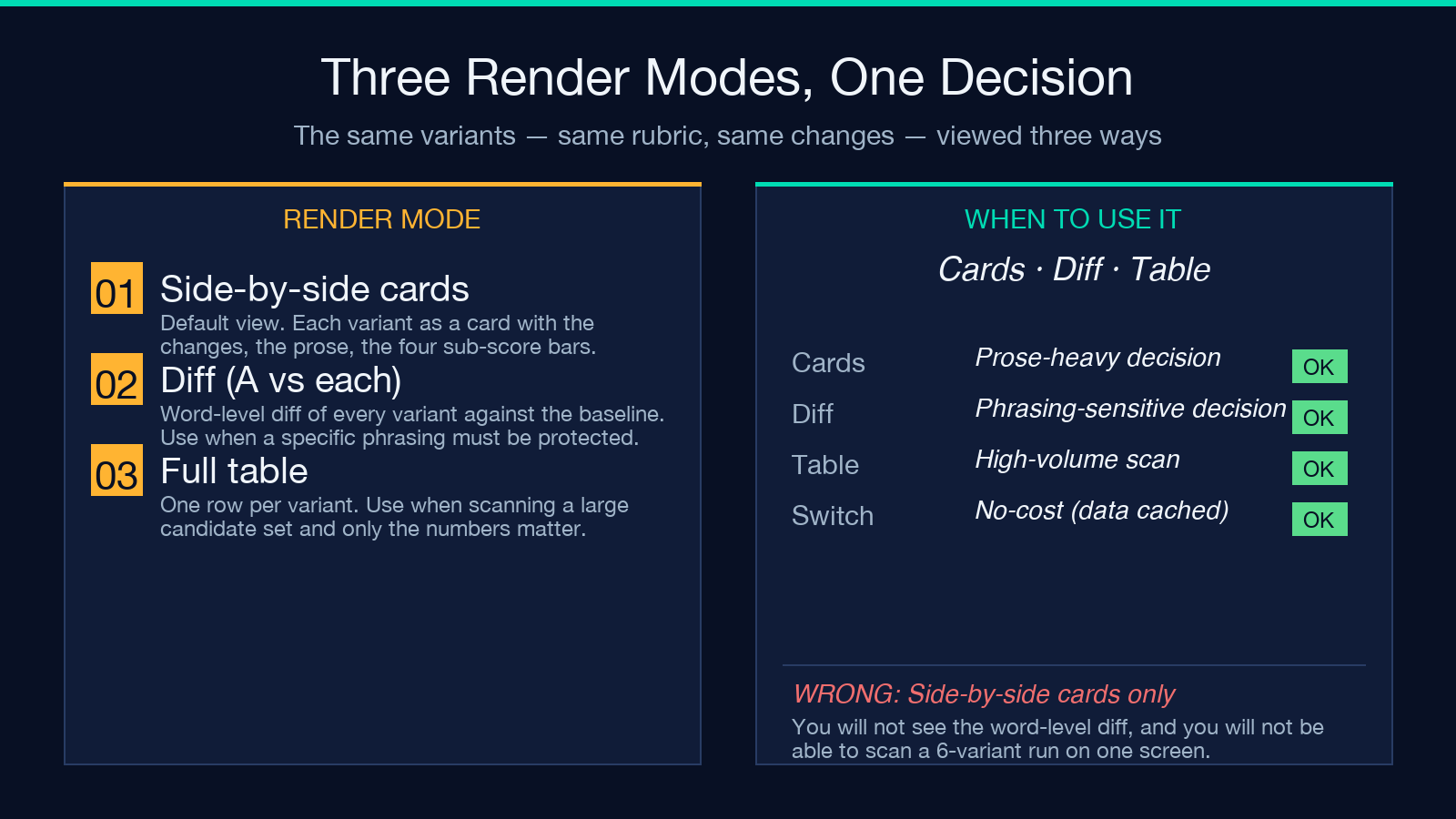
The generator has three render modes. Pick the one that matches the decision you are about to make.
Side-by-side cards is the default. Each variant gets a card with the changes it made (which dimension, which value), the rendered prompt text, and the four sub-score bars. This is the mode to use when you are choosing between personas or tones — you see the prose and the score together. It is also the mode that exposes the limitation of the heuristic: a variant that scores 80 on the rubric may still be wrong for your use case.
Diff (A vs each) is a word-level diff of every variant against the baseline. The baseline is the original prompt with only the temperature nudge applied; everything else is unchanged. The diff is a longest-common-subsequence token diff, with red removed spans and green added spans. This is the mode to use when you have a specific phrasing you are protecting and you want to see exactly what each variant breaks.
Full table collapses the comparison to one row per variant. The columns are specificity, structure, constraints, robustness, and total. Use this mode when you are scanning a large candidate set and you only need the numbers.
The three modes draw from the same underlying data. Switching modes is a no-cost operation; the data is computed once per run.
The AI refinement toggle: what changes when you turn it on
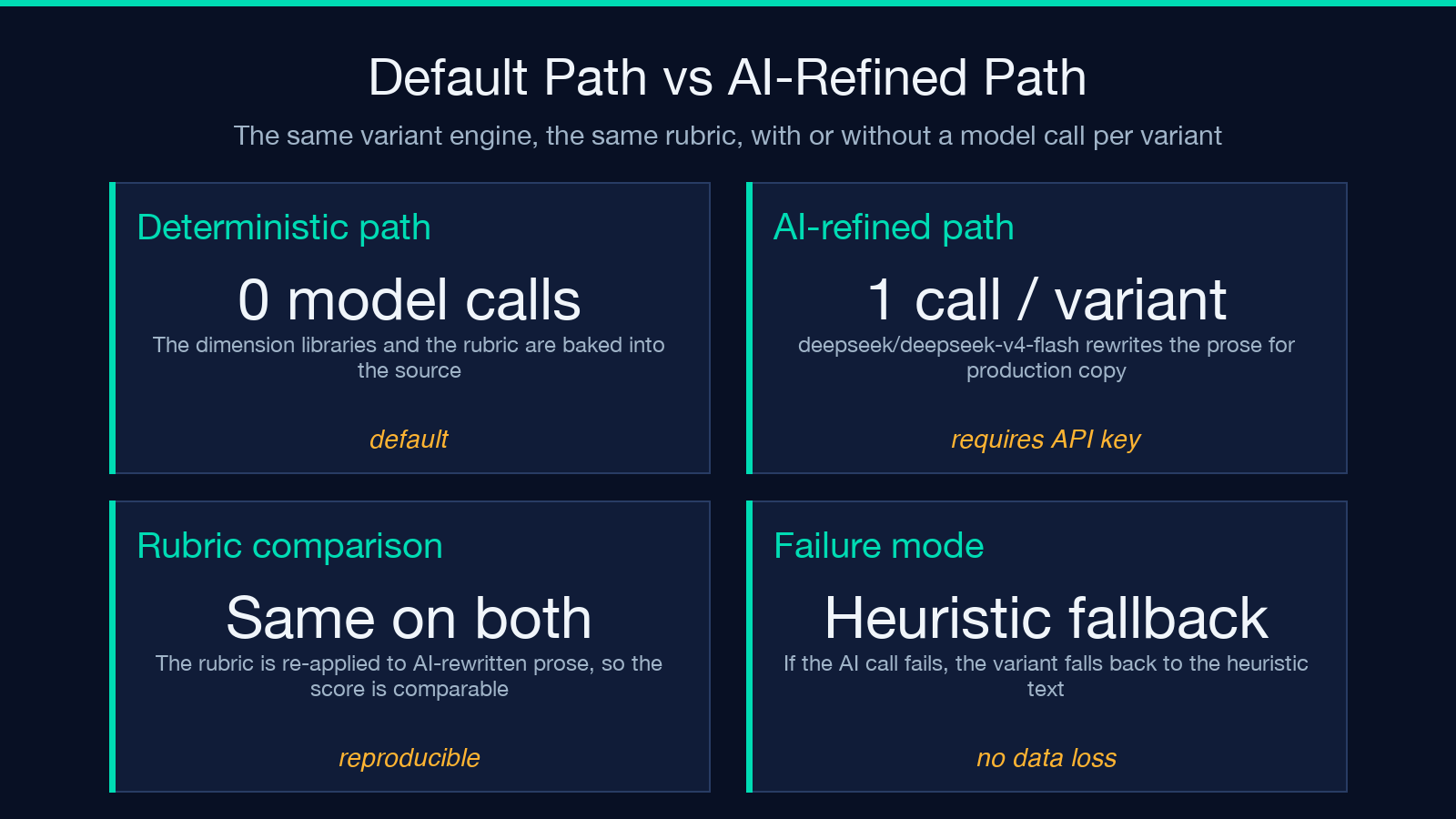
The default generation is deterministic and local. The dimension libraries are baked into the source; the rubric is a heuristic. There are no model calls in the default path, which means the same input produces the same output, every time, and the comparison is reproducible across runs.
The Generate with AI toggle turns the generator into a two-stage pipeline. Stage one is the deterministic variant engine. It produces the same set of variants with the same changes, the same rubric, and the same labels. Stage two is a model call per non-baseline variant, using the deepseek/deepseek-v4-flash model by default. The system prompt instructs the model to rewrite the baseline prompt into a single coherent prompt that applies every directive (persona, tone, format, constraints), preserves the original task intent exactly, and produces copy-pasteable prose with no preamble.
The AI refinement path does not change the changes structure. The rubric is re-applied to the AI-rewritten prose, so the comparison stays meaningful. The model is asked to produce production-ready prose; the heuristic is asked to produce reproducible output. Both pass through the same scoring rubric.
The AI refinement path requires an API key. The deterministic path does not. For the first time you explore a new prompt, the deterministic path is faster and cheaper. For the variant you actually plan to ship, the AI refinement path is closer to production.
If the AI call fails for any reason — network, key, model — the variant falls back to the heuristic text. The comparison still works; the prose is just less polished.
The five-step workflow that picks a variant you can ship
The tool is not a magic “pick the winner” button. It is a controlled comparison engine. The decision still has to be made by a human, with the production context in mind. The workflow that consistently picks a good variant in a single afternoon is five steps.
Step 1 — Lock the base prompt. Pick the prompt you actually intend to ship. The tool preserves the task intent across variants. If your base prompt is unclear, no variant will save you.
Step 2 — Pick the dimensions. The default is persona + tone + format. Add constraints if the production prompt needs explicit limits. Drop format if the consumer is flexible.
Step 3 — Set the variant count. Four variants (A through D) is the sweet spot. Two is too few to see the variation space; eight collapses into noise.
Step 4 — Set the temperature. The temperature dial is a creativity knob, not a model temperature. At 0.5, the engine stays close to the baseline. At 0.8, the engine appends a generation note that pushes for concrete, specific phrasing. The default is 0.5.
Step 5 — Render, compare, ship. Use Side-by-side cards for prose-heavy decisions and Diff (A vs each) for phrasing-sensitive decisions. Pick the variant whose sub-scores match your production priorities, not the one with the highest total. Then re-run with the AI refinement toggle on for the final prose pass.
For related decision-making tooling, see the AI regex explainer for prompts that produce regex, the AI RAG chunk quality scorer for prompts that produce chunks, and the broader AI tools collection for the rest of the prompt-shaped tooling at Elysia Tools.
When not to use this tool
The generator assumes you have a base prompt that already works. If the base prompt is broken, the variants will be broken in the same way with different phrasings. The tool will not rescue a vague base prompt; it will only spread the vagueness across a rubric. If the base prompt is empty or returns a refusal, the variants will too.
The tool also assumes the variation axes (persona, tone, format, constraints) are the dimensions you care about. They are the most common production axes, but they are not the only ones. If you are testing retrieval depth, tool-selection strategy, or chain-of-thought length, this tool is the wrong tool. Use a benchmark instead.
Finally, the rubric is a heuristic, not a measurement. It does not call a model. It does not measure user behaviour. It measures text features that correlate with production readiness. The score is a useful first cut, not a verdict. The final shipping decision is still yours.
What to do with the variant you pick
Once you have a variant whose sub-scores match your production priorities, two things happen next. First, you version the prompt. Write the variant into your prompt store with a date, a name, and a link to the generator run that produced it. The link is the receipt — six months from now, when someone asks why the prompt is phrased that way, the run is reproducible. Second, you measure it. The rubric is a heuristic; the measurement is a live A/B test against the prior prompt. If the new variant wins on the user behaviour you care about, ship it. If it does not, revert and try a different axis.
The whole point of the tool is to make the prompt decision reproducible, versionable, and falsifiable. The variants are the input to that decision. The shipping is the output. The rubric is the bridge.
The fastest way to use this on your own prompt is to open the tool, paste your base prompt, leave the defaults, and read the four cards. That first run takes two minutes. The shipping decision still takes an afternoon, but you will start it with a set of comparable options instead of a single gut-feel rewrite — and six months from now, the question why is the prompt phrased this way? will have a reproducible answer instead of a shrug. The question is not whether you can afford to run a controlled comparison. The question is whether you can afford the post-mortem where you have to admit you shipped without one.
