
Mark every shared CSV or JSON with a non-repudiable fingerprint. When a dataset escapes three weeks later, the recipient column already says who received which export, when it was generated, and which salt batch made the signature — and you can prove it without a courtroom fight. That is the entire job of a data watermarker: turn a leaked file into a checksum you can trace.
A watermark is not encryption. The data stays readable. What changes is that the file carries an identity-shaped trail that survives copy-paste, sort, filter, and (most of the time) even re-export through a different tool. The Watermarker at Elysia Tools implements two complementary modes: an invisible mode that hashes the payload with a per-user salt so you can later prove the file came from a specific run, and a visible mode that writes a __wm_* column or key into every record so the trail shows up in any spreadsheet viewer. Both modes embed the same five inputs — username, timestamp, custom field, and salt — so an audit can extract the fingerprint without re-running the tool.
This field guide shows how to design a watermark scheme that survives normal data wrangling, how to choose between invisible and visible modes, and how to recover authorship when the leaked file is the only artifact you have left. Tooling lives in CSV/JSON Data Watermarker; reference datasets for ad hoc testing live in the CSV Samples and Cryptography Samples hubs.
What a watermark actually buys you
A watermark is a one-way trip wire, not a lock. Encryption hides the content from anyone without the key; a watermark lets anyone see the content, but taints every record with metadata that survives transit. The legal and operational difference matters: encryption failures are silent, watermark leaks are observable.
The metadata you can embed is limited by what the file format allows and what survives the normal operations downstream consumers perform. A naïve approach — append a footer comment or a single trailing row — survives head and cat but breaks under sort, awk, pandas.dropna, or any Excel “Remove Duplicates” pass. The Elysia watermarker writes metadata into per-record fields so the trip wire stays attached to the rows that travel, not to a single footer line. This is the same idea as blockchain anchoring applied to a flat file: each row carries a witness that does not depend on position.
For most data-leak investigations, the goal is not to recover the watermark from a heavily mangled file. It is to recover it from a file that still has the columns it had when you sent it out. As long as the rows survive, the watermark survives.
Five inputs the watermarker takes
Every watermark run collects the same five inputs, in this order. They are the only knobs you need to think about for 95% of cases.
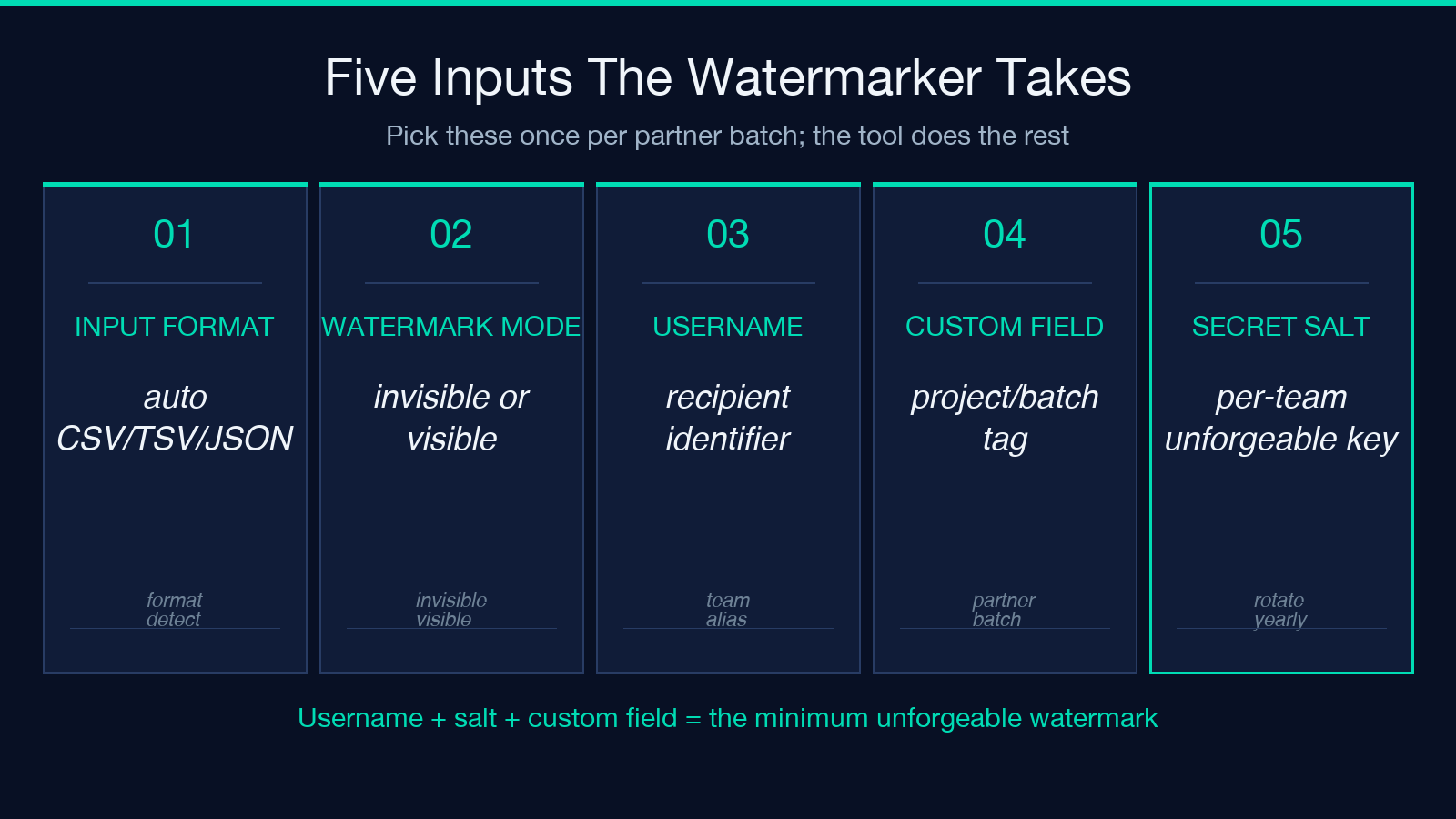
– Input Format — auto-detects CSV, TSV, or JSON; the parser normalizes newlines and quoted fields before stamping.
– Watermark Mode — invisible (per-row HMAC-style signature) or visible (added metadata column/keys).
– Username — the recipient identifier you want pinned to the export. Convention: use the email or team alias, not a person’s real name, so the column itself does not become a privacy leak.
– Custom Field — a free-form string that names the project, batch, or destination. Useful when many runs are issued for the same recipient chain.
– Secret Salt — a per-team string mixed into the signature derivation. Without this, an adversary who knows the tool can trivially forge a watermark. Treat it like a webhook secret.
Three things are deliberately not inputs: the data itself, the timestamp source, and the column ordering. The tool hashes the timestamp and the auto-detected format into the signature automatically. The only thing you should think about is which metadata to bake in and how stable it should be.
Invisible versus visible modes
Invisible mode computes a per-record signature from username + timestamp + custom field + salt + row_data, then writes that signature into a designated key or column. The signature is one-way — it does not let anyone reconstruct the salt — but it does let you, holding the salt, verify that a given row was indeed emitted under a specific run.
Visible mode writes the same metadata as explicit fields: a __wm_user column, a __wm_at timestamp, a __wm_batch for the custom field, and an optional __wm_sig if you also want the cryptographic proof. The visible trail is what an auditor reads; the invisible trail is what a court reads.
The two modes are not mutually exclusive. A common pattern is to use visible for the partner-facing delivery (so the recipient team knows their copy is tagged) and invisible for the internal snapshot (so leakage from cloud sync or thumb drive copy still leaves a fingerprint). Run the file through both modes if you have any reason to suspect the visible column might be stripped — Excel sort, pandas.drop_duplicates, and any tool that calls DataFrame.to_csv(columns=...) will silently delete the watermark column if it is not in the whitelist.
Where the watermark survives and where it does not
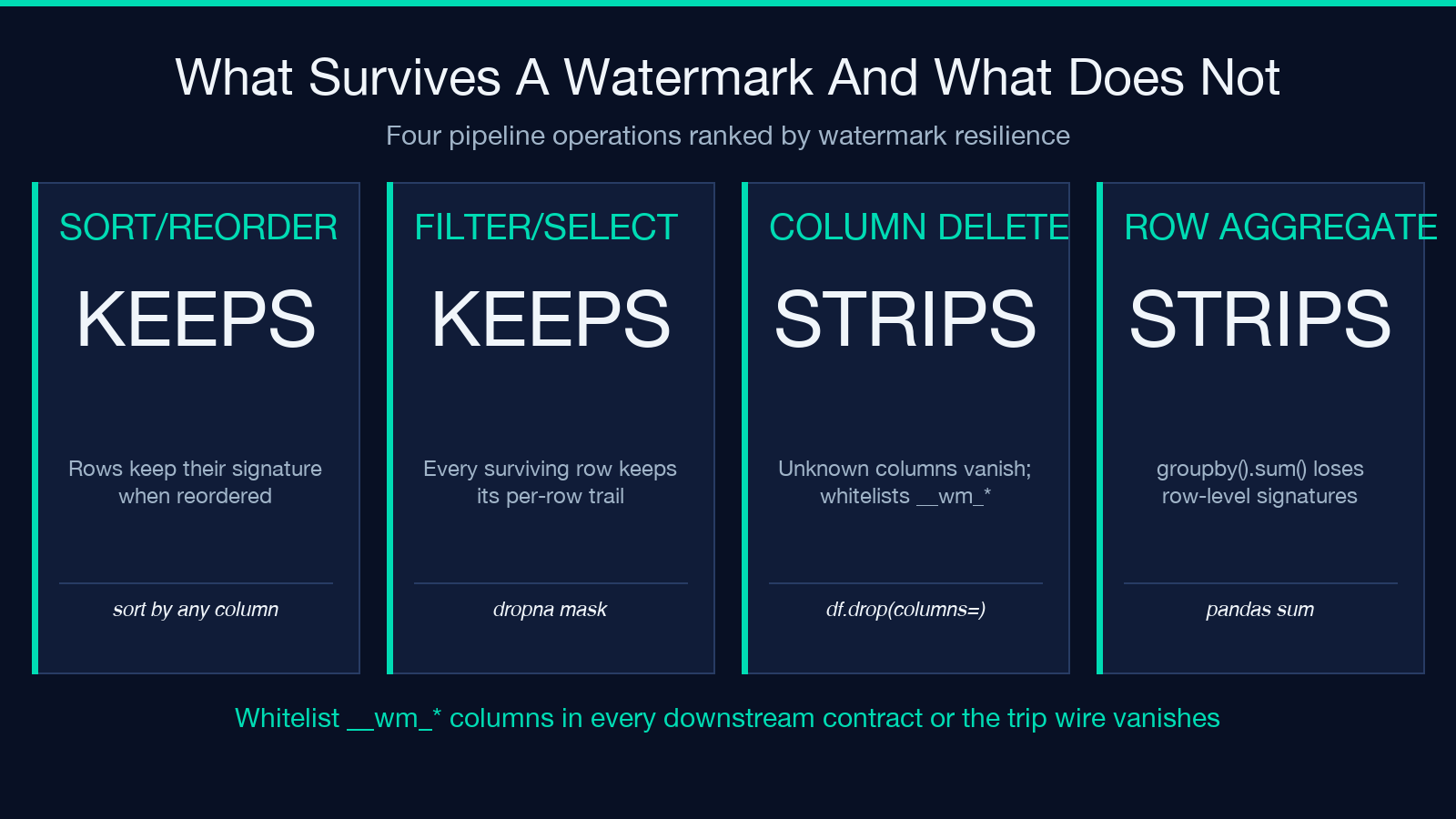
The watermark column behaves like any other column. It survives:
– Sort and reorder — moving rows around does not invalidate per-row signatures.
– Filter and select — every row that travels keeps its signature.
– Copy-paste into Excel, Sheets, Airtable — the metadata goes with the row.
– JSON re-serialization — keys are preserved through round-trips.
It does not survive:
– Column deletion — if a downstream pipeline calls df.drop(columns=['__wm_sig']) because it treats unknown columns as schema noise, the signature goes with it. Whitelist watermark columns in your contracts.
– Row aggregation — pandas.groupby().sum() aggregates the data but loses the per-row signature. If your downstream story is “what rows leaked?”, you must keep rows intact.
– Compression and re-encoding — the bytes change, but the row-level meaning is preserved. Decompress, then re-check.
– Format migration — CSV becomes Parquet, JSON becomes Avro. The watermark still lives in the columns, but the type system may coerce your strings. Pre-coerce back to string before re-checking.
Designing a recipient tag scheme
The custom-field slot is the most under-used input. Most teams paste partner-share-export-2026-Q3 once and reuse it for every export that quarter, then lose granularity when the leak happens six months later. The custom field is cheap; use it.
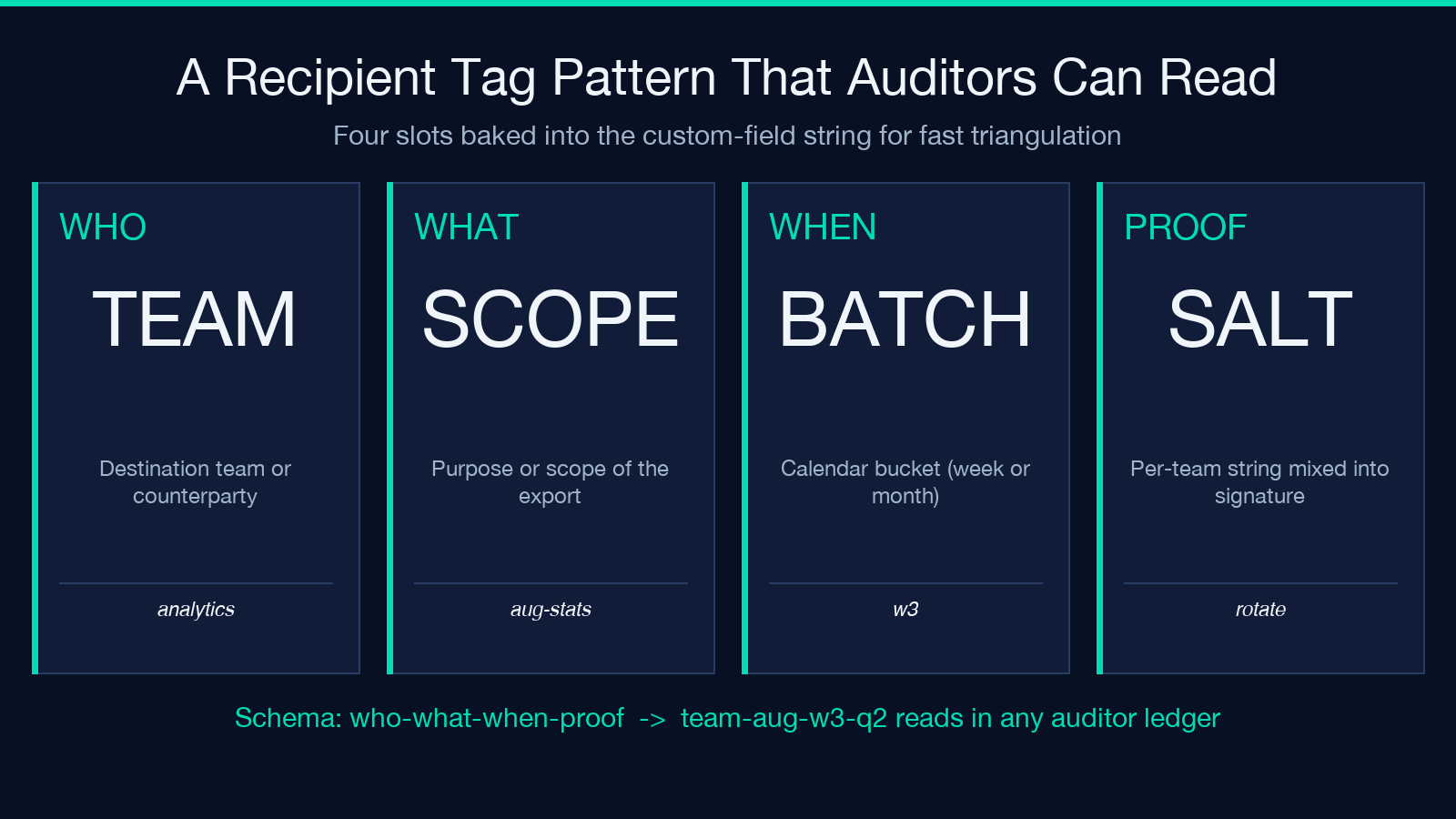
A useful pattern is to encode who-what-when into the custom field itself:
– who — the destination team or counterparty – what — the purpose or scope of the export – when — the calendar bucket (week or month number)
For example: analytics-aug-2026-w3-q2 reads as “analytics team, August 2026, week 3, Q2 batch”. When a leak shows up, you can triangulate against your outbound calendar to identify the likely sender in under five minutes. The string does not need to be machine-parseable; it needs to be auditor-readable.
Pair this with a per-team Secret Salt that the destination does not have access to. The salt is what makes the signature unforgeable. Rotate the salt when a team member leaves, when a partner agreement ends, or once per year. Keep a small salt ledger in the team’s runbook; do not put salts in your CI logs.
Verifying a leaked file against your ledger
When a dataset surfaces where it should not — in a forum dump, in a competitor’s API response, in a journalist’s inbox — the verification flow is the same.
1. Convert the file back to its original shape: same columns in the same order, same line endings. If the file was JSON, parse and re-emit it canonicalized before reading columns. 2. For each row, extract the watermark column or key and split on the separator convention you used at emit time. 3. Recompute the signature against the salt ledger and compare to the value in the file. If they match, you have proof-positive the file came from that run. 4. If the signature column is missing but the other watermark columns are present, you can still narrow the source to the team and the batch from the visible trail.
A verification script that automates these four steps for CSVs is a one-hour build. Once you have it, every future leak costs you minutes, not weeks. The Elysia watermarker does not bundle a separate verifier, but the signatures are HMAC-SHA-256 keyed by the salt, which is a textbook standard you can implement in any stack.
Operational checklist before you watermark a partner export
A clean watermark run takes ten seconds of attention; a leaky one costs a week. Run through this list every time you stamp a file that leaves the building.
– Confirm the recipient is correct. A watermark to the wrong team still points back to you, but it points to a team that never received the file — which is useless in an audit. – Confirm the custom field is fresh for this batch. Re-stamping an old tag is the single most common cause of “the watermark was correct but it didn’t help” reports. – Confirm the salt is the current team salt. Cross-team leaks are usually a salt-rotation mishap, not a tooling failure. – Confirm the invisible signature round-trips before sending. Stamp a one-row sample, then run the verifier; if the verifier says match, you are good to go. – Confirm the downstream schema whitelists __wm_*. Send the file to a test consumer first; if their first reaction is “what are these extra columns?”, the watermark will not survive their pipeline.
When all five pass, the stamped file is ready. The watermark does not slow down the recipient, and the trail survives the next three quarters of data wrangling.
When watermarking is the wrong tool
Watermarks are excellent for the data-leak story and useless for almost everything else. They do not protect against:
– Live API access — a watermarked export can be queried row by row without ever taking a snapshot. Watermark at the export boundary, not at the API boundary.
– Encrypted exfiltration — if the file is stolen in transit, the watermark is stolen with it. Use TLS, signed URLs, expiring tokens.
– Aggregation down to scalars — once a sum() or mean() is taken across the rows, the per-row signatures are gone. The visible metadata column will still report user=q.team, but the per-row proof is lost.
– Adversaries who know the tool — anyone with the source code (it is open source on the Elysia Tools site) can produce a “watermarked” file. The scheme is for honest adversaries and careless insiders, not for nation-state attackers.
If your threat model includes any of the above, watermarking is one layer in a defense-in-depth stack, not the whole stack. It pairs well with rate limits, audit logs, signed download links, and the basic hygiene of “do not email CSVs to your personal Gmail”.
Try the CSV/JSON Data Watermarker on a sample row to see the round-trip for yourself; the CSV Samples page has ready-made inputs if you do not want to upload your own data.
