
The generated TypeScript sits in the same repo as your hand-written code, and the moment one of the eight controls is wrong, the strict-mode compiler will tell you about it before the API client ever does. The OpenAPI to TypeScript generator field guide you are reading right now exists because openapi codegen is the kind of task that looks solved the first time you paste a tiny spec into a tool and watch it spit out a clean interface User { id: string; name: string; }. The second time, when the spec has forty schemas, three composition keywords, and a namespace collision with an existing domain model, the same tool produces a file that compiles nowhere, and the cause is one of the six controls the generator exposes, not the generator itself.
This guide walks through the eight controls — Source Format, Output Format, Naming Style, Declaration Style, Namespace Name, Include Operation Types, and Include Descriptions — in the order they should be chosen, and treats each one as a decision the codebase makes on your behalf rather than a switch you flip on the generator UI. The OpenAPI to TypeScript Generator is the tool behind every example in this article; every code block was produced by pasting a real OpenAPI snippet into the tool with the controls set the way this guide recommends, and the worked example at the end unpacks the full input-to-output trace so you can see exactly which control produced which line.
Before reading further, get the tool open in a side tab. Most of the value here comes from running the same snippet through the tool with two different control combinations and comparing the output side by side.
The Source Spec Is the Single Source of Truth (or the Lie at the Heart of Your Types)
Every typed API client is downstream of one document — the OpenAPI 3.x or Swagger 2.0 specification that the API team published. When that document is well-written, with stable schema names, consistent required arrays, and unambiguous type fields, the generated TypeScript is almost mechanically correct: every endpoint produces one request interface and one response union, every schema becomes one named interface, and the only thing the generator adds is the structural shape that the schema already described. When that document is sloppy — when id is sometimes string and sometimes string | null, when required is missing on what is clearly a non-optional field, when oneOf is used as a synonym for anyOf because the spec author was in a hurry — the generated TypeScript inherits the sloppiness exactly, and the strict-mode compiler at the end of your build pipeline is the first place that becomes visible.
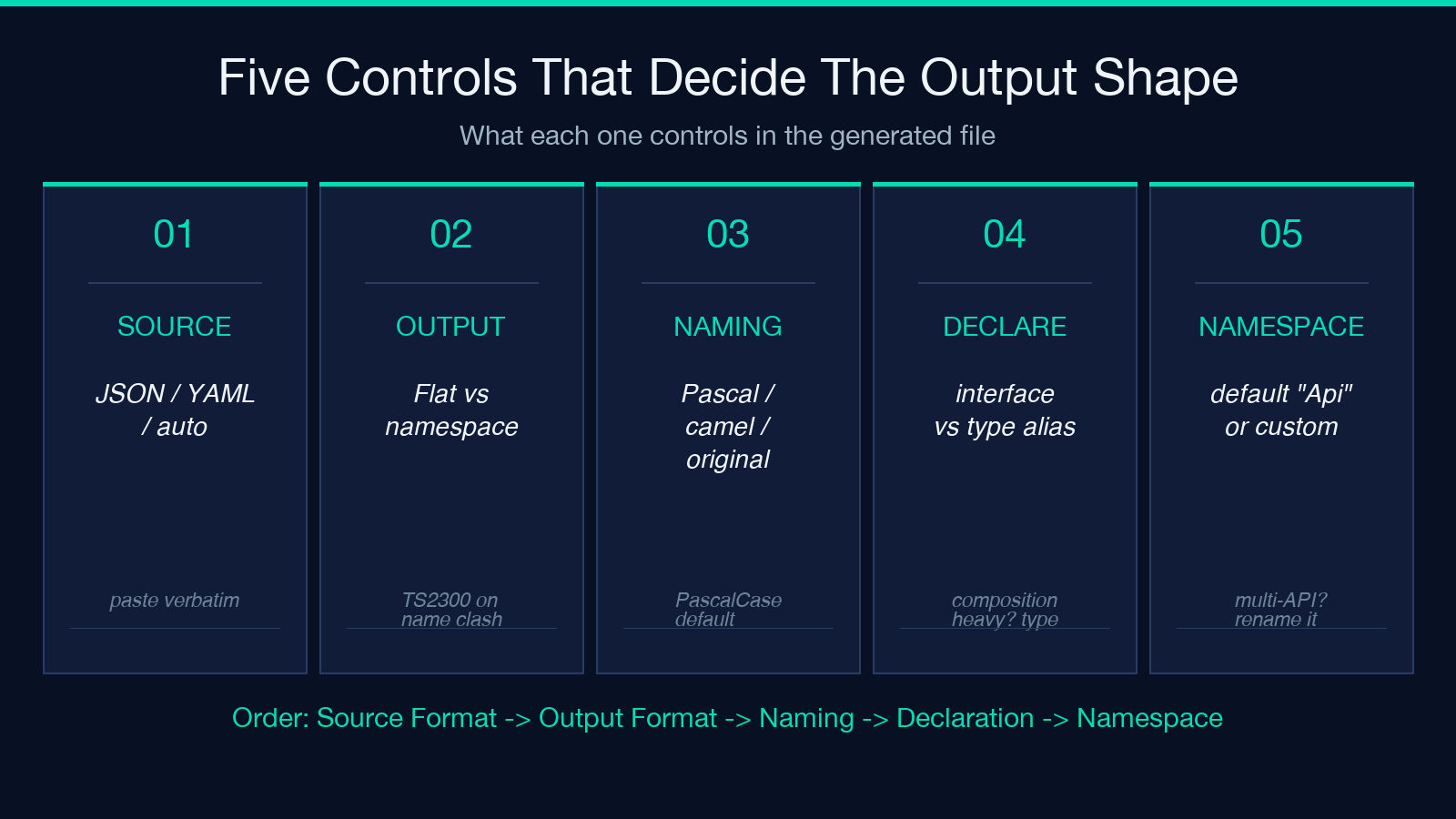
The first decision the generator asks for is the Source Format — auto, json, or yaml. Auto-detect works on the first sniff of the document: a leading { or [ means JSON, a top-level scalar or mapping means YAML. The decision matters because the wrong format silently produces a parse error that looks like an empty spec, and you waste five minutes wondering why the tool returned zero types.
A practical rule for picking the Source Format: pick json when the API team serves the spec via a link header that points to a JSON file, and pick yaml when you copied the spec from a README or a Swagger UI page that renders YAML by default. Pick auto when you genuinely do not know which form the source takes, and trust that the first character of the document is the only signal the auto-detector uses.
The generator expects the spec as a single paste, not as a URL. That is intentional: the tool runs entirely in the browser, no network calls, no upload to a backend. The implication is that any $ref in the spec must resolve to a schema that lives inside the same document — the generator does not fetch external refs. If the API team publishes a spec that points at shared schemas living under /components/schemas and at a separate ./schemas/common.yaml file, the second file must be inlined into the paste before the generator will produce a complete output. This is the most common reason an OpenAPI-to-TypeScript run produces a half-finished file with a missing import on the first line — the spec had external refs, and the paste did not include them.
Source Format: Auto-Detect Works Until Your Spec Starts with a Comment
YAML files frequently start with a comment line — # Pet Store API — version 3.0.0 — that sits above the openapi: key. The auto-detector handles this gracefully: comments are stripped before sniffing, and the first non-comment non-blank line determines the format. JSON files cannot legally start with a comment, so a leading # in a JSON file is always a paste error, not a real comment.
The corner case is when the spec author used the JSON-with-comments dialect that some tooling emits. In that case the first character of the document is {, the auto-detector chooses JSON, and the subsequent // or /* */ comments survive into the parse step where they fail with a JSON parse error that does not name the comment as the cause. The fix is to either pre-strip the comments or paste the spec as YAML.
The other corner case is the empty spec. A paste that contains only whitespace — a single newline, or three spaces — produces zero types and zero errors. The tool’s audit panel reports 0 interfaces generated and you do not get a hint that the paste was empty. If the audit panel reports zero after a paste you thought was the full spec, the first thing to check is the Source Format selector: switching from auto to yaml or json explicitly causes a re-parse that surfaces the empty-input state with a clearer message.
For real-world specs larger than ten thousand lines, paste in two stages: the schemas block first (which is self-contained), then the paths block (which references the schemas by $ref). The tool does not require the spec to be pasted in a single block, and a two-stage paste is easier to debug when the schema list is large.
Output Format: Flat Exports Versus Namespace Wrappers
The Output Format control decides whether the generated file uses flat exports — export interface User, export interface Order, side by side — or wraps everything inside a named namespace — export namespace Api { export interface User { ... } }. The decision looks like a cosmetic preference; it is actually a structural one that determines whether the auto-import path in your codebase resolves correctly.
Flat exports are the right default when the generated file is consumed by one application, one repo, and one bundle. Each interface is exported under its own name, the IDE’s auto-import picks it up by name, and the import statement reads import type { User } from './api-types';. The trade-off is that flat exports cannot coexist with another module that exports an interface of the same name — if your hand-written code already has interface User in the user domain, the two declarations collide the moment a file imports both.
Namespace wrappers are the right choice when the generated file is consumed alongside other modules that may share names, when the file is published as a third-party package, or when the API spec contains schema names that read like ordinary English words (User, Order, Product, Address) that are likely to collide with hand-written domain models. The namespace acts as a disambiguator: import { Api } from './api-types'; type T = Api.User;.
The strict-mode compiler in TypeScript treats flat and namespace outputs identically — both produce named types that the type checker resolves. The compiler does NOT treat a flat export interface User and a hand-written interface User in the same file as the same declaration; instead it raises error TS2300: Duplicate identifier 'User'. That error appears at the line where the second declaration is, and the fix is either to rename the hand-written interface or to switch the generator to namespace mode.
For multi-tenant repos where several applications consume the same API spec, namespace mode is the safer choice even when no immediate collision exists, because it removes the chance of a future collision when the second consumer adds its own hand-written User interface.
Naming Style: PascalCase Is the Default, But It Isn’t Always the Answer
The Naming Style control decides how the tool transforms the schema name from the spec into the interface name in the output. PascalCase is the default and the most common choice — User becomes interface User, OrderItem becomes interface OrderItem. The other options are camelCase (user, orderItem) and original (User, OrderItem left as the spec wrote them).
PascalCase is the right default for TypeScript interfaces because the type-naming convention in TypeScript is PascalCase, and the IDE’s auto-import renders PascalCase names with the leading capital letter. The choice to override is rare and tied to specific codebase conventions: some repos use camelCase for interface names to distinguish them from class names, and some repos use the original casing because the spec names already follow the convention the repo wants.
The trap with naming style is that it interacts with the rest of the output. A flat export with PascalCase produces export interface User. A namespace export with the same naming style produces export namespace Api { export interface User { ... } }. A flat export with camelCase produces export interface user { ... }, and TypeScript raises a warning that interface names should be capitalized. The IDE displays the warning inline but does not block compilation; the strict-mode compiler will block it if noImplicitAny and the lint rule interface-name-casing are both on.
The naming style also affects how the tool generates operation types. With PascalCase, an operation named getUser becomes GetUser (the prefix is capitalized). With camelCase, it becomes getUser (camelCase as the spec wrote it). With original, it stays as the spec wrote it, which can produce lowercase operation names that violate the lint rule.
A practical rule: stick with PascalCase unless the consuming codebase has a documented deviation from the TypeScript convention. The interaction with the rest of the output is hard to predict, and the default produces types that compile cleanly across every common strict-mode configuration.
Declaration Style: Interface Versus Type Alias — And the Strict-Mode Surprise
The Declaration Style control decides whether each schema is emitted as an interface or as a type alias. The two forms are interchangeable for almost every practical purpose — both produce named structural types, both compose with extends/&, both participate in discriminated unions. The decision matters in exactly two cases: when the schema uses composition (allOf, oneOf, anyOf) and when the consuming code uses interface-specific features like declaration merging.
Interface is the right default for component schemas that represent single concrete shapes (User, Order, Product). The interface form is the form the IDE auto-completes first, and the form that most React/Next.js tutorials use in their examples. The form also participates in declaration merging: if the consuming code wants to add a field to a generated schema, an interface User { ... } declaration in the consuming file will merge with the generated one as long as the file is not generated again (which would overwrite the merge). The merge pattern is fragile and the recommended alternative is to keep the generated file immutable and use a separate extends User interface for hand-written extensions.
Type alias is the right choice for schemas that use union composition — oneOf produces type X = A | B | C; more naturally than interface X extends A, B, C {} does. Type aliases also handle recursive schemas more cleanly: type TreeNode = { children: TreeNode[] } reads as a definition of TreeNode in terms of itself, and the type checker resolves the recursion without complaint. The interface form requires a class or a separate interface declaration to model the same structure.
The strict-mode surprise is that the two forms interact differently with exactOptionalPropertyTypes, the strict-mode flag that requires optional fields to be marked T | undefined rather than just T?. The interface form renders field?: string for optional fields, which the flag treats as field: string | undefined only if the spec marks the field as not required. The type alias form renders field?: string for the same case, and the strict-mode flag raises an error if the spec did not mark the field as not required. The fix is to either pre-process the spec to ensure required is set correctly on every field, or to disable exactOptionalPropertyTypes for the file that imports the generated types.
For most projects, stick with the interface default. Switch to type alias when the spec uses oneOf heavily or when the consuming code already declares most of its types as type aliases (some codebases do this for consistency).
Namespace Name: One Identifier That Decides Whether Your Auto-Imports Collide
The Namespace Name control is the simplest of the eight and the one most often left at the default Api. The default works when the generated file is the only module in the project that uses the name Api and the file is consumed by application code rather than a published package.
The control matters when the generated file is consumed by a published library, when the consuming application already has a hand-written Api module, or when the file is consumed alongside another generated file that also uses Api as the namespace name. The first case (published library) is the most common cause of a collision: a package that publishes both an API client and a separate utility module, both with export namespace Api, collides on the second import and the strict-mode compiler raises TS2300.
The fix is to set the namespace name to something project-specific: UserApi, BillingApi, InventoryApi. The name appears in every type reference inside the namespace block, and the IDE’s auto-import picks it up as UserApi.User, UserApi.Order, and so on. The naming overhead is minimal because the IDE handles the prefix automatically.
For application code that consumes a single API, the default Api is fine. For application code that consumes multiple APIs — a public API and an internal admin API, both generated from OpenAPI specs — use distinct namespace names (PublicApi and AdminApi) to avoid the same collision in reverse.
Composition: allOf, oneOf, anyOf, and the Schema Features That Catch Codegen Off Guard
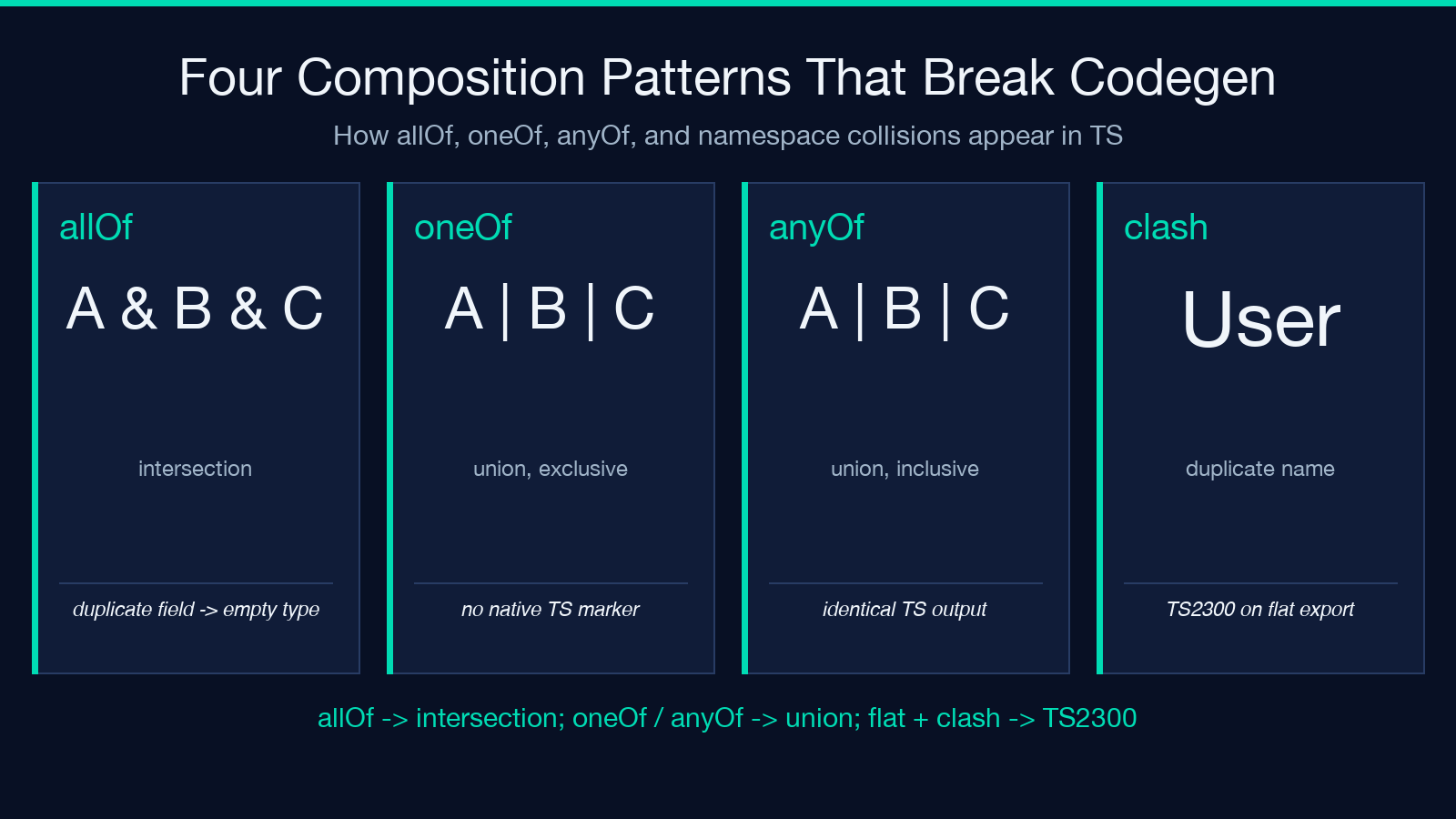
OpenAPI 3.x supports four composition keywords that map directly to TypeScript type-system features, and the generator handles each one with a different output pattern. The four keywords are allOf (intersection), oneOf (exclusive union), anyOf (inclusive union), and not (complement). The last one is rarely used and the generator emits a comment that it was dropped, which is the right behavior — TypeScript has no native complement type, and the generated file should not pretend otherwise.
allOf produces an intersection: type X = A & B & C. This works cleanly when the constituents are object schemas with non-overlapping fields, and it produces a degenerate type when two constituents have fields with the same name and incompatible types. The degenerate case is the most common reason an intersection looks wrong: two id fields, one typed as string and the other as number, produce id: string & number which is the empty type. The generator does not detect this — it emits the intersection as the spec wrote it. The fix is on the spec side: reconcile the field types before generating.
oneOf and anyOf produce union types with the same syntax (type X = A | B | C). The generator cannot tell oneOf from anyOf in the output: both produce A | B | C. The discriminator metadata that the spec uses to tell them apart is preserved as a comment inside the generated file, but the TypeScript type checker treats them identically. The TypeScript workaround for oneOf (the exclusive variant) is to add a discriminator field and a switch on the field type, which the consuming code writes by hand after the generation.
The composition keywords interact with declaration style. Type-alias mode produces type X = A & B & C for allOf, which reads as a definition. Interface mode produces interface X extends A, B, C {} for allOf, which reads as inheritance. The two are structurally identical but the type-alias form preserves the order of the constituents while the interface form deduplicates them, which can matter when two constituents share a field with the same type — the type-alias form shows the duplicate literally and the interface form shows it once.
For specs that use composition heavily, the combination to prefer is type alias + namespace wrapper. The combination produces union types for oneOf/anyOf that read naturally inside the namespace block, and the consuming code references them as Api.GetUserResponse | Api.CreateUserResponse.
The Six Controls in the Order They Should Be Chosen
The eight controls are not equal in importance, and the order in which they should be chosen is not the order they appear in the tool UI. The order that produces the cleanest output across the most consuming codebases is:
1. Source Format first, because the wrong format produces zero output and a confused audit panel. Default auto unless you know the spec was published as JSON or YAML. 2. Output Format second, because the flat-vs-namespace choice determines whether the consuming code uses import { User } or import { Api }; type T = Api.User. Default flat for single-application repos; namespace for libraries and multi-API applications. 3. Naming Style third, because it interacts with the IDE’s auto-import and the strict-mode lint rules. Default PascalCase. 4. Declaration Style fourth, because the choice only matters when the spec uses composition. Default interface. 5. Namespace Name fifth, because it only matters when the namespace mode is selected. Default Api. 6. Include Operation Types sixth, default on — every endpoint produces a request and response type unless you turn this off. 7. Include Descriptions seventh, default on — JSDoc comments on each interface and field improve IDE hover and reduce the need to cross-reference the spec.
The eighth control, the OpenAPI Specification textarea itself, is not a control — it is the input. The text in the textarea IS the spec, and the only decision is whether to paste the spec verbatim or to pre-process it (strip comments, inline external refs, fix required arrays) before pasting. The first paste should be verbatim to verify the spec is well-formed; subsequent pastes can be pre-processed as needed.
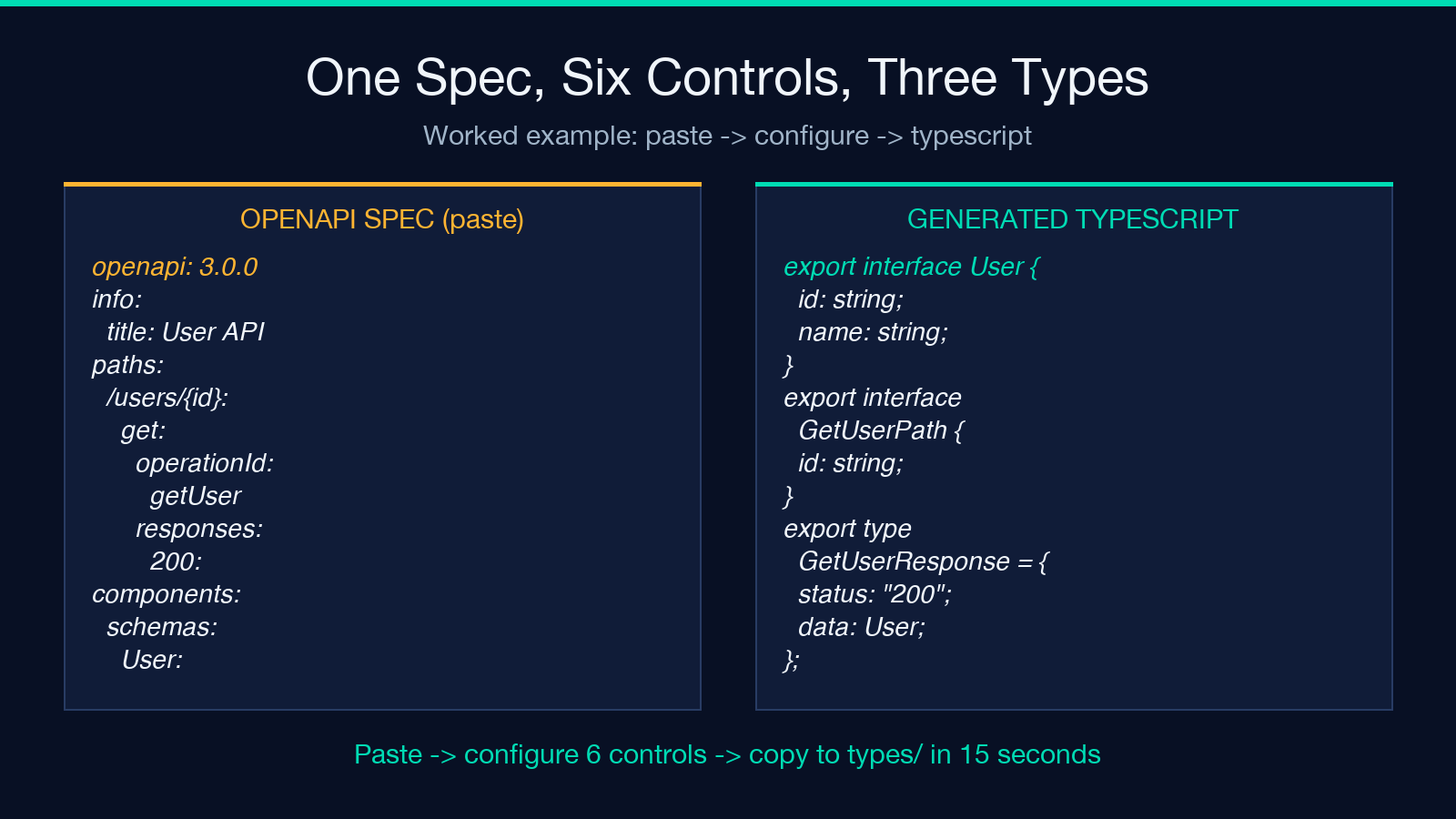
The worked example: a small OpenAPI spec with two endpoints (GET /users/{id} and POST /users), one schema (User), and the controls set to sourceFormat=json, outputFormat=flat, namingStyle=pascal, declarationStyle=interface, namespaceName=Api, includeOperationTypes=true, includeDescriptions=true. The output is a file with three interfaces: User (the schema), GetUserPath (the path parameter), and GetUserResponse (the response union). One additional type alias: GetUserResponse is type GetUserResponse = { status: "200"; data: User } when the declaration style is type, or interface GetUserResponse extends ... when the style is interface. The trade-off is between the cleaner reading of the type alias form and the more familiar interface form. Both compile identically.
The full pipeline — paste, configure six controls, copy the output, drop it in your types directory — takes about fifteen seconds for a typical spec. The five minutes saved by getting the controls right the first time comes from not having to re-paste after the strict-mode compiler rejects the output, and from not having to reconcile field collisions between the generated file and the hand-written code.
For related reading on schema-to-code workflows, see the JSON to Rust Struct Converter for the same composition problem in a different target language, and the JSON to TypeScript Converter for the case where you only have a sample JSON document and no OpenAPI spec. For sample-payload practice, the JSON samples provide the realistic inputs the composition examples in this guide were drawn from.
Explore more tools at elysiatools.com/en/tools.
