
The HTML Entity Encoder/Decoder decides whether the angle bracket in your pasted log line is text or markup, and it does so before the browser has a chance to misread it. When < and > appear inside a <pre>, an attribute value, or a JSON string that is itself going to be re-serialized into HTML, the next parser in the pipeline treats them as a tag boundary. The fix is small and old: replace < with <, > with >, & with &, and quote characters with " / '. Knowing when to apply that replacement — and when a literal Unicode glyph is enough — saves you from rendering bugs, XSS holes, and double-encoded strings that turn café into café three times in a row.
The browser does some of this work for you. Type <b>hello</b> into a paragraph, the parser reads it as a tag. Type <b>hello</b> into the same paragraph, the parser reads it as the four characters <b>hello</b>. That is the entire job of an HTML entity encoder: take a string that the next layer will treat as markup, and replace the markup-significant characters with the named or numeric references that produce the same visible output without the side effect of opening a tag. A decoder runs the same mapping in reverse — but with one trap, because < and < are different inputs and only one of them round-trips.
Most teams hit this the same way. A user pastes a snippet of code into a comment box, the backend stores it as raw text, and the page renders the snippet correctly. Then someone enables rich-text editing and the snippet stops rendering — the snippet is now in the DOM as actual elements. Or the reverse: a server serializes an error message into a JSON response, the frontend injects that JSON into an HTML template, and an attacker who can include <script> in their username has just opened an XSS path. Both failures trace back to the same missing step: deciding whether the string crosses from “data” to “markup”, and encoding the boundary characters on the way across. A live HTML entity encoder at Elysia Tools handles the named and numeric reference forms in one pass, so the rule applies consistently across the codebase.
The five characters that actually matter
The HTML5 Named Character References list runs to over 2,000 entries, but the entire encoder reduces to five code points. & because it is the escape character itself. < and > because they delimit tags. The matching quotation mark — " in attribute values delimited by double quotes, ' in attribute values delimited by single quotes — and the bare-apostrophe case in text nodes, where browsers historically tolerated ' while still preferring ' for round-trip safety. Everything else (©, é, →, €, —) is a convenience: you can write ©, é, →, €, — and the parser will substitute the correct Unicode codepoint. But you can also write the literal codepoint directly in UTF-8 and the browser renders it identically. The named form only becomes mandatory when the codepoint cannot survive the transport — inside JSON inside HTML, inside a Content-Type: text/plain; charset=us-ascii email body, or anywhere the bytes get re-encoded without preserving the original Unicode.
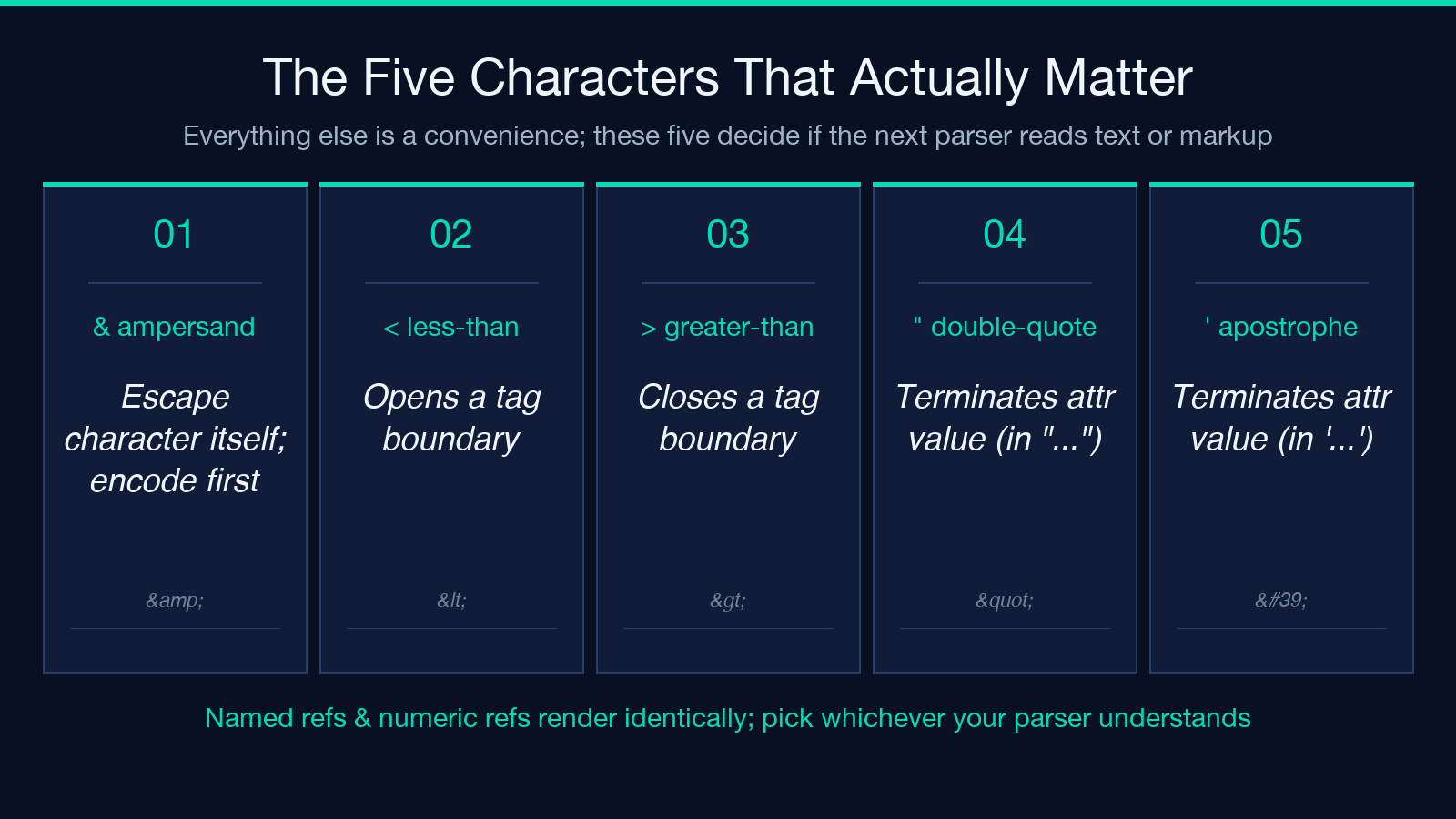
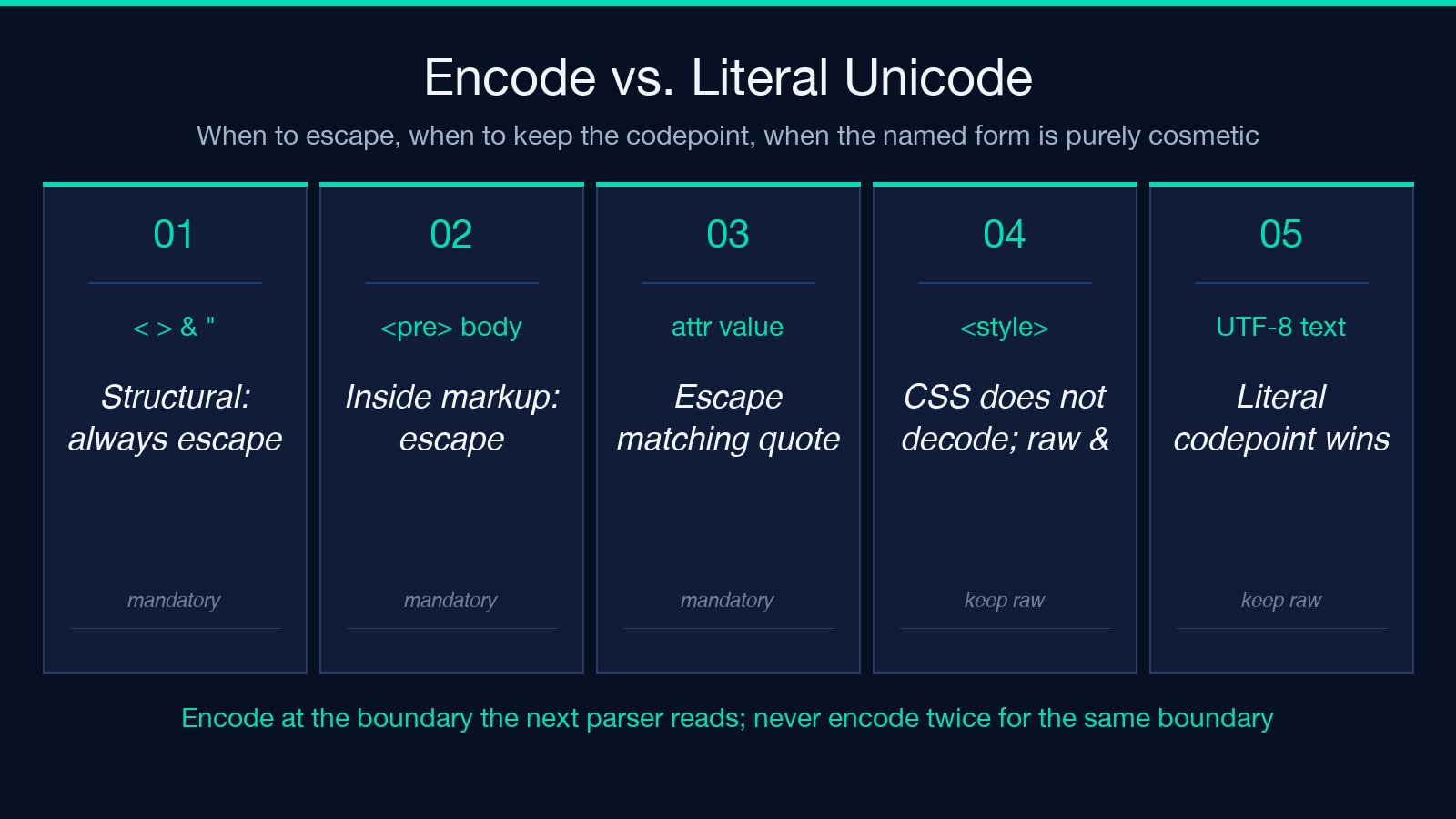
That distinction is the first decision rule. If the output medium preserves UTF-8, prefer the literal character. The named form is only required when the character is structurally significant (<, >, &, the matching quote) or when the transport drops bytes. A <pre> block inside a UTF-8 HTML page does not need ’ for the apostrophe in it's; the raw ' renders correctly and survives the round-trip. The same ' inside an attribute value delimited by "…" does need ' to avoid breaking out of the attribute. The named-reference form exists for both reasons — semantic characters and transport limitations — and conflating them produces strings that double-encode on the next pass.
When encode is mandatory vs. optional
Encode is mandatory at every boundary where data crosses into markup. Inside a <textarea>, a <pre>, an attribute value, a <style> block, a <script> body, a comment — anywhere the next parser will read the bytes as a grammar — the structural characters must be escaped. Encode is also mandatory when the output goes through an intermediate transport that reinterprets bytes: an email sent as text/plain, an SMS at 7-bit GSM, a URL component, a JSON string that will be embedded in an HTML page.
Encode is optional when the output is already in a transport that preserves UTF-8 and the only thing that would be escaped is a non-structural character. Writing café instead of café in a UTF-8 HTML body is technically valid and produces the same render, but it adds eight characters for zero functional benefit and breaks search across the encoded and unencoded forms. The decoder, run on the same string, produces café either way. The cost of over-encoding is silent: every later pass that decodes the string adds a layer, and three layers of decode still produce café because the original encoding was applied to a string that did not need it.
Numeric vs. named references: when each wins
Numeric references (< for <, < for the same character in decimal, > for >) are unambiguous and complete. The HTML5 spec defines every Unicode codepoint as a numeric reference, and a parser that fails to recognize the name will fall back to the numeric form. For the structural four — &, <, >, and the matching quote — numeric references are the safest bet because no parser ever drops them. A legacy browser that does not understand ' still understands '.
Named references are shorter and more readable in source code. &, <, >, ", ©, — all parse identically to their numeric counterparts and most teams find them easier to grep for. The cost is that some older parsers do not implement the full HTML5 named table, and a small number of names (', 
, some of the math symbol entries) are inconsistently supported. For the structural characters, both work; for non-ASCII convenience characters, named references are a stylistic choice rather than a correctness one.
A practical rule: prefer named references for the structural four when the output is HTML5 and the audience is modern browsers. Prefer numeric references for everything else, especially in templating systems where the output may be post-processed or rendered by non-browser consumers. A run-through of Elysia Tools HTML entity encoder lets you paste a string and see both forms side by side, which is the fastest way to confirm the rule holds for your specific output medium.
The decoder round-trip trap
Decoding looks symmetric — replace every named and numeric reference with its codepoint — but two classes of inputs cause silent bugs. The first is over-encoded input: a string that has been encoded twice produces a string that decodes once and still contains references. The visible symptom is < rendering as the four characters < instead of the four characters <b> after a single decode pass, which most teams mistake for a parser bug rather than an encoder bug. The fix is to decode until the string stops changing; a fixed-point loop with a length check before and after each pass.
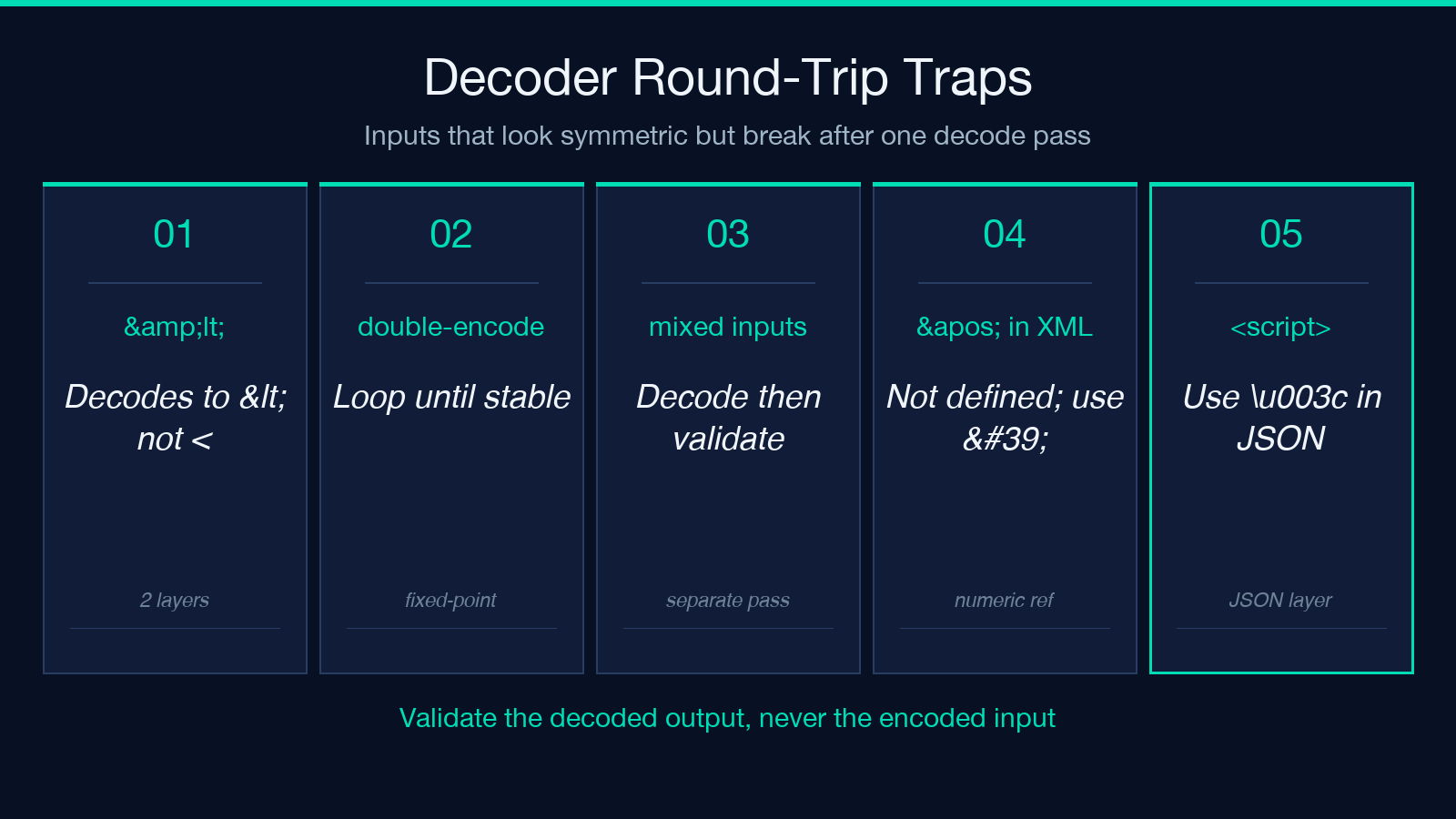
The second is mixed-direction input: a string that contains both encoded and literal sections because two upstream services each applied their own rule. The decoder will normalize the encoded sections and leave the literal sections alone, which is correct, but a downstream regex like &[#a-z0-9]+; applied to “decode then sanitize” will miss the literal < in the literal sections and flag a false positive on the encoded <. Treat decoding and validation as separate passes, and validate the decoded output rather than the encoded input.
Worked example: encoding a JSON-in-HTML embed
Suppose the frontend embeds a server response into a <script type="application/json" id="payload"> block so the script tag holds the data without executing it. The JSON must be valid JSON and must not break out of the script tag. The structural fix is to encode the JSON string before injection: every < becomes u003c in the JSON layer and every & becomes u0026 so the HTML layer cannot interpret them, then the whole JSON is placed inside the script tag with no further encoding. A reverse direction — encoding the JSON as HTML first, then dropping it into a script tag — produces < in the JSON, which the JSON parser decodes back to <, which then gets interpreted as a tag by the HTML parser. The result is the XSS path. The encoder choice is not a style decision; it is the boundary that prevents the two parsers from disagreeing.
A live HTML entity encoder at Elysia Tools covers both directions and the named-versus-numeric choice; sample inputs that exercise this JSON-in-HTML pattern are at the HTML with Images sample page, and the broader tool directory lives at elysiatools.com/en/tools.
When to keep the literal character anyway
Three cases call for keeping the literal codepoint instead of encoding it. First, when the output is HTML5 in UTF-8 and the character is non-structural. ©, é, → all render identically to their named references, and the literal form survives search, copy-paste, and diff cleanly. Second, when the character is inside a <style> or <script> block that does not parse HTML entities — CSS and JavaScript treat & as a literal, so & in a stylesheet is the four characters &, not the single character &. Third, when the character is a separator inside a URL, where the encoder of choice is URL-encoding rather than HTML-encoding, and double-encoding produces a string that decodes only once.
A rule that holds across all three: encode at the boundary the next parser will read, with the encoding that next parser understands. The boundary matters more than the character.
Common mistakes in production
The most common mistake is encoding at the wrong layer. A backend that receives HTML-form-encoded input, decodes it, stores it, then re-encodes it on output, applies the encoder twice — and a frontend that decodes once gets < instead of <b>. The fix is to track which layer owns the encoding and to never re-encode a string that has already been encoded for the same boundary. The second most common mistake is encoding for HTML inside a context that reads JSON, or vice versa. JSON has its own escaping rules (", \, uXXXX) and the HTML encoder does not implement them; the JSON encoder does not implement HTML’s named references. Both mistakes produce strings that look correct on inspection and fail in production.
The third mistake is forgetting that attribute values need a different quote than text nodes. <a title="He said "hi""> is broken; the inner quote terminates the attribute. The fix is to encode the inner quote (" or ") or to switch the attribute delimiter to a single quote ('…') — and a one-line rule that encodes the matching quote closes the entire class of bugs. The fourth mistake is using ' in attribute values that flow through XML rather than HTML; XML does not define ' and the parser will leave it literal. The fix is ' or the literal apostrophe in a single-quoted attribute.
A short checklist before publishing
Pick the boundary the next parser reads. Encode the structural four (&, <, >, the matching quote) at that boundary. Use named references for HTML5 modern browsers, numeric references for everything else. Skip named references inside <style> and <script> blocks where the parser does not understand them. Decode until the string stops changing. Validate the decoded output, not the encoded input. Encode for the actual transport, not for a hypothetical one.
That checklist is the whole job. The HTML entity encoder is a small piece of machinery that runs on the boundary between data and markup, and the rule for using it is the same rule for using any other boundary-crossing tool: know which side of the line you are on, encode at the line, and never encode twice.
