
A clean Postman collection starts with a clean spec, not a clever converter. Most “OpenAPI to Postman” workflows lose information on the second edge case — a oneOf schema, a $ref cycle, an enum query param, or a security scheme that is bearer AND apiKey — and ship a collection that imports fine but breaks under Newman. The fix is to treat the conversion as a typed translation: every OpenAPI concept must map to exactly one Postman v2.1.0 construct, and every “best-effort” should be visible in the saved request body. This guide walks through the eight decisions that decide whether the OpenAPI to Postman Collection tool produces a collection you can newman run today or one that needs a Monday-morning rewrite.
Folder strategy: path trie or tags
OpenAPI has two common grouping conventions: a tags array on each operation and the literal /pets/{petId} path structure. Postman folders are physical, and the converter has to pick one or split the difference.
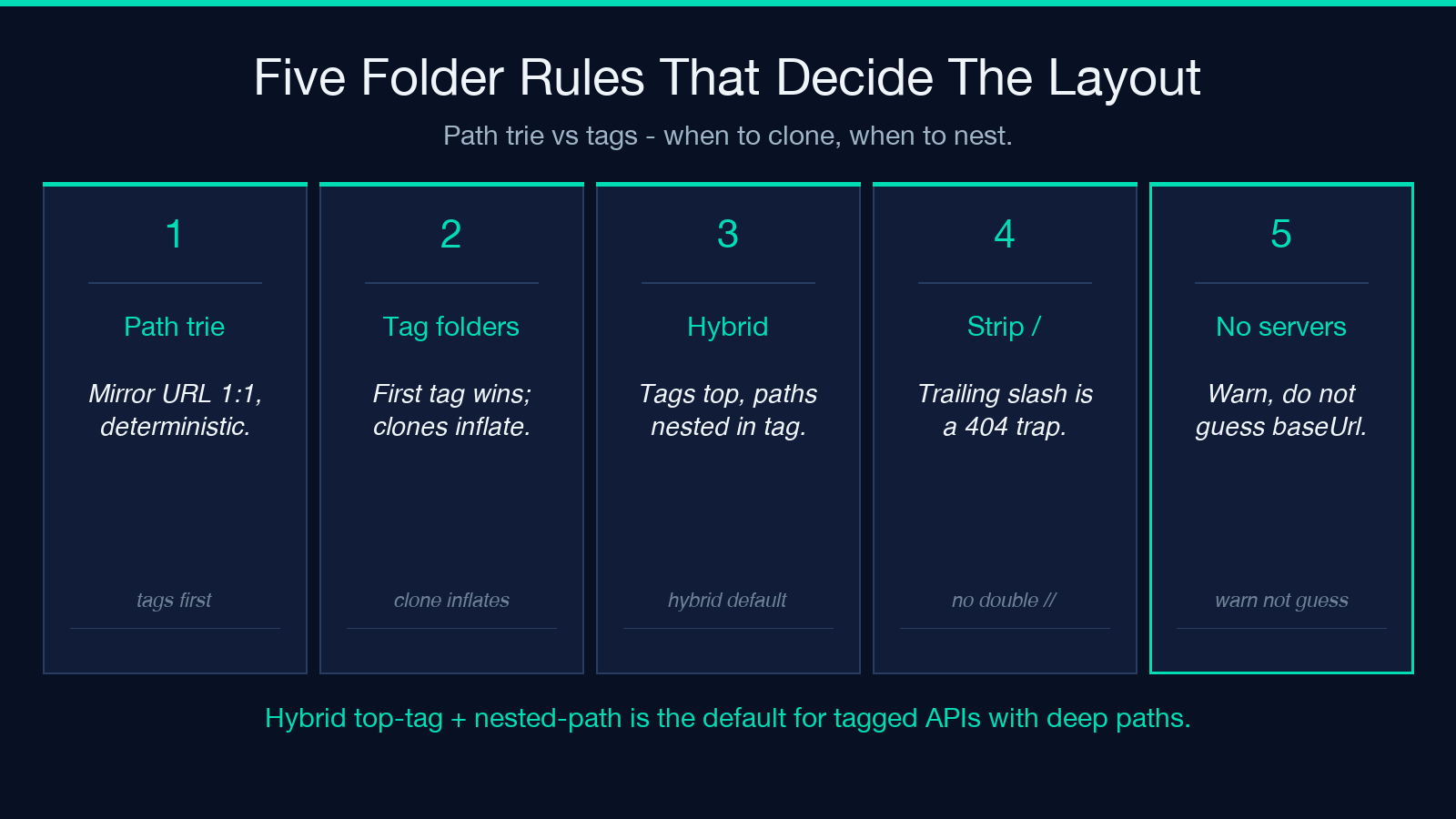
Path-trie folders are deterministic. /pets, /pets/{petId}, and /pets/{petId}/photos become three nested folders whose names match the URL segments. The downside is that an endpoint tagged Billing but living under /v2/users/{id}/invoices ends up four folders deep inside a folder the team does not think of as “billing.”
Tag folders mirror how engineers talk about the API. Every operation with a tags: [Billing] line lands in a single Billing folder regardless of path. The downside is that the same operation may declare multiple tags, and the converter has to choose: clone the request into both folders, or pick the first tag only. Cloning inflates the collection; first-tag-only surprises reviewers.
The cleanest answer is a hybrid: use tags as the top-level folder, and let path segments become subfolders within each tag. Petstore ends up as Petstore / pets, Petstore / pets/{petId}, etc., and a billing-tagged /v2/users/{id}/invoices ends up as Billing / v2 / users / {id} / invoices — searchable both ways. See the openapi-to-postman-collection page for the live converter and a worked Petstore + Tasks example.
Server URL and the trailing-slash trap
OpenAPI lets servers[].url be relative (/v1), host-rooted (https://api.example.com), or path-rooted (https://api.example.com/v1/). Postman v2.1 collections expect a single {{baseUrl}} variable that the runner prepends to every path.
Three rules keep the conversion tight:
1. Strip a trailing / from each server URL. https://api.example.com/v1/ becomes https://api.example.com/v1; otherwise the first request hits https://api.example.com/v1//pets and a CDN eats the double slash. 2. Emit every server URL as a separate Postman variable if the spec declares more than one. {{baseUrl}} defaults to the first, but {{stagingUrl}} and {{prodUrl}} stay available for the environment switcher. 3. Refuse to invent a baseUrl when the spec is silent. An OpenAPI document with no servers block is invalid; the converter should warn rather than default to http://localhost.
A spec that loses its server list silently is the most common cause of a Newman run that returns 404 for every endpoint.
Parameter mapping: query, path, header, and cookie
Each operation parameter has an in field. Postman stores these on the URL bar (path), the Params tab (query), the Headers tab, and (rarely) the Cookie helper. The mapping is mechanical but the edge cases are not.
– Path parameters with no example or schema.example get a {{petId}} Postman variable plus a default of 1. Saving the example 1 matters because Newman without an environment will run GET /pets/1 instead of crashing.
– Query parameters with an enum get a deterministic pick — the first enum value. A status enum of [available, pending, sold] lands in the saved request as ?status=available, which is what reviewers expect.
– Header parameters with no required: true get a placeholder row in the Headers tab but are not pre-populated. A required header (think X-Request-Id) gets a {{xRequestId}} variable and a UUID-shaped default so it does not look blank.
– Cookie parameters land on the URL helper, not the Headers tab — Postman 10.x no longer renders a Cookie input row.
The Tasks example shows all four at once: a limit query enum, an Authorization header for the bearer token, a petId path variable, and a sessionId cookie.
JSON bodies from schemas: deterministic, not random
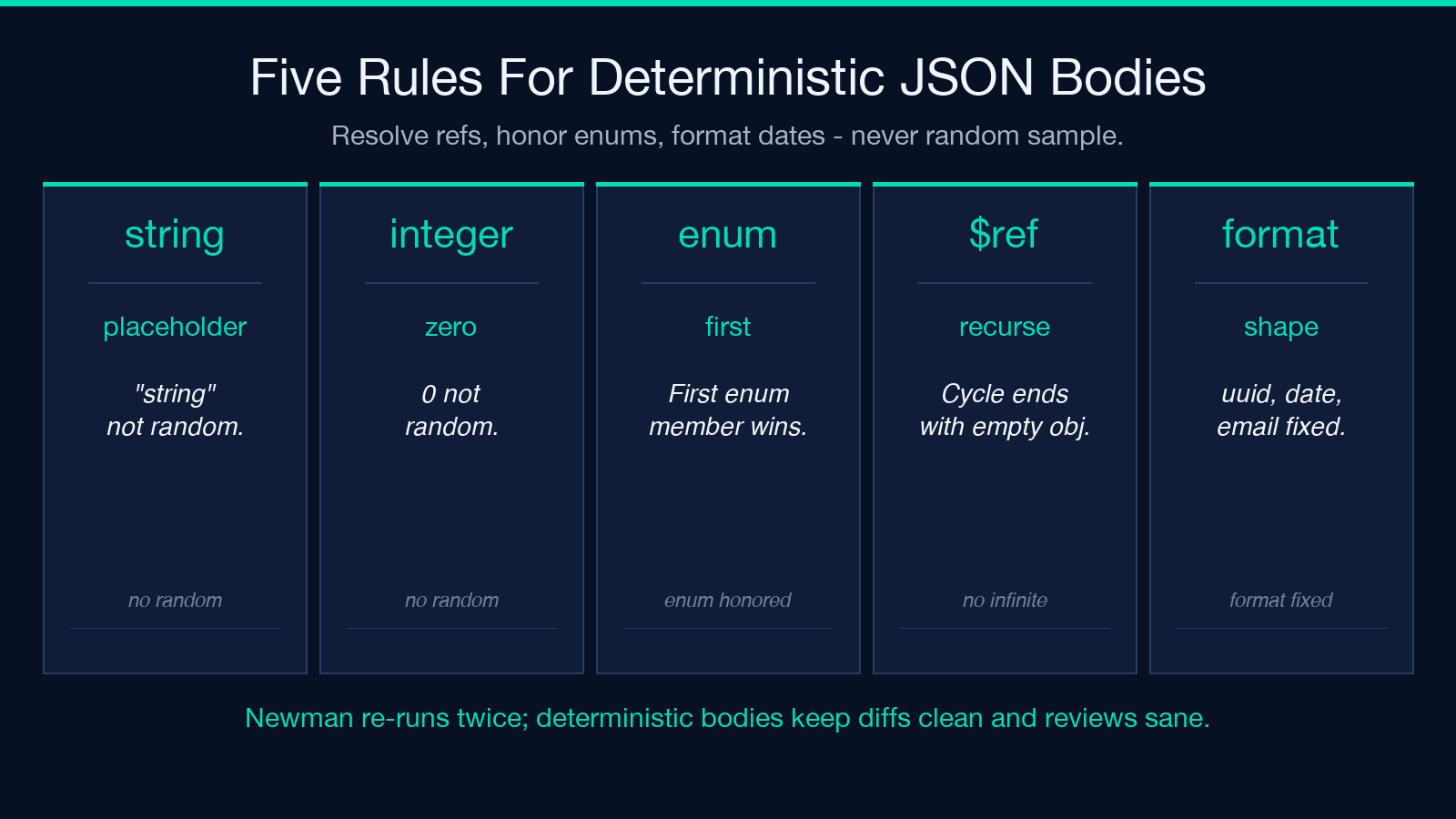
Every requestBody.content."application/json".schema triggers a saved body in the Postman request. The body must be deterministic — Newman re-runs the same request twice and a different random value each time makes the diff noisy.
The canonical approach:
1. Resolve $ref recursively, with a cycle detector. A schema that points at itself terminates with an empty object {} and a converter warning, not an infinite loop. 2. For each property, pick a deterministic example. string → "string" (or the example field if present). integer → 0. boolean → false. array → [<one item>]. object → <one of each property>. 3. Honor enum — pick the first member. 4. Honor format: date-time → "2025-01-01T00:00:00Z". format: uuid → "00000000-0000-0000-0000-000000000000". format: email → "[email protected]". 5. For oneOf / anyOf / allOf, prefer allOf (merge), then anyOf (first branch), then oneOf (first branch) — and emit a // converter: chose anyOf branch X comment header so reviewers can swap.
The Petstore example produces a POST /pets body with { "id": 0, "name": "string", "tag": "string" }, which is more useful than {} for visual review.
Example responses: saved as Postman test data
Each OpenAPI responses.<code>.content.<media>.example (or examples) lands as a Postman example on the request — visible in the Examples dropdown, runnable by the test runner, and exported by newman run --export-environment.
A typical 201 response with { "id": 1, "name": "fluffy" } shows up as the first example attached to POST /pets. Three rules:
1. Always save at least one example per status code. A 204 No Content saves an empty body so reviewers know the response is intentionally empty. 2. Reuse the example field verbatim when present. Inventing {"id": 42} from a schema that only declares type: integer is a lie. 3. Do not synthesize examples for status codes the spec omits. If OpenAPI lists only 200, do not invent 400 examples — the test runner will assert against them and fail.
Security schemes: bearer, basic, apiKey, and the OAuth2 trap
OpenAPI supports apiKey, http (basic + bearer), oauth2, openIdConnect, and mutualTLS. Postman v2.1 supports a subset:
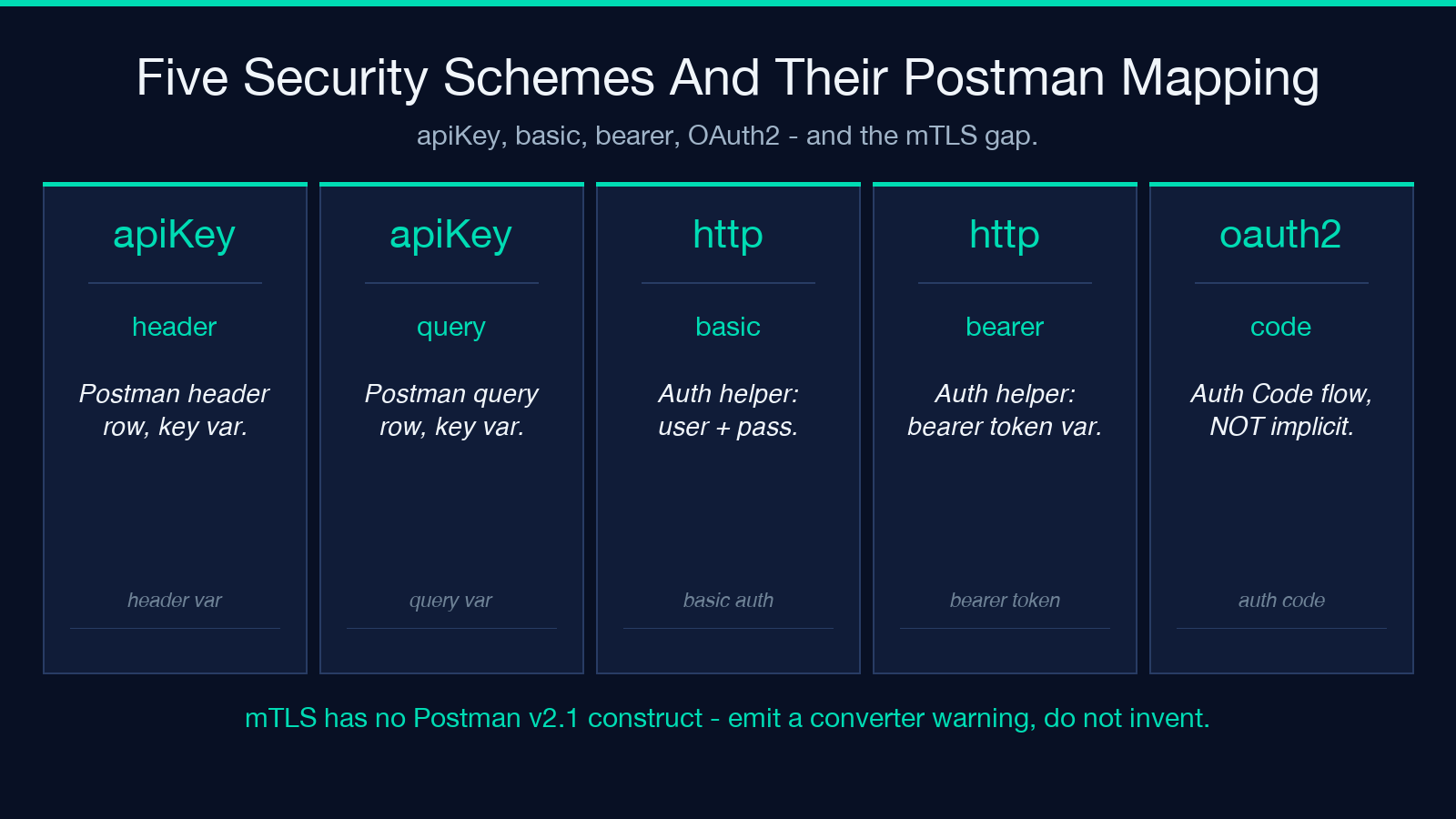
– apiKey in: header → Postman header row with the value as a {{key}} variable. – apiKey in: query → Postman query row with the value as a {{key}} variable. – http scheme: basic → Postman Authorization helper set to Basic Auth with {{basicUser}} / {{basicPassword}} variables. – http scheme: bearer → Postman Authorization helper set to Bearer Token with {{bearerToken}} variable. – oauth2 → Postman Authorization helper set to OAuth 2.0, configured for Authorization Code by default with authUrl, tokenUrl, scope filled from the spec. This is the trap: most specs omit flow, and a converter that picks implicit silently breaks PKCE-protected providers. – openIdConnect → same as oauth2 with discoveryUrl filling authUrl. – mutualTLS → no Postman construct; emit a // converter: mTLS not supported in Postman v2.1 warning.
For combined AND / OR security, Postman stores one Authorization helper per request. The converter emits the first scheme and adds a header comment with the full list.
Server variables: keep them, do not flatten
OpenAPI lets servers[].url contain {var} placeholders with a variables block declaring defaults and enums. Postman variables are simpler — a flat map of name → value — so the converter has to flatten carefully:
1. Each {var} becomes a Postman {{var}} with the spec’s default value. 2. Each enum becomes an // enum: a, b, c comment in the variable description; Postman does not natively render enums on variables. 3. Do not overwrite a {{var}} that the path-trie had set (e.g. {{petId}}). Namespace server variables as {{serverVar.<name>}} to avoid collision — and update path-trie callsites accordingly.
The Tasks example emits {{baseUrl}}, {{bearerToken}}, and {{sessionId}} with no collision.
Validation and the Newman round-trip
A converted collection is only correct if Newman can run it. Two checks before declaring the job done:
1. newman run collection.json --dry-run (or --reporters cli against a stopped mock) should enumerate every request without import errors. 2. The collection’s info._postman_id and info.schema must match the Postman v2.1.0 schema — a missing schema field is the most common cause of “the Postman app shows the collection as v1.”
Any converter that skips validation produces a collection that imports but does not run.
The openapi-to-postman-collection tool bakes these eight decisions into a single browser paste-and-download workflow: paste the spec, pick a folder strategy, download collection.json, drop it into Postman, run newman run. No localhost server, no manual rewrite, no // TODO markers in the saved requests.
For more pairwise converter examples — JSON Schema diff, Swagger 2.0 to OpenAPI 3.1 migration, and OAuth2 flow round-trips — see the Elysia Tools collection.
