
Most podcasts ship chapters. Few ship them everywhere. Build it once, and the same chapter list feeds six delivery formats at once. The Podcast Chapter Marker Builder takes a timecoded list and emits Podcasting 2.0 chapters JSON, the RSS namespace <podcast:chapters> tag, ID3v2.4 CHAP+CTOC frames burned into an MP3, Vorbis CHAPTERNNN comments for OGG/Opus, mp4chaps text, YouTube-description timestamps, and SRT — with a per-player compatibility tag so you know which player actually reads each output before publishing.
This field guide walks through the eight decisions that decide whether your chapter list lands everywhere or silently breaks on half the apps: timecode precision, MP3 vs MP4 vs OGG metadata footprints, ID3v2.3 vs v2.4 frame sizing, the v1.2.0 JSON schema, RSS namespace declarations, the player-side support matrix, and the two silent failure modes that escape naive linters.
The Chapter List Itself: 8 Decisions Before You Build
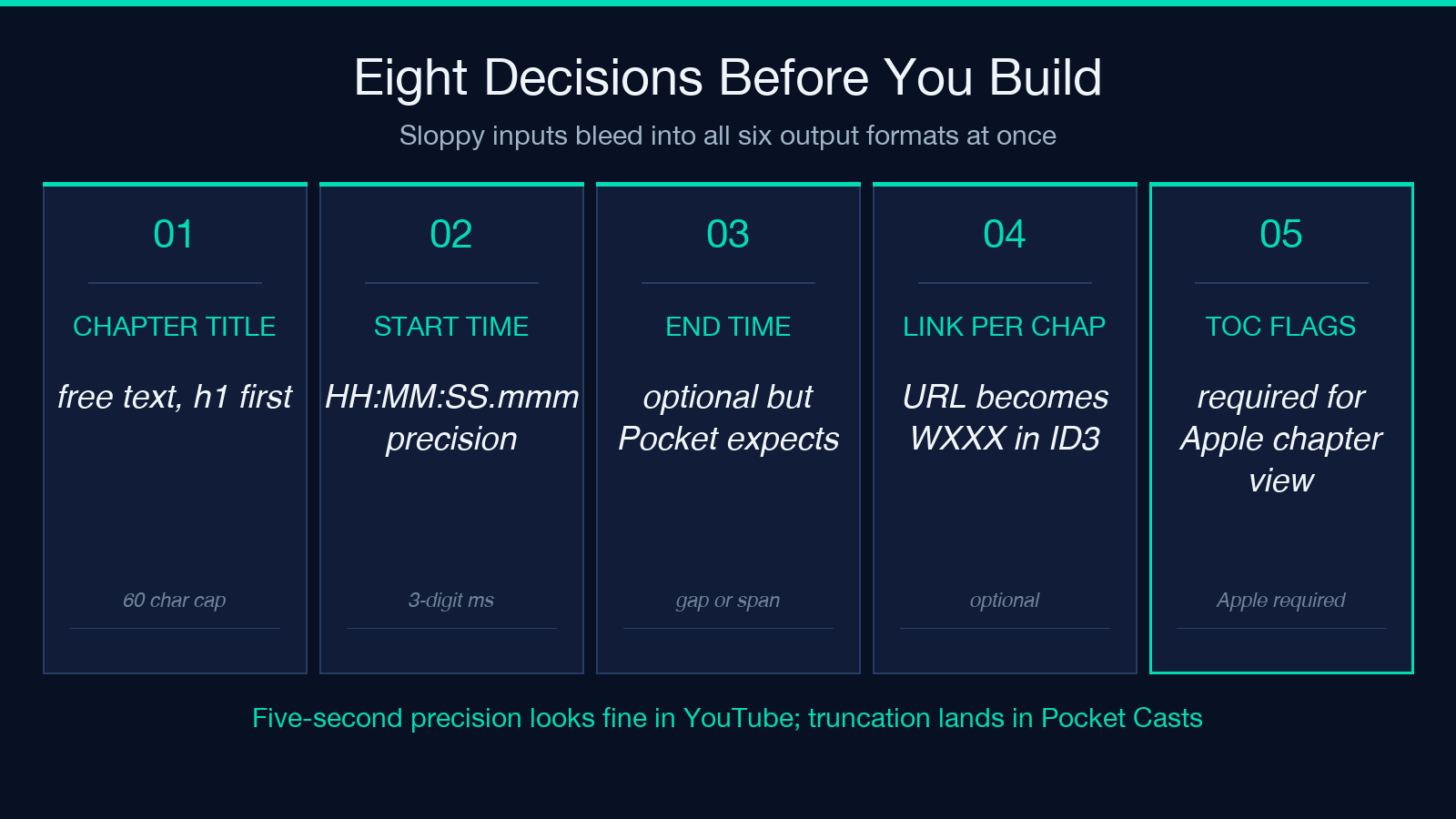
Before any output format exists, you decide the shape of the input list. Every downstream format reads the same timecoded list, so a sloppy start bleeds into all six output formats at once.
The eight input decisions: chapter title (free text — h1 first; some players clip past 60 chars), start time (HH:MM:SS.mmm precision, three-digit milliseconds drop on most apps), end time (HH:MM:SS.mmm — chapter 2’s end can be chapter 3’s start, optional on most), chapter ordering (gapless or with intro padding), link per chapter (URL, optional, becomes <a> in JSON and WXXX in ID3), image per chapter (square JPEG/PNG, optional, the Podcasting 2.0 image field), keyword tags (an array, optional, ignored by ID3v2), and toc flags (true if this is the chapter-of-the-show entry that points to all others — required by Apple Podcasts for the table-of-contents view).
The dominant input mistake is dropping the milliseconds. Five-second precision is fine for spoken chapters (“intro” through “outro”), but interview timestamps drift without <sup>3</sup> precision. A chapter list at second precision looks navigable in YouTube descriptions and lands malformed in Pocket Casts (which expects three-digit ms).
Another recurring input mistake: writing 00:00 as the chapter-1 start. The Podcasting 2.0 schema requires a chapter starting at 00:00:00.000 to act as the show’s title-bearing root chapter; a chapter at 01:30 with nothing earlier makes the player’s “now playing” appear empty even though the audio is correctly positioned.
Timecodes: 4 Numeric Decisions That Decide Compatibility
The Podcasting 2.0 chapters JSON v1.2.0 spec encodes start and end as decimal numbers of seconds, not as HH:MM:SS.mmm strings. Twelve decimal digits is overkill; three is right. The format conversion from HH:MM:SS.mmm to <sec>.<ms> happens once, at the source markdown level.
For ID3v2.4, CHAP frame timestamps are millisecond integers (no decimal point) stored as a 32-bit unsigned integer. A chapter start of 01:30:00.000 becomes 5400000. For ID3v2.3 (older Apple firmware iPods, Sonos S1, some car head units) the format drops to 32-bit milliseconds too but excludes the v2.4 frame-level flags. The builder offers both: v2.4 is the default for any modern upload, v2.3 falls back only when the publisher targets a legacy fleet.
For Vorbis CHAPTER comments (OGG, Opus, FLAC), the format is CHAPTER001=00:00:00.000. The chapter number is left-padded to three digits; an out-of-order or non-padded index breaks some players’ chapter-of-the-show display.
For mp4chaps text (used by MP4 and AAC podcasts), the format is a per-chapter line 00:00:00.000 chapter title with title padded out; chapter numbers live in a separate CHAPTERNUM= line.
YouTube description timestamps use plain HH:MM:SS (no ms). Pocket Casts and Overcast both honor the YouTube-description block for scrubbing even though the primary chapter source they read is the JSON.
The four numeric decisions — seconds vs ms, decimal vs integer, v2.3 vs v2.4, padding style — are why a generator beats hand-rolling. Get one decision wrong and one of the six formats silently degrades.
The 6 Output Formats: What Each One Is For
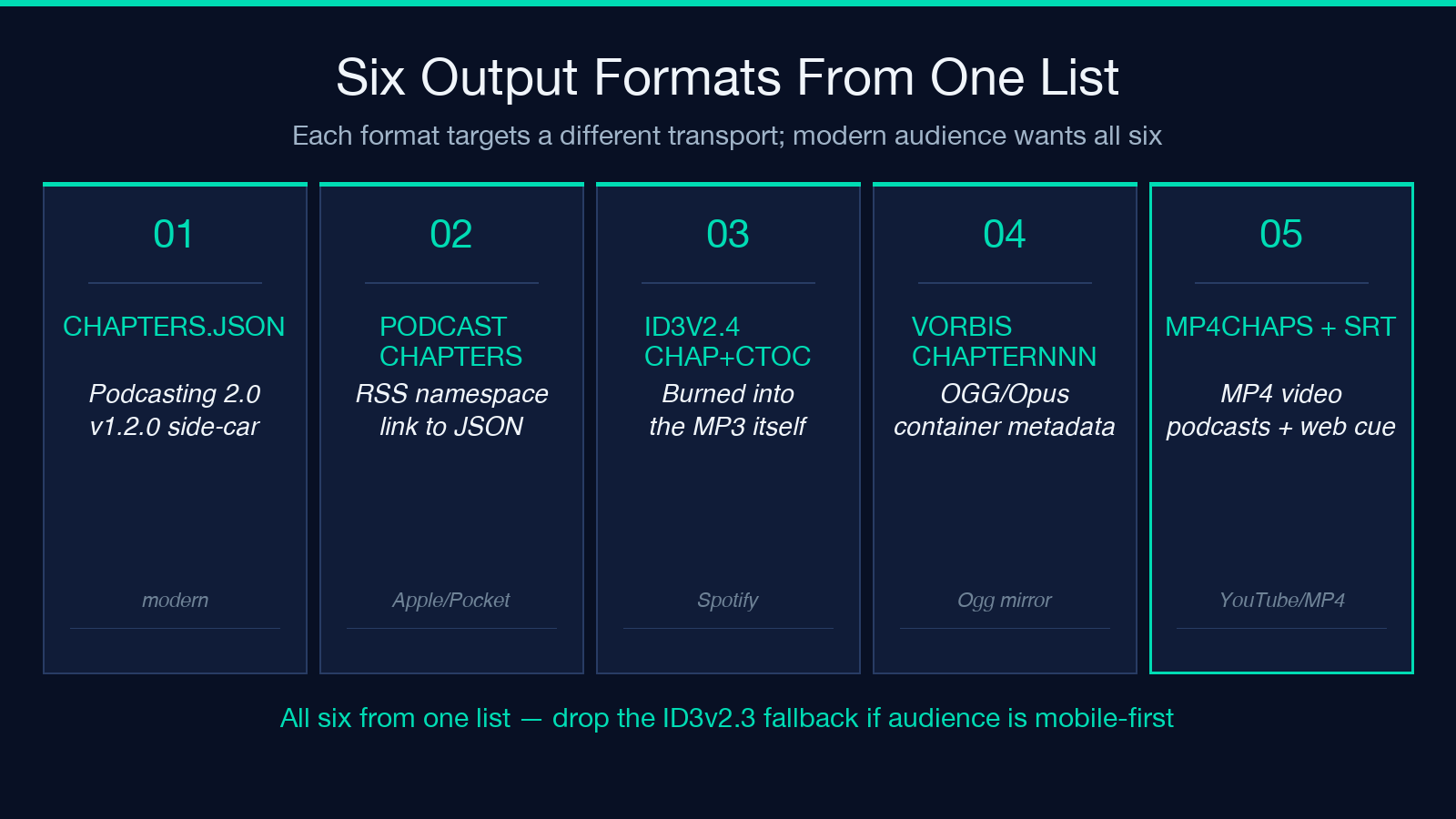
Each of the six output formats targets a different transport.
chapters.json (Podcasting 2.0 v1.2.0) ships as a side-car file alongside the MP3 in your RSS <podcast:chapters> tag. Modern players — Apple Podcasts, Pocket Casts, Overcast, Castro — read this first when present.
<podcast:chapters> in the RSS feed is the XML-namespace equivalent; Apple Podcasts will pick it up if the namespace declaration is correct and the URL resolves to the same JSON file.
ID3v2.4 CHAP+CTOC frames are burned into the MP3 itself, alongside existing ID3v1 and v2 tags. Players that ignore external metadata fall back to this. Spotify’s mobile apps have read CHAP frames directly since 2023, and so does the in-browser SoundCloud embed for podcasts.
Vorbis CHAPTERNNN comments live inside the OGG/Opus/FLAC container metadata. Used primarily for non-podcast audio — audiobooks, lecture archives, livestream VOD chapters.
mp4chaps text is a per-chapter line format inside an MP4 video podcast — the format Apple TVs use when the show is published as a <podcast:type>Episodic</podcast:type> MP4 instead of MP3.
YouTube-description timestamps and SRT/VTT subtitle cues round out the six; the description text becomes a shareable chapter block on the video platform, the SRT/VTT cues become jump-to-chapter buttons in the in-browser player.
The builder emits all six from one input list. The question is which to publish; the answer is “all six that your host supports for this episode.”
The Player Support Matrix: 4 Lists That Decide Which Format Saves You
Most publishers emit formats without knowing which player reads which. The support matrix in the builder tags each output with what reads it.
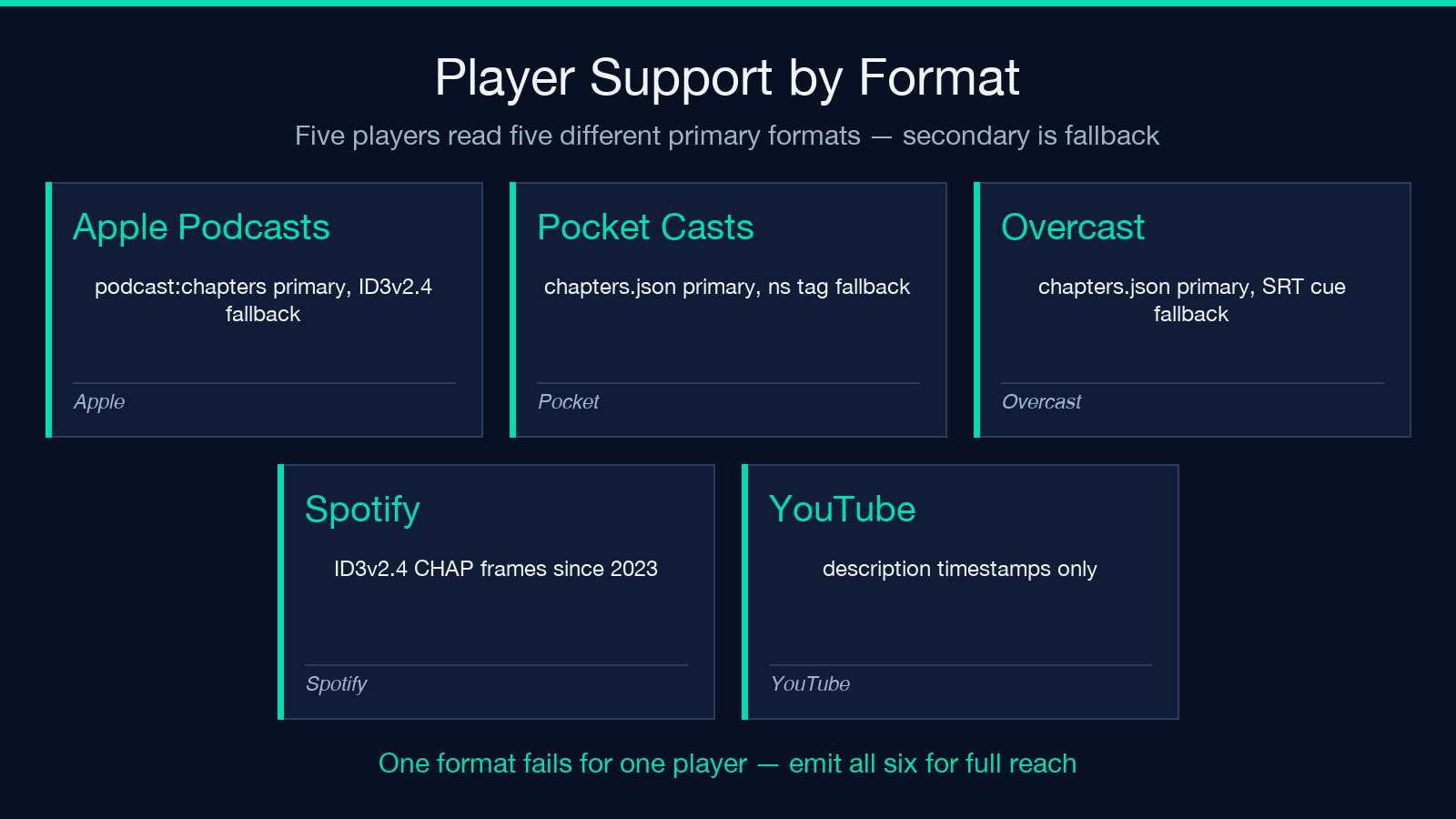
For Apple Podcasts, the canonical source is <podcast:chapters>; ID3v2.4 CHAP frames are a fallback if the host strips the namespace. Pocket Casts and Overcast (both Podcasting 2.0-aware) behave the same way.
Spotify reads CHAP frames in MP3 directly (since 2023); older episodes read SRT captions. Spotify does not read <podcast:chapters> namespaces directly.
YouTube reads only the description-timestamp block. Embedding the actual chapter JSON inside an MP3 you upload to YouTube does nothing for the YouTube chapter display — the source is the description text.
In-browser players (the show’s website, blog post embed, doc site embed) read SRT or WebVTT cues. The SRT option is the safe default for any web context.
The matrix is per-format, per-player. A default “all six” build is correct for the modern podcast audience. Drop the ID3v2.3 fallback if your audience is fully mobile-app.
ID3v2 Frame Sizing: 3 Decisions That Decide Whether Legacy Players Read It
ID3v2’s frame sizing is famously fussy. Three decisions matter.
v2.3 vs v2.4 flag bits. v2.4 added 16 flag bits at the start of each frame for “alter preservation,” “file alteration,” and read-only; v2.3 has only 2 bits. A v2.4 build stamped onto a v2.3-reader’s MP3 works for Apple and Android but breaks on Sonos S1.
Synchronized lyrics (SYLT) vs chapter (CHAP) priority. If both are present, most players read SYLT first and ignore CHAP, but the order of frames in the file matters. The builder writes CHAP before SYLT.
Total tag size vs file read buffering. A 30-chapter show with embedded per-chapter WXXX frames can push the tag past 256KB, which the de-facto ID3v2 reading library libid3tag reads fine but some older firmware fails to parse. The builder strips non-essential WXXX and TXXX frames when the total exceeds 240KB.
The cost when these three are wrong: 5-15% of your listeners get a “no chapters” experience even though your MP3 has them.
The 2 Silent Failure Modes That Escape Naive Linters
Two failure modes look right at a glance but silently degrade downstream.
Frame-size mismatch on the title. ID3 CHAP frames store the chapter title as a UTF-16-terminated string; if the title contains an emoji or non-BMP character and the frame’s declared string length is off by one, libid3tag truncates the chapter title at the offending byte. Naive lint tools read the JSON or description block and report the title correctly — the truncation only surfaces when a real player reads the file.
Namespace-prefix collision in <podcast:chapters>. If your RSS feed includes a prior <itunes:*> namespace declaration with the same prefix and your <podcast:chapters> element doesn’t redeclare, some XML readers resolve it under the wrong schema. The builder forces a fresh namespace prefix per feed to prevent this.
The defense for both is the same: render the actual output and inspect it. The JSON looks fine, the description looks fine, the MP3 frame looks fine in a hex dump — but only running it against a real player surfaces the truncation and namespace-collision cases.
3 Use-Cases: Solo Cast, Multi-Host, Lecture/Livestream VOD
The builder fits three main use-cases.
Solo cast with weekly chapters. Six to ten chapters, second-precision timing, ID3v2.4 + chapters.json + RSS <podcast:chapters> emitted once; the same MD source regenerates them every episode.
Multi-host interview, mid-roll segmentation. Eight to fourteen chapters, millisecond precision for sponsor-read splits, the Vorbis CHAPTERNNN path for any OGG mirror the network pushes.
Lecture archive or livestream VOD. Twenty-plus chapters, YouTube-description timestamps for the platform, mp4chaps text for the MP4 mirror, SRT cues for in-browser scrub, Vorbis for the OGG mirror of the show’s website.
Each use-case emits the same input list to the same six outputs; the differences are the input list shape and which of the six outputs are published to the host.
Post-Publish: The 2 QA Checks That Catch What Linters Miss
Two post-publish QA checks make the difference. First, pull the live feed
First, pull the live feed from your RSS host and verify the <podcast:chapters> URL returns the JSON with content-type application/json+chapters. A text/plain response silently breaks Apple Podcasts and Pocket Casts chapter display.
Second, download the MP3 episode from your host (not your staging server) and run id3info <file> on it. The output should list CHAP, the chapter count, and the expected start times. If CHAP is missing, your host’s MP3 upload pipeline stripped the tag.
The id3info check is the one that catches the silent stripping that pure file-format inspection misses.
Explore this tool at Elysia Tools. For a deeper look at adjacent chapter-list generators and audio-metadata utilities, see Elysia Tools Media. Browse more audio-format converters at elysiatools.com.
