
Close first: pick the metric, not the color. The CSS Color Name Resolver ranks all 148 named CSS colors against your hex using the CIEDE2000 perceptual distance, exposes the runner-up list with real ΔE values, and lets you flip to CIE94, CIE76, or plain RGB so you can see why the same hex ends up at a different name under each. In family mode, it buckets all 139 distinct colors into 12 designer families (white, gray, black, brown, red, orange, yellow, green, cyan-teal, blue, purple-violet, pink-magenta) so “what browns exist in CSS” is one query — and your brand violet turns out to be sitting closer to slateblue or rebeccapurple than to blueviolet in CIEDE2000, even though RGB says otherwise. Open the CSS Color Name Resolver when the question is “what do I call this color, and which name is the perceptually correct one?”
The 148 vs 139 count — why CSS has both, and which to count on
The CSS Color Module Level 4 keyword list has 148 entries, but only 139 distinct colors. Nine of the entries are aliases: gray and grey are the same sRGB value (#808080); aqua and cyan share (#00FFFF); fuchsia and magenta share (#FF00FF). The Resolver folds these together so the ranked list does not show “sandybrown” twice because it appears in CSS as “sandybrown” and “SandyBrown” — they are identical. The family count is 139, not 148, for the same reason.
If you are writing a design-token spec or a Tailwind theme and want to count “how many browns are there,” the answer is around 16. If you want to count “how many CSS keywords are brown,” the answer is 16 plus the aliases that point at brown (none in practice — the three aliases are gray/grey, aqua/cyan, fuchsia/magenta, none of them brown).
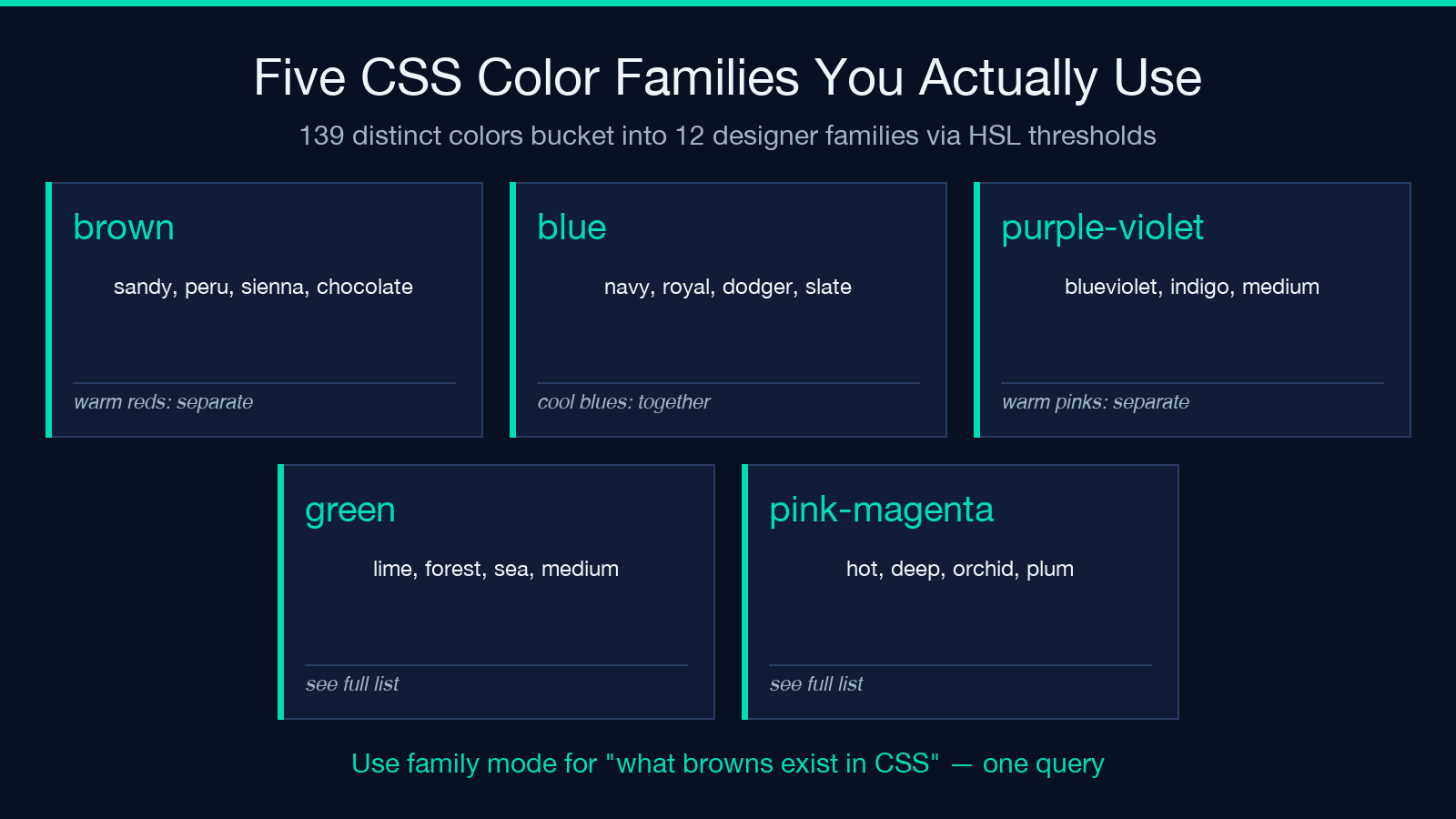
The 12 family buckets are derived from HSL thresholds, not hue-only, so dark muted blues land in blue while warm muted purples land in purple-violet. That boundary is the reason “is indigo in blue or purple?” has a defensible answer: indigo’s HSL sits at hue 275°, which crosses the 270° boundary the Resolver uses, so indigo goes to purple-violet. slateblue at hue 248° stays in blue.
CIEDE2000 vs RGB — the same hex, two different names
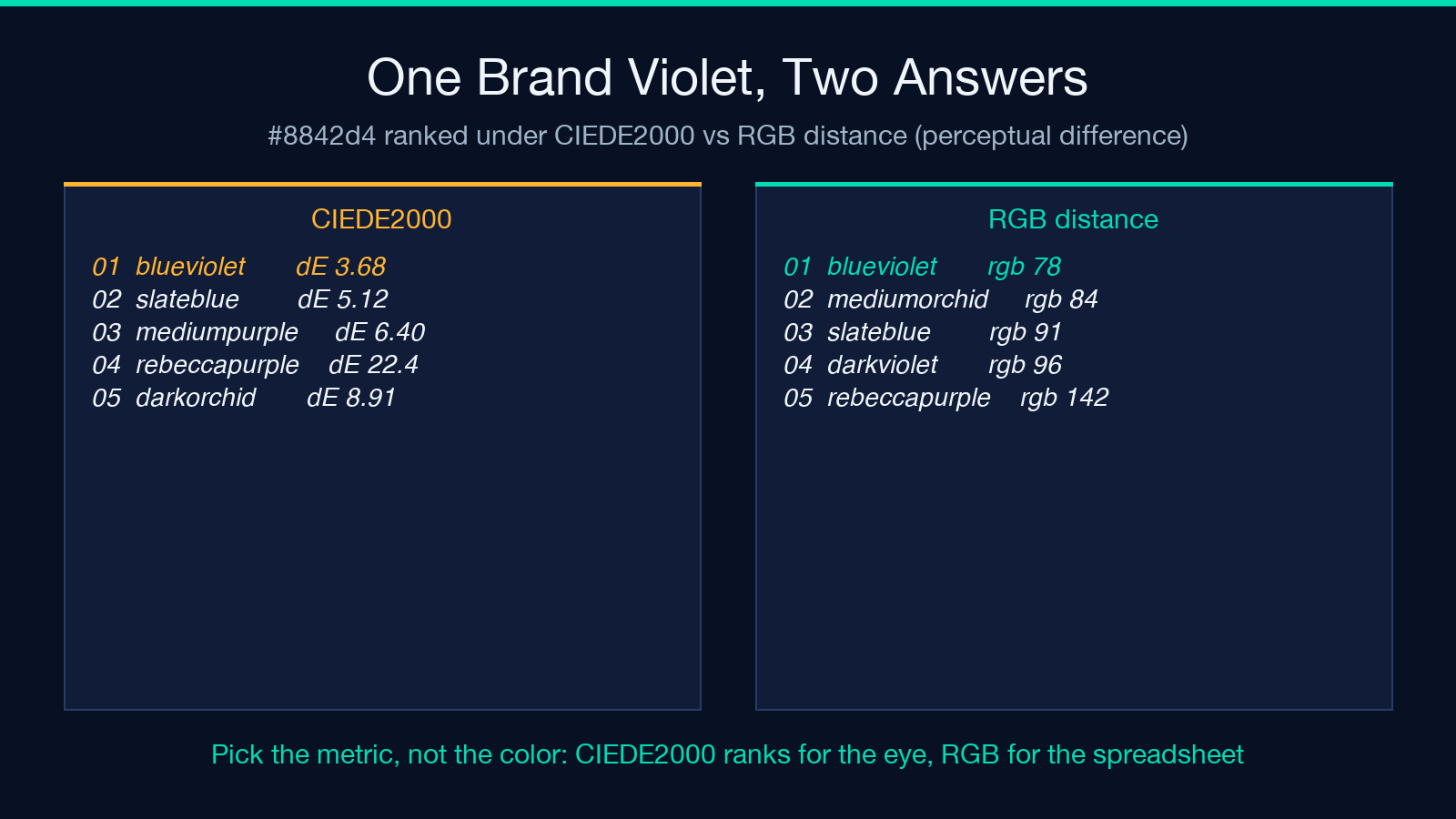
Take the brand violet #8842d4. Under CIEDE2000 the nearest named color is blueviolet at ΔE 3.68 — perceptually close, a defensible “this is the CSS name for our brand color.” Under plain RGB distance, blueviolet still wins, but the runner-up order shifts: mediumorchid edges ahead of slateblue because its raw channel distances are smaller, even though your eye sees mediumorchid as more pink and less violet than slateblue.
The Resolver exposes this directly. Open the CSS Color Name Resolver, paste #8842d4, switch the metric dropdown from CIEDE2000 (recommended) to RGB distance (legacy), and the ranked list reorders. The names at the top are similar but not identical, and the ΔE values disappear for the RGB row because RGB distance has no perceptual unit — it is just a Euclidean distance in sRGB space.
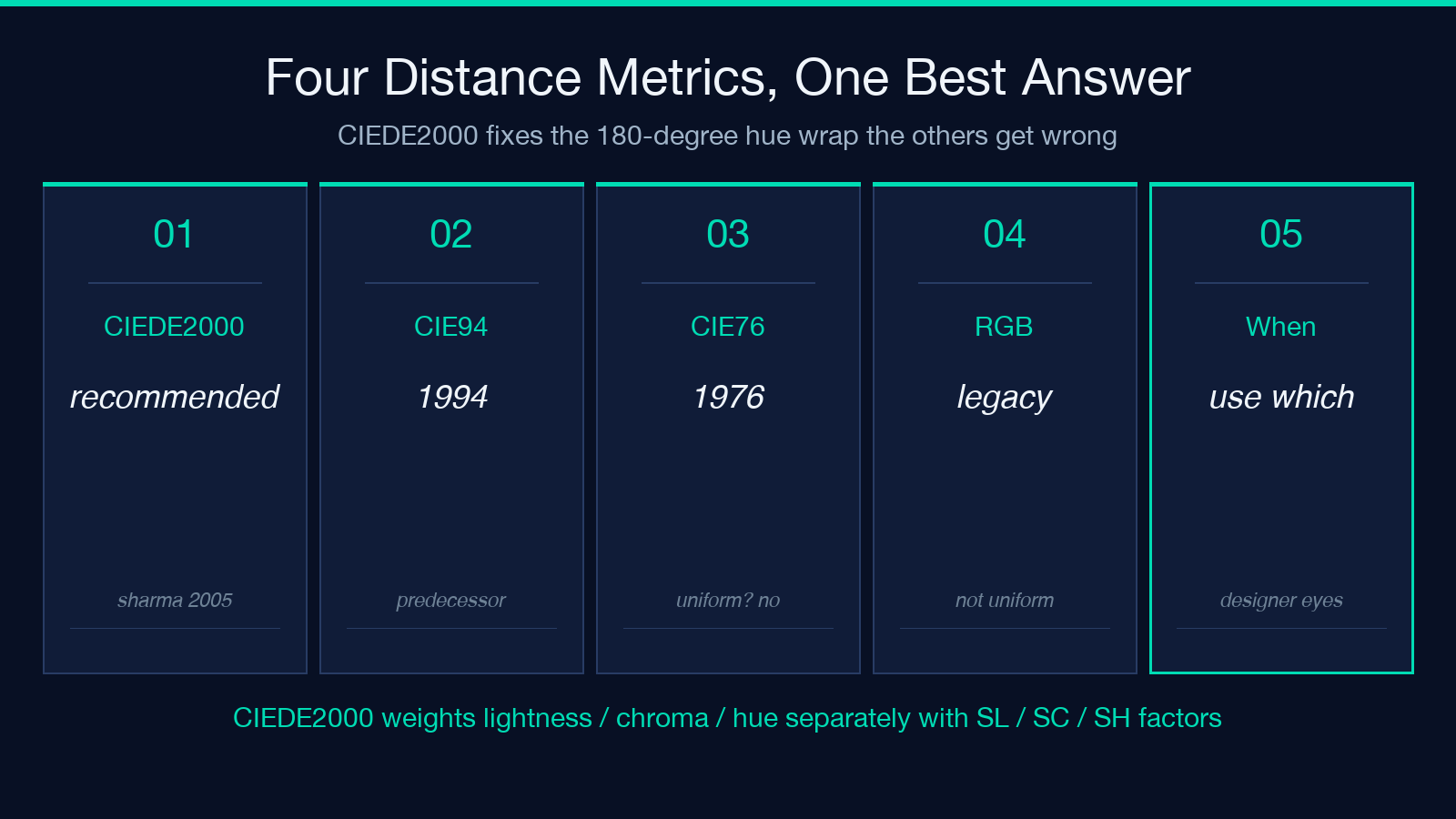
The rule of thumb for ΔE values: under 1 is imperceptible to a calibrated observer under D65; 1–2 is barely perceptible at a color-managed monitor; 2–10 is obvious on side-by-side comparison; 50 or above means the colors are essentially opposite. blueviolet at ΔE 3.68 is “your designer will see the difference on a calibration target but a customer won’t notice in a button.”
For accessibility review of the resulting palette, the Color Contrast Checker pairs naturally: pick a foreground and background from the ranked list, then run the WCAG ratio check.
The four metrics, in plain English
CIEDE2000 is the recommendation because it is the only one of the four that handles the 180° hue wrap (where red sits at both 0° and 360°, and the naive angular distance treats the two reds as 360° apart instead of 0° apart). It also weights lightness, chroma, and hue separately with the SL, SC, SH weighting factors from Sharma, Wu, and Dalal’s 2005 paper. CIE94 is the predecessor from 1994 and gets the hue wrap right but uses simpler weighting; on near-neutral colors CIE94 and CIEDE2000 agree, on highly chromatic colors they diverge. CIE76 is the original 1976 CIELab ΔE formula and is fast but misranks near-neutrals badly because it treats lightness and chroma as the same kind of distance.
Plain RGB Euclidean distance is what most “name that color” sites use because it requires no color-space conversion: take the input, take each named color, subtract the R, G, B channels, square, sum, sqrt. The problem is that sRGB is not perceptually uniform — the same numerical distance in sRGB corresponds to wildly different perceptual distances depending on where you are in the color space. A 30-unit RGB difference between two dark blues is barely perceptible; the same 30-unit difference between two mid-greens is obvious. CIEDE2000 fixes this by computing distance in CIELab, which was designed to be perceptually uniform.
Family browse mode — when you want the whole category
Switch the result mode from “nearest named colors” to “color family browse” and the Resolver returns the entire family of the input color, ranked by ΔE distance from the input. For #8842d4 in family mode, you get all 16 colors in the purple-violet family, each with its ΔE00 from your input — blueviolet at 3.68 first, then mediumorchid, darkorchid, darkviolet, and so on down to colors that are obviously wrong (like rebeccapurple at ΔE 22.4, perceptually distant despite sharing a hue region).
This is the mode for design-system audits: “what does CSS actually offer for our accent color family?” is answered in one screen, and the ΔE values tell you which named colors are perceptually close enough to be interchangeable in a palette and which are too far apart to swap.
The 12 families and what sits in each
white, gray, black — eight neutrals total, plus the gray/grey alias, so seven unique neutrals. brown — sandy, chocolate, peru, saddle, sienna, plus a handful of tan and beige variants. red — the warm reds (crimson, firebrick, tomato, salmon, indianred, darkred) live here. orange — coral, orangered, darkorange, plus the desaturated tans. yellow — gold, khaki, goldenrod, plus the pale variants. green — a long list, from lime and forestgreen through the teal-leaning seagreen and mediumseagreen. cyan-teal — the cool greens and blues with high lightness and moderate chroma. blue — the cool blues, including navy, royalblue, dodgerblue, cornflowerblue, and the slate variants. purple-violet — the warm blues and cool purples, including blueviolet, mediumpurple, indigo. pink-magenta — the warm pinks and magentas, including hotpink, deeppink, orchid, plum, thistle.
Mixing into a design system
The Resolver’s output is meant to feed straight into tokens. Pick a named color from the ranked list, copy the hex, and it slots into a Tailwind config or a CSS custom property as the canonical source. The ΔE runner-up list becomes the “if the design system needs a 5% lighter / 5% darker variant, here are the perceptually closest CSS names” map.
For palettes built from images, the Color Palette Extractor from Image URL pulls a 5-color palette from any image, then the Resolver names each swatch. For gradient palettes, the CSS Gradient Mesh Generator builds the visual; the Resolver names the stops.
What the Resolver does not do
It does not generate a palette. It does not pick colors that go well together. It does not check WCAG contrast — that is the Color Contrast Checker‘s job. It does not handle images. It does not produce CSS output; it produces ranked lists of names with ΔE values, and the named hex comes from the CSS keyword table.
It also does not invent color names that are not in CSS. The 148 keywords are the universe; “deep eggplant” is not a CSS color and will not appear in the output, no matter how close it is to your input. The closest CSS keyword is the answer.
A working call to make today
Take any hex from your design system. Paste it into the CSS Color Name Resolver, default metric CIEDE2000, default mode nearest. If the nearest name is your canonical token name with ΔE under 2, your spec is aligned with the CSS color space. If the ΔE is over 5, your spec disagrees with what the eye sees, and you have a decision to make: rename the token to the CSS keyword, or keep the token and accept that your hex will not match a CSS keyword perceptually.
Then run family mode. The whole family of your token color is one click away, and the ΔE-ranked list tells you which neighbors are perceptually interchangeable. That list is the design system’s “what if we need to darken this by one perceptually meaningful step” reference — and it is built from the 139 CSS colors CSS actually defines, not from a marketing-pitch palette. Explore more tools at elysiatools.com.
