The next time you stare at 10.0.0.0/8 and feel a small tremor of uncertainty, you’re not alone. That single number after the slash decides whether you’re working with 16 million addresses or 256 — and getting it wrong is the difference between a working VPC and one that quietly swallows your packets. Every developer eventually meets CIDR notation, but most of us only learn it once we hit a subnet mistake that takes a Saturday to diagnose. There’s a faster way. A good CIDR calculator doesn’t just answer “how many addresses?” — it makes the entire address space legible: the network boundary, the broadcast, the first usable host, the last. Once you’ve seen the table, the slash stops feeling like punctuation and starts feeling like a switch. That shift in mental model is what this article is for. We’ll walk from a single IP and a prefix length into a full IPv4 layout, look at why IPv6 needs its own rules (BigInt math, a different “broadcast” idea), then bring the same lens to a real subnet-planning decision so the concept sticks. Try the CIDR Calculator alongside the article — the tables below become clearer when you can plug in your own ranges and watch the network address jump.
The slash is a bit count, not a fraction
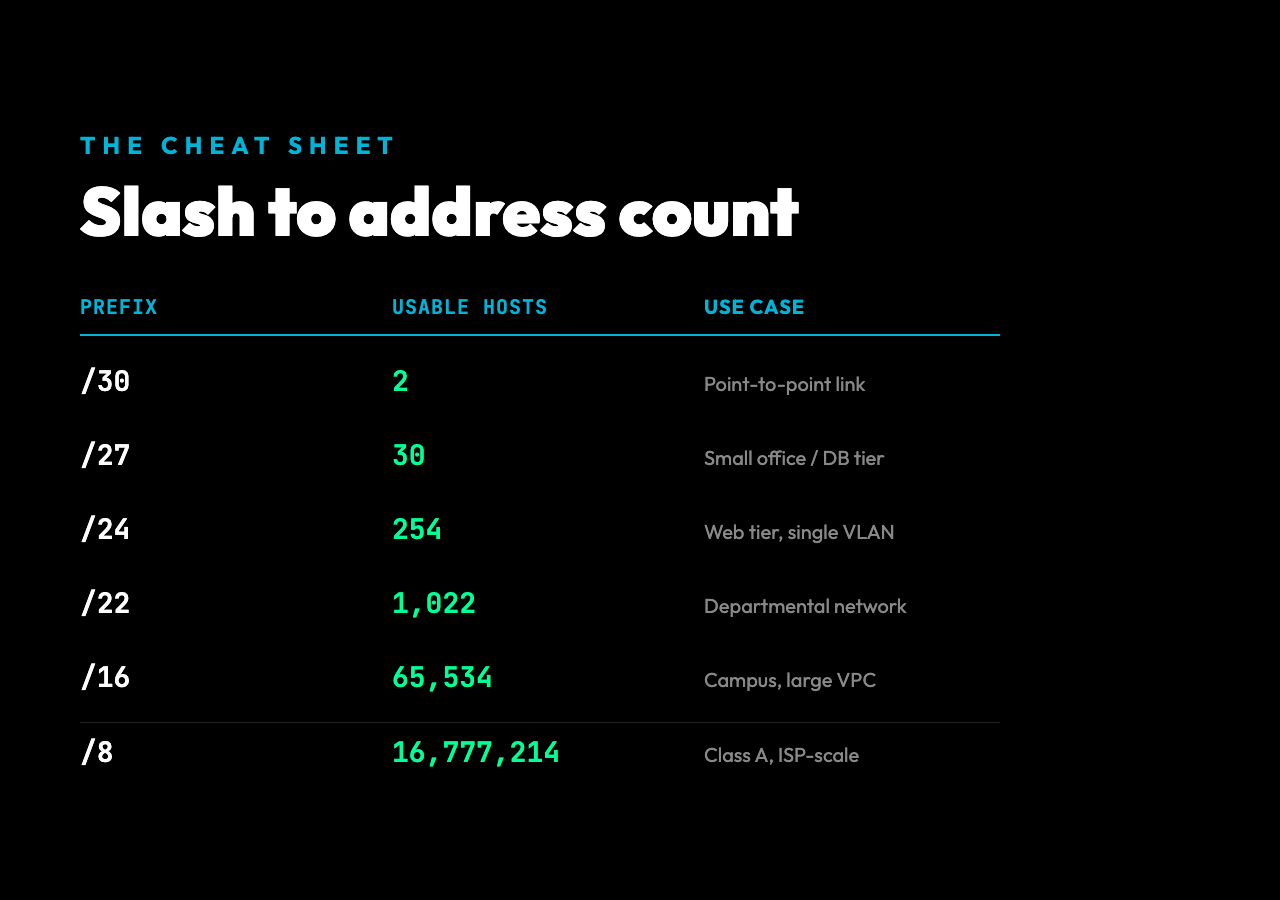
The /24 after an IPv4 address is shorthand for “the first 24 bits identify the network, the remaining 8 bits identify the host.” That single integer is the most important number on the page. It determines the size of the subnet, the subnet mask, and the total address count. A network engineer reads /24 and instantly sees 256 addresses; a /30 reads as a point-to-point link with exactly 2 usable hosts.
The mental trick is to convert the slash to a binary mask. For /24, the mask is 11111111.11111111.11111111.00000000, which is 255.255.255.0 in dotted decimal. The ones mark network bits, the zeros mark host bits. The number of host bits alone tells you everything: a /16 has 16 host bits, so 2¹⁶ = 65,536 addresses; a /30 has 2 host bits, so 2² = 4 addresses, minus the network and broadcast, leaving exactly 2 usable hosts. The slash is doing the work of a multiplication table in a single character.
You can run this conversion by hand for the small cases, but the moment you see a /22 or /27 in a config file, the bit-shifting gets tedious. This is the first place a CIDR calculator earns its keep — typing 192.168.1.0/22 and getting the full breakdown back in one line, including wildcard mask, first usable IP, and broadcast.
What a calculator actually returns
Drop an address and prefix into the CIDR Calculator and you don’t get a single number. You get a small network diagram in text form. For 192.168.1.0/24, the result is a six-line breakdown:
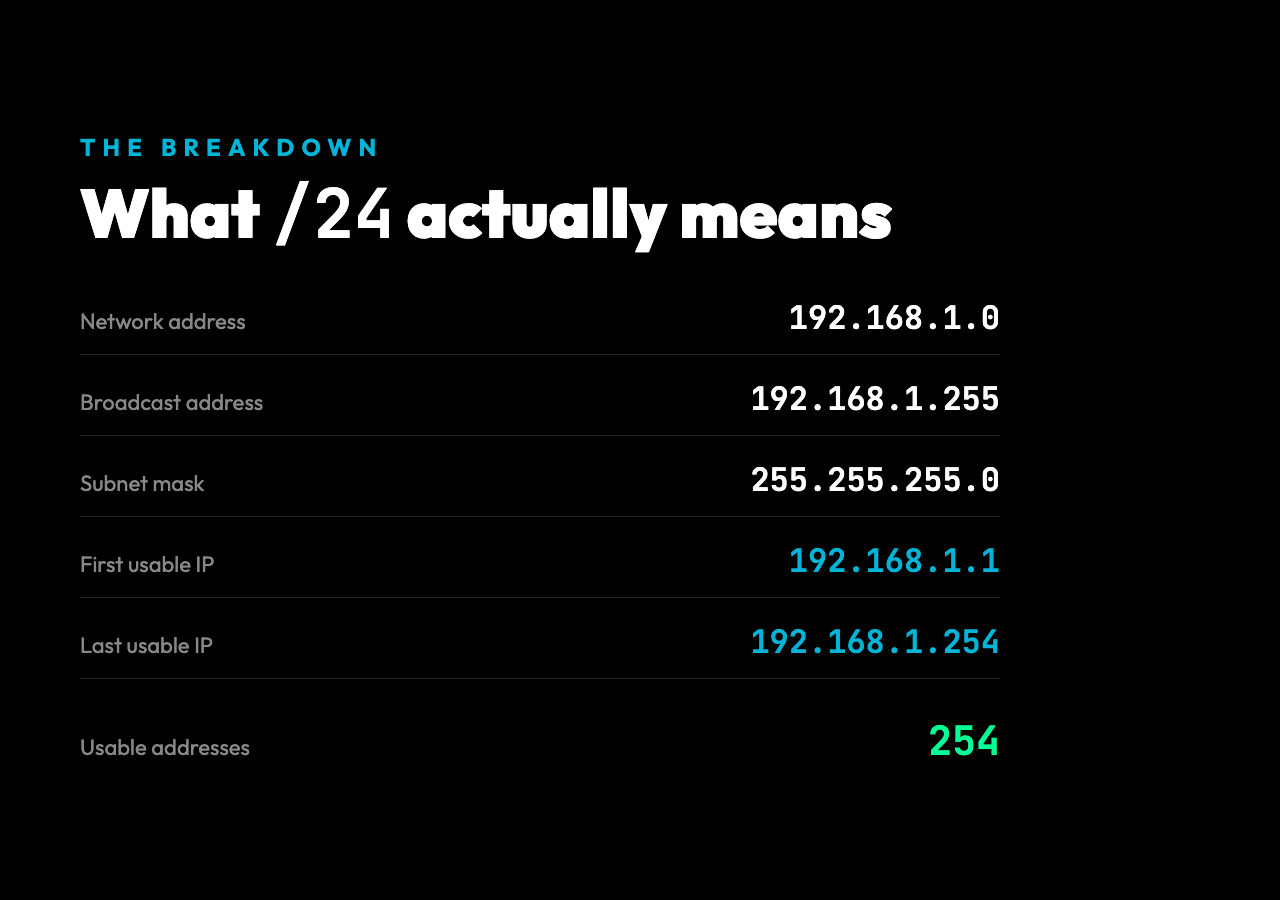
- Network address:
192.168.1.0— the lowest address, where the host bits are all zero - Broadcast address:
192.168.1.255— the highest address, where the host bits are all one - Subnet mask:
255.255.255.0— the dotted-decimal form of the bit pattern - Wildcard mask:
0.0.0.255— the inverse of the subnet mask, used in Cisco ACLs - First usable IP:
192.168.1.1— one above the network address - Last usable IP:
192.168.1.254— one below the broadcast
The two ends of the range — network and broadcast — are reserved by protocol. That’s why a /30 gives you 2 usable hosts, not 4: you have 2² addresses but lose 2 to protocol. This convention is so old and so fundamental that it survives intact in every modern IPv4 stack. Subnet calculators expose this rule the moment you look at a /31 — which has 2 addresses and 0 usable, because both endpoints are protocol-reserved (RFC 3021 repurposes /31 for point-to-point, but most code still treats both as unusable). The interesting edge cases live there.
The boundary cases that catch people
Three prefix lengths deserve attention because they break the simple “2^(32-prefix)” mental model:
/31: 2 addresses total, 2 usable. Originally reserved for point-to-point links per RFC 3021 (adopted 2000). Most production stacks now allow both addresses, which is why the calculator returns 2 usable on/31instead of 0./32: 1 address total, 1 usable. This is a host route, not a subnet — common in firewall rules and loopback configurations./0: 4,294,967,296 addresses total, 4,294,967,294 usable. The default route. Every packet with no more-specific match ends up here.
The rule “subtract 2 for network and broadcast” only applies to subnets with more than 2 addresses. The calculator handles the exceptions correctly, which is why it’s worth using even for “obvious” prefixes — the answers don’t always match what your intuition predicts, and getting one of these wrong in a routing table is a multi-hour debugging session.
IPv6 plays a different game
IPv6 doesn’t use the same “network minus broadcast” model. The broadcast concept is gone — IPv6 uses multicast instead — so a /64 has 2⁶⁴ addresses, and every single one of them is usable. The “subtract 2” rule from IPv4 does not apply.
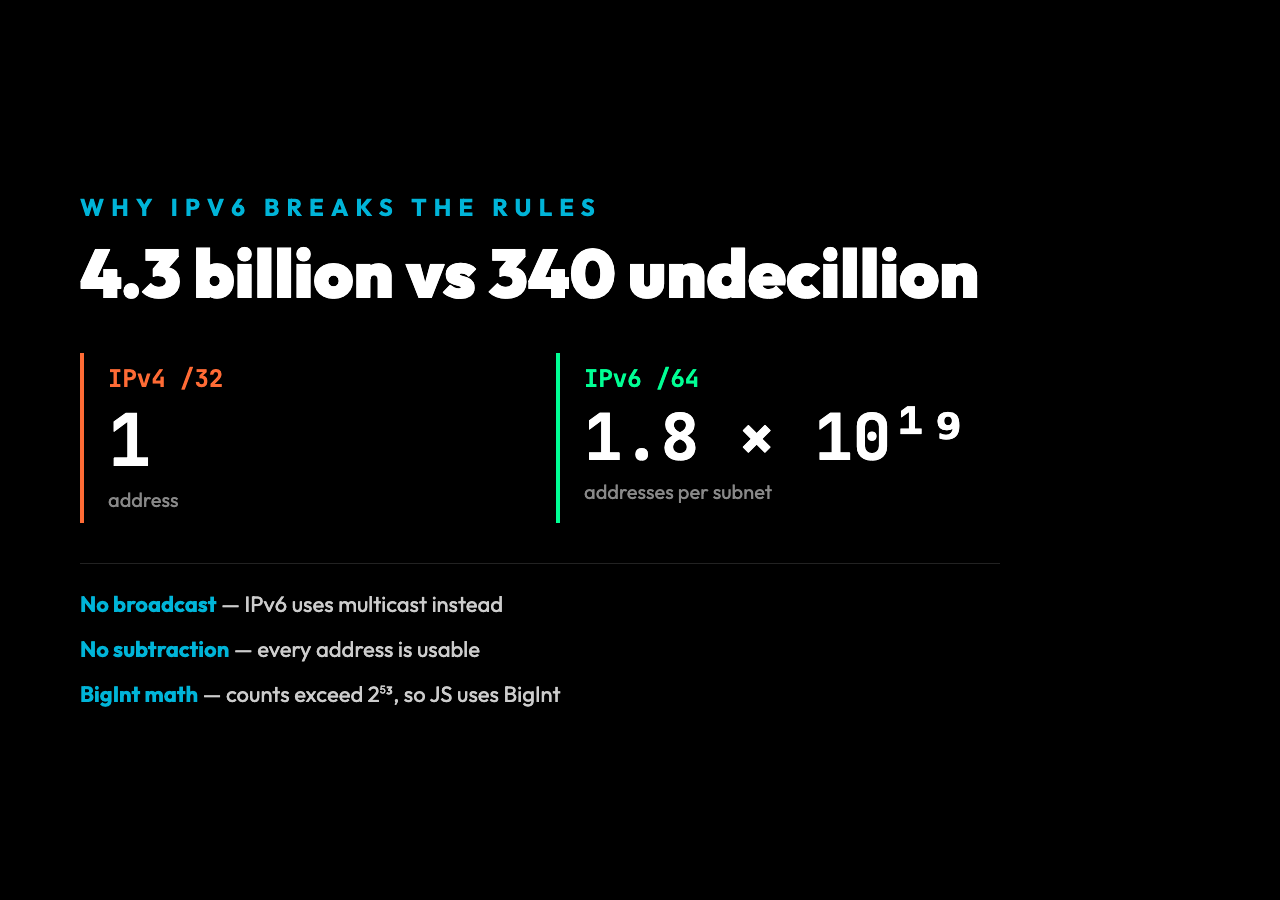
The other change is the math. An IPv6 /64 subnet has 18,446,744,073,709,551,616 addresses, which overflows JavaScript’s standard Number type at the 2⁵³ boundary. The CIDR calculator sidesteps this by using BigInt for IPv6 calculations — that’s why the source code has BigInt(2) ** BigInt(128 - prefixLength) instead of Math.pow(2, ...). If you’ve ever pasted a large IPv6 prefix into a “calculator” that returned scientific notation, you’ve hit this exact issue.
For IPv6, the calculator returns:
- Network address: the bits outside the prefix zeroed out, in compressed form
- Prefix length: the slash value
- Total addresses: the BigInt count as a string, since 2⁶⁴+ can’t fit in a regular number
There’s no broadcast, no first/last usable distinction. The address space is so large that splitting it for “usable hosts” makes no sense — you’re not conserving a scarce resource. This is one of those design choices that only makes sense once you see the scale difference: IPv4 has 4.3 billion addresses; IPv6 has 340 undecillion.
Subnet planning in real life
The place CIDR math actually matters is when you’re carving a larger network into pieces. Suppose a cloud VPC gives you 10.0.0.0/16 — that’s 65,536 addresses. You need to allocate subnets for web servers, databases, and a management tier. The mistake most people make is to start from the bottom and add networks sequentially without a written plan.
A cleaner approach: work backward from the prefix lengths you actually need. A /24 for the web tier (256 addresses, room for growth), a /27 for the database tier (32 addresses, comfortably more than you have DB instances), and a /28 for management (16 addresses, only bastion hosts and jump boxes). The remaining 65,280 addresses stay unallocated for future use. The split is non-overlapping by construction, and the broadcast addresses never collide.
This is where a calculator earns its second keep: not for one-off lookups, but for sanity-checking a plan. Type each candidate subnet in, confirm the network and broadcast don’t overlap with the others, and you have a written artifact you can paste into a Terraform module. The cognitive load of “did I get the bit math right” disappears, and the planning becomes a layout exercise instead of an arithmetic one.
What to remember when the prefix surprises you
Three quick checks for the next time a /22 shows up in a config:
- Count the host bits:
32 − prefixis the number of host bits, and2^(host bits)is the total address count. - Subtract 2 only when needed: the network and broadcast reservation applies to prefixes ≤
/30;/31and/32are exceptions. - IPv6 throws out the playbook: no broadcast, no subtraction, BigInt math for the address count.
There’s an old joke that the slash is the only part of a CIDR notation that fits in a tweet. It’s not entirely wrong — once you can read that single number, you’ve internalized a piece of network math that hasn’t needed an update since RFC 1518 in 1993. The next time you see /22 in a Terraform module, run it through the CIDR Calculator. Watch the network address snap to a clean boundary. The pattern is small enough to memorize and durable enough to outlast every framework you’ll use this year. The slash is the door. Everything after it is a question about how much room you want — and whether you’ll know the answer by heart the next time the page loads.
Explore more tools at elysiatools.com.