
A Stripe invoice.paid event arrives at 3:14 AM. Your handler logs a 500. By morning the customer is double-charged, the merchant double-refunded, and Stripe has long since stopped retrying. The webhook fired once. Your code crashed. Now you reverse-engineer a payload from logs that may not exist, replaying it against a fix you cannot test. A request bin you control changes the math: capture the event, inspect the headers, validate the HMAC, replay the payload until the fix holds. Try the Webhook Debugger & Relay.
Why webhooks fail in production and not in staging
Most webhook integrations pass every test in the development environment and break in the first week of production. The reason is not the test suite — it is the gap between what the test sends and what the upstream actually sends.
Stripe’s test mode signs payloads with whsec_test_… and emits predictable event types. GitHub sends x-hub-signature-256 as a lowercase hex digest. Shopify uses base64 with a =-padded HMAC. Every provider encodes a different field, a different header, a different encoding, and a different retry policy. The first time you receive a real payload from a real merchant in a real timezone, at least one of these assumptions is wrong.
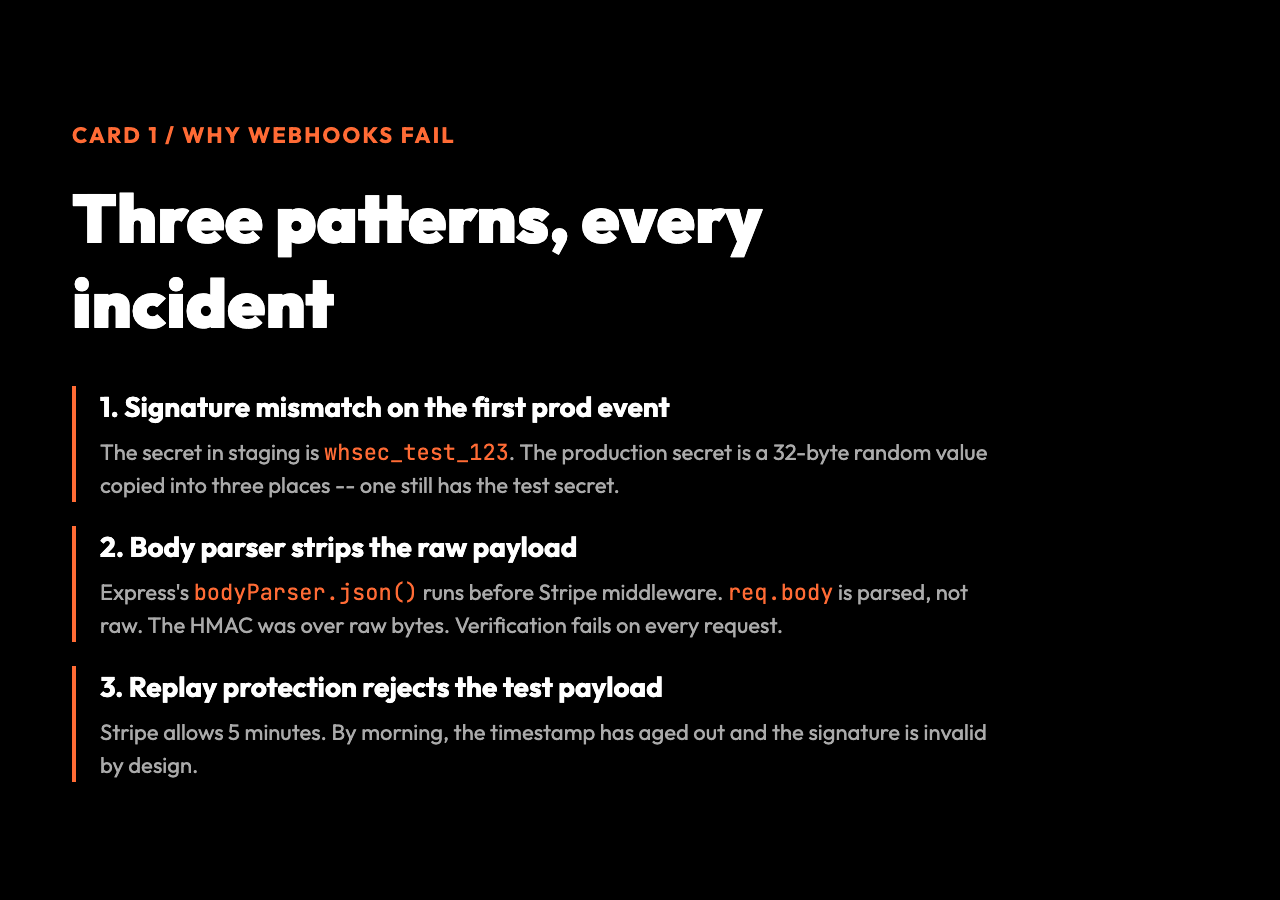
Three patterns account for almost every webhook bug we have seen:
1. Signature mismatch on the first production event. The shared secret in staging is whsec_test_123; the production secret is a 32-byte random value the merchant copied from a dashboard and pasted into three places — one of which still has the test secret. 2. Body parser strips the raw payload before verification. Express’s bodyParser.json() is configured before the Stripe middleware, so req.body arrives as a parsed object, not a raw string. The HMAC was computed over the raw bytes. The verification fails on every request. 3. Replay protection rejects the test payload. Some providers encode a tolerance window in the signature. Stripe allows 5 minutes; others allow 30 seconds. When you replay the original event the next morning, the timestamp has aged out and the signature is invalid by design. According to Stripe’s published webhook retry schedule, the platform attempts delivery up to 3 days with exponential backoff across roughly 16 attempts, then gives up entirely. GitHub retains webhook deliveries in the dashboard for redelivery but does not auto-retry. Shopify retries up to 19 times over 48 hours before flagging the endpoint as failing.
None of these failures show up in unit tests. They show up the first time the upstream talks to your real endpoint with a real secret and a real clock. A request bin is the only way to capture the exact bytes the upstream sent so you can debug against ground truth, not a hand-typed approximation.
What a webhook debugger actually does
A webhook debugger is a public HTTP endpoint that you control, that captures every request sent to it, and that lets you replay those requests to a destination of your choosing. In concept, it is a programmable tcpdump for the webhook protocol.
The Webhook Debugger & Relay exposes a small set of controls that cover the realistic workflow:
| Control | What it does | When it matters |
|---|---|---|
| Relay target URL | Forwards matching requests to your real endpoint after capture | When you want to verify the fix without changing upstream config |
| Signature secret | Validates HMAC-SHA256 against the header you choose | When the provider sends signed payloads (Stripe, GitHub, Shopify) |
| Auto-replay matching requests | Forwards every captured request that matches your filters | When you want to replay a whole batch (a deploy, a cron, a test sweep) |
| Method filter | Restricts capture to POST, PUT, PATCH, or any method | When the upstream sends a heartbeat GET you do not want to forward |
| Body must contain | Only forwards requests whose JSON payload contains a substring | When you only want to relay one event type out of dozens |
| Stored request limit | Caps the rolling buffer at 10-200 requests | When you are capturing a high-volume feed and want to bound memory |
The dashboard shows the live session as a polling iframe — every captured request appears with method, headers, body, signature verdict, and a one-click replay button. You can open the same session in a second tab on a different machine and watch the requests land in real time, which is how distributed teams debug the same webhook without screen-sharing.
The signature math that decides whether to trust the request
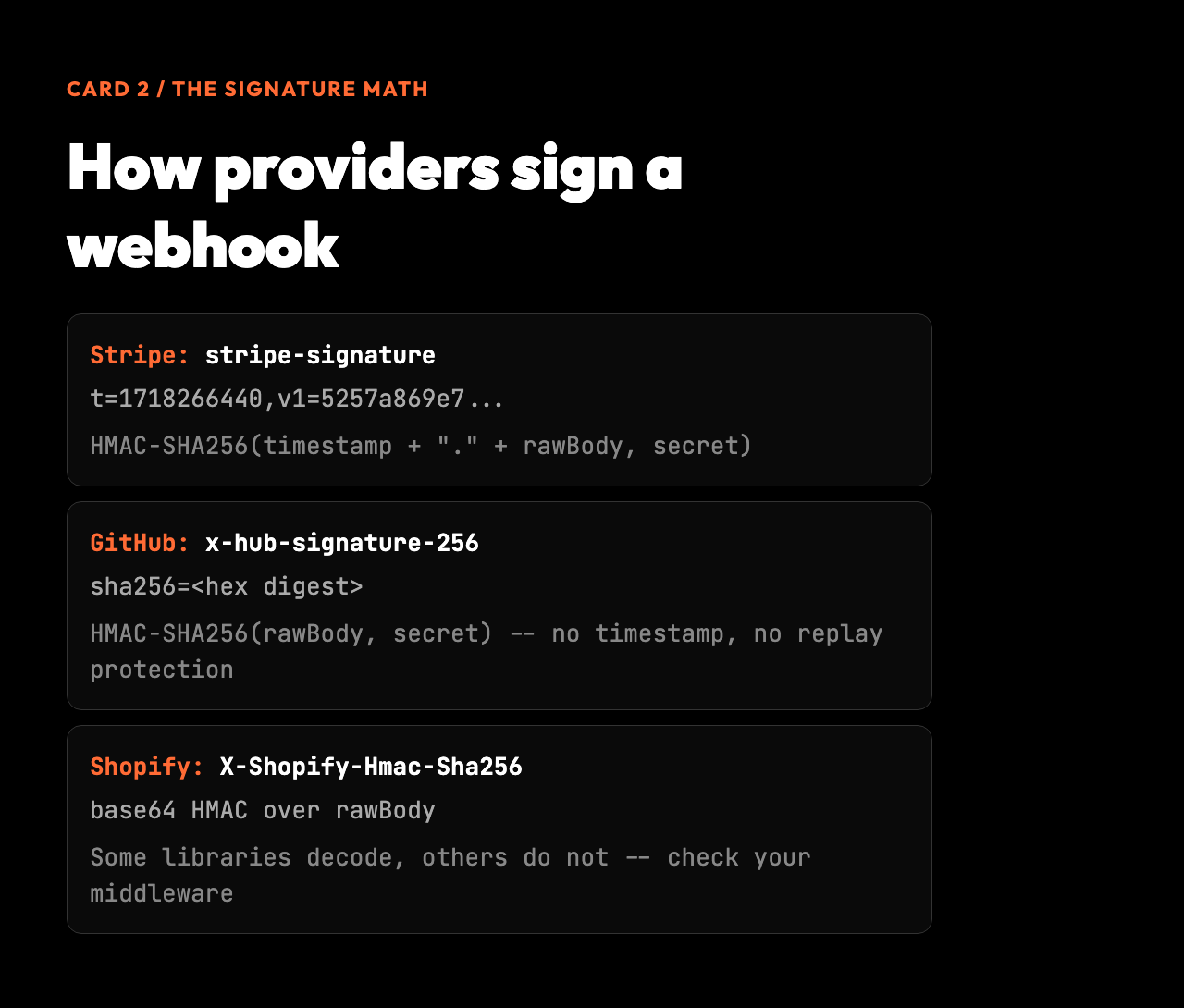
A signed webhook is a triple: the raw body, a timestamp, and a digest. Stripe’s stripe-signature header looks like t=1718266440,v1=5257a869e7…. The verification step recomputes HMAC-SHA256(timestamp + "." + rawBody, secret) and compares it byte-for-byte against the v1= value. If they match, the request was signed with the shared secret. If they do not, the request is either forged or tampered with.
The t= field is what makes the signature time-bounded. The library checks that now - t < tolerance (default 300 seconds) and rejects anything older. This is replay protection — a stolen signature is only useful for a few minutes. It also means that the signature you capture today cannot be replayed next week, which is why debugging tools store the raw request and replay it with a fresh signature against your endpoint, not the original signed payload against a third party.
GitHub’s x-hub-signature-256 is simpler: sha256=. No timestamp. No replay protection. The mitigation is the underlying TLS — if you can intercept a GitHub webhook on the wire, you have bigger problems than replay. Shopify sits between the two: a base64 HMAC over the raw body, with a X-Shopify-Hmac-Sha256 header that some libraries decode and others do not.
This is why a debugger that stores the raw body bytes is more useful than one that stores a parsed JSON object. The moment your bodyParser is misconfigured, you have lost the bytes that the signature was computed over. Capturing the original request — headers, body, raw — is the only way to know whether the upstream signed what your code is verifying.
Conditional replay: the difference between a test and a debugging tool
Most webhook debuggers capture and replay. The useful ones let you filter the replay. The conditional replay controls — method filter, body must contain, auto-replay flag — turn the debugger from a passive logger into an active proxy.
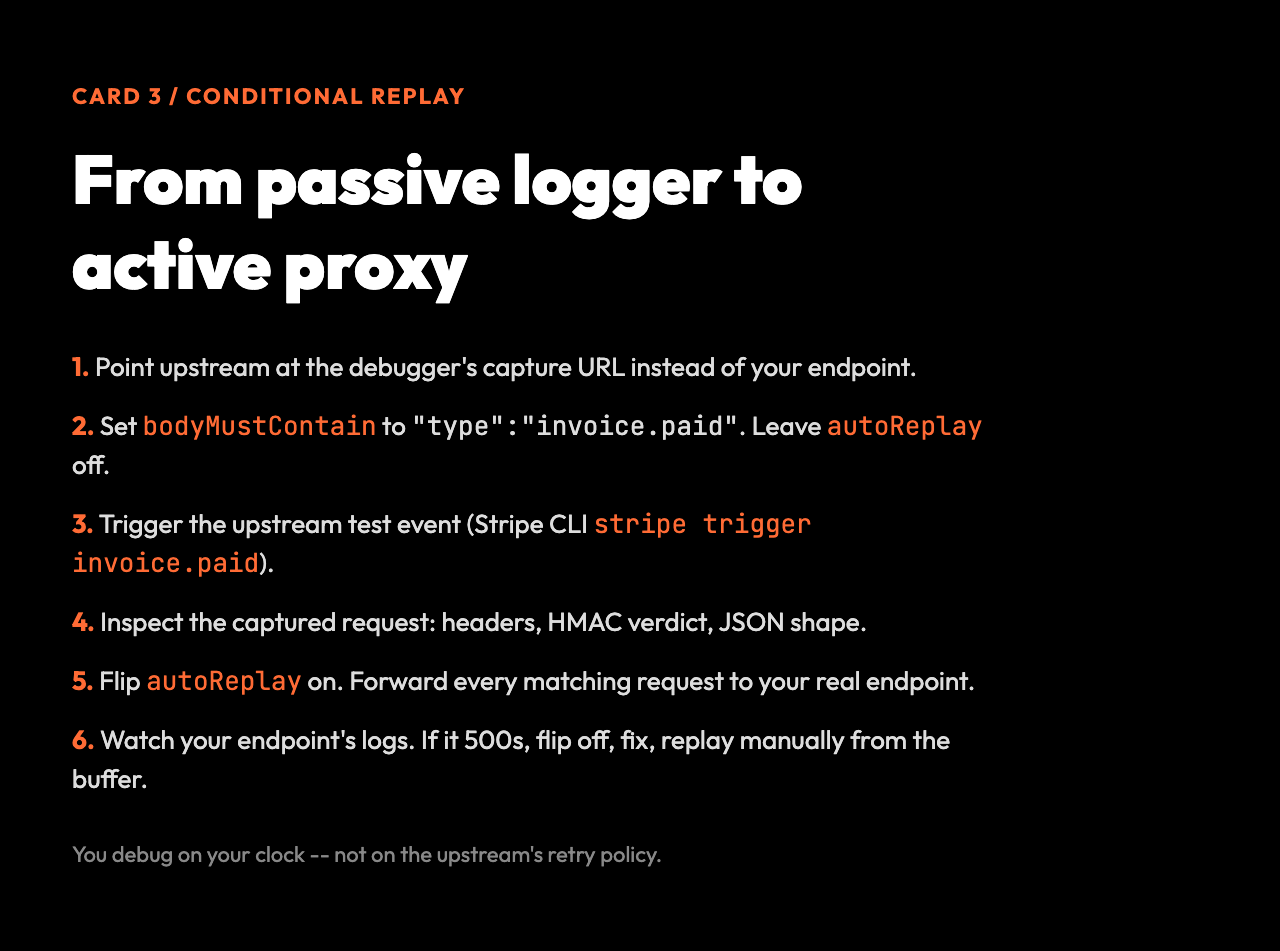
The realistic workflow looks like this:
1. Point the upstream at the debugger’s capture URL instead of your endpoint. 2. Set bodyMustContain to the event type you care about ("type":"invoice.paid") and leave autoReplay off. 3. Trigger the upstream test event (Stripe CLI stripe trigger invoice.paid, GitHub webhook redeliver, etc.). 4. Inspect the captured request in the dashboard: check the headers, validate the HMAC, confirm the JSON shape. 5. When the fix is ready, flip autoReplay on. The debugger now forwards every matching request to your real endpoint. 6. Watch your endpoint’s logs. If it still 500s, the debugger keeps the buffer — flip autoReplay off, fix again, replay manually from the buffer.
This pattern is the inverse of how teams normally debug webhooks. The default flow is: upstream sends to production, production logs, you read logs the next morning, you fix, you ask the upstream to redeliver. Redelivery is at the upstream’s discretion. GitHub allows redelivery from the dashboard. Stripe redelivers automatically for a few hours, then stops. Many providers do not redeliver at all.
With conditional replay, the upstream always sends to the debugger. The debugger always captures. The forwarding happens when you decide, with the filter you choose. You are no longer waiting on the upstream’s retry policy. You are debugging against the exact bytes it sent, on your clock, with your controls.
When the debugger is not enough
A debugger captures and replays. It does not replace integration testing. There are scenarios where a captured payload is the wrong starting point:
– The upstream sends a different payload in production than in test mode. Stripe test mode omits several fields the real API populates (the livemode flag, the customer’s tax information, the invoice’s line-item totals). Replaying a test payload against your production endpoint will pass your signature check and then crash on a null field.
– The upstream mutates the payload shape between API versions. A customer.created event in API version 2020-08-27 has a different nested structure than the same event in 2024-06-20. If your code was written against an older API version, replaying a current payload will fail type checks the test never exercised.
What a working webhook integration looks like
– The signature secret rotates faster than your debug session. Some providers rotate the webhook secret on a schedule (every 90 days is common). A capture from a previous rotation will not replay against the current secret.
The debugger is the right tool for the first incident. It is not a substitute for a contract test that runs against the real upstream’s staging API on every deploy. Use the debugger to capture the exact bytes you missed, fix the handler, deploy the fix, and then write the test that would have caught it.
A reliable webhook handler has four properties, and a debugger exercises each one: