The 73 Score That Quietly Decides Whether Your Dataset Is Production-Ready
A dataset profile is not a dashboard. It is the difference between catching a bad row at 9 a.m. and catching it at the bottom of a machine learning training run, three weeks later, when the model quietly fails on a class it never saw. The number itself — the quality score out of 100 — is not the point. What matters is what gets inspected before the score is computed, what gets flagged when the score drops, and what never gets surfaced at all. Most teams run the profile, glance at the score, and move on. The score is what they look at. The columns the score ignores are what come back to bite them.
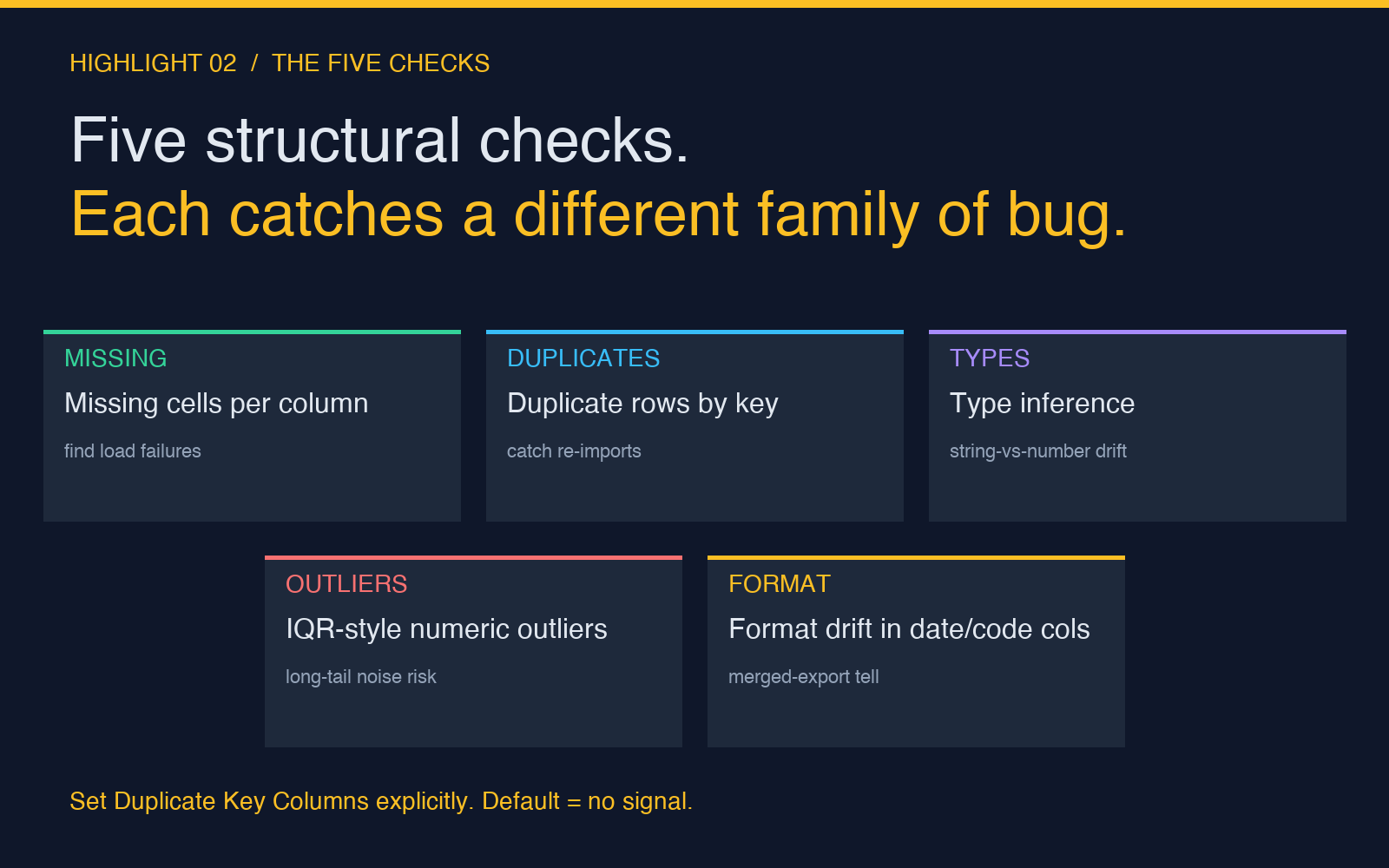
This is a field guide to the checks that actually catch problems: missing values per column, duplicate rows by business key, type inference when CSV columns lie, numeric outliers using an IQR-style rule, and format drift where one column carries three different date formats because three different exports got merged into one file. Each of those checks has a version that runs in milliseconds on a small CSV and a version that quietly scales to a million-row JSON array. The differences are not subtle. They are the difference between a profiler that helps you find the broken column and a profiler that tells you the dataset is “fine.”
You can profile a CSV in your browser at Elysia Tools Dataset Quality Profiler. Paste the data, set the duplicate-key columns, click run, read the report. The rest of this article walks through what to look for, why each check exists, and the three failure modes that the score itself will never warn you about.
Why Your Dataset Score Is Not What You Think It Is
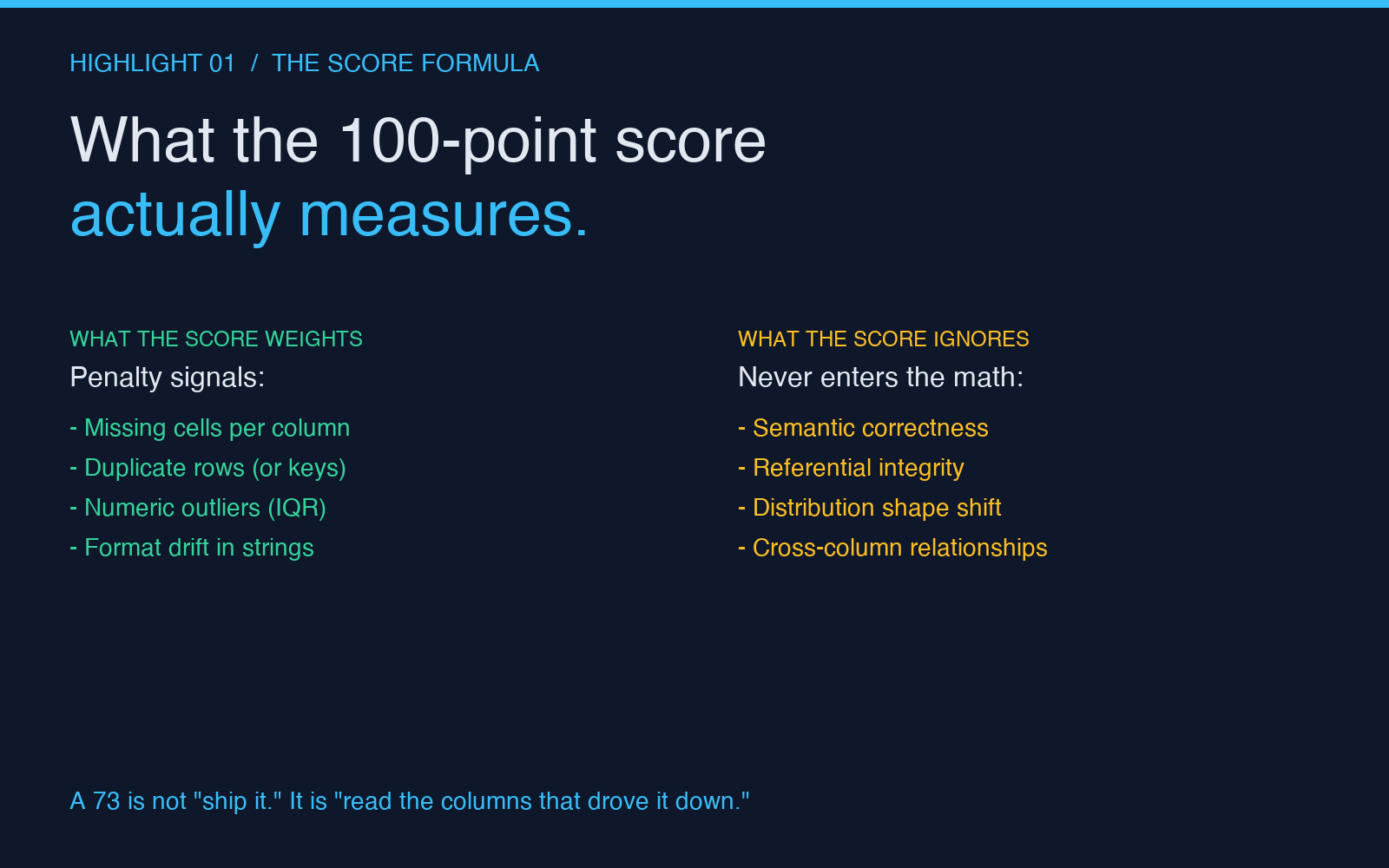
The quality score is computed as a weighted penalty on the things the profiler can see. Missing cells subtract. Duplicate rows subtract. Numeric outliers subtract. Format drift subtracts. The arithmetic is simple — the philosophy underneath is what trips people up.
The score is meant to be a quick operational signal, not a formal data-governance grade. A 73 is not “ship it.” A 73 is “look at the columns that drove the number down before you trust the rest of the report.” On a 10,000-row customer export, a 73 with no per-column breakdown is essentially useless. You do not know whether the score dropped because of one column with 40% nulls or because of forty columns each with 1% nulls. The first is a data pipeline bug. The second is just the nature of the dataset. The score cannot tell them apart.
The columns the score never touches are even more dangerous. Semantic correctness — whether a “country” column actually contains country codes or whether some rows contain city names because two product teams exported different shapes and merged them — never enters the score. Referential integrity — whether a user_id column references IDs that exist in the users table — never enters the score. Distribution shape — whether a numeric column has two distinct modes because the dataset is a union of two pipelines — never enters the score. The profiler reports the structural shape of the data. It does not report whether the data is right.
This is not a complaint. It is the design. The profiler tells you what is mechanically wrong with the file. It does not pretend to know what the file is supposed to mean. The mistake most teams make is treating the score as a proxy for “this dataset is good.” The score is a proxy for “this dataset’s mechanical shape is consistent.” That is a much weaker claim. A dataset can be internally consistent and semantically wrong. A dataset can be semantically correct and structurally messy. You need to read both signals.
Run a profiler on a known-bad dataset before you trust its verdict on a borderline one. Take a 500-row CSV with three known issues — a column with 30% nulls, two duplicate business keys, and a date column with mixed YYYY-MM-DD and MM/DD/YYYY formats — and profile it. Watch the score drop. Watch which columns get flagged. Watch what the report says about the duplicate rows. Now you know what the tool considers a problem. Now you can read its verdict on real datasets without guessing.
The Five Checks That Actually Catch Problems
The profiler runs five classes of check on every CSV or JSON dataset. Each catches a different family of bug. Each has a configuration that controls what it actually measures. None of them require a database, a Python environment, or a data engineering ticket — they run in the browser, on the file as it sits on your laptop.
Missing values per column. The profiler counts the cells in each column that are blank, null, or NaN, and reports the count plus the column’s distinct-value count. A column with 4,000 missing cells out of 10,000 rows is not the same as a column with 400 missing cells out of 10,000 rows, but the report makes the difference obvious. The real use of this check is not the count — it is the pattern. A column where missing values are concentrated in the last 2,000 rows is a load failure. A column where missing values are evenly distributed is a schema mismatch. The profiler does not distinguish these patterns. You do, by reading the rows. The check is a flag, not a diagnosis.
Duplicate rows, or duplicate combinations. This is the single check that has the largest blast radius when it catches a real problem and the largest “false alarm” rate when configured naively. By default, the profiler treats two rows as duplicates only if every column matches — including a timestamp column that almost certainly differs. That configuration will almost always report zero duplicates. The fix is the Duplicate Key Columns field: a comma-separated list of column names that together identify a business entity. For a customer export, that is customer_id or email. For an orders table, that is order_id or (customer_id, order_date). With the right key, the duplicate check catches the 47 customers who got imported twice because two CSV exports got joined. Without it, the check is noise.
Column type inference. The profiler looks at the values in each column and infers a type: number, boolean, date, string, or empty. Type inference sounds trivial until you hit a column where 80% of values are numeric and 20% are strings like "N/A" or "unknown" because someone hand-filled exceptions into a numeric column. The profiler will mark that column as “string” because the minority type wins. That is the correct behavior. A consumer that assumes the column is numeric will fail on the 20%. The check catches this — if you read the report. The score does not penalize type drift directly. The penalty is downstream, when the consumer fails.
Numeric outliers using an IQR-style rule. For each numeric column, the profiler computes the interquartile range and flags values that fall outside Q1 − 1.5 × IQR to Q3 + 1.5 × IQR. This is the textbook rule. It is also the rule that fires on every legitimate long-tail distribution — order amounts, page-view counts, session durations — because those distributions are skewed by design. The check is useful when you expect a roughly symmetric distribution (heights, ages, latencies in a controlled benchmark). The check is noisy when you do not. The report tells you the count of outliers per column. You decide whether the count is meaningful.
Format drift for string and date-like columns. This is the check that catches the merged-export problem. If a column named signup_date has 8,000 rows in YYYY-MM-DD format and 2,000 rows in MM/DD/YYYY format because two product teams exported different shapes, the format-drift check flags the column as inconsistent. The check also catches structural inconsistencies in code-like columns — a column named country with mostly two-letter ISO codes and a handful of three-letter codes that snuck in from a different export. The penalty is small, but the bug is large: the consumer code that joins on country code will fail silently on the 1,500 rows that use the wrong format.
The Three Failure Modes the Score Will Never Warn You About
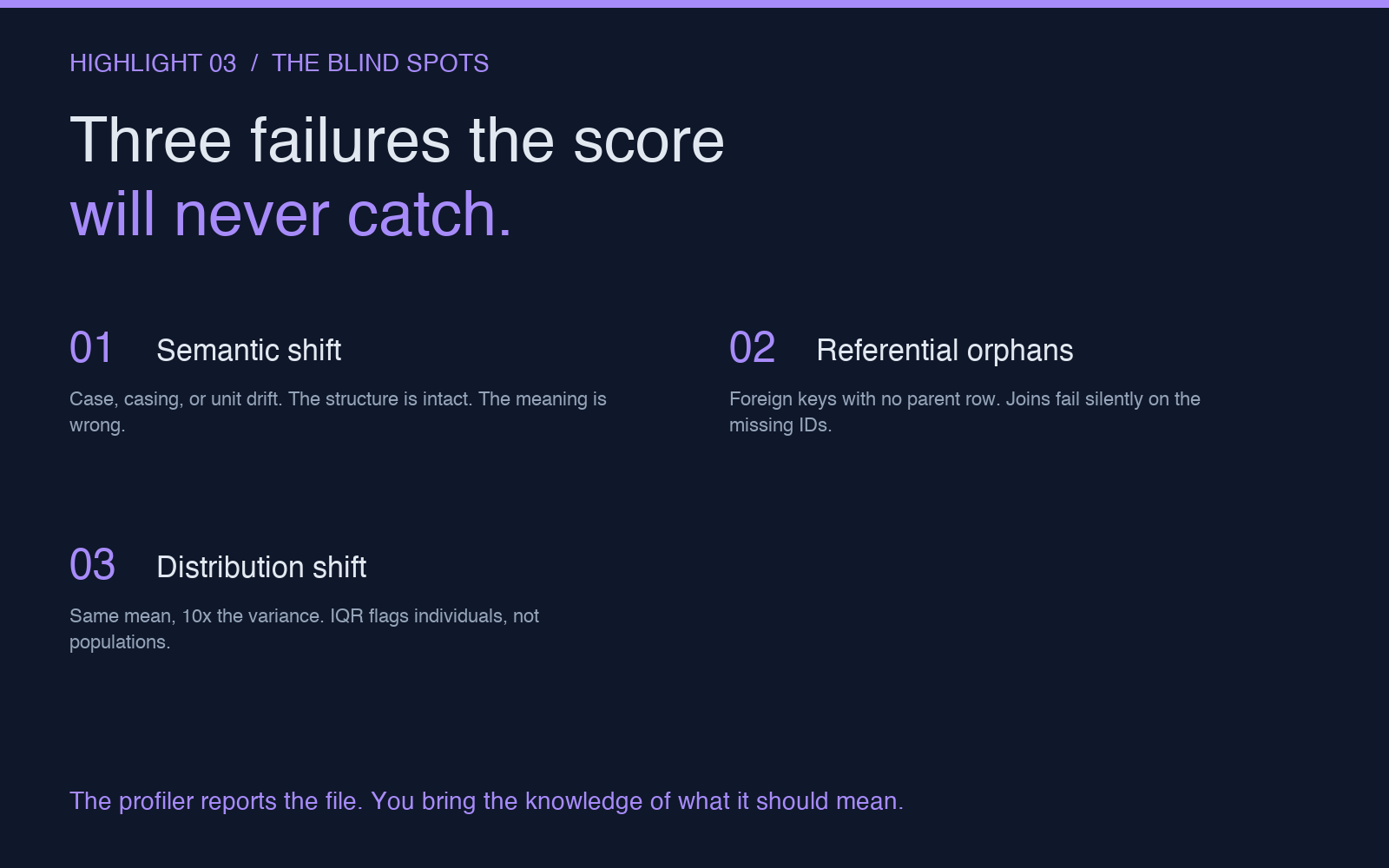
A profiler that reports only structural problems is, by construction, blind to semantic ones. Three specific failure modes appear often enough in production datasets that they deserve explicit attention — and explicit defense, because no profiler will catch them for you.
Silent semantic shift. A column named status with values ["active", "inactive", "pending", "archived"] in the original export becomes a column with values ["active", "inactive", "PENDING", "ARCHIVED"] after an ETL transform uppercases everything. The profiler sees a string column with four distinct values. The score is unchanged. Downstream code that compares against lowercase strings will fail on half the rows. The fix is not in the profiler. The fix is in the ETL — or in a downstream assertion that catches the case mismatch before it reaches the consumer. The profiler’s role here is to confirm that the column structure is intact. The semantic shift is yours to detect.
Referential orphans. A column named user_id in an orders table references 10,000 distinct user IDs. Only 8,500 of those IDs exist in the users table. The profiler sees a numeric column with 10,000 distinct values. The score is unchanged. The 1,500 orphan orders will fail every join. The fix requires a second dataset (the users table) and a join. The profiler does not know about joins. It does not know about foreign keys. It does not know that user_id is supposed to refer to anything. This is a deliberate boundary — referential integrity is a database concern, not a file-concern — but it is a boundary that bites teams that assume “the profiler checked the data.” The profiler checked the file. Not the relationships.
Distribution shape change. A numeric column called response_time_ms has a mean of 240 ms and a standard deviation of 18 ms in the training data. In the new export, the same column has a mean of 240 ms and a standard deviation of 240 ms because one product team started measuring in microseconds and forgot to convert. The profiler sees a numeric column with no missing values and no flagged outliers (because the IQR rule does not penalize high variance, only individual extreme values). The score is unchanged. The downstream model that was trained on response_time_ms interpreted as milliseconds is now interpreting values 1,000× too large. The fix is in the pipeline. The fix is also in a sanity check that compares the distribution’s mean and standard deviation against a known baseline before the data is consumed. The profiler does not do this. The profiler does not know what the column is supposed to look like.
The pattern across all three is the same: the profiler tells you about the file. You bring the knowledge of what the file is supposed to mean. The score is a snapshot of the file’s mechanical health. It is not a verdict on the data’s correctness. Treat it that way, and you will catch real problems before they reach production.
If you want to run the profiler on a real export, the Dataset Quality Profiler handles CSV and JSON inputs up to several hundred thousand rows. For a quick way to do the same check on a small representative sample — useful when you want to validate the schema before committing to a full load — the CSV Column Selector tool sits one click away, and so does the Data Deduplicator for a deeper look at the rows the duplicate-key check flagged. You can find more in the Elysia Tools catalog.
Run the profile. Read the per-column breakdown. Then go fix the rows the score ignored.