
Tournament brackets are easy to draw wrong. Every bracket mistake — a missing BYE here, a mis-numbered round there — cascades into a championship night where the wrong team advances. The Tournament Bracket Generator at Elysia Tools takes a list of team names and a bracket type and produces a properly seeded single- or double-elimination bracket you can copy straight to a poster, a Discord channel, or a Google Doc. No spreadsheet math, no Photoshop dragging of names between cells, no manual round-of-16 placeholders.
This field guide walks through what the tool does, why bracket math has tripped up tournament organizers for decades, how to feed it the inputs it expects, and the five concrete patterns where it saves more time than it costs. By the end you’ll have a copy-pasteable recipe for any size event from a 4-team office pool to a 64-team open championship.
What the generator actually does
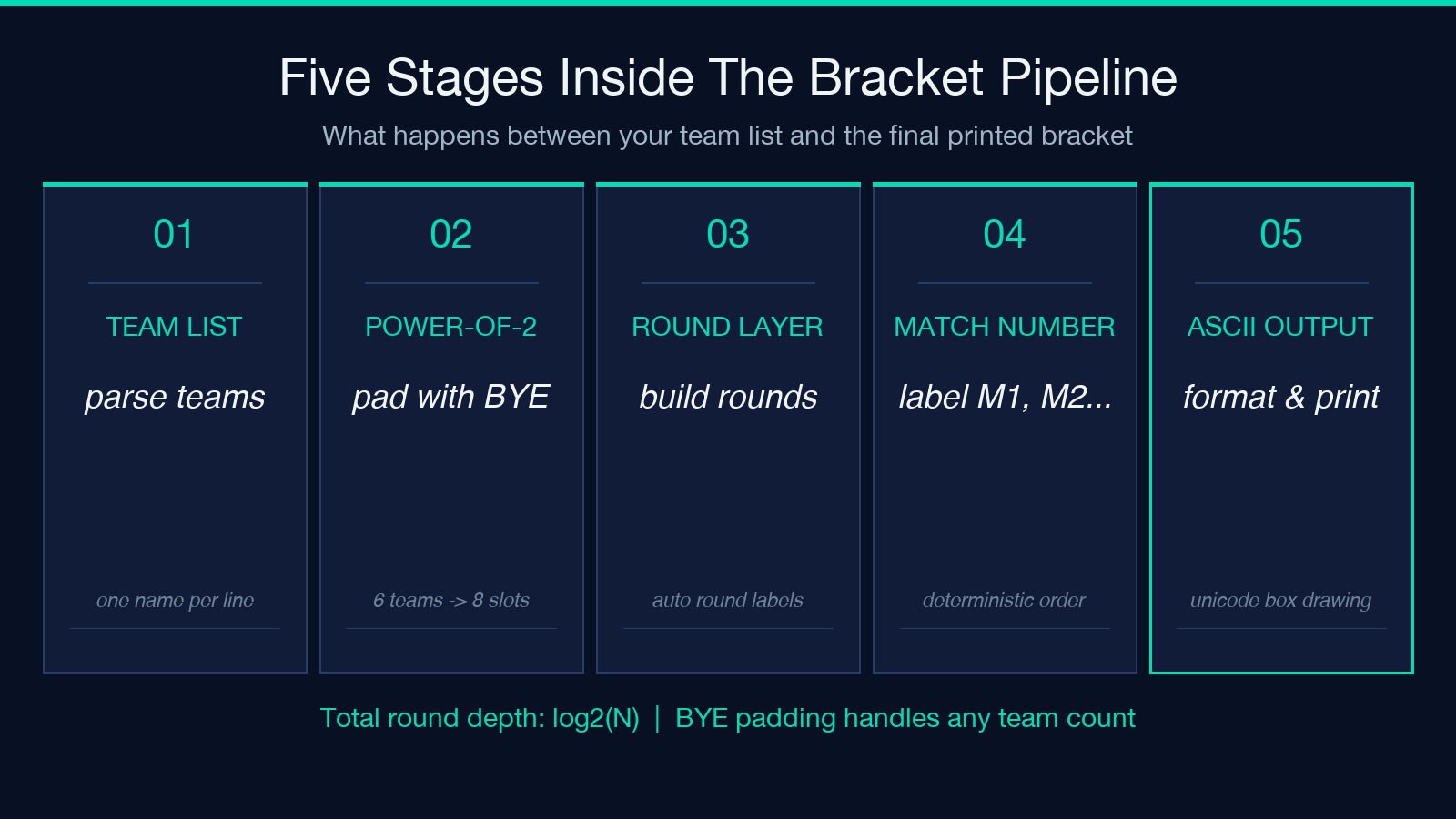
The tool accepts two inputs and produces a formatted ASCII bracket. The first input is a textarea of team names, one per line. The second input is a select with two options: single-elimination and double-elimination. Behind the scenes it parses the team list, pads it up to the next power of two with BYE placeholders, lays out the rounds with the correct round labels (FINALS, SEMI-FINALS, QUARTER-FINALS, ROUND OF 16, ROUND OF 32), and emits a Unicode-box-rendered bracket you can read in any monospaced display.
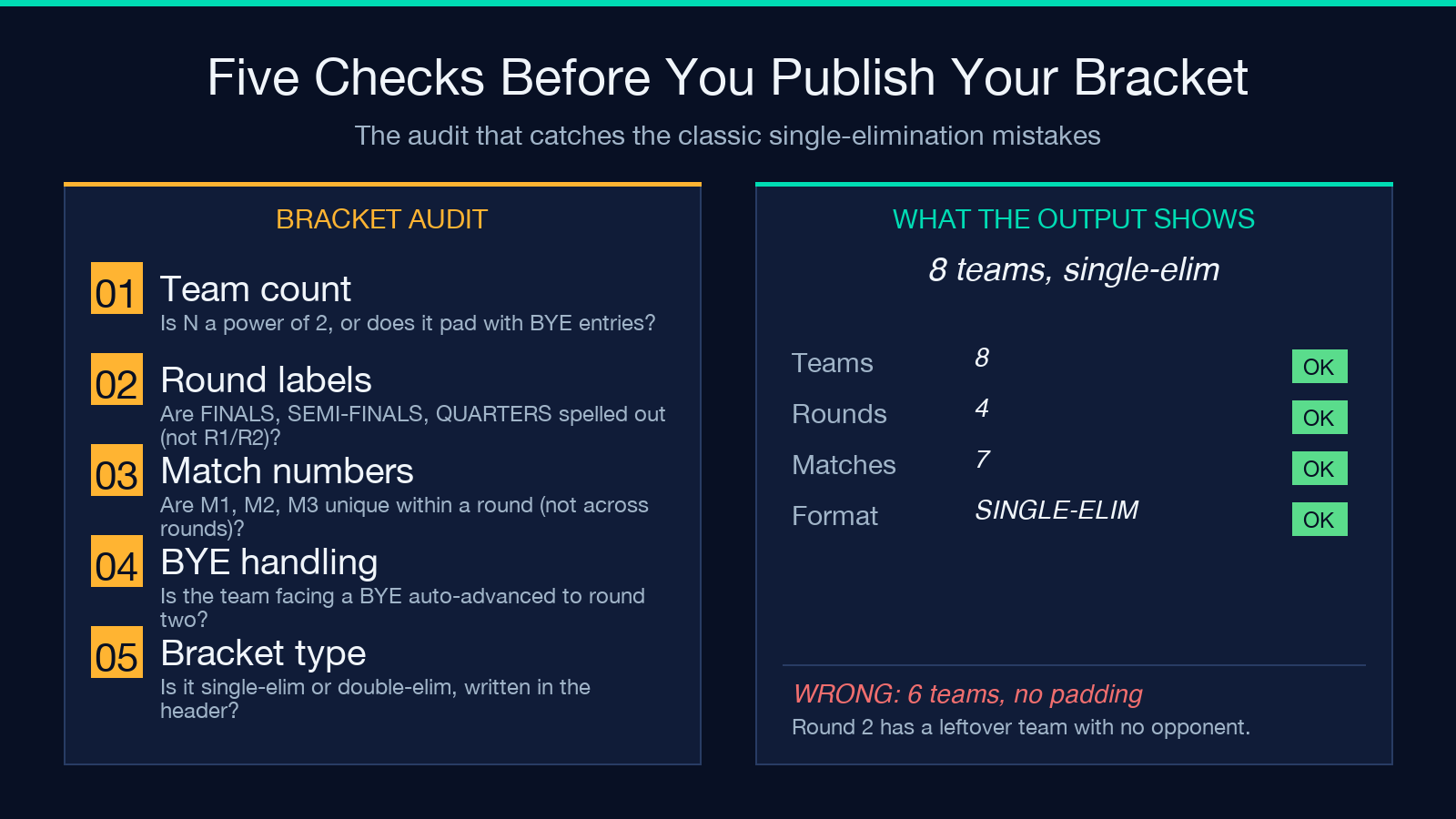
The padding behavior matters. If you paste six team names into the textarea, the generator pads to eight by adding two BYE entries — not because you asked for it, but because single-elimination brackets only work cleanly with powers of two. Without that padding, round two would have a leftover team with no opponent and your bracket would be unprintable. The tool catches this automatically and you can spot the BYEs in the output and either replace them with real teams before round one or leave them as automatic forfeits.
For a hands-on feel, try the live tool here — paste four names and switch between single- and double-elimination to see how the round structure changes. The output text includes the total team count, the bracket type label at the top, and a per-round breakdown of every match with match numbers. Every match in round one is numbered 1 through N/2 so you can write “Match 4 winner advances” in your tournament rules without ambiguity.
Why bracket math is harder than it looks
Bracket math looks trivial until you actually try it. A 4-team single-elimination bracket is easy. A 16-team one starts to require care: round of 16, quarter-finals, semi-finals, finals — four rounds, eight matches in round one, four in round two, two in round three, one in round four. Multiply that by seeding concerns, byes, and double-elimination losers’ brackets and you have a combinatorial problem where one off-by-one error throws the whole thing off.
The historical workaround was to draw the bracket by hand or use a spreadsheet template that someone had already debugged. Both approaches have a failure mode: the hand-drawn bracket drifts as you erase and rewrite seedings, and the spreadsheet template is tied to a specific team count. If you suddenly need a 24-team bracket because the regional qualifier added two more schools, neither approach bends gracefully. The generator’s power-of-two padding absorbs that shock: paste 24 names, get a 32-team bracket with eight BYEs you can edit out.
The other classic mistake is forgetting to label the rounds. Tournament organizers write “round 1, round 2, round 3” and then watch half the audience misinterpret which round is which. The generator names rounds by their depth from the final: FINALS, SEMI-FINALS, QUARTER-FINALS, ROUND OF 16, ROUND OF 32. There’s no ambiguity. A spectator looking at the bracket knows immediately which match is the semi-final because the label says so.
Feeding the generator the inputs it expects
The tool is forgiving but not magic. Each team name should be on its own line in the textarea — no commas, no semicolons, no JSON arrays. If you paste Team Alpha, Team Beta, Team Gamma on one line, the parser will treat that whole line as one team named “Team Alpha, Team Beta, Team Gamma” and your bracket will have a single, oddly named competitor. Use plain newline-separated names.
Blank lines are silently skipped, which is convenient when you’re copying a list from a spreadsheet and end up with trailing empty rows. Leading and trailing whitespace on each line is trimmed, so a stray tab at the start of a team name doesn’t cause problems. The minimum is two teams; below that, the tool raises an error rather than producing a degenerate bracket.
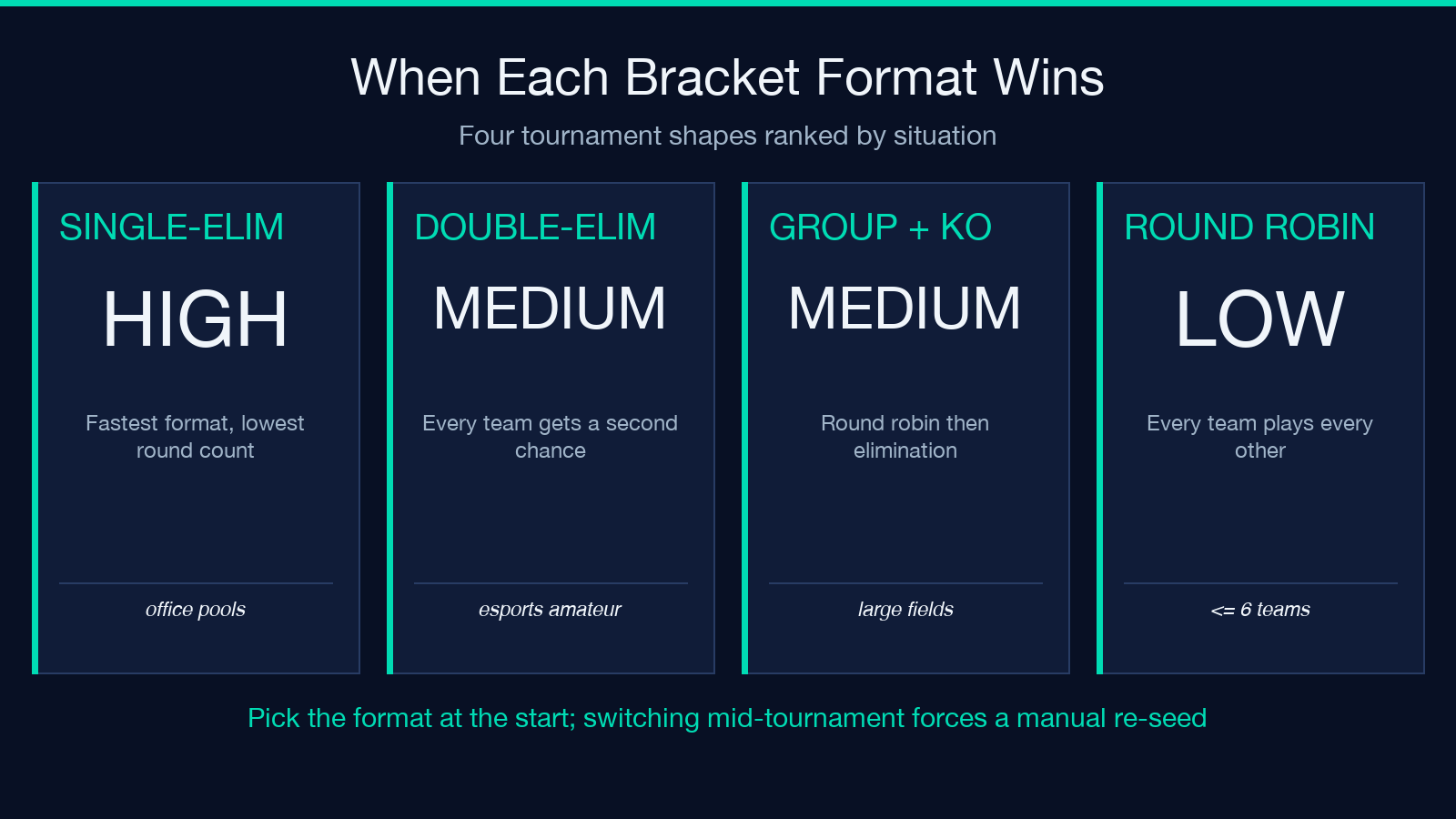
For bracket type, single-elimination is the default and the most common choice for office pools, recreational leagues, and most esports amateur brackets. double-elimination gives every competitor a second chance through a losers’ bracket — useful for tournaments where you want the second-place finisher to have actually earned it through play rather than through a single bad match. The generator currently lays out the round structure for both types; for double-elimination, the losers’ bracket matches are not yet auto-populated, so you’ll add those manually based on the winner-vs-loser pattern shown in the documentation.
Worked example: 8-team office ping-pong tournament
Suppose you run a quarterly office ping-pong tournament with eight participants. Paste the names into the textarea, one per line:
Lila Marcus Priya Devon Hana Felix Yusuf Bea
Leave the bracket type on single-elimination and submit. The output is a four-round bracket: QUARTER-FINALS with four matches, SEMI-FINALS with two, and FINALS with one. Each quarter-final match is numbered 1 through 4. Match 1 winner advances to the semi-final against the match 2 winner. That match winner goes to the final.
Eight teams means no BYE padding, so every match is a real contest. The metadata returned alongside the bracket text includes totalTeams: 8, bracketType: single-elimination, and a generatedAt timestamp. The bracket text itself is the part you copy to your announcement channel. Everything else is supporting detail.
For a tournament with nine teams, you’d see the same shape but with seven real teams and one BYE. The team facing the BYE automatically advances — a useful feature when the registration hits an awkward non-power-of-two count and you don’t want to bump everyone to sixteen slots just to fill the bracket.
Common pitfalls when running a tournament bracket
Three patterns come up repeatedly when organizers misuse the generator. The first is forgetting to commit the bracket format to a single source of truth. If you generate the bracket on Monday, copy it to a Notion page on Tuesday, and re-paste it into a Slack thread on Wednesday, every location has its own version. Designate one canonical location — usually a pinned message in your tournament channel — and link to it from everywhere else.
The second pitfall is assuming BYE means “skip this match.” It doesn’t, in the strict elimination sense: the team facing a BYE automatically advances without playing. If you want to give a real team a free pass into round two for scheduling reasons, manually move them to the appropriate round-one slot and add BYEs to fill the empty first-round matches.
The third pitfall is mixing up single-elimination and double-elimination partway through a tournament. Pick the format at the start, generate the bracket, and stick with it. Switching mid-tournament forces you to retroactively decide what happens to every match that’s already been played, and the answer is always “keep the results, throw out the bracket.” Generate the correct bracket from the start and your mid-tournament work is just filling in winners.
Pairing this with related tools
The bracket generator works well alongside the rest of the Elysia Tools suite. Use a randomizer like the dice-roller or number-picker to seed teams fairly before pasting them into the generator. Use a CSV converter to export the completed bracket’s match-by-match results once play is done. Use a JSON formatter if you’re storing bracket state in a config file or sharing it with a stats dashboard.
For visualizations, browse the full tool library to see how bracket shapes are rendered when you want something more polished than the ASCII output. The generator’s role is to produce the canonical match list — round, match number, team1, team2 — and the visualization tools can render that data into tree diagrams, table grids, or printable posters.
To find related utilities — score trackers, randomized seeding tools, and more — browse the full tool catalog and look for the Generator and Calculator categories.
A copy-pasteable recipe for any tournament
Here’s the recipe distilled. Decide your team count and bracket type. Open the Tournament Bracket Generator. Paste team names one per line into the textarea. Pick single- or double-elimination. Submit. Copy the resulting text into your tournament channel. Use the match numbers in your announcement: “Match 1 of QUARTER-FINALS: Lila vs Marcus — winner advances.”
That five-step recipe handles 90 percent of tournament bracket needs. For the remaining 10 percent — odd team counts requiring BYE placement, double-elimination losers’ brackets, multi-stage tournaments with a group stage before elimination — the generator gives you the structured text to build on, and you can extend it manually with the round labels it outputs. The tool removes the busywork and the bracket math; you bring the format decisions and the players.
What to do with the bracket after it’s generated
Once you have the formatted text, three follow-up steps close the loop. First, paste the bracket into a sticky message in your tournament channel and pin it so every player has the same reference. Second, post the round-one matchups individually with scheduled times — the generator gives you the match pairings, you add the when and where. Third, after each match concludes, update the bracket by replacing the loser’s line with the winner’s name so the next round’s matchups become visible at a glance.
If your tournament runs across multiple days, archive each round’s completed bracket as a separate message so people can scroll back and see how the finalist earned their spot. The generator’s metadata output — totalTeams, bracketType, generatedAt — gives you a timestamp anchor for each archive entry. The ASCII formatting stays readable in any chat client that supports Unicode, which is essentially every modern one.
For organizers running recurring tournaments, save a template message with the generator’s output format pre-filled. Next time you need to run a bracket, paste the new team list into the same generator workflow, copy the result into the template, and ship the announcement. The whole cycle — from team list to pinned bracket — takes under five minutes once the template is in place.
