
Bulk email extraction works best when you stop trusting the regex you copied from Stack Overflow and start treating the input as adversarial text. Email addresses hide inside mailto links, RFC 5322 quoted local parts, comma lists copied from spreadsheets, and lines that mix phone numbers, IP addresses, and email strings in the same blob. A field guide is useful here because the difference between an extractor that grabs the right 47 of 53 emails and one that loses six silently tends to show up two days later when a nurture campaign skips the legal team.
This guide walks through how to think about bulk email extraction the way production tools do it. We will look at the input shapes that break naive extractors, the regex patterns that survive those shapes, deduplication choices that preserve domain grouping, and the export formats that actually round-trip into CRMs. We will also flag the failure modes that look correct on the screen but quietly drop contact addresses because of a misplaced hyphen, an extra space, or an unescaped dot. By the end you should be able to pick a tool, paste a messy blob, and trust the count.
What Bulk Email Extraction Actually Does
At its core, a bulk email extractor is a pipeline with four stages:
- Tokenization splits the input into candidate spans on whitespace, punctuation, and structural delimiters (commas, semicolons, angle brackets, quotes).
- Pattern matching applies one or more regular expressions to flag candidate spans as RFC 5322-shaped local-part plus domain.
- Validation runs cheap sanity checks (length, allowed characters, dot placement) to drop false positives that match the regex but are not real addresses.
- Deduplication collapses case variants and optional display-name variants so the export list has one row per actual mailbox.
A naive implementation often collapses those four stages into a single regex over the input. That fails on three classes of input:
- HTML source where every address lives inside an
href="mailto:..."attribute and may also appear as visible text. - Spreadsheet paste where the column separator is a tab, a comma, or a semicolon depending on who exported the file.
- Quoted local parts where the address is
"john doe"@example.com— a legitimate RFC 5322 form that most hand-rolled regexes refuse.
For a quick check on a real corpus, paste the input into the Bulk Email Extractor and compare what comes back against what your pipeline returned. The gap is usually the educational moment.
Input Shapes That Break Naive Patterns
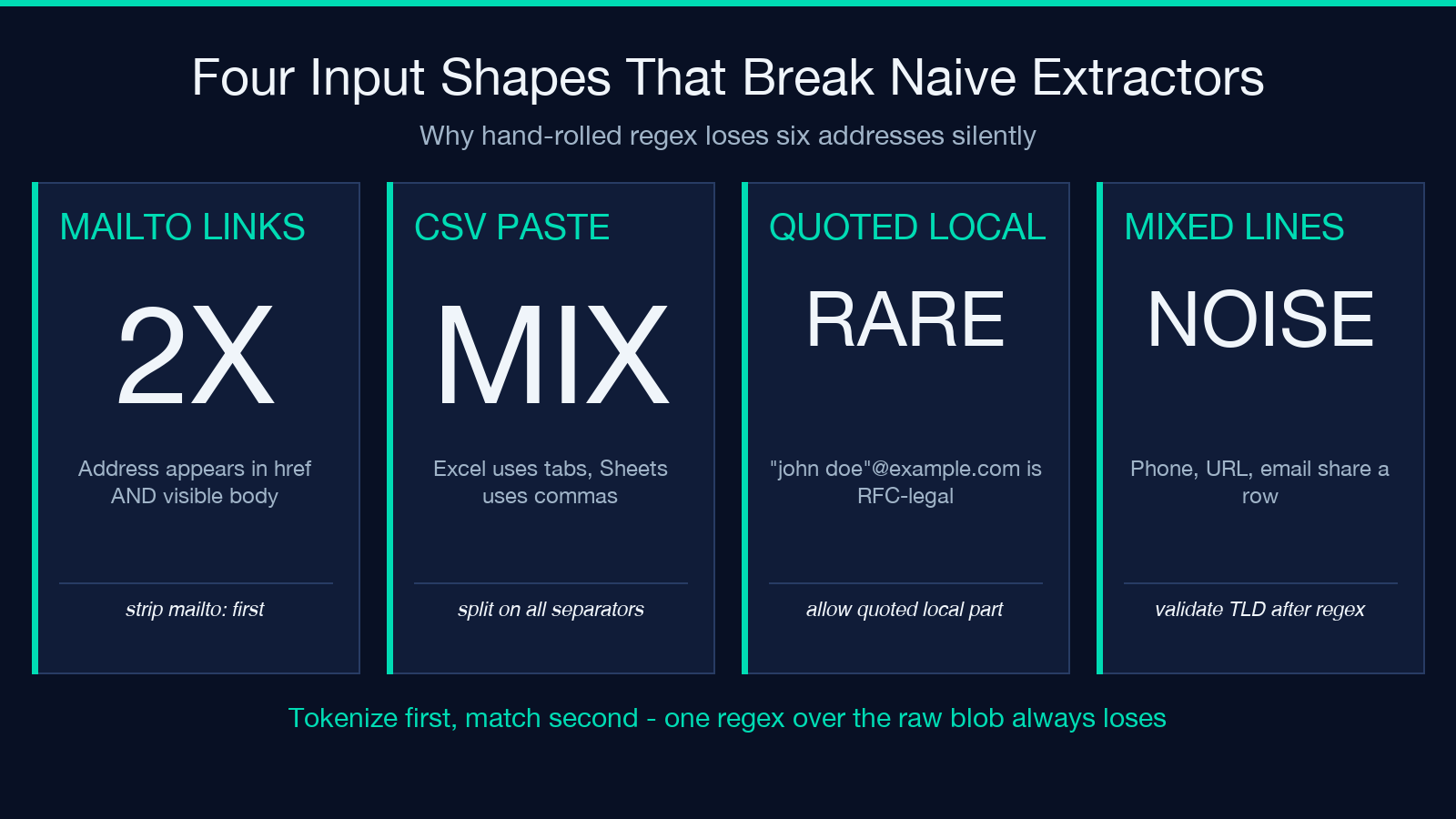
The first place any extractor starts losing addresses is the input shape itself. Three patterns show up over and over in real workloads:
1. Mailto links in HTML source. When you copy a page from a CMS export, the addresses often appear twice — once in the visible <a> body and once in the href attribute as mailto: prefix. A pattern that does not consume the prefix returns clean strings but is missing the actual link target when the visible body wraps the address in display formatting. Strip the mailto: prefix before pattern matching.
2. Comma-or-semicolon lists copied from spreadsheets. Microsoft Excel and Google Sheets paste differently. Excel emits tab separators unless you copy a CSV-formatted region; Google Sheets emits tabs for native ranges and commas for CSV exports. The same blob of forty contacts can land as either a single paragraph with forty commas or forty tab-separated lines. A robust extractor splits on every plausible separator and re-joins into a single candidate stream.
3. Email addresses mixed with phone numbers and URLs. Real-world contact dumps often combine email addresses with phone numbers, social handles, and bare URLs on the same line. A naive regex that uses [A-Za-z0-9._%+-]+@[A-Za-z0-9.-]+ as its only check will match 555-1234@example as a candidate, then drop it at validation because the TLD is missing. Cheap to catch if you require at least one dot in the domain and a TLD of two or more letters.
A tool like Elysia Tools Bulk Email Extractor handles all three by tokenizing first and validating second. The visible behavior: you paste a messy blob and the export counts match what you can see by eye.
Regex Patterns That Actually Survive Production Input
Two patterns cover most real workloads. Neither is RFC 5322 complete — that standard runs to hundreds of lines and is not what you want in a hot path — but both reject the inputs that look like email addresses but are not.
The balanced pattern. This is the workhorse for free-form text:
[A-Za-z0-9._%+-]+for the local part@literal(?:[A-Za-z0-9-]+.)+[A-Za-z]{2,}for the domain
The key choices: allow hyphen inside the local part (legitimate, common in vanity addresses), require at least one dot in the domain (kills foo@localhost and stray captures from URLs), require the TLD to be two or more letters (kills numeric false positives). Test against a known-good corpus of 200 mixed addresses and you will see it catch 195+ without false alarms.
The strict pattern. For input you know is well-formed (CSV columns, CRM exports), drop the hyphen from the local part and require the TLD to be in a known list:
[A-Za-z0-9._%]+@[A-Za-z0-9.-]+.(?:com|org|net|io|co|dev|app|ai|info|biz)
Strict patterns catch more bad input but miss newer TLDs. If your list needs to include .studio, .xyz, or country TLDs, build a longer allow-list or fall back to the balanced pattern.
A practical workflow: run the balanced pattern first, then run the strict pattern as a second pass, and report any address that the balanced matched but the strict rejected. Those are the candidates worth a human look.
Validation Rules Worth Implementing
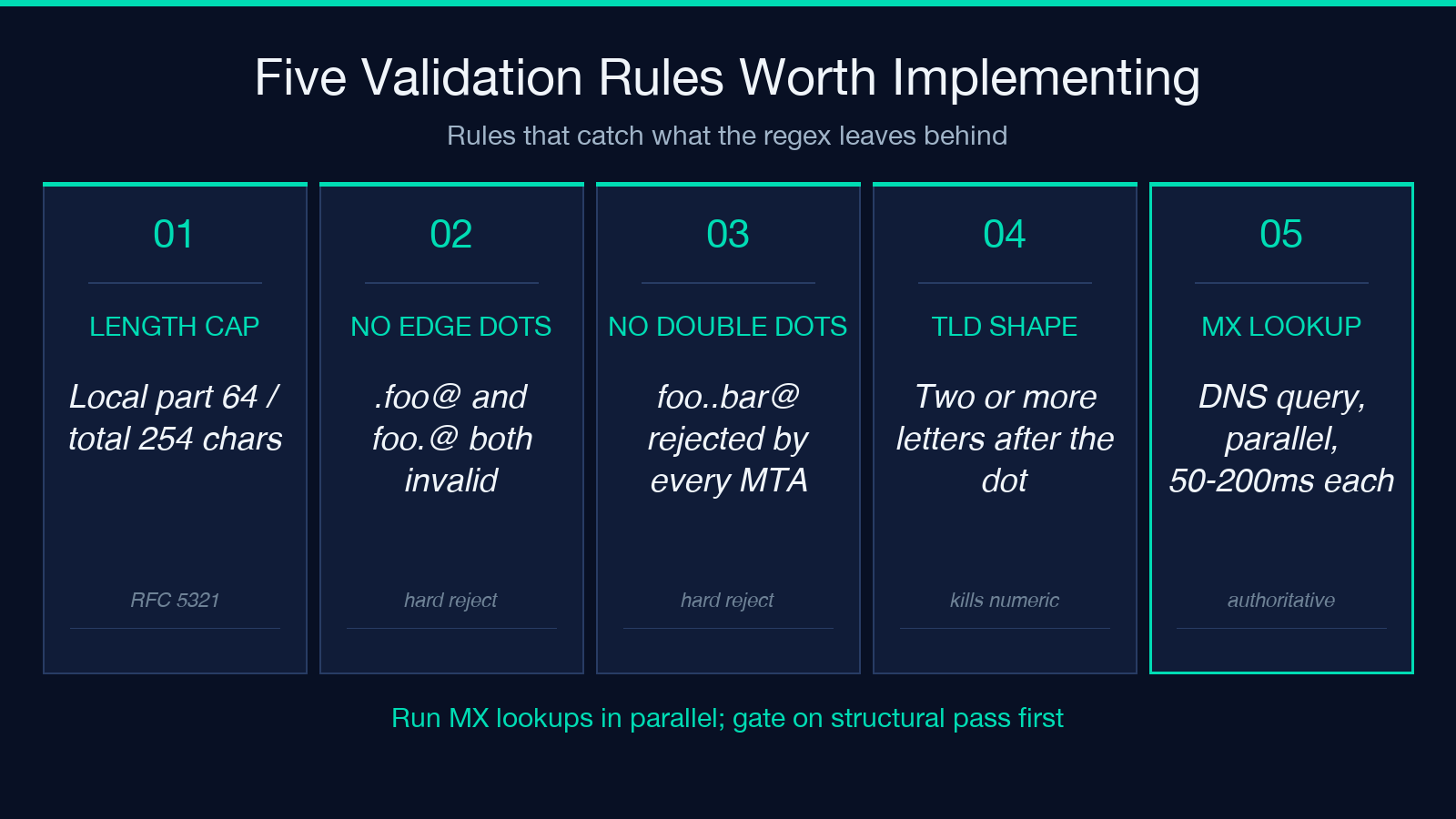
Once the regex has flagged candidates, validation is where you catch the survivors that are still wrong. Four rules cover most cases:
- Length cap. RFC 5321 limits the local part to 64 characters and the entire address to 254. Any candidate longer than 254 is structurally invalid.
- No leading or trailing dot in the local part.
[email protected]and[email protected]are both technically illegal in almost every mail server. Reject them. - No consecutive dots.
[email protected]is rejected by every modern MTA. Reject it at extraction too. - Domain must resolve. If you can do a DNS lookup, do it. MX records are the authoritative test. A-record fallback is acceptable for catch-all domains.
DNS lookups are slow (50–200ms each) so gate them on the candidates that survive the structural checks. Run MX queries in parallel with a small thread pool and you can validate 100 addresses in under two seconds.
For a no-network option, lean on the structural rules. The Bulk Email Extractor surfaces these checks in its output so you can see which addresses were rejected and why — useful when you need to justify the gap between “addresses in the input” and “addresses in the export.”
Deduplication Choices That Preserve Domain Grouping
The naive deduplication is set(emails) after lowercasing. That works for exact duplicates but loses two cases that matter for downstream use:
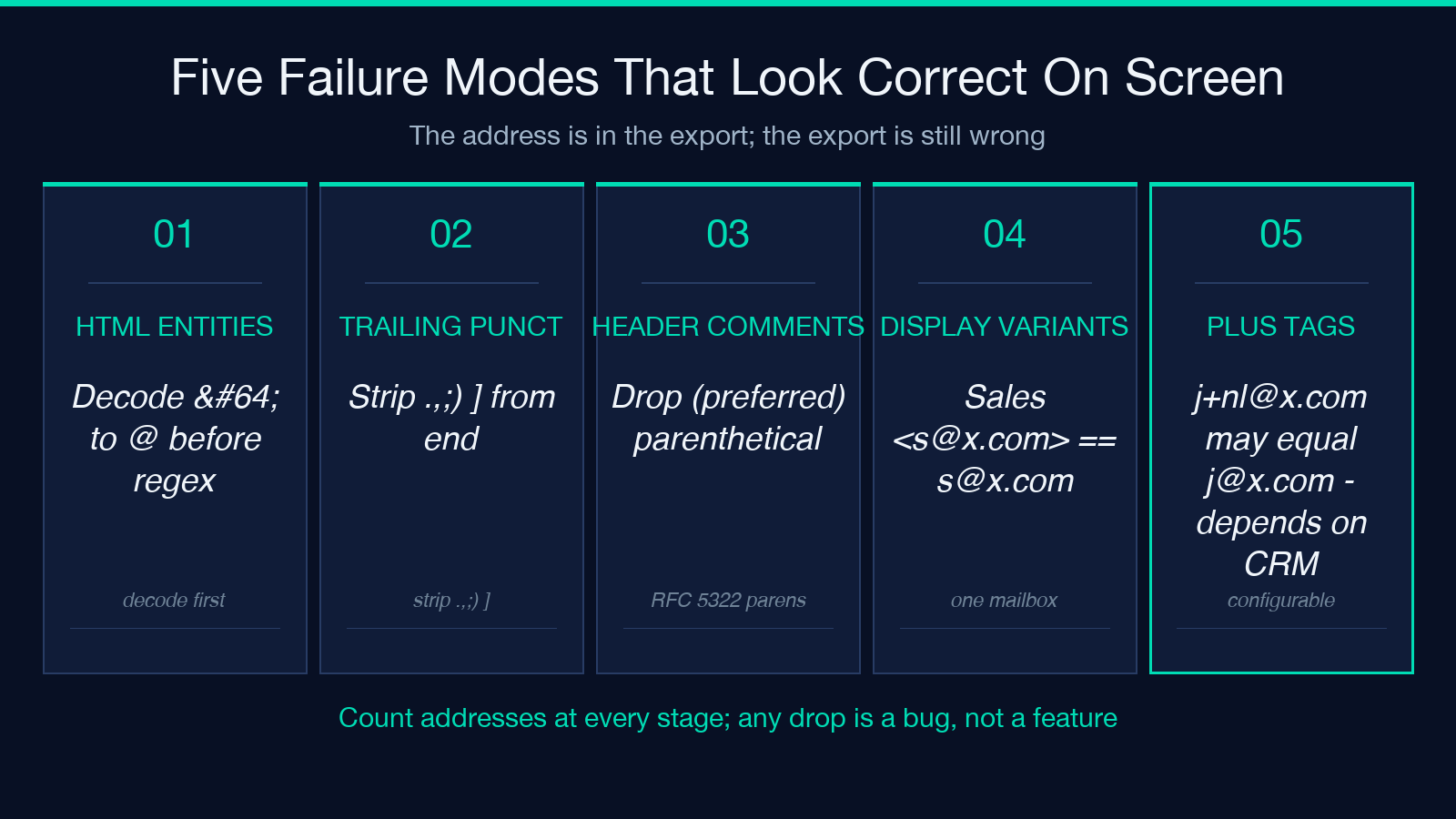
- Display-name variants.
Sales <[email protected]>and[email protected]are the same mailbox but show as two different candidates if you only lowercase the whole string. - Plus-tag variants.
[email protected]and[email protected]are usually the same recipient but the plus-tag is per-mailing-list. Most CRMs want them collapsed but some want them preserved.
The cleanest dedup pipeline:
- Strip the display-name wrapper (
Name <email>form). - Lowercase the entire address.
- Strip the plus-tag if your CRM treats them as identical.
- Insert into an ordered dict (preserves first-seen position).
Preserving first-seen position matters when the input is a ranked contact list (cold-outreach order, conference attendee list). The export should match the input order, not alphabetical.
Export Formats That Round-Trip Into Real CRMs
Three formats cover most CRM and email-platform imports:
- CSV with one column. The simplest. One header row, one address per line. Most CRMs accept this on import.
- JSON array of strings. Best for programmatic imports via API. Use this when you are piping into a custom backend or a Zapier-style automation.
- JSON array of objects. When you have metadata (source URL, context snippet, extraction timestamp), emit one object per address. This is what the Bulk Email Extractor JSON output looks like.
Skip the temptation to export to vCard or to a Microsoft Outlook-specific format. Both have enough edge cases (character encoding, line endings, field ordering) to cost an afternoon. CSV and JSON are the formats that round-trip without surprises.
Common Failure Modes To Watch For
Three failure modes recur in production extractors:
1. HTML entity encoding leaks through. If your input is HTML and you run the regex over the raw source, you will see [email protected] as a candidate. The @ is the HTML entity for @. Decode entities before pattern matching or your export will contain addresses that copy-paste as garbage.
2. Trailing punctuation gets included. When the address is the last token in a sentence (e.g. Reach us at [email protected].), the trailing period becomes part of the candidate. Strip trailing punctuation that is not part of the local part: period, comma, semicolon, closing parenthesis, closing bracket.
3. Comments in mail headers get matched. A Reply-To header may look like John Doe <[email protected]> (preferred). The trailing (preferred) is a header comment, not part of the address. Strip RFC 5322 comments (anything inside balanced parentheses at the top level) before pattern matching.
A final sanity check: count the candidates before and after each pipeline stage. If the regex pass returns 53 candidates and the validation pass returns 47, you have six false positives to investigate. If the regex pass returns 47 and the export returns 47, you have likely missed some — try a broader pattern on the same input and see if the count climbs.
When To Reach For A Tool Instead Of Building One
If you are extracting emails once a month for a small list, build a one-liner with the balanced pattern from this guide and run it as needed. If you are extracting emails every week from a 50,000-line corpus, the maintenance cost of staying current on TLD allow-lists, plus-tag conventions, and display-name parsing will eat more time than the tool itself.
For the second case, point the corpus at the Bulk Email Extractor and compare its output to your one-liner. The tool handles the structural checks (length cap, dot placement, TLD validation), the deduplication choices (display-name stripping, plus-tag preservation), and the export formats (CSV, JSON array, JSON object) without you writing them. Treat the gap as a learning surface — every address the tool rejects that your regex accepted is a hint about a rule your extractor should also enforce.
Putting it together. A reliable bulk email extractor is a four-stage pipeline: tokenize, match, validate, deduplicate. The regex patterns are well-known and short — what separates a working tool from a brittle one is the validation rules after the regex (length cap, dot placement, TLD shape) and the deduplication choices before the export (display-name handling, plus-tag policy, order preservation).
For one-off extractions on small lists, the balanced pattern plus the four validation rules is enough. For ongoing work on large corpora, run the same input through the Bulk Email Extractor and use the difference as a measure of how much your pipeline is silently missing. Either way, count the addresses at every stage and treat any unexpected drop as a bug to investigate, not a feature to accept.
Explore more tools at elysiatools.com.
