
Every WebSocket bug looks the same on the server: a quiet 1006 abnormal closure, a retry that never reconnects, and an event channel that fires once and then dies. Most teams discover the failure after the production dashboard flatlines. A browser-based WebSocket Tester that you can open in a tab, paste a URL into, and watch frames flow is the fastest way to find those bugs before users do — no client SDK, no proxy setup, no shell-built websocat invocation.
This field guide walks through the four problems a tester surfaces that no REST client can show you: the connect/upgrade handshake, subprotocol negotiation, mid-session abnormal closures, and binary-vs-text framing mismatches. Each section uses a different angle — packet-level inspection, code-level reasons, and runtime observability — and ties back to a tool that runs entirely in your browser.
What a WebSocket Tester Actually Does
A WebSocket is not an HTTP request. It is a long-lived TCP socket that begins with one HTTP/1.1 upgrade request and then drops into a frame-based protocol. Once the upgrade returns 101 Switching Protocols, every byte that follows is opaque to your HTTP debugger. The Tester’s job is to act as a minimal client that you can drive manually: it owns the upgrade handshake, parses frames as they arrive, surfaces close codes, and lets you resend frames without re-implementing the protocol each time.
In practice the Tester accepts a ws:// or wss:// URL, opens the connection, and immediately begins logging the events most clients ignore: the subprotocol string the server selected, the HTTP upgrade headers the server returned, the precise close code, and whether the close was clean (1000) or abnormal (1006). You can also pin a custom subprotocol header, toggle auto-reconnect, and toggle the binary-vs-text frame mask.
The diagnostic value is highest when you suspect the failure is at the protocol layer rather than in your application code. If your mobile app’s chat drops every 30 seconds but the same endpoint works from a desktop browser, the disconnect is almost always a subprotocol, ping/pong keepalive, or proxy timeout — not a logic bug. The Tester isolates the wire from your app in two clicks.
Reading the Open Handshake
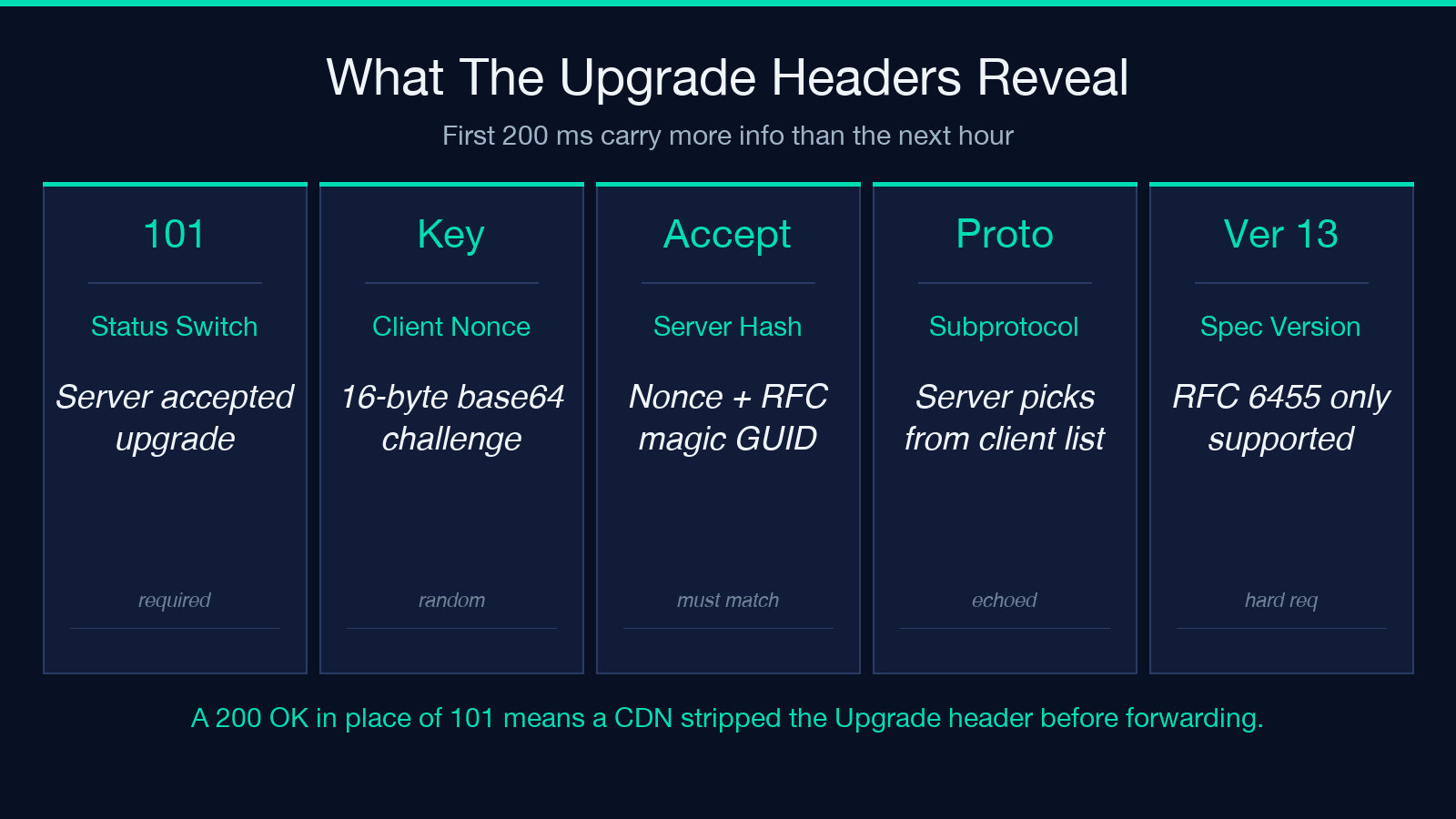
The first 200 milliseconds of a WebSocket connection carry more information than the next hour. The HTTP/1.1 upgrade request includes Sec-WebSocket-Key (a random 16-byte base64 nonce), Sec-WebSocket-Version: 13, and optionally Sec-WebSocket-Protocol. The server’s response must include Sec-WebSocket-Accept (a hash of the client nonce + a magic GUID), confirm Upgrade: websocket and Connection: Upgrade, and echo the chosen subprotocol if any was offered.
Most testers hide these headers behind a friendly “Connected” toast. A good WebSocket Tester surfaces them in a collapsible panel. The reason is debugging: a server that returns 200 OK instead of 101 Switching Protocols means it understood the request as plain HTTP and replied with a landing page — your endpoint is wrong, the path is missing the upgrade handler, or a CDN stripped the Upgrade header. A server that returns 101 but no Sec-WebSocket-Accept is non-compliant and will not survive the first frame.
If you are debugging through Cloudflare or a corporate proxy, the upgrade headers are the first place to look. Some intermediaries only forward Upgrade: websocket when the request uses the literal wss:// scheme, so a ws:// URL routed through an HTTPS-only edge will silently fall through to plain HTTP. Try the tool at Elysia Tools WebSocket Tester to see the full header exchange in real time.
Subprotocol Negotiation and Why Your Server Picks the Wrong One
WebSocket subprotocols are advertised by the client in Sec-WebSocket-Protocol as a comma-separated list and selected by the server in the response. The server is supposed to pick one and echo it back; if it picks none, the client must assume no subprotocol was agreed. Common choices are wamp, graphql-ws, soap, and mqtt — but in-house APIs often invent their own (myapp.v2.json, chat.beta).
If your server returns a subprotocol your client did not offer, or returns none when the client expected one, every subsequent frame may be rejected. The Tester shows the exact string the server selected, so you can confirm it matches what your SDK sends. When the strings diverge, the fix is almost always on the client side: either drop the Sec-WebSocket-Protocol header entirely or align the version string.
A second subprotocol pitfall is case sensitivity. The spec requires exact-byte comparison, but many SDKs downcase the header on the way out. wamp.2.json and WAMP.2.JSON are different subprotocols per RFC 6455, but most servers are forgiving. The Tester logs the byte-for-byte string the server selected, which makes a mismatch trivial to spot — try toggling the subprotocol field with the same URL and watch the negotiated value change.
Reading Close Codes and Reconnection Behavior
The close frame is the most diagnostic message in WebSocket. There are five codes that account for almost every real-world failure: 1000 Normal Closure (clean shutdown), 1001 Going Away (server restart, browser tab closed), 1002 Protocol Error (malformed frame), 1003 Unsupported Data (binary where text expected, or vice versa), and 1006 Abnormal Closure (no close frame received at all — the socket was severed).
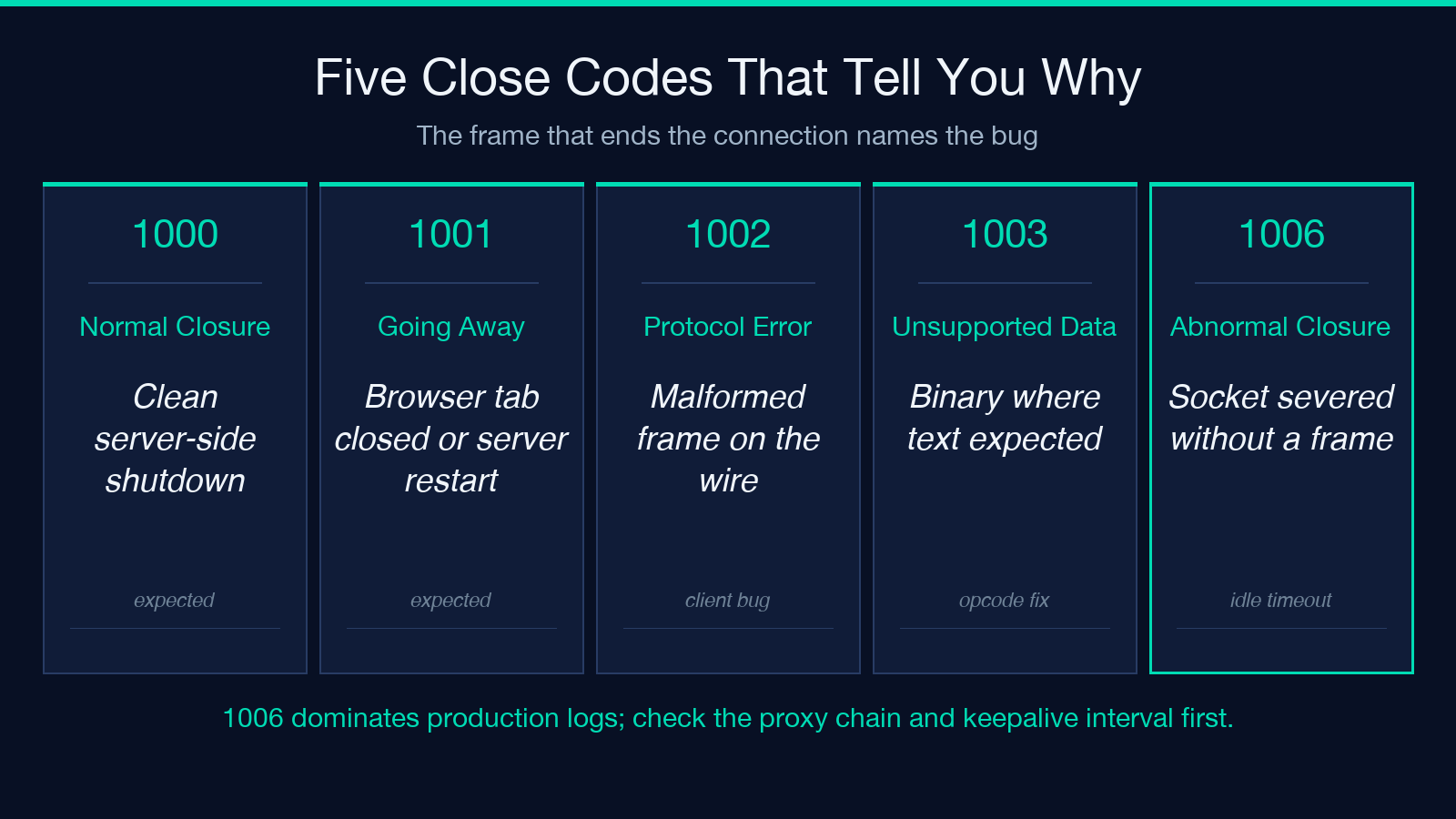
1006 is the code you will see most often when something is broken. It means the TCP socket closed without a clean WebSocket close frame — typical causes include a server crash, a load balancer idle timeout, a NAT keepalive mismatch, or a TLS renegotiation. The Tester reports this code and the time-since-connect, which together let you distinguish “server is dying” from “intermediary is killing idle sockets after N seconds”.
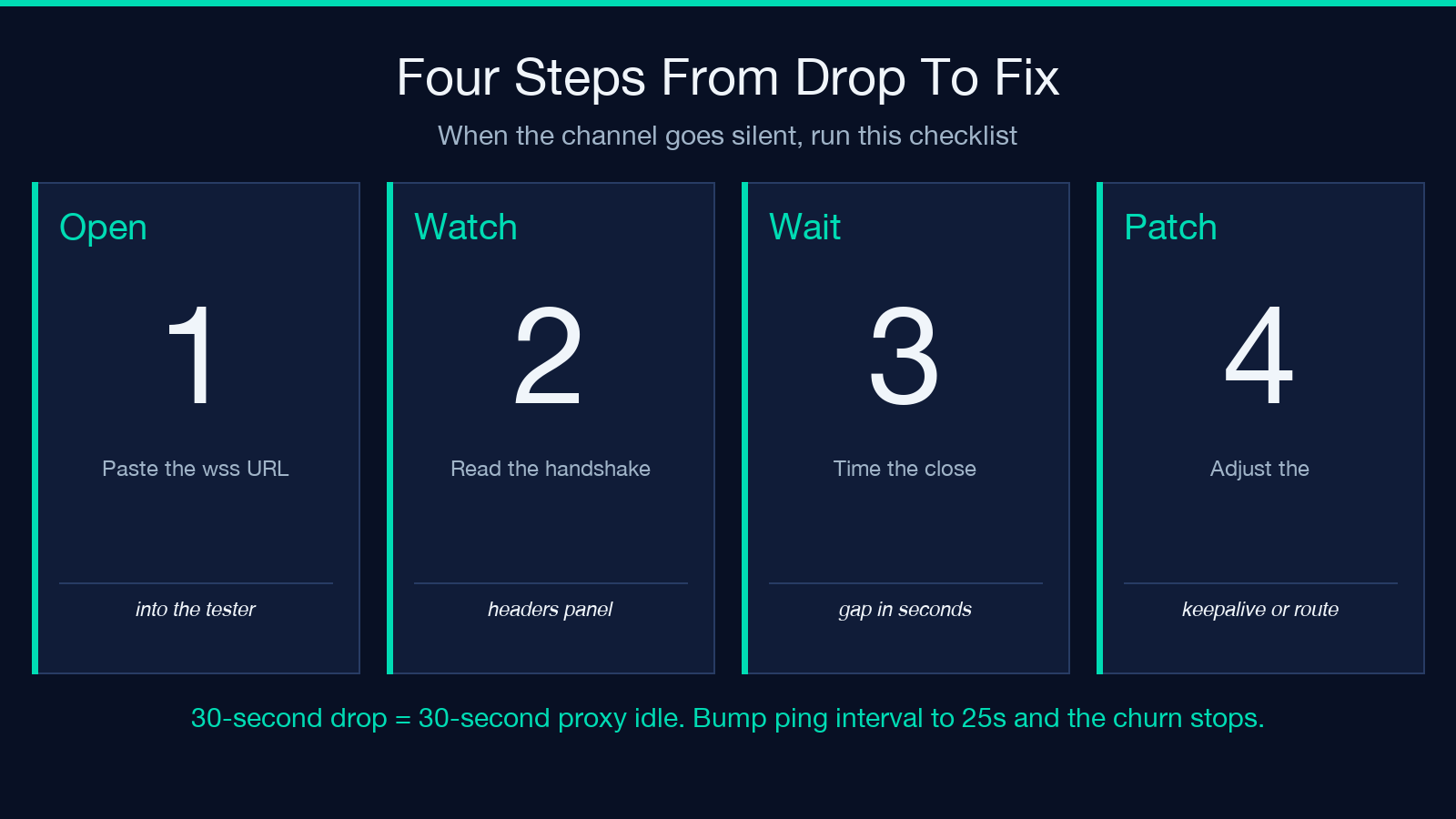
Auto-reconnect is the default most apps want, but it masks the symptom rather than fixing it. The Tester exposes a checkbox for auto-reconnect that defaults to off — leave it off during debugging. Watch the close code, the time gap, and the resumption behavior. If you reconnect every 30 seconds, you almost certainly have a 30-second idle timeout in the proxy chain. Bumping your server’s ping interval to 25 seconds, or the proxy’s idle timeout to 120, will eliminate the churn.
Binary Frames vs Text Frames
WebSocket supports two frame types: text (UTF-8) and binary (any octet stream). The bit in the opcode header determines how the receiver interprets the payload. A common bug is a server that sends binary but a client that calls JSON.parse on the message — JSON.parse will throw on the first binary byte and the connection drops with 1003 or silently closes on the next error.
The Tester lets you toggle the frame type before connecting and shows the incoming opcode on each frame. Send a known JSON object as text, then send the same bytes as binary, and watch the server’s response change. Some servers refuse the connection outright (no negotiation), some accept both and route to different handlers, and some crash on the binary path entirely.
For protocol buffers, MessagePack, or any compact binary format, the binary frame is mandatory. For JSON-over-WebSocket (the common case for chat and dashboards), text frames are correct. The Tester helps you confirm which one your endpoint expects before you commit to an SDK that hardcodes one or the other.
Proxies, TLS, and the wss:// Scheme
Every WebSocket URL is either ws:// (plaintext, port 80) or wss:// (TLS-wrapped, port 443). Most production deployments use wss:// because the upgrade handshake piggybacks on HTTPS, and corporate proxies, CDNs, and browsers will not pass ws:// through their TLS terminators. If your Tester connects over wss:// but fails over ws://, you have not actually deployed a plaintext endpoint — you have a path the firewall has blackholed.
A second TLS pitfall is SNI and certificate chain mismatch. The Tester reports the negotiated TLS version and cipher, which is useful when an older client insists on TLSv1.0 and your server has dropped it. If the connection fails during the upgrade, check the Tester’s TLS panel for handshake_failure — that means your cert chain, SNI host, or cipher list is incompatible with the endpoint.
For most debugging workflows, wss:// is the right default. Reserve ws:// for localhost and explicit LAN testing. The Tester accepts both and the URL bar remembers whichever you used last.
When to Reach for a Real Client Instead
The Tester is a diagnostic tool, not a load generator. If you need to send 10,000 concurrent connections, replay a session at full packet speed, or fuzz the frame parser, you want a CLI tool like websocat or a scripted client like wscat. The Tester is the right tool when the question is “does this endpoint accept my handshake and survive 30 seconds of traffic” — a yes/no question with a frame log.
For unit tests against a fake server, the Tester is overkill. For one-off debugging of a misbehaving endpoint, it is the fastest path from “the socket dropped” to “here is the exact frame and code that killed it”. Run it before you open a ticket with the server team and you will often find the answer is on your side.
Closing the Loop
A WebSocket Tester compresses three hours of wscat invocation, header inspection, and TLS debugging into a single browser tab. Open it when the production channel drops, paste the URL, watch the handshake, and read the close code. If the answer is 1006 after 30 seconds, fix the keepalive. If the answer is 1003, fix the binary/text mismatch. If the answer is a missing Sec-WebSocket-Accept, fix the server’s upgrade handler. Each one is a five-minute fix once you can see it.
Explore more real-time debugging tools at elysiatools.com.
