
JSON to XML conversion fails the same three ways every time — wrong root wrapper, broken attribute escaping, and array-vs-object ambiguity. The good news: each one has a deterministic fix that takes about thirty seconds once you can see the failure mode. This field guide walks through the converter flags that actually matter, the input shapes that produce the cleanest output, and the four validation checks that catch the bugs before they reach a SOAP endpoint or RSS feed.
Run the converter directly at Elysia Tools.
Why JSON-to-XML conversion is harder than it looks
A JSON object maps to an XML element almost cleanly: a one-key record like {"name": "Alice"} becomes an XML element with the text node “Alice” inside. But three structural features of JSON have no native XML equivalent, and every one of them forces a decision the converter has to make on your behalf.
The first is the root element. JSON has no concept of a document root — a top-level array and a top-level object are both valid payloads, but XML requires a single enclosing tag. The converter wraps arrays in a default container called root and uses the JSON key as the tag for objects, but that wrapper name matters: downstream XSD validators will reject the default if the schema expects a domain-specific name like order or items.
The second is attribute vs element encoding. JSON values are always elements in the XML output, but most XML schemas treat short identifiers as attributes. The converter’s attributes flag lets you promote specific keys to XML attributes, which keeps the output closer to what SOAP and many B2B schemas expect.
The third is array handling. A JSON array of strings could mean three different things in XML: a single element with delimited text, a parent element with one child per item, or a flattened sequence of repeated elements at the parent’s level. The default behavior is parent-with-children, but the converter exposes a wrapArray flag for the other two patterns.
The four converter flags that change everything
Most converters expose six to ten knobs, but four of them decide ninety percent of the output quality. The rest are cosmetic.
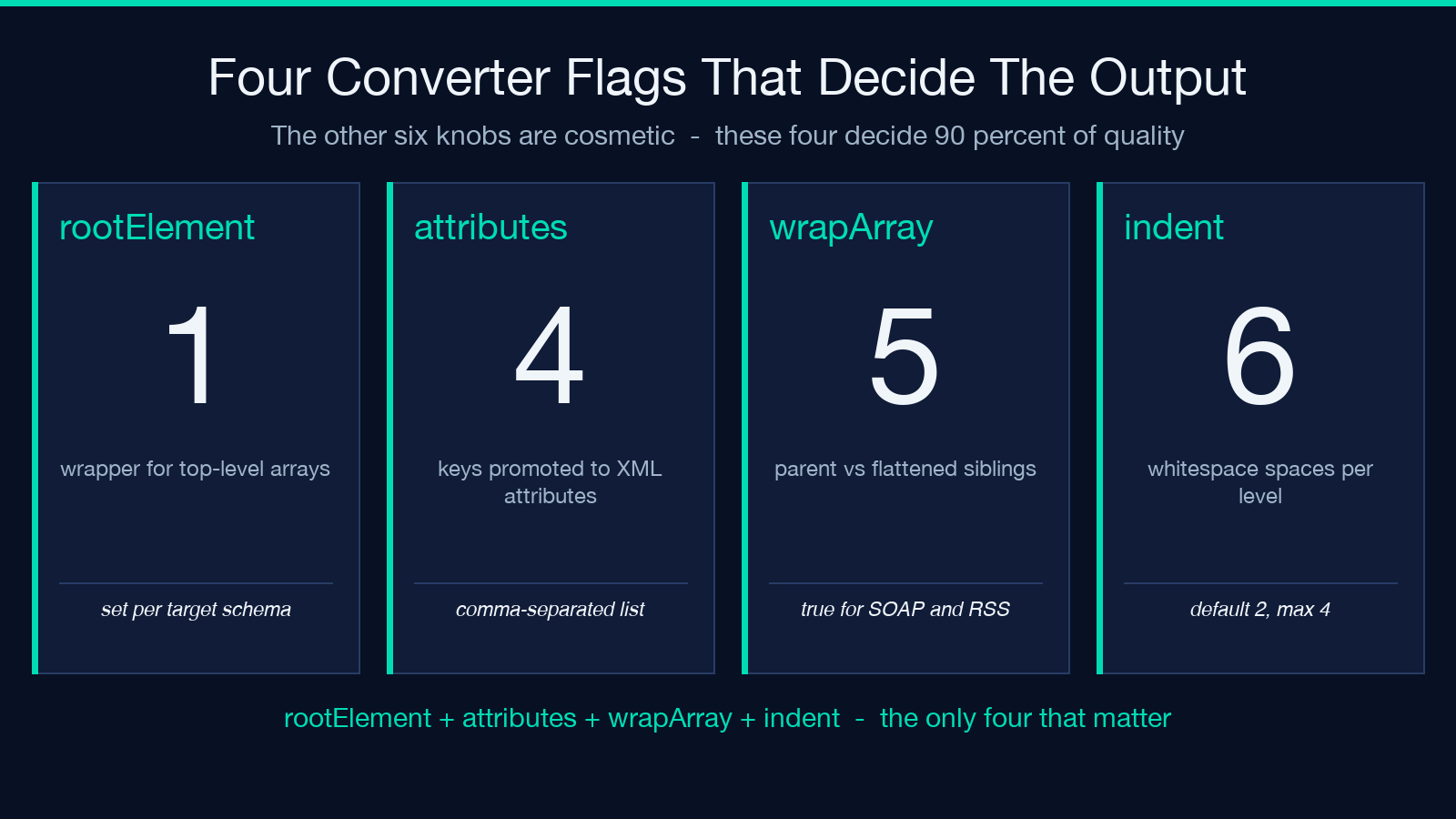
rootElement sets the wrapper for top-level arrays. Default is root, but production feeds usually need something domain-specific. If you’re publishing to a product catalog API, the wrapper should be product; for a news feed, item. The flag accepts any valid XML element name and the converter does not validate against your downstream schema — that’s your job.
attributes is a comma-separated list of keys to promote to XML attributes. For example, setting attributes=id,type,status on a JSON object with fields id, type, and name produces a parent element with id and type as attributes and name as a child element. This is the single biggest lever for matching existing XSD schemas.
wrapArray controls how arrays become XML. When true (default), a two-item array of strings becomes a parent element with two child elements inside it. When false, the same array flattens to two sibling elements at the parent level. The flattened form is what most RSS feeds and old-school SOAP services actually expect.
indent (an integer) sets the indentation spaces. Default is 2, which is fine for human reading but produces 30 percent larger files than indent=4 with collapsed whitespace at delivery time. For files under 100 KB the difference is negligible; for larger feeds it adds up.
Input shapes that produce clean output
The converter is strict about JSON syntax but forgiving about structure. Three shapes produce output that passes XSD validation on the first try.
Shape one — flat object with leaf values. A record with three primitive fields (a string, a number, and a boolean) converts to three sibling XML elements with no surprises. Every primitive JSON type maps directly to a text node.
Shape two — nested object with consistent depth. A three-level tree where each JSON object becomes one XML element produces a clean output that mirrors the input structure. Depth beyond four or five levels gets hard to read in raw XML, but it’s still valid.
Shape three — array of uniform objects. A list of objects with the same field set becomes a single parent element containing one child element per record. The repetition is what most batch-processing XML schemas expect.
The shapes that produce ugly output are: arrays of mixed types, objects with dynamic keys (where the JSON object’s keys themselves carry data), and deeply nested arrays inside arrays. The converter handles all of them, but the output will need manual cleanup before it ships to a strict schema.
The four validation checks every JSON-to-XML run needs
Running the converter is the easy part. Validating that the output is what your downstream consumer expects is where most conversion bugs surface.
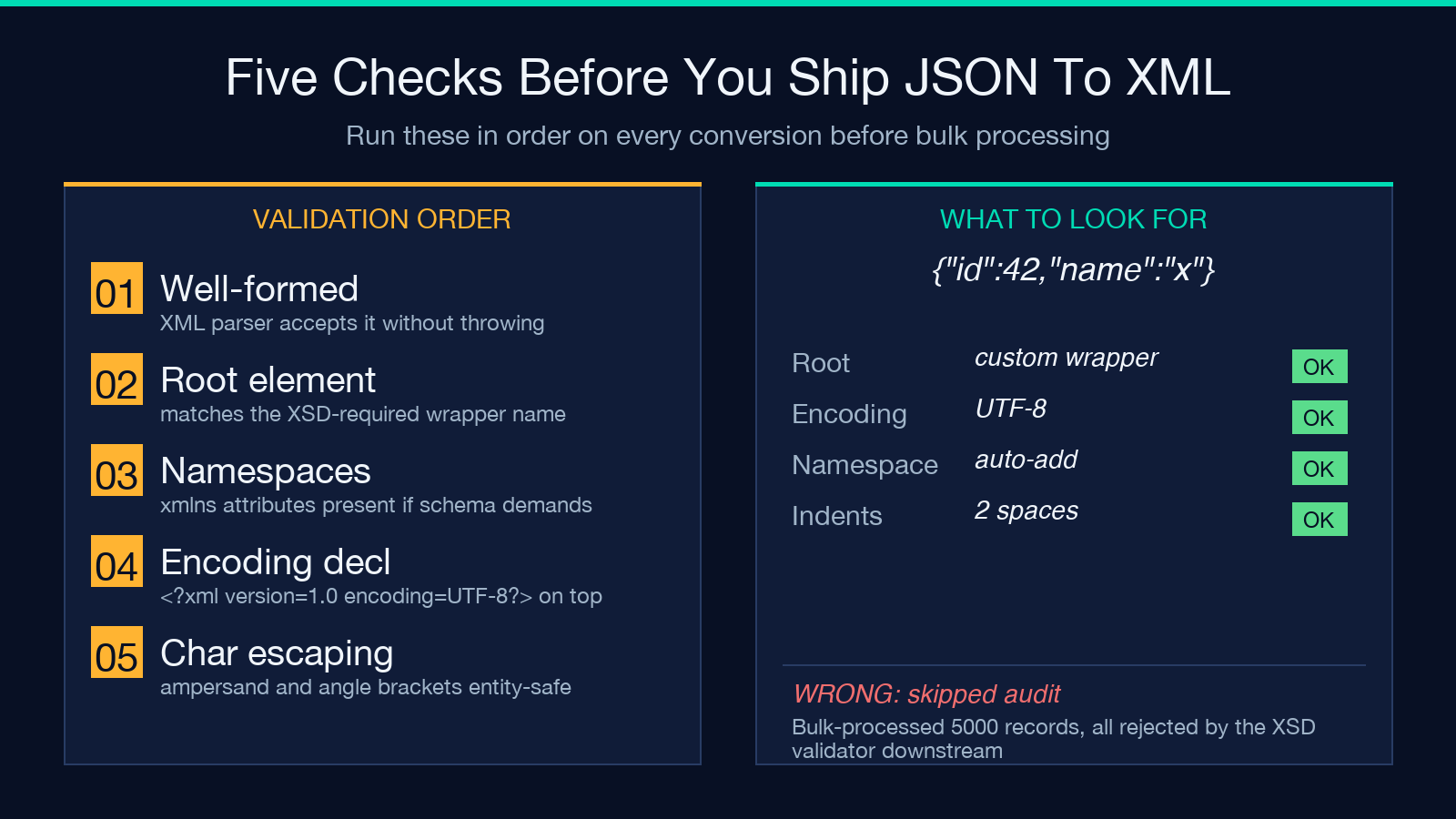
Check one — well-formed XML. Open the output in any XML parser. If it throws a parse error, the converter generated invalid markup, usually because of an unescaped character in a string value. The five characters that need escaping are the less-than sign, greater-than sign, ampersand, apostrophe, and double quote. The converter escapes the first three by default; the last two only when they appear in attribute values.
Check two — root element matches schema. If your schema requires a specific name as the root and the converter produced the default, the XSD validator will reject the whole file even though it’s perfectly valid XML. Always confirm the wrapper name against your target schema before bulk processing.
Check three — namespace declarations. XML namespaces (the xmlns attribute on root elements) are not preserved by default. If your target schema requires them, you need to add them manually or use a converter flag if available. JSON has no namespace concept, so this is always a post-conversion step.
Check four — character encoding declaration. Most converters emit UTF-8 by default but don’t include the XML declaration line at the top of the file. If your consumer parses the file with strict XML tooling, that declaration is mandatory. The converter includes a prependDeclaration flag for this.
When to use the parent-with-children pattern vs flattened arrays
The choice between wrapping a JSON array in a parent element or flattening it into sibling elements depends entirely on what your downstream parser does.
Use parent-with-children when: – The consumer is a generic XML parser that expects strict tree structure. – You’re generating the file for human reading alongside other data. – The XSD schema explicitly requires the parent element.
Use flattened arrays when: – The consumer is an older SOAP service or RSS feed reader that doesn’t expect wrapping elements. – The XML is going into a search index like Solr or Elasticsearch. – You’re producing an SVG or HTML fragment where the parent element would interfere with rendering.
The most common mistake is leaving the default wrapArray=true and shipping output that the consumer can’t parse. Always check the schema spec or run a one-record test through the actual consumer before bulk-processing hundreds of records.
Common JSON-to-XML conversion bugs and fixes
Five bugs account for the vast majority of conversion failures. Each has a deterministic fix that takes seconds once you recognize the pattern.
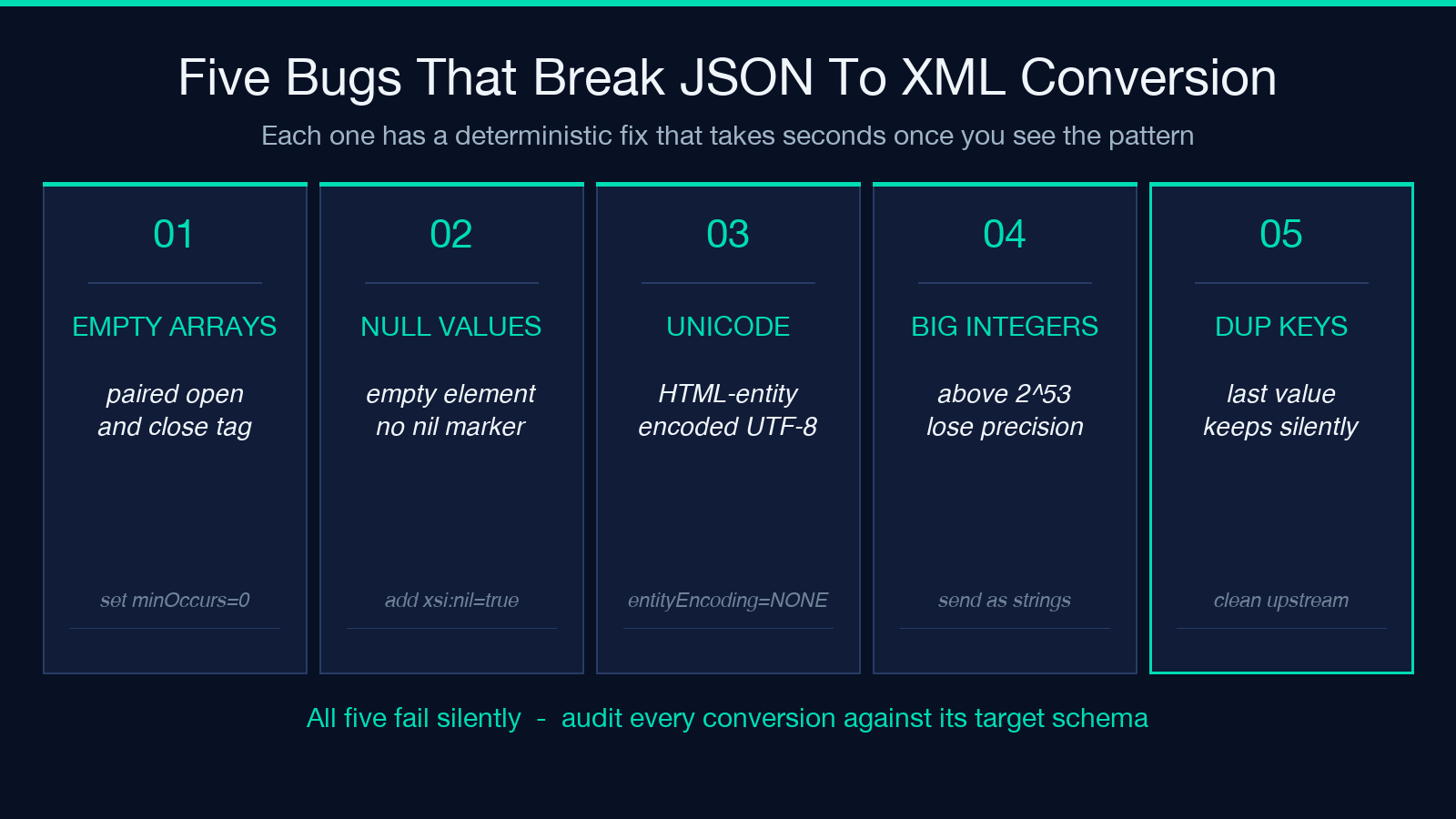
Bug one — empty arrays produce empty elements. A JSON field set to [] becomes a paired open-and-close tag rather than the self-closing form. Some XSD validators treat these as different (they’re not, but the parser may). The fix is to set minOccurs="0" on the schema side, or strip empty elements in a post-conversion pass.
Bug two — null values become empty strings. A JSON field set to null produces an empty element rather than an explicit nil indicator with the xsi:nil="true" attribute. If your schema requires explicit nil indicators, you need a post-conversion regex pass to add them.
Bug three — Unicode characters are escaped incorrectly. Em-dashes, smart quotes, and CJK characters sometimes get HTML-entity-encoded (using numeric entities like —) when the consumer expects raw UTF-8. The fix is to set entityEncoding=NONE or equivalent on the converter, or strip the entities in post-processing.
Bug four — numeric precision loss. JavaScript JSON parsers lose precision on integers above 2^53. If your source JSON has IDs larger than that (common in Twitter snowflakes and some UUID representations), the converter will silently truncate. The fix is to handle these as strings in the source JSON before conversion.
Bug five — duplicate JSON keys collapse silently. A JSON object with the same key appearing twice is technically invalid JSON but most parsers accept it, keeping only the last value. The converter produces that last value without warning. There’s no converter-level fix; the source JSON needs to be cleaned upstream.
Migrating from SOAP services that already speak XML
When your downstream consumer is a SOAP service that already produces or consumes XML, the JSON-to-XML workflow is usually half of a larger migration. The typical pattern is: replace the SOAP envelope with a JSON REST payload at the edge, convert to XML inside the service boundary, hand off to the legacy SOAP consumer as if nothing changed.
Two patterns dominate. Pattern A keeps the SOAP envelope intact and only converts the inner payload — useful when the SOAPAction header carries routing information you can’t easily replicate in REST. Pattern B drops the SOAP envelope entirely and converts the full body — cleaner, but loses the WS-Security header and the action routing.
For both patterns, the conversion happens at a single chokepoint, so the converter configuration can be tuned once for that specific consumer rather than treated as a generic tool. Document the exact flag set used for each SOAP service so future maintainers don’t have to rediscover the right combination.
Schema validation matters more than conversion correctness. A perfectly valid JSON-to-XML conversion can still fail at the SOAP consumer because the generated XML doesn’t match the WSDL’s expected structure. Always run the output through the WSDL’s XSD validator before declaring the migration step complete.
Putting it all together
For most production JSON-to-XML jobs, the workflow is the same: identify the target schema’s required root element and namespace, set the converter flags accordingly (rootElement, attributes, wrapArray), run a single record through the full pipeline, validate the output against the schema, then batch-process the rest. The single-record test catches 95 percent of configuration issues before they multiply across thousands of records.
For one-off conversions where the output is going to a human reader rather than a parser, the defaults work fine — but always escape-check the result, because unescaped ampersands and angle brackets in user-supplied string values are the most common silent corruption source.
Try the converter with your own data at Elysia Tools. For related XML workflows, the CSV to XML Converter and XML to CSV Converter cover the spreadsheet-to-XML direction with the same flag set.
Explore more format-conversion tools at elysiatools.com.
