
An invoice OCR pipeline that returns 90 percent accuracy is a debugging project, not a feature.
PDFs are not flat text — they’re a geometry problem wearing a font costume, and every shortcut you take on text extraction shows up as a missing field, a date written as `15 Mar 2026` instead of `2026-03-15`, or a currency value that silently lost a thousand separator on the way to your ERP. The OCR PDF to structured JSON bridge at Elysia Tools treats the document the way the PDF spec treats it: extract the text layer with its position information (lines by y-coordinate, tables by column gaps, multi-level headings by font size, colon and dotted-leader key-value pairs), then walk a JSON Schema you supply and coerce every value into the type you declared. The result is validated with ajv before it’s returned, so the JSON block you paste into your ERP is either valid against your schema or it tells you exactly which path failed and why. The point isn’t to make OCR work on every weird scan — it’s to make the success cases predictable and the failure cases loud.
What The Bridge Actually Extracts From A PDF Text Layer
The bridge starts where OCR stops. A scanned image PDF has no text layer at all — it needs Tesseract or a cloud OCR service first. A born-digital PDF (the kind your accounting system spits out, or that you can save-as-text from Word) already has a text layer with positional metadata: every glyph carries x and y coordinates, the font and font size are known, and the original reading order can usually be reconstructed by sorting on y-major then x-minor. The bridge pulls that text layer, walks the geometry, and emits four structured views of the same document: lines (in y-order), tables (groups of y-aligned text clusters that form columns), headings (text whose font size exceeds a threshold relative to body text), and key-value pairs (text matching the colon or dotted-leader patterns common in invoices and forms).
The four views are returned as separate structures so the schema mapping step can pick which view to source each field from. `invoice_number` almost always comes from a colon key-value pair (the heading “INVOICE” or “BILL TO” is too generic); `line_items` comes from the table view; `customer_name` may come from a heading if the document puts it as a banner, or from a key-value pair if it’s a colon-labeled “Customer:” field. The bridge exposes all four so the schema author can decide per field. A flat regex-only pipeline has no way to make that decision — it gets one view of the document and either matches or doesn’t.
The PDF text layer has known failure modes that the geometry-aware approach handles and the regex approach doesn’t. Hyphenated line breaks (a word split across two visual lines with a hyphen at the end of line one) get rejoined. Columns that wrap (a multi-line cell where the second line of text drifts left of the first line) get treated as a single cell rather than two short columns. Right-aligned numeric columns (the canonical invoice layout: `Qty` left-aligned, `SKU` left-aligned, `Amount` right-aligned) get column boundaries detected from the x-position clustering of the numeric tail rather than from uniform x-intervals. The result is a table view that respects what the page actually looks like, not what a generic table parser thinks a table should look like.
Mapping Labels To Schema Fields Without A Regex Per Vendor
Every invoice vendor spells “Invoice Number” differently: `Invoice #`, `Invoice No.`, `Inv. No.`, `INV-NUMBER`, `Bill Number`, `Reference`, `Our Ref`. A regex-per-vendor pipeline accumulates hundreds of patterns and breaks the moment a new vendor shows up. The bridge takes a different approach: normalize both sides. The label side gets lowercased, punctuation stripped, whitespace collapsed, and a small synonym dictionary applied (`inv` → `invoice`, `no` → `number`, `ref` → `reference`). The schema field side gets the same normalization. Matching is then a normalized-equals comparison with a small Levenshtein fallback for near-misses. A schema field `invoice_number` matches `Invoice #` on the first try, and matches `Inv. No.` via the synonym dictionary, without any vendor-specific code.
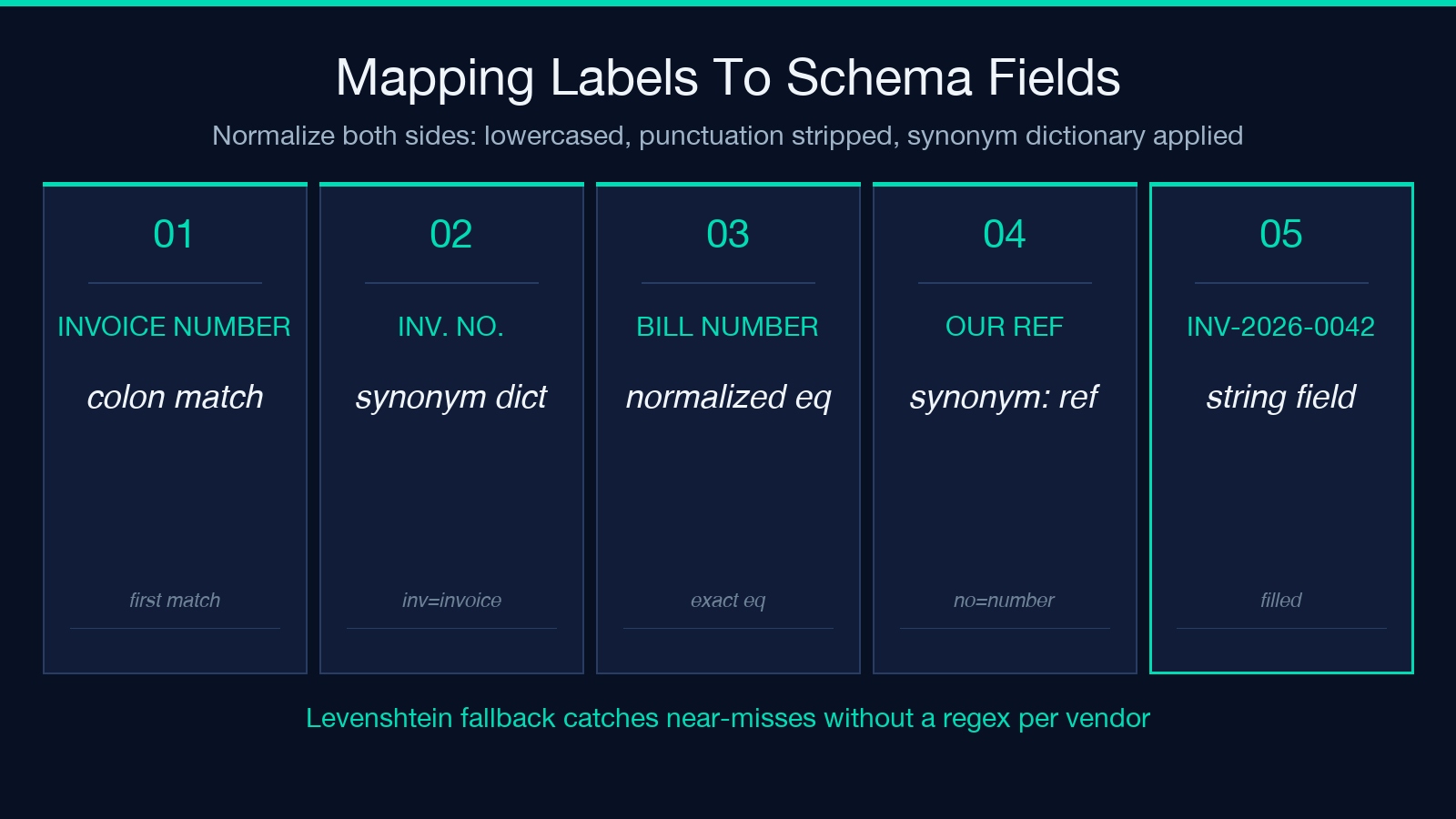
The schema side is plain JSON Schema — the same draft-07 or 2019-09 dialect your forms library already uses. Declare a field as `{“type”: “string”, “format”: “date”}` and the bridge will coerce any parseable date to ISO `YYYY-MM-DD`, regardless of input order (DMY, MDY, YMD all work because the bridge tries each in turn and accepts the first that round-trips). Declare a field as `{“type”: “number”}` and the bridge strips currency symbols, thousand separators, and trailing `,` before parsing — `$1,250.50` becomes `1250.5` cleanly. Declare a field as `{“type”: “string”, “enum”: [“USD”, “EUR”]}` and the bridge leaves the raw value in place but flags enum mismatches as validation errors rather than silently substituting a value. The enum-mismatch surfacing is the point of the second example at Elysia Tools: the same invoice against a schema whose currency enum omits USD still maps and coerces everything else, but ajv flags the violation with its exact path so the import script can route the document to a human instead of silently dropping the currency.
The validation runs as the last step before the result is returned. ajv (the canonical JSON Schema validator) compiles your schema once and walks the filled object field by field. Every error has a JSON Pointer path (`/currency`), a keyword (`enum`), the expected value (`[“USD”, “EUR”]`), and the actual value (`”USD”` when the enum is `[“EUR”, “GBP”]`). The bridge returns the filled object AND the ajv error list, so downstream code can decide: halt and surface to a human, fall back to a default, or log-and-continue. The choice is yours; the silent failure mode is closed.
Tables: When Column Detection Beats Single-Line Parsing
A line-item table on an invoice is the part most pipelines get wrong. The cells rarely align cleanly — column widths vary per row, the rightmost column is right-aligned while the leftmost two are left-aligned, and the second line of a wrapped cell drifts horizontally. A naive x-bucket parser (split the page into equal-width columns and assign each text fragment to a column by its x-coordinate) breaks on the first row whose cells don’t fit the bucket widths. The bridge detects column boundaries from the actual x-position distribution of the text in the candidate rows: it finds the column x-positions that appear consistently across multiple rows and uses those as the column boundaries, ignoring rows that don’t conform (which are usually wrapped-cell continuations).
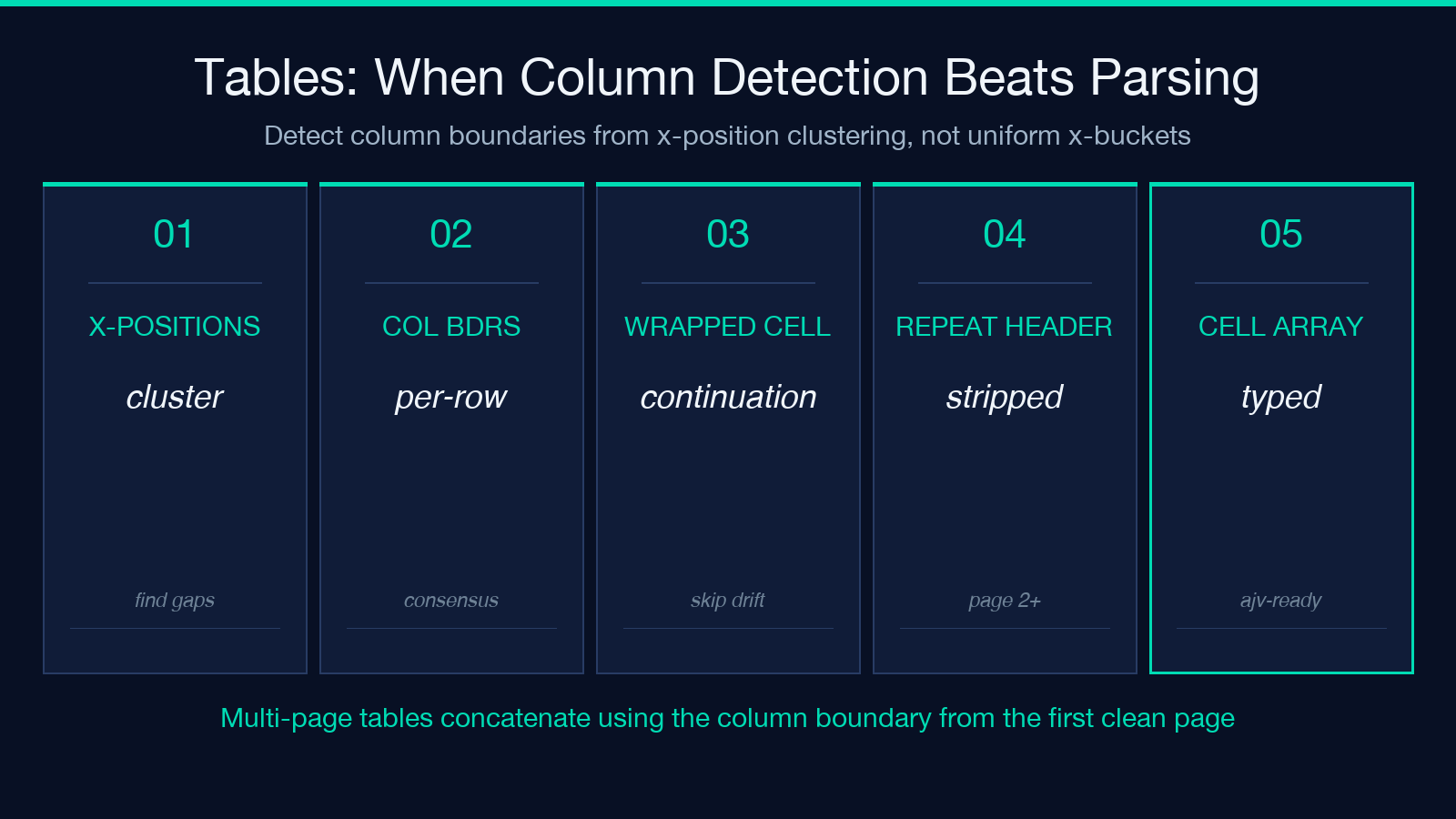
The detection step matters because the rest of the pipeline depends on it. If column boundaries are wrong, every cell value lands in the wrong column, every numeric field is filled with a description string, and the ajv validation fails with a flood of `type` errors that don’t tell you the real problem was upstream. The bridge returns the detected column boundaries in the metadata so you can sanity-check them against the source PDF before you trust the cell values. When the column detection is right (which is most of the time, for born-digital PDFs with clear column structure), the rest of the table extraction is mechanical: each row is a list of cell texts in column order, the schema mapping walks the row list and fills `line_items[*]`, and the result is a JSON array of typed objects matching whatever shape your schema declared.
For tables that span multiple pages (a long invoice with 80 line items), the bridge concatenates the per-page table views using the column boundary detected on the first page that has a clean table. Pages with header rows (the recurring “Qty / SKU / Amount” header at the top of each page) are detected and stripped before concatenation, so the final array doesn’t contain 80 cells of column-name strings. The header detection is heuristic but reliable for the common case: a row whose texts exactly match the first row’s texts on the previous page is treated as a repeating header and dropped.
Key-Value Pairs: Colon Labels, Dotted Leaders, And The Patterns That Don’t Fit Either
Most invoices and forms put field labels in one of three patterns: a colon-suffixed label (`Invoice Number: INV-2026-0042`), a dotted-leader label (`Invoice Number ………… INV-2026-0042`), or a right-aligned label with the value on the next line (`Invoice NumbernINV-2026-0042`). The bridge recognizes all three and emits them as the same key-value structure regardless of source pattern. The pattern detection is per-line: each line is scanned for a colon, for a stretch of dots, or for a y-position break followed by a different x-position, and the matching pattern determines how the line is split into key and value.
Patterns that don’t fit any of the three are common enough that the bridge has a fourth fallback: a label-followed-by-value detection that uses the first text on a line as the label if the line starts with a capital letter and ends with no punctuation, and the first text on the next line as the value if it doesn’t start with a capital letter. This catches the “label on its own line, value on its own line” pattern that shows up in older invoice templates. The fallback is lower-confidence than the three main patterns, so the bridge tags it in the metadata; schema authors can opt to ignore low-confidence key-value matches or to surface them for human review.
The dotted-leader pattern is the trickiest because the leader can be periods, dashes, equals signs, or whitespace. The bridge accepts any sequence of three or more identical non-alphanumeric characters as a leader, with a preference for the period (the most common case). Once the leader is detected, the value is whatever follows it on the same line; the label is whatever precedes it. A line like `Invoice Number . . . . . . INV-2026-0042` is split into key=`Invoice Number` and value=`INV-2026-0042`, normalized, and matched against the schema’s `invoice_number` field.
Date Coercion: Any-Order To ISO, Without Losing Rejection
Dates are the field most likely to silently get wrong. `15 Mar 2026`, `March 15, 2026`, `3/15/26`, `15-03-2026`, `2026-03-15`, and `20260315` all need to become the same JSON value (`2026-03-15`) when the schema says `{“type”: “string”, “format”: “date”}`. The bridge tries each format in order: full-month-name parsing first (`15 Mar 2026`, `March 15, 2026`), then numeric with separator parsing (`3/15/26`, `15-03-2026`, `15.03.2026`), then bare numeric (`20260315`). For numeric parsing the bridge tries each of DMY, MDY, and YMD and accepts the first that round-trips (parse, format, compare — if the formatted version matches the input, it’s unambiguous). Ambiguous dates (like `03/04/2026`, which could be MDY or DMY) emit a warning in the metadata: the bridge picked one and flagged that the other interpretation was also valid.
The rejection case matters too. `Q1 2026` is not a date; `TBD` is not a date; `15 Mar 2026 at noon` is a datetime, not a date. The bridge rejects these and surfaces them in the metadata as `unparseable_dates` with the raw text and the source pattern. The schema field stays empty (or, if `default` is declared in the schema, fills with the default), and the validation report flags the missing required field if the schema required it. The choice between “best-effort fill with default” and “halt on missing field” is the schema author’s, via the schema’s `default` keyword — the bridge surfaces both options rather than silently picking one.
Date coercion respects locale-specific separators. European invoices use `.` as the date separator (`15.03.2026` is unambiguously DMY in that context), American invoices use `/`. The bridge detects the separator and biases the DMY/MDY guess accordingly: `.` separator biases toward DMY, `/` separator tries both and flags ambiguous. The locale bias can be overridden in the schema (`{“type”: “string”, “format”: “date”, “dateLocale”: “US”}`) for documents where the separator contradicts the actual locale.
Number Coercion: Currency Symbols, Thousand Separators, And The Decimal Point
Currency symbols (`$`, `€`, `£`, `¥`), thousand separators (`,` or `.` depending on locale), and decimal points (`.` or `,` depending on locale) make number coercion non-trivial. The bridge strips currency symbols unconditionally, then handles the thousand/decimal ambiguity by detecting the rightmost separator: if the rightmost separator is followed by exactly two digits, it’s the decimal point; otherwise it’s the thousand separator. This handles both US (`$1,250.50` → `1250.50`) and European (`1.250,50 €` → `1250.50`) cleanly, and it handles the mixed case (`$1.250,50` is European-with-dollar-sign, → `1250.50`).
Integer Rounding And Negative-Number Conventions
For schema fields declared as `integer`, the bridge rounds half-to-even (banker’s rounding) by default, which avoids the systematic upward bias of half-up rounding in large datasets. The rounding mode is overridable via the schema (`{“type”: “integer”, “rounding”: “half-up”}`) if your downstream code expects a specific convention. Negative numbers in parentheses (`($1,250.50)`) are recognized as `-1250.50` — the parenthesis convention is unambiguous once you know to look for it, and ignoring it silently is a common source of finance-pipeline bugs.
The edge case that breaks most pipelines is the empty-cell case: a row in a table where the quantity column has whitespace (or is just visually empty). The bridge returns `null` for empty cells, which is the right answer for nullable fields. For required numeric fields, the empty cell becomes a validation error at the ajv step — the bridge doesn’t silently substitute `0` because that changes the meaning of the document. A zero quantity is different from a missing quantity, and the bridge preserves the difference.
Validation Failures: When To Halt, When To Route To A Human
ajv returns three classes of error, and the bridge surfaces each with a distinct severity. `type` errors (the field exists but the wrong type) are usually upstream — the regex matched the wrong label, or the column detection put a description in a numeric field. These almost always indicate a pipeline bug and should halt the import. `enum` errors (the value isn’t in the allowed list) are usually a new vendor or a typo — route to a human who can either update the schema enum or correct the document. `required` errors (a required field is missing) split into two cases: the field is genuinely missing (human review needed) or the field exists but the bridge couldn’t find it (schema mapping bug, halt).
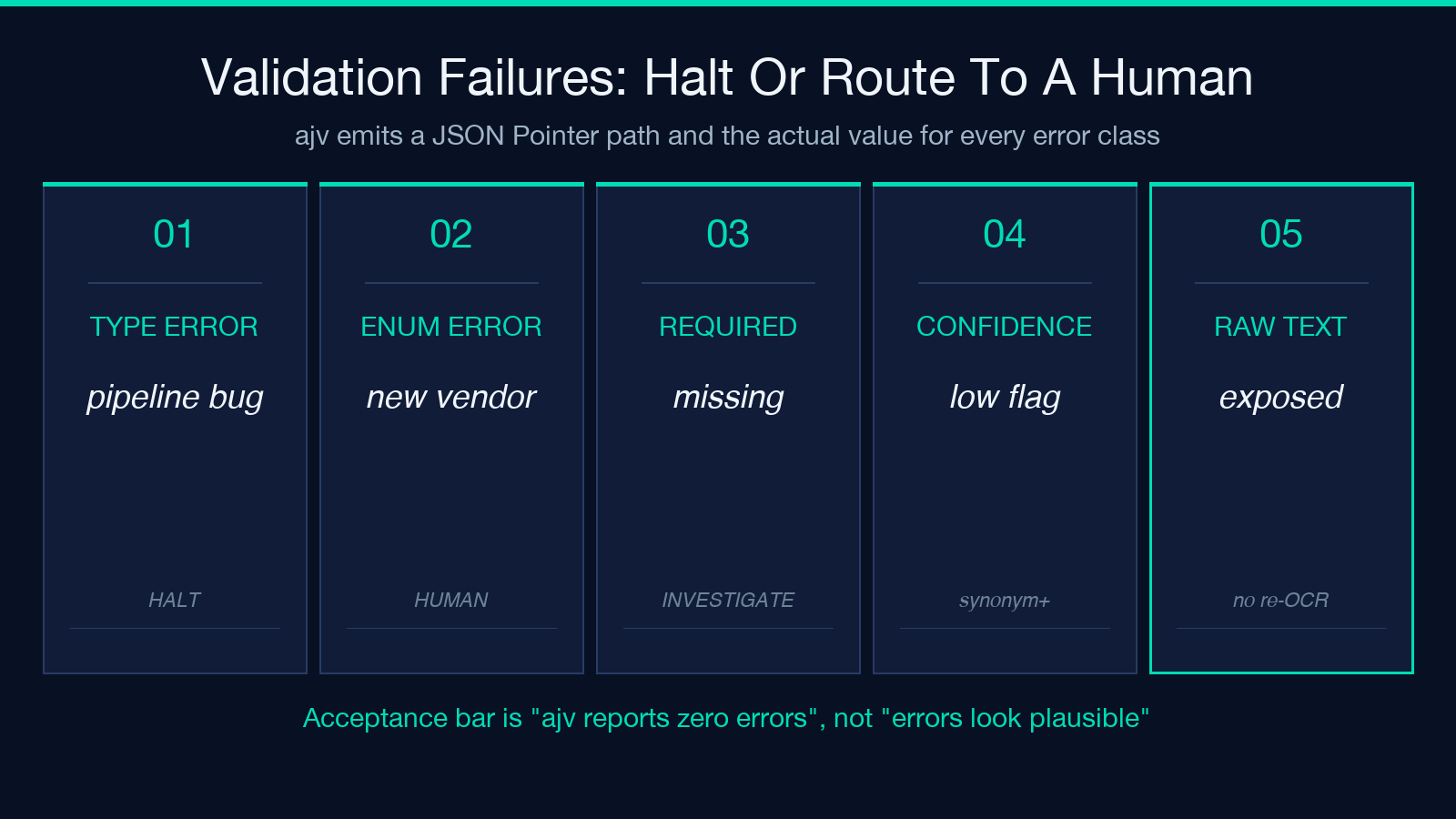
The bridge’s metadata separates these cases so the downstream code can route correctly. A `required` error tagged with `confidence: low` means the bridge saw a candidate label but couldn’t match it confidently — usually a label-spelling issue, often fixable by adding a synonym to the schema. A `required` error with no candidate at all means the field truly isn’t in the document, and the right action is human review or document rejection. The metadata also includes the raw text the bridge saw for each required-but-missing field, so a human reviewer doesn’t have to re-OCR the PDF to know what’s there.
The end-to-end workflow for a high-volume invoice import is: run the bridge on every document, route documents with `enum` errors to a human queue, halt and investigate on `type` errors, and accept documents with zero errors. The acceptance bar is “ajv reports zero errors,” not “ajv reports zero type errors and the enum errors look plausible” — the latter is the kind of soft-validation heuristic that lets bad data into the ERP and makes the next month’s reconciliation a nightmare. For a worked example of the full bridge run on a real invoice, see the PDF samples; for the broader schema-validation patterns, the data-processing and validation tool hubs collect the related utilities.
The bridge’s value isn’t that it OCRs better than the alternatives — for born-digital PDFs, the text layer is already perfect and any pipeline that uses it correctly gets the same text. The value is that it makes the failure modes explicit: which field came from which document region, which coercion rule was applied, which validation check failed and why. A pipeline that fails loudly at the field boundary is one you can debug in an afternoon; a pipeline that fails silently in the import script is one you discover three months later when the totals don’t reconcile. Try it on your worst vendor’s invoice at Elysia Tools and see how many of the field-boundary edge cases were already costing you accuracy you thought you had. Browse related PDF and JSON pipeline samples at elysiatools.com/en/samples/pdf-samples, or explore more document pipelines at elysiatools.com.
