

Short links are a courtesy to the people who send them and a puzzle to everyone else. You can see a tidy https://is.gd/Ab3xY in a chat, a newsletter, a forum signature, or a QR code, and have no real way to predict where it is about to take you — shorteners are not routing magic, they are a load-bearing wall between a sender’s analytics dashboard and your trust. The URL Expander on Elysia Tools takes that wall down cleanly: paste a short link, pick an expansion method, and the tool returns the real destination, plus the full redirect chain when one exists, in a single text result. One sentence is what this guide covers.
Why a short link is opaque on purpose
A URL shortener does two things at once. It rewrites a long URL into a token, and it remembers where that token should resolve. When you click the short link, the service sends back a redirect (an HTTP 3xx with a Location header) pointing your browser to the original long URL. From the outside, you only ever see the token; the long URL is stored server-side and only revealed at the moment of resolution. That design is friendly to the sender — short links fit on Twitter, in print, in a text message — but it asks the receiver to trust whatever the shortening service currently has on file, including any post-creation editing of the destination.
There is a second, less obvious opacity: shorteners can chain. A news outlet may publish a link to its own campaign tracker, which 302s to a partner’s tracking domain, which 302s again to the actual article. Each hop is invisible to the recipient, and the long URL the original author wrote is one or two indirection steps away from the final destination by the time it lands. If you have ever pasted a short link into the address bar, watched it load fine, and then wondered how the landing page knew your campaign source — that is the chain at work.
What the tool does under the hood
The URL Expander accepts one required input and two controls. The required input is the short URL itself, validated against an http:// or https:// pattern with Zod. The first control is Expansion Method, with four options: Auto-detect, is.gd, v.gd, and HTTP Redirects. The second control is Show Redirect Chain, a checkbox that, when on, surfaces every hop the tool walked through.
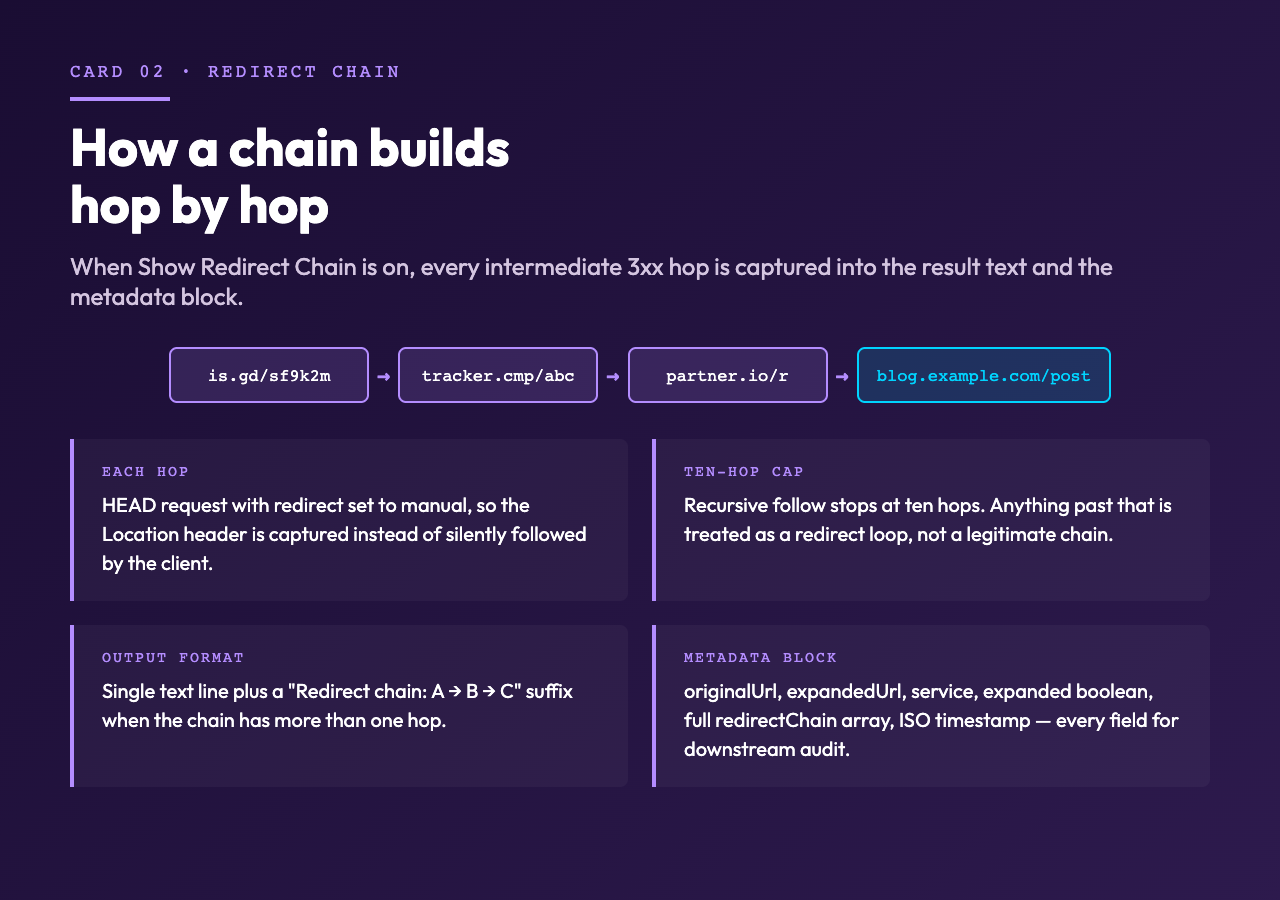
The Auto-detect mode branches on the host of the input. If the short URL contains is.gd, the tool calls the isgd library, which wraps the public is.gd lookup API and returns the stored long URL or fails. If the URL contains v.gd, the same shape runs through vgd, the package that talks to v.gd’s lookup endpoint. Anything else falls through to a manual HTTP redirect follower that issues HEAD requests with redirect: 'manual' so each hop is captured rather than followed silently, and walks up to ten hops before giving up.
When expansion succeeds, the result is a single text line of the form Expanded URL (is.gd): https://example.com/the/full/path/here. When Show Redirect Chain is on and the redirect count is greater than one, a second line is appended: Redirect chain: https://is.gd/Ab3xY → https://tracker.example.com/c → https://example.com/the/full/path/here. The metadata block returned alongside carries originalUrl, expandedUrl, service, expanded: bool, the full redirectChain array, and an ISO timestamp, so downstream consumers can reconstruct what happened without re-parsing the text result.
A worked expansion, end to end

Imagine you receive https://is.gd/sf9k2m in a product update email and want to confirm the destination before you click. Paste it into the Short URL field. Leave Expansion Method on Auto-detect — the host string contains is.gd, so the tool will route to the isgd lookup automatically. Tick Show Redirect Chain. The result text comes back as:
Expanded URL (is.gd): https://acmeproducts.example.com/blog/2026/08/release-notes
Redirect chain: https://is.gd/sf9k2m → https://acmeproducts.example.com/blog/2026/08/release-notes
The single hop in the chain confirms nothing unexpected sits between the shortener and the landing page. If you had instead received https://bit.ly/3xampl3 and the same expansion returned a chain like bit.ly → t.co → ad.doubleclick.net → nyt.com, you would know immediately that the original sender’s link had been wrapped in two tracking hops before reaching the news article — useful information if you are auditing where a referral actually came from.
Choosing the right expansion method
Auto-detect is the right default for almost every case, because the tool’s branch logic handles the two most common shortener domains for you and only falls back to raw HTTP redirects for everything else. There are still three situations where picking the method manually is worth the trouble.
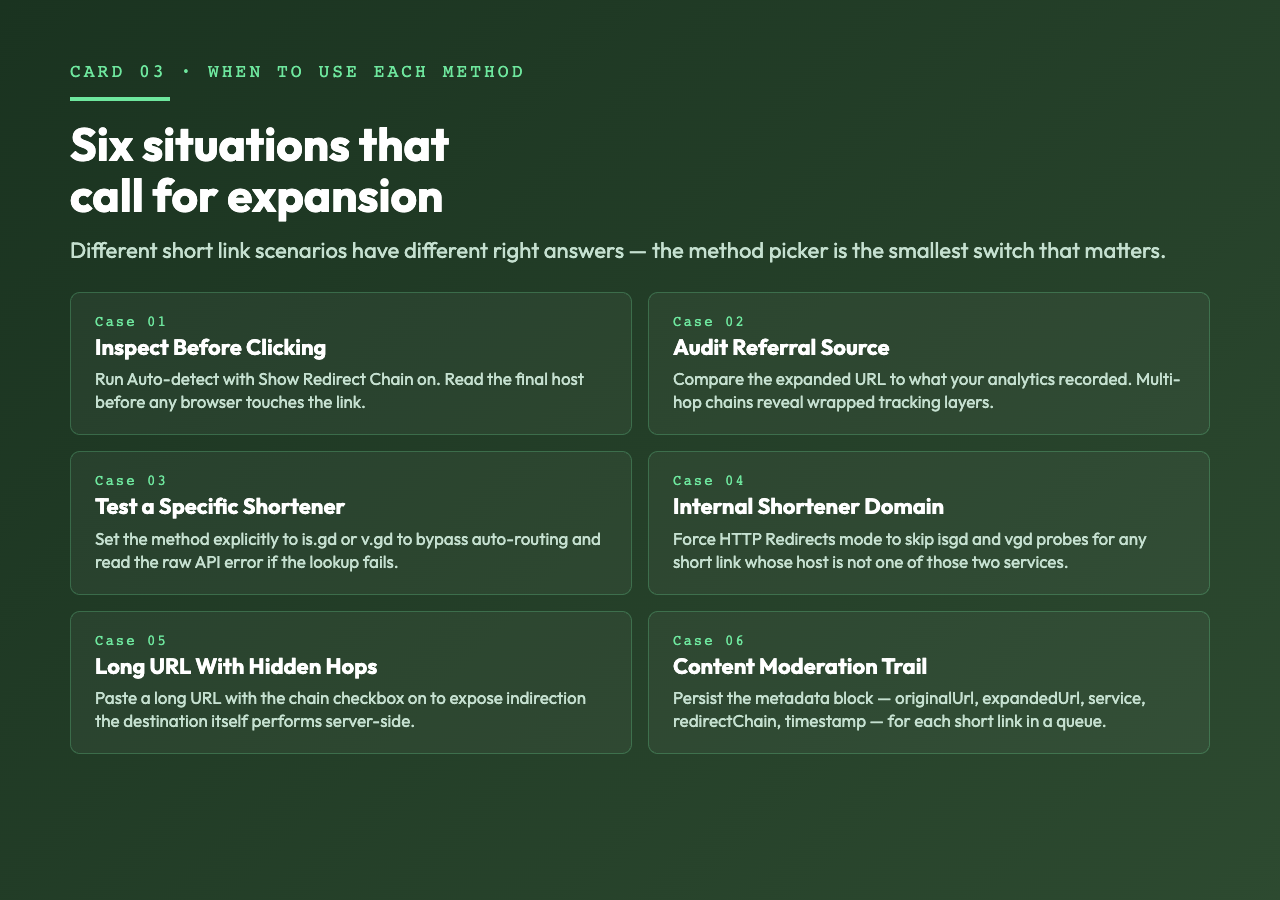
You want to test a specific shortener’s database. Some is.gd and v.gd links are deliberately private and the lookup APIs will refuse to expand them; if you suspect that is the case, set the method explicitly so you can read the error message without it being attributed to a generic HTTP failure.
The short link is to a domain the tool does not recognize. Many internal shorteners (go.acme.internal, s.team.example.com) look like ordinary hostnames. Auto-detect will land in the manual HTTP redirect path, but if you know the link is internal, set HTTP Redirects explicitly to skip the unnecessary isgd/vgd probes and the latency they add.
You want the redirect chain for a link that is already a long URL. Pasting a long URL with Show Redirect Chain on will reveal whatever indirection the destination has — useful when debugging an analytics mismatch between the link in your dashboard and the page users actually land on.
Edge cases the tool surfaces honestly
The tool returns four honest outputs. First, when the input URL is not a valid http:// or https:// string, Zod rejects it before any network call is made; you get a clean validation message instead of a half-formed lookup. Second, when the shortener’s lookup API succeeds but reports the same URL you passed in (meaning the link was never actually shortened), the tool flags it: URL expansion: The URL https://example.com/long/path does not appear to be shortened. Third, when the manual redirect walker hits the ten-hop cap, it returns the last known URL and the partial chain — preferable to silently truncating or hanging. Fourth, any thrown error is captured with the underlying message intact, not wrapped in a generic “expansion failed” string.
The redirect-following limit is worth understanding in context. Ten hops is enough to handle the longest realistic marketing chain (a shortener, two analytics wrappers, and a regional redirector) without exposing the tool to a redirect loop. If a chain truly needs more than ten hops, the partial result tells you the chain is being abused and the short link is not worth trusting.
Pairing it with other tools
The URL Expander solves the “where does this short link go” question, but several adjacent jobs are common enough to call out.
When you need to decode tracking parameters appended to a long URL (UTM tags, click IDs, fbclid), a separate query-string parser is the right next step. When you need to normalize a URL to its canonical form (lowercased host, sorted query params, trailing-slash policy), a URL canonicalizer catches what an expander ignores. When you need to verify a link is reachable after expanding it, an HTTP status checker or HEAD-only ping will tell you whether the destination is up without rendering the page.
For content moderation, link audit trails, or analytics reconciliation, the tool’s structured metadata block (original URL, expanded URL, service used, redirect chain, timestamp) is the payload you want to persist, not just the human-readable text line.
A short checklist before you click
Before pasting any short link into a browser, three checks cover most of what matters. First, run the URL Expander and read the destination — if it is a domain you do not recognize, stop there. Second, if the chain has more than two hops, expect analytics wrappers and treat the destination as one layer of indirection away from what the original sender typed. Third, for anything that asks for credentials or payment on the landing page, expand first, confirm the destination is on the registrable domain you expect, and only then click.
The tool is a five-second step that converts a short link from a black box into a transparent one. Used before clicking, it is the cheapest link-audit pass you can run.
Try it yourself
Paste any short link — https://is.gd/..., https://v.gd/..., or a campaign wrapper — into the URL Expander, turn on Show Redirect Chain, and read the full path from token to destination in one result block. The tool is free, runs entirely in the browser session, and never logs your input. For more developer-focused link utilities, browse the broader set at elysiatools.com.
