
Currency by Country answers one question: what is the money called in a given country, and what is the unit you should be quoting against? Most of the time the answer is straightforward. A few times it is not, and the difference between a clean invoice and a bounced wire is whether the lookup returned the right four fields plus the details block.
The Currency by Country tool gives you one consistent JSON answer per country. This field guide walks through what the three options actually do, which ISO codes you will see in the output, why the eurozone overlap catches you off guard, and how to read the optional details block so your invoice does not get bounced.
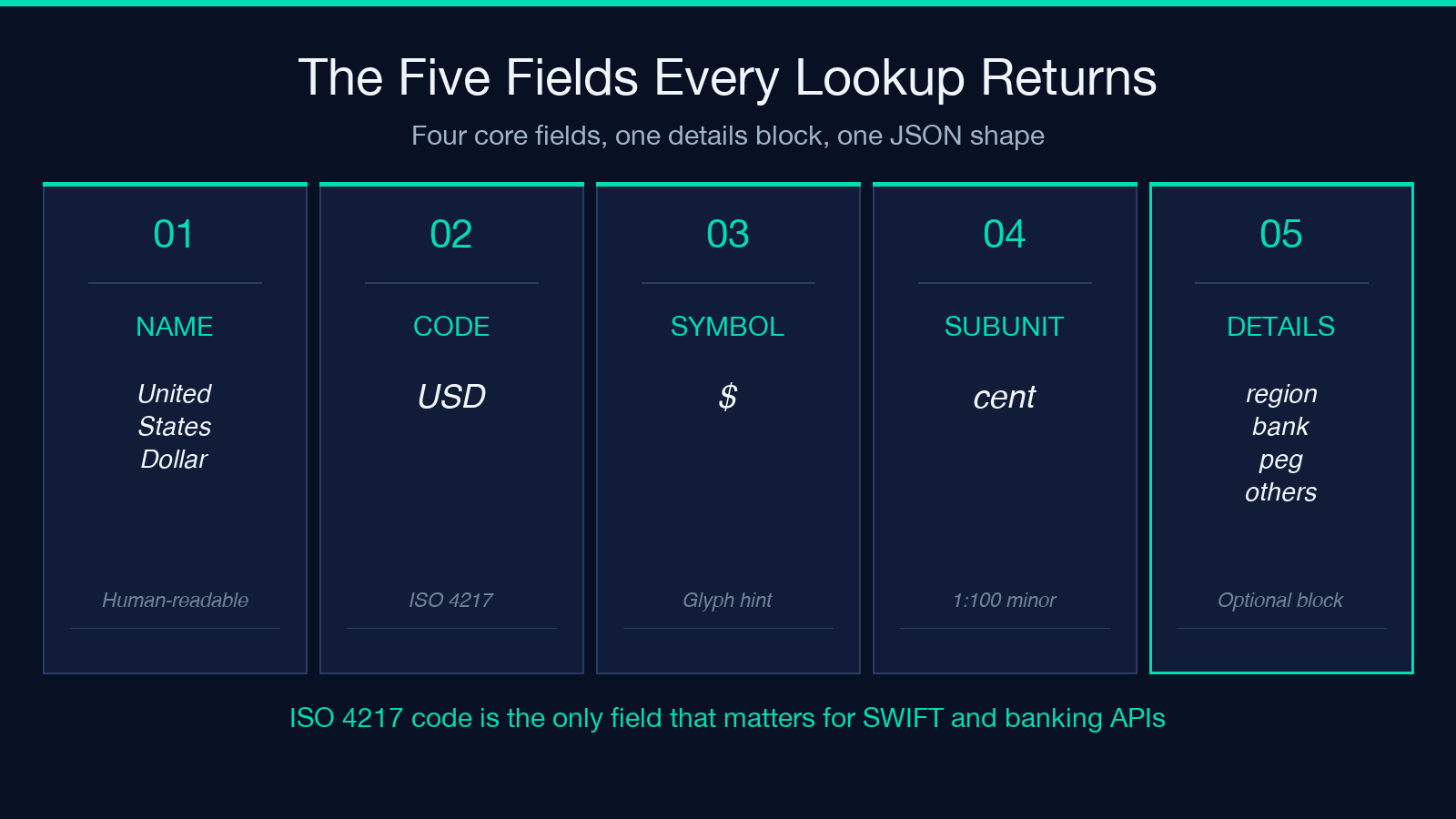
Quick reference: enter a country name, optionally include the symbol, optionally include the details block (region, central bank, peg, multi-country usage), and the tool returns a JSON object with country, currency.name, currency.code, currency.symbol, and currency.subunit. The details block adds four more fields for the cases where the answer is not just “this country, this currency”.
What goes wrong with a plain country-to-currency map
When you type a country name into a finance form and the system writes back $ instead of €, the bug is rarely in the form. It is in the lookup that decides what currency that country uses. A plain country-to-currency map breaks on a few specific edges:
- Shared currencies. Twenty countries plus four microstates share the euro. Eight island nations share the East Caribbean Dollar. Eight mainland nations share the West African CFA franc. A one-to-one map cannot represent any of these without losing information.
- Dollarized economies. Ecuador, El Salvador, Panama, and a handful of Caribbean nations use the US dollar as their primary or sole legal tender. The map says
USD, but the issuing country is not the United States. - Pegged currencies. A pegged currency inherits the value of another currency but keeps its own code. The exchange rate is fixed at the peg, but the lookup by code does not tell you that.
- Currencies with no subunit. The Japanese yen, the South Korean won, the Chilean peso (post-2010). A standard
amount * 100calculation to convert to minor units is silently off by a factor of 100. - Redenomination. A country mid-redenomination has a transitional period where both old and new currencies are legal tender. A static map has to pick one or the other.
The right tool for this question returns not just the four core fields, but a details block that disambiguates the shared-currency and pegged-currency cases. That is what Currency by Country does.
The three options, and what each one decides
The tool exposes three inputs and they map to three orthogonal decisions, which is worth knowing up front because the labels are intentionally minimal.
The first input, country, is the only required field. You type a country name as a string and the lookup matches it against the canonical country list. The matcher handles common short forms: US, USA, and United States all resolve to the same entry; so do UK and United Kingdom. The placeholder text in the form explicitly suggests China, US, and Japan, which are exactly the three that most often trip casual lookups because CN returns yuan and JP returns yen but neither is what a Western finance team expects from a Chinese or Japanese invoice line.
The second input, Include Currency Symbol, defaults to true and controls whether the output’s currency.symbol field is populated. Setting this to false returns the symbol as undefined, which is the right choice when you are piping the JSON into a system that already prefixes its own symbol from the currency.code field, or when you are doing a code-only comparison between two countries and do not want the symbol bytes cluttering the diff. Leave it on for human-readable invoices.
The third input, Include Additional Details, defaults to true and controls whether the details block is included at all. Turn it off when you only want the four core fields (country, currency.name, currency.code, currency.symbol, currency.subunit); turn it on when the country is on the eurozone, when you are working with a pegged currency, or when the answer to “what currency does X use” is itself ambiguous because the same currency is shared across borders.
The four core fields in the base response
The four fields you will see in the base response are country, currency.name, currency.code, and currency.symbol, plus the often-overlooked currency.subunit.
currency.name is the human-readable currency name in English: United States Dollar, Euro, Japanese Yen, Swiss Franc. This is the field to put in a UI label when the user is reading the screen, and the field that PDF invoice templates typically pull for the line item.
currency.code is the ISO 4217 three-letter code: USD, EUR, JPY, CHF. This is the field that SWIFT messages, banking APIs, and accounting systems actually key on. If your downstream system stores currency by code, the code field is the only field that matters, and a wrong code is the difference between a wire that lands and a wire that bounces. ISO 4217 also reserves a few special codes that look like country codes but are not: XAU for gold, XBT for bitcoin (informal), XXX for “no currency”. None of these will appear in a normal country lookup result, but a tooling layer that tries to validate the code against the ISO list should accept them as edge cases.
currency.symbol is the glyph you put in front of the amount: $, €, ¥, ₣. Two important things to know. First, the same symbol can map to multiple currencies: $ is used by the United States, Canada, Australia, New Zealand, Hong Kong, Singapore, and a dozen others; ¥ is used by both Japan and China. The symbol is a display hint, not an identifier. Second, some symbols are spelled out as code rather than glyph: the Swiss Franc symbol is CHF in the tool’s output for some renderers, because ₣ is not in the same Unicode plane as € and $ and not every downstream system renders it. If you need a guaranteed-renderable symbol, fall back to the code.
currency.subunit is the field most pipelines silently ignore, and it is the one that catches you on rounding. The subunit is the minor unit of the currency: cent for the dollar, centime for the Swiss franc, sen for the ringgit. Some currencies have no subunit at all: the Japanese yen, the South Korean won, the Chilean peso (post-2010). For those, the smallest unit is the whole currency, and any downstream calculation that does amount * 100 to convert to minor units will silently be off by a factor of 100. Always check the subunit before assuming a 1:100 minor-unit ratio.
The eurozone overlap that catches you off guard
Turning on Include Additional Details adds a details object with region, countries, centralBank, and pegged. The most common reason to want this is the eurozone overlap, and it is the case where the lookup returns a one-country input and a many-country answer.
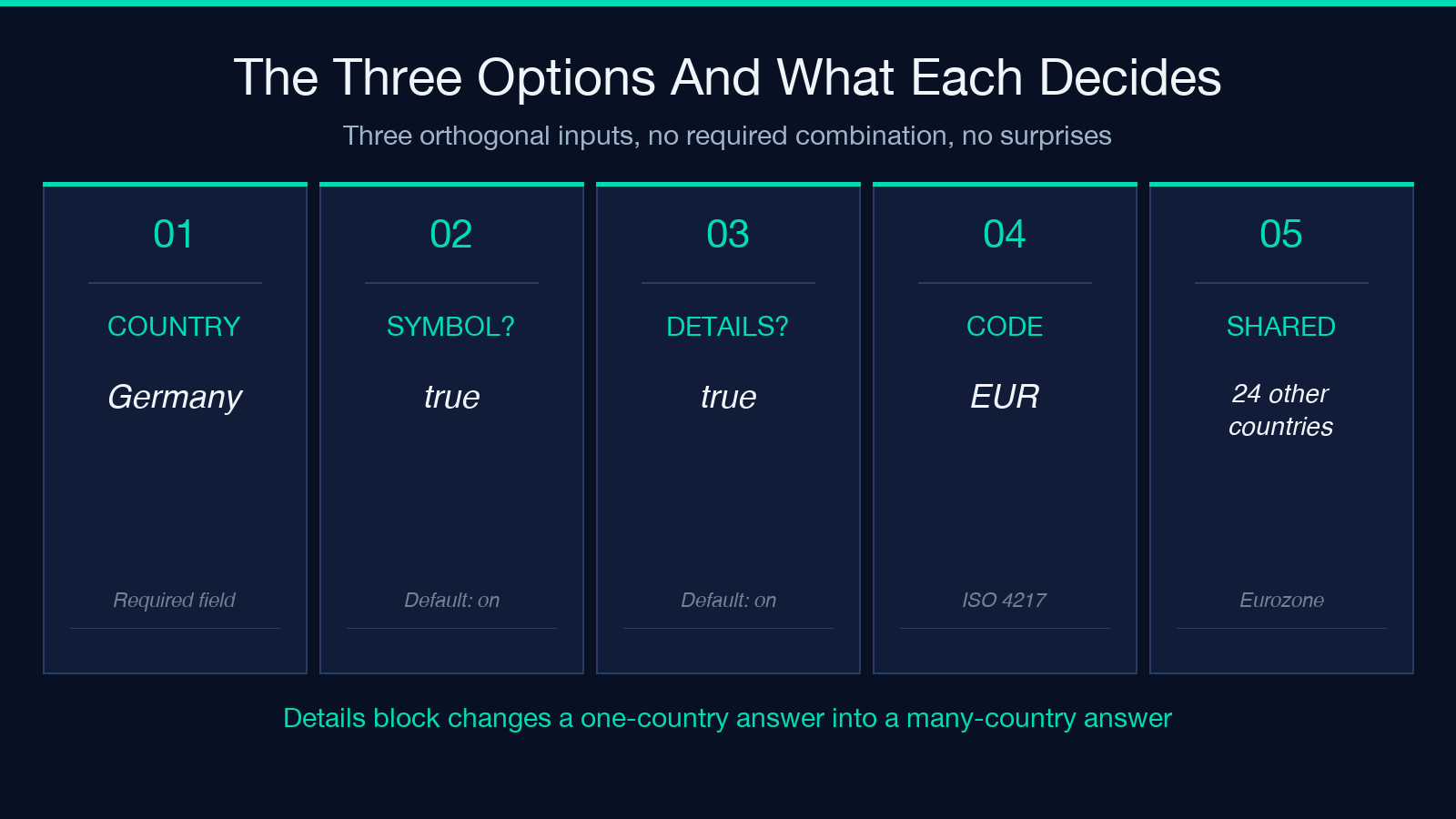
A query for Germany returns currency.code: EUR, currency.name: Euro, and a details.countries array of every other country that also uses the euro: Austria, Belgium, Croatia, Cyprus, Estonia, Finland, France, Greece, Ireland, Italy, Latvia, Lithuania, Luxembourg, Malta, the Netherlands, Portugal, Slovakia, Slovenia, Spain, plus the four microstates (Andorra, Monaco, San Marino, Vatican City) that use the euro by agreement. If your downstream system expects one country per currency, this is the moment to check the array before assuming. Similarly, a query for France or Italy returns the same EUR code with the same shared-country list.
The same pattern applies to other shared currencies: the East Caribbean Dollar (XCD) is used by eight island nations; the West African CFA franc (XOF) is used by eight mainland nations; the Central African CFA franc (XAF) is used by six more. For all of these, the details.countries array is the source of truth for how many invoices you are really dealing with.
The dollarized-economy and pegged-currency cases
Two more cases where the details block is worth its weight, both for the same reason: the currency code does not tell you which country issued the currency.
First, dollarized economies. Ecuador, El Salvador, Panama, and a handful of Caribbean nations use the US dollar as their primary or sole legal tender. The tool returns USD for each, with details.countries listing the United States alongside. If your finance template assumes that USD means “United States invoice”, these countries break that assumption.
Second, pegged currencies. A currency pegged to another currency inherits the value but not the code. The tool reports the peg in details.pegged, which is the field to check before quoting an exchange rate. HKD (Hong Kong Dollar) is pegged to USD; AED (UAE Dirham) is pegged to USD; BHD (Bahraini Dinar) is pegged to USD; BSD (Bahamian Dollar) is pegged to USD. The rate is not always exactly 1:1 even when the peg is nominal, and the peg can shift. Always check pegged before quoting the rate.
The details.centralBank field is the monetary authority that issues the currency. For most queries this is what you would expect (the Federal Reserve for USD, the European Central Bank for EUR, the Bank of Japan for JPY), but for currency unions the central bank is shared across all member countries, and the field surfaces that. Use it for compliance and audit logs when you need to record who issued the currency, not just what the currency is.
Edge cases: aliases, unknown countries, and bulk lookups
Three edge cases are worth knowing about, because they are the ones that show up in real finance flows and not in synthetic test data.
Country aliases. The matcher accepts common short forms and alternate names. UK and United Kingdom resolve to the same entry. UAE and United Arab Emirates resolve to the same entry. Czechia and Czech Republic resolve to the same entry. If you are piping the output into a system that uses ISO country codes (GB, AE, CZ), the tool still returns the human-readable country name; the lookup is on the name, not the country code. If your input source is two-letter ISO country codes, you will need a separate name-resolution step before passing into this tool.
Unknown country. If the input does not match a known country, the tool returns an error field with the message Country not found and a contextual message naming the input that was tried. Do not silently treat an error response as a successful empty response: a currency.code: undefined is a real failure, not a “no currency” case. Always check for the presence of error first, then proceed.
Multiple-input ambiguity. If you have a list of countries and you want to look up each in turn, do them one at a time. The tool’s API is single-country, and bulk lookups are not supported in a single call. If you need to map a 200-country spreadsheet to currency codes in one pass, the most reliable pattern is to call the tool once per country and collect the results into an array, with explicit per-row error handling for any country that fails the lookup.
How to wire the output into a finance system
The JSON shape is intentionally flat, so the integration is a property read, not a deep parse.
For an invoice line, take currency.code and put it in the line item’s currency field; take currency.name and put it in the human-readable description; take currency.symbol and prefix the amount. For a SWIFT message, only currency.code matters, and the rest of the fields can be discarded. For an exchange-rate calculation, check details.pegged first; if the currency is pegged, you do not need an external rate feed for the quote, and if it is not pegged, you do.
For an audit trail, store the full response object as JSON, including the details block. The four extra fields cost a few hundred bytes per row, and they are the difference between an audit that can answer “why does this row show USD when the country is Ecuador” and one that cannot.
What to verify before you ship the lookup to the rest of the pipeline
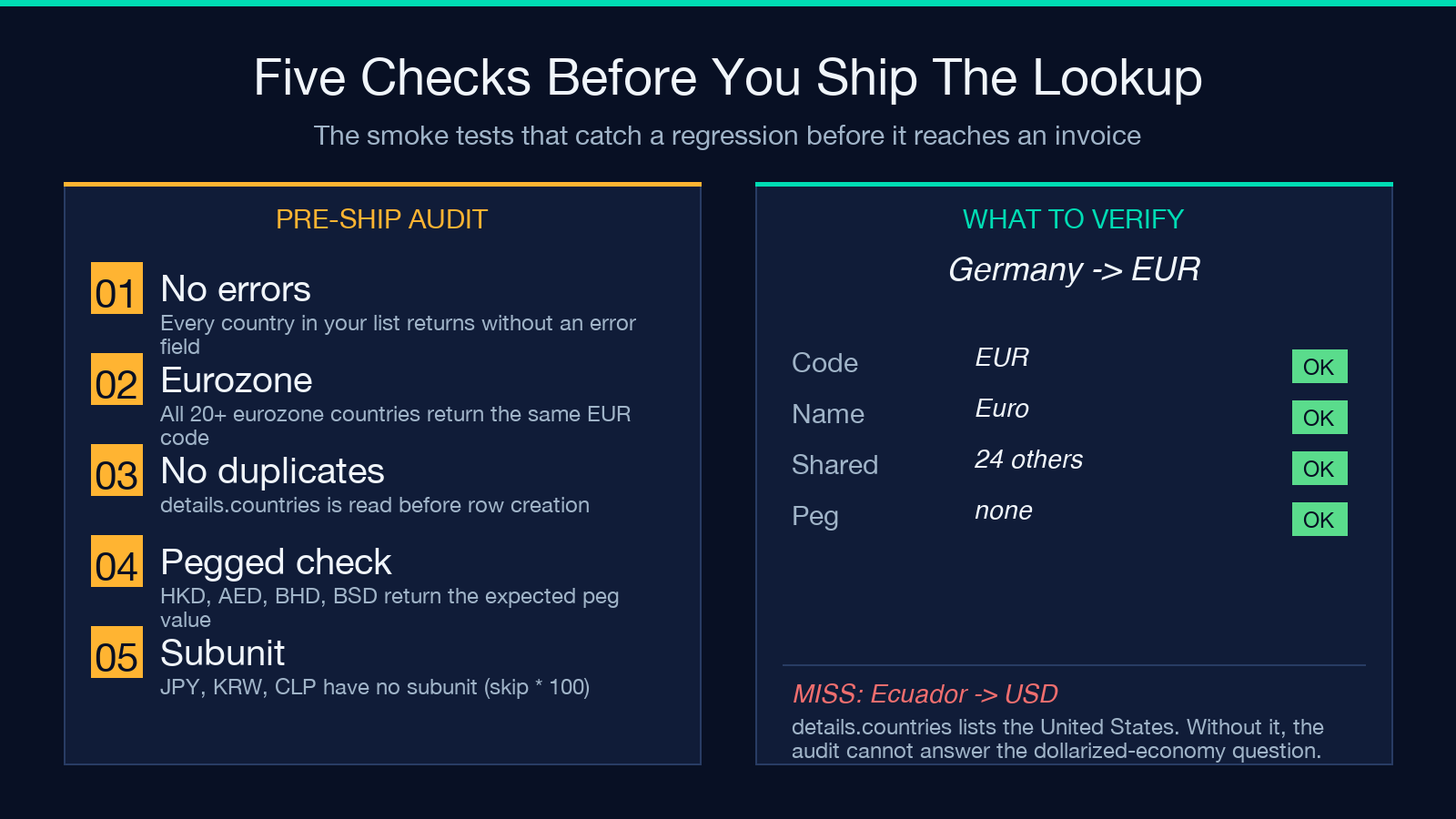
Before you wire the tool into a finance system, run three smoke tests against the country list you actually serve. First, confirm every country you invoice appears in the tool’s response without an error field, by running a one-time batch against your full country list. Second, confirm that every country in the eurozone returns the same currency.code (EUR) and that your downstream table handles the details.countries array without duplicating rows. Third, confirm that any pegged currency in your list (HKD, AED, BHD, BSD, and the dozen others) returns the expected details.pegged value, and that your exchange-rate component reads pegged before falling back to an external rate feed.
The lookups are deterministic for a given country, so a regression in the tool is easy to detect: if a query for Germany ever returns a non-EUR code, or a query for Japan ever returns a code other than JPY, the tool is broken and you should pin to a known-good snapshot before continuing. The audit-trail JSON makes that pin straightforward: store the full response object, hash it, and compare against the hash of a known-good response.
Try it on the country that just appeared in your latest invoice queue, and check whether the details.countries array changes the way you model the row in your downstream table. The eurozone and the dollarized-economy list are the two patterns where a single-country query gives you a multi-country answer, and both of them are easy to miss if you only look at the four core fields. The tool is at Currency by Country, and the API and the live form are the same endpoint, so anything you can do in the browser you can pipe into your finance system. Explore more country, currency, and geography lookups at elysiatools.com.
