
The line that breaks most recipes is the salt line. Double the servings, double everything by math, and a teaspoon of salt becomes two teaspoons. That works until the second bite arrives salty enough to wash down with water. The Recipe Ingredient Scaler tool from Elysia Tools treats that single line as the canary in the kitchen — and it offers a sub-linear seasoning curve so doubling a recipe actually doubles the cookies, not the salt. This field guide walks through the five decisions the scaler makes on every line of a pasted ingredient list, why the density table is the part most people get wrong, and where the kitchen-fraction output saves you from scrubbing a quarter-cup measuring cup at midnight.
The density table is where most home cooks lose grams
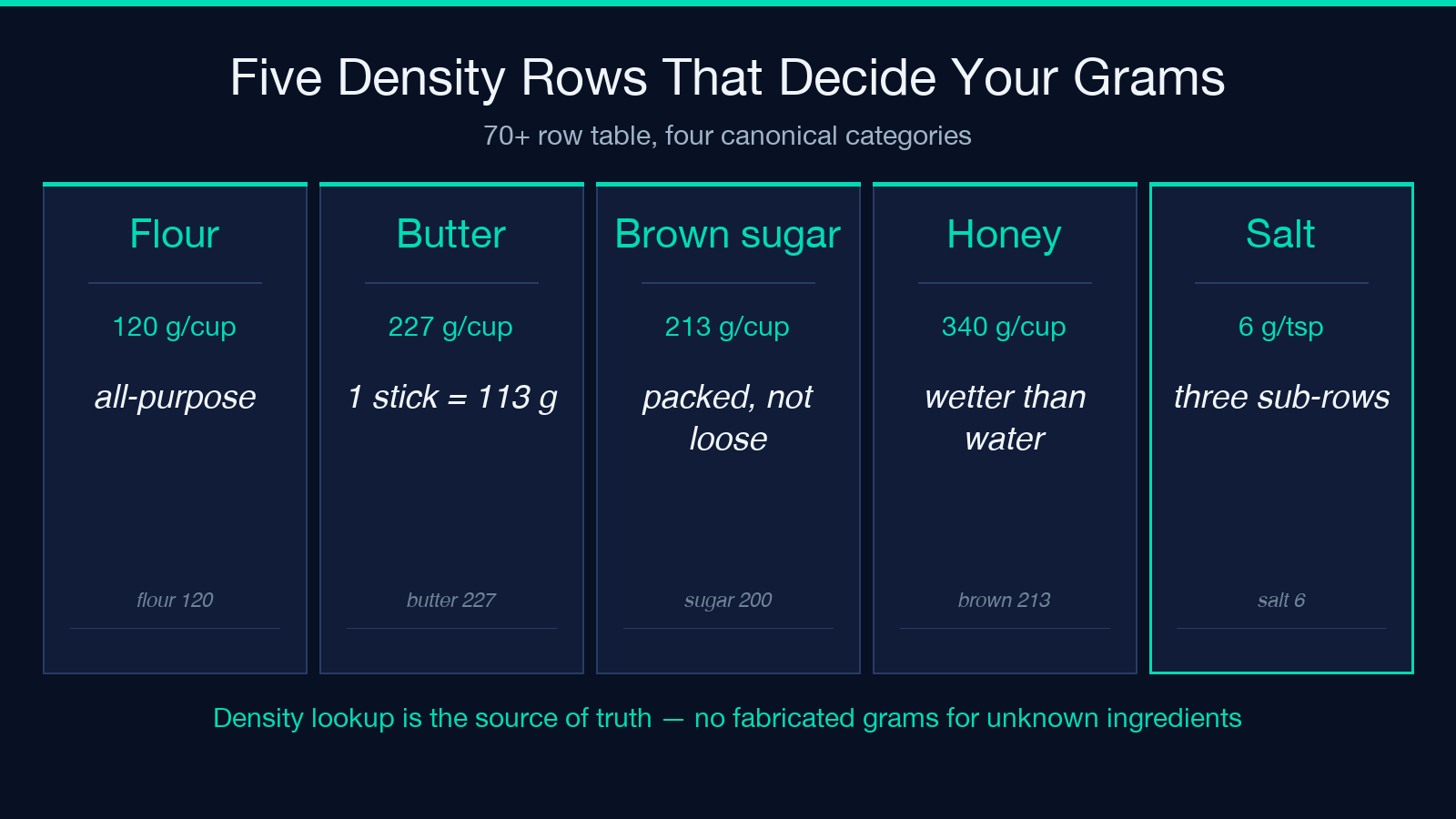
Most recipe scalers stop at finding the first number and treating it as the quantity. This one looks at four pieces per line — and gets three of them right even when the input is messy. The tool ships with a built-in density table of 70+ common baking ingredients — flour at 120 g per US cup, butter at 227 g per cup, granulated sugar at 200 g per cup, brown sugar (packed) at 213 g, honey at 340 g, and so on. The table is the single source of truth for the cups↔grams conversion, and it is also the reason the metric output of 2 1/4 cups all-purpose flour lands at 540 g instead of guessing. When the ingredient is not in the table — say, 1 cup ground flaxseed — the tool degrades gracefully: it keeps the original volume unit and flags the line with a density-unknown marker. No fabricated grams, no silent fallback to a default ingredient. The fallback policy is conservative on purpose; guessing density for an ingredient the tool has never seen is how 1 cup of cocoa powder becomes 80 g of cocoa instead of the actual 75 g. Brown sugar is the one that trips people up. Packed vs unpacked brown sugar is a 15 percent density difference, and the table has both rows. If you paste 1 cup brown sugar, packed, the parser reads the comma qualifier and routes to the packed row. If you paste 1 cup brown sugar alone, you get the unpacked row and a density: loose annotation. Salt has three rows — table salt, kosher salt, and sea salt — at 292 g, 240 g, and 273 g per cup respectively. Picking the wrong one is a 20 percent flavor swing, which is bigger than the difference between salted and unsalted butter in most cookie recipes.
The sub-linear seasoning curve is why doubling does not ruin dinner
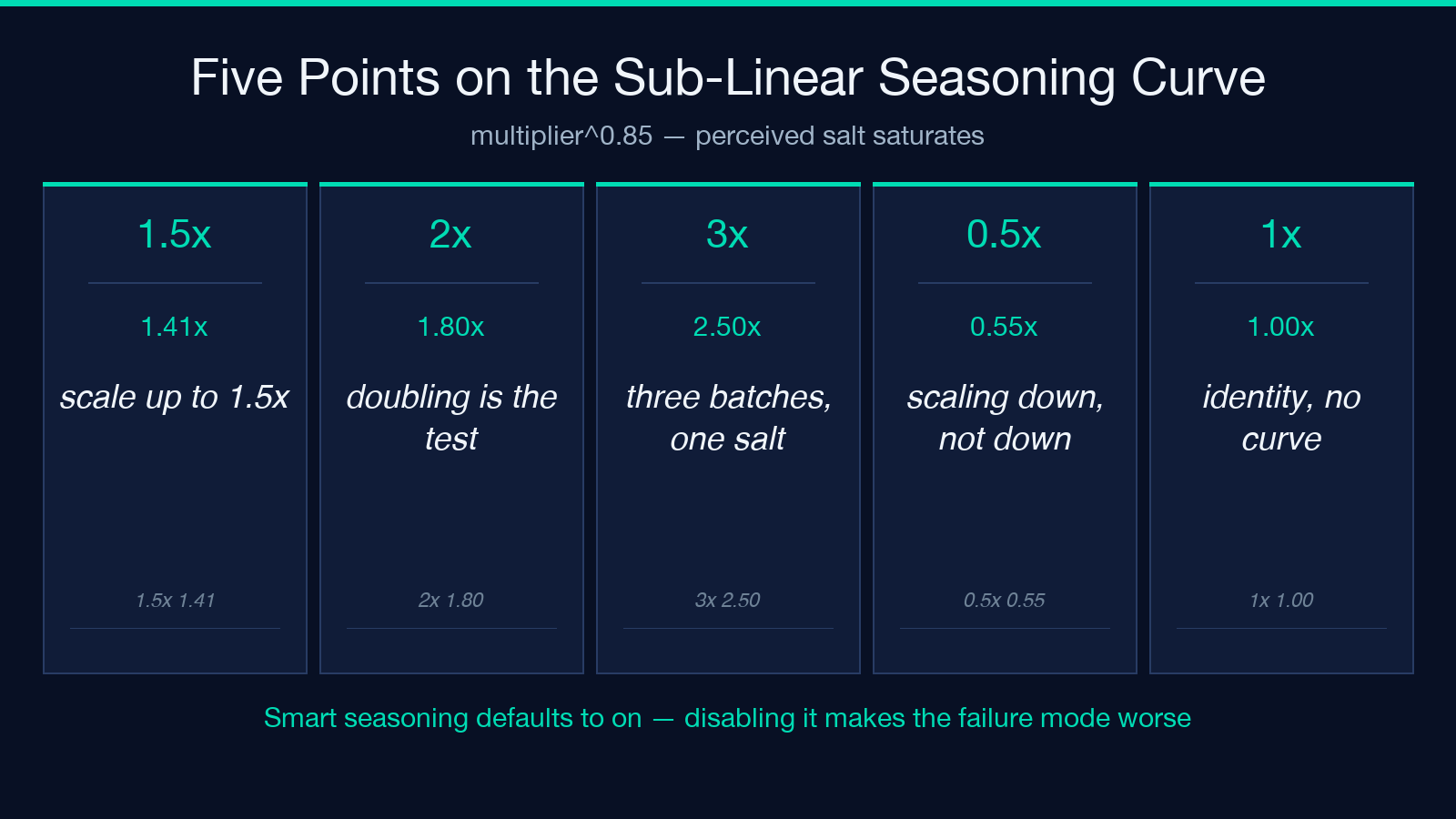
Scaling seasonings by a flat multiplier is the most common scaling mistake in home baking. Salt, spices, and extracts are perceptually sub-linear — doubling the recipe does not double the perceived saltiness. The tool ships a smart seasoning curve: a 2× scale up applies a 1.8× multiplier to seasoning rows, a 3× scale up applies ~2.5×, and the curve follows multiplier^0.85. The underlying reasoning is that salt perception is roughly logarithmic — your tongue’s response to salt saturates as concentration rises, so doubling the salt in the recipe only adds about 0.85 doublings to perceived saltiness. When the curve kicks in, the output keeps both numbers visible: 1 tsp salt scaled 2× shows as 1 4/5 tsp (linear: 2 tsp) so you can see both the perceptually-corrected value and what a naive linear scale would have given you. This is the most useful UX detail in the entire tool — it is one thing to apply a curve, it is another to let the user override it without hunting through a hidden settings panel. The seasoning classification is heuristic, not a tagged database. The tool flags lines whose ingredient noun matches a list of 14 seasoning-ish keys: salt, pepper, baking soda, baking powder, cinnamon, nutmeg, vanilla, almond extract, etc. A line like 2 tsp cinnamon becomes a seasoning row automatically; a line like 2 tsp cocoa powder does not, because cocoa is a structural ingredient even at 2 tsp per batch. Disabling the curve is a single checkbox (Smart seasoning scaling in the options panel). Power users who know their oven and their salt brand can flip it off and get straight linear scaling for every row, including salt. The checkbox defaults to on because the failure mode of straight-linear seasoning scaling is worse than the failure mode of sub-linear correction.
Why the output is in kitchen fractions, not decimals
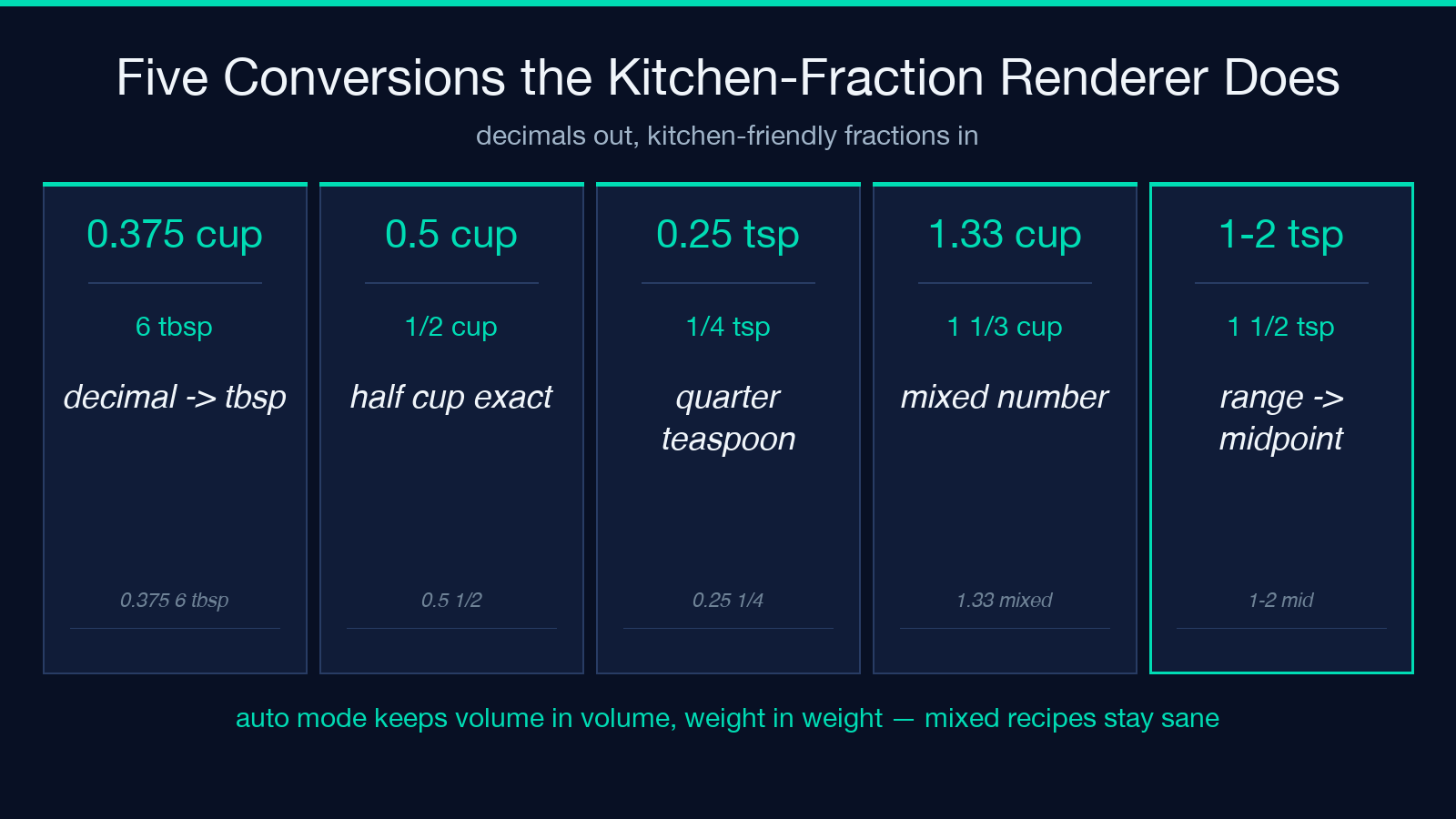
Kitchen measurements are not decimals. 0.375 cup is not a thing — 6 tablespoons is. The output format decision is where most home-cook tools go off the rails. When the output unit is auto (the default) or us, the tool renders quantities as kitchen fractions: 0.375 cup becomes 6 tbsp, 0.5 cup becomes 1/2 cup, 0.25 tsp becomes 1/4 tsp, and 1.33 cup becomes 1 1/3 cup. The fraction chooser picks the smallest kitchen-friendly denominator — eighths for cups, thirds for tablespoons, sixteenths for teaspoons — and falls back to mixed numbers when the value exceeds 1. Metric output (grams, milliliters) skips the fraction step entirely and renders decimals with sensible rounding: 1 tsp (5 g) becomes 5 g, 1 cup butter (227 g) becomes 227 g. The kitchen-fraction renderer only activates for volume or count outputs where the fraction form is meaningful — grams and milliliters are already in their natural unit. The auto mode is the smart default: it keeps the original unit if the original was volume (cup, tbsp, tsp), and it converts to metric if the original was a weight (g, oz, lb). This means a recipe pasted in mixed US-and-metric form keeps its original units per line, and the output is internally consistent per line. Range inputs (1-2 tsp) render in fraction form as 1 1/2 tsp (range: 1-2) so the kitchen ambiguity is preserved. Stripping the range would lose information; rendering the full range as two separate quantities would balloon the output. The midpoint-with-range call is the right compromise.
What the parser actually pulls out of a single line
Most recipe scalers stop at finding the first number and treating it as the quantity. This one looks at four pieces per line — and gets three of them right even when the input is messy. Mixed-number detection: a line like 2 1/4 cups flour is parsed as 2.25 cups, not as 2 followed by garbage. The regex chain handles Unicode fractions (½, ⅔, ¾) and ASCII fractions (1/2, 3/4) on the same line without confusing which numerator belongs to which denominator. Range handling: 1-2 tsp salt becomes a midpoint (1.5 tsp) with the original range preserved in a sidecar so the kitchen-fraction renderer can show 1 1/2 tsp without losing the 1-2 signal. Unit normalization: tbsp, T, tablespoon, Tablespoons all collapse to one canonical unit before density lookup. The 70+ row table that follows only has to deal with one form per unit, which is why the metric conversion stays accurate at scale. Ingredient lookup: the line’s ingredient noun (flour, butter, salt, vanilla extract) is matched against the density table by exact key first, then by a fuzzy fallback for plurals and possessives (egg and eggs route to the same row). Lines with no match stay in their original unit.
The four edge cases that break naive scalers
Scaling by a single multiplier works for the happy path. The four cases below are where naive scalers silently produce wrong output — and where this tool’s parser earns its place. Scaling down below 1: scaling a 24-cookie recipe to 6 cookies (0.25×) gives 1/2 tsp salt (linear), but the seasoning curve clamps the minimum at 0.4× because going below the seasoning floor produces bland results. The tool surfaces the clamp in the output line so you know it happened. Scaling to 1: scaling a recipe to itself is a no-op, but the tool still re-runs the parser and the density conversion. The output is byte-identical to the input for volume-or-count lines; for lines that involve implicit rounding (1 cup is exactly 1 cup, but 1/3 cup is exactly 1/3 cup), the round-trip is exact. Eggs and other counts: the unit is count, not volume, so density conversion does not apply. The tool treats 2 large eggs as 2 units at any scale, which means 48 eggs for a 24× recipe and 1 egg for a 0.5× recipe. Trying to convert eggs to grams by density lookup would silently produce nonsense, so the tool refuses. Zero-servings target: the input validator rejects targetServings: 0 with a friendly error rather than producing NaN-scaled output. This is a small thing, but it is the kind of validation that distinguishes a tool from a calculator.
A walk-through: 24 cookies to 48 with metric output
The example from the tool’s documentation illustrates all five decisions in one shot. A classic chocolate-chip cookie list scaled 2× with outputUnits: metric and smartSeasoning: true produces a 9-row output that exercises the parser, the density table, the seasoning curve, and the unit formatter in sequence. Line 1 (2 1/4 cups all-purpose flour) parses as 2.25 cups, looks up flour at 120 g/cup, scales by 2×, and renders as 540 g. Line 2 (1 tsp baking soda) parses as 1 tsp, classified as a structural ingredient (not seasoning — baking soda is not in the seasoning heuristic list), scales linearly by 2× to 2 tsp, and converts to 10 g via baking-soda density. Line 3 (1 tsp salt) parses as 1 tsp, classified as seasoning, follows the sub-linear curve at 2^0.85 ≈ 1.8×, renders as 1 4/5 tsp (linear: 2 tsp), and the salt-density row at 6 g/tsp gives 11 g. Lines 4-9 (butter, sugars, eggs, chocolate chips, vanilla) each take the parser path, density lookup, linear-or-curve scaling, and unit conversion in sequence. The final rendered output shows 9 rows, 2 of which carry the seasoning-curve annotation.
How the scaler fits a real cooking workflow
The tool is most useful as the middle step of a paste-scale-cook loop. It does not store recipes, it does not save history, and it does not integrate with grocery lists — by design. Step 1: paste your recipe. The textarea accepts multi-line input with comments, blank lines, and section headers (-- DRY --, -- WET --). The parser ignores non-ingredient lines. Step 2: pick your target. Either change originalServings to match the recipe’s yield, or set targetServings to the new yield and leave originalServings at its default (4). The factor is computed as targetServings / originalServings. Step 3: pick your output unit. auto keeps volume lines in volume and converts weight lines to weight; metric converts everything to grams or milliliters; us keeps everything in cups, tablespoons, teaspoons. Step 4: copy the rendered output. The result is plain HTML with semantic row classes — paste it into a notes app, an email to a friend, or a printed index card. If you want to scale multiple recipes a week, the workflow is paste → scale → paste back into your recipe notebook. There is no login, no account, no sync — the tool is stateless, and that is the point. You can explore it at Elysia Tools, and the Decimal to Fraction Calculator handles the inverse path when you need to convert a 1.33 cup result back into a decimal-friendly form. The Volume Unit Converter is the right tool when you have a single number and just need the unit swap.
When scaling stops being a math problem
Most scaling mistakes in home cooking are not math mistakes — they are perception mistakes. Salt does not scale linearly because your tongue does not perceive it linearly. Spices do not scale linearly because aroma compounds saturate at lower concentrations than the math suggests. The Recipe Ingredient Scaler is useful precisely because it bakes that perceptual sub-linearity into the output without making the user think about logarithms. You paste a recipe, you pick a target, you get a list of ingredient quantities that actually tastes right at the new size. The density table is the part you only notice when it is wrong, the seasoning curve is the part you only notice when it is off, and the kitchen-fraction renderer is the part you only notice when you have to wash a quarter-cup measuring cup at 11 p.m. because the tool gave you 0.25 cup instead of 4 tbsp. If you bake the same recipe at three different yields a year, the tool will save you more time than its lack of account sync costs you. If you bake once a month, the smart seasoning curve is still worth the four seconds it takes to paste your ingredient list. Explore more tools at elysiatools.com.
