
Tunnel math decides whether your TCP stream survives the path. Stack a 1500-byte underlay under VXLAN, WireGuard, IPSec, and a CNI overlay, and the effective MSS can drop below 1380 — far lower than any single configuration knob reveals — before anyone notices the first silent retransmit.
What the MTU / MSS Path Calculator Actually Returns
Every transport engineer has hit the same line in tcpdump: ICMP fragmentation needed but DF set. The MTU / MSS Path Calculator at Elysia Tools takes one underlay byte count and a list of encapsulation layers, and returns three numbers that drive every debugging decision: the effective interface MTU after subtracting each layer’s overhead, the TCP MSS after IP and TCP headers, and the exact payload size for a Don’t-Fragment ping that proves the path. It targets the practitioner who has to ship a working SD-WAN policy, a Kubernetes CNI configuration, or a WireGuard tunnel — and who is tired of guessing at the eight-byte magic constant that breaks three layers deep. The five decisions the calculator forces — underlay MTU, tunnel order, MSS clamping, DF probe size, IPv4-vs-IPv6 header size — are the same five decisions captured in every post-mortem for “the VPN was fine yesterday.”
The Overhead Stack and Why Order Matters
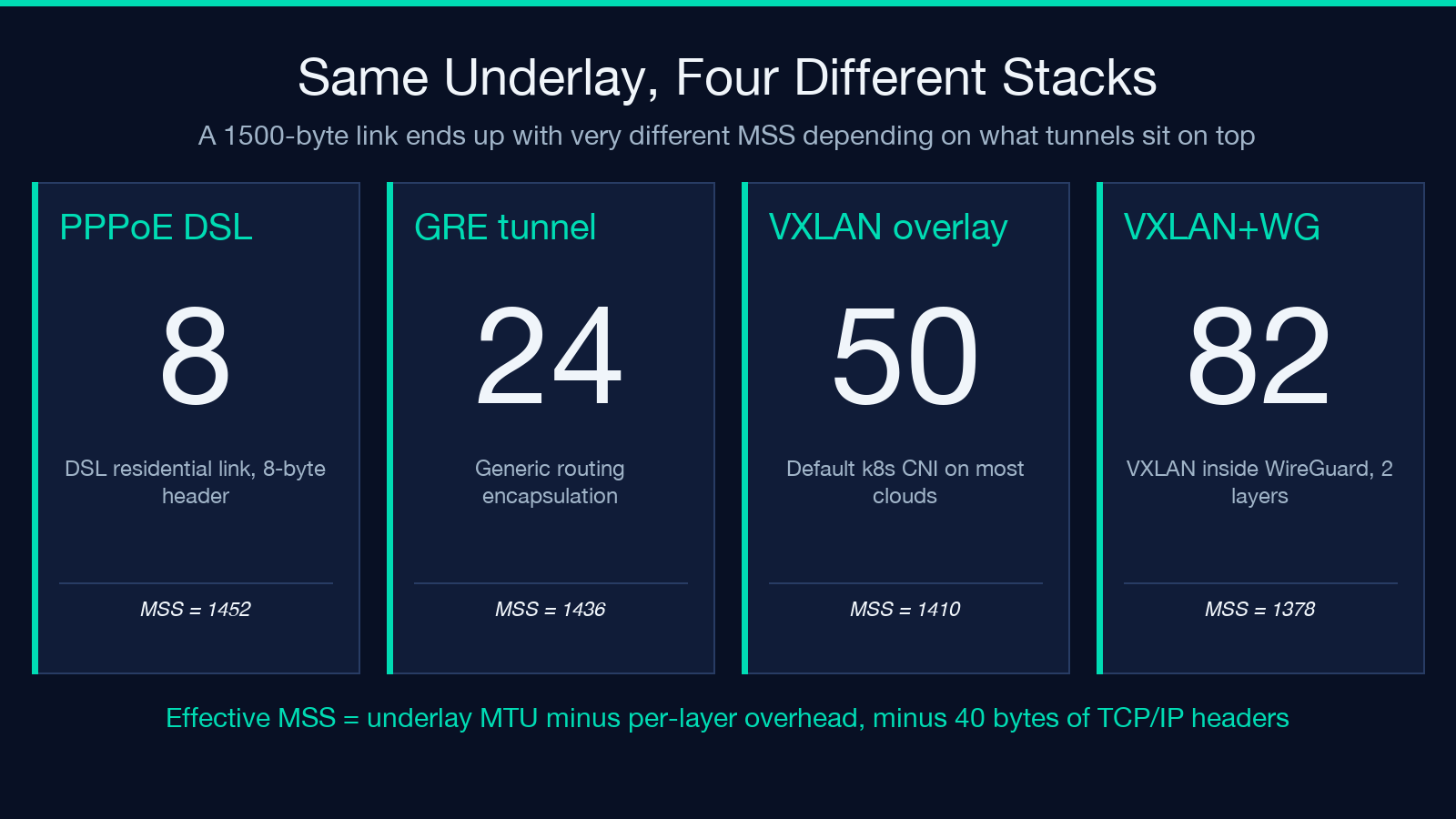
The calculator walks the encapsulation stack in physical-to-overlay order. PPPoE on a DSL link consumes 8 bytes (2 PPP + 6 PPPoE session), leaving 1492 effective MTU on a 1500 underlay. Add VXLAN on top and another 50 bytes disappear; add WireGuard inside that and 32 more; the calculator reports the cumulative subtraction at each step rather than a single black-box number. The order matters because some layers assume IP encapsulation and others assume raw Ethernet — the calculator refuses to silently recompute when you reorder the stack, and it flags when the resulting MSS would fall below the conventional 1380 minimum that most kernel TCP stacks auto-clamp to. Engineers running Calico or Cilium CNIs on top of WireGuard overlays usually arrive at the calculator already suspicious that 1452 is too generous; the tool confirms or denies in one pass.
Reading the Output Bands
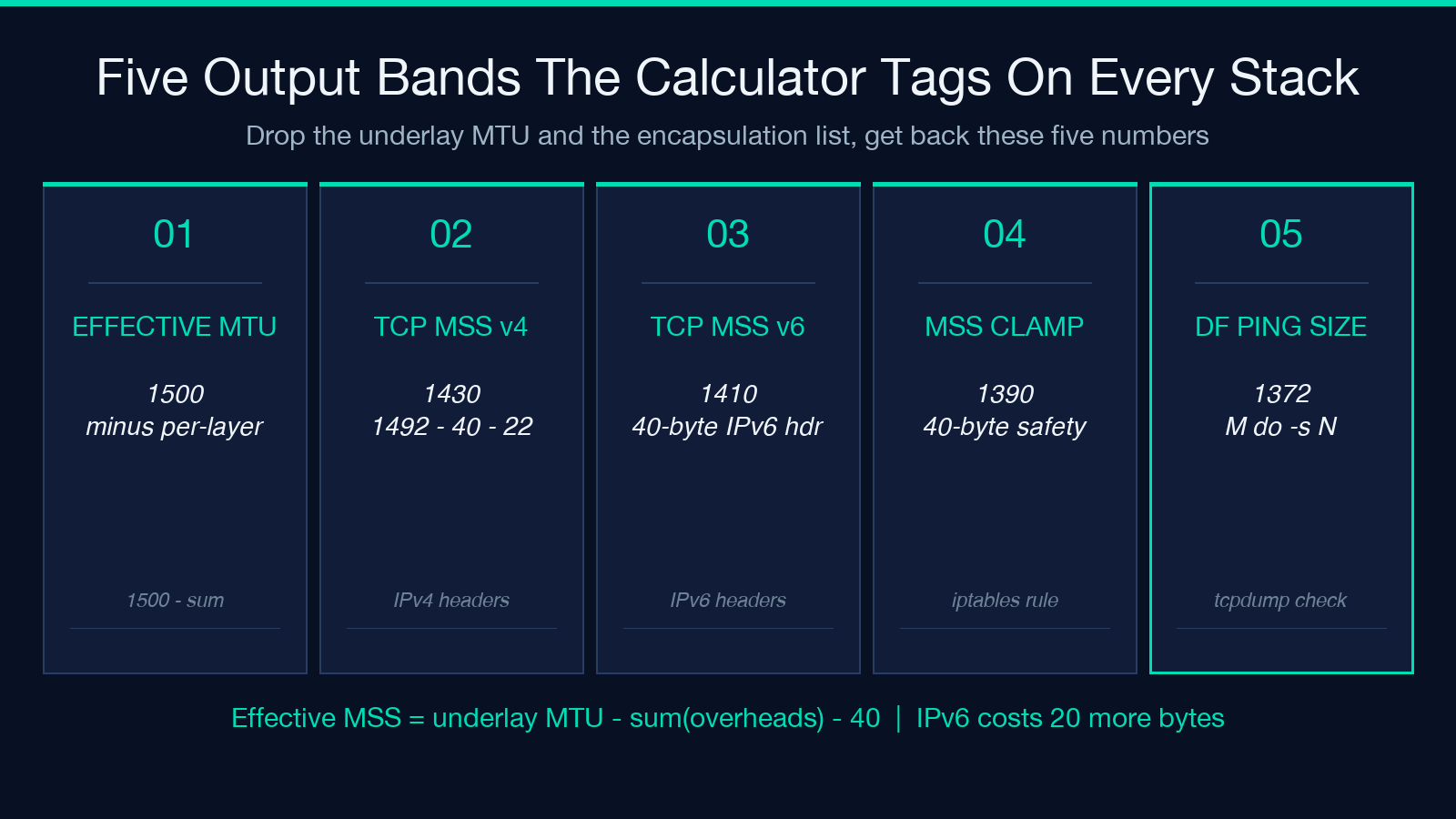
The calculator returns a single page with five distinct outputs: the cumulative MTU after each layer, the per-layer overhead (so you can see which layer is the offender), the TCP MSS for both IPv4 and IPv6 (a 20-byte difference most teams miss), the suggested MSS clamp value for iptables or sysctl, and the DF ping payload size you should run with ping -M do -s . For SRE and platform teams, the per-layer breakdown is the most useful — it makes the difference between “WireGuard ate 32 bytes” and “WireGuard ate 32 bytes inside a 50-byte VXLAN envelope inside a 4-byte VLAN tag” impossible to argue with. The MSS clamp suggestion is conservative (always 40 below the calculated MSS to leave room for IP options), and you can paste it directly into a tcp_wmem sysctl or a Cilium bandwidth-manager policy.
Pairing With PCAP and Network Security Samples
The calculator tells you what should happen on the wire. To verify it actually does, the PCAP Capture Samples library gives you a set of reference captures from clean single-tunnel paths and noisy multi-overlay paths — you can compare your live tcpdump against a known-good baseline and confirm whether the fragmentation you suspect is real or a tcpdump display artifact. For the policy side, the Network Security Samples bundle covers the firewall and MTU-clamping rules that turn the calculator’s MSS number into a working iptables or nftables policy without leaving the obvious 40-byte MSS gap that breaks path-MTU discovery. The two-sample combination — one for verification, one for enforcement — covers the full debug-to-deploy loop for any team that owns an overlay network.
How PMTUD Failure Looks in Production
Path MTU Discovery works when routers along the path send back ICMP “fragmentation needed” packets, and the source TCP stack shrinks its segment size. It fails when an upstream firewall or load balancer silently drops ICMP — the symptom is a connection that opens, sends the first SYN with a 1460-byte MSS, and then hangs on the first large write. The calculator’s DF ping payload size is exactly the test for this: if ping -M do -s fails with Message too long but succeeds with
Choosing the MSS Clamp Target
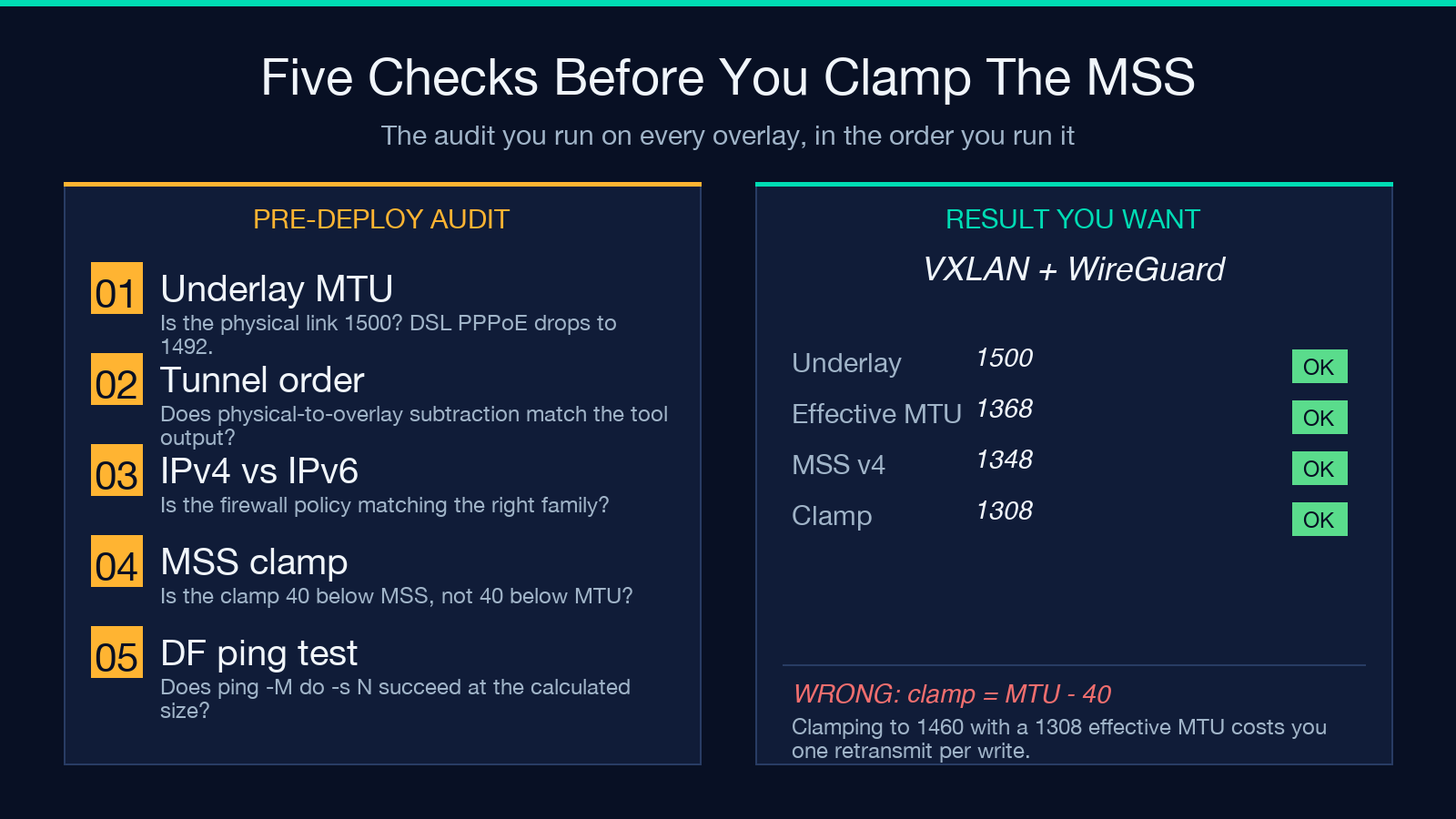
The conventional wisdom — “clamp MSS to 1380” — survives because most overlay stacks converge there, not because 1380 is special. The calculator computes the actual MSS for your stack, then suggests the conservative 40-byte-below clamp value. For a simple VXLAN overlay on a 1500 underlay, the effective MTU is 1450, the IPv4 MSS is 1430, and the clamp is 1390. For a VXLAN-inside-WireGuard stack, the effective MTU drops to 1368, the IPv4 MSS is 1348, and the clamp is 1308. Setting the clamp 10 bytes higher than calculated will cost you one silent retransmit per connection; setting it 50 bytes lower will cost you 3-4% of long-tail throughput on bulk transfers. The calculator makes the trade-off explicit instead of leaving it in the kernel default.
Verifying the Tunnel End-to-End
Once the calculator gives you a number, the verification loop is short. Run the DF ping from the same network namespace as the client application — not from the host’s root namespace — so the test path matches the application’s path. If the ping succeeds at the calculated payload and the application’s TCP connection still hangs, the problem is downstream of MTU and you should look at TCP window scaling or ECN negotiation. If the ping fails, the path is dropping ICMP or has an unexpected encapsulation the calculator didn’t see (most often an MPLS label or a second VPN layer between your tunnel and the destination). The calculator outputs an MSS-clamp suggestion that’s safe to deploy even in the “we don’t know what’s on the path” case; the 1308-clamp is conservative enough to survive most multi-overlay stacks without manual intervention.
The One Decision That Trumps All the Others
Across all the encapsulation and clamping decisions, one is decisive: whether your overlay network has IPv6 in the data plane. IPv6 mandates a 1280-byte minimum MTU and uses a 40-byte header (vs IPv4’s 20), which means the calculator’s IPv6 MSS output is always 20 bytes lower than the IPv4 output for the same encapsulation stack. Teams that ship IPv4-only overlays with IPv6 management planes regularly misconfigure MSS clamps because the wrong family is in the firewall policy. The calculator outputs both numbers, side by side, on the same page — and that’s the answer to the question “why does the same config work in staging and break in production” more often than any other single number in the overlay toolkit. Run the calculator, pick the right family, ship the clamp, then verify with PCAP.
