
A recipe scaler that knows 2¼ cups is 540 g, not 4.5 cups of confusion. Recipe scaling looks simple until you hit a line that reads “1¾ cups flour, sifted” and discover that the difference between 1.75 and 1¾ depends on which side of the Atlantic wrote the cookbook. Multiply that by four other lines that mix tsp with grams, doubled eggs by 0.5×, and salt that should not actually double when the batch doubles, and a recipe for 24 cookies turned into something that needs an actual kitchen experiment to fix. The Recipe Ingredient Scaler at Elysia Tools was built for that exact moment: paste the messy ingredient list, choose the new serving count, and read back quantities that a real cook can measure without grabbing a calculator.
The interesting design decision is what to do about seasonings. Doubling a chocolate-chip cookie recipe from 24 to 48 cookies should not double the salt and the baking soda linearly, because most recipes are not perfectly tuned to a single batch size — they were tuned to the cook’s palate at 24. The scaler applies a sub-linear curve (n^0.85 when n >= 2, n^1.0 when scaling down or holding steady) to salt, spices, leaveners, and extracts, while still printing the linear value underneath so you can see the gap. Flour, sugar, butter, eggs, and other structural ingredients scale by the raw ratio. The result is a list that reads like a recipe a chef would write, not a spreadsheet that multiplied every cell by two.
What the Parser Actually Reads
The input box accepts a free-form text dump of the recipe. Each line is parsed for three things: a quantity (which may be a decimal, a mixed number like 1¾, a Unicode fraction like ½, a range like 2-3, or a count like 2 large eggs), a unit (cup, tbsp, tsp, g, ml, oz, lb, or unitless for things that count), and the ingredient name. Lines that say salt and pepper, to taste or pinch of cayenne get marked unscaled and pass through untouched — no algorithm should be guessing how much salt a stranger wants.
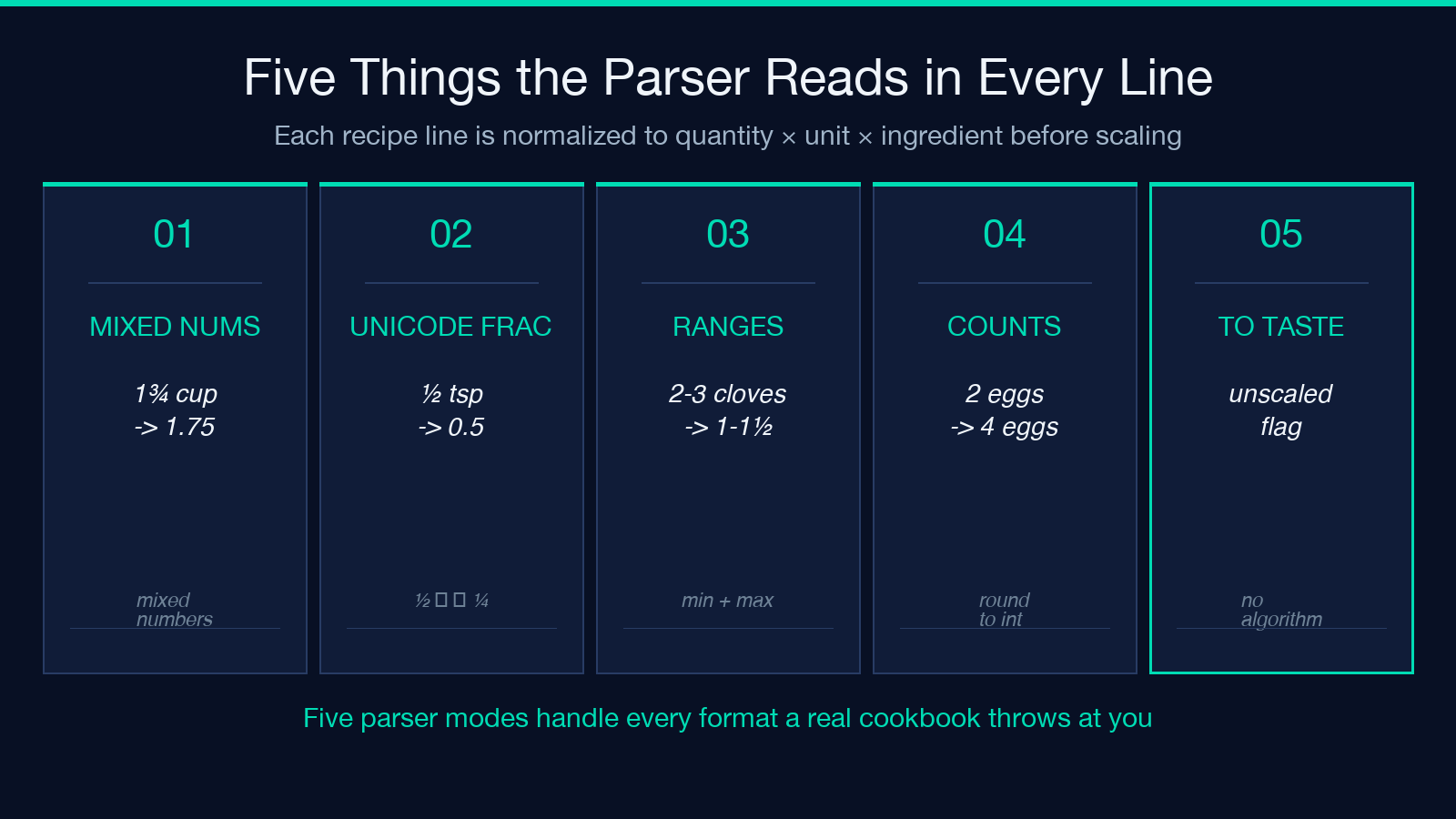
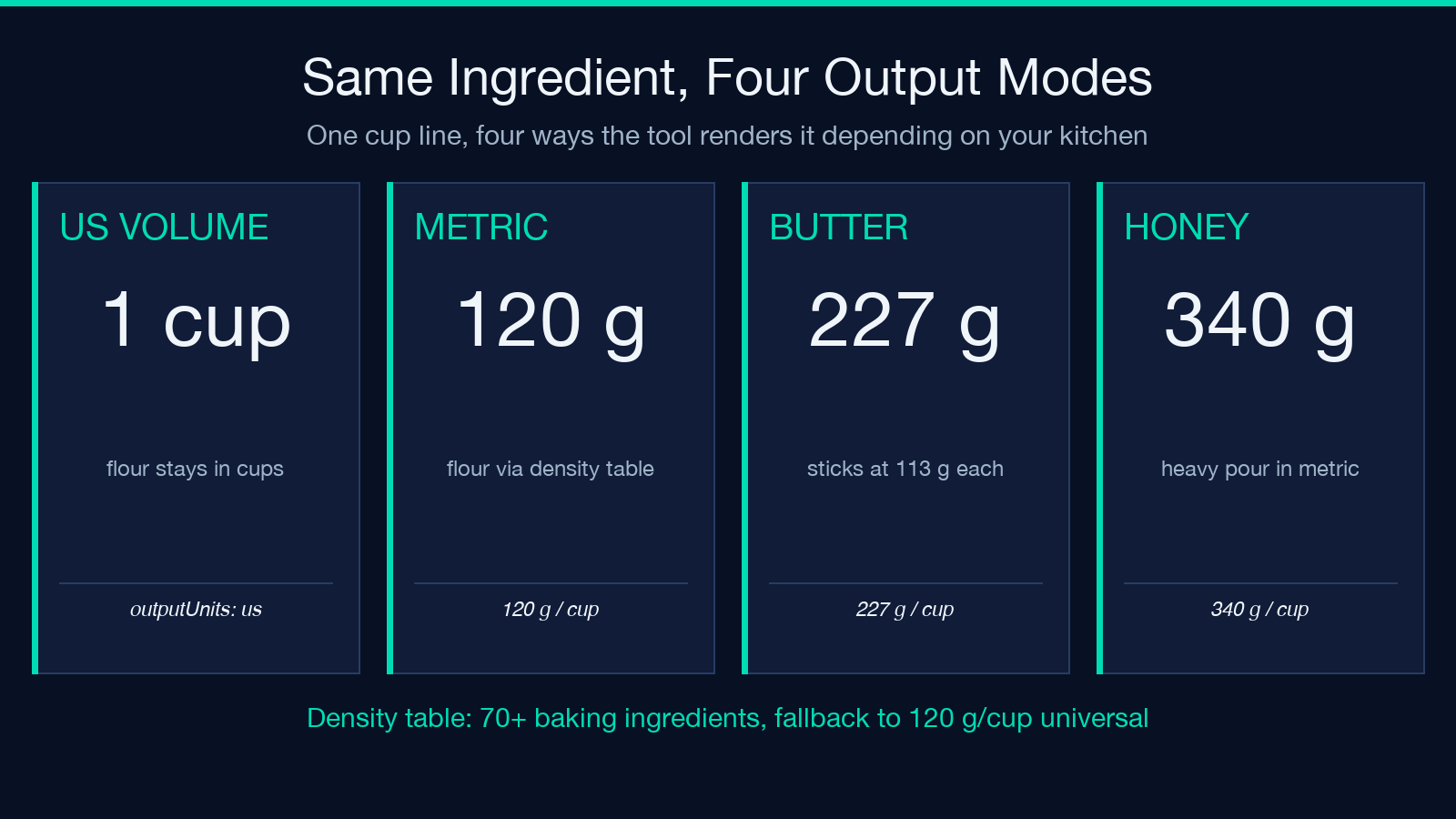
Mixed numbers are converted to decimals internally, but the output re-renders in the kitchen-friendly fraction closest to the scaled value: 0.375 cup becomes 6 tbsp, 0.5 tsp becomes ½ tsp, 1.25 cup becomes 1¼ cup. The display always prefers a unit that does not require a kitchen scale. If you ask for metric output, the cup measurements go through a per-ingredient density table — flour at 120 g/cup, granulated sugar at 200 g/cup, brown sugar at 213 g/cup, butter at 227 g/cup, honey at 340 g/cup — so a 1 cup line becomes the actual grams for that ingredient, not a universal 240 ml approximation.
The Smart Seasoning Curve
The sub-linear seasoning adjustment is the single feature that distinguishes a recipe tool from a multiplication tool. The math is adjusted = 1 + (linear - 1) × 0.85 when the factor n >= 2, and adjusted = linear when n <= 1. In practice this means doubling a recipe (n=2) applies a 1.85× multiplier to salt, baking soda, baking powder, yeast, vanilla extract, and any other ingredient flagged as a seasoning. Tripling (n=3) applies 2.55× instead of 3×. Halving (n=0.5) uses the linear value — reducing a recipe does not need a taste-buffer curve because the cook can adjust upward as they go.
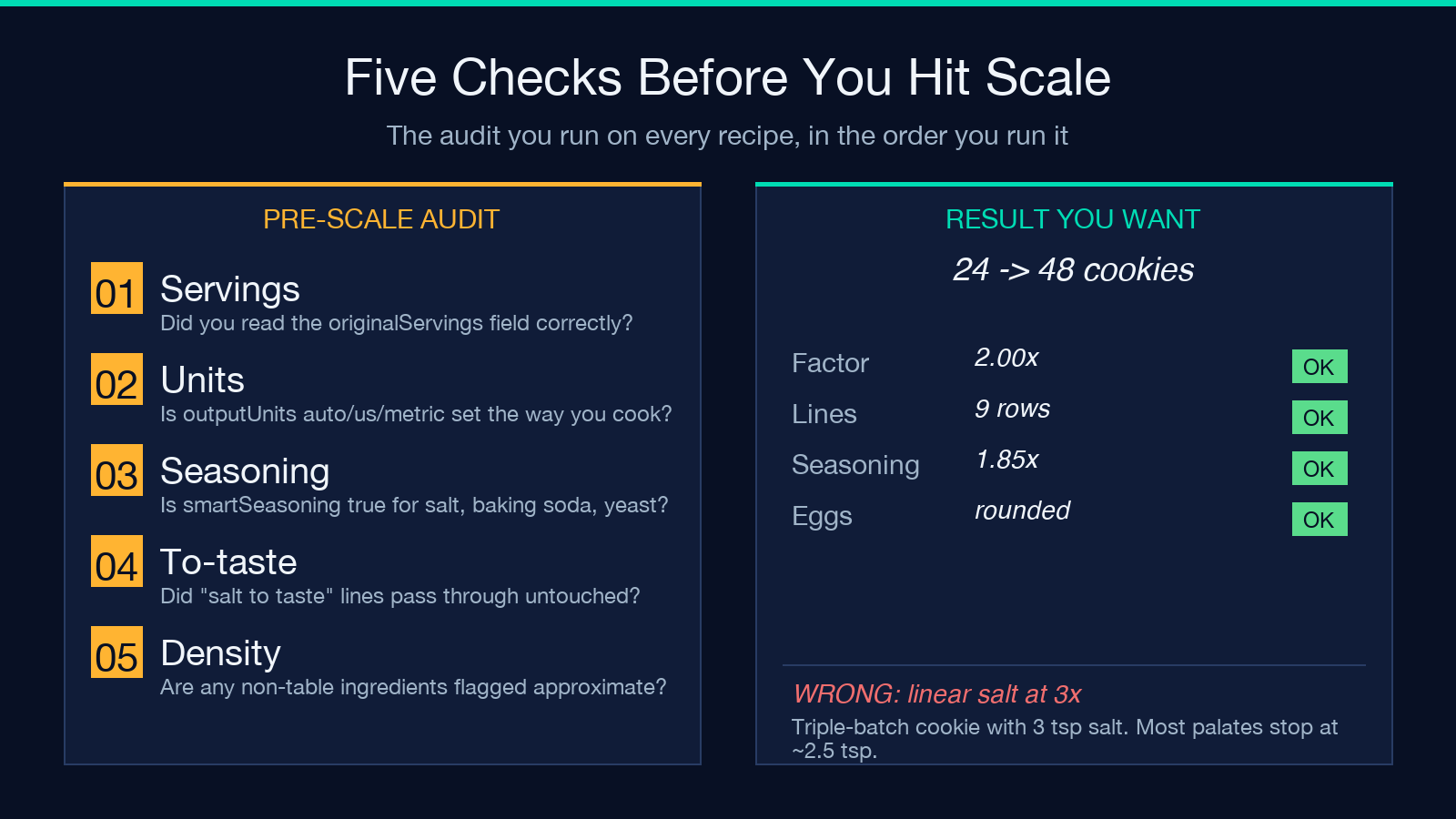
The classification of what counts as a seasoning is keyword-based: any ingredient name containing salt, baking soda, baking powder, yeast, vanilla, extract, spice, pepper, cinnamon, cumin, paprika, nutmeg, clove, cardamom, ginger (ground), or cayenne is flagged. You can disable the curve entirely with the smartSeasoning: false toggle if you have a recipe whose seasoning ratios are already tuned and you want a strict linear scale. The output always shows both values when the curve is on, so you can audit the gap.
Unit Conversion Both Ways
The output unit selector is auto, us, or metric. auto keeps the unit from the input line — if you wrote cups it stays in cups, if you wrote grams it stays in grams. us forces everything to US volume (cups, tbsp, tsp) where possible, with weight ingredients shown in ounces. metric forces grams and milliliters through the density table. The conversion is bidirectional: a recipe entered in metric (500 g flour) can be output in US volume, and the reverse works just as cleanly, because the parser normalizes everything to a canonical quantity × unit × ingredient triple before scaling.
A subtle behavior: ranges like 2-3 cloves garlic are split into a minimum and a maximum, both scaled, and the output preserves the range notation (2-3 cloves becomes 1-1½ cloves when halved). Counts like 2 large eggs scale as integers when the result is close to an integer, and as 2.4 eggs style decimals otherwise — but the output rounds eggs to integers because nobody cracks 1.4 eggs, and prints (about 2) if the rounded count drifts more than 0.2 from the true value.
What the Output Looks Like
The output is an HTML block with one row per ingredient line. Each row shows the scaled value, the original value in parentheses for cross-checking, a small icon if the smart seasoning curve adjusted the line, and a kept as written tag for any line the parser classified as to taste. The block is styled to be readable on a phone propped up on the cutting board, with large type for the scaled quantity and small type for the unit. No spreadsheet rows, no tables — just a vertical list a cook can read top to bottom.
If you scale a recipe and then scale it back, the output does not always exactly match the input, because the fraction renderer rounds to the nearest kitchen-friendly fraction. A 1 cup line that became 2 cups will become 1 cup again, but a 1/3 cup line that became 2/3 cup will become 1/3 cup only because the rounding happens to land there. The tool is honest about this: the output header includes a factor: 0.5× badge and a lines: 9 count, so you can verify the math at a glance without re-reading every line. Try a sample run at Elysia Tools and paste in a recipe you already trust — the differences between the tool’s output and your mental math are where the seasoning curve earns its keep.
Edge Cases That Actually Come Up
Three edge cases show up in nearly every home-cook workflow. First, doubling a recipe that already calls for 1 tsp salt in a sweet application — the curve applies, and the output is 1.85 tsp with the linear 2 tsp shown underneath, so the cook can decide which to trust. Second, halving a recipe that calls for 1/3 cup oil — the output is 2 tbsp + 2 tsp (the closest combination of US volume units that equals 1/6 cup) instead of a decimal. Third, scaling a soup where the ingredient list ends with salt and pepper, to taste — the unscaled line passes through unchanged regardless of the factor, because no algorithm should be deciding how much salt a stranger wants.
A fifth edge case worth knowing: ingredient lists that contain ranges (2-3 carrots) scale as a range, not as a single point estimate. A range of 200-300 g flour becomes 100-150 g when halved, not 125 g or 250 g. If you want a single point estimate, you can write 250 g (a single number) in your input and the range renderer will not engage. The parser distinguishes between a range (dash between two numbers on the same line) and a list of ingredients on separate lines (each line is its own row).
When the Density Table Is Not Enough
The per-ingredient density table covers roughly 70 common baking ingredients — flour, sugars, butter, oils, honey, molasses, cornmeal, oats, cocoa powder, baking chips, shredded cheese, sour cream, yogurt, buttermilk, cream, milk, water, broth, salt, baking soda, baking powder, yeast, cornstarch, gelatin, and the standard spices. If you are scaling a recipe that contains an ingredient not on the list — say, masa harina, almond flour, brown rice flour, or a non-standard sugar — the metric output falls back to a 120 g/cup universal approximation and prints a density: approximate warning next to the line. The warning is small but visible, and the US-volume output is unaffected because it does not need a density.
For ingredients that count (2 large eggs, 1 onion, diced, 3 cloves garlic), no density table is needed — the count just scales linearly. For liquids with no density in the table (most teas, infused oils, fish sauce), the metric output uses 1 g/ml as a safe default and prints the same approximate warning. If you find yourself needing a density that is not in the table, the tool is open-source and the density list is a single JSON object in the source — adding a new ingredient is a one-line change and a pull request.
Putting It Together
The fastest way to use the tool is to paste your recipe as a numbered or bulleted list, choose the new serving count, and read the output. For a recipe that already scales cleanly (a soup, a stir-fry, a casserole), the smart seasoning curve does most of the work and you barely need to read the linear values. For a recipe where the seasoning ratios are the entire point of the dish (a salted caramel, a spice rub, a vinaigrette), disable the curve with smartSeasoning: false and let the linear scale speak for itself. For a recipe you have never scaled before, do a dry run on a factor of 1.0 first to see how the parser interprets each line — the output preserves every line, so you can correct typos in the ingredient names before they propagate to the scaled output.
The tool does not store your recipes. Every paste-into-an-existing-leaves-no-trace policy is the default; the input box is stateless and the output is rendered in the browser. There is no account, no save button, no history page. If you want to keep a scaled version, copy the output HTML and paste it into a note.
Try It on Your Own Recipe
The fastest way to learn what the smart-seasoning curve is doing for you is to paste in a recipe you have already scaled by hand and see where the tool agrees with your instinct. Most bakers land within 5–10 percent of the curve for salt and baking soda on a 2× factor, and within 10–15 percent on a 3× factor — the gap is largest for very large batch sizes where human intuition starts to flatten for the same reason the algorithm does. For more kitchen-math tools and recipe-aware converters, browse the Math & Numbers category or the full Elysia Tools index for related helpers.
