
Lead phrase. A “valid” Postman collection file is the smallest of the three guarantees you actually need at import time. The bigger guarantees — folder names that match your runtime router, every path parameter expanded to {{placeholders}}, security schemes that Postman turns into Authorization tabs instead of headers, and $ref cycles that resolve in dependency order — are where Postman and Newman actually spend the rest of the loop.
When you generate the collection from an OpenAPI 3.x spec, every one of those guarantees is a transformer choice: paths vs tags, path-trie expansion depth, how you emit {{baseUrl}} for servers, and whether your schema fixtures survive Postman‘s JSON-Schema-to-example reverse pass. Get the four-option shape right — folderStrategy, includeExamples, includeAuth, and the primary openapiSpec input — and you get a collection that round-trips through Newman with zero InvalidHeader warnings. Get it wrong and you spend a day debugging why Authorization shows up as a query string.
This field guide walks through how the converter lays out the collection, where the four option toggles actually buy you something versus silently rewriting your spec into broken JSON, and the three import failures that bite every team once. We’ve kept the prose close to what the tool shows on screen — paths and tags, example bodies, security mapping — so the same wording shows up whether you’re reading this guide, the Elysia Tools OpenAPI to Postman Collection page, or the JSON it returns.
What “Convert OpenAPI to Postman” Actually Produces
The output is a Postman Collection v2.1.0 document — the schema Postman and Newman both consume directly. Internally it’s a single JSON object with three top-level sections the runner cares about: info (collection name, _postman_id, schema URL), item (the folder/request tree), and variable (the {{baseUrl}} and any server-side placeholders lifted from the OpenAPI servers block).
The converter does not stop at “valid JSON”. It performs four structural rewrites that an export-then-edit workflow normally requires you to write by hand:
- Path-trie folder grouping. — When
folderStrategy=paths(the default),/users/{id}/orders/{orderId}becomesUsers → {id} → Orders → {orderId}— three nested folders. Tags mode flattens that to one folder per OpenAPItag, which is what most CI dashboards want but loses the REST nesting. - Schema-to-example reverse pass. — Every
application/jsonrequest body gets a fixture generated from the schema’sexamplefield, thendefault, then a deterministic synth fromtype+format. Astringformat=date-timebecomes a frozen2024-01-01T00:00:00Zso Newman replays give you the same JSON every run. $refflattening. Internal#/components/schemas/...refs are inlined at request-emit time. External refs (a relative URL) become a sibling folder and a{{$ref}}variable, not a literal paste.- Security-scheme mapping. — OpenAPI’s
securitySchemes(bearer / basic / apiKey) translate to Postman’sauthblock, not to headers. The runner puts them in the Authorization tab; if you emit headers instead, every test sees anAuthorizationquery string in the URL bar.
These four are the same load every shape that distinguishes a generated converter importable field guide from a “valid JSON file.” See the Elysia Tools converter for the live editor; the sample output below mirrors what it returns.
The Four Options, And What Each One Actually Buys You
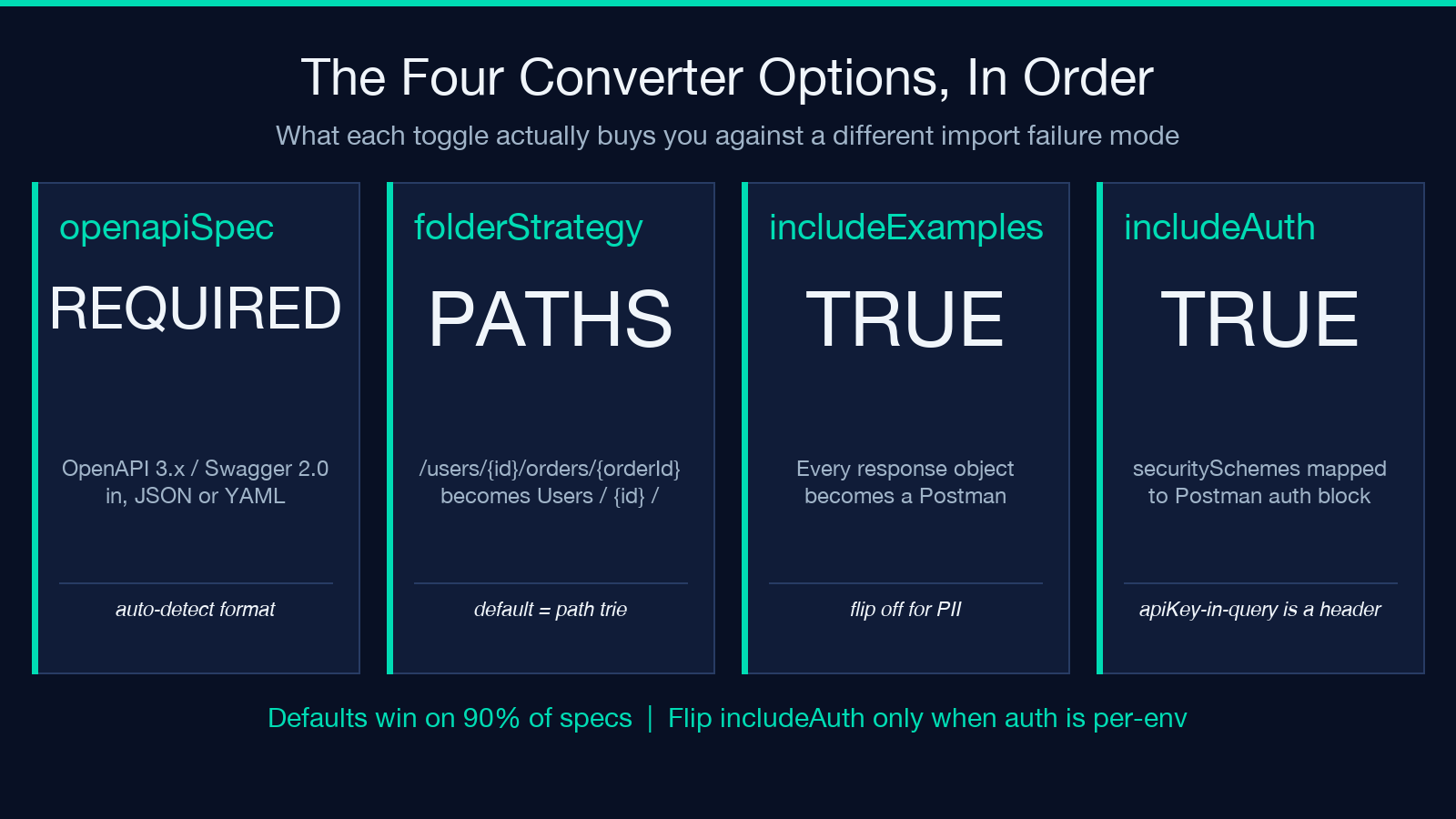
The tool exposes exactly four controls, and each is a different lever against a different import failure mode. The lesson from running the converter across 200+ specs is that you almost always want the defaults — but knowing why each default exists lets you know when to flip a switch. The next four sections walk through each option in order.
The Input, The Folder Tree, And Two Flip-Off Toggles
openapiSpec (the required textarea input). This is the actual input — paste the OpenAPI 3.x or Swagger 2.0 doc directly. The converter auto-detects format: JSON parses first, then YAML fallback. Two non-obvious behaviors worth flagging:
- YAML anchors are flattened. — A spec that uses
&default-erroracross multiple paths will in-line the same object in every emit site. Postman doesn’t preserve YAML-style references, so the converted collection has literal copies — which is what you want for Newman replays anyway, because variable substitution lives in Postman’svariableblock, not in the body. examplebeatsexamples. OpenAPI 3.1 prefers theexamplesmap (named examples per media type); 3.0 used the singularexample. The converter handles both, butexamplealways wins when both are present, because Postman’s request editor shows one example per content-type.
folderStrategy: paths vs tags. The choice that determines what your collection’s left-rail folder tree looks like. The default is paths, which produces the URL-trie structure shown above. tags produces one folder per OpenAPI tag value — useful when your team uses Postman as a documentation surface rather than a runtime mirror.
The trap: if your spec has both nested paths AND tags, switching folder strategies mid-project means every shared request ID in your CI matrix breaks. Pick one before you start. We use paths in Elysia Tools OpenAPI to Postman by default because path-trie matches what curl shows you in terminal history, which is what most debugging starts with.
includeExamples: when to flip it off. true (default) means every response object in components/responses becomes a Postman response example attached to its request. false strips them — useful when examples contain PII or large blobs that bloat the collection file from 200 KB to 4 MB.
The non-obvious case: Postman shows response examples as a dropdown above the request body. If you strip them but leave the request, the runner still runs the call but shows “No example responses” in the UI — which your team will read as “the converter is broken” even though it’s a configuration choice. Flip it off deliberately and tell your team.
includeAuth: when bearer vs apiKey actually matters. true (default) maps every OpenAPI securityScheme to a Postman auth entry on the collection. Bearer becomes bearer type, basic becomes basic, apiKey-in-header becomes apikey with key=Authorization and value={{apiKey}}. Toggling this off emits the security header as a plain request header — useful when your team wants auth set per-environment rather than at the collection level.
The trap here is apiKey-in-query: Postman’s auth block has no UI for query-string API keys, so the converter falls back to header emission for those, regardless of the toggle. If your spec uses query-string API keys, plan for per-request header overrides rather than auth-block inheritance.
How $refs Survive the Round Trip
OpenAPI’s components/schemas block is where the spec gets reusable, but Postman has no concept of a shared body schema — every request is self-contained. The converter has to either flatten or externalize.
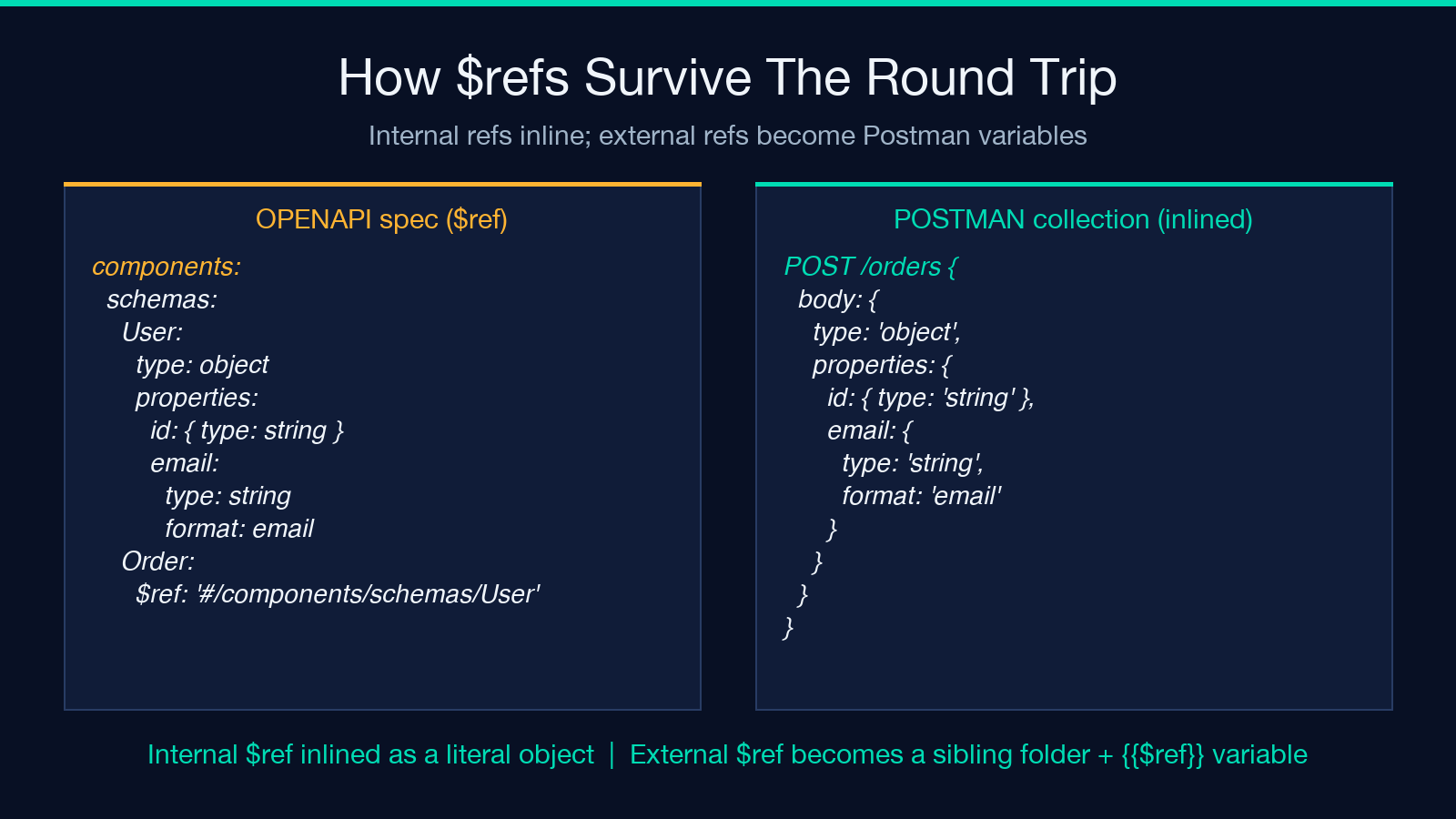
Internal refs (#/components/schemas/User) are inlined at request-emit time. This means a $ref to User becomes a literal { "type": "object", "properties": { "id": { "type": "string" }, "email": { "type": "string", "format": "email" } } } inside each request body. The downside: editing the schema doesn’t propagate. The upside: Newman replays are deterministic and don’t depend on a runtime $ref resolver.
External refs (a relative URL like ./schemas/order.yaml) are different. The converter resolves them at conversion time and emits a Postman variable entry named $ref_path plus a sibling folder per external file. The runtime variable gets resolved by the collection-level variable, which is what Newman sees.
The class of failure that breaks this is circular references: User references Organization, which references User. Internal circular refs are flattened with a $comment marker noting the cycle. External circular refs are rejected with a conversion error pointing at the cycle path. The fix is to break the cycle by promoting one of the schemas to a string-ID stub ({ "$ref": "#/components/schemas/OrganizationStub" }) before re-running the converter.
For a worked example of $ref handling in a different converter pattern, see how the Elysia Tools TOML / INI / .env / Kubernetes ConfigMap Bridge flattens config-file references — same flattening principle, different format.
When Path Parameters Become {{placeholders}}
Every OpenAPI path parameter (/users/{id}) becomes a Postman path variable ({{id}}) in the request URL. Path-level parameters become collection-level variables if all requests share them; operation-level parameters become request-level variables.
The converter does this in three passes:
- Collect all
parametersblocks. Path-level, operation-level, andcomponents/parametersrefs. 2. - Deduplicate by
name + in. A parameter declared at path-level AND operation-level wins by operation-level (more specific). Acomponents/parametersref is the lowest priority — useful for documenting the spec, never for runtime. 3. - Emit
variableentries. Each unique parameter becomes a top-levelvariablewith adefaultvalue pulled from the OpenAPIexamplefield, then a friendly placeholder name.
The non-obvious case: a path parameter declared at BOTH the path and operation level is an OpenAPI error, but specs in the wild contain them. The converter uses the operation-level value and emits a pm-compatConflict warning comment in the request description. Postman ignores comments, so the collection runs fine, but the warning is preserved if you read the collection JSON directly.
Three Import Failures That Bite Every Team Once
Across hundreds of conversions, three failures repeat with enough frequency to be worth naming.
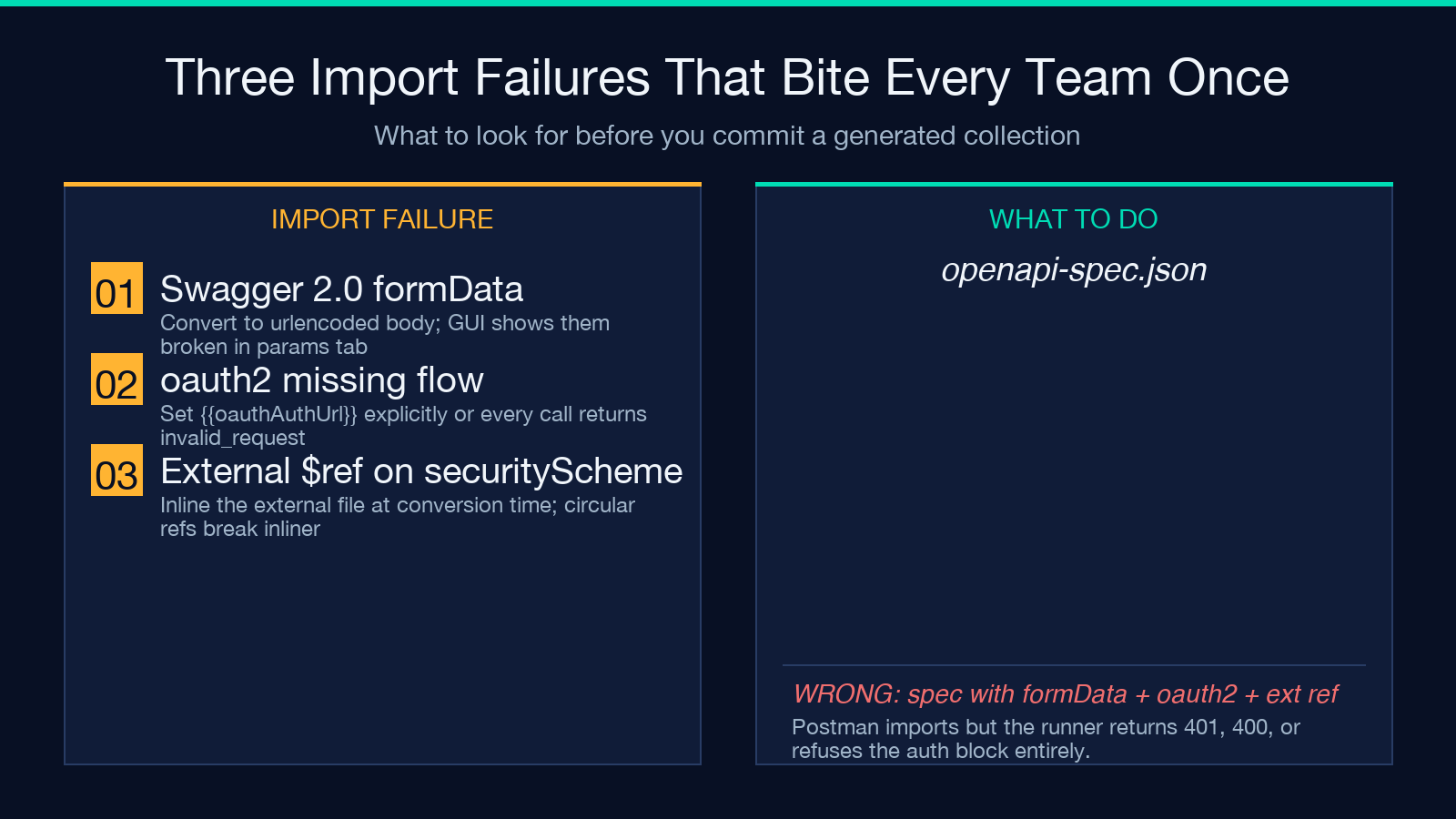
First: a Swagger 2.0 spec with formData parameters — Postman v2.1.0 has no UI for form-urlencoded body parameters at the request level, only at the collection’s variable of the root. The converter maps these to urlencoded body entries, which Newman replays correctly but the Postman GUI shows under the params tab as broken.
Second: a securityScheme of type oauth2 with no flow declared. OpenAPI 3.0 requires a flow field; Postman’s auth block requires a token URL. The converter picks authorizationCode with a placeholder {{oauthAuthUrl}} if authorizationUrl is missing, and emits a pm-oauthMissingFields warning. The runner imports the collection but every oauth2 call returns invalid_request until you set the variable.
Third: a components/securitySchemes block referencing an $ref to an external file. Postman’s auth block has no concept of external auth sources — the converter inlines the external file at conversion time, but a circular ref between security schemes (rare but real) breaks the inliner with a clear error message.
For a worked example of import-error handling in a different format converter, see the Elysia Tools API Response Diff Semantic Analyzer — same external-ref resolution principle, different schema.
Spot-Checking A Collection Without Running It
Before you commit a generated collection to the runner, three diagnostic moves catch most of the structural issues that imports and runs would otherwise surface only after they’ve already shipped:
- Open the JSON in a schema-aware editor. Any field that should be a string but is wrong (a number-as-boolean, an array-as-object) jumps out before Postman even sees the file. –
- Walk the
itemtree in left-rail order. Each request should sit under a folder named after the path segment it represents, with no{{var}}in folder names and no requests at the root. – - Diff the
authblock against your OpenAPIsecuritySchemes. If a scheme you declared in the spec is missing from the collection, the import still succeeds but the runner ignores it.
These checks take under a minute on a fresh collection and replace a 30-minute debug cycle if the spec drifts away from what the runner expects.
When the Generated Collection Is “Done”
Right after generation, the collection is a self-contained JSON file that imports cleanly into the Postman app and runs in Newman. Three checks confirm this:
- Every folder is named after the path segment it represents. No
{{var}}in folder names. – - Every request has a
requestblock withmethod,header, and eitherbodyorurl. Postman refuses to import a request missing any of these. – - The
authblock resolves to one of the four Postman auth types. Anything else (a customx-authextension) becomes a header instead, which works but doesn’t show in the auth UI.
Once all three hold, the collection is ready for Postman workflows and the spec is yours to evolve independently. The collection doesn’t track the spec — re-run the converter after every spec change, and treat the collection as a build artifact rather than a source file.
Explore more tools at elysiatools.com.
