
Most binary-file bugs hide in the headers that your IDE never opens. A 4-byte magic number, a 16-byte section table entry, an export directory the linker hides behind an RVA — every one of those is a place where a Windows .exe, a Linux shared object, or a Mach-O dylib quietly breaks. The Windows PE / Linux ELF / Mach-O Binary Header, Section, Import & Export Inspector parses all three end to end so you can read those headers the way the loader does — without firing up a hex editor.
What the parser actually does on upload
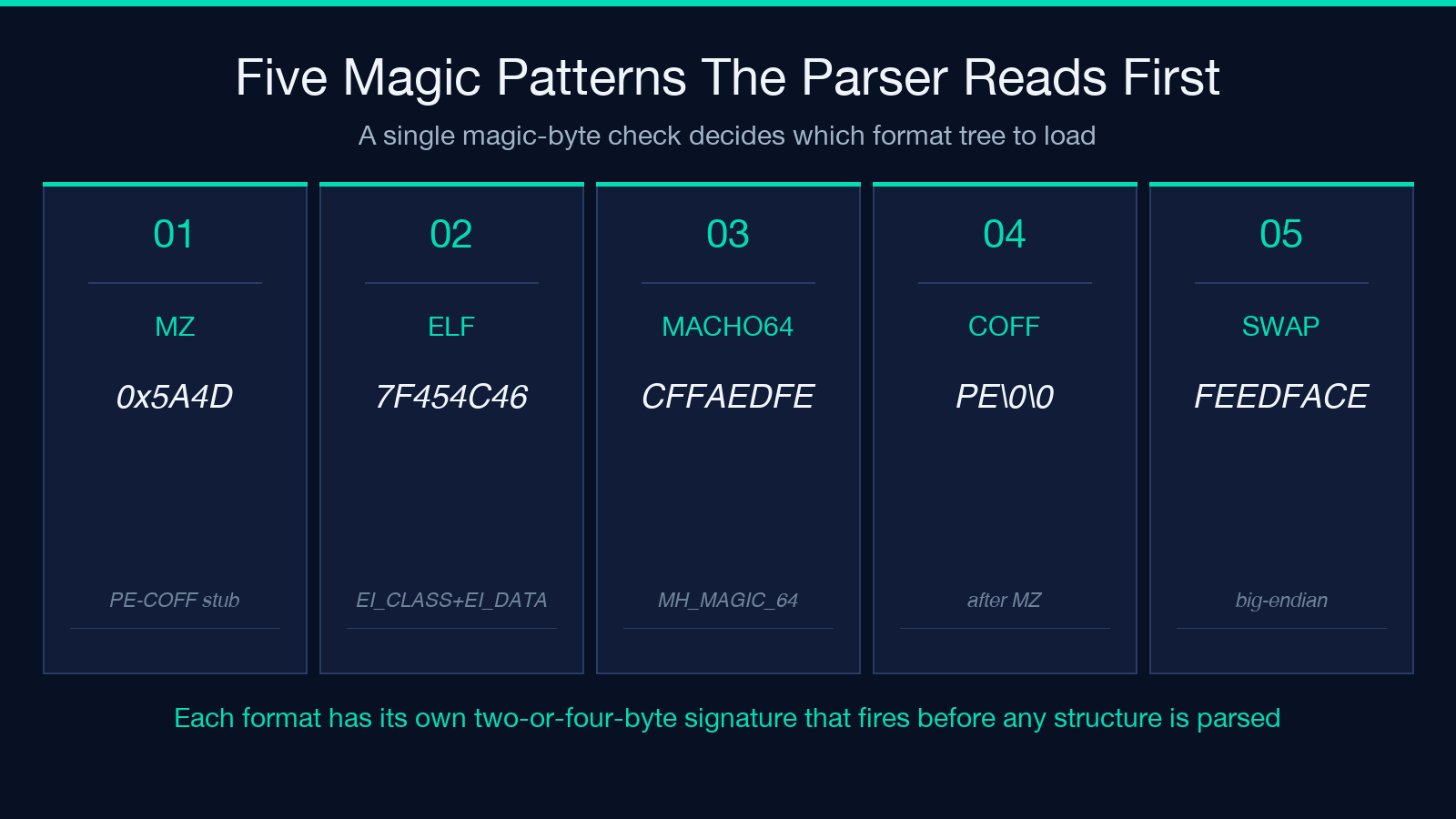
The first thing the inspector does is read the magic bytes and pick a parser. MZ (0x5A4D, the DOS stub) points it at the e_lfanew offset, which holds the PE signature; the ELF parser looks at EI_CLASS / EI_DATA / e_machine; the Mach-O parser checks MH_MAGIC_64 or the byte-swapped variant. Once it knows the format, it walks the structure tree top to bottom and produces a single human-readable report — no native FFI, no WASM, no subprocess shell-outs; the file is parsed locally in bounded chunks.
The value proposition: you paste a binary in, you get back the same fields dumpbin /headers, readelf -a, or otool -l would show, but cross-architecture and side-by-side. You can compare a Windows PE32+ console executable, a Linux ELF64 PIE shared object, and a Mach-O 64-bit dylib in the same session and see exactly which fields mean the same thing in each format.
Why the COFF optional header is where security lives
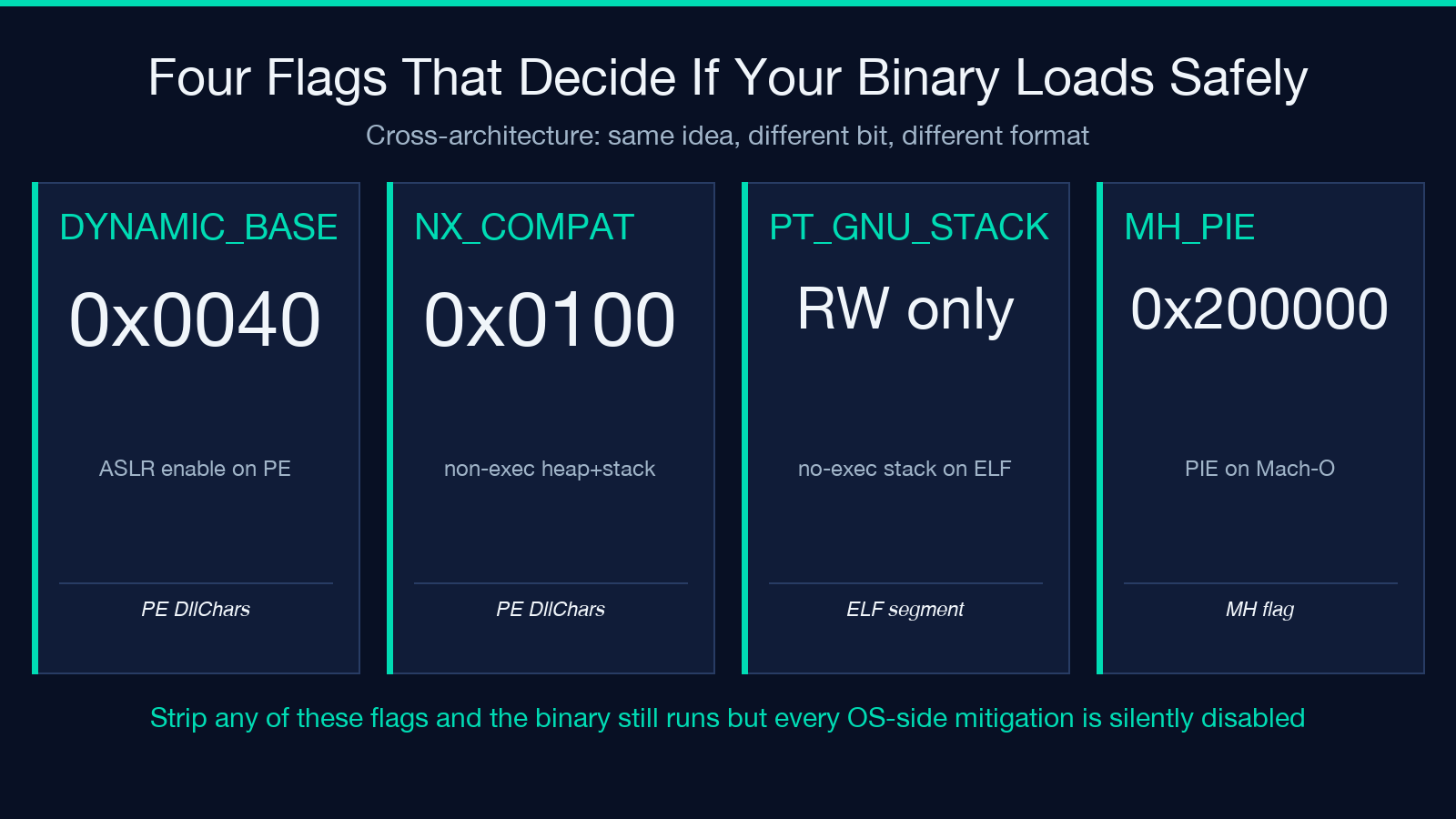
IMAGE_OPTIONAL_HEADER64 looks like a boring 112-byte struct, but three bits inside it decide whether your executable gets the protections the OS can offer. DYNAMIC_BASE (0x0040 in DllCharacteristics) opts into address space layout randomization; NX_COMPAT (0x0100) opts into non-executable heap and stack; HIGH_ENTROPY_VA (0x0020) lets the loader use 64-bit ASLR entropy. Strip those flags — accidentally or because the linker template dates from 2010 — and the binary still runs, but every exploit mitigation your OS can offer is silently disabled.
A pre-deploy sanity check used to mean firing up dumpbin /headers and squinting. With the inspector, you upload the .exe or .dll and the report tags the binary as ASLR: enabled, NX: enabled, CFG: enabled (Control Flow Guard is bit 0x4000), HIGH_ENTROPY_VA: enabled, with the actual DllCharacteristics word printed below for cross-check. The same report flags the subsystem (IMAGE_SUBSYSTEM_WINDOWS_CUI / GUI), the entry-point RVA, and the image base — so a build that drifted to a wrong subsystem shows up immediately, not three production deploys later.
The ELF DT_NEEDED list is your Linux deployment manifest
On Linux, DT_NEEDED entries in the .dynamic section are the runtime loader’s to-do list. Each one names a shared object the binary cannot start without — libc.so.6, libpthread.so.0, libssl.so.3, libstdc++.so.6. Forget one in your Dockerfile’s base image and the binary fails to start with a message that does not name the missing file directly on every distro. The inspector reads .dynamic, pulls out the DT_NEEDED and DT_SONAME entries, and prints them as a plain list. You can scan it against the packages in your base image in seconds.
For PIE detection the parser looks at e_type == ET_DYN plus a PT_INTERP program header, both of which are required for a position-independent executable. A binary built without -pie looks identical to a regular .so until it tries to load at a fixed address and the kernel rejects it on modern Linux. The inspector flags that case explicitly: “Not PIE: e_type=ET_EXEC, no PT_INTERP” — the same warning checksec.sh --output=json would emit, but inline rather than as a separate shell pipeline.
For a worked example of PIE detection and DT_NEEDED listing side by side with a real ELF64, the Elysia Tools hub has the comparison view pre-loaded.
RVA-to-file-offset math is where Windows reverse engineers get stuck
Every Windows binary uses RVAs (Relative Virtual Addresses) for almost everything — the entry point, the import directory, the export directory, the resource directory. The file on disk uses raw byte positions. To turn an RVA into a file offset you walk the section table: find the section whose VirtualAddress <= RVA < VirtualAddress + VirtualSize, then add (RVA - VirtualAddress) + PointerToRawData. That’s three fields, three subtractions, three chances to get the math wrong by a byte and read garbage.
The inspector does this resolution for every interesting RVA — imports, exports, resources, exception table, TLS callbacks — and prints both the RVA and the resolved file offset for each. It also highlights the section the RVA landed in (.text, .rdata, .rsrc) so you can sanity-check whether the import directory you expected to be in .rdata actually lives there, or whether some pre-link step moved it to .idata. A wrong section is the first sign of a custom linker script that nobody documented.
Imports and exports are where license and ABI leak out
The PE import directory lists every DLL the binary depends on, with the hint table and the import name table pointing at each function. For license audits this list is ground truth: if your proprietary application links against GPL-only symbols, the import directory is where that fact is visible. The inspector prints DLL names with their imported functions in the same view, so the audit is one screen rather than two dumpbin /imports runs.
Exports work the same way. IMAGE_EXPORT_DIRECTORY lists the functions the binary makes available to other binaries; the export name table and the export ordinal table map between names and numeric IDs. A library that exports more than its public API — every internal function exposed for debugging, for instance — is a slightly larger attack surface than the documentation suggests. The inspector counts both and prints them side by side, so a “small public API” can be cross-checked against “300 exports” in one glance.
Mach-O load commands are not PE data directories
A Mach-O binary’s load commands do the work that PE data directories and ELF program headers do on the other two formats, but they are a flat list of typed records — LC_SEGMENT_64, LC_SYMTAB, LC_DYLD_INFO, LC_LOAD_DYLIB, LC_ID_DYLIB, LC_MAIN, LC_UUID — rather than a fixed table at a known location. The inspector walks the load command list in order, classifies each by type, and groups them by purpose: segments and sections, symbol tables, dynamic linking info, entry point and UUID.
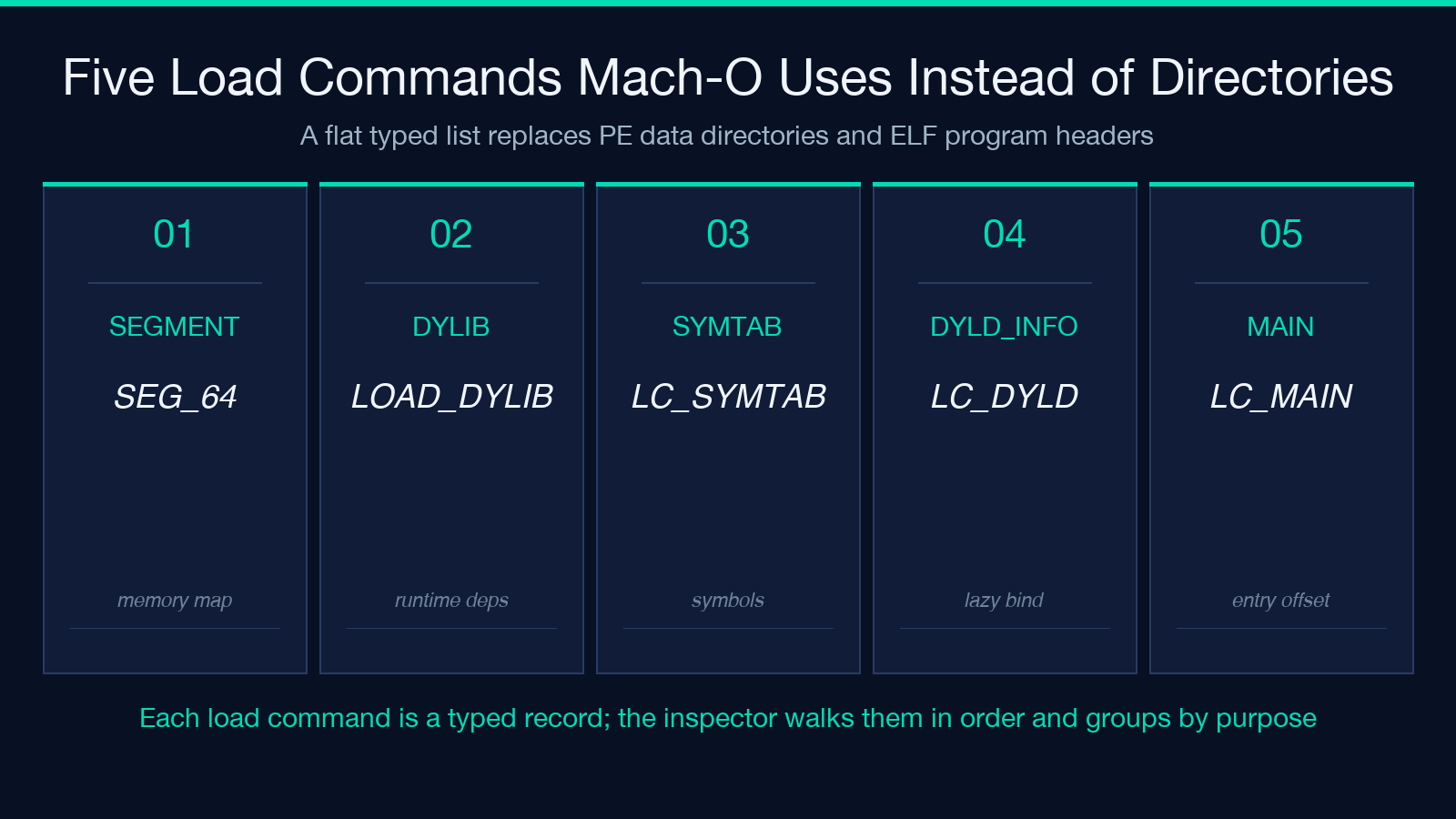
For a LC_SEGMENT_64 the inspector expands the contained sections inline (similar to a PE section table) so the Mach-O report reads top to bottom the same way a PE report does. For LC_LOAD_DYLIB and LC_ID_DYLIB it prints the dylib name and the compatibility version / current version pair, the same way the inspector would print a Linux DT_NEEDED and DT_SONAME. The cross-architecture layout is the point: a Windows engineer can read a Mach-O report without first reading Mach-O.
Cross-architecture annotations catch subtle format skew
The same idea means different things on each format. ASLR is DYNAMIC_BASE on PE, ET_DYN + PT_INTERP on ELF, and the MH_PIE flag on Mach-O. NX (no-execute) is NX_COMPAT on PE and PT_GNU_STACK with the X bit off on ELF; Mach-O expresses it as MH_NO_HEAP_EXECUTION. The inspector normalizes the names — “PIE: enabled”, “NX: enabled” — and prints the format-specific evidence below. A binary that is PIE on Linux and not-PIE on Windows, for instance, is a configuration mismatch worth catching in CI, not at the user’s first crash.
The hex preview the inspector adds at the bottom of the report makes the cross-check physical: the same bytes (7F 45 4C 46, 4D 5A, CF FA ED FE) that name the format on disk are visible at the top of the preview. If the report says “ELF” but the preview starts with 4D 5A, you have either the wrong file or a polyglot — both worth knowing before you ship.
When to use the inspector and when to reach for a heavier one
The inspector is the right tool for the 95 percent case: a single binary, three formats, headers through to imports and exports, in the browser, no upload, no install. It is not a disassembler, a decompiler, or a control-flow analyzer. If you need to step through instructions, trace calls, or recover high-level code structure, the inspector tells you where to look in the binary, but the actual analysis lives in tools like Ghidra, IDA, or radare2.
For deployment-time checks — ASLR/NX/CFG flags, DT_NEEDED against your base image, exports smaller than the public API — the inspector is faster than the local toolchain and the report is shareable. For reverse-engineering research it is a triage step before the heavy tools come out. Either way, the headers stop being invisible.
Explore more binary-format tools at elysiatools.com/en/tools.
