
Three semantic-convention releases, twenty-five renames, and a single leftover http.target that no auto-rewriter can split. That’s the shape of an OpenTelemetry upgrade between v1.20.0 and v1.27.0 once a production codebase has HTTP, database, and messaging spans wired in. The work looks mechanical until the rename map and the dashboard JSON refuse to agree, and until one attribute — the one your alerting rule depends on — turns out to have been removed rather than renamed. If your CI is failing on telemetry schema drift, the fix is not a search-and-replace script. The fix is a layer-aware migration table, an honest diff, and a collector rename_attribute_actions block you can paste into the pipeline without re-deriving it by hand.
OpenTelemetry’s semantic conventions are the contract that lets a backend query http.request.method and get the same answer regardless of which SDK produced the span. When that contract changes shape between minor versions — and v1.23.1, v1.24.0, and v1.27.0 each reshaped a namespace — every emitter in your fleet, every dashboard panel, and every alert rule is suddenly looking at the wrong column. A migration tool that understands each layer in isolation will silently under-report the churn; a migration tool that applies them naively in sequence will miscount duplicates. The trick is to run the three layers as a stack, not as a single pass.
This field guide walks through what a real v1.20.0 → v1.27.0 migration looks like across HTTP, database, and messaging attributes, why a layer-stacked approach beats a flat search-and-replace, where the rename_attribute_actions collector block actually lives in a production pipeline, and how to keep Grafana dashboards synchronized without a Tuesday-afternoon outage. The tool this guide is built around — the OpenTelemetry Semantic-Convention v1.20 → v1.27 Attribute Migration Tool — handles the seven-attribute Node.js case end-to-end, but the principles apply to any language or config format you paste in.
What the Three Semantic-Convention Layers Actually Rename
The v1.20 → v1.27 jump is not one migration; it is three stacked migrations that landed in three releases. Each one targets a different namespace, and applying them out of order produces silently wrong diffs.
The v1.23.1 HTTP stabilization layer is the largest of the three. Old flat names split into the stable HTTP shape: http.method becomes http.request.method, http.status_code becomes http.response.status_code, http.url becomes url.full, http.scheme becomes url.scheme, http.target becomes url.path + url.query (and is the canonical example of an attribute that must be removed and split, not renamed), net.peer.name becomes server.address, and the legacy http.user_agent becomes user_agent.original. Any span emitted by an SDK on a v1.20 contract needs every HTTP attribute rewritten in this layer; the alternative is to leave half your traces speaking two dialects in the same backend.
The v1.24.0 database layer is narrower but more mechanical. db.system becomes db.system.name, db.statement becomes db.query.text, the per-database db.name/db.namespace pair collapses into db.namespace (or db.collection.name for document stores), and the connection attributes net.peer.ip/net.peer.port migrate into server.address/server.port (which is also the HTTP layer’s destination — the two layers agree on the server-side namespace, which is the whole point). For services emitting SQL spans or driver-level instrumentation, this layer is the difference between your DB dashboards continuing to render and your DB dashboards showing zero rows.
The v1.27.0 messaging layer is the smallest in attribute count but the most invasive in shape. messaging.destination becomes messaging.destination.name, the per-message fields move from snake_case to dotted names (messaging.message_id becomes messaging.message.id, messaging.conversation_id becomes messaging.conversation.id), and the operation attributes messaging.operation becomes messaging.operation.type with a stricter value vocabulary (send/receive/process only). Brokers that were sending messaging.destination to a topic-filter rule will need both the source-side rename and a new rule against messaging.destination.name; without both, alerts fire on the new attribute name and miss every existing message.
The migration tool’s diff summary card reports the per-layer count alongside the total — 7 replacements / 7 attributes / 0 removals / 0 unmapped for the canonical Express + Postgres + Kafka example — and the three-layer breakdown in the table makes the source of each rename unambiguous. A flat search-and-replace gives you the same seven names back without telling you which layer they came from, and that information is what tells you which release notes to read when an alert stops firing.
How the Three Layers Stack in a Single Diff Pass
A real v1.20 → v1.27 migration applies the three layers in a fixed order: HTTP first (because it touches the most spans), then DB, then messaging. The order matters because the DB layer’s server.address rename collides with the HTTP layer’s server.address rename — both layers converge on the same destination, and applying them in reverse order would mark the destination as “already migrated” before the source had a chance to fire. The migration tool’s diff table tags each row with its source layer, so a developer can audit the stacking order without re-running the pass.
The layer stack also matters for attribute coverage. A service that emits HTTP spans but no DB spans will only see the HTTP layer’s renames in the diff table; the DB and messaging layers appear as zero-replacement rows. The migration tool surfaces the zero-replacement rows explicitly so a developer can confirm the absence is intentional (the service has no DB spans) and not a bug in the migration tool’s coverage. A flat search-and-replace hides this signal — the absence of a rename looks the same as the absence of a match.
The layer stack is also where the per-version migration table lives. v1.23.1 is the HTTP layer’s stable cut, v1.24.0 is the DB layer’s stable cut, and v1.27.0 is the messaging layer’s stable cut. Picking an intermediate target (v1.23.1 → v1.24.0) skips the messaging layer entirely, which is the right choice for a service that doesn’t emit messaging spans but a confusing choice for one that does. The migration tool exposes the target version picker as a UI control, and the diff table shows which layers actually fired against the chosen target — so a v1.20 → v1.23.1 migration shows the HTTP layer as “applied” and the DB and messaging layers as “skipped, target reached”.
Why a Naive Search-and-Replace Misses the Whole-Token Rule
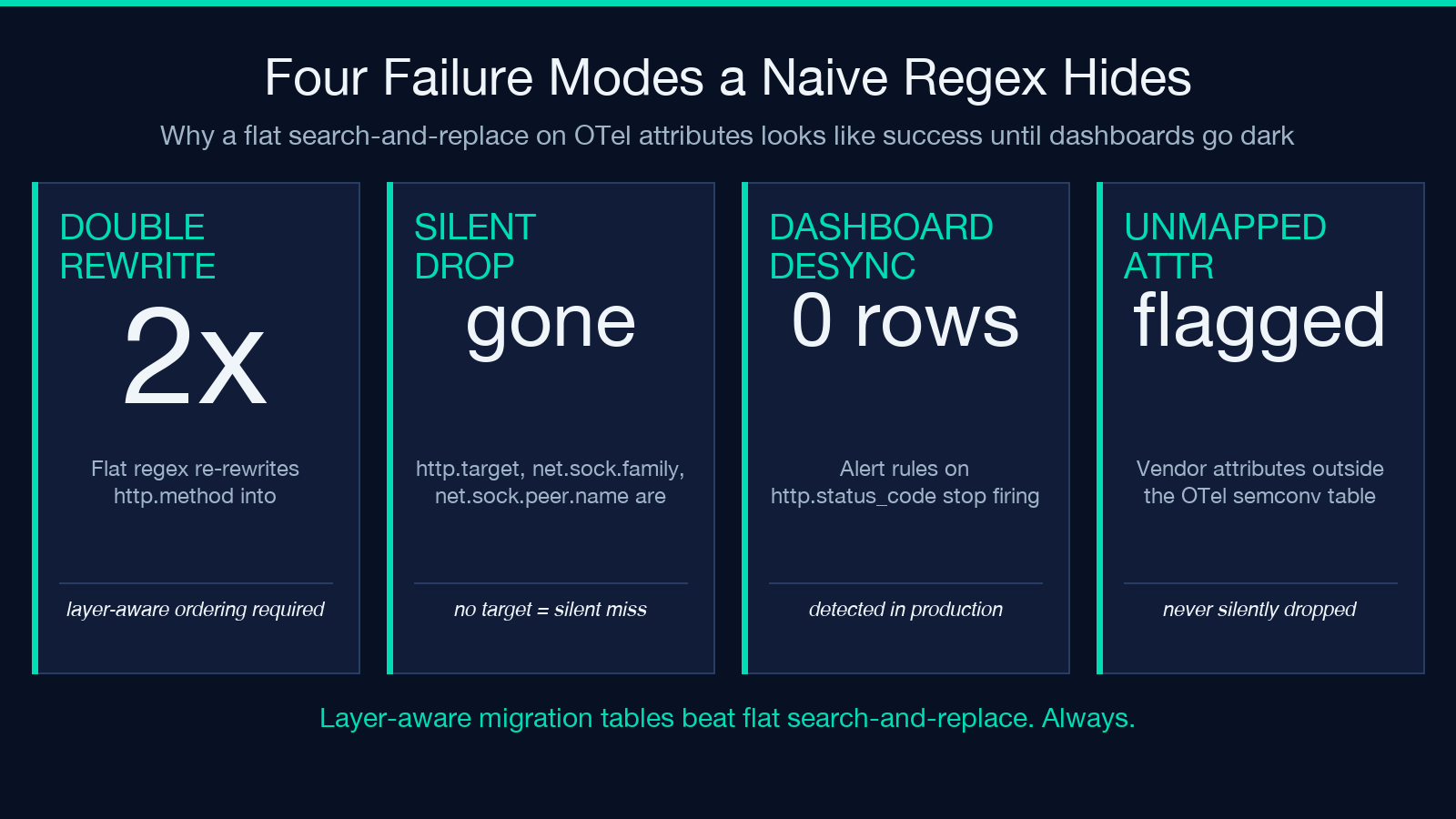
A naive regex over a source file will rewrite http.method to http.request.method and then, on a second pass, will rewrite the http.method substring inside http.request.method‘s prefix. After three passes your HTTP method attribute is now http.request.request.request.method and your backend dashboard is showing nothing.
The OpenTelemetry migration tables enforce whole-token matching for exactly this reason. An attribute like http.method should only match the literal token — not as a prefix of http.method_override, not as a substring of a longer attribute name. The migration tool implements this with a tokenizer that walks each identifier boundary and only fires on token-equal matches; the per-attribute diff table then reports which exact tokens fired and which were skipped, so a developer can audit the migration without re-running it by eye.
The whole-token rule also matters for legacy aliases. http.client_ip and http.host were both deprecated in favor of client.address and server.address; a search-and-replace will rewrite one of them but not both, leaving the codebase in a half-migrated state. The migration tool applies both aliases in a single layer-aware pass, and the diff report tells you which alias fired where. Without that, a service whose request header was set with http.client_ip keeps emitting it past the migration window, and the new dashboard panels stay empty for weeks.
The whole-token rule is also what lets the tool tell you about attributes that were removed rather than renamed. http.target, net.sock.family, and net.sock.peer.name are gone in v1.27.0 — not because they were renamed, but because they were deprecated and the migration table marks them as removed. The migration tool flags these in a separate “contextual hints” section: for http.target, it tells you to split it manually into url.path + url.query because the semantic split is not unique (a single http.target value can map to many possible url.path / url.query pairs depending on how the URL was parsed). For net.sock.peer.name, the hint points you at server.address for the case where the peer is the server, and client.address for the case where the peer is the client. A flat regex can’t tell you which case applies; the migration table can.
Where the Collector rename_attribute_actions Block Lives
The OTel Collector attributes processor supports a rename_attribute_actions section that renames attributes at ingest before the data hits your backend. This is the single most useful piece of a v1.20 → v1.27 migration for any team that runs a collector fleet, because it lets you upgrade the backend schema and the dashboards before every SDK in your fleet is finished migrating.
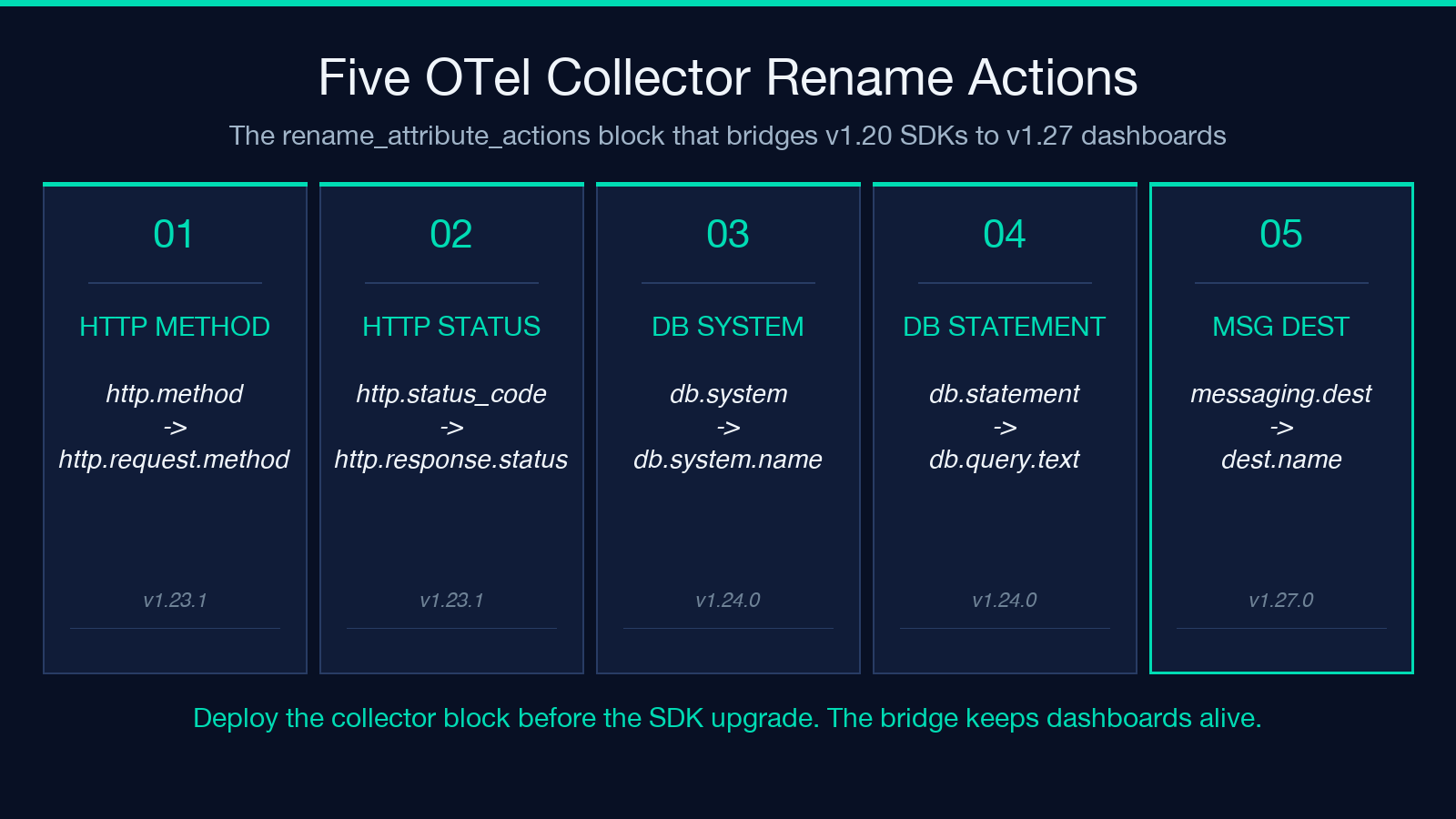
The migration tool generates a rename_attribute_actions block from the same layer-aware tables it applies to source code. For the canonical seven-attribute Express example, the output looks like:
processors:
  attributes/otel-migration:
    actions:
      - key: http.method
        from_attribute: http.request.method
        action: update
      - key: http.status_code
        from_attribute: http.response.status_code
        action: update
      - key: http.url
        from_attribute: url.full
        action: update
      - key: net.peer.name
        from_attribute: server.address
        action: update
      - key: db.system
        from_attribute: db.system.name
        action: update
      - key: db.statement
        from_attribute: db.query.text
        action: update
      - key: messaging.destination
        from_attribute: messaging.destination.name
        action: update
The block is direction-aware: it rewrites the new attribute names to the old ones at the collector, so a fleet still on the v1.20 SDK can keep emitting http.method and the backend (which is on v1.27 dashboards) sees the v1.27 attribute name. This lets you migrate dashboards first, then the SDKs, then turn off the collector rename once every emitter is on the new SDK. Without the collector layer, you have a hard cutover — and a hard cutover with telemetry is how you lose the metrics you need to verify the migration actually worked.
The rename_attribute_actions block also handles the removed-attribute case differently from the renamed case: removed attributes get a delete action, not an update. The migration tool emits the correct action for each entry, and the per-attribute diff table makes the action visible in the report — a single attribute with delete is a flag that the source-side migration needs a manual step (the http.target → url.path + url.query split), not a search-and-replace.
The collector layer is also where you handle the multiple-alias case. The migration tool’s report for a Java service emitting both http.client_ip (deprecated v1.21) and net.peer.ip (deprecated v1.23) will show both attributes in the rename table, each mapped to its v1.27 destination. A flat regex sees client.address in the rename table and assumes it’s the only path; the migration tool sees both source attributes and emits both rename actions, so the collector handles whichever alias the legacy SDK happens to emit.
How to Keep Grafana Dashboards Synchronized Without an Outage
A v1.20 → v1.27 migration breaks Grafana dashboards in three distinct ways: the variable queries reference old attribute names, the panel queries reference old attribute names, and the alert rules reference old attribute names. Each one fails silently — the dashboard loads, shows zero rows, and the alert stops firing — because the new attribute names don’t exist in the data yet.
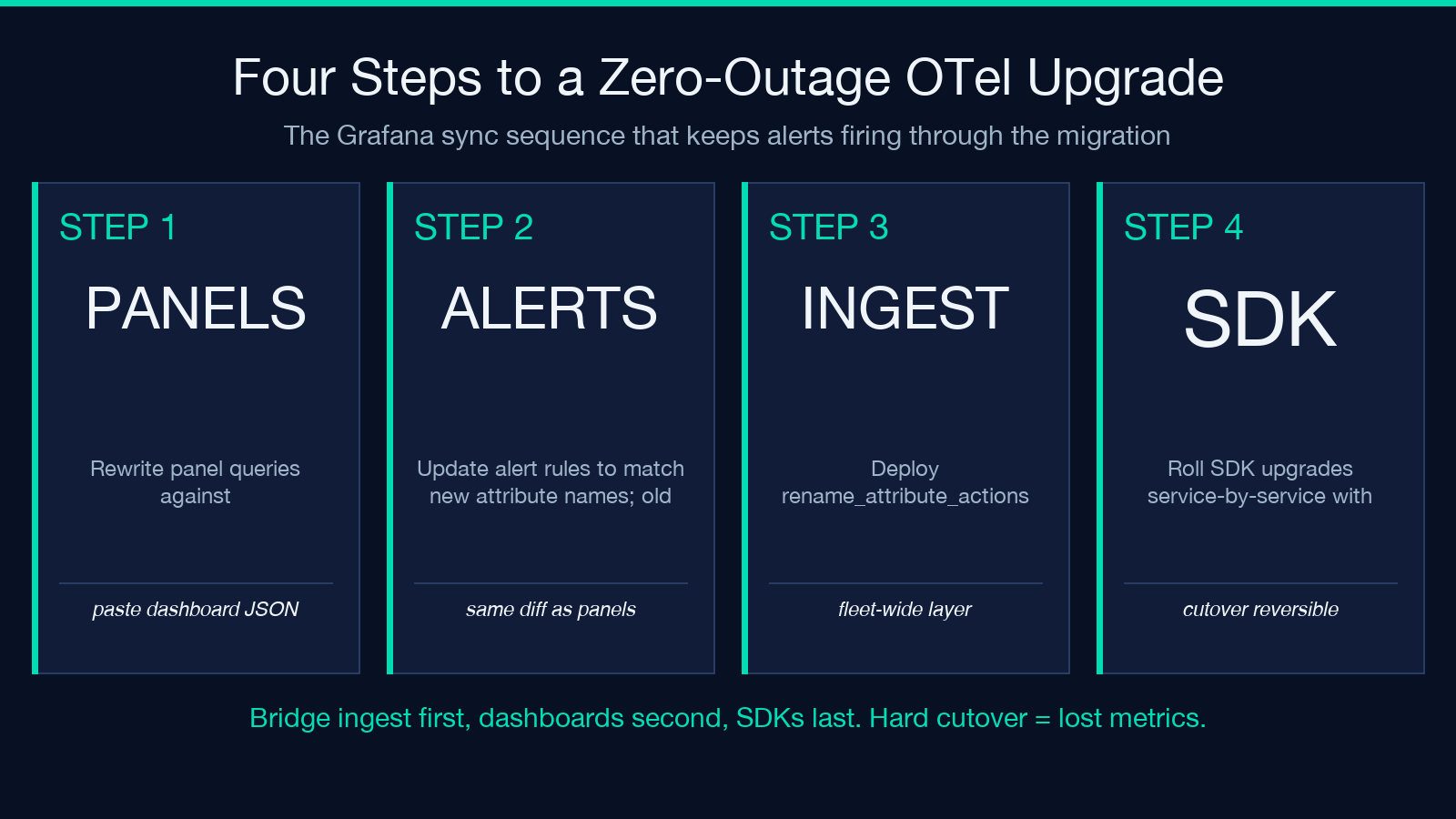
The migration tool processes a pasted Grafana dashboard JSON through the same layer-aware tables. For each variable, each panel query, and each alert rule, the tool rewrites the attribute references and reports the diff. The dashboard JSON is then updated in-place, with the original panel structure (thresholds, units, transformations) preserved. The output is a dashboard JSON that you can paste back into Grafana as a new version, with a clear “review the diff before saving” prompt because a dashboard that auto-saved the migration without review is the fastest way to ship a typo to production.
The synchronized dashboard update also covers alert rules. An alert rule that watches http.status_code for 5xx errors will silently stop firing once the SDK migrates and the data starts emitting http.response.status_code instead. The migration tool rewrites both the panel query and the alert rule, and the per-panel diff report shows which alerts had their attribute references changed. A team that uses Grafana’s alerting-as-code workflow can paste the updated JSON straight into the alert rule repo and let CI do the validation.
For teams that run both a Grafana fleet and a direct backend (Datadog, Honeycomb, New Relic), the dashboard synchronization step is the same — every backend reads the same attribute names from the same OTel collector output, so a dashboard that points at http.response.status_code works against any backend that ingests v1.27 OTel data. The migration tool doesn’t need to know which backend you use; it rewrites the dashboard JSON and lets the backend-specific variables (datasource UID, panel type) stay unchanged.
The dashboard synchronization step is also where the unmapped-attribute report earns its keep. If your dashboard JSON references an attribute that the v1.27 migration table does not know about — usually because it’s a vendor-specific attribute, or an internal attribute your team added manually — the migration tool flags it in the unmapped section rather than silently dropping the reference. A silent drop is the worst-case failure mode: a dashboard that loads, shows zero rows, and never tells you why. The unmapped report makes the gap visible, so the team can decide whether the vendor now publishes a stable name, or whether the dashboard panel needs to be retired.
The Three Failure Modes a Migration Tool Must Catch
The three failure modes that show up in a v1.20 → v1.27 migration, in roughly the order they bite, are: double-rewrite from a flat search-and-replace, silent attribute drops for removed attributes, and dashboard desync that breaks alerting before anyone notices. A migration tool that only catches the first one is a partial tool — it will leave you with a clean source tree and a broken production pipeline.
The double-rewrite failure mode is the easiest to detect: the diff table shows the same attribute twice, once as a source and once as a target. The migration tool prevents it by enforcing whole-token matching and by reporting the rename graph as a directed acyclic graph — if a rename target would itself be a source for another rename, the tool flags the cycle and refuses to apply it. This is the layer-aware property: each layer is applied in sequence, and the output of layer N is the input of layer N+1, but no layer’s output is fed back into itself.
The silent-attribute-drop failure mode is harder to catch because it looks like success: the source file has fewer old attributes after the migration, but it’s because the old attributes are gone, not because they were renamed. The migration tool’s removed-attribute section catches it by tagging each removed attribute with a contextual hint that points at the manual replacement (http.target → url.path + url.query for the canonical case). A flat regex never produces a “removed” tag — it just doesn’t match, and the user assumes the migration succeeded.
The dashboard-desync failure mode is the most expensive because it surfaces in production, usually as a missing alert or an empty panel. The migration tool catches it by processing the dashboard JSON in the same pass as the source code, so the per-attribute diff table includes dashboard hits alongside code hits. If http.status_code appears in three panels and one alert rule, the diff table shows four hits — and the developer can verify each one was rewritten correctly.
What a Complete v1.20 → v1.27 Migration Report Looks Like
A complete migration report has four sections: the stat cards at the top (N replacements / N attributes / N removals / N unmapped), the per-attribute diff table with the layer (HTTP / DB / Messaging) tagged on each row, the removed-attribute hints with manual replacement instructions, and the collector rename_attribute_actions block ready to paste into the pipeline. Anything less is a partial report, and a partial report is what leaves you with a half-migrated codebase at 3 a.m.
For the canonical seven-attribute Express + Postgres + Kafka example, the report looks like: 7 replacements across 7 distinct attributes, 0 removals (because the example doesn’t use http.target or net.sock.family), 0 unmapped (because every attribute in the example is in the v1.27 migration table), and a collector block with seven update actions. The diff table shows each layer separately: three HTTP renames, two DB renames, one messaging rename, and one cross-layer rename (net.peer.name → server.address, which is also where the HTTP layer puts the server-side address — the two layers agree, the report shows it once).
For a larger migration — say, a Java service with 200 spans and a Grafana dashboard with 40 panels — the same report scales: the stat cards tell you the total scale, the per-attribute diff table tells you which layers carried the churn, the removed-attribute hints tell you where the manual work is, and the collector block tells you how to bridge the gap while the SDK fleet catches up. None of those four sections is optional; a migration report without one of them is incomplete in a way that will eventually show up as a production incident.
Where to Run This Without Re-Deriving It By Hand
The whole point of an OpenTelemetry semantic-convention migration tool is that the migration tables are public, but the per-layer sequencing, the whole-token matching, the removed-attribute hints, and the collector block generation are not — they are the part that takes a careful developer an afternoon to get right, and a careless developer a week to get wrong. Running it once by hand is educational. Running it on every minor-version upgrade across a fleet of services is not.
The OpenTelemetry Semantic-Convention v1.20 → v1.27 Attribute Migration Tool at Elysia Tools takes pasted source code (any language), a collector YAML, or a Grafana dashboard JSON, picks the source and target convention versions, and runs the layer-aware migration in one pass. The output is the four-section report, the rewritten source, the collector block, and the synchronized dashboard JSON. The unmapped-attribute report and the removed-attribute hints are the part that catches the failures a flat regex never will.
For teams running an OTel collector fleet, the migration is a three-step process: run the tool on the dashboard JSON to get the v1.27 panels, deploy the collector rename_attribute_actions block to bridge the SDK gap, and roll the SDK upgrades fleet-by-fleet with the rewritten source as the reference. The collector layer is what makes the rollout safe — without it, a dashboard upgrade is a hard cutover, and a hard cutover with telemetry is how you lose the metrics you need to verify the cutover actually worked.
Explore more developer tools at elysiatools.com/en/tools.
