
A subtitle file is not correct or incorrect; it is correct for one delivery spec and wrong for the next. The Subtitle Platform Spec Checker grades an SRT, WebVTT, SBV or TTML file against four platform rulebooks at once, and the number it puts in front of you is rarely the one you were worried about. It is characters per second on the single cue that carries more text than a viewer can actually read, and the report tells you the exact milliseconds that cue needs before it becomes compliant. You can run it against your own file at Elysia Tools.
Why the Same Subtitle File Passes Netflix and Fails the BBC
The first mistake in subtitle QA is treating correctness as a property of the file. It is not. It is a property of the file measured against a named delivery spec, and the specs disagree with each other in ways that are easy to miss and expensive to discover late.
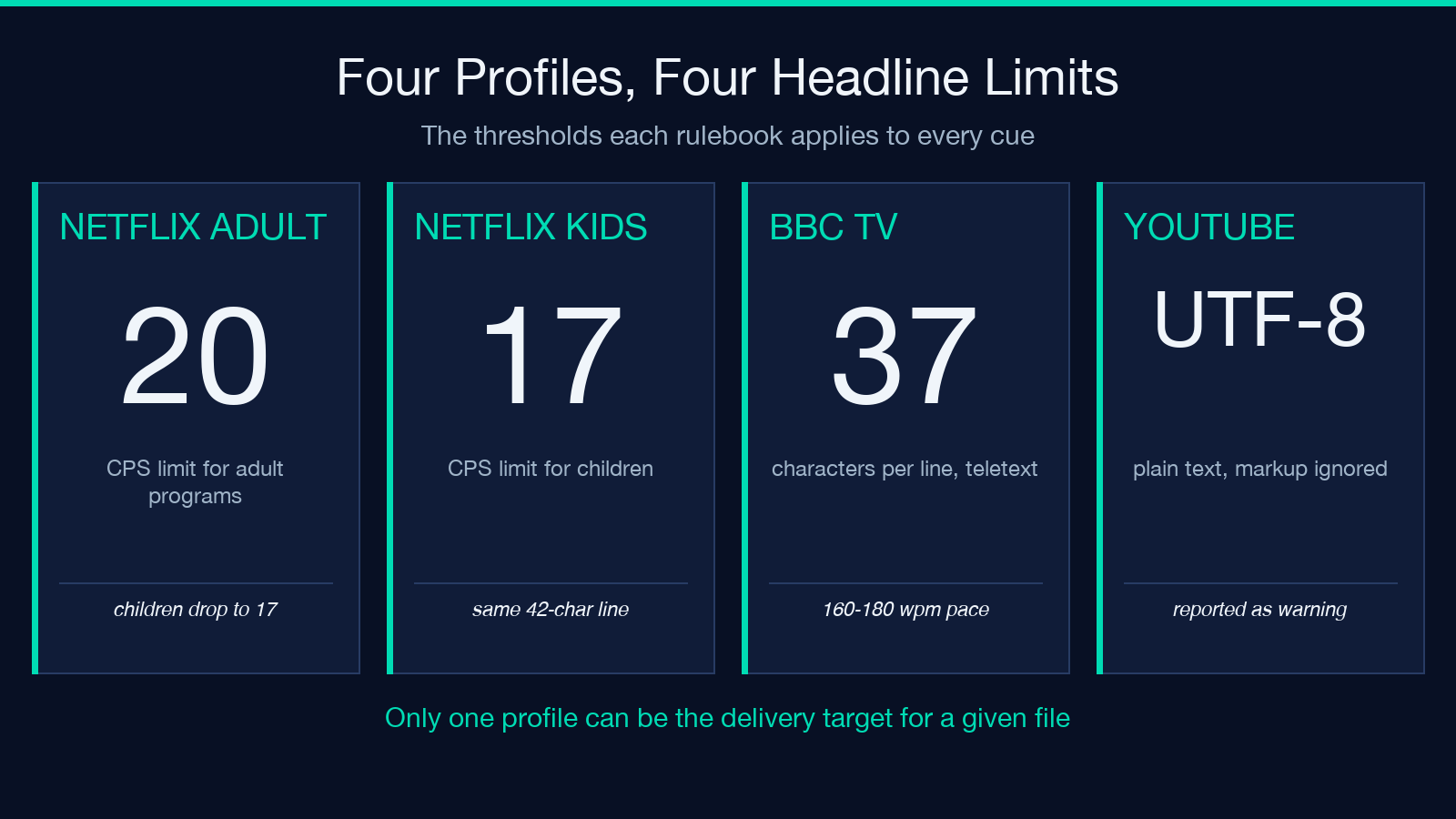
Netflix’s Timed Text Style Guide counts characters per second and characters per line. The BBC guidelines count words per minute and keep the teletext heritage of 37 fixed-width characters per line. YouTube mostly ignores timing and cares that the file is plain UTF-8. Take one cue that reads comfortably under a Netflix rulebook and hand the same file to a BBC broadcast deliverable, and the same line can be five characters too wide on every line.
So “the subtitles are fine” is not a usable statement. “The subtitles are fine for the adult Netflix profile at 24 frames per second” is. The checker models this properly by making the target explicit: you pick a platform profile, and every threshold in the report comes from that one rulebook rather than from a blended average of all four.
Reading Speed Is the Rule That Actually Breaks Files
Here is the arithmetic the tool performs, and it is worth doing by hand once so the number in the report stops being mysterious. Characters per second is the character count of the cue divided by its on-screen duration, with spaces counted as characters.
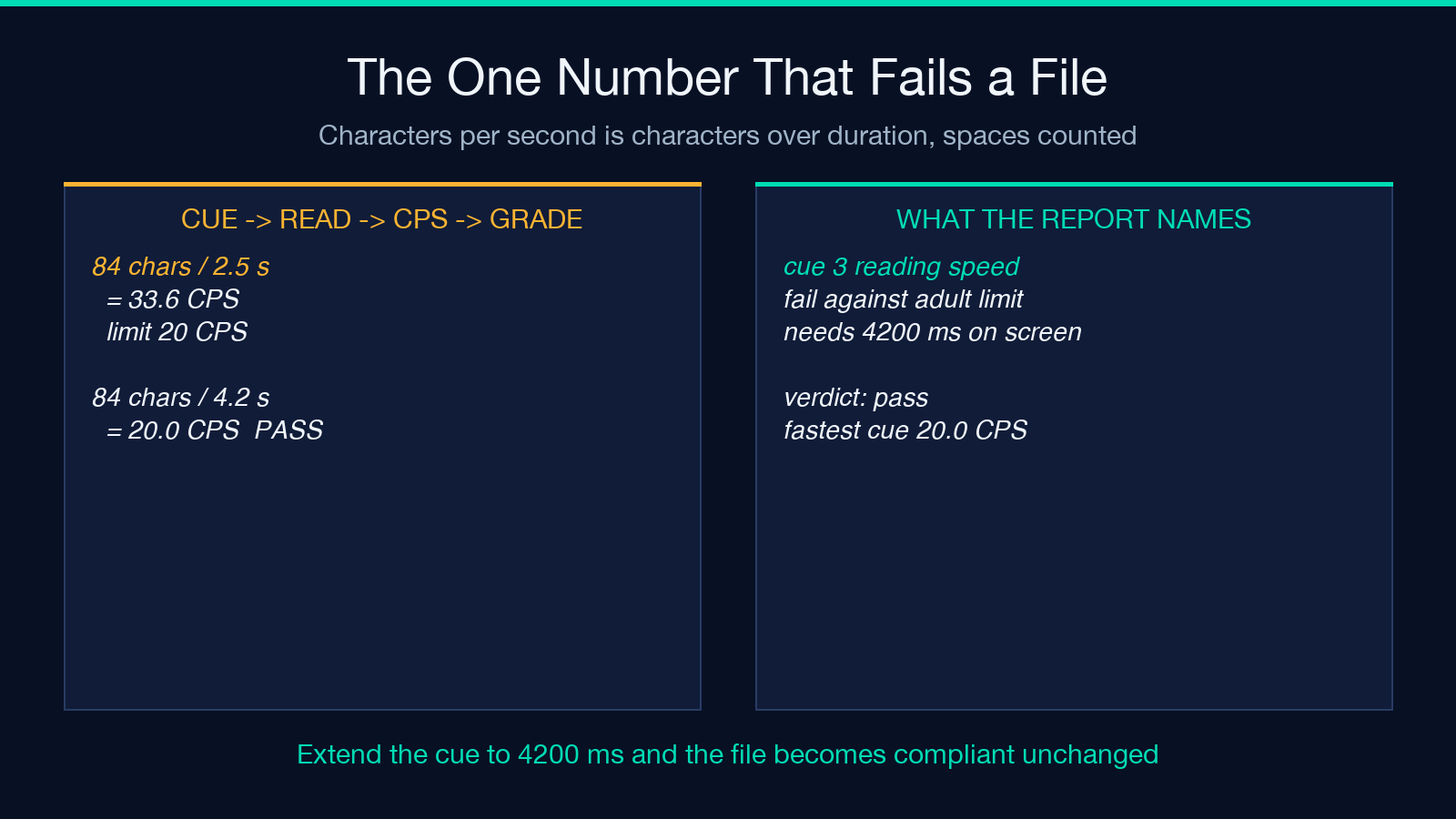
Take the worked example from the platform spec checker’s own smoke file: a two-line cue holding 84 characters over 2.5 seconds. That is 84 divided by 2.5, which is 33.6 characters per second. The Netflix adult profile allows 20, so the cue fails by a wide margin. The children’s profile allows 17, which is tighter still. The report names cue 3, prints the 33.6 figure, and then does the genuinely useful thing: it computes how long that line needs to be on screen to read at spec speed. Eighty-four characters at 20 characters per second is 4.2 seconds, so the cue needs 4200 milliseconds instead of the 2500 it was given.
That is the difference between a rejection and a fix. A report that only says “too fast” leaves a subtitler guessing at a rewrite. A report that says “this cue needs 4200 milliseconds” tells you to extend the cue, and the file becomes compliant without a single word changing.
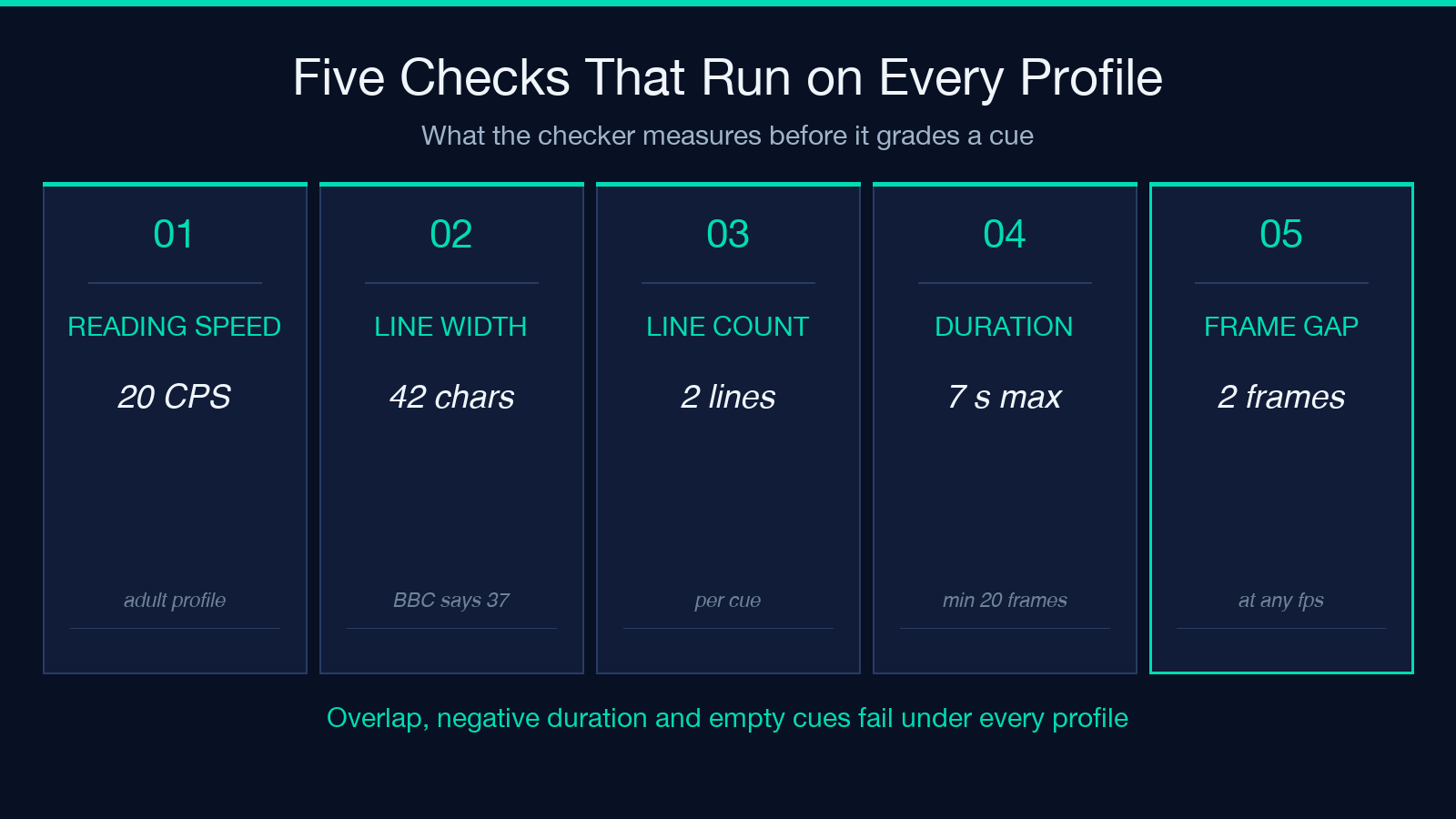
Two structural checks run regardless of which profile you select, because they are defects rather than style choices: overlapping cues, negative durations, empty cues, and timestamps that run backwards. If you want a second opinion on the reading-speed side once the spec profile passes, the Subtitle Reading Speed & Localization Auditor measures the same quantity against translation expansion risk, which is what usually breaks a file after it ships.
Line Length and Line Count: 42 Characters, Two Lines
Both Netflix profiles cap a line at 42 characters and allow at most two lines per subtitle event. The BBC guidelines cap a line at 37 characters and also allow two lines.
The multiplication is the point. A Netflix-legal two-line cue holds up to 84 characters, which is exactly the cue that blows through the reading-speed ceiling. A BBC-legal two-line cue holds 74. So a file that is compliant with the Netflix line rules still has to be rewritten, not merely reflowed, before it can be delivered to the BBC, and rewriting changes the character count, which changes characters per second, which changes how long the cue has to stay on screen. One constraint never moves alone.
The line break is therefore not cosmetic. It is how a writer fits a sentence into the width the platform allows, and it is where the reading-speed budget gets spent. Breaking a cue into two lines does not make it faster to read; it gives the reader two shorter saccades, which is exactly why the CPS calculation uses the full cue length rather than the longest single line.
Duration Bounds and the Frame Gap Requirement
Netflix also bounds the event itself. The minimum duration is five sixths of a second, expressed as 20 frames at 24 frames per second. The maximum duration of a single event is 7 seconds. Between two consecutive events there must be a gap of at least 2 frames at any frame rate, with the timing guide allowing gaps to be chained up to exactly 2 frames. The BBC guidelines ask for a gap of a second and a half wherever the speech pauses.
Those are frame quantities, and frame quantities need a frame rate. That is why the checker asks for one explicitly, defaulting to 24 with a step of 0.001, and why the gap rule is stated “at any frame rate” rather than “at 24 fps”. A 2-frame gap is roughly 83 milliseconds at 24 fps and 80 milliseconds at 25 fps, and an editor that rounds timestamps to the nearest millisecond can turn a legal 2-frame gap into a 1-frame gap without changing a single visible character. This is the class of defect that survives a visual review of the burnt-in video and fails the delivery spec, and if the file was timed against a different frame rate entirely, the Subtitle Frame-Rate Retime Converter is the tool for rescaling the timings before you re-check them.
Fail Versus Warn: What Each Grade Actually Means
Every finding in the report is graded. A fail is a breach of a hard spec limit: 33.6 characters per second against a 20 limit is a fail, and no amount of editorial argument changes the arithmetic. A warn is a guideline recommendation, and it tells you that you are outside the comfortable envelope rather than outside the contract.
The YouTube profile is where the distinction earns its keep. YouTube accepts SRT and WebVTT as plain UTF-8 text, and styling markup such as <i>, <b>, <u> or <font> is simply not recognized in an SRT file. Rather than dropping that markup silently, the checker reports it as a warning, because the file still plays correctly and only the emphasis is lost. That is a different problem from a reading-speed fail, and it deserves a different decision: you either accept the loss of emphasis or you change the target format. Note that this is also where a file that has picked up accessibility annotations and speaker labels gets complicated, and the SDH Annotation Cleaner strips bracketed sound effects and speaker labels so that the characters remaining are the ones the reading-speed rule is actually about.
The Platform Profiles Side by Side
The four profiles are worth keeping in one place, because the choice between them is a delivery decision rather than a preference. The adult Netflix profile allows 20 characters per second and 42 characters per line. The children’s profile drops the reading speed to 17 characters per second while keeping the 42-character line. The BBC television profile works in words per minute and keeps the 37-character teletext width. The YouTube profile checks UTF-8 cleanliness and flags unrecognized markup.
The frame rate sits beside them as its own input, and it belongs beside them because the gap rules and the minimum duration are both expressed in frames. A file checked at 24 fps and delivered at 25 fps has not been checked at all.
Reading a Real Findings Report Cue by Cue
The report card is built for triage. On the failing smoke file, four cues are measured against the adult Netflix profile at 24 fps and exactly one fails: cue 3, at 33.6 characters per second, with 4200 milliseconds named as the duration the line needs. The verdict for the file is fail, the fastest cue in the file is 33.6, and the fail count is 1. Every other cue passes, which matters: a report that lists six violations when one is real gets ignored, and a report that names the single cue with its required duration gets fixed.
The clean counterpart is the more instructive case. The clean smoke file has four cues, zero failures, zero warnings, a fastest reading speed comfortably under the 20 character per second ceiling, and every gap at least 3 frames at 24 fps. Nothing about that file is remarkable except that it is the state you are trying to reach, and the checks that produced it are the same checks. The report lists every finding by cue number so that a file can be corrected against the exact rule before delivery, rather than by guesswork.
What to Check Before You Send a File to a Platform
- Name the profile before you check anything. Netflix adult, Netflix children, BBC television and YouTube are four different rulebooks, and the checker measures against the one you select.
- Read the characters-per-second column first. It is the constraint that fails most files, and it is the one that tells you how long a cue must stay on screen.
- Treat the frame rate as part of the spec. Minimum duration and inter-cue gaps are both frame quantities, and a file checked at one rate and delivered at another has not been checked.
- Decide the markup question deliberately. If the target is YouTube SRT, italics and bold are decoration you cannot ship, and a warning is the tool telling you so before a human reviewer does.
- Fix reading speed before you fix line breaks. Changing the line distribution changes the character count of neighbouring cues, and a file fixed in the wrong order has to be fixed twice.
Test against real files rather than a file you know is clean. The SRT subtitle samples and WebVTT samples cover two-cue files, four-cue walkthroughs, multi-line release-note briefings and a VTT file with a NOTE block, which is the coverage you want before you trust a verdict on a finished episode. Karaoke and lyric tracks are the hardest case of all, because a song line is one very long cue that no reading-speed rule will ever accept; the LRC SRT Lyrics Converter is the right place to look when the material is synced lyrics rather than dialogue.
Run the check on the final export, at the frame rate you will deliver, against the profile you will deliver to. Then fix the named cue, re-check, and confirm the verdict moved from fail to pass.
