
I ran the same 2 steps over the same 4 lines twice and got two different files. Nothing was random — the engine is deterministic and the output says so. I had only swapped their order, but the leftover line I was hunting survived in one run and disappeared in the other. A cleaning recipe is not a list of steps. It is an order, and the defaults decide what each step can even see.
That distinction is easy to miss because a JSON recipe reads like a manifest of intent. normalizeWhitespace, then uniqueLines, then sortLines — the verbs sound finished. But each one carries its own defaults for the same option name, and a per-line operation sees a newline as data like any other character. I spent an afternoon pinning the behavior of the Text Pipeline Builder against its own source, and the findings are the useful part: none of them are bugs, and all of them change your output.
Nine operations, five limits, one validated parse
The tool exposes nine operations, including trim, normalizeWhitespace, replace, regexReplace, filterLines, sortLines, uniqueLines, case, and removeEmptyLines. A recipe is {"version": 1, "steps": [...]} — the version must be exactly 1, and the step count must sit between 0 and 50.
The input limits are worth knowing before you paste a log file. Text is capped at 200,000 characters and the recipe JSON at 50,000. Both rejections happen before any step runs, so a rejection never leaves you with a half-cleaned document to reason about.
The parse step does one thing that pays for itself: it compiles each regular expression up front. An invalid pattern in step 7 fails the whole recipe before step 1 executes. That is the right order of failure. If you have ever watched a cleaning script die halfway through a 40,000-line file and leave you wondering which edits landed, this is the behaviour you want.
caseSensitive is four different defaults wearing one name
This is the finding that changes recipes. The same option name resolves differently depending on which operation reads it.
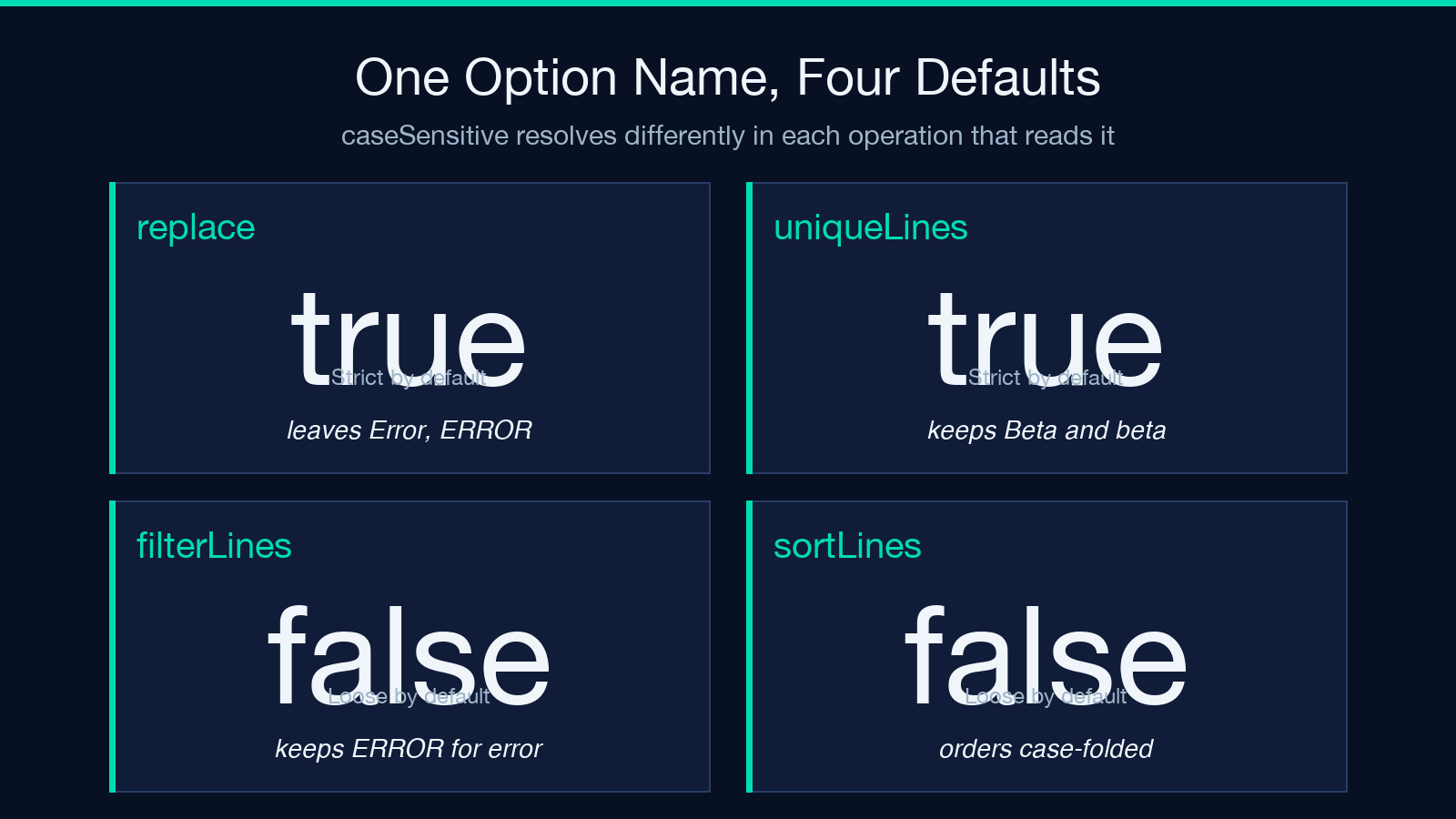
replacedefaults totrue. Asked to replaceerrorinError: disk full. error: disk full. ERROR: disk full.the result isError: disk full. ERR: disk full. ERROR: disk full.— one of three matches replaced.filterLinesdefaults tofalse. The same needleerrorkeepsERROR diskandError net.sortLinesdefaults tofalse, so ordering is case-folded.uniqueLinesdefaults totrue, soBeta,beta, andBETAall survive. Four lines in, four lines out.
Look at which way each default leans. The two operations that delete — replace and uniqueLines — are strict by default. The two that arrange and collect — sortLines and filterLines — are loose. So out of the box the pipeline under-deletes and over-collects.
That combination produces a specific, quiet failure. You sort a list to check for duplicates. sortLines case-folds, so Alpha and alpha land next to each other and look like a pair. Then uniqueLines runs case-sensitively and keeps both. The arrangement told you the lines were duplicates; the delete step disagreed; the final text shows two lines that a reviewer reads as one.
To a per-line operation, the trailing newline is a line
Each per-line operation does the same thing first: split on the newline. That means a document ending in a newline arrives with a phantom empty element at the end.
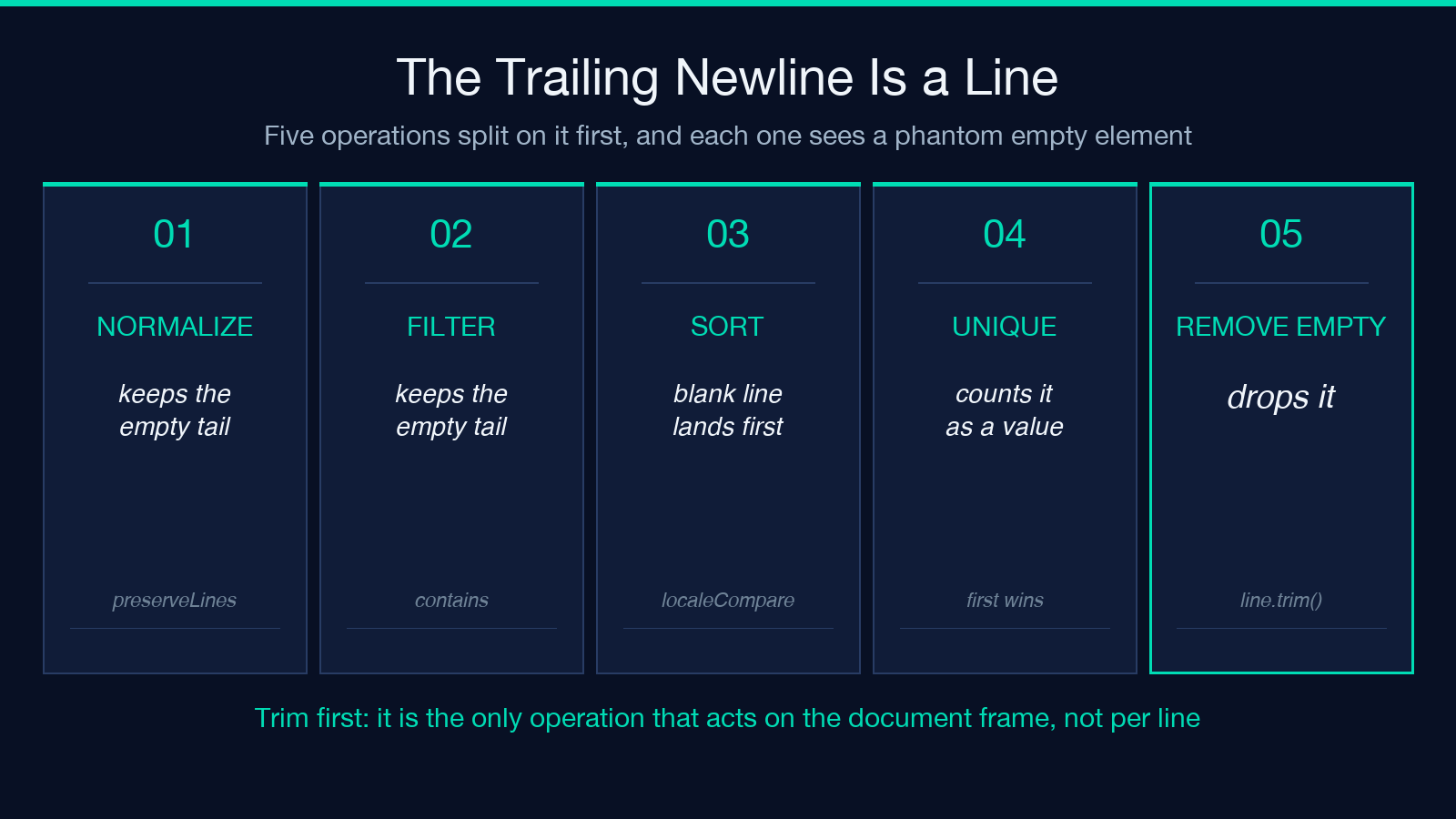
Measured on alpha\nbeta\n, the split yields three elements, not two. uniqueLines returns three lines — the empty tail is a distinct value it has never seen. And sortLines returns \nalpha\nbeta: the empty string sorts before any letter, so the blank line lands at the top of your output.
Three ways out, all measured: removeEmptyLines gives alpha\nbeta; trim before anything else gives alpha\nbeta; nothing else does. I observed the same phantom empty element in all five operations that split on the newline, and once you sort, that element becomes the first line of your output. trim is the only operation that acts on the document frame, not line by line, which is why it is the right first step in almost any recipe — and why it is not redundant with normalizeWhitespace, even though both involve stripping spaces. Alone, normalizeWhitespace on " a b \n c \n" returns a b\nc\n, trailing newline intact; with trim in front you get a b\nc.
Sorting a table moves the header row to the bottom
Here is the recipe people write first. Take a messy CSV excerpt, run normalizeWhitespace, removeEmptyLines, uniqueLines with caseSensitive: false, then sortLines ascending. Seventy-three characters in, four lines out:
- Input: a header row
id , name ,email, two data rows with stray spaces, and one blank line. - Output:
1, Ada ,ada@x.io/2,Ada,ada@x.io/3, Grace, grace@x.io/id , name ,email.
The header is now the last line, because the string id sorts after the string 3. The pipeline has no notion of a header row, a field, or a record. It sorts lines.
The dedupe step also failed for a reason worth noticing: rows 2 and 3 carry the same email address but different ids, so the lines are not equal, so line-level deduplication cannot see them as duplicates. Column-level dedupe is not in the operation set. If your cleanup depends on one field, you need regexReplace to narrow the line to that field first, or the dedupe you wanted is not happening.
The diff is a frame around your change, not an edit script
Each step reports added and removed character counts plus a line diff. Both use the same shape: find the longest common prefix, find the longest common suffix, and treat all text between them as removed-then-added.
Measured, a six-line file with edits on line 2 and line 6 produces a single hunk at line 2: 5 removals and 5 additions for a 2-line edit. A minimal diff would show two small hunks. The numbers are honest about the window and misleading about the work.
The character counters have the same property. For instance, substitute one character in place — aXb becomes aYb — and the step reports one character added, one removed, net zero. Nothing was added; nothing was removed; the window is one character wide. Summing added and removed tells you how much text sat inside the changed frame, not how many edits you made. net is the only figure that answers a size question.
This matters because review effort follows the diff. A diff that reports five changed lines for a two-line edit trains you to skim it, and skimming is how the blank-line-at-the-top defect from the previous section gets past you. The diff is also capped at 8,000 characters, with a truncation marker replacing the middle of the tail.
Normalize first, then delete, then arrange
Comparison operations read the string as it arrives. That single fact fixes most ordering mistakes.
Two steps, one document, two results. On " Beta \nalpha\nBeta\n Beta\n", running uniqueLines before normalizeWhitespace leaves three Beta variants and a blank tail. Running the same two steps in the opposite order leaves one Beta. Same operations, same input, two lines of difference.
The order bug is louder in sorting. On " zebra\napple\n mango\nbanana\n", sorting before normalizing puts mango and zebra first — their leading spaces are compared as content — and returns \nmango\nzebra\napple\nbanana. Normalizing first returns \napple\nbanana\nmango\nzebra.
So the working order is short: Trim the document frame, normalize whitespace so equal things are equal, then delete, then arrange. Any recipe that compares, dedupes, or orders before it normalizes is comparing two different spellings of the same line and getting a defensible wrong answer.
Two more defaults that surprise people and are not ordering problems. Sorting numeric strings is lexicographic, so 2, 10, 1, 20, 3 becomes 1, 10, 2, 20, 3. And case with mode: "title" lowercases the whole string before capitalizing word starts, so iPhone Pro and API v2 becomes Iphone Pro And Api V2 — brand casing and acronyms do not survive.
The recipe you get back is not the recipe you sent
Step objects are rebuilt during parsing. Each one is returned as a fresh object containing only the keys that operation understands, with each default written out explicitly.
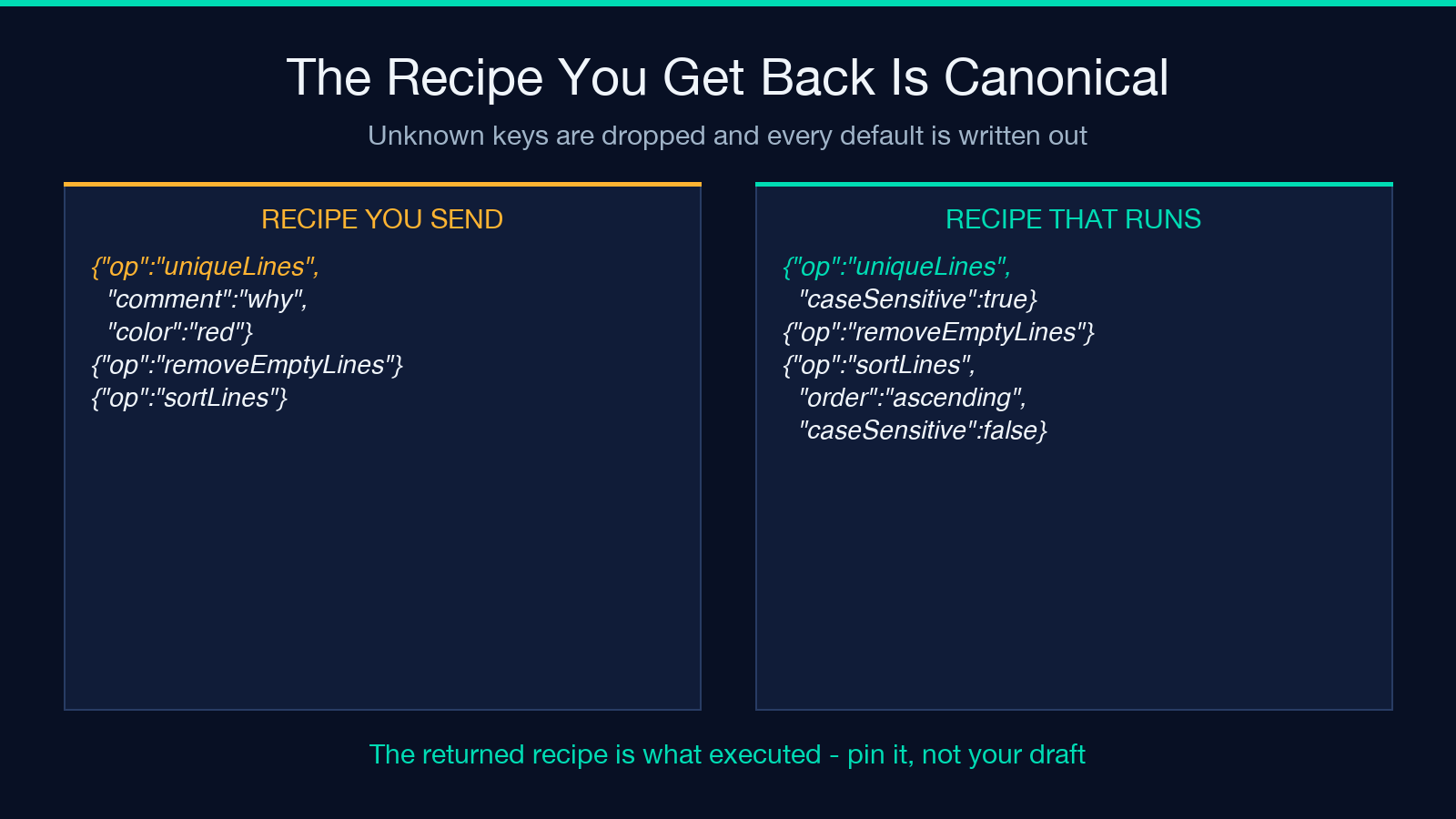
Send {"op": "uniqueLines", "comment": "why", "color": "red"}, {"op": "removeEmptyLines"}, and {"op": "sortLines"}. The response carries {"op": "uniqueLines", "caseSensitive": true}, {"op": "removeEmptyLines"}, and {"op": "sortLines", "order": "ascending", "caseSensitive": false}.
Your comment and color are gone. The defaults are now visible. Treat that returned object as the source of truth and pin it next to the output — the version you drafted and the version that executed are different documents, and only the second one explains the text you got.
The same parse step resolves a related trap quietly. filterLines accepts a mode, and the check is an equality test against regex. Anything else becomes contains. A typo in that field turns a regular expression into a substring search with no warning, which still returns rows, only the wrong ones.
Where this pipeline stops
The operation set is small on purpose and the gaps are predictable, so treat them as boundaries, not defects.
There is no Unicode normalization such as NFC or NFD. Two accents that differ in composition compare unequal, and uniqueLines will keep both. There is no numeric or date comparison, no field awareness, and no CSV quoting logic, so a comma inside a quoted field is a comma like any other. filterLines in regex mode ignores caseSensitive entirely — the flags own that decision — so passing it there is a no-op. Input stops at 200,000 characters, which rules out most raw application logs.
What you get in exchange is determinism you can verify: the same input and recipe produce identical text, the parse fails before execution when the recipe is wrong, and each step reports what it touched. That is a better trade than a smarter engine you cannot audit.
If you want to check any of these numbers yourself, paste the inputs above into the tool and read the per-step panel. The other text operations live under text processing. Explore more tools at elysiatools.com.
The defaults are not the fine print. They are the recipe. Four defensible choices, each correct in isolation, combine into a blank first line, a header row at the bottom, and a duplicate that survives its own dedupe step — and the final text still looks clean. So read the diff, not the result, and read it knowing the diff exaggerates. Then ask the question that would have caught all three: which of these steps is allowed to decide that two lines are equal? That is the only decision in the file that changes what you ship, and it is never the one you are looking at.
