
Two files, two different powers. An llms.txt tells an AI model what your site is about. A robots.txt decides whether that model’s crawler may fetch it at all. I keep meeting teams who publish the first, treat it as the second, then ask why GPTBot still reads the pages they meant to withhold. Both files sit in the site root, both are plain text, yet one of them has 5 enforceable rules behind it and the other has none.
llms.txt is a description, not a permission system
The proposal at llmstxt.org stays small on purpose: drop a markdown file at /llms.txt and describe your site to a language model the way you would describe it to a new contractor. A name, a one-line summary, some prose, and the pages worth reading.
Nothing enforces it. There is no status code, no crawler obligation, no rejection path. A model that never fetches your llms.txt loses context and nothing else. That is not a flaw in the proposal — it is the proposal. A table of contents has never stopped anyone from reading the last page first.
robots.txt is the opposite document. It implements the Robots Exclusion Protocol standardised as RFC 9309, and the major crawlers implement it: a disallowed path becomes a request that never happens. The RFC is disarmingly candid about the mechanism. Section 1 states that “These rules are not a form of access authorization” — cooperation, not cryptography. Cooperation is enough, because the cooperating parties are the ones you are trying to reach.
One file describes, the other gates. Confusing them is the most common mistake in AI crawler policy, and it costs nothing to make: both files are .txt, both live at the root, and both get written in the same ten minutes.
The llms.txt / AI Crawler Audit Generator runs both halves in one pass, which shows how little they overlap.
The file has four parts, and one of them carries the weight
Read the spec once and the structure is fixed. The file opens with an H1 naming the site or project. The next line is a blockquote holding a one-sentence summary. Optional prose follows when you have context a model would otherwise get wrong. Then come H2 sections, each holding entries built from a square-bracketed page name, a parenthesised URL, a colon, and notes.
The tool’s worked example makes this concrete. Input: four pages, one site name, one summary. Output: two H2 sections named Docs and Blog, four links, and the required H1 and blockquote. Four pages in, four links out, nothing invented.
The notes field after each colon is where the weight sits. Quickstart tells a model almost nothing. Install the CLI and run your first job tells it whether the page deserves retrieval. You are not indexing your site here — you are writing retrieval hints, and the hints are the only part a model cannot rebuild from the URL. For example, two pages can share a title and differ entirely in what their notes promise.
Grouping by first path segment is the real editorial choice
The generator groups pages by their first URL path segment, turns dashes and underscores into spaces, then title-cases the result. /docs/quickstart becomes Docs. /blog/cli-tips becomes Blog. Pages sharing a first segment land in the same section, in the order they were found.
That single rule means your URL taxonomy quietly becomes the model’s table of contents. If your documentation lives at /help/, your knowledge base at /kb/, and your tutorials at /articles/, you get three flat sibling sections with equal standing, plus no hint that one is canonical and the other two are legacy. The fix is not in the file. The fix is in the URL plan, and the generated file shows the damage.
Two pages, no grouping. A flat ## Pages list is honest about the size of your inventory, and an honest two-item list reads better to a model than two sections pretending to be a hierarchy.
robots.txt reduces to five rules
Strip away the folklore and the evaluator comes down to five decisions, applied per URI:
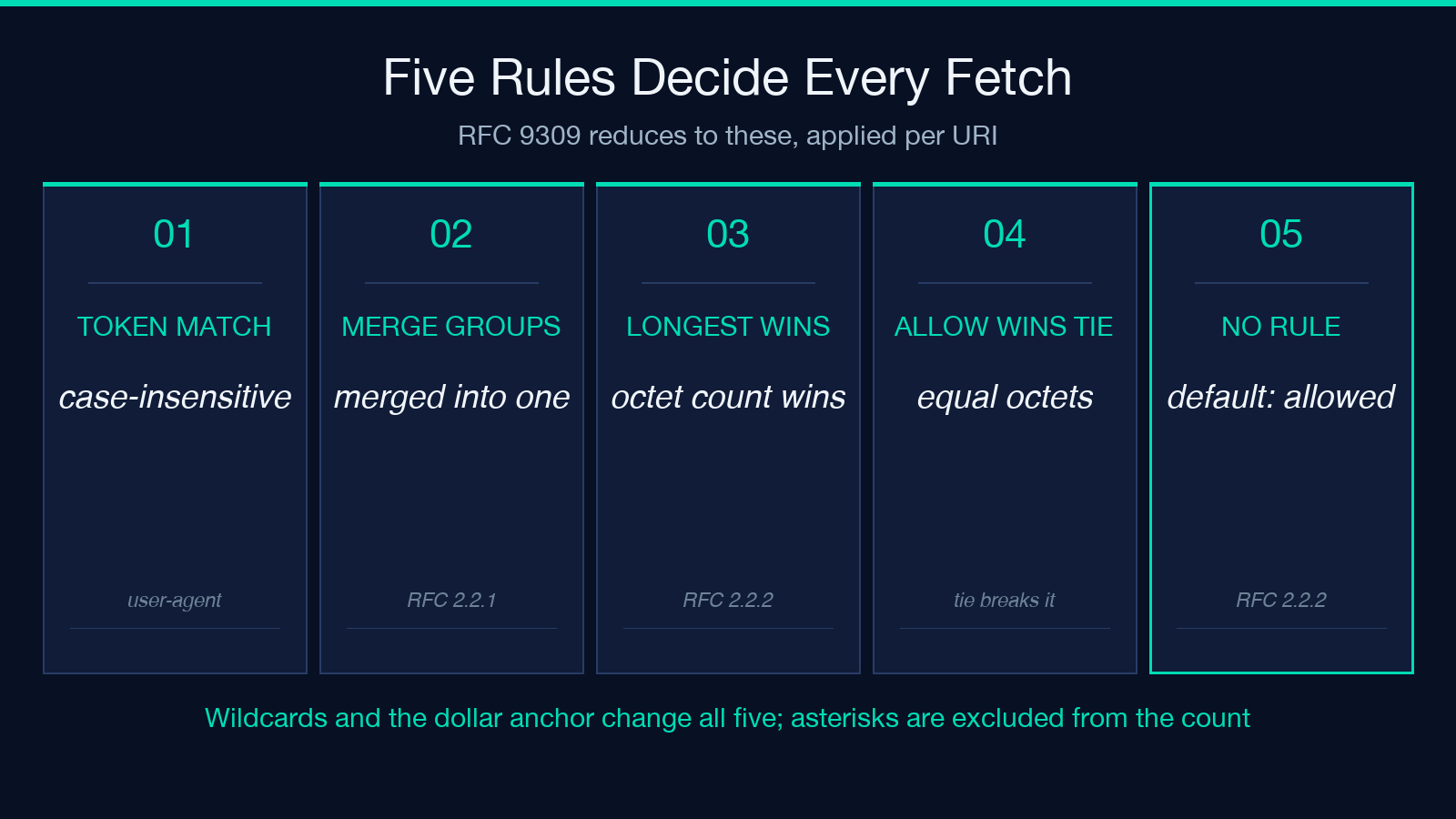
- A group applies if its user-agent value matches the crawler’s product token, case-insensitively.
- Groups that match the same token merge into one rule set. Implementations also disagree here, and that disagreement flips answers.
- Of the rules whose pattern matches the URI, the most specific one wins, and specificity is the octet count of the pattern with wildcards excluded.
- If two rules are equally specific, allow wins the tie.
- If no rule matches, the URI is allowed.
Two pattern characters modify all five, and RFC 9309 section 2.2.3 makes both mandatory: an asterisk designates “0 or more instances of any character”, and a dollar sign designates the end of the match pattern. A hash character starts a comment, so a trailing note on a rule line disappears at parse time.
The empty case matters more than people expect. A file with no rules, or a group holding only an empty Disallow: line, produces zero rules — and zero rules allows all of it. In the tool’s own example, the ClaudeBot group contributes an empty Disallow: and ends up blocked on 0 of 5 audited paths, while GPTBot is blocked on all 5. Two more facts hide in the same section: /robots.txt is implicitly allowed for all crawlers, and a parser must accept at least 500 kibibytes before giving up.
Specificity is counted in octets, and wildcards betray you
This is the section worth reading twice, because the arithmetic is not what most people expect. RFC 9309 defines the rule flatly: “The most specific match is the match that has the most octets.” I ported the published evaluator to Python and ran the four cases below, so each verdict is output, not intuition.
Case 1: Allow and Disallow on the identical path. Allow: /docs and Disallow: /docs are 5 octets each. Equal specificity, so the tie goes to allow, and /docs/anything stays fetchable despite a Disallow line naming that exact path.
Case 2: The deeper Disallow. Allow: /docs at 5 octets loses to Disallow: /docs/private at 14. Result: /docs/private/keys blocked, /docs/api open. This is the behaviour people assume is universal, and it is the only case here that behaves that way.
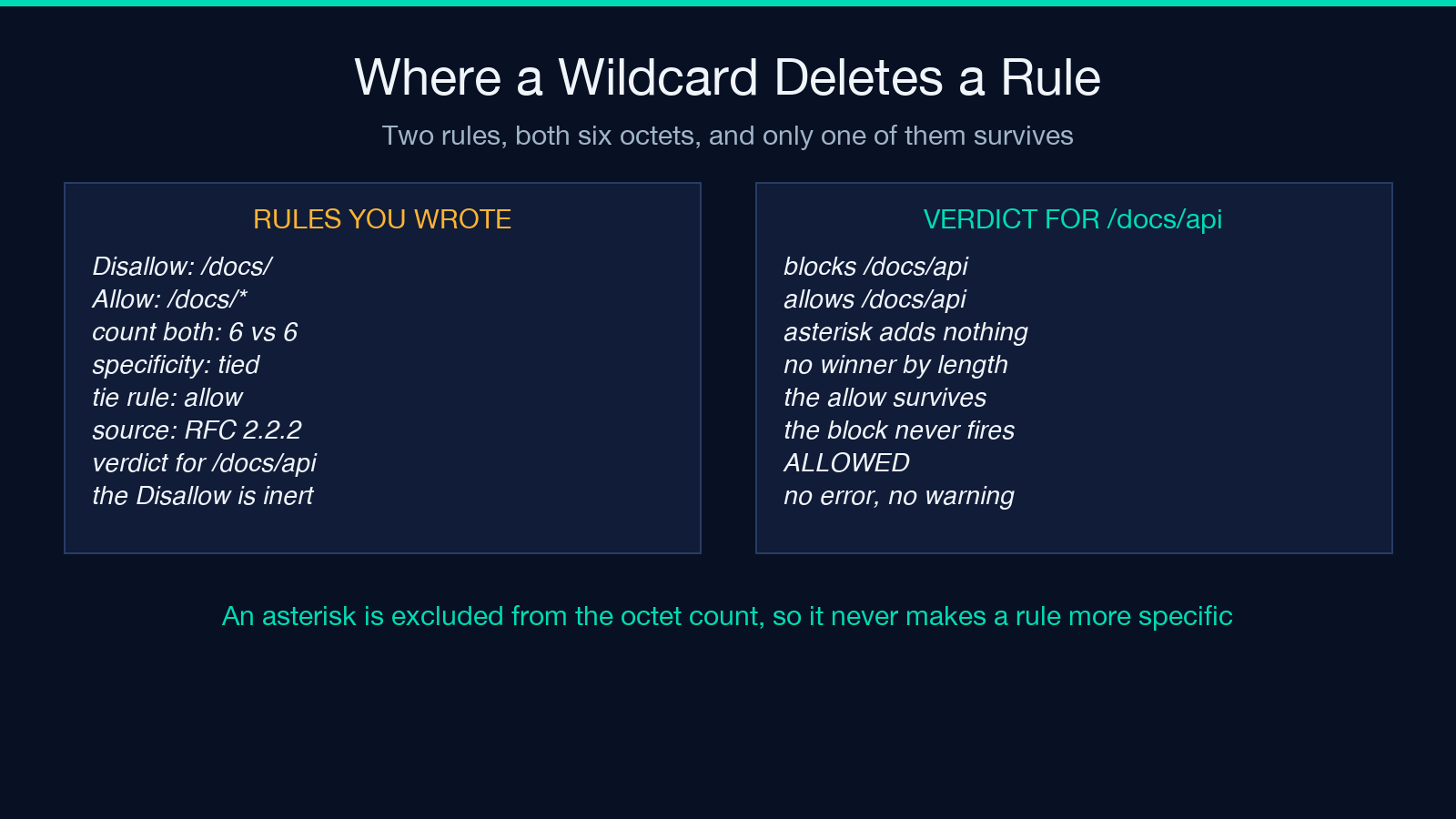
Case 3: The betrayal. Disallow: /docs/ is 6 octets. Allow: /docs/ followed by an asterisk is also 6 octets, because the asterisk is excluded from the count. The rules tie, allow wins, and the disallow is dead. Adding a wildcard to an allow rule to make it feel more specific silently removes the rule it was meant to soften. You did not widen the exception; you deleted it.
Case 4: Anchoring cuts the other way. Disallow: /docs plus a trailing dollar sign is 5 octets and matches /docs alone, so /docs/api remains allowed even though a root-level Allow: / never gets consulted for the deeper path.
The working rule survives all four: never put an asterisk in a rule you want to lose.
One group-selection rule flips the answer
The second of the five rules hides the most. The published implementation collects groups whose agent string equals the product token plus groups whose agent is the wildcard value, then flattens all of them into a single rule set.
RFC 9309 section 2.2.1 reads differently. It requires crawlers to obey wildcard rules only “if no matching group exists”, which means a specific group replaces the wildcard group instead of joining it.
Both readings agree on nearly any file you will write, then diverge completely. Take four lines: a GPTBot group with Disallow: /private/, a blank line, then a wildcard group with Disallow: /. Under the flattening reading GPTBot is blocked at / and at /docs/api — both audited paths. Under the RFC reading the specific group wins, the wildcard group drops out, and GPTBot is blocked on neither. I measured both readings against that same file and the counts change while the file does not.
The practical rule survives either reading: never let a specific group grant more access than your wildcard group, because that is exactly the case where implementations split. When your wildcard group is the blunt instrument — Disallow: / on a half-staged site, or a block on search endpoints — a permissive GPTBot group is not the exception you think it is.
I verified this by porting the source, not by driving the hosted form. The code path runs three lines and the consequence is deterministic, but if the difference decides real policy, paste your own file into the audit tool and read the per-bot verdict.
Four bots, and the one that does not read the file
Four crawlers cover most of the argument, and they are not four versions of one thing:
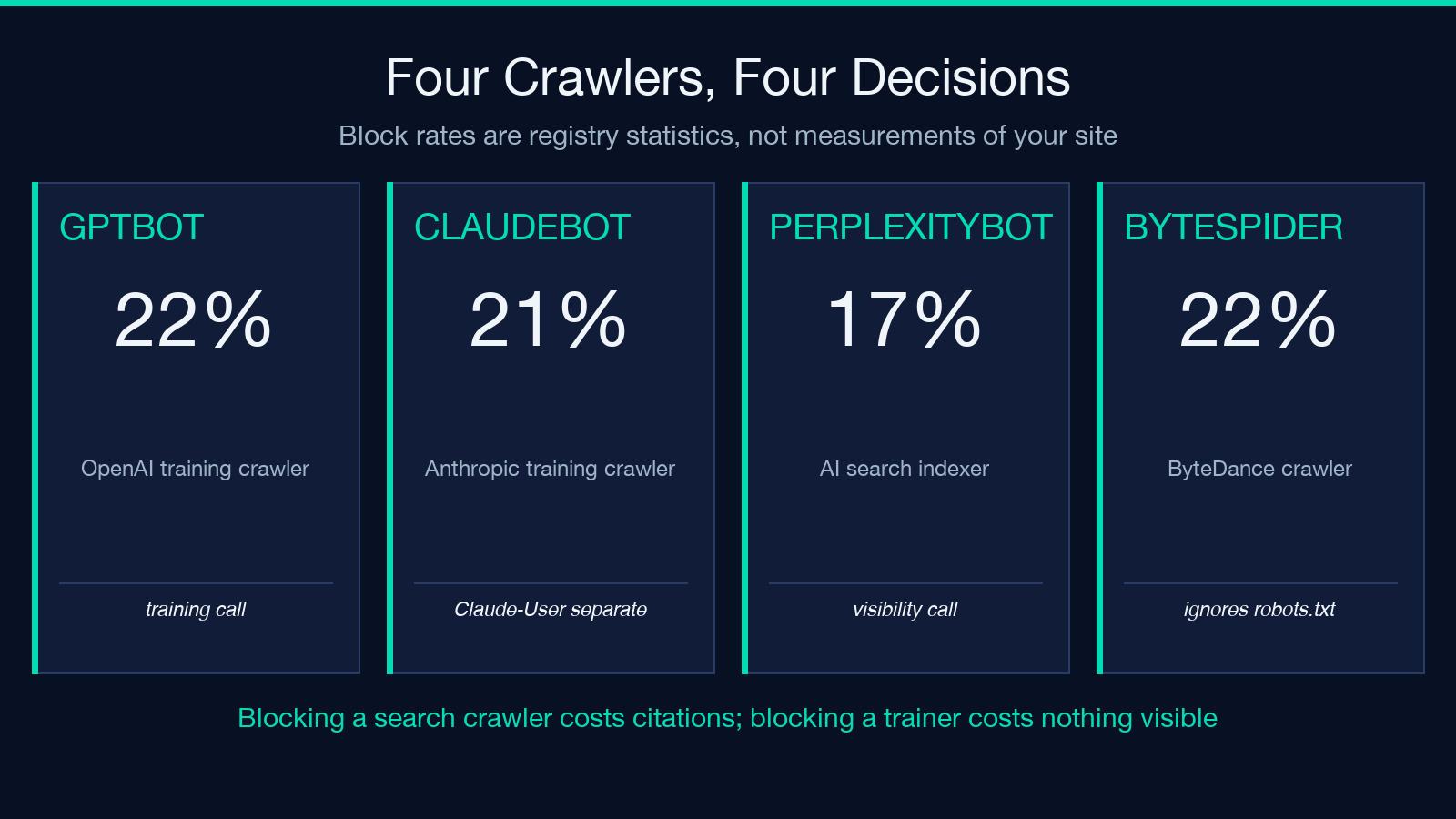
- GPTBot, from OpenAI, downloads public pages to improve its models. According to the registry statistic the tool cites, 22 percent of top sites block it. This is a training decision.
- ClaudeBot, from Anthropic, crawls for the training data behind Claude, at a cited 21 percent block rate. Claude-User and Claude-SearchBot are separate tokens for live user traffic, so blocking ClaudeBot will not stop Claude fetching a page a person asked about. This is a training decision mistaken for a traffic decision.
- PerplexityBot, from Perplexity, indexes pages for AI search answers, cited at 17 percent. Perplexity recommends allowing it for search visibility, which makes it the one where blocking reduces your citations. This is a visibility decision.
- Bytespider, from ByteDance, is cited at 22 percent blocked and is widely reported to ignore robots.txt outright. Here the file is documentation, not enforcement. This is a security decision, and it needs a server-side answer: user-agent blocking at the edge, a rate limit, or a firewall rule.
Those block rates are registry statistics, not measurements of your site, and the output labels them that way for a reason. They report what other operators decided, not what your logs show. Four bots, four different conversations, one file that cannot express any of them.
An audit you can finish before the coffee goes cold
The audit is smaller than it sounds. Paste your robots.txt and a page inventory of lines holding a URL, a title, and a description. The tool builds a matrix — each bot marked allowed or blocked at the root, with a blocked count against the number of audited paths — plus a per-bot directive you can paste verbatim, plus the llms.txt draft generated from the same inventory.
One detail in that arithmetic deserves attention. The audited path set is the root plus the distinct pathname of each page you supplied. Four pages that share no path shape produce five audited paths, which is why the output reads 5/5 blocked instead of a whole-site figure. You are auditing your inventory, not your site, and a crawler still reaches each URL you forgot to list.
Offline mode is the mode to use. The live crawl fetches your robots.txt first, then obeys it for its own user-agent token, so a site that disallows unknown agents at the root gets refused instead of audited — and a crawler that ignored your rules while testing them would be a strange thing to trust. Live mode also caps at 26 pages and falls back to sitemap lookup when the homepage exposes fewer than three links, which describes how much of a client-rendered site one pass can see.
The tool emits the directive, but the judgment stays yours: description or gate, welcome or lock. Explore more tools at elysiatools.com.
I opened this article believing llms.txt was the AI-era robots.txt, and that publishing one counted as governance. It is neither. The gap is not a flaw in the proposal — it is the proposal: one file describes your site to a crawler that already holds permission, the other decides whether permission exists at all. The consequence is uncomfortable for anyone who shipped a welcome mat and called it a lock. Which file did you write?
