The Three Mistakes in Every JWT Generator That Make Your Tokens Forgeable
Most JWT generator tutorials walk through the happy path: pick an algorithm, paste a secret, set an expiry, click generate. The token comes out looking like a real token, the verifier accepts it, the auth flow works. The problem is that the same three mistakes show up in nearly every project that builds its own JWT generator — and they all produce tokens that look perfectly valid while being trivial to forge. This article walks through the three errors that turn a JWT generator from a security primitive into a vulnerability generator, and what the working pattern looks like instead.
JWTs (JSON Web Tokens) are the de-facto format for stateless auth on the modern web. They sign a small JSON payload with HMAC-SHA256 (or one of its siblings) so a server can verify the issuer without a database lookup. The signing step is the entire point of the token: if the signature checks out, the server trusts the claims. Everything else — the algorithm choice, the secret length, the expiry semantics — is what makes that signature something an attacker can or cannot reproduce. Skim a real-world JWT generator and you’ll see how easy it is to get those three things wrong.
The good news: the fixes are mechanical. A working JWT generator is not harder to use than a broken one — it just enforces a few defaults that the broken version leaves to chance. You can see what those defaults look like in the JWT Generator on Elysia Tools, which is one of the few generators that surfaces the algorithm choice and the secret strength in the same view. The rest of this article uses it as a reference, but the same three patterns apply to every JWT library you’ll find on npm, PyPI, or Maven Central.
The alg: HS256 default that lets an attacker downgrade the verifier
The first mistake shows up the moment you open a JWT generator and look at the algorithm dropdown. Most generators default to HS256 (HMAC SHA-256), and most generators let you pick from a list of algorithms — usually HS256, HS384, and HS512. The list is presented as if the three options were interchangeable. They are not interchangeable, and the choice you make in the generator has a knock-on effect on what the verifier will accept.
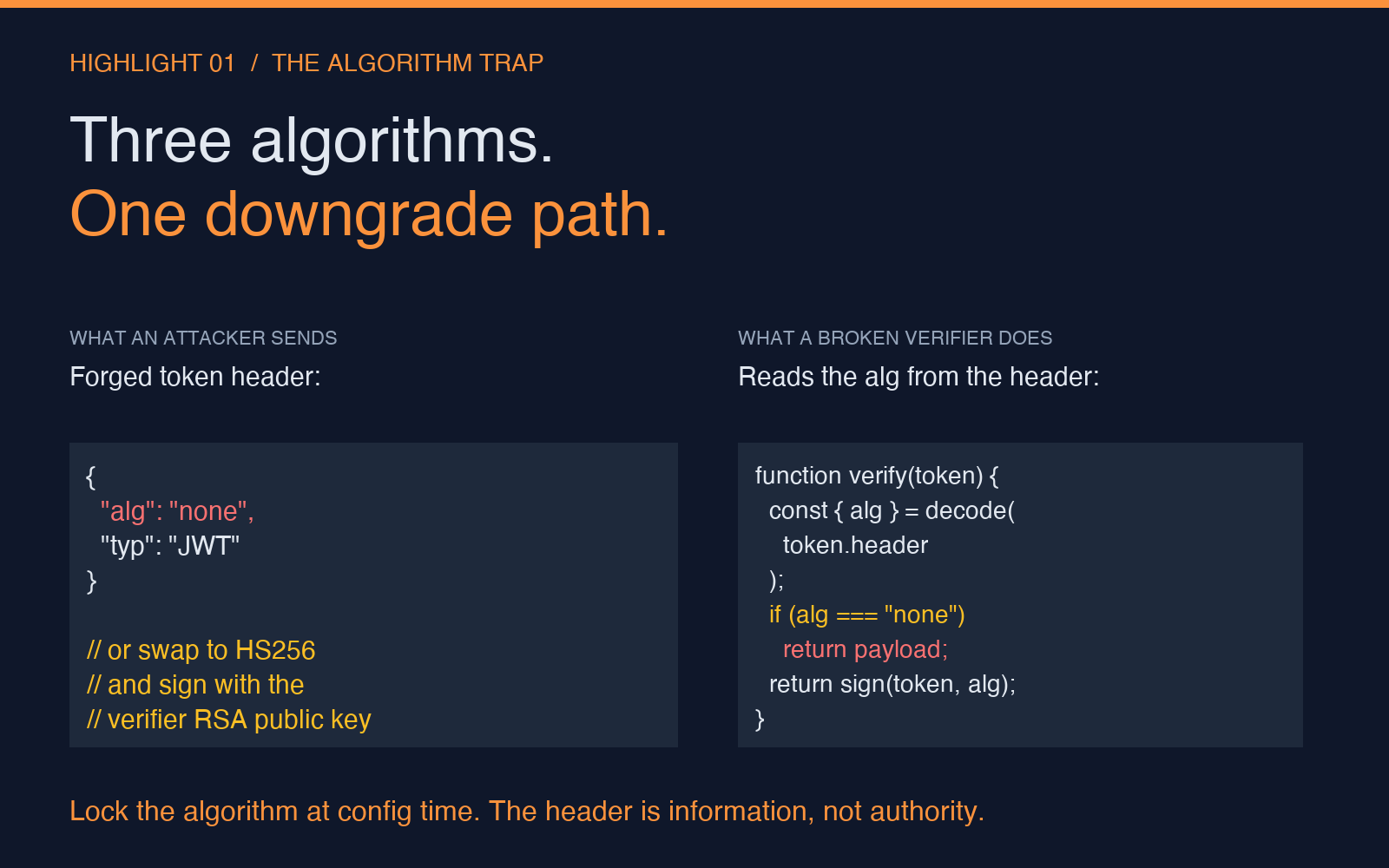
The classic attack is the algorithm confusion attack. The verifier, if it’s written the way most tutorials teach, reads the alg field from the JWT header to decide which verification algorithm to use. A token generated with HS256 is verified using the HMAC secret. But if the verifier also supports RS256 (RSA), and the attacker swaps the header from {"alg":"HS256"} to {"alg":"none"} — a string the JWT spec reserves for “unsigned” tokens — the verifier may treat the token as valid without checking the signature at all. Or the attacker submits a token with {"alg":"HS256"} against a verifier that expects an RSA public key, then signs the token using the public key as if it were an HMAC secret. The public key is, by definition, public. Anyone who can read the verifier’s public key can forge tokens.
A working JWT generator treats the algorithm dropdown as a one-way commitment. Pick HS256 at generation time, and the verifier only accepts HS256. Pick RS256, and the verifier only accepts RS256. The generator and the verifier agree on a single algorithm out-of-band — usually via configuration, not via the token header — and the alg field in the header is informational, not authoritative. If you need to support multiple algorithms, the right pattern is multiple verifiers, not a single verifier that reads the algorithm from the token.
The JWT Generator on Elysia Tools surfaces this directly: the algorithm dropdown is the first thing you see, and the generated token’s header is bound to that choice. For a working example of the downgrade attack in code, see the JWT Samples page — the “alg” field in the header is what every verifier in the wild reads first, and it’s the field most attacks start with.
The “32-character secret” that an offline attacker can guess in a weekend
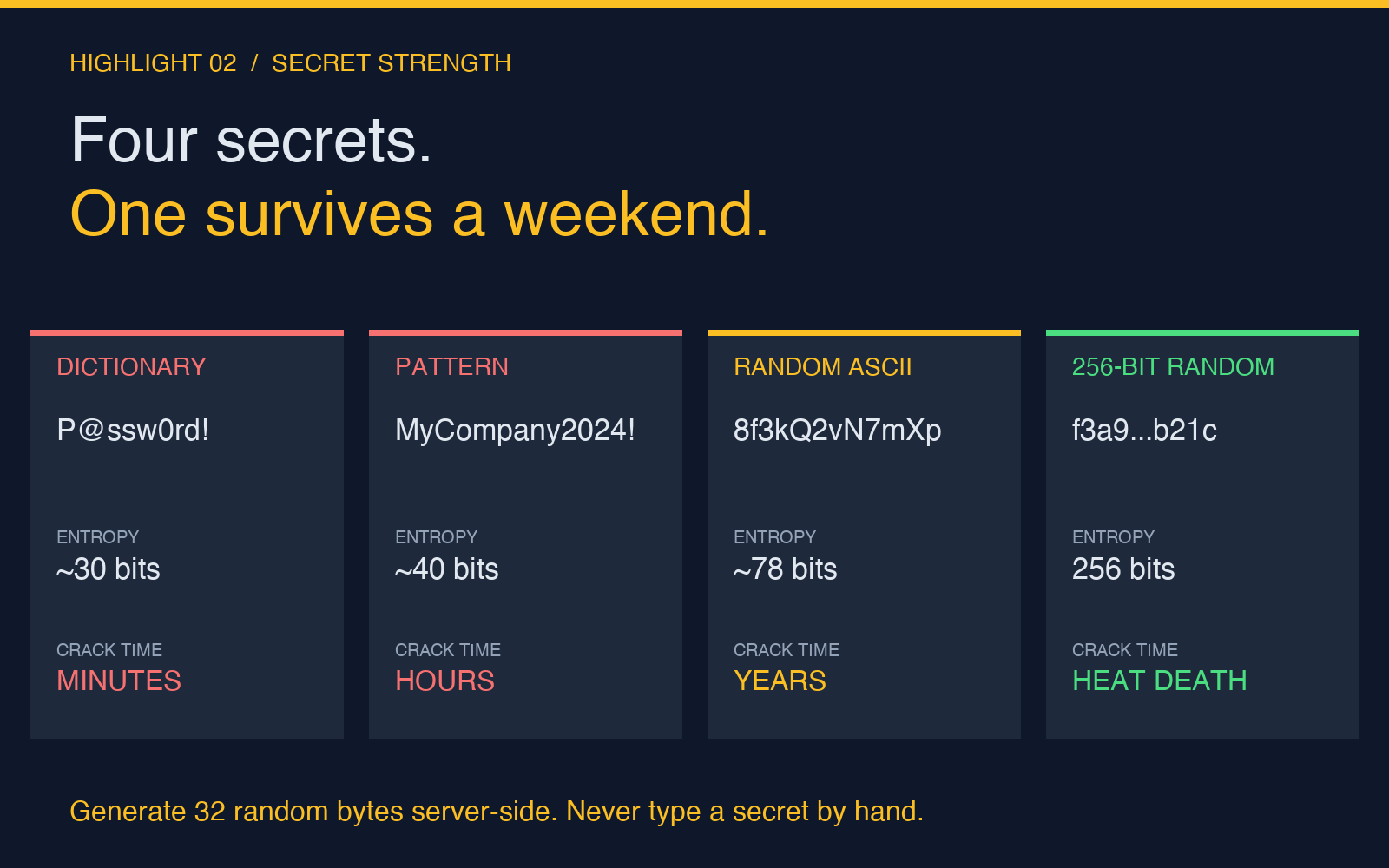
The second mistake is in the secret field. A JWT generator’s secret input usually shows a single text box with a placeholder that says something like “your-secret-key”. The user types in a value, the generator signs the token with it, and the resulting token is “secure.” The problem is that “secure” depends entirely on the entropy of the secret, and the generator has no way to enforce a minimum. A 16-character ASCII string is roughly 95 bits of theoretical entropy — but a phrase like MyCompany2024! is closer to 30 bits because it follows predictable patterns. An attacker who steals a token (a log file, a URL parameter, a copy-pasted debug request) and runs it through hashcat with a rules-based wordlist will find a secret like MyCompany2024! in minutes, not days.
A working JWT generator refuses weak secrets. The minimum length is 32 bytes of true entropy — 256 bits, which is the security level HS256 was designed around. The secret should be generated with a cryptographically secure random number generator (crypto.randomBytes(32) in Node, secrets.token_bytes(32) in Python) and stored in a secrets manager, not typed into a form. If a human has to read the secret out loud, it’s the wrong secret. If the secret appears in a Slack channel or a Git commit, it’s the wrong secret.
A useful sanity check before shipping: copy the secret into the entropy estimator at Elysia Tools and see what it says. The estimator will tell you whether the secret is at the 256-bit security level HS256 expects or at the 30-bit level your dev box defaulted to. The difference between those two outcomes is the difference between a token that takes longer than the heat death of the universe to brute-force and one that an attacker cracks over a long weekend.
The second-order mistake is using the same secret for two different tokens — for example, the access token and the refresh token share an HMAC key. If either leaks, both are forgeable. The right pattern is one secret per token type, rotated independently, with the verifier configured to accept only the secret for the token type it’s checking.
The “Expires In: 3600” that means 24 hours because the verifier compared dates wrong
The third mistake is the one that survives the longest in production because the test suite passes. The generator has a field that says “Expires In (seconds)” with a default of 3600. The user sets it to 3600, generates a token, sees the exp claim in the decoded payload is now + 3600, and assumes the token will expire in one hour. The token does expire in one hour — if the verifier compares the exp claim correctly. Most verifiers don’t.
The pattern that produces long-lived tokens is the timezone mismatch. The generator writes exp as a Unix timestamp in seconds. The verifier reads the token, gets the timestamp, and does one of three things: compares it to Date.now() / 1000 (correct), compares it to new Date() after parsing the timestamp as a string (also correct), or compares it to a Date object created from the timestamp with the wrong unit. The classic mistake is comparing token.exp < new Date() after parsing exp as milliseconds instead of seconds. A 3600-second token becomes a 3.6-millisecond token — except the comparison goes the other way. The token is “expired” the moment it’s generated, and the verifier rejects it, and the developer removes the expiry check to “fix” the bug. The token now has no expiry at all.
The inverse mistake is even more common: the generator writes exp in seconds, the verifier parses it correctly, but the system’s clock is skewed. A server that hasn’t run NTP in six months is several seconds to several minutes off. Tokens generated at 10:00:00 with a 1-hour expiry are valid until 11:00:00, but the verifier thinks the current time is 11:02:00. The token gets rejected as expired. The user complains, the developer extends the expiry to 24 hours, the security review notes the change, and the token lives for 24x longer than intended.
A working JWT generator’s expiry field is paired with a verification-side clock check. Both sides agree on the unit (seconds since epoch, UTC, no exceptions), both sides have a synchronized clock (NTP, leap-second-aware, no exceptions), and both sides use the same comparison (< not <=, with a small clock-skew window — 30 seconds is the conventional choice). The JWT Generator on Elysia Tools writes exp as a Unix timestamp in seconds and gives you the raw value in the decoded payload, so you can verify the unit before you wire the token into your app. The verification-side example in the JWT Samples shows the working pattern: decodedToken.exp < Math.floor(Date.now() / 1000), with no Date-object math in the critical path.
What a working JWT generator enforces by default
The three mistakes — algorithm confusion, weak secrets, and clock-skewed expiry — share a single root cause. The generator presents each parameter as a free-form input, and the user fills in values that look reasonable. A working generator turns each parameter into a constraint. The algorithm is a single fixed choice, locked at configuration time. The secret is generated server-side or imported from a secrets manager, with a minimum entropy check. The expiry is paired with a clock-skew tolerance and a unit (seconds) that’s enforced on both the generator and the verifier.
If you’re building your own JWT generator, the working pattern is to import the library’s signing function (jsonwebtoken for Node, PyJWT for Python, java-jwt for the JVM), pass the secret from a secrets manager, set the algorithm explicitly (algorithm: 'HS256', not the library’s default), set the expiry as a number of seconds (expiresIn: 3600), and ship the same verification code that ships with the library — no custom parsing, no string-to-date math, no clock comparisons that tolerate drift. The whole “is this token valid” question reduces to a single library call that knows all the rules.
If you’re using an online generator to produce test tokens, the JWT Generator at Elysia Tools is one of the few that surfaces the three parameters as first-class concerns: the algorithm dropdown is a commitment, the secret field has a length indicator, and the expiry field shows the decoded exp timestamp in the same view. Pair it with a JWT Decoder for a round-trip check, and you’ve got a working test harness in two tabs.
The same three mistakes show up in nearly every “JWT in 10 minutes” tutorial because the tutorials optimize for the happy path. A token that signs, verifies, and expires correctly is the visible result. A token that’s forgeable, weak, or clock-skewed is invisible until an attacker demonstrates it. The fix is to treat the generator as a security primitive, not a convenience — and to make the three constraints the defaults, not the configurations.
How the algorithm choice and the secret length interact
There’s a fourth mistake that doesn’t get its own section because it’s a special case of mistake two, but it’s worth flagging: the secret length must match the algorithm. HS256 takes a 256-bit secret, HS384 takes a 384-bit secret, HS512 takes a 512-bit secret. The JWT spec actually permits any length of secret for any HMAC algorithm — the libraries don’t enforce a minimum — but the security level of the token is min(secret_entropy, algorithm_strength). If you generate an HS512 token with a 128-bit secret, the token is only as strong as a 128-bit HS256 token. The attacker doesn’t care which algorithm you picked; the attacker cares about the entropy of the secret.
A working generator warns the user when the secret is shorter than the algorithm’s native strength. The JWT Generator at Elysia Tools shows the secret length as you type, and the algorithm dropdown stays in sync with the secret length. The token is only as strong as its weakest parameter, and the working pattern is to make the weakest parameter obvious.
A five-line working JWT generator in Node
The minimal working JWT generator, in production-safe code, is about five lines:
const jwt = require('jsonwebtoken');
const secret = process.env.JWT_SECRET;
const token = jwt.sign(
  { sub: 'user_123', role: 'admin' },
  secret,
  { algorithm: 'HS256', expiresIn: '1h', issuer: 'api.example.com' }
);
Five lines, but each line is doing real work. The secret is loaded from the environment, never hard-coded. The algorithm is explicit, never the library’s default. The expiresIn is a string duration, parsed by the library into a Unix timestamp. The issuer is set, so the verifier can check it. The verification side, if you’re following the same pattern, is jwt.verify(token, secret, { algorithms: ['HS256'] }) — note the algorithms array, which locks the verifier to HS256 only. An attacker who swaps the header to alg: none gets a 401, not a forge.
The five-line version is not what you ship. What you ship is the five-line version wrapped in a secrets-manager call, a clock-skew check, an issuer check, an audience check, and a logging layer that redacts the token before it hits the log. But the core is five lines, and the three mistakes above are the difference between those five lines being a security primitive and those five lines being a vulnerability. The choice is in the defaults.
Where to verify the patterns in your own tokens
A good way to check whether your JWT generator is doing the right things is to take a token it produced, paste it into a JWT Decoder, and look at three fields: the alg field in the header (is it the one you expected, or did the library pick a default?), the exp claim in the payload (is it in seconds since epoch, and is the value sane?), and the iss and aud claims (are they set, and do they match what the verifier expects?). If any of the three is missing or wrong, the token is weaker than it looks. The round-trip through the decoder takes ten seconds and surfaces the three mistakes above without any code changes.
For more patterns — including the full Node.js signing and verifying example, the Express middleware, and the browser-side AuthManager class — see the JWT Samples page. The samples are prefill-ready: paste the same secret into the JWT Generator and the decoder, and you can verify the round-trip end-to-end. The same three mistakes show up in the samples if you remove the explicit algorithm, the explicit expiry, or the explicit issuer; the same three mistakes disappear if you keep all three.
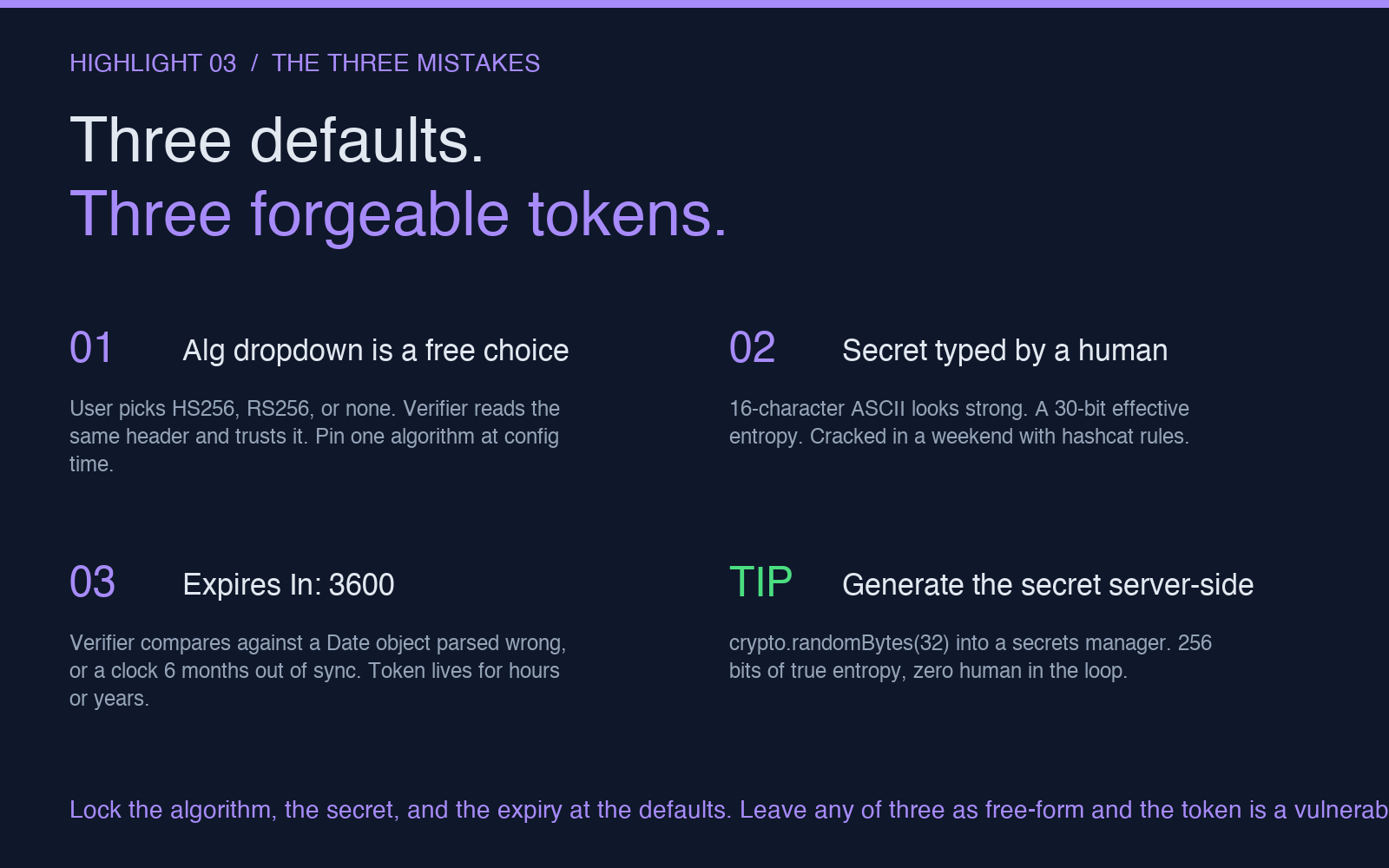
The takeaway: a JWT generator is a security primitive, and the three parameters that make it secure are the ones most generators leave to chance. The algorithm, the secret, and the expiry. Lock all three at the defaults, and the generator is a security primitive. Leave any one of them as a free-form input, and the generator is a vulnerability. The fix is mechanical, the verification is a ten-second round-trip, and the cost of getting it wrong is a forge-able token in production.
For more on the verification side of the same trade-offs — algorithm confusion, clock skew, claim trust — see the JWT Decoder & Security Auditor tool and its reference on the four checks most decoders skip. The decoder side and the generator side are the same three mistakes viewed from different angles. Fix them in the generator and the decoder has nothing to flag.