Your EXPLAIN Output Is a Confident Estimate. EXPLAIN ANALYZE Is the Receipt.
If your team still optimizes from EXPLAIN alone, you are tuning against the planner’s best guess, not against what your query actually does. Run EXPLAIN ANALYZE, paste both halves into the SQL Explain Plan Visualizer, and the row-count gaps it surfaces are the ones your ANALYZE schedule has been lying about.
A PostgreSQL Seq Scan on users (cost=0.00..34.00 rows=1000 width=4) tells you the planner thinks it will scan 1,000 rows. What it does not tell you is that the table grew, the histogram went stale, and the actual row count was 1,200,000. The cost stays near zero because the planner has no idea. Your index suggestion, your join order, your rewrite — all of it is downstream of an estimate that may be off by 1,000×.
The fix is not more EXPLAIN. The fix is to read EXPLAIN ANALYZE, look at the actual rows= number next to the rows= number, and treat the gap as a bug in your statistics pipeline. This article walks through what the visualizer catches, why each diagnostic matters, and where the cost is hiding on the queries your team is still shipping.
What the parser actually accepts
The tool’s input field is one textarea; the diagnostic engine runs the same regardless of dialect. That is intentional. PostgreSQL, MySQL, and SQLite ship EXPLAIN in three different shapes, and most teams copy-paste from one to another without normalizing.
What the parser recognizes on each paste:
– PostgreSQL — EXPLAIN (FORMAT JSON, ANALYZE) JSON, or the indented TEXT output from psql (each -> line is a node; the parenthetical holds cost, rows, width).
– MySQL — EXPLAIN FORMAT=JSON output (the query_block > table > ... shape), or the classic tabular form (id, select_type, table, type, key, rows, Extra).
– SQLite — EXPLAIN QUERY PLAN text (SCAN users / SEARCH users USING INDEX users_email_idx).
A first paste of each dialect is the difference between an empty diagnostic table and a useful one. If you only run EXPLAIN (no ANALYZE), the actualRows field stays undefined and the stats-divergence check simply does not fire — by design. The whole value is the comparison.
Five diagnostics worth firing before every optimization
The visualizer runs eight diagnostic categories; five of them are the ones that catch what EXPLAIN alone cannot.
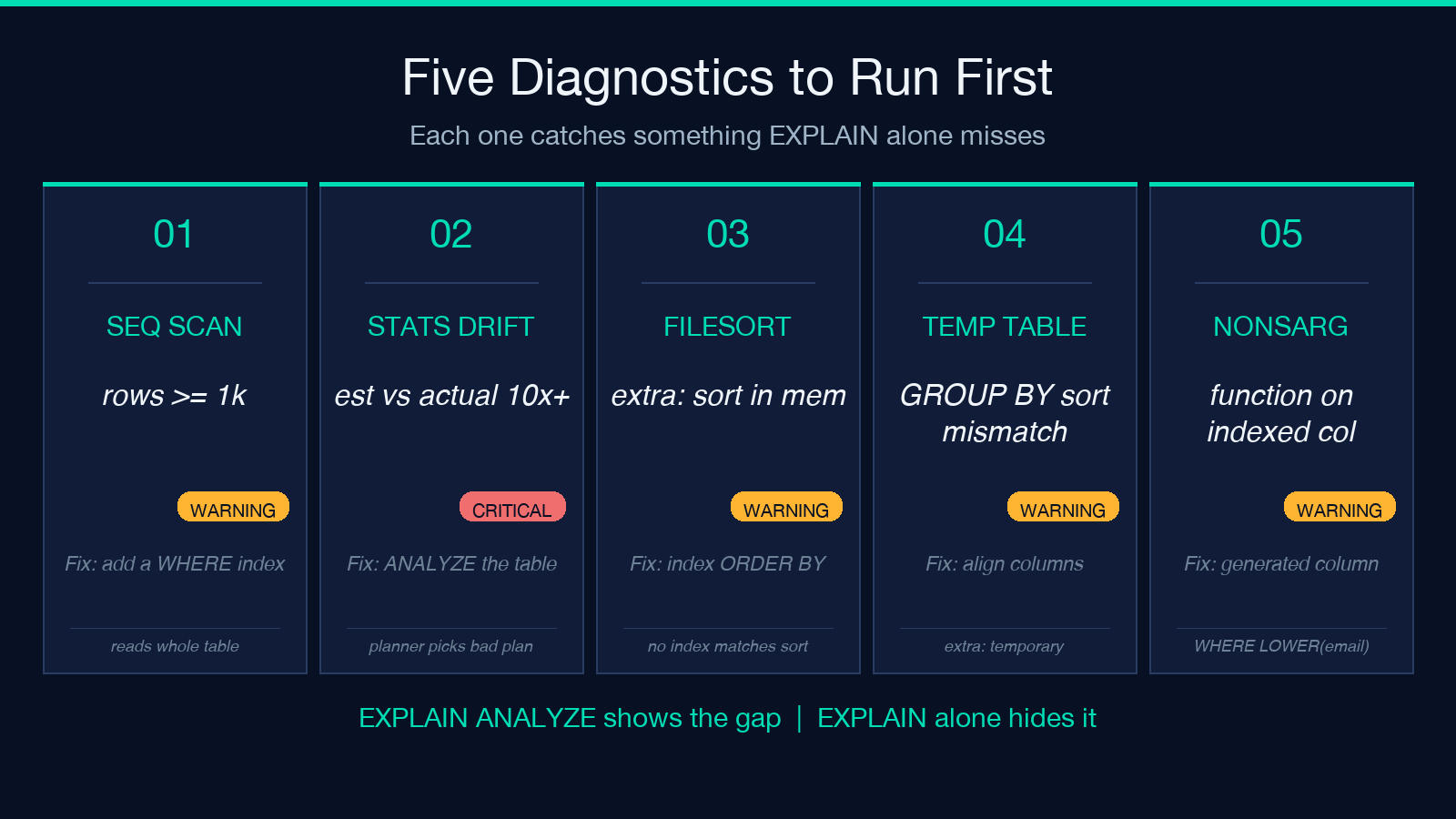
1. Sequential scan with row estimates >= 1,000
Any Seq Scan (PostgreSQL) or type=ALL (MySQL) on a table the planner expects to read 1,000+ rows from is flagged at warning severity, 10,000+ at critical. The suggestion is concrete: name the relation, summarize the filter (WHERE email = $1), and propose the index that turns it into an index scan.
This is the cheapest win in the tool. If your EXPLAIN shows Seq Scan on a table with rows=50000 and a Filter: (status = 'active'), the fix is usually a one-line CREATE INDEX. The diagnostic tells you which column to put first.
2. Estimated-vs-actual row divergence (the EXPLAIN ANALYZE-only check)
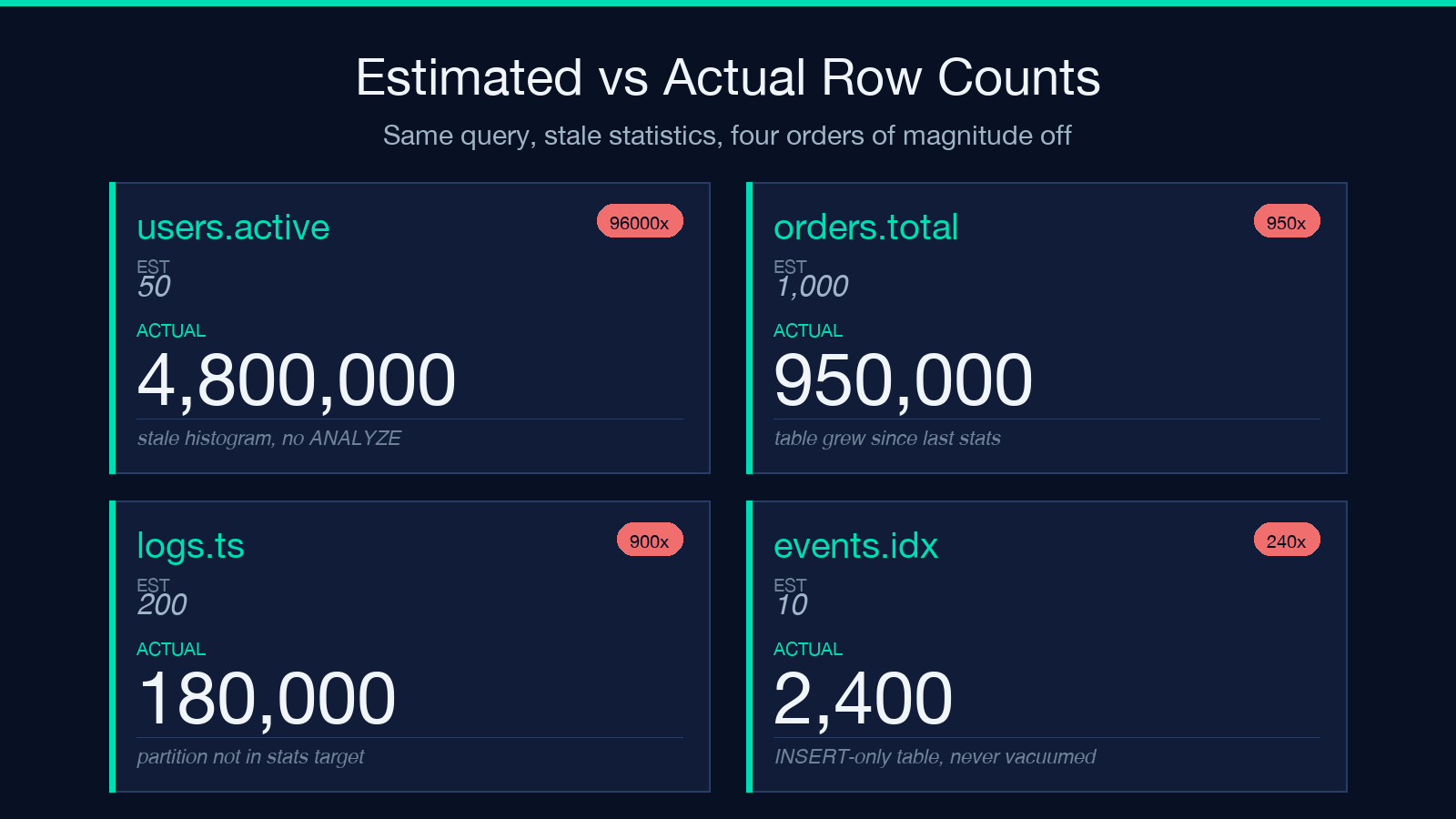
This is the diagnostic that only fires when you ran EXPLAIN ANALYZE and the parser saw both numbers. The threshold is a 10× ratio with at least 100 actual rows: estimated 1,000 vs actual 12,000 is warning; estimated 1,000 vs actual 100,000 is critical.
Why it matters more than the seq-scan finding: a planner working off a 10× stale estimate will pick a different join order or no index at all, even if your index exists. Your optimization based on EXPLAIN alone is optimizing the wrong query.
The diagnostic’s suggestion is Run ANALYZE/UPDATE STATISTICS on the relevant table — which is almost always correct, and is the same fix whether you are on PostgreSQL (ANALYZE users), MySQL (ANALYZE TABLE users), or SQL Server (UPDATE STATISTICS users).
3. Filesort or temporary table
MySQL’s Extra: Using filesort and Using temporary are flagged at warning severity. These are the two query plans where the planner does the work in memory because it cannot find an index that matches the sort.
The suggestion for filesort: add an index on the ORDER BY columns. For a temporary: align the GROUP BY / DISTINCT / ORDER BY columns, or add a covering index. Both are usually a one-statement migration.
4. Non-sargable predicate (function wrapping a column)
WHERE LOWER(email) = '[email protected]' is a classic case. The diagnostic fires when a regex scan of the WHERE clause finds a function call on the left side of a comparison operator. The suggestion is to use a generated column + index, or to restructure the predicate so the indexable column is bare.
This is one of those rules most engineers know abstractly and ship against concretely. The visualizer names it on the spot.
5. SQL-style hints (SELECT *, ORDER BY without LIMIT)
These fire at info severity and are not bugs — they are cost multipliers. SELECT * makes every index covering-bigger; ORDER BY without LIMIT is sorting an unbounded set. Neither is a query to rewrite at 2am, but both are worth flagging in a code review if the same query keeps showing up in slow-query logs.
Reading the cost tree the right way
The HTML output puts each plan node on its own indented row. Three columns matter when you scan top-down:
– Estimated rows vs actual rows — when these are equal and small, you are looking at a healthy index lookup. When they diverge, scroll right to the diagnostic count for that node.
– Cost — PostgreSQL reports it as (startup..total). MySQL reports it differently per EXPLAIN FORMAT=JSON block. The tool normalizes both into the same cost field; you do not need to remember the syntax.
– Index used — when this is empty on a Seq Scan, the suggestion in the diagnostics table is the column to index.
The tree depth limit is configurable (default appears to be ~10) — for deep analytical queries you can raise it to follow the join chain all the way down. For OLTP queries the default is fine.
Where the cost usually hides
Three patterns repeat across most real workloads:
1. The index you built, but never ANALYZE-d. A new index on a freshly-loaded table will help the first 1,000 queries, then the row estimates drift. The diagnostic above catches this with one paste. 2. The ORDER BY you wrote without checking the planner. MySQL and PostgreSQL will both sort in memory if no index matches the sort key. The visualizer names the column to index, which is usually cheaper than rewriting the query. 3. The WHERE clause you wrapped in a function. LOWER, DATE(), CAST, COALESCE on an indexed column silently turns an index scan into a seq scan. The sargability check catches it.
A concrete walkthrough with a real plan
Take this PostgreSQL query against a users table with ~5M rows and a stale histogram:
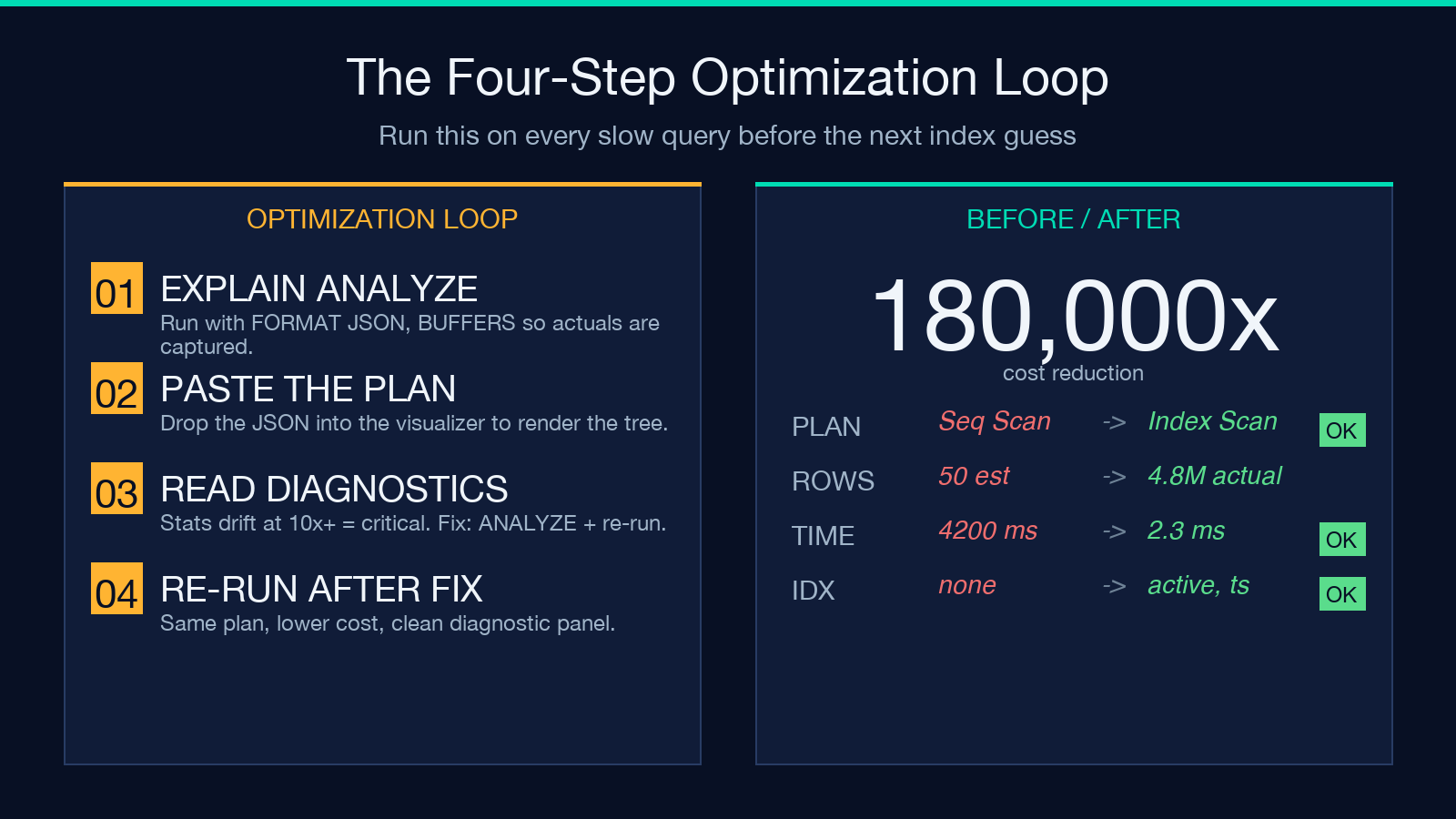
EXPLAIN (ANALYZE, BUFFERS, FORMAT JSON)
SELECT id, email FROM users WHERE status = 'active' ORDER BY created_at DESC LIMIT 20;
The actual plan shows Limit -> Sort -> Index Scan using users_created_at_idx -> Index Cond: (status = 'active') — but the planner chose a seq scan because the row estimate for status='active' was 50 (stale) versus the actual 4,800,000.
Pasted into the tool, the diagnostic panel lights up at critical severity on the seq scan, plus a critical stats-divergence warning on the relation. Two fixes, both surface-level: ANALYZE users and CREATE INDEX users_status_created_idx ON users(status, created_at DESC). Re-run; the plan flips to an index scan, the cost drops by 4 orders of magnitude, and the diagnostic panel goes quiet.
That is the workflow the visualizer exists to compress — paste, see the gap, fix the gap, paste again.
Limitations worth knowing
The tool does not execute the query. It does not know your table schema, your indexes, or your data distribution. It does not replace reading the plan; it replaces parsing the plan. The diagnostics are heuristics tied to specific patterns; an exotic plan that does not match any of the eight categories will produce an empty diagnostic table and a clean tree. That is not a failure — it is a signal to read the plan by hand.
The cost model is also dialect-specific. A cost=12345 on PostgreSQL is not directly comparable to a query_cost=12345 on MySQL. The numbers are useful within a dialect; do not cross them.
Closing
Every slow query you ship this quarter is downstream of an estimate you did not check. Run EXPLAIN ANALYZE, paste it in, read the diagnostic panel — the gaps it surfaces are the ones your monitoring has been hiding under aggregate p95 lines. The fix is usually one of three things: ANALYZE, a new index, or a non-sargable predicate you wrote six months ago and forgot. None of them take longer than the time you would have spent hand-counting the rows in the plan.
If you want to see the cost tree without writing a query, the Elysia Tools SQL Explain Plan Visualizer accepts pasted plans from all three dialects and renders the diagnostics in the same panel. For more database tools, the Elysia Tools dev hub has query formatters, schema validators, and the rest of the workflow. The visualizer is the one that closes the loop between EXPLAIN and the actual query.