
Your JWT Verifier Passed a Forged Token. The Library Did Exactly What It Was Told.
A developer on a fintech team I worked with spent two weeks debugging a “JWT validation bug.” Their verifier was accepting forged tokens minted by an attacker. The root cause was not a broken library, a missing check, or a typo in the algorithm name. The verifier was correctly validating the signature against the public key it had been configured with. The problem was that it had been configured with the attacker’s public key. The signature was valid. The token was forged. The library did exactly what it was told.
This is the algorithm-confusion attack, and it is the single most common JWT verifier failure in production. The fix is not a code change — it is a discipline: pin the expected algorithm, pin the expected issuer, pin the expected audience, and reject everything else before you even reach the signature check. The JWT Inspector & Verifier at Elysia Tools is built to surface exactly these pinning failures in a token before you ship a verifier that has them.
Anatomy of a JWT: header, payload, signature
A JSON Web Token is three base64url-encoded JSON blobs separated by dots: header.payload.signature. The header declares the algorithm and key type. The payload carries the claims — who the subject is, when the token was issued, when it expires, who issued it. The signature is HMAC over the first two blobs using either a shared secret (HS) or an asymmetric private key (RS, PS, ES, EdDSA). In production, the average JWT sits between 250 and 800 bytes; anything above 4KB usually means the issuer is stuffing user records into the payload instead of fetching them by ID.
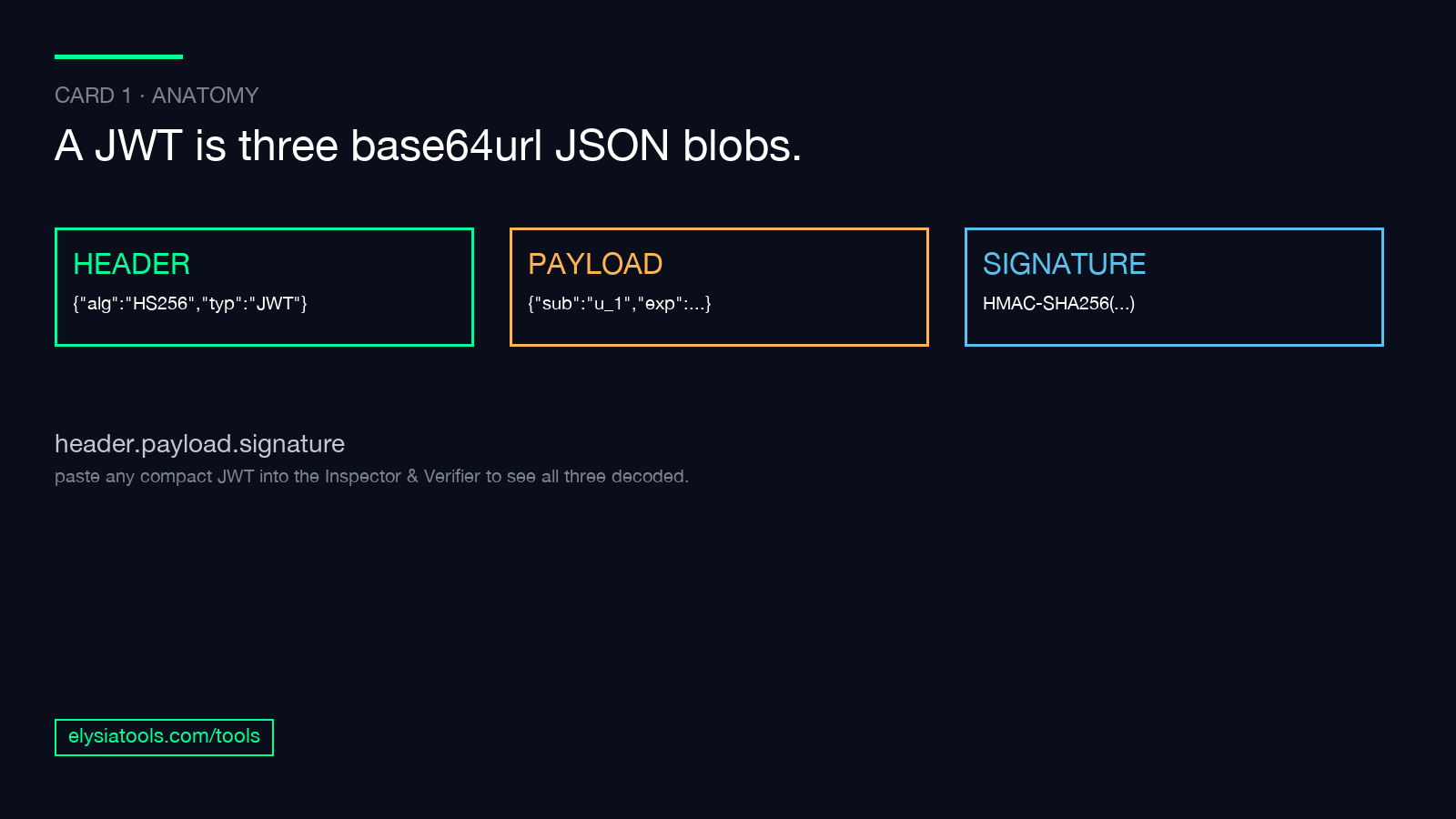
Paste any compact JWT into the JWT Inspector & Verifier and the tool decodes all three pieces into readable JSON. This is the first step of any audit — you cannot diagnose a verification failure if you cannot see what the token contains.
A typical decoded payload looks like this:
{
  "sub": "user_123",
  "iss": "https://auth.example.com",
  "aud": "https://api.example.com",
  "iat": 1735689600,
  "exp": 1735693200,
  "jti": "abc-123-def-456"
}
The numeric iat and exp are Unix timestamps in seconds. A token with an exp one hour ahead and an iat at “now” gives the client exactly one hour of validity. A token with no exp gives the client forever — and creates a verifier bug the moment the signing key rotates, because old tokens remain valid against the new key until the replay store catches up. Every one of those claims has a purpose, and every one of them is a place a verifier can be too lenient. exp is “not valid after this timestamp.” iss is “I expect this to come from this issuer.” aud is “I expect this to be used by this audience.” A verifier that ignores any of these is a verifier an attacker can abuse.
The claim checks that fix 90 percent of verifier bugs
The JWT Inspector & Verifier runs a fixed diagnostic pass against every token you paste. Each check is a one-line answer a verifier should be doing — and most verifiers in the wild are doing at most four of them. The eight checks below come straight out of the standard RFC 7519 claim set, and every one of them is a place a buggy verifier fails.
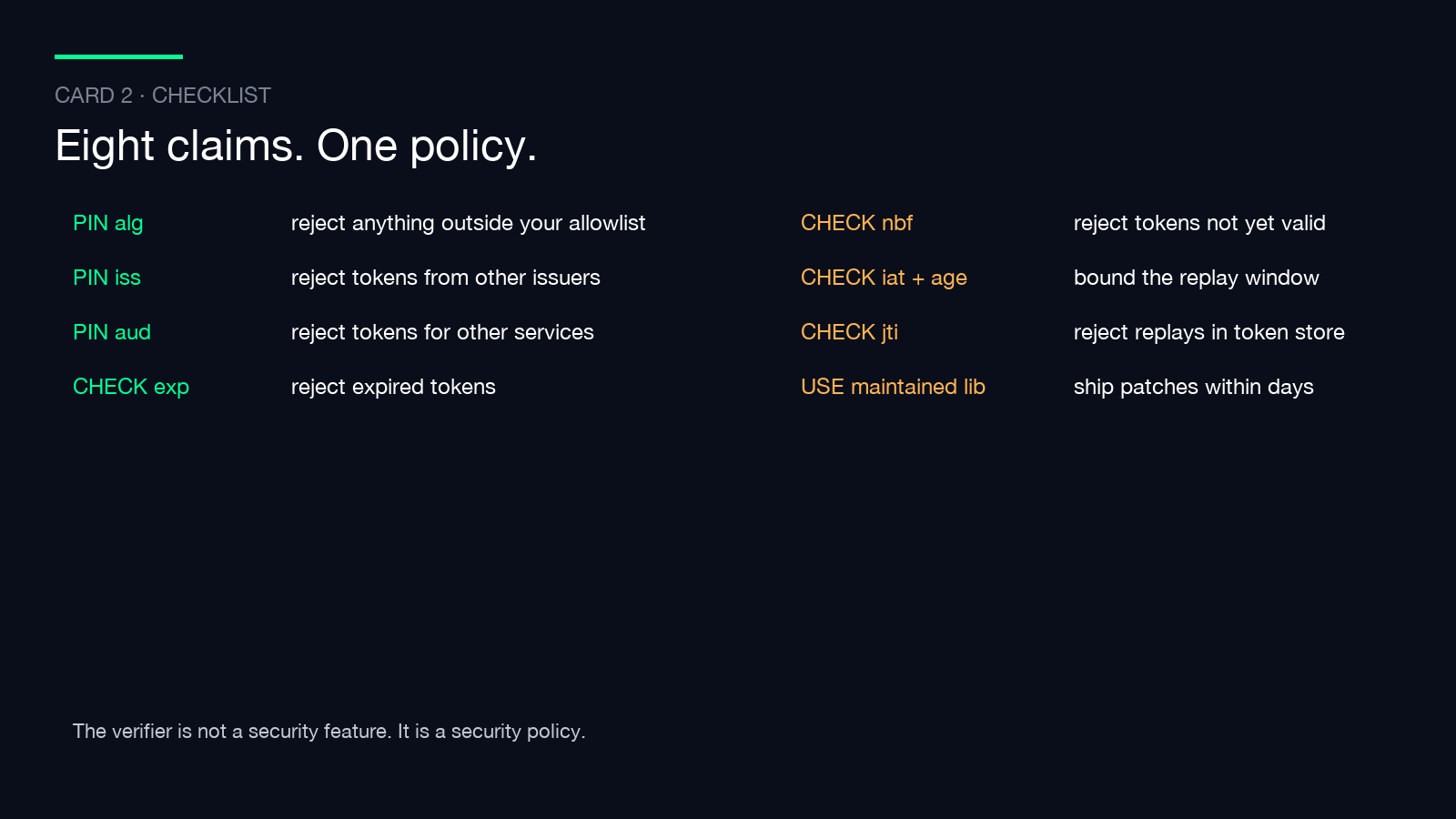
– exp (expiration) — Is the token past its expiry? If yes, reject. Most libraries do this. The bug is when the library trusts the exp claim to be present at all, and a forged token omits exp.
– nbf (not before) — Is the token valid yet? Useful for delayed-activation scenarios. Often skipped in production verifiers because nobody thinks about it until they need to.
– iat (issued at) — When was the token minted? Useful for replay windows and maximum-age policies. The check is “if iat + max_age is in the past, reject.”
– iss (issuer) — Did the token come from the issuer you trust? A JWT minted by a different service in your org using the same shared key will pass signature verification and then be accepted as if it came from the trusted issuer. Pin iss.
– aud (audience) — Is this token intended for my service? A token minted for service A but presented to service B will pass signature verification. Pin aud.
– sub (subject) — Who is the token about? Always present, almost always the user ID you authorize against.
– jti (JWT ID) — A unique identifier for the token. The right place to check a replay store — has this jti been seen before? If yes, reject.
– alg field in the header — What algorithm is this token signed with? Pin this. If your verifier accepts “alg”: “none”, you do not have a verifier — you have a decoder that says yes. If your verifier accepts “alg”: “HS256” but the token claims “alg”: “RS256”, an attacker can forge a token using your public key as an HMAC secret. Build the allowlist at deploy time and reject anything outside it.
That last check is the algorithm-confusion attack I opened with. The fix is two lines in the verifier: read the alg from the token, compare it to the list of algorithms you accept, reject if it does not match.
How the forgery demo makes algorithm confusion visible
The JWT Inspector & Verifier has a third mode beyond decode and verify — “Verify signature + forgery demo.” This is the educational mode that makes the algorithm-confusion attack visible. You paste a legitimately signed RS256 token, supply the public key, and the tool verifies the signature. Then it shows you what happens if the same verifier, configured with the public key treated as an HMAC secret, tries to verify a forged HS256 token: it passes. That is the attack. The signature check returns valid. The token is a forgery.
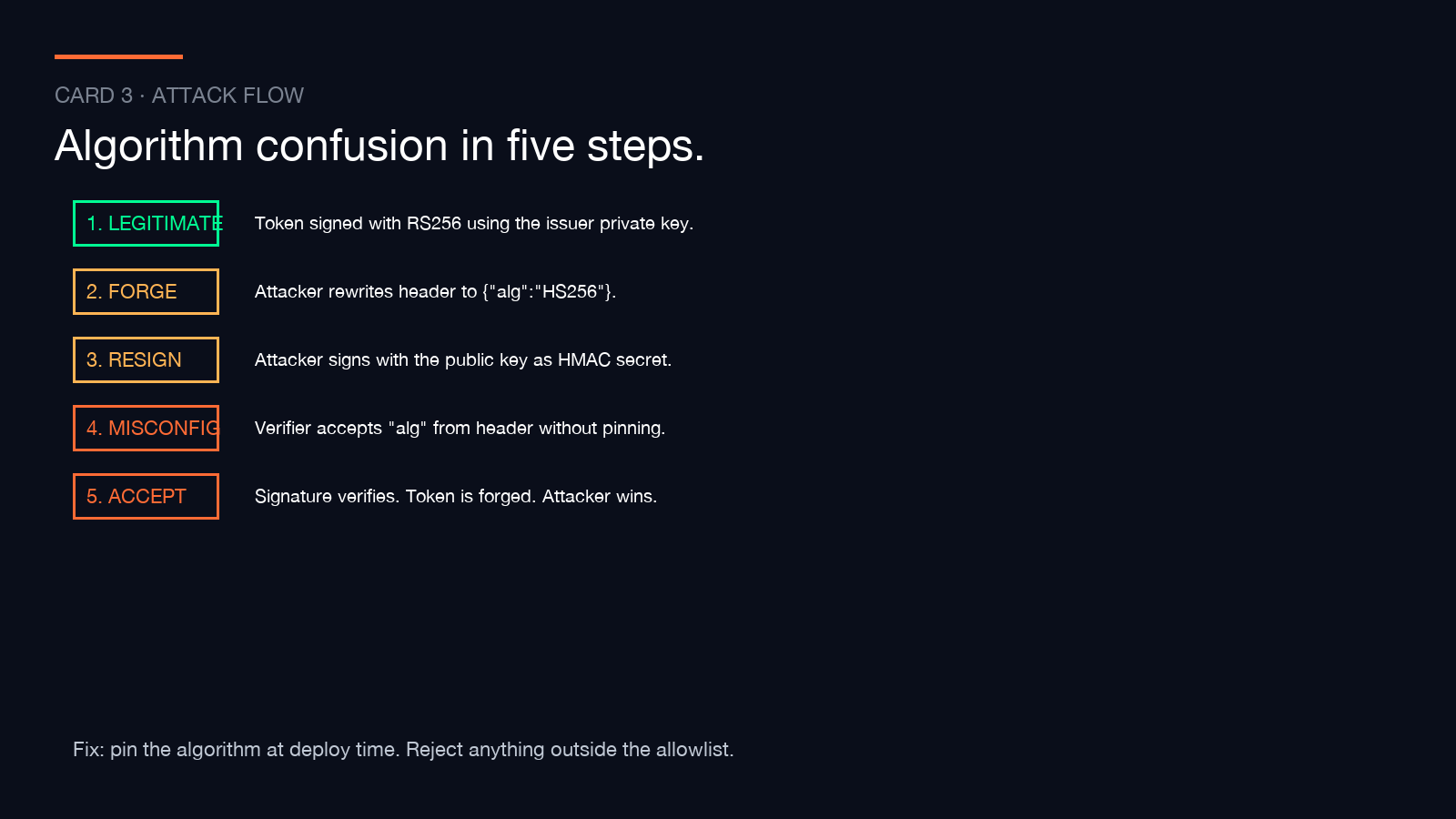
The reason this attack works is structural. The signature in a JWT is over base64url(header) + "." + base64url(payload) using the algorithm named in the header. If the verifier does not pin the algorithm, an attacker can re-encode the payload with a “alg”: “HS256” header, sign it with the public key as the HMAC secret, and the verifier will accept it because the public key bytes double as a valid HMAC key. The signature verifies. The identity is forged. The library does exactly what it was told. This pattern has shown up in real audits of libraries across Python, Node, and JVM ecosystems, and it ships to production more often than any other JWT misconfiguration because it is invisible to functional tests — the forged token round-trips correctly.
The remediation is not subtle: pin the alg, pin the iss, pin the aud. Every verifier that fails to do all three is a verifier with a security bug, even if the tests pass.
What to check before you ship a JWT verifier
If you are rolling a JWT verifier yourself, the checklist below is the minimum. The JWT Inspector & Verifier is the fastest way to verify each item against a real token.
– Pin the algorithm. Reject any token whose header alg is not in your allowlist. “none” is never in the allowlist.
– Pin the issuer. Reject any token whose iss claim does not match your expected issuer exactly.
– Pin the audience. Reject any token whose aud claim does not include your service identifier.
– Check exp. Reject any token whose exp is in the past. Reject any token with no exp at all if your service requires one.
– Check nbf. Reject any token whose nbf is in the future.
– Check iat + max age. Reject any token whose iat is more than your maximum token age in the past.
– Check jti against a replay store. For high-security flows, reject any token whose jti has been seen before.
– Use a maintained library. “I’ll verify it myself” is how production verifiers get the algorithm-confusion bug. Stick to libraries with active security maintenance, and force upgrade cycles that ship dependency patches within days of disclosure.
Pair the verifier with the right token samples
If you are stress-testing your verifier, real token samples beat synthetic ones every time. The JWT samples collection at Elysia Tools contains working tokens in HS256, RS256, and ES256 formats, plus intentionally expired and intentionally forged tokens for negative testing. Feed them through your verifier and confirm it rejects the negative cases.
For lighter inspection work — decode only, no signature verification — the JWT Decoder is the focused alternative. It is faster for spot-checking the payload during a debugging session.
If you need to mint test tokens, the JWT Generator lets you produce signed tokens with a chosen alg and key, which is useful for the integration tests on the verifier side.
The hub view for the whole auth workflow
The JWT Inspector & Verifier sits inside a broader auth-and-tokens workflow at Elysia Tools. The token decode/verify side is one slice. Token generation, JWK generation, and certificate decoding are adjacent slices you can chain together. If you are scoping the full auth boundary for an audit, start with the verifier, then check how your tokens are minted, then verify the signing keys are rotated correctly.
The verifier is not a security feature. It is a security policy.
A JWT verifier is not a security feature. It is a security policy. The library executes whatever policy you wire into it. If the policy is “check the signature,” the verifier accepts the algorithm-confusion attack. If the policy is “check the signature, pin the alg, pin the iss, pin the aud, reject expired tokens,” the verifier is a defense. The difference is not in the code. It is in the discipline of what you tell the code to reject.
If you have not audited your verifier against a real forged token in the last six months, paste one through the JWT Inspector & Verifier and watch what it flags. That is the smallest unit of work that catches the attack before someone else does. Explore the broader Elysia Tools catalog to see how the rest of the auth workflow fits together.
