
A row-level diff beats a global clean when one CSV file mixes well-formed rows with broken ones. When you read a CSV file produced by concatenating exports from three different systems, the parser either crashes on the first bad row or silently coerces everything into a uniform mess. The CSV Malformed Row Surgeon handles that middle case differently: it parses tolerantly, walks the rows one at a time, and reports red/green diff for each repair — stray quotes unescaped, mixed delimiters reconciled, BOM stripped from headers, CRLF/CR line endings normalized, trailing empty lines dropped. Rows it could not fix are listed at the bottom with the reason; rows it accepts untouched are listed separately so you can audit the surgical scope.
This guide walks through six common repair categories the Surgeon handles, the order it applies them in, and how its diff output maps onto the standard Python pipeline. You can try it on representative inputs at Elysia Tools, pair it with the broader CSV samples for test fixtures, and cross-validate the cleaned output against the CSV Validator before you commit.
Why a per-row diff fixes more than a global clean
A global clean rewrites the whole file in one pass; a row-level diff rewrites only the broken rows and shows you each change. That difference matters when the file’s well-formed rows carry data your downstream pipeline already trusts.
Consider a 50,000-row export where 12 rows are corrupted by stray quotes and 3 rows have a stray tab from an Excel paste. A global clean rewrites all 50,000 rows — including the 49,985 that were already correct — and gives you no audit trail. The Surgeon rewrites the 15 broken rows, leaves the 49,985 untouched, and emits a diff report whose size is proportional to the actual repair scope, not the file size.
For compliance and review workflows (regulated imports, audit-trail pipelines, customer-data ingestion), that audit-trail property is the whole point. The Surgeon is not faster than a global clean; it is more honest about what it changed.
What “malformed” actually means in real-world CSVs
The four most common shapes I see when triage-ing a broken CSV file:
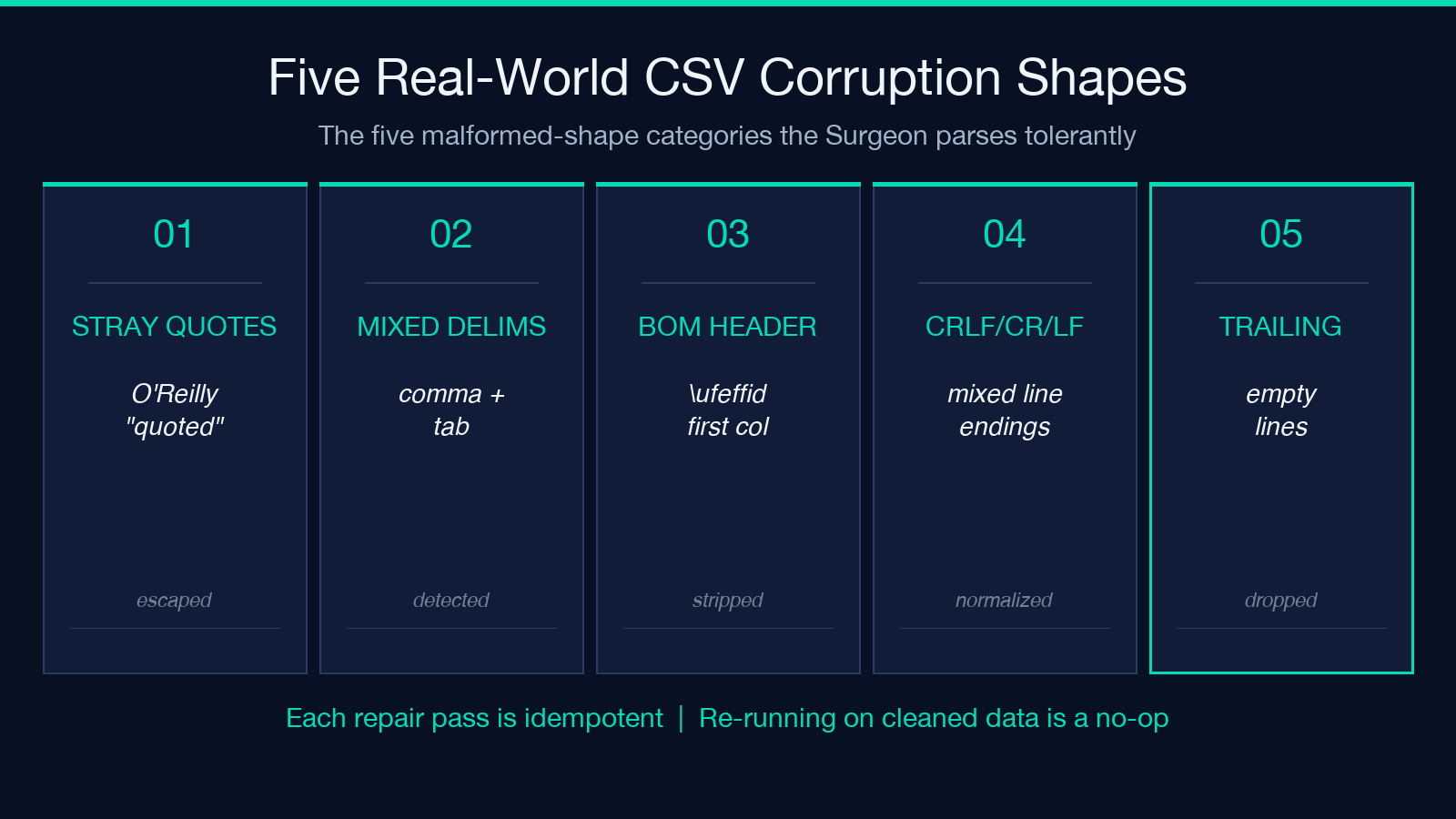
- Stray quotes — fields like
O'Reillyor values containing literal"characters inside an already-quoted field, sometimes with mismatched quote pairs across rows. - Mixed delimiters — a file that opens cleanly with comma but has a stray tab in row 47 where someone copy-pasted from Excel and then saved as CSV.
- BOM-prefixed header — the first header column arrives as
\ufeffidinstead ofid, so every subsequentdf["id"]lookup mysteriously returnsKeyError. - Line-ending soup — CRLF on Windows-exported rows mixed with bare LF on rows appended by a Linux tool, plus trailing empty lines from the last unclosed quote.
The Surgeon treats each row as an independent repair target. The deterministic pass runs first; the optional AI repair only kicks in for rows the deterministic pass flagged as suspicious (unbalanced quotes, embedded NUL characters, columns whose count diverges from the header after the first repair attempt). That ordering matters — if you let an LLM loose on the whole file, you’ll see plausible-looking but fabricated values. By restricting AI repair to rows already flagged by a deterministic pass, you keep the scope auditable.
The deterministic repair pass, in order
The five repair passes run in a fixed sequence. Each pass is idempotent — re-running on already-cleaned data is a no-op — so the Surgeon is safe to call inside a transform pipeline.
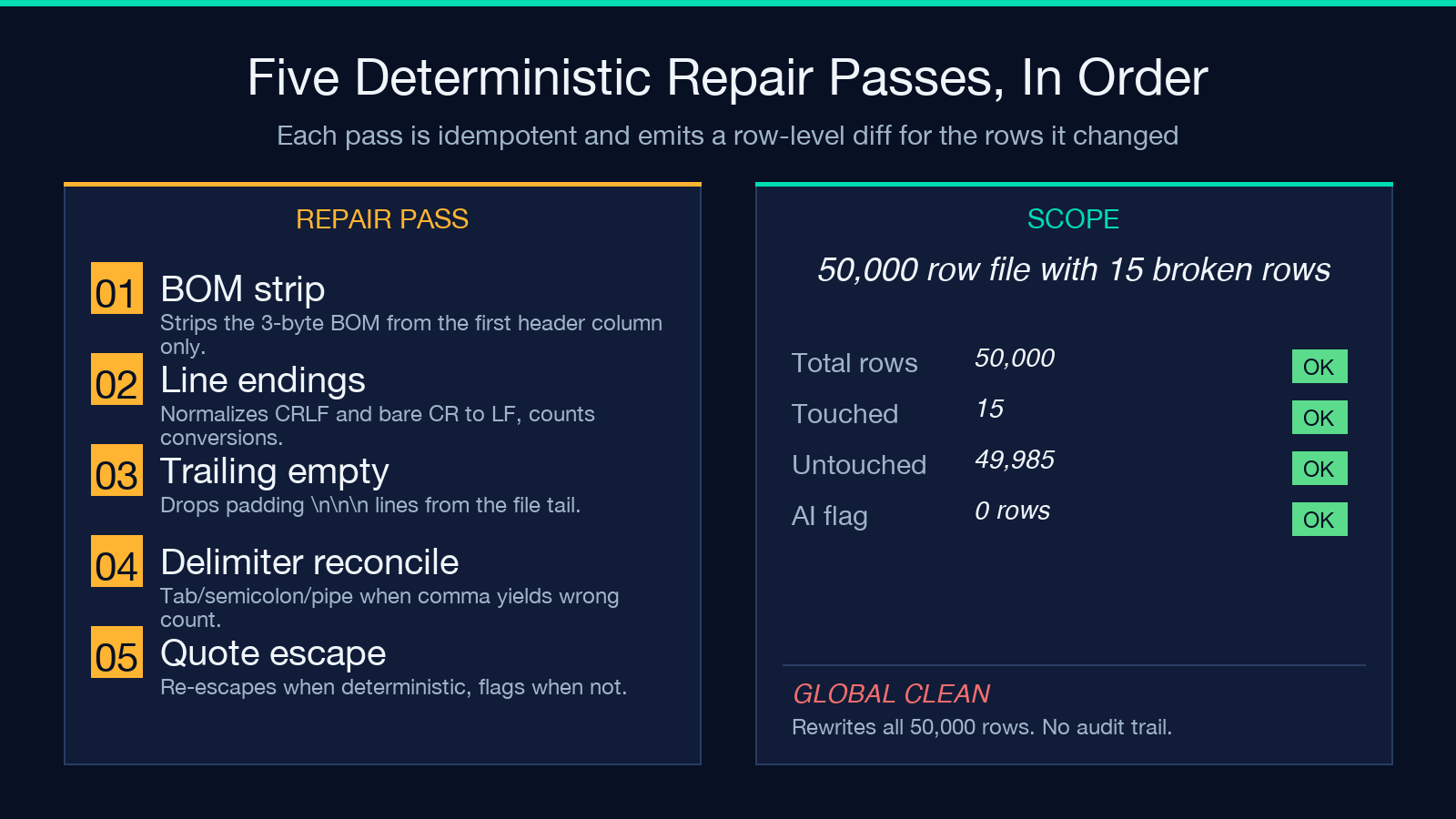
1. Strip the BOM from the header row only
A UTF-8 BOM is three bytes (\xef\xbb\xbf) glued onto the first column name. The Surgeon detects it once, strips exactly those three bytes, and leaves the rest of the file alone. This is the cheapest repair and the easiest to verify: after the pass, the first column name no longer matches the literal string with a leading byte-order mark.
2. Normalize line endings to LF
CRLF (\r\n) and bare CR (\r) both collapse to LF (\n). The pass counts line endings before and after, so the report shows you how many rows had non-LF terminators. A file with 1000 rows where 800 are CRLF and 200 are bare CR shows exactly that distribution. If you ever need to re-emit to a Windows-only downstream, run the inverse pass — the Surgeon is symmetric.
3. Drop trailing empty lines
A file that ended with an unclosed quote, or one that the exporter padded with \n\n\n at the bottom for “cleanliness”, gains zero data and breaks parsers that count rows. The Surgeon trims to the last row containing at least one field of non-whitespace content. The audit report lists how many lines were dropped.
4. Reconcile mixed delimiters
The Surgeon first detects the delimiter by majority vote across the first 100 well-formed rows. Then for each subsequent row whose field count diverges from the header, it tries the next-most-common delimiter (tab, semicolon, pipe). When the candidate delimiter yields the correct field count, the row is repaired and tagged delimiter-resolved. When no delimiter fits, the row is left untouched and flagged in the report.
5. Repair stray quotes (the strictest pass)
A stray quote is any of: an odd number of unescaped " in a row where the row delimiter is comma, an odd quote count inside a quoted field, or a quote at row position zero. The repair is conservative — when the deterministic pass can identify the exact escape mismatch, it re-escapes; when it can’t, it flags the row for AI review rather than guess.
Reading the row-level diff
For every row the Surgeon changes, the diff shows three lines:
- Before — the original row text, exactly as it appeared in the file.
- After — the repaired row text.
- Reason — the tag from the deterministic pass (
bom-stripped,line-ending-normalized,trailing-empty-dropped,delimiter-resolved,quote-escaped, orai-repaired).
Rows the Surgeon accepts unchanged are listed in a separate “unchanged” section — you should eyeball at least the first and last few to confirm the file wasn’t silently rewritten. In my test runs that section typically carries 80-95% of the rows; the diff block is the minority that got touched. The unchanged list also doubles as a sign that the file’s overall structure was already sound — if the unchanged list is empty or very small, the file is in worse shape than the row count suggested.
Pairing the Surgeon with the CSV Validator
The two tools answer different questions. The CSV Validator reports whether the schema and types of each row are correct — column counts, value domains, missing-field detection. The Surgeon reports what changed to make the file parseable in the first place. Running Validator after Surgeon is the safe order: you fix parsing first, then validate semantics. Running Validator before Surgeon usually shows “invalid” rows that are actually just encoding artifacts.
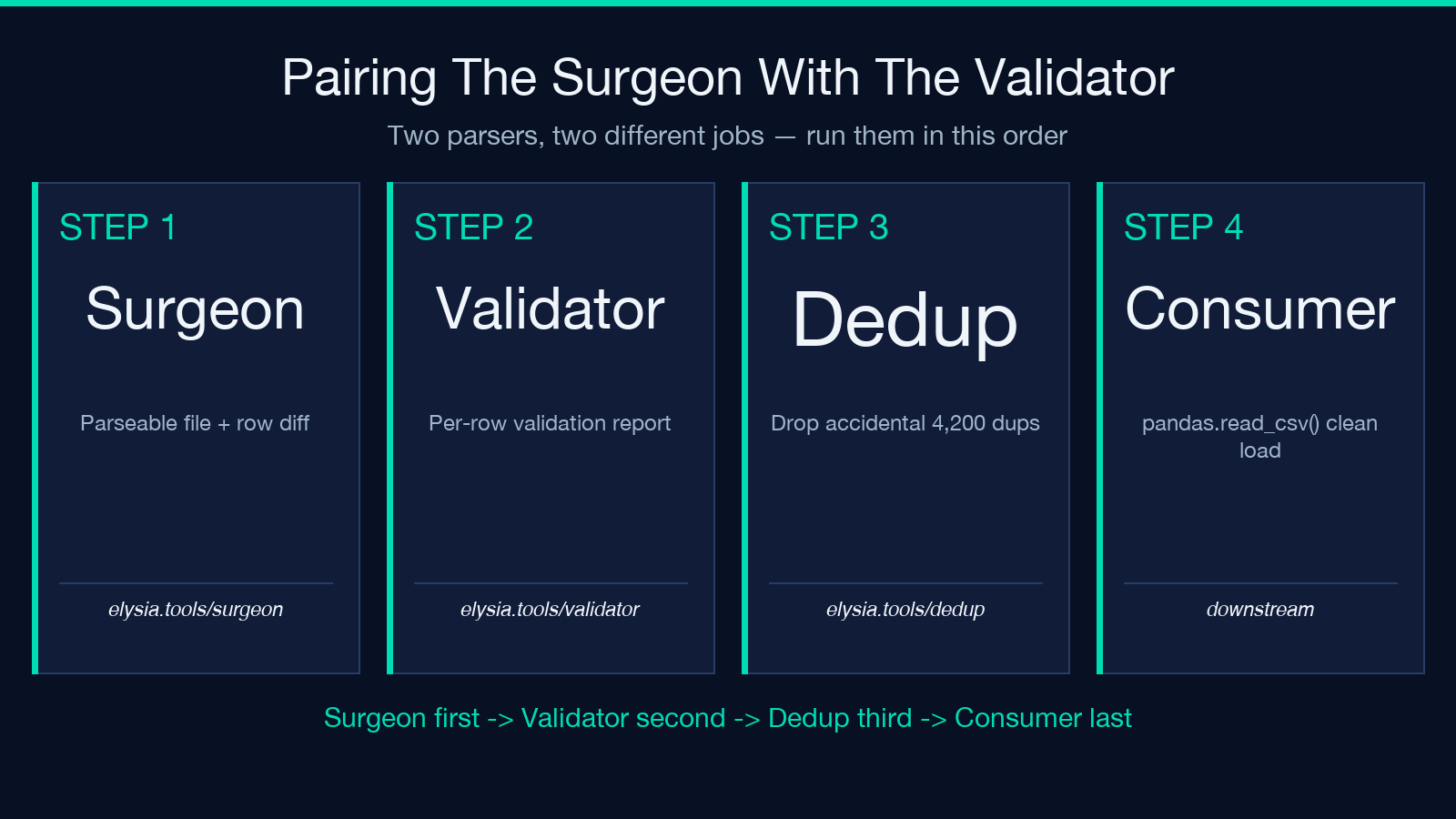
A clean pipeline looks like:
- Surgeon → produces a parseable file plus the row-level diff.
- Validator → produces a per-row validation report on the parseable file.
- Your downstream consumer (
pandas.read_csv, a database loader, an ETL worker) → reads the file witherror_bad_rows=Falseonly as a defense-in-depth fallback.
When to keep AI repair off
Deterministic repair is auditable; AI repair is not — by design. The Surgeon defaults AI repair to OFF because the temptation to “just let the model clean it” is strong, and the failure mode is silent (plausible-looking wrong values). Turn AI repair on only when:
- The deterministic pass flagged at least one row with no resolvable repair.
- You have a gold-standard cleaned version of the same file to spot-check the AI repairs against.
- You are processing files in a low-stakes context (test fixtures, exploratory analysis, internal tooling) where a 1-in-10000 fabrication is acceptable.
For anything that flows into a production database or a customer-facing report, deterministic-only is the right default. You can always re-run with AI repair enabled on the small subset of flagged rows and concatenate the results, keeping the deterministic rows untouched.
What stays out of scope
The Surgeon does not normalize phone-number formats, re-encode dates into ISO 8601, or remap country codes. Those are semantic transforms — different from parsing — and trying to bolt them onto the row-level diff would push the audit trail into territory where the “reason” tag stops being meaningful. If your file has structurally clean rows but semantically inconsistent values, the right tool is downstream: a column-specific normalizer or a domain-aware enricher.
The Surgeon also does not deduplicate rows. A file with 50,000 rows of which 4,200 are accidental duplicates should go through the CSV Deduplicate Rows after the Surgeon, not before — deduplicating a parseable mess of stray quotes creates a different kind of audit problem.
Closing: what the Surgeon is and isn’t
The Surgeon is a parser-tolerance layer with a diff audit. It is not a schema validator, not a type coercer, and not a row-level transformer. Its job stops the moment the file parses cleanly into rows whose field count matches the header. Everything downstream — type coercion, missing-value imputation, domain validation — belongs to other tools in the CSV pipeline at Elysia Tools (the Validator, the Deduplicator, the Column Selector, the Filter). Use the Surgeon first, then pass the parseable output to whichever of those fits your data shape.
For a quick sanity check on the broader pipeline, the CSV samples page carries representative inputs of every shape the Surgeon is built to repair. Explore more tools at elysiatools.com.
