
A chemistry formula that survives Slack, a footnote marker that pastes clean into any text field, and a math expression that doesn’t need a renderer. When the input is plain text and the destination is plain text — chat, social, code comments, filenames, exported CSV — superscripts and subscripts have to ride on real Unicode, not HTML tags. The Superscript & Subscript Converter on Elysia Tools maps each ASCII character to its Unicode glyph counterpart without leaning on / tags, so the output is a single string the receiving system will display correctly even when it has zero formatting support.
What the tool actually does
The converter accepts a chunk of text and produces the same characters, mapped character-by-character, into one of three Unicode transformations:
- Superscript — every letter, digit, and operator is replaced by its Unicode superscript counterpart (e.g.
xbecomesˣ,2becomes²,+becomes⁺). - Subscript — every character is replaced by its Unicode subscript counterpart (e.g.
2becomes₂,obecomesₒ,+becomes₊). - Mixed — odd-position characters become superscript, even-position characters become subscript, producing an interleaved demo mode useful for mixed math/chemistry notation.
The output is plain text. There is no wrapper element, no tag, no font-feature-settings magic. The string is just a sequence of Unicode code points from U+00B2 through U+2094 — which means it round-trips through anything that accepts UTF-8 and renders anything past ASCII.
The most useful complement in the same Text Processing cluster is the Bold & Italic Text tool, which applies the same Unicode-only principle using the Mathematical Alphanumeric Symbols block for when you need emphasis without a renderer.
Where the Unicode coverage actually breaks
Unicode does not assign a superscript or subscript glyph to every letter. The converter does not invent characters — it uses the published Unicode tables — and unmapped characters fall back to themselves with no warning. That fallback is the right design choice, but it means you have to know the coverage map before you trust the output.
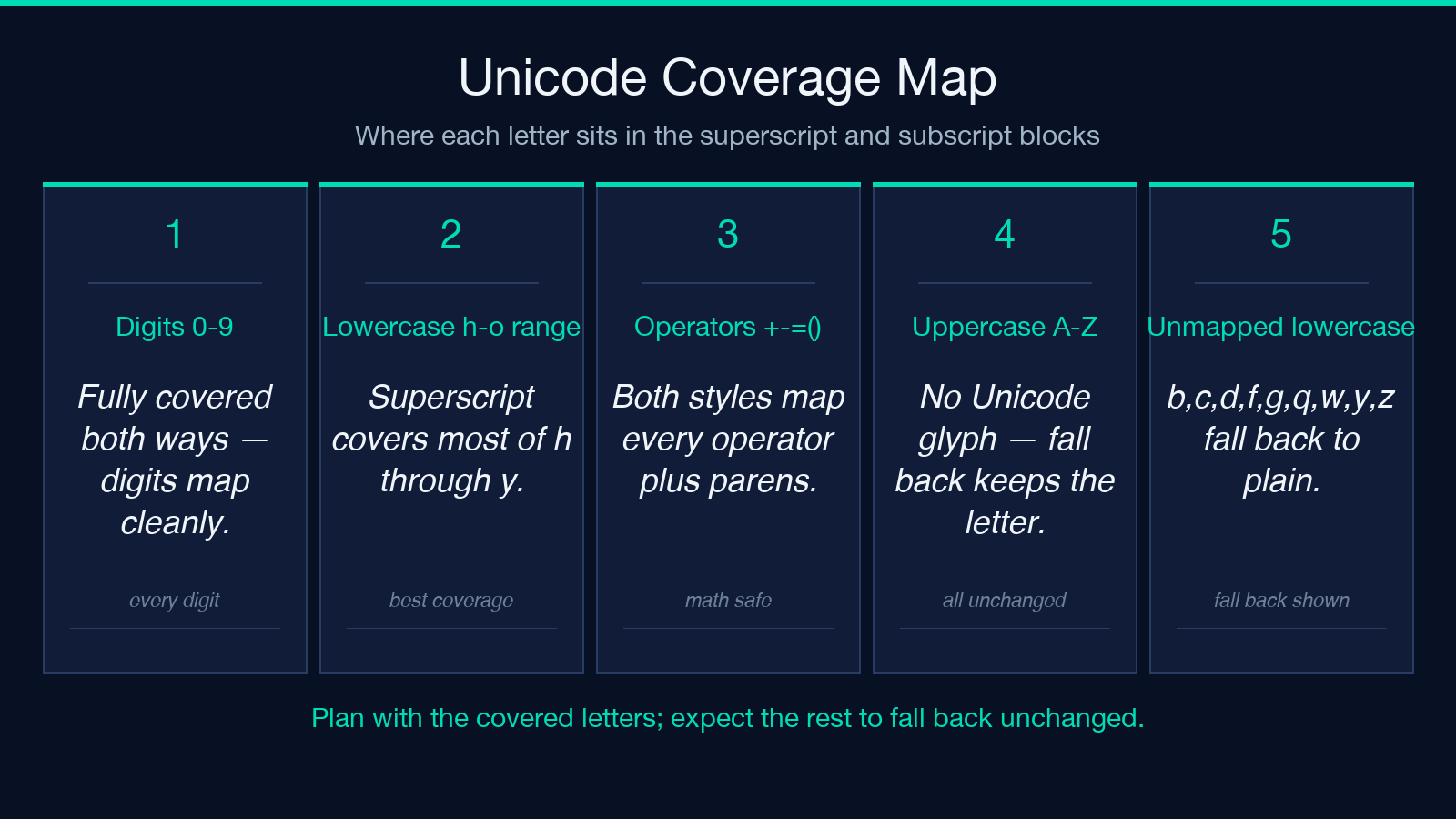
Superscript, fully covered: digits 0-9, the operators + - = ( ), and lowercase h i j k m n o p r s t u v w x y plus a small set of additional letters. Parentheses and punctuation all map.
Superscript, missing: most uppercase letters (A–Z have no superscript glyphs in Unicode at all), and a handful of lowercase (b c d e f g l q).
Subscript, fully covered: digits 0-9, the operators + - = ( ), and lowercase a e h i j k l m n o p r s t u v x.
Subscript, missing: the entire uppercase range, plus lowercase b c d f g q w y z.
This is why H₂O works perfectly — H has no subscript glyph and stays as H, while ₂ and O both exist in the subscript block — but a fully-subscripted sentence like the quick brown fox ends up with tₕₑ qᵤᵢcₖ bᵣₒwₙ fₒₓ where the unmapped letters (q, k, b, r, w, n, f) fall back to plain ASCII. This is a fundamental Unicode limitation, not a bug in the converter.
The four rules of converting without surprises
After running a few hundred inputs through real chat and CMS systems, four rules turn out to do most of the work of avoiding escape-sequence ugliness:
- Strip the wrapper expectation. If you paste
x<sup>2</sup>+y<sup>2</sup>into a chat window the tags render literally because chat windows have no CSS. The whole point of Unicode conversion is to skip that step — writex²+y²once and paste it anywhere. - Use superscript for chemistry and math literals. Formulas like
CO₂,H₂SO₄,E=mc²,xⁿ,10²³map cleanly because the letter sets overlap with the covered Unicode ranges. This is the tool’s sweet spot. - Use subscript only for chemistry and well-known series.
H₂O,C₆H₁₂O₆,log₁₀,a₁ + a₂ + ... + aₙall map cleanly. Pure-uppercase subscripts (writing the digits of a compound with uppercase elements) will not survive, so avoid spelling letters that don’t exist in the subscript block. - Use Mixed as a demo, not a final form. The interleaved odd/even split is great for showcasing how the two ranges feel side-by-side, but mixed text rarely appears in real prose — your downstream reader will assume you typoed.
A [Superscript & Subscript Converter] run that obeys these rules produces output that is visually compact, font-portable, and copy-paste-safe across Slack, Discord, GitHub, Notion, Google Docs, and markdown source files.
The Math Tools cluster for related work
If you find yourself reaching for the converter often, the Elysia Tools Math & Numbers cluster holds a small set of related primitives worth bookmarking together: percentage change, exponent-by-hand, scientific-notation normalization. These all produce plain-text output designed for the same destinations — chat, comments, social — without requiring a renderer.
For the specific case of writing math in any context where you might otherwise reach for LaTeX (like a long forum post or an exported document), the Unicode-only approach has one big advantage: the math stays diffable, searchable with grep, and copy-paste-able as a single line.
Side-by-side: Unicode text vs HTML
Take the input x2 + y2 = z2:
- Unicode form:
x² + y² = z². One string, 14 characters, and that 14-character string is what arrives on the other side of any pipe. - HTML form:
x<sup>2</sup> + y<sup>2</sup> = z<sup>2</sup>. Pasted into a markdown-aware renderer it looks right; pasted into Slack it shows the tags; pasted into a YAML file it breaks the structure.
For a chemistry formula like C6H12O6:
- Unicode form:
C₆H₁₂O₆. All three numbers and the four most common subscript letters are covered, so it round-trips intact. - HTML form:
C<sub>6</sub>H<sub>12</sub>O<sub>6</sub>. Breaks anywhere HTML is not parsed.
The same comparison holds for any tagging wrapper — Markdown’s , reST’s :sub:, AsciiDoc’s ~...~. Unicode conversion is the only form that survives the chat-to-CMS trip without manual reformatting.
Two correctness tests you can run in 30 seconds
Test 1 — coverage probe. Type a single string abcABC123 into the converter with Style set to superscript. Output should be ᵃᵇᶜABC¹²³ (lowercase mapped, uppercase passed through unchanged, digits fully mapped). If you see literal A B C in the output, the converter fell back and you have your answer about which letters to avoid.
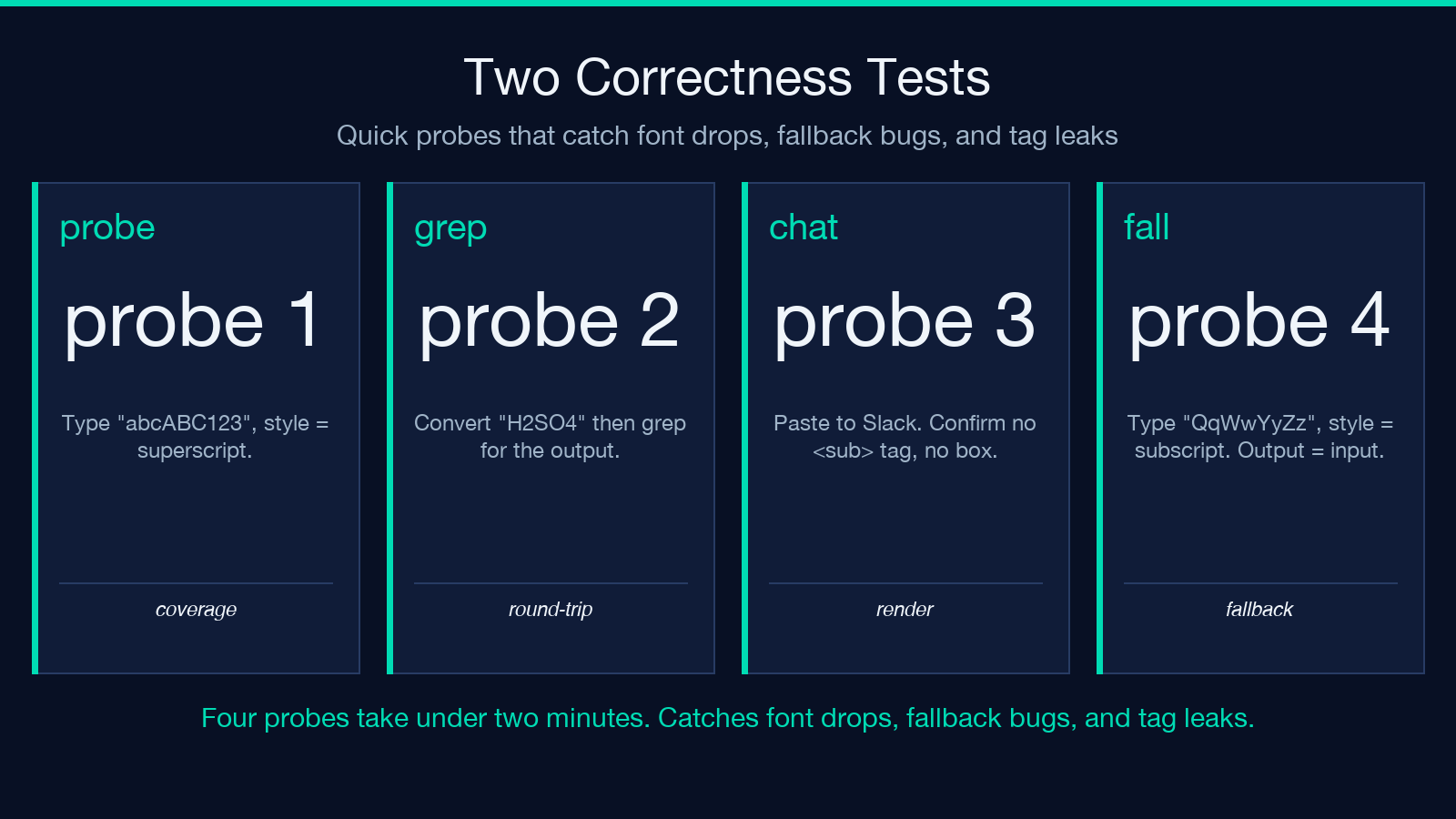
Test 2 — round-trip through grep. Convert H2SO4 to H₂SO₄, then a fixed-string grep for H₂SO₄ against any UTF-8 text file. If the grep matches, the Unicode form is treated as plain text everywhere downstream — it is, but the test confirms your specific pipeline handles it. If grep treats ₂ as a multi-byte sequence and misaligned, that’s actually correct UTF-8 behavior and not a converter problem.
For tools in the Elysia Tools Validation cluster — credit-card Luhn checks, ISBN validators, regex sniffers — the round-trip-and-grep test is the same recipe: convert, paste into a shell pipeline, confirm the bytes match.
Edge cases worth knowing
A few Unicode superscript and subscript characters live outside the BMP (Basic Multilingual Plane) for some niche letterforms. The converter uses only the BMP range (U+00B2 through U+2094 plus the operator/digit subset), so the output stays in single-codepoint territory and won’t trigger surrogate-pair issues in JavaScript string operations or older JSON parsers. If you’ve ever seen a low-surrogate fragment appear in a JSON log and traced it back to a math symbol, the converter’s BMP-only policy is the cure.
Two characters genuinely have no Unicode form at all: the asterisk * and the percent sign %. They fall back to themselves in every style. If you need to call out a footnote with an asterisk you’ll still type the asterisk as-is — Unicode picked the asterisk for footnote markers before the working group added the superscript glyphs, so they overlap only at the base form.
Putting it together
The converter is small on purpose. The whole job is mapping roughly 60 code points into their transformed variants, then letting Unicode do the rest. Add it to your plain-text toolkit next to Bold & Italic Text and a calculator in the same Elysia Tools Text Processing hub and you have a self-sufficient writing surface for any context where the output is plain text and the read is plain text.
The plain-text discipline — write the chemistry formula as Unicode, not as HTML; write the footnote marker as Unicode, not as Markdown syntax; write the math expression as Unicode, not as LaTeX — saves you every time the destination system strips the tags.
Explore more text tools at elysiatools.com.
