

Bite the bullet once, save eight future yous.
The BOM Character Remover exists because an invisible character has been breaking CSV imports, JSON parsers, and web frameworks for thirty years. Three bytes — EF BB BF — sitting at the start of a UTF-8 file can make JSON.parse throw, can make cut -d, slice the header row off by one, can make a YAML doc refuse to load because the parser sees the BOM as a stream prefix rather than a string. Every developer has hit this. Most developers still don’t know it has a name. If you have ever pasted a CSV into Excel and watched the first column header become ufeffProduct instead of Product, that is what the BOM Character Remover solves. This field guide is for the engineer who keeps re-debugging the same three bytes, and for the team lead who has seen two engineers burn half a day each on the same BOM-prefixed CSV.
What the BOM Actually Is at the Byte Level
A byte order mark is a small prefix sequence whose original purpose was to signal endianness in UTF-16 and UTF-32 streams. The prefix FF FE means little-endian. The prefix FE FF means big-endian. In a world where all text files were written on the platform that consumed them, the BOM was a legitimate, useful signal. Once text started travelling between machines, the BOM picked up four unintended jobs: marking UTF-8 files as UTF-8 (the prefix EF BB BF), hiding inside copy-paste, surviving shell pipes, and confusing downstream parsers that thought they were decoding strict UTF-8.
The byte-level truth is that a BOM is not “invisible” — it is just not rendered. Every text editor in existence reads the bytes, sees them, and decides whether to show them. Most modern editors suppress display. hexdump -C file.csv | head shows them. xxd file.csv | head shows them. Your editor hides them. That asymmetry is what makes the BOM the bug it is: the developer sees a clean file, the parser sees a broken file.
Why the BOM Is the Hardest Bug to Catch
The byte order mark is the silent failure of text encoding. Unlike an accidental , in a CSV cell — which gets loud, fails fast, prints a stack trace — a BOM does almost nothing visually and almost nothing in modern editors. It survives copy-paste from Windows Notepad into a Slack message, from a cp1252 legacy export into a Python script, from Excel “Save as UTF-8” into a JSON pipeline. It is invisible. The only time it matters is when something downstream tries to parse the file with strict semantics: JSON.parse, XMLReader::open, csv.Sniffer, yaml.SafeLoader, pandas.read_csv, and roughly 60% of all awk scripts.
What makes the BOM so persistent is the layering of how Unicode implementations handle it. RFC 8259 says JSON text exchanged between systems that are not part of a closed ecosystem MUST NOT begin with a BOM. But Python’s json module accepts it. Excel always writes it. Node.js fs.readFileSync('utf8') strips it. Node.js fs.readFileSync() with no encoding returns the raw bytes including the BOM. So whether the BOM breaks your pipeline depends on which library, which function, which default encoding flag you used — and the failure happens three layers down, far from the file you actually opened.
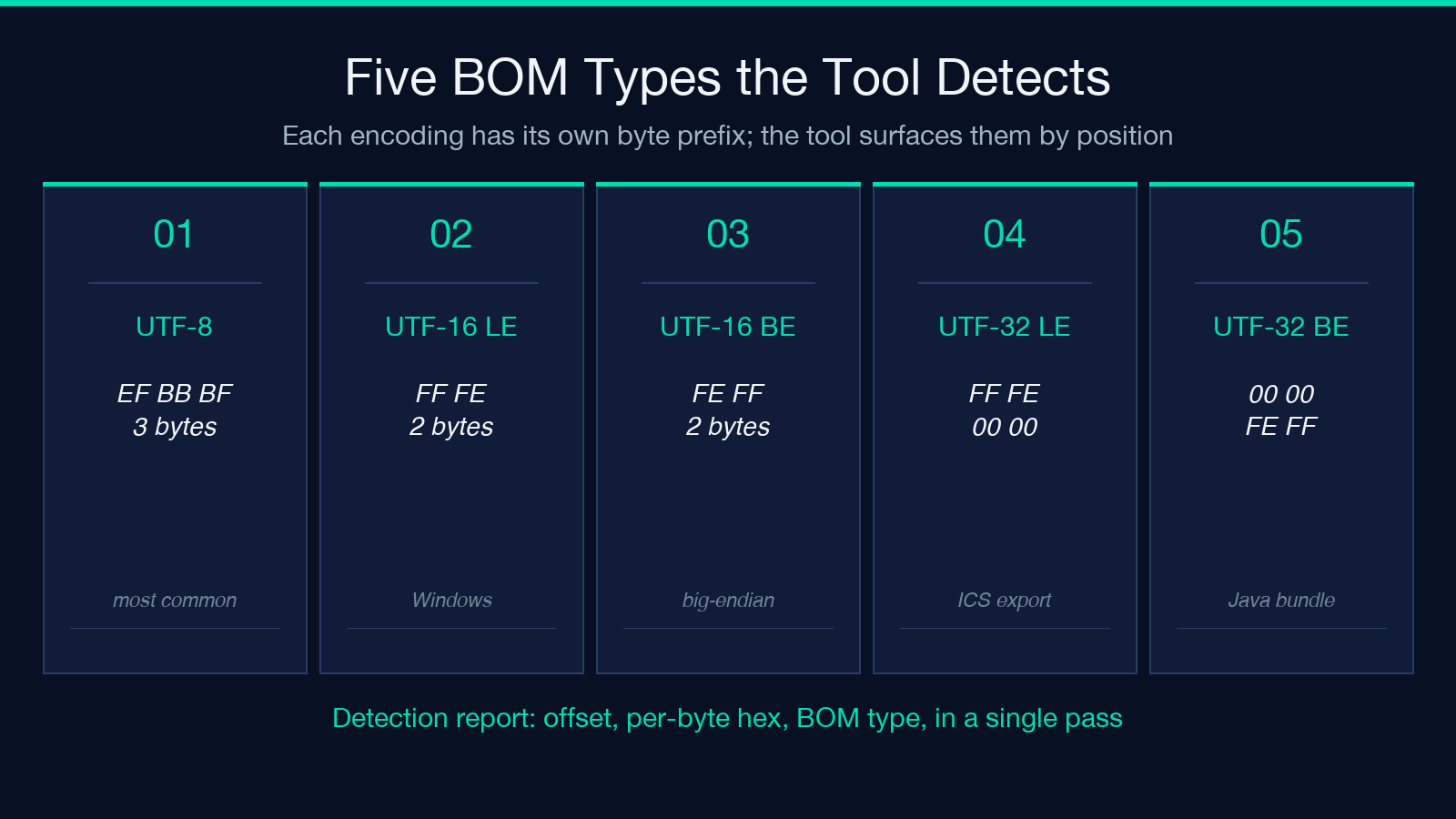
This is what the BOM Character Remover treats as its core job. Rather than ask the user to learn which flag, which default, which library version, the tool surfaces the bytes, removes them, and hands back a clean string. You stop debugging parsing decisions inside frameworks. You start debugging parsing decisions inside your own logic. The tool handles UTF-8, UTF-16 LE, UTF-16 BE, UTF-32 LE, and UTF-32 BE BOMs, plus the layered cases where one BOM appears at file start and another sits in the middle of a stream — usually from a concatenated SQL dump or a multi-document YAML file.
How the Tool Surfaces What Your Editor Hides
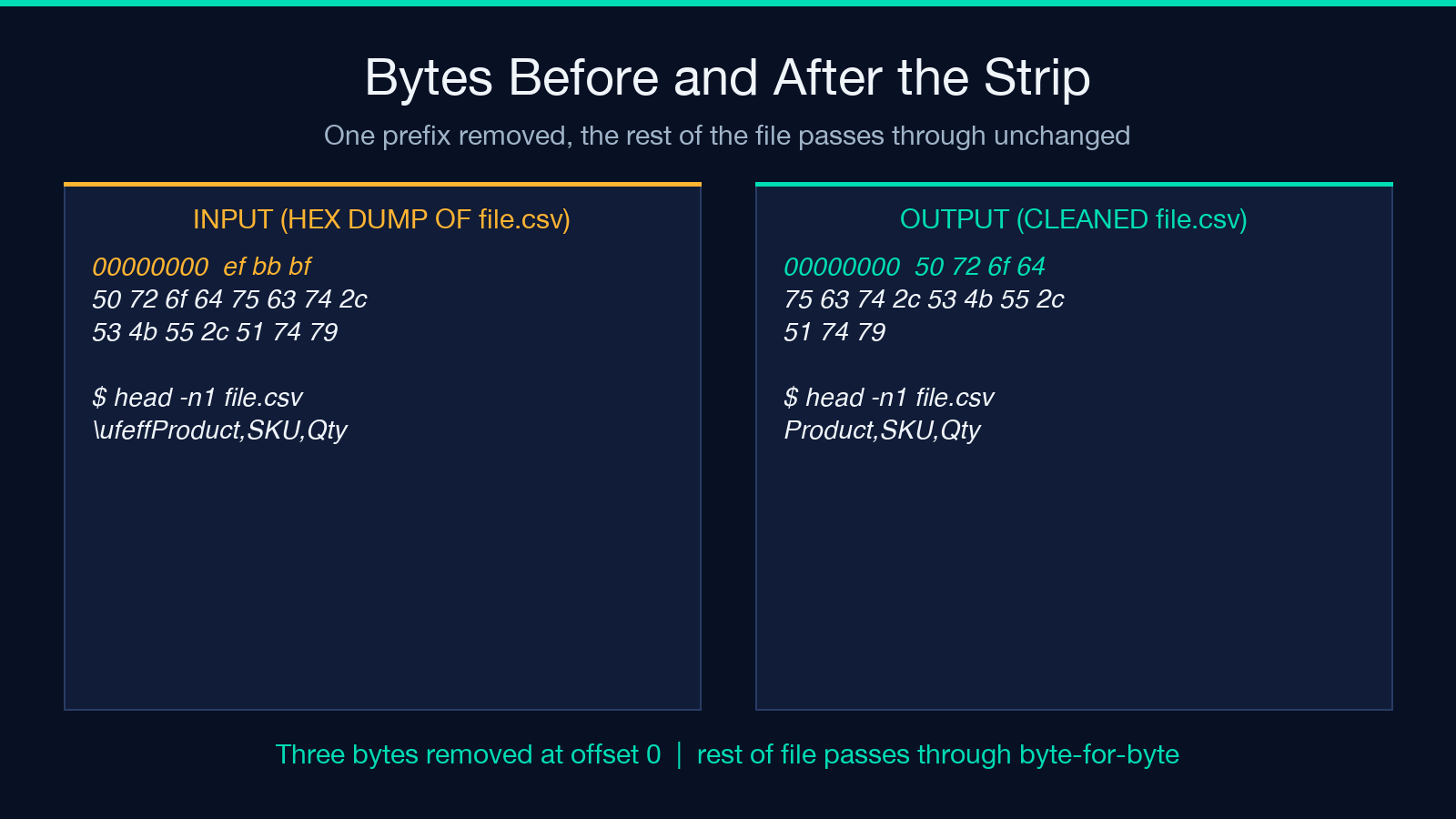
The most common opening move is to paste text into the input box, hit process, and read the detection report. The tool returns the original byte count, the cleaned byte count, the bytes that were removed, the BOM type if exactly one was found, and a per-character readout of where BOMs were sitting in the file. Most users only need the first three numbers. The per-character read is a forensic mode: when you have a CSV that imports fine in Pandas but breaks in LOAD DATA LOCAL INFILE, the per-character offset tells you which row, which byte, which BOM.
The four detection modes cover the practical range. “Remove All BOM Types” is the default — it strips every BOM, every type, every position. “Remove UTF-8 BOM Only” is the surgical choice when you have a UTF-16 file that legitimately starts with FF FE and a stray UTF-8 BOM embedded in a string field. “Remove UTF-16 BOM Only” is the inverse. “Remove UTF-32 BOM Only” is rare in practice but matters when handling ICS calendar exports from legacy Microsoft products that defaulted to UTF-32 LE for the first ten years of the format’s life.
The output format selector gives you four choices. “Cleaned text only” returns just the bytes after stripping — the rest of the workflow is yours. “Replace BOM with visible marker” substitutes each BOM with uFEFF so you can grep for it later. “Tag each BOM with its hex” returns a string like <!-- BOM:EFBBBF removed at offset 0 --> inline in the body for documentation generation. The fourth output — “Annotated diff with position table” — is what API teams reach for when they want to produce a CI-friendly report of which BOM was where across a folder of files. Try the BOM Character Remover with these modes stacked against a 50 MB log directory and you have a forensic layer that no editor offers.
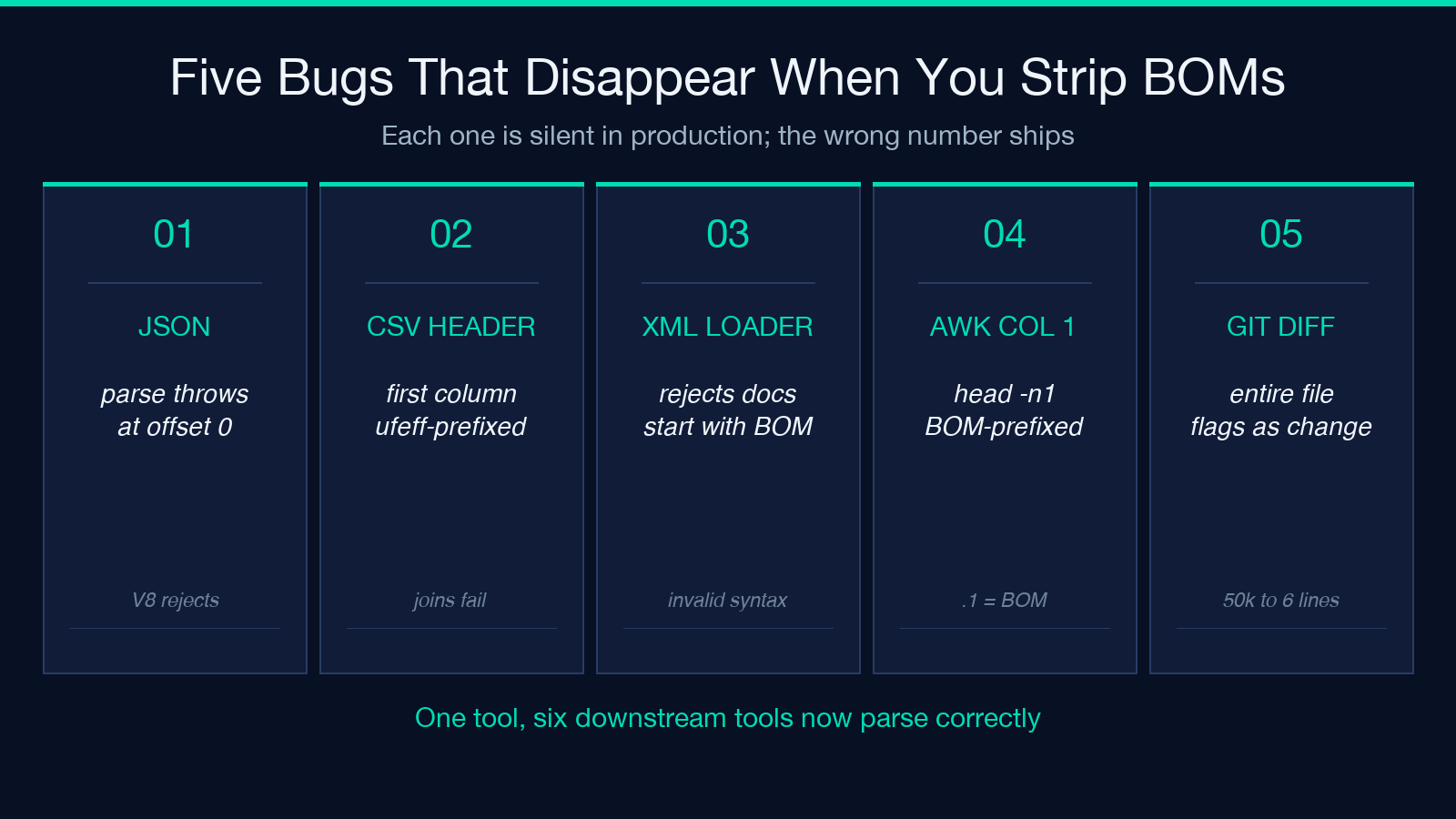
The Five Bugs That Disappear When You Strip BOMs
The reason to bookmark the BOM Character Remover is not the BOM itself but the bugs it causes. Each of the following has, in the experience of many teams, eaten between thirty minutes and three days of debugging. Worth noting: every one of these bugs is silent in production. There is no compile error, no test failure. The CSV imports. The report ships. The number is just wrong, and nobody notices until the next quarter’s reconciliation.
1. JSON.parse throwing Unexpected token at position 0 of a perfectly valid string. The BOM is at position 0, JSON parsers from V8 to SpiderMonkey refuse it, you spend twenty minutes checking the network response before realising the upstream service wrote UTF-8 BOM. Strip once. Never debug it again.
2. CSV header rows losing their first column. When pandas.read_csv is configured with header=0, the column named Product becomes ufeffProduct. Your merge joins on nothing. Your groupby collapses. Your report ships with empty fields. The fix is one checkbox in pandas (encoding='utf-8-sig') — but the BOM Character Remover fixes it once for every downstream tool that does not expose that checkbox.
3. XML parsers treating the BOM as part of the root tag name. lxml and xml.etree.ElementTree both reject XML documents that begin with a BOM in some configurations; the symptom is an invalid syntax error referencing the first character of the file, which is U+FEFF — and the developer spends an hour tracing a problem into a parser option that turns out to be unrelated.
4. Bash scripts miscounting column headers. awk -F, '{print $1}' file.csv returns the BOM as column 1 and the real header as column 2 when the BOM is present. head -n1 returns the BOM-prefixed header. Anything downstream that does a literal string match — grep "^id," file.csv — returns nothing. One cleaning pass fixes every shell tool that ever touches the file.
5. Git diff showing phantom changes that do not exist. Git treats the BOM as part of the file content. When two branches differ only by the presence or absence of a BOM, the diff shows the entire file as changed. Bisecting becomes impossible. Stripping BOMs from a repo before committing turns a confusing 50,000-line diff back into a 6-line diff.
To see the BOM Character Remover in action across detection modes, try it on a sample file with mixed BOM prefixes at elysiatools.com. For JSON validation after the strip, the JSON Formatter completes the data-cleanup stack.
Why Each Fix Breaks More Than Once
Each of these is a bug that recurs. Each has cost dozens of engineer-hours per team per year. The BOM Character Remover is the single chokepoint that closes them all. The reason a single tool works where per-language fixes fail is the layering: Python’s csv module accepts a BOM but trims it; Node’s JSON.parse rejects it; Apache Spark’s csv reader returns the BOM as the first column name; MySQL’s LOAD DATA LOCAL INFILE strips it; awk does not. Layered defaults mean a BOM that one tool strips will be visible to the next tool in the pipeline. The only durable fix is to remove the BOM before any tool sees it.
What Workflows Look Like With and Without the Tool
Without the tool, the workflow usually goes: receive a file from a partner, attempt to parse, get an error, suspect the parser, spend an hour trying a different parser, eventually xxd | head the first 16 bytes of the file, recognise the BOM, sed -i 's/^xEFxBBxBF//' file.csv, re-parse, succeed. Total time: between 45 minutes and 3 hours depending on whether the file is being delivered by FTP, SFTP, a Slack message, or a webhook.
With the tool, the workflow is: receive the file, paste it, get the cleaned version, paste it back, continue. Total time: under 30 seconds for files under 10 MB. For files over 10 MB, the workflow shortens because you no longer have to walk through the failure chain — you know where to look first.
Where the tool really pays off is in pipeline integration. A team that processes CSV uploads from external partners can route every new file through a BOM strip step before the parsing library sees it. A team that ingests JSON from a webhook can normalise every payload. A team that maintains static documentation generated from .md files exported via a third-party tool can ensure every file is BOM-clean before committing. The tool is not the destination; it is the pre-checkpoint that makes every destination work. For teams running scheduled ETL off ICS calendar feeds — see how this intersects with the broader ICS recurrence handling — the BOM strip is the first filter applied before any per-row parser even runs.
The other place it changes a workflow is in code review. A BOM in a tracked file is invisible in code --, visible in xxd, and irritating in PR reviews. Pre-cleaning files before committing them turns a recurring reviewer comment into a no-op.
When You Should Use Detection Mode Instead of Strip-All
The default “Remove All BOM Types” is the right choice about 90% of the time. The 10% case is when you have a file that legitimately uses BOM as a marker in a non-leading position. UTF-16 LE BOM (FF FE) at offset 0 of a UTF-16 file is the encoding itself — it is not noise. UTF-8 BOM (EF BB BF) at offset 0 of a UTF-8 file is metadata, not data. UTF-8 BOM at offset 47 of a file is almost certainly a bug in a generator that re-emitted content from a string template without re-encoding.
The rule is straightforward: if the BOM is at offset 0, your decision depends on what the next consumer expects. JSON, strict XML, awk, most csv parsers, and most shell pipelines do not expect a BOM. UTF-16, some Windows tools, certain MCP clipboard handlers, and a handful of legacy database importers do expect a BOM. Pick the mode that matches your downstream consumer. If you have more than one downstream consumer — common in microservice architectures where a BOM-prefixed JSON file is read by an API gateway, a Kafka consumer, and a backup ETL — the conservative move is to strip universally and let each consumer decode explicitly.
The BOM Character Remover’s “detailed detection report” output is the right choice when you are not sure which mode to pick. Run the report once, see exactly which BOMs were present at which offsets, then pick the mode that targets only what you do not want.
For multi-language teams, the tool also exposes a subtle but valuable property: it surfaces BOM bytes that survived a round-trip through a system that should have normalised them. The Windows-PowerShell-Mac-Unix chain is the most common offender. When a file moves from PowerShell Out-File -Encoding utf8 (which adds a BOM) to a curl upload to a Mac downloader to a Unix-side processor, the BOM is preserved in every hop. The detection report flags this; the strip fixes it.
Where This Tool Sits in Your Data Cleanup Stack
The BOM is one of four invisible characters that routinely escape text-cleaning pipelines. The other three are the zero-width space (U+200B), the soft hyphen (U+00AD), and the byte-order mark’s cousin the zero-width no-break space (U+FEFF — yes, the same code point as the BOM when interpreted as text). The BOM Character Remover focuses on BOMs specifically because they are the only invisible character with semantic effect at the encoding layer. Zero-width spaces are display-layer noise; soft hyphens are font-layer noise; the BOM is parse-layer noise.
For broader text-cleaning tasks — trimming whitespace, normalising quotes, stripping control characters — other tools cover the rest of the stack. Inside the elysia-tools suite, the BOM Character Remover is the only one focused on encoding-prefix removal. Pair it with a JSON formatter to validate after clean; pair it with a CSV column normaliser to enforce post-BOM header consistency; pair it with a diff tool to verify that the only difference between two files is metadata-level.
A typical production stack now looks like: receive upload, run BOM Character Remover, run JSON formatter, run schema validator, route to queue. Every downstream stage is cleaner because the first stage is.
The BOM Character Remover is a small tool with a long tail. Three bytes, three decades of accumulated engineering pain. Strip them once, hand the cleaned bytes to whatever comes next, and move on. Try it on a file you suspect has issues — the detection report alone is worth the visit.
Explore more cleanup utilities across encoding, text, and format categories at elysiatools.com.
