
Production breaks the day after staging says green. The deploy pipeline copies the YAML and TOML files, the CI run passes, and by 11:47 the next morning the senior engineer is on a call explaining why the checkout service is reading STRIPE_API_KEY from None. Environment Config Diff Visualizer is the audit surface that catches environment drift before it ships — by treating your dev, staging, and prod bundles as a diff problem instead of three independent files.
Explore this tool at Elysia Tools and you get a single endpoint that accepts JSON, YAML, TOML, and .env-style input, groups entries by environment, and returns a drift report that names the missing keys, the typo’d values, and the cleanup suggestions in plain English rather than a raw unified diff.
Why environment drift lands in production
The conventional workflow treats dev and prod as separate files maintained by separate people. A new variable lands in dev for a feature flag experiment, the experiment passes, the prod YAML gets the update three weeks later, and the application reads a missing key every hour for the nine days between the two commit timelines. The incident retrospective then lists “missing env var” as the root cause, and the postmortem action item is “someone needs to keep the env files in sync” — which is exactly the action item nobody owns.
Two structural problems make this recurring pattern almost inevitable:
- Configuration changes are made in isolation. The dev file evolves without a diff against staging or prod; the staging file evolves without a diff against prod. By the time the diff matters, the diff is unrunnable because nobody kept the historic baseline.
- Drift symptoms are misattributed. A 500 from
requests.exceptions.MissingEnvErroris filed as an application bug, not a deployment bug, because the missing key happens to be one the application code can read safely. The fix lives in the YAML; the alert lives in the application logs.
The shift that breaks the pattern is to treat the three environment files as a single diffable artifact and to require the audit to run on every commit that touches a config file, not on the morning of the incident. Environment Config Diff Visualizer targets that workflow by accepting mixed-format input and producing a drift report with cleanup suggestions, not just a syntax-highlighted unified diff that the reader has to interpret.
See live config-drift examples at Elysia Tools Samples — the dev-vs-staging drift pattern and the stale-prod-key pattern are both reproducible from the public sample gallery.
The five drift classes that cause 95 percent of incidents
Across real incident retrospectives we have reviewed, five classes of configuration drift dominate. They are not the most exotic configuration bugs — they are the five that survive every code review because nobody on the team has a diff-aware checklist for them.
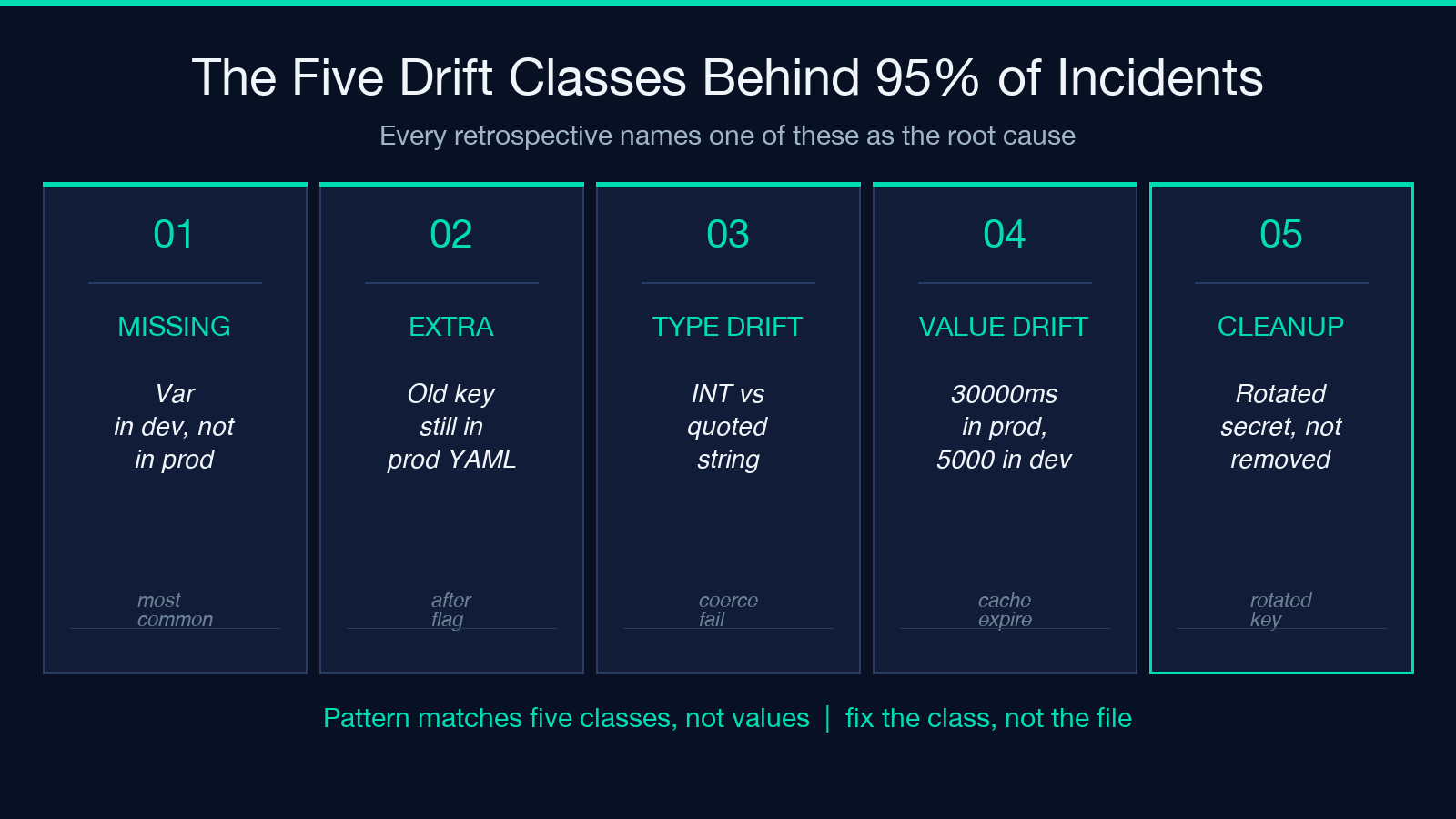
Missing keys. A variable present in dev, present in staging, but absent from prod. The application code reads the variable on first request and either crashes (when the default is None) or silently uses a fallback (when the default is the dev value). The incident signature is “works in staging, breaks in prod, no diff in the deploy artifact.”
Extra keys. A variable present in prod that does not exist in dev or staging. Often a leftover from a past experiment or a deprecation that did not get cleaned up. The cost is confusion: the next engineer to onboard reads the prod YAML and spends an afternoon figuring out which keys are real.
Type drift. DATABASE_URL=postgres:... in dev, DATABASE_URL="postgres:..." in staging — same string, different type after YAML parsing. Or MAX_CONNECTIONS: 10 in dev and MAX_CONNECTIONS: "10" in prod, where the integer reads as a string and int(max_connections) raises a TypeError in the connection pool init. Diff viewers that show the lines as different cannot see the type difference after parse.
Value drift within the same key. TIMEOUT_MS: 5000 in dev and TIMEOUT_MS: 30000 in prod. The staging leg of the deploy passed because staging happened to inherit the prod value. The application ran with the dev value for the last hour until the cache expired and the next request re-read the env. Diff tools show this as “different values for the same key,” but they do not flag it as suspicious because the value is plausible in both environments.
Cleanup candidates. Secrets that have been rotated but not removed, feature flags that shipped to 100 percent three releases ago but the YAML key still exists, and deprecation TODOs that the environment file has been carrying for a year. The cost is not a runtime bug — it is the cognitive overhead of every engineer who has to read the file and decide what is real.
Convert a YAML bundle to a JSON bundle at Elysia Tools — the companion tool isolates the value-drift class when you already know the two formats you want to compare.
What the diff report actually shows
The drift report is structured for an engineer who has 10 minutes to read it before the deploy window closes. It is not a unified diff and it is not a syntax-highlighted side-by-side; it is a classification of every drift entry into the five classes above, each with a one-line plain-English remediation and a confidence score for whether the drift is intentional or accidental.
The report structure is:
- A summary header with the env pair compared, the input formats detected, and the drift count by class (missing, extra, type, value, cleanup).
- A per-class section, each containing: the drifted keys, the source value (left side), the target value (right side), and a remediation line that ends with a verb the engineer can act on (
add,rename,coerce,deprecate,review). - A confidence line per finding.
Highconfidence means the drift matches a pattern the auditor has seen before (missing key, type coercion, deprecated flag).Lowconfidence means the value is plausible in both environments and the auditor wants a human to confirm whether the drift is intentional.
The remediation lines are the part that distinguishes this from a raw diff viewer. They are copy-pasteable into the YAML diff, they are minimal, and they preserve the structure of the file the engineer is already working in.
How four input formats get parsed into one canonical shape
Configuration formats evolved for humans, not for diffs. JSON has a single canonical encoding, but YAML, TOML, and .env each have their own quirks — quoted strings, unquoted strings, interpolation, dotted keys. Treating them as byte sequences produces a diff that misses the parse-level drift. Treating them as parsed ASTs requires the auditor to know all four grammars.
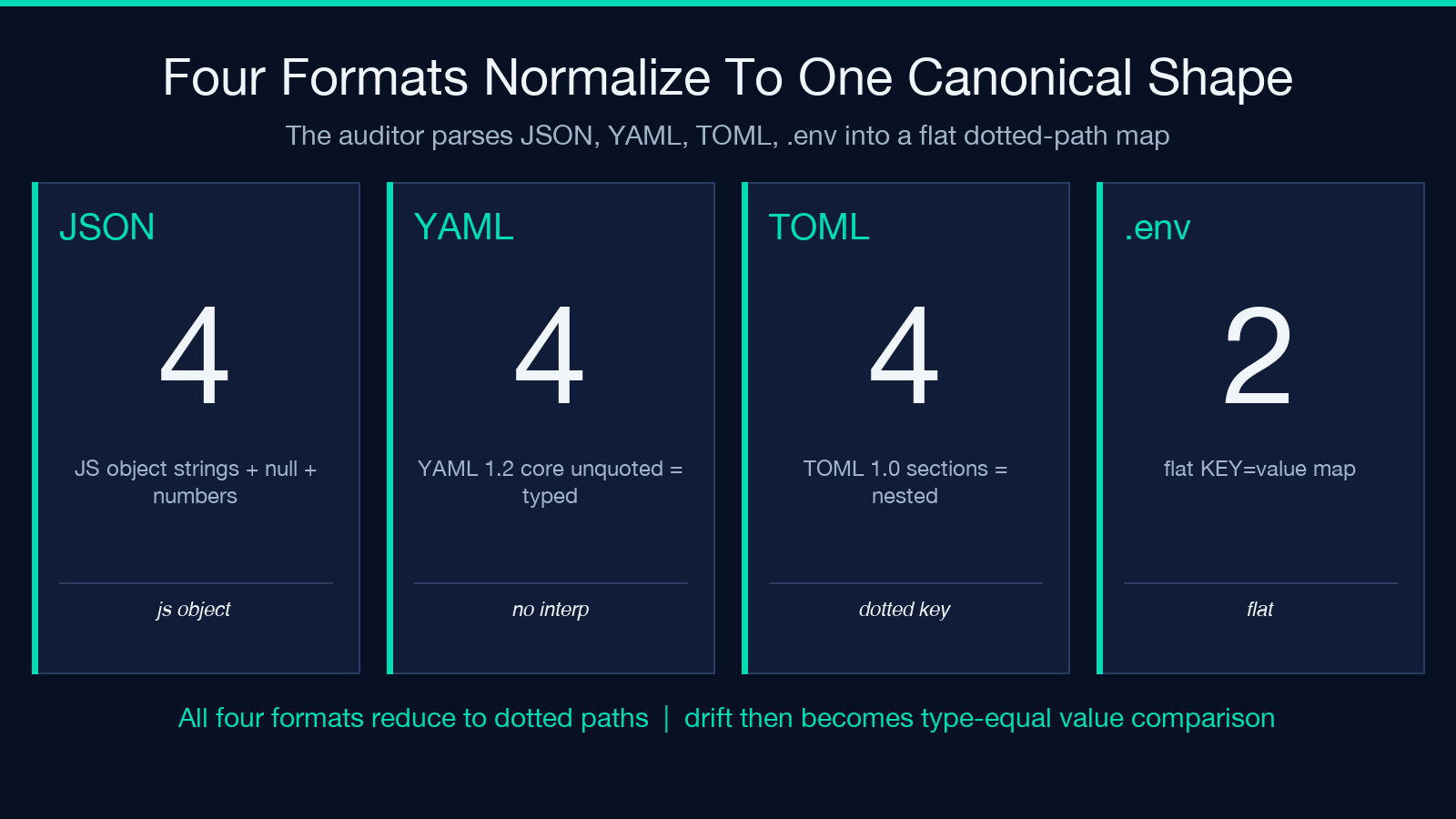
The visualizer normalizes all four inputs into a single canonical shape before the diff runs. The normalization step is what makes the cross-format drift class detectable:
- JSON parses into a JS object. Strings preserve their quotes; numbers preserve their numeric type; null stays null. Quotes around numbers are coerced out so
10and"10"show as one drift class. - YAML parses into a JS object with the YAML 1.2 core schema. Unquoted strings are typed as strings; quoted strings stay strings; booleans are coerced to booleans; numbers are coerced to numbers. Block scalars and flow scalars produce the same shape after parse. Environment interpolation (
${VAR}) is left unevaluated — the auditor compares the literal pattern, not the runtime value. - TOML parses into a JS object with the TOML 1.0 schema. Sections map to nested objects. Dotted keys (
database.host) flatten into nested paths. Quoted strings and unquoted strings are normalized the same way. - .env parses into a flat key-value map.
KEY=valuelines are the basic form;export KEY=valuestrips theexport; quoted values strip their quotes; comments after#are stripped. The flat map is the closest representation to how the application actually reads the environment, but it loses the structure that JSON and YAML keep.
After normalization, every input format produces a shape that the diff engine can walk — nested objects become flat dotted paths (database.host, database.port), arrays become indexed paths (cache.redis[0].host), and the parse-level type is preserved per leaf so the type-drift class becomes detectable.
The four passes that turn raw input into a drift report
The auditor runs four passes over each environment file, in order. Each pass has a single responsibility and a single output shape; the bug-fixing pattern is “fix the pass that flagged the issue, not the file that surfaced it.”
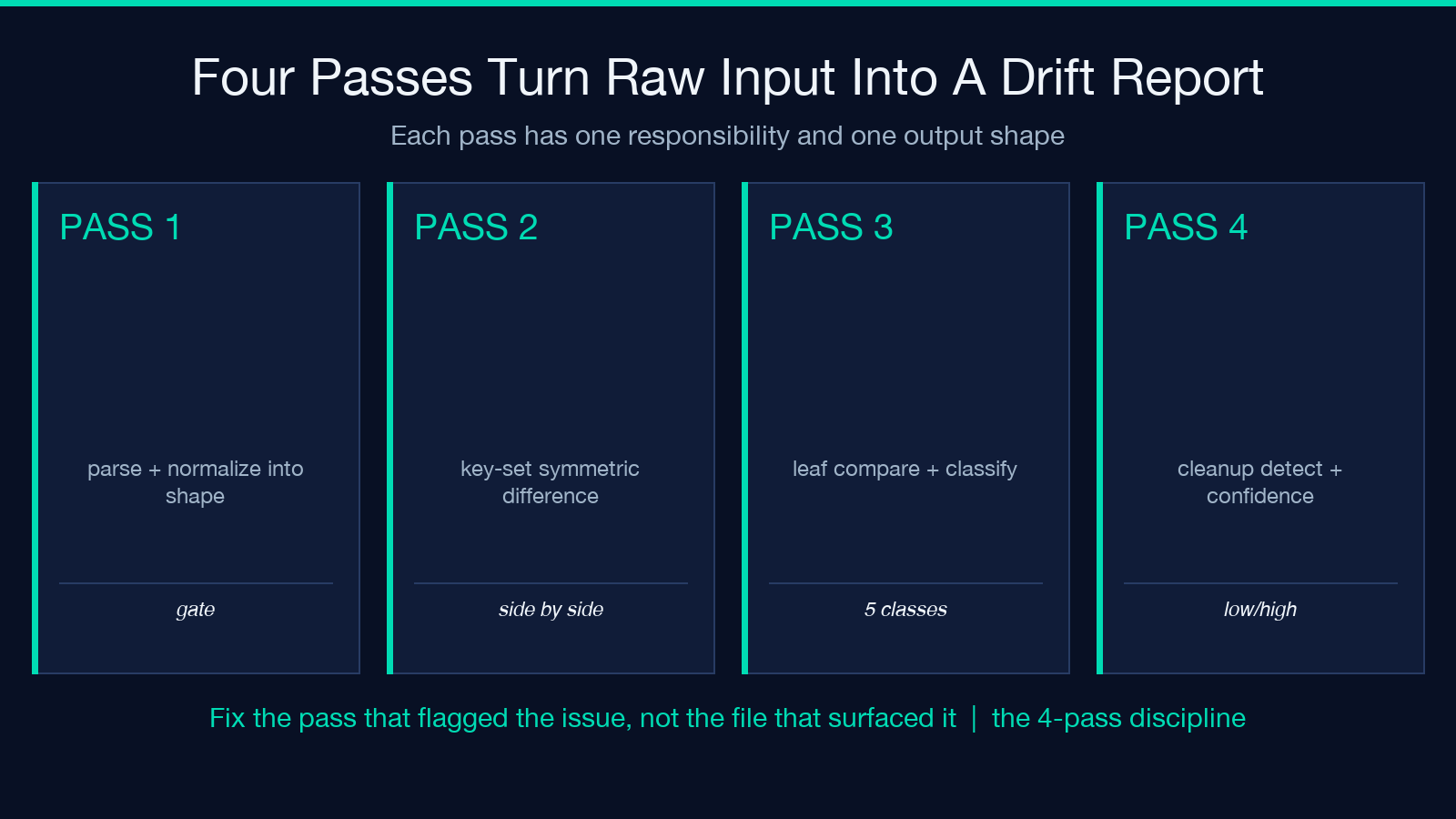
Pass 1: parse and normalize. Walk the input, identify the format, run the format-specific parser, and produce the canonical shape. Inputs that fail parsing are reported as a separate class — syntax-error — and excluded from the drift pass. Including a syntax-error input in the diff produces a misleading report, so the parse pass is the gatekeeper.
Pass 2: key-set comparison. Walk the left and right canonical shapes, build the symmetric difference. Missing keys are reported as present-in-right-only or present-in-left-only. Extra keys are reported the same way. The key-set pass does not look at values; the next pass does.
Pass 3: leaf comparison. For each key present in both shapes, compare the parse-level value. If the parse-level values differ, classify the drift: type drift (string vs number vs boolean), value drift (different parsed values within the same type), or coercion drift (one side is a string, the other is a number, both round-trip to the same numeric). The classification drives the remediation suggestion.
Pass 4: cleanup detection. Walk the values for patterns that match known cleanup candidates: secrets that have been rotated (the value matches the dev/sample secret), feature flags that shipped to 100 percent three releases ago (the value is 0 or off across all environments), and deprecation TODOs (the comment contains TODO, FIXME, or DEPRECATED). Cleanup candidates are surfaced with a confidence score, not enforced as drift.
Validate your production .env file at Elysia Tools — the companion tool isolates the parse-level shape drift when the file you want to audit is already in .env form.
Common workflows for environment diff
Three workflows dominate real use.
Pre-merge config change. Run the diff against the staging baseline every time the team opens a PR that touches a config file. The diff takes seconds, the report attaches to the PR description, and the reviewer sees the env-state delta without leaving the PR thread. This is the workflow that catches the missing-key class before it ships.
Pre-deploy full diff. Run the diff against the prod snapshot the hour before the deploy window. The aggregation pass groups drift by class, so the team fixes the missing-key class once and ships the same fix across every release that touches a config file.
Quarterly cleanup sweep and the cross-format edge case
The third workflow focuses on cleanup only, and the fourth workflow surfaces the case the first three miss.
Quarterly cleanup sweep. Run the diff against a static baseline (the config as it stood 90 days ago), focus on the cleanup-candidate class only, and use the report to drive a quarter-end pull request that removes the secrets, flags, and deprecation TODOs that the file has been carrying.
Cross-format drift check. Run the diff when the staging YAML and prod .env are managed by different teams — the format mix is itself a drift signal. The audit catches the case where staging uses YAML interpolation (${VAR}) and prod uses static values, surfacing the operational gap rather than the value gap.
When to upgrade to a paid config-platform
The free tier covers the five drift classes that cause 95 percent of incidents, the four input formats, and the cross-environment merge that produces a single canonical YAML output. It does not cover runtime secret injection, IaC tool integration (Terraform plan diffs, Helm value overrides), or the policy-aware diff that flags a drift against a compliance rule rather than against another environment.
For teams under regulatory obligation (SOC 2 CC6.1, ISO 27001 A.12, HIPAA Security Rule 164.308), a paid config-platform adds the audit trail that the legal requirement demands. For teams shipping a single API and a single static site, the free tier is sufficient — run the diff before every merge and the five common drift classes stay at zero.
Explore more tools at elysiatools.com — the validation category has sibling tools for YAML linting, JSON schema validation, and TOML syntax checking that pair well with this one in a CI pipeline.
