
One unbalanced quote in a million-row file is not a syntax error — it is a data outage. Every CSV Validator round-trip trades one pass of human reading for one row that the loader silently truncates, and the difference between the two is the question this field guide answers. We walk the four checks that catch what your parser accepts, the five failure modes that survive csv.reader, and the audit pass that catches the malformed row before the warehouse notices.
The Elysia Tools CSV Validator parses a CSV payload against configurable structural rules — delimiter, quote character, header presence, column count, empty-line handling, trailing-delimiter tolerance — and reports each row’s column count, quote balance, and delimiter match in one pass. The output is a structured report that separates “this row parses” from “this row is correct,” and the gap between those two states is where most pipelines lose data without knowing it. The Elysia Tools CSV Samples library feeds the validator real malformed rows from the wild so the audit has something to bite on.
Why csv.reader is not a validator
Python’s csv.reader and its equivalents in Node, Go, and Java are parsers, not validators. They accept whatever bytes the file gives them and produce whatever rows the dialect rules allow. The behavior is consistent across libraries: a parser reports “I read the file successfully,” which is a much weaker statement than “every row in the file is structurally well-formed.”
The gap shows up in three places.
First, the parser silently coalesces rows when the quote balance is wrong. A row that opens with "Acme, Inc. and never closes the quote absorbs every following newline until the next quote in the file, producing a single row with thousands of columns where the source had hundreds of rows. The parser reports no error — it read everything — but the row count has dropped from 14,302 to 1.
Second, the parser accepts whatever delimiter it sees most often. A file with 100 comma-separated rows and one stray tab-separated section gets parsed as comma-separated everywhere, and the tab section becomes a single row with embedded tabs that look like field separators to downstream code. The parser reports no error — it read everything — but a downstream join key silently differs across rows.
Third, the parser accepts mismatched column counts. A row with 8 columns in a 7-column file becomes 8 columns in the output. The parser reports no error — it read everything — but a downstream df.merge on the eighth column joins zero rows. The warehouse reports “success,” the dashboard reports “no data,” and the on-call engineer has no log line to point at.
A validator exists to catch these three cases. The Elysia Tools CSV Validator flags each row by its line range, its detected column count, and the specific structural defect — unbalanced quote, delimiter mismatch, column-count drift — that prevents the row from being safely loaded. The output is a JSON report with one entry per defect, grouped by category, and the report’s structure is the audit trail your pipeline needs to reject the file before the warehouse ingests it.
The four checks that decide whether a CSV is safe to load
A CSV file is safe to load when it passes four structural checks. None of them require a full parse — each can be evaluated by streaming the file once and counting characters.
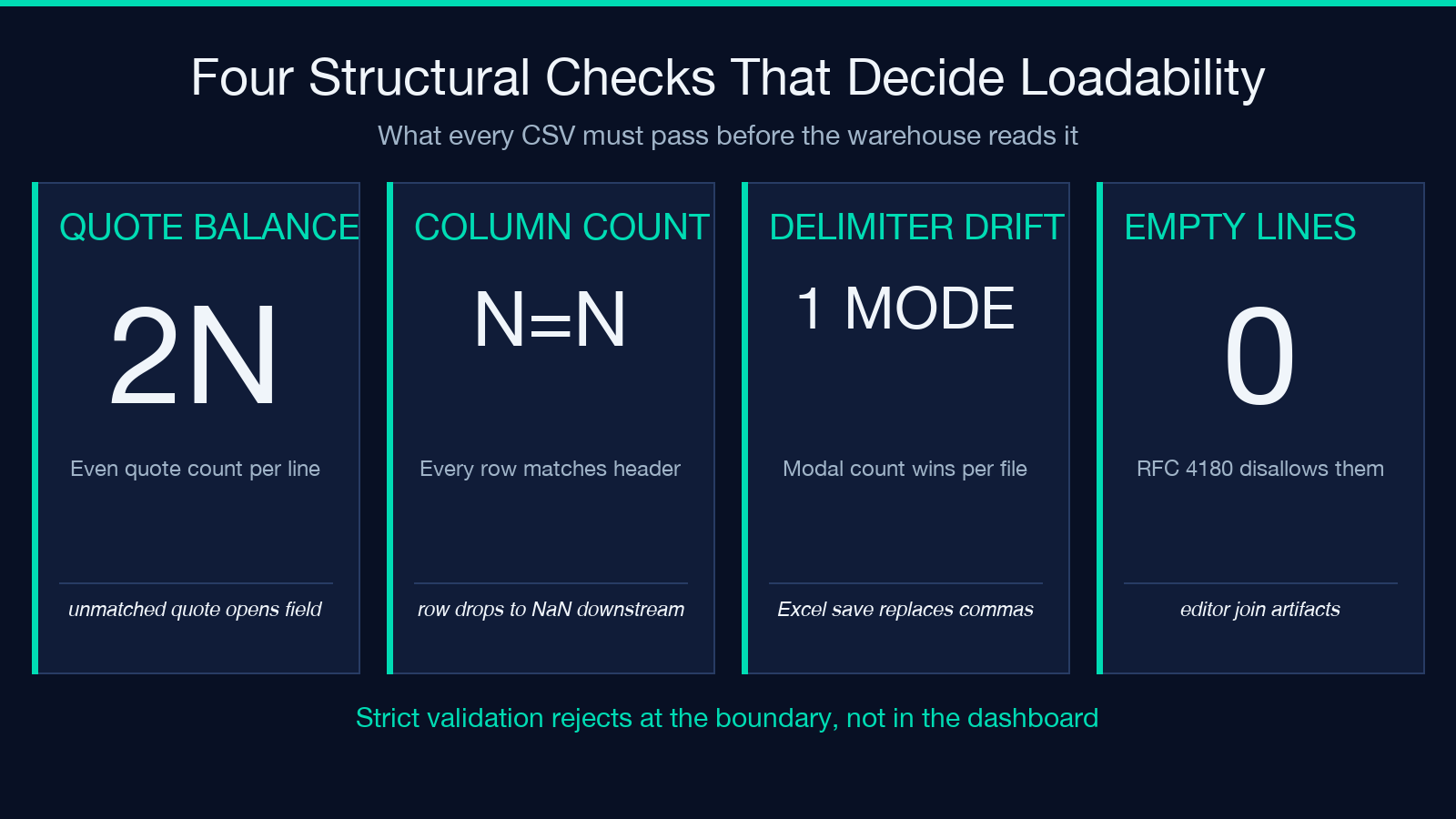
Check 1 — Quote balance. Every opening quote character must have a matching closing quote character on the same line. An unbalanced quote opens a quoted field that never closes, and the parser silently absorbs subsequent newlines until it finds the next quote. The check is line-local: for each line, count the quote characters, verify the count is even, and flag any odd-count line as a quote-balance error.
Check 2 — Column count consistency. Every data row must have the same number of fields as the header row (or as the count derived from the first data row when no header is present). The check is positional: for each line, count the field separators outside of quoted regions, compare to the expected count, and flag any row whose count differs. A row with 8 columns in a 7-column file is a defect — not because the parser fails, but because downstream code assumes the column count matches.
Check 3 — Delimiter consistency. The delimiter character (comma, semicolon, tab, pipe) must appear with the expected frequency on every line. A row with 5 commas in a comma-delimited file whose neighbors have 6 commas has either a missing field or a stray delimiter inside a quoted value. The check is positional: count the delimiters outside of quoted regions on each line, compare to the expected count, and flag any row whose count differs.
Check 4 — Empty-line handling. Empty lines inside the data section are either defects or accepted patterns, depending on the file’s dialect. RFC 4180 disallows empty lines between data rows; many real-world files include them as visual separators or as artifacts of editor joins. The validator surfaces every empty line with its line number, and the operator decides whether to ignore it or reject the file.
The Elysia Tools CSV Validator implements all four checks in one pass. The output groups defects by category, lists each occurrence with its line range, and counts the total rows affected so the operator can decide whether to fix the file or reject the upload. The validator runs in the browser, the file never leaves the client, and the report is a plain JSON object that can be diffed against the previous report to catch regressions.
Five failure modes that survive csv.reader and break the warehouse
Every CSV that loads cleanly into a pandas DataFrame has passed exactly one check: the parser read every byte. The five failure modes below pass that check and fail at least one of the four structural checks. None of them trigger a warning at parse time. All of them trigger a silent data outage downstream.
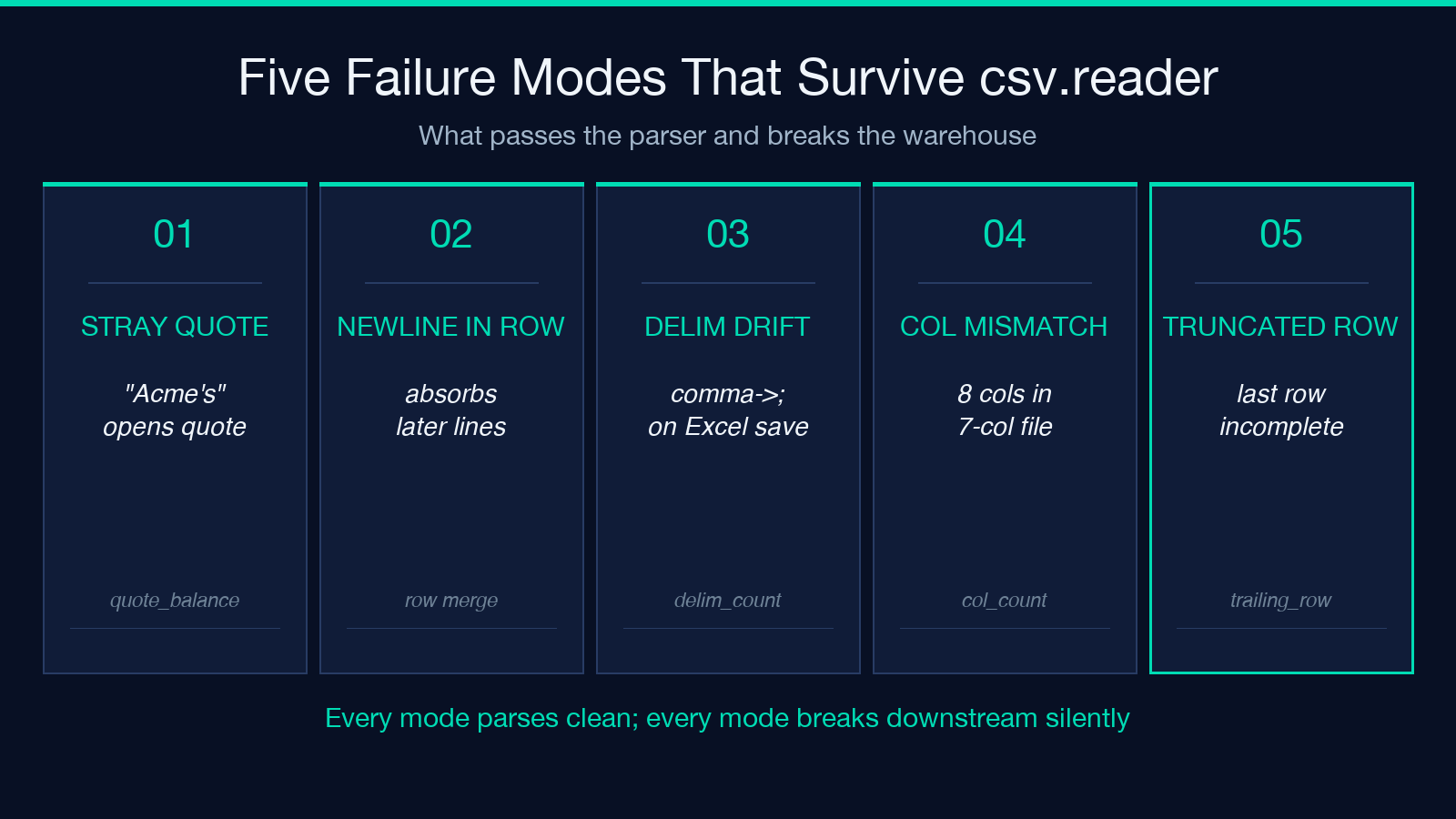
1. Unbalanced quote from a stray apostrophe. A product description like "Acme's flagship widget" (with a curly apostrophe) parses correctly; the same field with a straight ASCII apostrophe inside quotes ("Acme's flagship widget") is parsed as a quote-open, content, and the parser waits for the next quote on a later line to close the field. The parser reads the file; the row count drops; the warehouse joins zero rows on product_name. The Elysia Tools CSV Validator flags this row with a quote_balance error pointing at the specific line and the unmatched quote.
2. Embedded newline inside a quoted field. A multi-line address ("123 Main StnApt 4BnSpringfield") is a legitimate CSV pattern when the field is quoted and the newlines are inside the quotes. The check: every newline inside a quoted region must be balanced by a closing quote on the same logical row. The failure mode: a row with "123 Main StnApt 4BnSpringfield (no closing quote) absorbs every subsequent line until the next quote in the file. The parser reads it; the row count drops; the next 200 rows merge into one.
3. Delimiter drift from a copy-paste into Excel. A CSV opened in Excel and saved as CSV-UTF8 replaces every comma inside a quoted field with a semicolon on save. The file still has the .csv extension; the parser still uses comma as the delimiter; the rows still parse — but every field that contained a comma now contains a semicolon. The check: count the delimiter on every row, flag any row whose count differs from the modal count. The Elysia Tools CSV Validator flags this row with a delimiter_count error pointing at the specific line.
4. Header mismatch from a renamed column. A file whose header row has 7 columns but whose data rows have 8 (or 6) columns parses successfully and produces rows of inconsistent width. Pandas auto-fills the missing column with NaN; downstream code reads NaN as “missing value” and reports a data-quality issue. The check: every data row must have exactly the same column count as the header row (or as the first data row when no header is present). The validator flags every row whose count differs.
5. Truncated last row from a partial upload. A file upload that fails halfway through leaves the last row incomplete. The row’s column count is one less than the modal count, and the parser reads it as a normal row with a missing trailing field. The check: the last row’s column count must match the modal count, and the last row must end with a newline. The Elysia Tools CSV Validator flags this row with a trailing_row error pointing at the specific line.
The audit pass before any CSV lands in the warehouse
Three checks catch every failure mode the previous sections warned about:
1. Run the validator on every file before the warehouse loader sees it — the Elysia Tools CSV Validator produces a JSON report in under a second for files up to 10 MB. 2. Reject any file whose report contains more than zero quote_balance errors or more than zero delimiter_count errors — both classes indicate structural corruption, not data-quality drift. 3. Diff the report against the previous report for the same file source — a new column_count error on a previously-clean file indicates a schema change in the source system that needs human review.
The diff step is the one most pipelines skip, and it is the step that catches the silent schema drift before the warehouse ingests the bad rows. A file that passed validation yesterday and fails today has a cause upstream — a new column, a renamed field, a delimiter change — and that cause is the bug to fix. The validator’s job is to surface the cause; the pipeline’s job is to act on it.
The audit pass costs ~50 milliseconds per megabyte of CSV and runs entirely in the browser, so the file never leaves the client and the validation result can be diffed against the previous run without network round-trips. For pipelines that ingest thousands of files per day, the cost is bounded by file size and the audit log is the canonical record of which files passed and which failed.
Configuring the validator for the dialect your file actually uses
The four structural checks assume a specific dialect — comma delimiter, double-quote quote character, no trailing delimiter, no empty lines. Every real-world CSV file deviates from that default in at least one dimension, and the validator’s option set is the dial that lets you declare the actual dialect before the file is parsed.
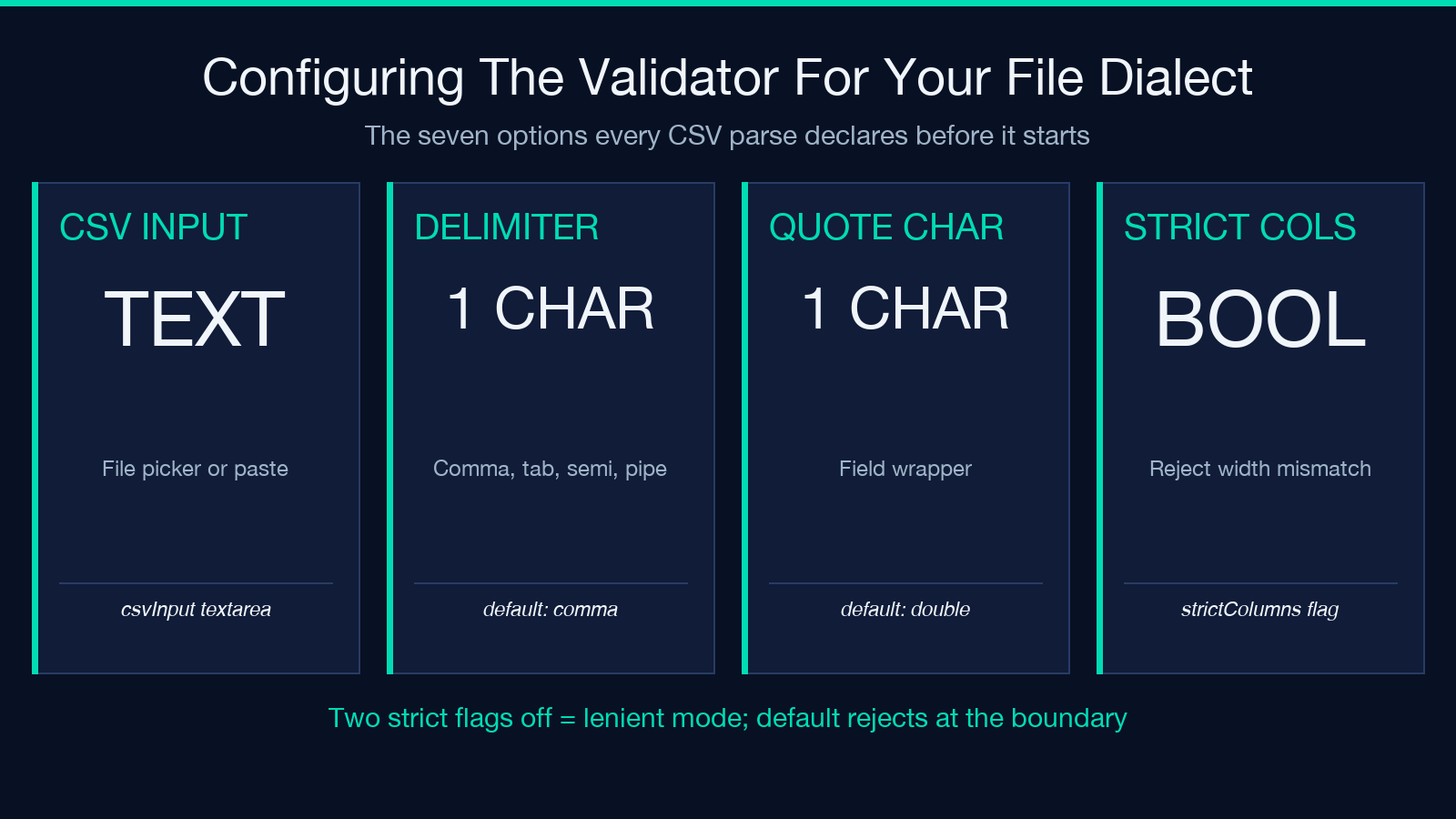
The seven options, in the order they appear in the Elysia Tools CSV Validator interface
csvInput— the file or pasted text to validate. Accepts a file picker or a textarea paste.delimiter— the field separator character. Default,. Common alternatives:;(European CSV),t(TSV),|(pipe-delimited).quoteCharacter— the character used to quote fields containing the delimiter or newline. Default". Common alternatives:'(single-quote, used by some legacy systems).hasHeader— when checked, the first row is treated as the header and is excluded from the column-count check. Default checked.strictColumns— when checked, any row whose column count differs from the header (or from the modal count when no header is present) is flagged. Default checked.allowEmptyLines— when checked, empty lines between data rows are tolerated rather than flagged. Default unchecked.allowTrailingDelimiter— when checked, a trailing delimiter on the last row is tolerated rather than flagged. Default unchecked.
l>
The two strict flags (strictColumns, no-allowEmptyLines) are the ones most often turned off, and turning them off is the difference between strict and lenient validation. The right combination depends on the file’s source system — strict for files generated by a controlled pipeline, lenient for files coming from outside the system that will consume them.
When strict parsing wins and when it loses
The default mode of every CSV parser is lenient — accept whatever bytes the file gives you and produce whatever rows the dialect rules allow. The default mode of every CSV validator is strict — flag every row whose structure deviates from the declared dialect. The two defaults disagree, and the disagreement is the source of every silent data outage this guide warns about.
The rule that holds up in production
- Loads where every row is consumed downstream (data lakes, search indexes, training pipelines) — strict validation by default. Reject the file at the boundary; let the source system know within minutes.
- Loads where some rows are acceptable and others are not (event logs, clickstreams, third-party feeds) — lenient parsing with per-row error capture. Parse the file, capture every malformed row, surface the count to the operator, ingest the rest.
- Loads where the file is a one-off export from a colleague’s spreadsheet (ad-hoc analysis, manual reports) — strict validation but with a “show me the rows” preview. Let the operator see the defects and decide whether to fix or accept.
The Elysia Tools CSV Validator supports all three modes through its option set: strictColumns, allowEmptyLines, allowTrailingDelimiter. The default is strict; the operator toggles the lenient flags when the source system is known to produce deviant files and the pipeline has a per-row error capture mechanism.
l>
What the validator report actually contains
The validator’s output is a JSON object with one entry per defect category. The structure is deliberately minimal so the report can be diffed across runs:
– total_rows — the row count the parser derived from the file, after empty-line handling. – header_columns — the column count derived from the header row (or null when no header is present). – quote_balance_errors — a list of {line, message} for every line whose quote count is odd. – column_count_errors — a list of {line, expected, actual} for every row whose column count differs from the header count. – delimiter_count_errors — a list of {line, expected, actual} for every row whose delimiter count differs from the modal count. – empty_lines — a list of {line} for every empty line in the data section.
The report’s structure is the audit trail. Each defect has a line number, the operator can jump to the line in the source file, fix it, and re-run the validator. For pipelines, the same JSON can be ingested into a monitoring system and alerted on — a non-zero quote_balance_errors count is a page-able event.
The Elysia Tools CSV Samples library provides a curated set of malformed files that exercise every defect category. Running the validator against the samples produces a non-zero report for each one, and the report’s structure is the contract your pipeline should consume.
Closing the loop: when the validator earns its place
The CSV Validator earns its place on every pipeline that ingests a CSV that came from outside the system that will consume it — third-party feeds, manual exports, partner integrations, regulatory filings. Every CSV that was written by the same system that will read it is structurally safe by construction, and the validator’s report comes back clean. The tool is not the validator of every CSV — the tool is the validator of every CSV whose authorship and readership are different systems.
Reach for the Elysia Tools CSV Validator when the file is from outside the system and the warehouse cannot afford a silent outage. Reach for the parser’s default mode when the file was generated by the same code that will read it and the dialect is locked. The two paths lead to the same data; only one of them surfaces the defects before the dashboard shows zero.
Explore more data-validation tools at elysiatools.com.
