
The cheapest 3D effect on the internet does not need a headset, a special screen, or a plugin. It needs a single image, a horizontal offset of about five pixels, and an animated GIF that flips between two shifted views faster than the eye can lock onto either one. The brain stitches the alternation into a depth illusion, and the image starts to breathe. The trick has been around since the 1950s as “wiggle stereoscopy” or “wobble 3D,” and it survives because the math is forgiving, the file format is universally supported, and the viewer never has to install anything. Most product photos, portraits, and architectural shots already contain enough depth information for a believable wiggle, which is why the technique keeps turning up in design blogs and Twitter demos even though proper stereoscopic photography has been niche for decades.
The Wiggle Stereoscope Generator on Elysia Tools takes any uploaded image and produces an animated GIF that does this alternation for you. You do not draw a depth map, you do not separate left and right eyes, you do not render anything. You pick how strong the offset is, how fast the wiggle flips, and whether the depth comes from brightness, color, or a combined heuristic. The rest is automatic. The generator turns a flat photograph into a small, loopable animation that anyone can paste into a tweet, a documentation page, or a product card.
This field guide walks through what the generator actually controls, why the parameters matter, and how to choose settings that hold up across phones, slow connections, and the moments when a viewer is half-paying attention. The deeper lesson is that “3D” does not have to mean stereoscopic photography or VR headsets. A two-frame alternating GIF, when tuned correctly, sells depth to the brain in under a second, and it does so with bytes that fit comfortably inside a chat message.
The two-frame alternation that became a 1950s parlor trick
Wiggle stereoscopy is older than most of the people reading this. It was popularized in the 1950s as a way to show three-dimensional images in magazines without printing two photographs side by side. The technique was simple: print two views of the same scene at slightly different angles, mask them into alternating vertical strips, and place a printed grating over the top. As the reader moved the page back and forth under the grating, each eye saw a different view, and the page appeared to have depth. It was never a perfect substitute for stereoscopic photography, but it was cheap, reproducible, and required no special equipment beyond a sheet of translucent plastic.
The modern GIF version drops the grating and the printed strips. It just alternates full views at speed. The brain does the same fusion work it did in the 1950s, only without the manual page-wiggling. The technique survived because the underlying neural trick is robust: any consistent alternation between two slightly shifted views, presented faster than the eye can fixate, reads as 3D. The fidelity is low, but the cognitive cost is also low. The viewer does not have to learn anything.
That low cognitive cost is why the wiggle trick keeps turning up in places where proper stereoscopic photography would have been impractical: product hero images on e-commerce pages, animated thumbnails in chat apps, and portfolio pieces where designers want a hint of dimensionality without committing to a full 3D render. The wiggle is the lowest-fidelity 3D that still feels like 3D, and “lowest-fidelity” turns out to be a feature, not a bug, when the alternative is asking a viewer to cross their eyes or wear cardboard glasses.
Why an eight-frame wiggle beats a static stereo pair
A traditional stereoscopic image pairs two photographs taken from slightly different positions, one for the left eye and one for the right. The viewer either crosses their eyes, uses a stereoscope, or wears anaglyph glasses to merge them. The result can be technically perfect, but the friction kills adoption. Crossing your eyes gives most people a headache within thirty seconds, and only a tiny fraction of viewers own red-blue cardboard glasses in 2026.
A wiggle GIF solves the alternation problem by showing both views sequentially. The eye sees the left-perspective frame, then the right-perspective frame, then left again, fast enough that the brain fuses them into a depth cue without conscious effort. The exact speed matters less than you might think. Somewhere between 8 and 18 flips per second, most viewers stop seeing the alternation and start seeing depth. The generator’s default of 15 FPS sits in the middle of that band, which is why most users never need to change it.
The depth illusion works because real-world parallax is small. When you look at a foreground object with a textured background, a five-pixel horizontal shift is enough to suggest the foreground is closer than the background. The brain does not need a true stereo pair; it needs a consistent shift between two views. Even a single-frame offset, repeated, sells the cue. That is why wiggle stereoscopy survives in a world of perfect VR headsets. It is the lowest-fidelity 3D that still feels like 3D.
The offset dial is the most important number you will touch
Every wiggle GIF is built around one parameter: how far the right view shifts from the left view, measured in pixels. Set it too low, and the wiggle looks like a flat image that shivers. Set it too high, and the two views separate so much that the brain stops fusing them and starts seeing two distinct pictures vibrating side by side.
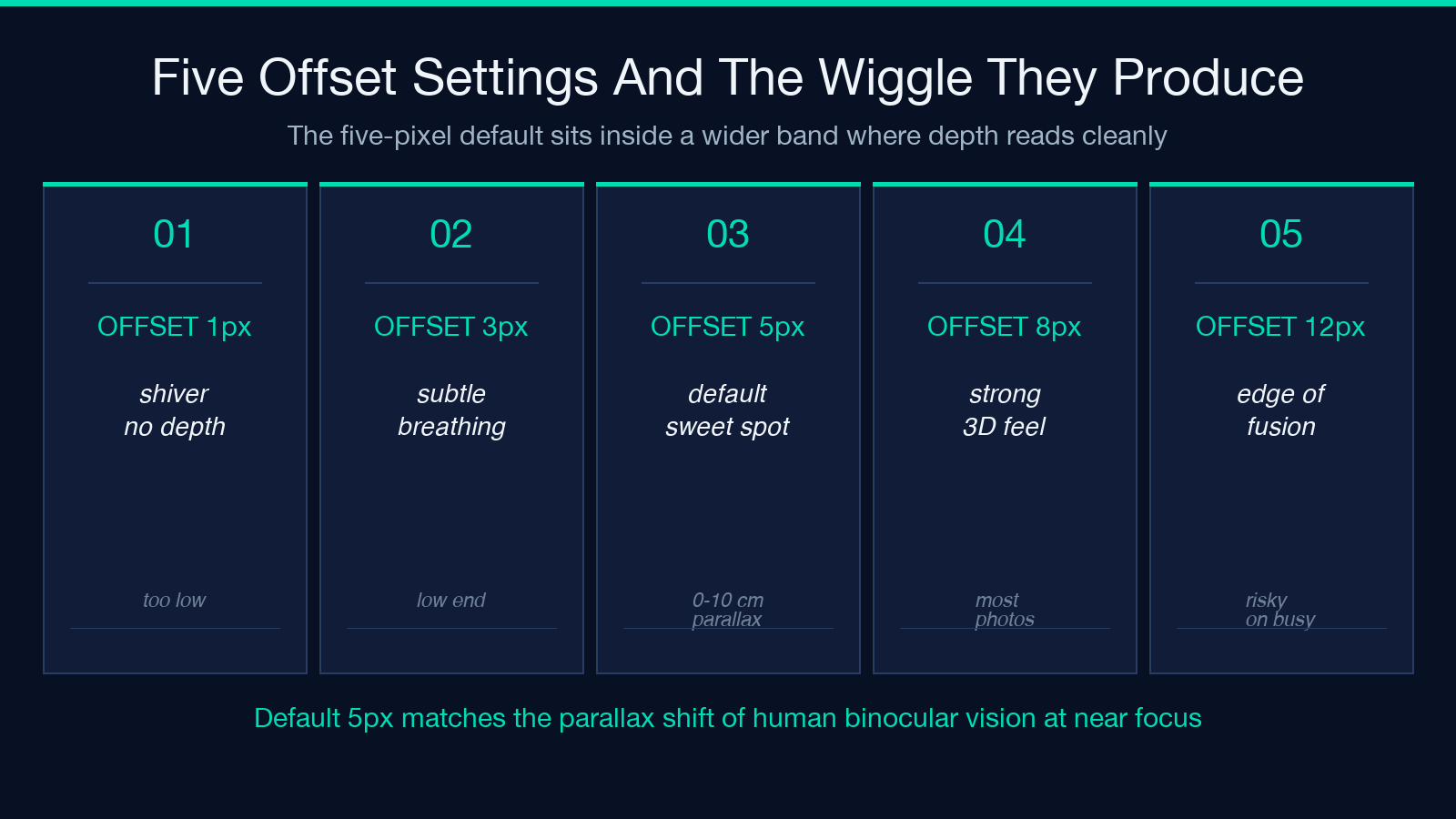
The generator’s default offset is 5 pixels, with a range from 1 to 30. For most product photos, portraits, and landscapes, the 4-to-8 pixel band is the sweet spot. Below 4, the wiggle is too subtle to read on a phone. Above 10, the views start to feel like two separate crops. The 5-pixel default is not arbitrary; it is roughly the parallax shift your own eyes produce when they converge on a near object against a far background. The generator is essentially encoding the geometry of human binocular vision into a single knob.
What the offset dial is really controlling is the strength of the depth illusion, not the literal geometry of the scene. A flat graphic with strong perspective lines will sell more depth at 6 pixels than a noisy photograph will at 12, because the brain has more edges to anchor the shift against. If your wiggle looks weak on a busy photo, the answer is usually to increase the offset by a step, not to find a “better” image.
Depth method is how the generator guesses where near and far are
The wiggle trick needs to know which parts of the image are closer to the camera and which are farther, because the offset is applied per pixel, scaled by depth. A pixel that is “near” shifts more, a pixel that is “far” shifts less, and the differential is what sells the 3D effect. The generator does not have a real depth map, so it computes one from the image itself, and the choice of heuristic changes the look of the wiggle more than any other setting.
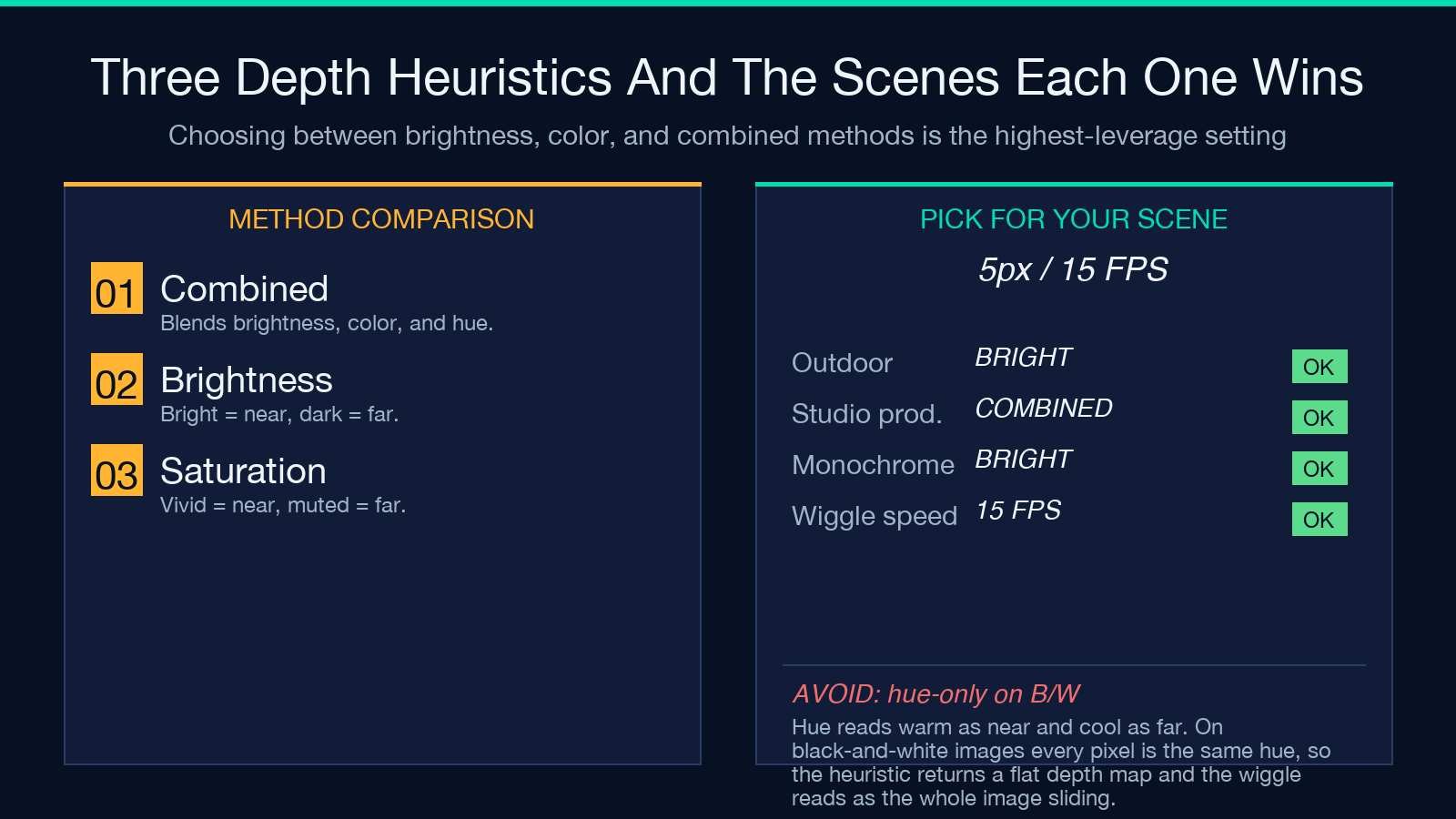
The combined method blends brightness, saturation, and hue into a single depth estimate. It is the default for good reason. Brightness alone reads dark areas as far and light areas as near, which works for outdoor photos but flips badly for backlit subjects. Saturation alone reads vivid colors as near and muted colors as far, which works for product shots but fails on black-and-white images. Hue alone reads warm tones as near and cool tones as far, which mimics how painters suggest distance but breaks on monochromatic scenes. The combined method averages all three, which is rarely the best for any one image but is rarely the worst either.
For product photography, brightness often produces a cleaner wiggle than combined, because products are usually shot against clean white or seamless backgrounds, and the brightness heuristic reads the product as “near” without confusion. For portraits, combined is more forgiving, because faces have warm tones, soft shadows, and color variation that any single heuristic will misread. For landscapes, brightness with a low depth strength setting tends to preserve the depth of the sky without warping the foreground.
The depth strength multiplier, defaulting to 1.0 and ranging from 0.1 to 2.0, lets you push or pull the wiggle without changing the offset. Drop it to 0.3 for a subtle, barely-there breathing effect. Push it to 1.5 or 2.0 for an aggressive wiggle that almost looks like a lenticular print. The combination of method plus strength is where you do most of the visual tuning; the offset is more of a course adjustment.
Frames per cycle, loop, and the GIF tax
A wiggle GIF is just a stack of frames. The generator lets you choose between 4 and 24 frames per cycle, with 12 as the default. Fewer frames mean smaller files and chunkier animations; more frames mean smoother motion and larger files. The trade-off is more interesting than it sounds because of how GIF compression works.
GIF uses palette-based compression, which means each frame in the animation is a snapshot of pixel colors at that offset. Doubling the frame count roughly doubles the file size but only marginally improves the perceived smoothness, because the wiggle is so fast that most viewers cannot tell the difference between 12 FPS of wiggle and 24 FPS of wiggle. The minimum useful count is 4 frames, which gives you two left views and two right views in alternation. Anything below 4 looks like a strobe. The generator recommends even numbers because the alternation works in pairs: left, right, left, right.
The loop checkbox is on by default, and it should stay on for almost every use case. A non-looping wiggle GIF plays once and stops, which feels broken. The alternation is the loop. There is no narrative arc, no climax, no resolution; there is just the breathing. A wiggle GIF that does not loop is a wiggle GIF that has not understood what it is for.
The quality slider, ranging from 10 to 100 and defaulting to 85, controls the GIF’s color palette compression. Quality 100 preserves the full color range but produces files that can run several megabytes for a single image. Quality 70 to 85 is the band where the wiggle still looks clean but the file stays small enough to embed inline. Below 50, the GIF starts to band and posterize, which is fine for a meme but not for a product page. The default of 85 is genuinely the right choice for most uses.
Invert depth and the scenes that need it
The invert-depth toggle flips the depth map so that bright areas read as far and dark areas read as near. The default behavior is what you want for almost every natural photograph, because real-world lighting tends to put brighter pixels on objects closer to the light source. But a small number of scenes read backwards, and that is what the toggle is for.
Backlit subjects are the most common inversion case. A portrait shot with the sun behind the subject will have a dark foreground against a bright background. Without inversion, the depth heuristic reads the dark subject as “far” and the bright sky as “near,” which produces a wiggle where the subject appears to sink into the page instead of standing in front of it. Flipping the toggle reverses the depth so the subject reads as near and the background as far, which is what the photographer intended.
Studio product shots on white seamless backgrounds are the other case where inversion matters. The product itself is usually darker than the background, which the depth heuristic reads as “far.” For most products, that is the wrong reading; the product is closer to the camera than the background paper. Inverting depth pulls the product forward.
The toggle is not destructive. Toggling it on and off on the same image produces two wiggles that look different but are both valid; one might suit your design better than the other. The mental model is “which color reads as near,” not “which is correct.”
What to upload: the image-quality rules wiggle stereoscopy actually rewards
Wiggle stereoscopy is more forgiving than stereoscopic photography, but it is not magic. The illusion breaks down on certain kinds of images, and the failure modes are predictable enough to design around.
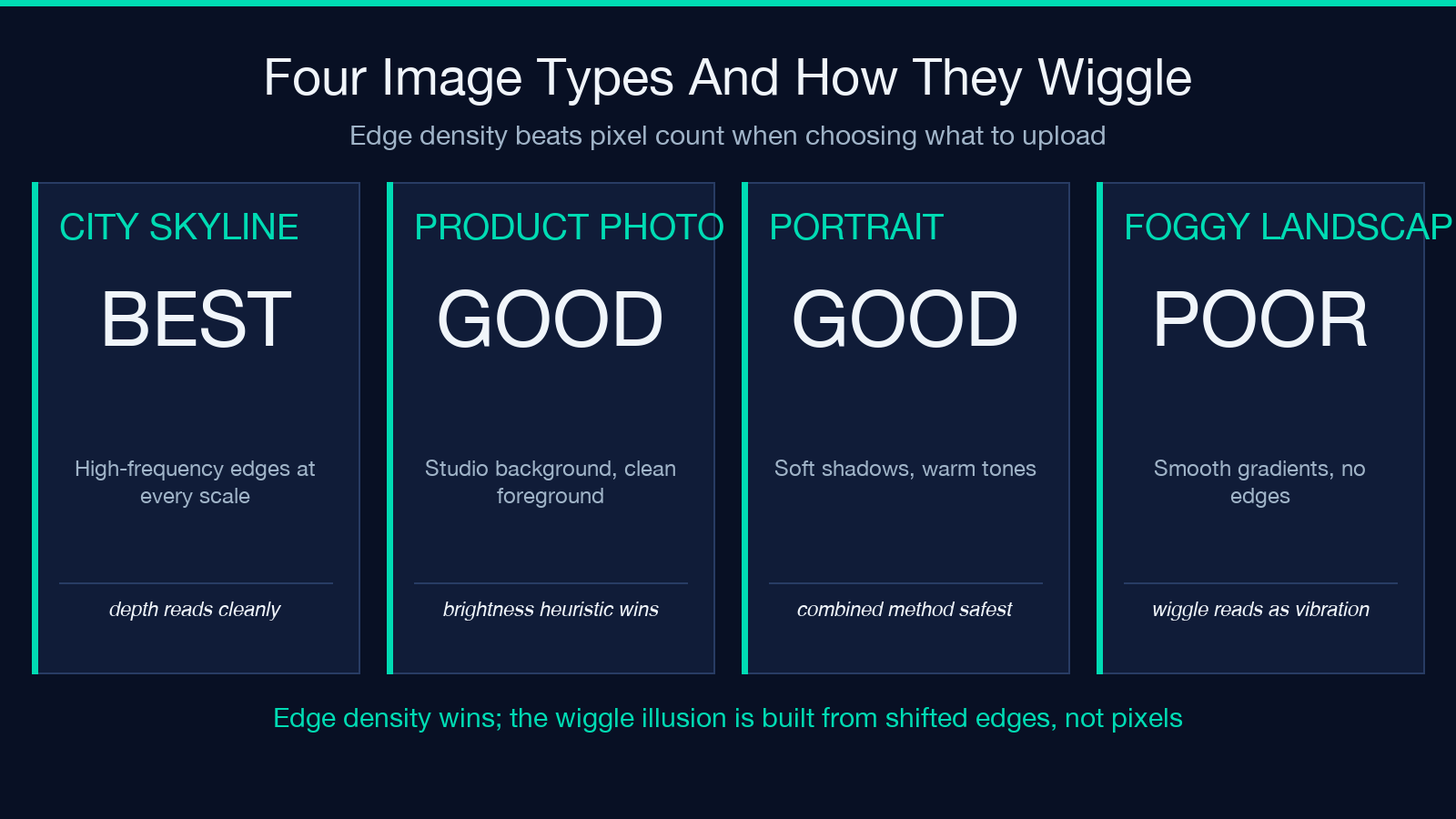
Flat, low-contrast images produce weak wiggles. If your source is a silhouette on a solid background, the depth heuristic has almost nothing to work with, and the wiggle will look like the whole image is sliding back and forth rather than breathing. The fix is to add contrast before uploading, either by raising the difference between subject and background or by introducing a texture in the background that the depth heuristic can latch onto.
Wide-angle shots with strong foreground-background separation work better than telephoto shots with compressed depth. A portrait shot at 85mm against a smooth studio background will wiggle less than the same portrait shot at 35mm with a textured wall behind it, because the wide-angle shot has more parallax to extract depth from. The generator cannot invent depth that the lens never captured.
High-frequency detail holds up better than smooth gradients. A photograph of a city skyline will wiggle more convincingly than a photograph of a foggy lake, because the skyline has edges, contrast, and texture at every scale. The wiggle works by shifting edges; if your image is mostly smooth gradients, there are no edges to shift, and the wiggle reads as the whole image vibrating.
The image does not need to be high resolution. The generator works fine on 800-by-600 phone photos. What matters is not pixel count but edge density. A 600-pixel-wide photograph of a brick wall will wiggle better than a 4000-pixel-wide photograph of a cloudless blue sky.
When to use wiggle stereoscopy, and when to reach for something else
Wiggle stereoscopy is a presentation tool, not a measurement tool. It is excellent for product pages where a single photo needs to suggest three-dimensionality without resorting to video. It is excellent for documentation pages where a screenshot benefits from a sense of “this is a real object floating in space.” It is excellent for tweets and chat messages where the cost of a video is too high. It is not a substitute for actual 3D, and it is not a substitute for video when motion is the point.
If your goal is to convey a process, a transformation, or a before-and-after, use a regular GIF or short video. The wiggle is not a vehicle for narrative. If your goal is to convey spatial relationships inside a 3D scene, use a turntable render or an interactive 3D viewer. The wiggle is too coarse for that. If your goal is to convey depth in a single static frame, use lighting and shadow. The wiggle only animates what is already there.
The use cases where wiggle stereoscopy wins are the ones where the image is the message, the depth is implicit, and the viewer’s attention is short. A product hero image. A documentation thumbnail. A blog post hero. A portfolio piece where the designer wants to suggest dimensionality without committing to a full 3D render. For all of these, a wiggle GIF produced in under a minute is enough.
The Wiggle Stereoscope Generator is the right tool for that minute. Upload, tune three sliders, download. The rest is the brain doing what it has always done: turning two slightly different pictures into one slightly more real feeling picture. Try it on a photo you have already published as a static image, and watch the engagement metrics respond. Depth sells, even when it is borrowed.
Explore more tools at elysiatools.com.
