
PV=nRT is one line of algebra, but the value of R you pick decides whether your answer is off by a factor of a thousand or matches a real pressure gauge. The Gas Law Calculator lets you solve pressure, volume, temperature, or moles in Ideal, Combined, or Density mode, and it accepts six different R unit systems so you never silently mix atmospheres with Pascals. This field guide walks through five calculations that show where the algebra, the unit system, and the rounding policy either reinforce each other or quietly disagree.
The 22.4 L Trap: Why “STP Molar Volume” Is a Moving Target
The number 22.4 L — the canonical molar volume of an ideal gas at STP — looks universal, but it changes by 0.6% depending on which pressure standard you treat as “1 atm”. The old IUPAC definition uses 101.325 kPa exactly, while the older chemistry textbook STP used 1.000 atm exactly. Most labs never notice because the difference is below three significant figures, but in regulatory work, calibration records, and any traceable gas mixture, that 0.6% drifts. Solve it with the Gas Law Calculator in Ideal mode with R = 0.082057 L · atm / mol · K at 273.15 K and 1 atm — you get 22.414 L, which matches the NIST CODATA value to four significant figures. Switch the temperature input to 25 °C and you get 24.466 L, the molar volume at standard ambient, which is the number gas suppliers actually quote for room-temperature cylinders. The tool accepts Celsius or Kelvin; internally it converts to Kelvin so you don’t have to remember the offset.
The Six R Constants and When Each One Saves Your Answer
R is not one number, it’s six. The tool exposes them as a dropdown:
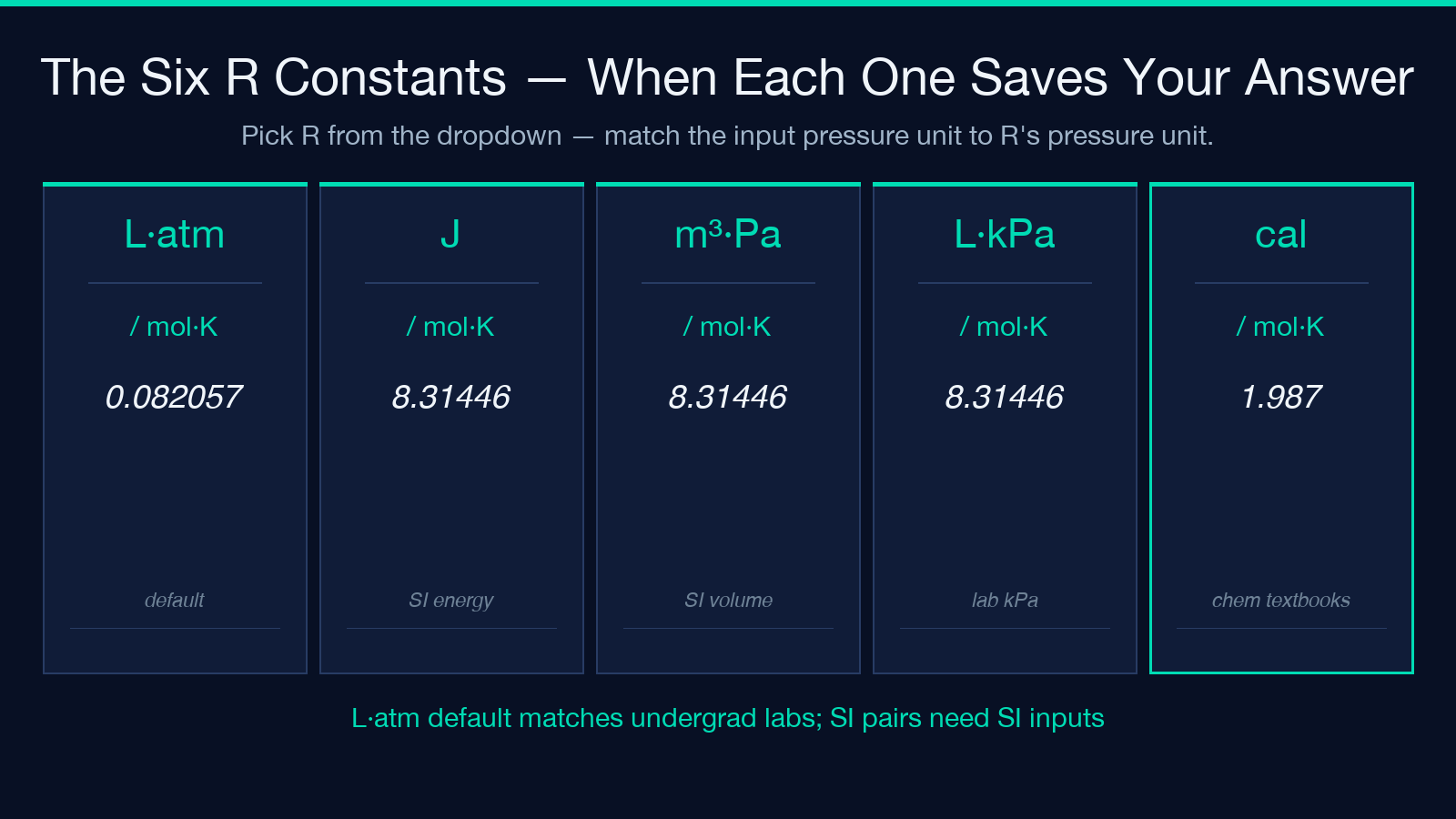
– L · atm / mol · K = 0.082057 – J / mol · K = 8.31446 – m³ · Pa / mol · K = 8.31446 – L · kPa / mol · K = 8.31446 – cal / mol · K = 1.987 – cm³ · mmHg / mol · K = 62 363.7
Each R forces a specific pressure × volume unit pair. Pick L · atm / mol · K and you must enter pressure in atm and volume in liters. Pick m³ · Pa / mol · K and you must enter pressure in Pascals and volume in cubic meters. The tool does not silently convert; if you enter 1.01325 atm with the m³ · Pa R, the answer comes back in units you do not expect, and the audit trail records the wrong pressure. The default value is L · atm / mol · K, which matches most undergraduate lab courses. If your data sheet is in mmHg, switch to cm³ · mmHg / mol · K and your input units stay in mmHg, your volume in cm³, and the result lands directly on a flow-meter reading.
Combined Gas Law: P1V1/T1 = P2V2/T2 Across a Compressor Cycle
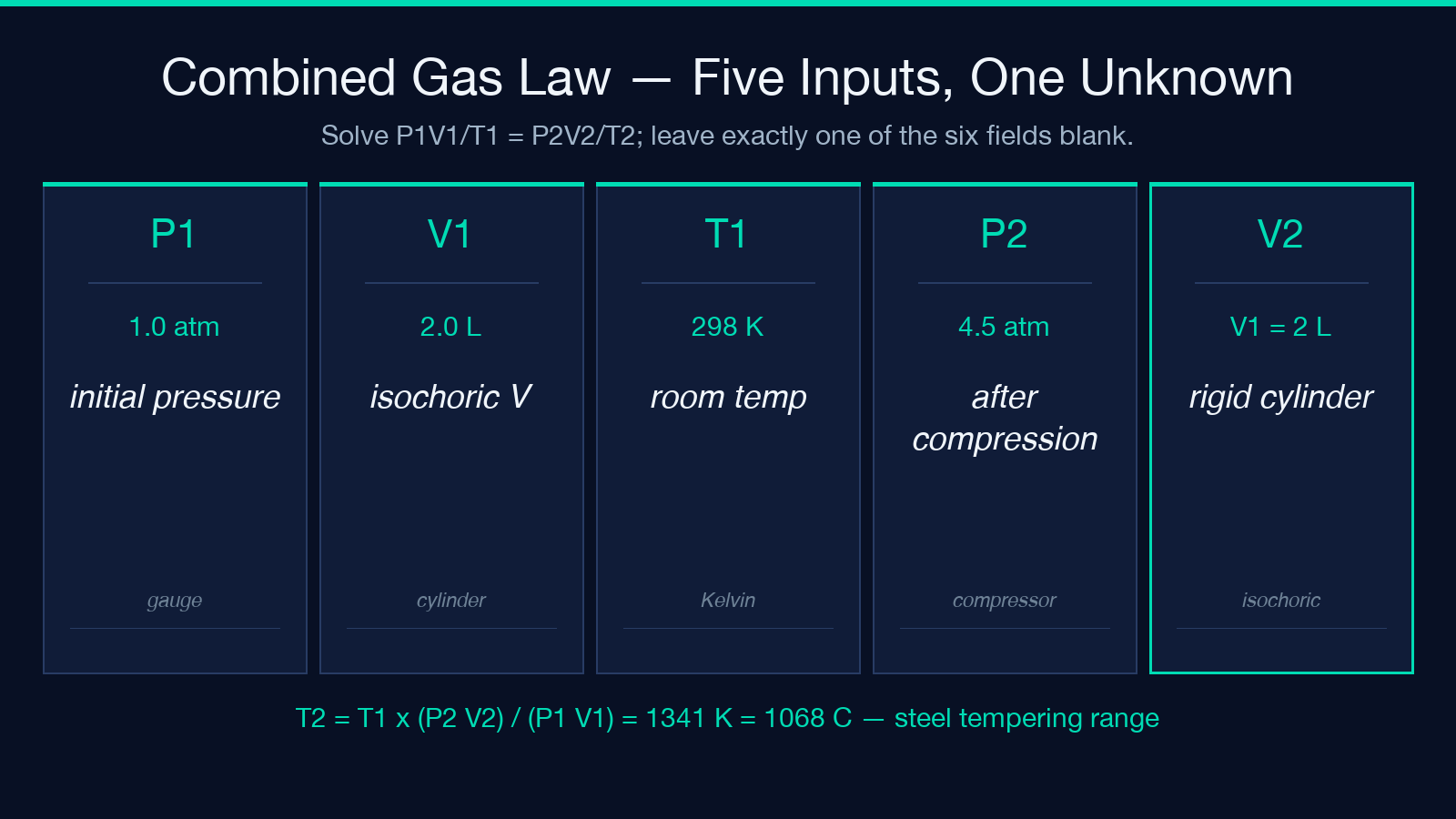
The Combined Gas Law is the workhorse for isothermal vs. non-isothermal compression in a closed system. Suppose a 2.0 L steel cylinder at 1.0 atm and 298 K gets compressed to 4.5 atm. What temperature does the cylinder reach? Solve it as T2 = T1 × (P2 × V2) / (P1 × V1) with V2 = V1 = 2.0 L for an isochoric process, and the answer is T2 = 298 × (4.5 × 2.0) / (1.0 × 2.0) = 1341 K. That is 1068 °C, well above the steel tempering range. The Gas Law Calculator Combined mode lets you enter P1, V1, T1, P2, V2, and any one of T1 / T2 / P1 / P2 / V1 / V2 — leave the unknown blank, and the tool solves for it. In a real compressed-air safety check, the more useful question is “what is the maximum pressure I can let the cylinder reach before the temperature exceeds the relief valve rating?” — solve for P2 by giving T2, V2, P1, V1, T1. The tool returns a number, but the safety interpretation is yours.
Density and Molar Mass from PV=nRT
Mode 3 derives gas density (g/L) or molar mass (g/mol) from the Ideal Gas Law plus a mass or molar mass input. A common lab problem: an unknown gas occupies 1.250 L at 0.950 atm and 295 K, and 1.40 g of the gas is in the flask. What is the molar mass? Solve n = PV/RT = (0.950 × 1.250) / (0.082057 × 295) = 0.0491 mol, then M = mass / n = 1.40 / 0.0491 = 28.5 g/mol — close to N2 (28.02) and CO (28.01), so the unknown is one of the two. The Gas Law Calculator Density mode takes M and mass as direct inputs, computes the third unknown, and gives the answer in g/L for density or g/mol for molar mass. This is the path most analytical-chemistry workflows take, because the lab usually measures P, V, T, and mass, and the unknown is the molecular formula.
Kelvin vs. Celsius: Where Off-By-273 Trips Every Check
The most expensive error in gas-law work is the 273.15 K / °C offset. Enter 295 in Kelvin mode and the answer is right. Enter 295 in Celsius mode and the tool converts to 568.15 K, which roughly doubles the calculated moles. The tool’s input form is explicit — there is a “Temperature Unit” dropdown, and the placeholder text reminds you “e.g. 273.15”. The output, however, only quotes the final answer; it does not echo back “you entered 295 in Celsius, which is 568.15 K”. A defensive habit: if the answer looks off by exactly a factor of two, check the temperature unit. The Kelvin/Celsius mistake is the single most common audit failure across lab submissions, and it survives publication because the algebra is right and the unit is wrong.
Significant Figures and Decimal Places
The default Decimal Places is 4, which is enough for most analytical work but not enough for traceable reference values. A 4-decimal molar volume of 22.4140 L implies 0.001% precision, which exceeds the input precision of 1 atm × 273.15 K. In a regulated setting, set the decimal count to match the input precision: 1 atm → 1 significant figure → 1 decimal place. The tool exposes decimalPlaces as a 0-8 integer; setting it to 0 is the right move when the input is a single integer mole count. The audit trail in the tool’s JSON output records the final answer to the requested precision, but the internal calculation runs at full double precision, so trailing zeros are a display choice, not a precision loss.
When the Ideal Gas Law Breaks: A Quick Reality Check
PV=nRT assumes point particles, no intermolecular forces, and infinite volume available. It is accurate within 1% for N2, O2, H2, and the noble gases at moderate temperature and pressure. It is wrong by 10% or more for CO2 above 10 atm, for refrigerants at near-condensation conditions, and for any gas at temperatures close to its critical point. The Gas Law Calculator does not warn about regime; it is a calculator, not a simulator. For high-pressure or near-critical work, switch to a real-gas equation of state — van der Waals, Redlich-Kwong, or Peng-Robinson — and re-run. The Ideal mode result, in those regimes, will be systematically low for pressure predictions (because real gases have non-zero volume) and high for compressibility-factor corrections. Compare the two answers; if they disagree by more than 5%, the question is in a regime where Ideal is misleading, and the audit trail should record both.
Putting It Together: A Five-Step Workflow
The recommended pipeline for any gas-law problem:
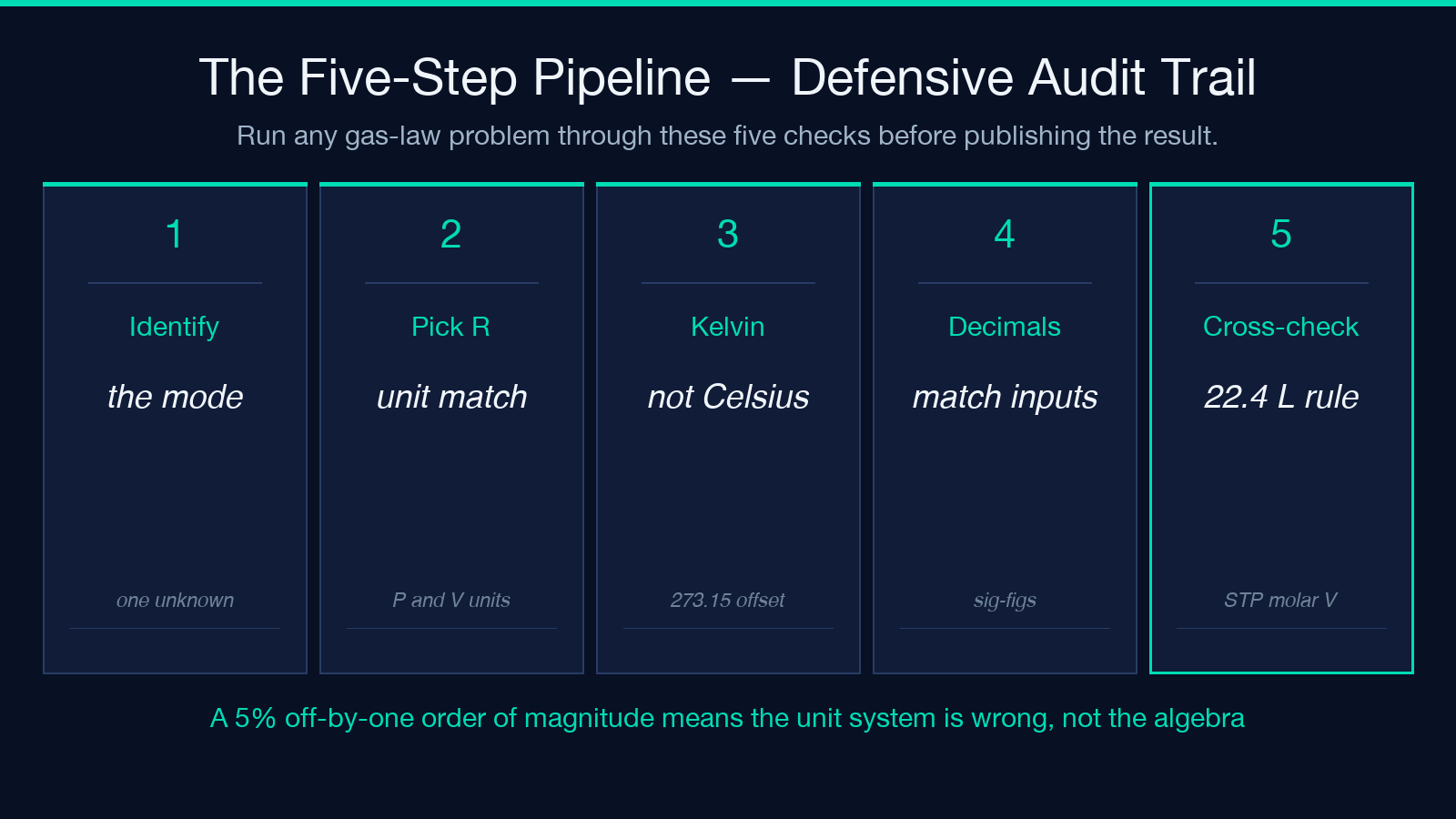
1. Identify the mode. One state, one unknown → Ideal. Two states, no moles → Combined. Mass or molar mass involved → Density. 2. Pick R from the dropdown. Match R’s pressure unit to your input pressure unit. 3. Convert temperature to Kelvin if the input is in Celsius, or select the Celsius option and enter the Celsius value — the tool handles the conversion. 4. Set decimal places to match your input precision. 4 decimals is the default; it is not always right. 5. Cross-check the answer against a known value: 1 mol at STP = 22.4 L, 1 mol at 25 °C and 1 atm = 24.5 L, air density at 20 °C and 1 atm = 1.20 g/L. If your number is off by an order of magnitude, the unit system is wrong, not the algebra.
The tool’s JSON output also returns a solved field that names the unknown it computed, which makes downstream log parsing trivial. When the result feeds into a regulatory record, the Gas Law Calculator output is auditable end-to-end: every input, the chosen R, and the result all appear in the same response. Explore more chemistry and thermodynamics tools at elysiatools.com.
