
Four boolean flags and one sort selector decide whether you get a clean deduplicated URL list or a 4,000-line dump. When you paste a real-world HTML page into a hand-rolled regex, the output is almost always wrong in the same five ways: lazy-loaded data-src slips through, srcset is treated as text, the same URL appears three times because the page references it in CSS and JS, the order reflects DOM position rather than usefulness, and a leading CDN proxy path replaces the real hostname you wanted to audit. The fix is not a fancier regex — it is five small choices made explicitly, in the right order, with the right defaults.
The Image Source Extractor at elysiatools.com makes those five choices explicit and reviewable. Paste any HTML fragment — a full page, a <div> snippet, or just ten <img> tags — and the tool returns a clean URL list with four flags that decide the output shape and one selector that decides the order. This field guide walks through each flag, the realistic input patterns it solves, and the one workflow decision that turns a noisy URL list into a useful asset audit.
The four flag pairs that decide your output shape
Every input to the extractor is a single HTML source string, and every output is a one-URL-per-line text list. The shape of that list is controlled by four boolean flags, each of which answers exactly one question about how the HTML is built.
The first pair is whether to look beyond img src. Most modern pages put the visible image URL in srcset for responsive sizing or in data-src for lazy-loading libraries like lazysizes and lozad.js. With both flags off (the default), you only catch the eagerly-loaded images — usually 30 to 40 percent of the real total on a typical marketing page. Flip Include data-src on, and you catch the lazy-loaded hero, the below-the-fold gallery, and the carousel images. Flip Include srcset on, and you catch every resolution variant — 1x, 2x, 3x retina sets — as a separate URL.
The second pair is whether to deduplicate. The same image often appears three times in a single HTML page: once in a <picture> source, once in an <img> tag, and once as a CSS background-image URL inside a style attribute. With Remove Duplicates on (the default), the tool collapses these to a single line and the count you read is the count of distinct images. With it off, you see every reference — useful when you want to count how many places a single asset is referenced, but rarely what you want when the goal is “what images does this page actually load?”
The third pair is how to treat URLs that differ only by query string. The tool treats https://cdn.example.com/hero.jpg?v=1 and https://cdn.example.com/hero.jpg?v=2 as different URLs because they are — and the audit you run downstream may legitimately want to know that. There is no flag for query-string folding, and that is intentional. URL canonicalization is a separate step with its own opinions.
The fourth pair is whether to keep CSS and SVG background-image URLs. The extractor reads <img> and <source> tags only. Inline style="background-image:url(...)" and SVG xlink:href are out of scope. The flag list reflects this — there is no “include CSS backgrounds” toggle because that path leads to an entirely different tool (CSS-aware extraction). When you need both, run the extractor twice and merge.
The one selector that decides the order
The Sort By selector has exactly two values: alphabetical (the default, A through Z) and none (DOM order preserved). Both are valid for different workflows, and picking the wrong one is the difference between an audit you can read in 30 seconds and one that takes 30 minutes.
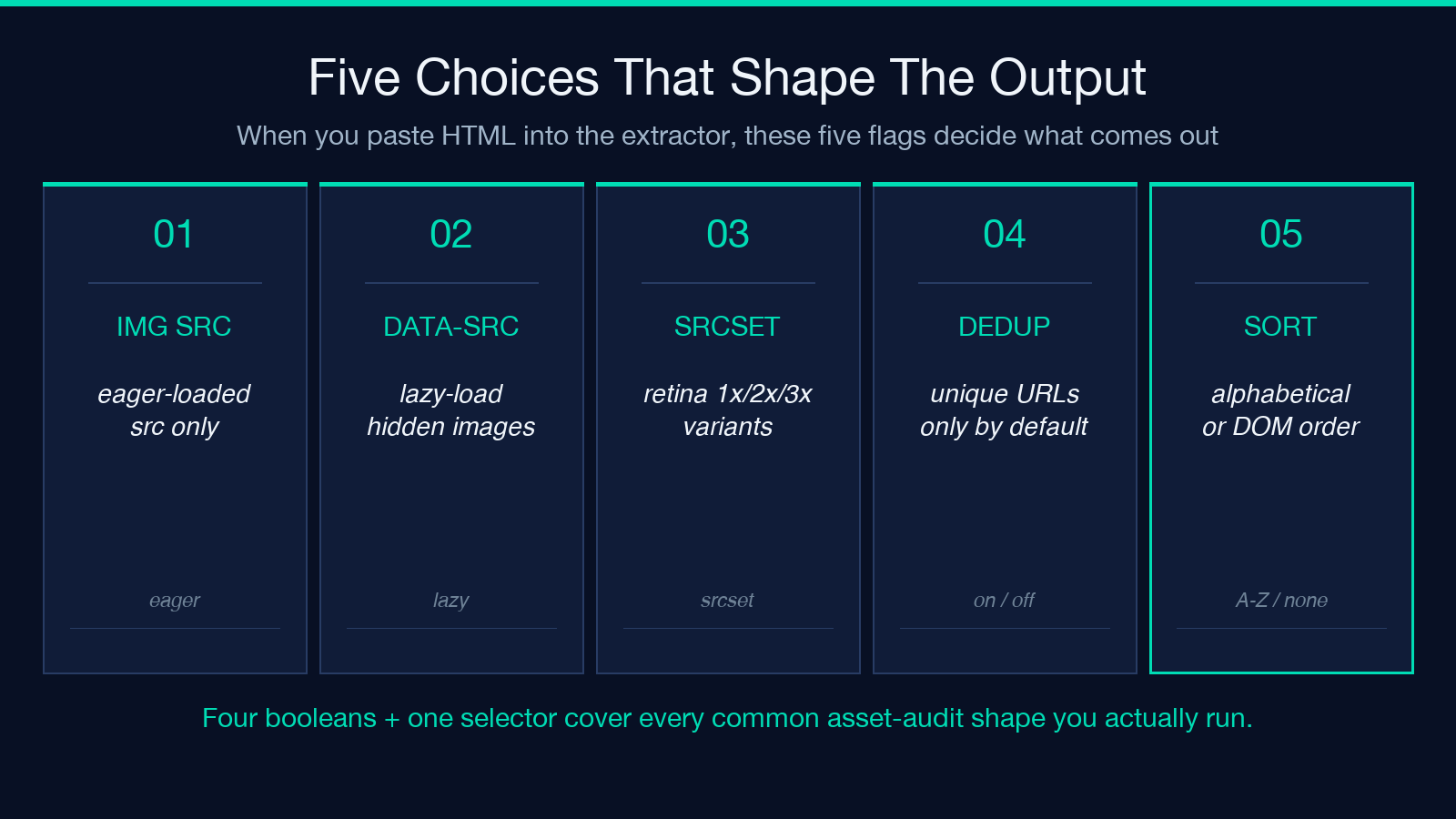
Alphabetical is the right default for asset audits where you want to see CDN clustering at a glance. When you sort A-Z, every cloudfront.net URL groups together, every imgix.net URL groups together, and any localhost:3000 or staging. URL that snuck into production jumps out because it sorts before the real CDN hostnames. This is the mode you want when the question is “is this page loading images from the CDN we expect?”
None (preserve DOM order) is the right choice for two specific workflows. The first is render-blocking analysis: the order images appear in the HTML is roughly the order the browser starts fetching them, so a DOM-ordered list lets you trace which image sits in the critical path above the fold. The second is story reconstruction: when you are auditing a content page to understand what the editor intended the user to see, the visual order matches the DOM order, and the audit output should match. For both, alphabetical sorting destroys the signal you are looking for.
There is no “by file size” or “by request count” mode, and that is intentional. The extractor returns URLs only — file size and request count require the network panel, and that is a different tool with different inputs.
What the output actually looks like
Given a typical product page HTML fragment with twelve images — six eager <img src>, four lazy <img data-src>, two <picture> sources — the default-flag output is exactly twelve lines, one URL per line, alphabetical. Flip on Include data-src and you get sixteen lines. Flip off Remove Duplicates and you might get twenty-two lines because the marketing page reuses the hero image in three places.
The output format is intentionally minimal: no line numbers, no byte counts, no MIME types, no JSON wrapping. This is the form you paste into wget -i, curl -K, an asset-CDN purge request, a CDN URL-prefix list for an allowlist, or a compare-against-catalog spreadsheet. The tool’s output is meant to be the input to the next tool in your pipeline, not a report to read on its own.
If you need a structured output — JSON, CSV, or a per-host breakdown — pipe the text list through your downstream tool of choice. sort | uniq -c | sort -rn gives you a per-host count in three commands. jq -R . | jq -s . converts the list to a JSON array in one line. The extractor stays out of that business because trying to be a Swiss-army output formatter makes it bad at the one job it does well.
The five pitfalls that quietly corrupt the audit
The five recurring failure modes are consistent across pages, and each has a one-flag fix.
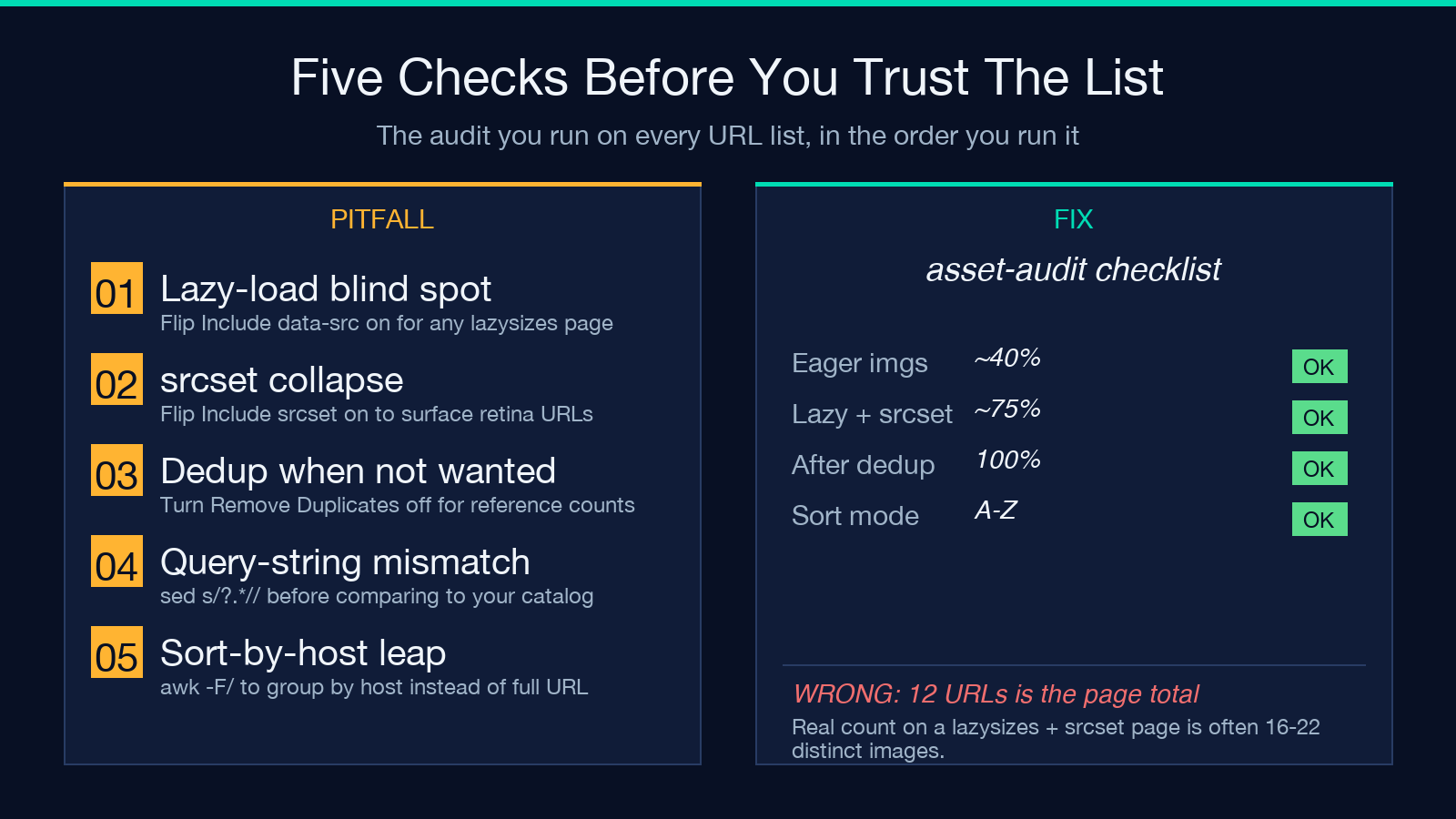
Pitfall one is the lazy-load blind spot — you ran the extractor with both flags off, got twelve URLs, and concluded the page has twelve images. It actually has sixteen. The fix is to flip Include data-src on for any page built with a lazy-load library. Pitfall two is the srcset collapse — you treated srcset="hero-1x.jpg 1x, hero-2x.jpg 2x" as a single URL and missed the retina variant. The fix is Include srcset on.
Pitfall three is the dedup-when-you-shouldn’t problem. When you are auditing where a single asset is referenced (for cache invalidation or for finding a stale link), turning dedup on hides the references you need. Turn it off and the count is the number of references, not the number of unique assets. Pitfall four is the query-string mismatch — the page loads hero.jpg?v=1 but your catalog has hero.jpg?v=2, and you conclude the asset is missing. Strip query strings with sed 's/\?.*//' in your downstream pipeline before comparing.
Pitfall five is the sort-by-hostname leap. Alphabetical sort on full URLs puts cloudfront.net and cloudinary.com near each other but interleaves them in unpredictable ways because the path comes after the host. When you want a per-host summary, sort by host first with awk -F/ '{print $3}' | sort | uniq -c | sort -rn. The extractor’s alphabetical sort is for whole-URL readability, not host clustering.
The three input patterns that change your flag set
Different HTML sources want different flag combinations. Here are the three patterns that cover most of the audit work.
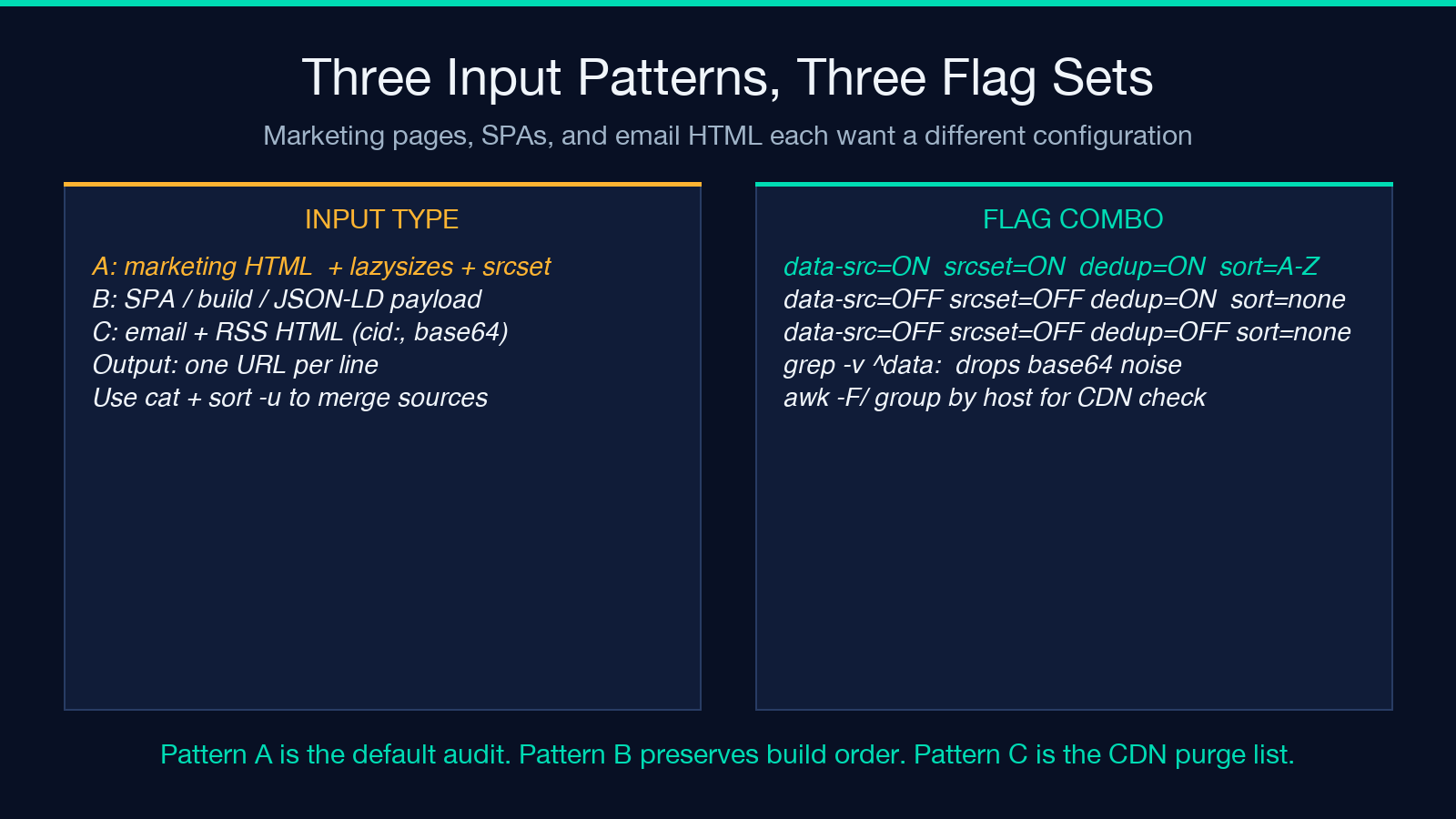
Pattern A — server-rendered marketing pages. These pages ship with eager <img src> tags plus lazysizes or vanilla-lazyload annotations, plus responsive <picture> with srcset. Use Include data-src on, Include srcset on, Remove Duplicates on, Sort By set to alphabetical. The result is a clean deduplicated URL list with the lazy-load gallery and retina variants included, sorted for CDN clustering review.
Pattern B — SPA build output and JSON-LD payloads. These usually contain JSON-escaped HTML inside <script type="application/ld+json"> blocks. The extractor reads the markup you paste, so it does not run the JSON parse first — you have to extract the HTML string yourself or paste only the <img> portion. Use all four flags off except Remove Duplicates on (the default), Sort By set to none so the output mirrors the build order. SPAs reference images in a specific render order, and you want to preserve that.
Pattern C — email HTML and RSS-to-HTML conversions. These are heavy on cid: inline references and base64 data: URLs, both of which the extractor surfaces as-is. Use Remove Duplicates off (every reference counts because you are looking for missing attachments), Sort By set to none (you want the inline-then-attached order). The data: URLs are usually noise for an asset audit; pipe the output through grep --invert-match 'data:' to drop them.
For each pattern, the defaults change for a reason — the question you are asking changes.
When to use this instead of a DOM crawler
The extractor is a static-HTML tool. Paste the markup, get the URLs. It does not execute JavaScript, it does not wait for AJAX-loaded content, and it does not see images injected by client-side frameworks after page load. For those cases, use a headless browser like Playwright or Puppeteer, render the page, and then either read document.querySelectorAll('img').forEach(i => i.currentSrc || i.src) from the console or save the rendered HTML and feed it to the extractor.
The division of labor is clean: use the extractor when you have the HTML in hand (saved page, build output, server-rendered template, email HTML, RSS-to-HTML conversion). Use a browser when the images appear only after JS runs. Use both when you want a complete inventory — extract from the static markup first to get the eager and lazy-loaded images, then run the browser to capture the JS-injected ones, then cat and sort -u to merge.
Pairing the extractor with the rest of your audit chain
The cleanest pipeline is: extract → group by host → cross-reference against your allowlist → flag anything that loads from a host you do not expect. Three of those steps are downstream of the tool’s output. The extractor gives you the URL list; the audit decisions are yours.
For deeper analysis after the extraction step, the text processing tools at elysiatools.com cover URL deduplication, regex extraction, and CSV-friendly reshaping of URL lists. For sample inputs that exercise the five flags together, browse the samples index for HTML fragments with known lazy-load, srcset, and dedup characteristics.
Picking the right defaults for your workflow
If you run the extractor once per week against your own site’s pages, leave Remove Duplicates on and Sort By at alphabetical. The output is clean, the file is small, and the audit takes minutes.
If you run it once per day against a list of competitor pages, flip both Include data-src and Include srcset on, leave dedup on, and switch to none (preserve DOM order) so the output reflects the rendering order you would see in DevTools. The five minutes you spend reading DOM-ordered output save you the half-hour you would otherwise spend correlating back to the live page.
If you run it as part of a build pipeline to generate a CDN purge list, turn dedup off (you want the references, not the unique assets) and keep sort at none (you want the order you would purge them in, which is reverse-DOM order — top of page first, last to load). Run the extractor’s output through tac to reverse it.
Four flags, one selector, one job. The Image Source Extractor does not try to render pages, scrape JavaScript, or output JSON. It reads HTML, lists URLs, and stays out of the way of whatever you do next. That is the whole tool.
Explore more tools at elysiatools.com.
