
Every weight-based infusion starts with three numbers you have to convert into each other: drug on board, total volume, prescribed dose per kilogram per minute. Get any one of them wrong by a factor of ten and the line says so in five seconds. The Medication Dose/Rate Calculator handles the bidirectional math between a clinical dose and an infusion-pump rate in mL/hr, supporting weight-based units (mcg/kg/min, mg/kg/hr, units/kg/hr) and flat units (units/hr) in one place. This field guide walks through the three calculations that show up on every critical-care shift, the four units conversions the calculator has to absorb, and the high-alert safety pattern that has to be paired with every result the calculator produces.
The Two Directions The Calculator Runs
The tool has exactly two modes selected by a direction toggle: Dose → Rate (you know the prescribed dose, you need to set the pump) and Rate → Dose (the pump is already running, you need to verify what is actually being delivered). Both directions share the same underlying concentration. Concentration is the bridge: it converts between “how much drug” (mg, units, mcg) and “how much fluid” (mL).
Concentration drug/mL = Total drug / Total volumeA 400 mg dopamine bag diluted in 250 mL is 400/250 = 1.6 mg/mL = 1600 mcg/mL. That concentration is what every subsequent step references. Changing concentration (titrating to a more concentrated bag, switching from a 250 mL to a 100 mL diluent) re-anchors the entire calculation, which is why the calculator exposes concentration as its own input rather than recomputing it on the fly.
Direction matters because the failure modes are different. Dose → Rate mistakes produce a wrong number on the screen that the nurse reads back to a partner, who catches it. Rate → Dose mistakes produce a right number on the screen that documents what the pump is delivering — wrong drug, wrong concentration, right mL/hr. The Rate → Dose direction is the verification step, the one that catches an upstream setup error before it shows up as a clinical event.
The Weight-Based Math: Dopamine At 5 mcg/kg/min
The most common weight-based critical-care infusion is dopamine, ordered in mcg/kg/min. The calculator takes the ordered dose, the patient’s weight, and the concentration, then returns the pump rate in mL/hr. The arithmetic the calculator runs is:
Dose drug/hr = dose drug-per-kg-per-min × weight kg × 60 min/hr
Rate mL/hr   = Dose drug/hr ÷ Concentration drug/mL
Worked example — a 70 kg patient on dopamine 400 mg in 250 mL, ordered at 5 mcg/kg/min:
Concentration = 400 mg / 250 mL = 1.6 mg/mL = 1600 mcg/mL
Dose          = 5 mcg/kg/min x 70 kg x 60 min/hr = 21,000 mcg/hr
Rate          = 21,000 mcg/hr / 1600 mcg/mL = 13.125 mL/hr ≈ 13.13 mL/hr
The 13.13 mL/hr result lands inside the typical starting dopamine titration range of 5-15 mL/hr on a standard concentration. If the calculator returns 131.3 instead of 13.13, the bug is almost always in concentration — somebody entered 400 mcg instead of 400 mg, which shifts the decimal three places and produces a result ten times too high. The calculator’s decimalPlaces option (default 2) controls only the rounding of the final rate; it does not catch input-unit errors. Always read back concentration as a separate sanity check before setting the pump.
Explore the calculator with a preset concentration and see the same 5 mcg/kg/min titration step across three weights (60, 70, 80 kg) in the Medication Dose/Rate Calculator. The rate scales linearly with weight; doubling the weight from 70 to 140 kg exactly doubles the rate from 13.13 to 26.25 mL/hr on the same concentration.
The Flat-Dose Math: Heparin At 15 mL/hr
Not every infusion is weight-based. Heparin drips, nitroglycerin, and many sedation infusions are ordered in flat units/hr (or mcg/hr, mg/hr) without a per-kilogram term. The same calculator handles these — direction = rate-to-dose, doseUnit = units/hr, and the calculator multiplies the current rate by concentration to give delivered dose:
Delivered dose = Rate mL/hr × Concentration drug/mLWorked example — a heparin bag of 25,000 units in 250 mL (concentration 100 units/mL) running at 15 mL/hr:
Concentration = 25,000 units / 250 mL = 100 units/mL
Delivered     = 15 mL/hr x 100 units/mL = 1,500 units/hr
The nurse ordered 1,500 units/hr; the pump is delivering 1,500 units/hr; the documentation in the chart matches the order. This is the Rate → Dose verification direction, and it is the calculation that should be run before the bag is hung, not after. Documenting the dose the pump is actually delivering (not the dose on the order) is the audit trail that protects against the common setup error of programming the wrong concentration into the pump.
Switch the same heparin setup to Dose → Rate with doseUnit = units/hr, target dose 1,500 units/hr, and the calculator returns 15 mL/hr — the round trip is symmetrical. The calculator exposes both directions as first-class modes because clinical practice uses them at different times: Dose → Rate when initiating, Rate → Dose when verifying.
The Three Unit Conversion Decisions The Calculator Owns
The calculator has to absorb three different unit grammars, and choosing the wrong one is the dominant source of weight-based dose errors in published literature. The three grammars are:
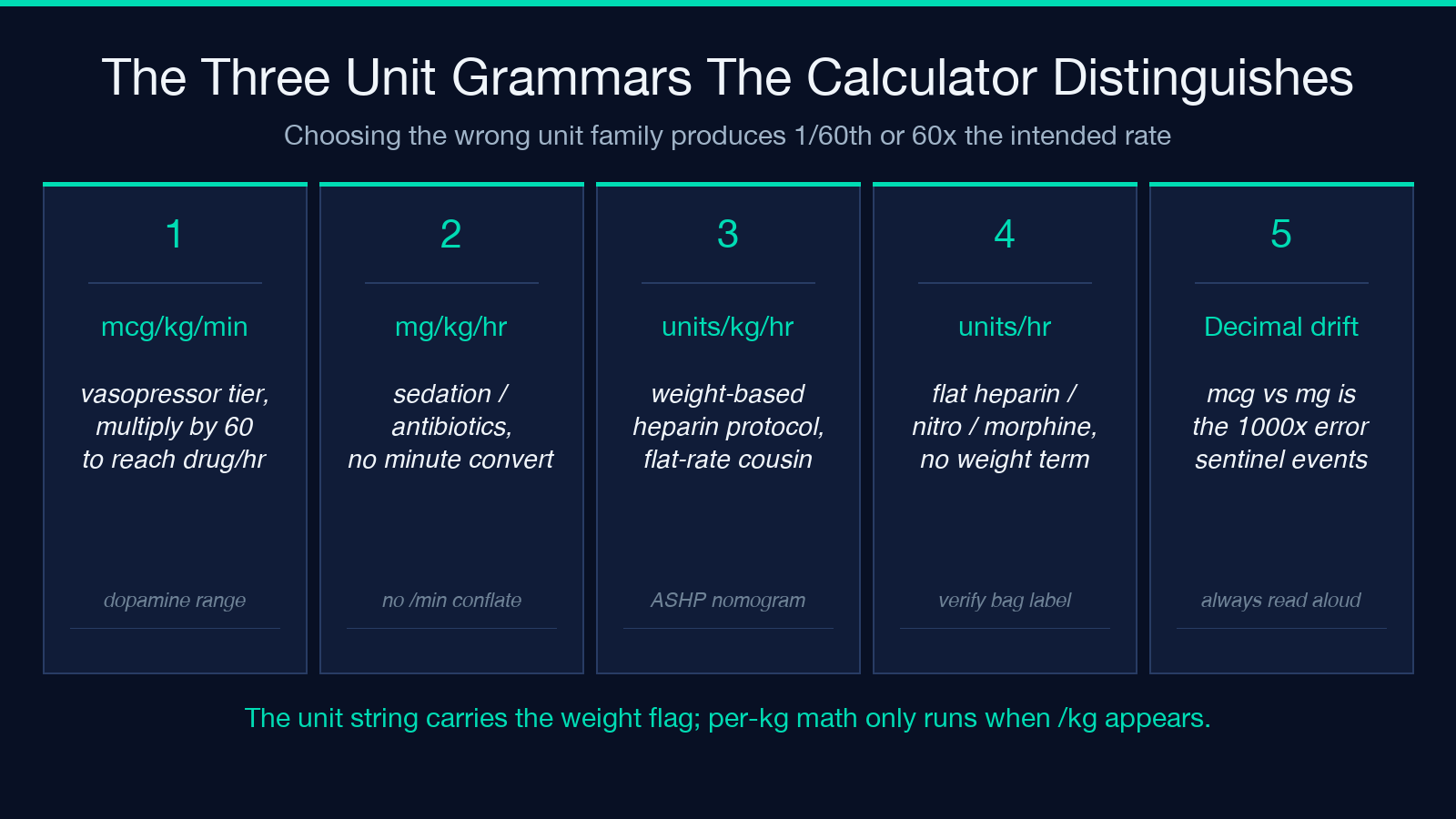
<ul> <li><strong>Per-minute weight-based</strong> (mcg/kg/min, units/kg/min) — vasopressor territory. The conversion factor to per-hour is multiplied by 60.</li> <li><strong>Per-hour weight-based</strong> (mg/kg/hr, units/kg/hr) — sedation, some antibiotics, some inotropes. No minute conversion needed.</li> <li><strong>Flat per-hour</strong> (units/hr, mg/hr, mcg/hr) — heparin, nitroglycerin, morphine drips. No weight term at all.</li> </ul>
The mistake that triggers Joint Commission sentinel-event alerts is misreading a per-minute dose as a per-hour dose, or vice versa. An order for “dopamine 5 mcg/kg/min” transcribed into the pump as “dopamine 5 mcg/kg/hr” gives a rate that is 1/60th of intended — the patient receives a sub-therapeutic infusion and the titratable pressor effect never appears. The reverse (per-hour read as per-minute) gives a 60x overdose.
The calculator enforces the unit choice through a doseUnit dropdown rather than a free-text field, which is the correct architecture: every value carries its unit, and the conversion is implicit in the dropdown selection. The four dose-rate units available (mcg/kg/min, mg/kg/hr, units/kg/hr, units/hr) cover the four common patterns; if a clinical scenario requires a fifth pattern, the calculator does not paper over the gap — it forces the clinician to convert before input.
A useful audit step is to print the resulting rate in mL/hr and ask whether it sits inside the expected clinical range. Dopamine 5 mcg/kg/min on a standard concentration should be 5-20 mL/hr for most adult weights; heparin 1,000 units/hr on a 100 units/mL bag should be 10 mL/hr exactly. A result outside the expected range is not a calculator bug — it is an input error that the calculator is correctly propagating.
Each of the four unit choices implies a different input schema. Weight-based modes require weight as a required input; flat modes omit it entirely. The schema distinction lives in the doseUnit dropdown — there is no separate isWeightBased toggle. This is the cleanest model: the unit string carries the weight flag, and the calculator applies the per-kg multiplication only when the unit string includes “/kg”. decimalPlaces is the only display-rounding knob. It defaults to 2 (so 13.125 displays as 13.13), which matches the precision most infusion pumps accept. Setting it to 0 produces a whole-number rate suitable for pumps that round to integer mL/hr; setting it to 3 reveals the floating-point remainder and is useful when debugging an order that lands at the boundary of a clinical range.
The High-Alert Double-Check Pattern
Every ISMP high-alert medication has to be independently double-checked by a second clinician before the line is connected. The calculator’s job is to produce the number on the screen; the double-check is the institutional protocol layered on top. The minimum viable double-check has three legs:
- Concentration verification. Read the bag label aloud — drug, total amount, total volume. Compare to the calculator’s concentration input. Reconcile before proceeding.
- Dose-range verification. Compare the ordered dose against published clinical range for the drug (dopamine 2-20 mcg/kg/min, heparin 15-25 units/kg/hr for most protocols). A calculated rate that implies a dose outside the range is a signal to stop and re-verify.
- Pump-program verification. Read the rate on the pump screen back to the ordering clinician. Have them confirm against the order. Document the verification in the chart.
The calculator is a math tool, not a safety system. It will happily compute a 5,000 mL/hr rate from a 50 mg/mL concentration at 100 mcg/kg/min for a 100 kg patient — that is what the inputs ask for. The clinical sanity check is what catches the case where the inputs were typed into the wrong row of the calculator, or the dose was mistyped as 50 instead of 5.
The pattern that integrates the calculator into the double-check workflow: nurse A enters the order into the calculator, reads the result aloud; nurse B independently re-enters the same order into a second calculator (or the same calculator with the inputs blanked), confirms the result matches. Two independent computations agreeing is the strongest pre-administration safety signal available without a bar-coded administration system.
Three Failure Modes The Calculator Does Not Catch
The calculator is a unit-conversion engine. It does not know — and cannot know — three classes of error that happen upstream or downstream of the math:
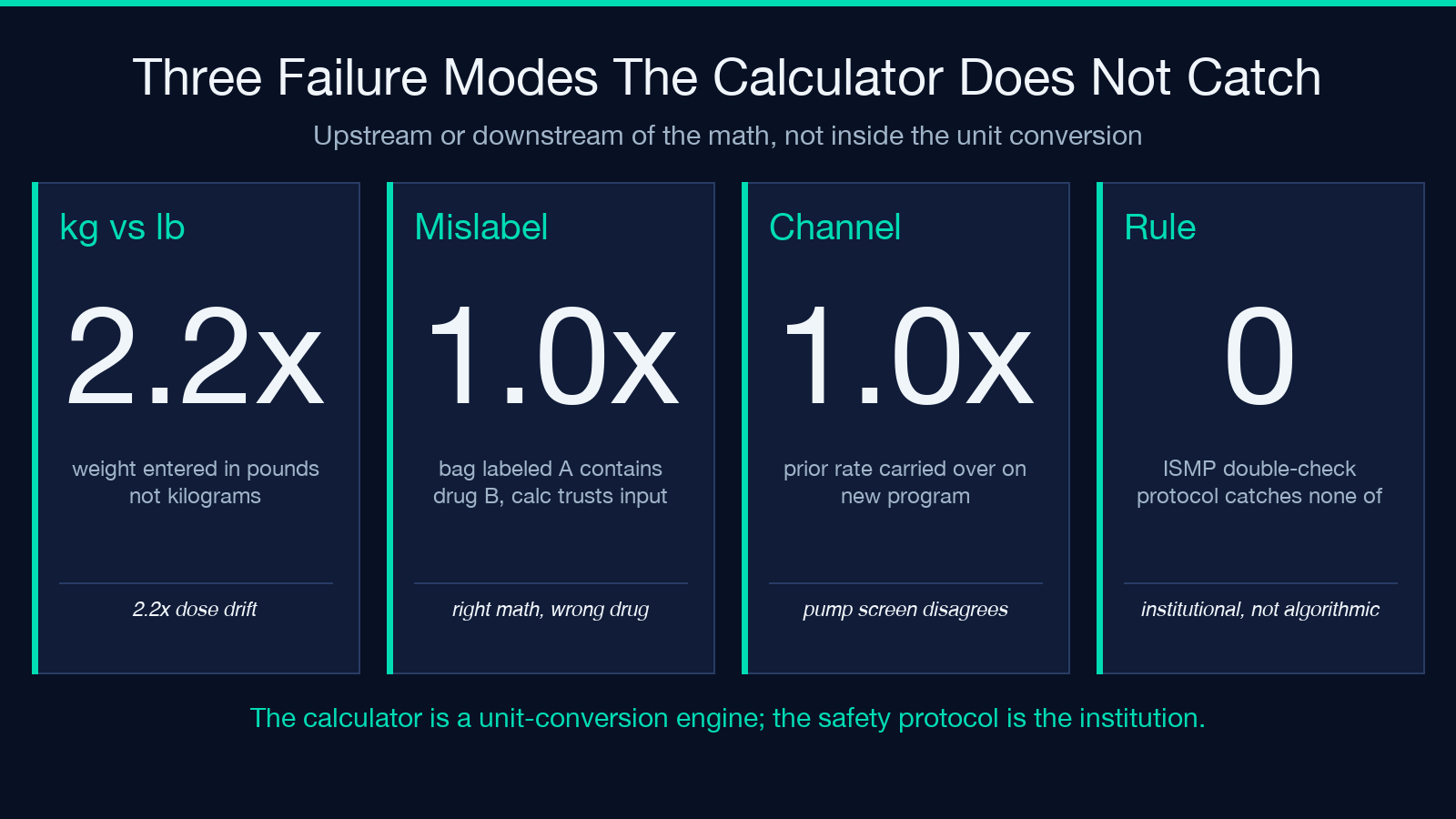
- Wrong patient weight. A weight entered in pounds rather than kilograms produces a 2.2x dose error. The calculator’s input schema accepts any positive number for weight; it does not enforce kilograms. Bedside scales in the US often display pounds by default; the protocol has to require “weight in kg” as a separate confirmation step.
- Wrong drug in the bag. A 400 mg dopamine bag mislabeled as 400 mg dobutamine produces a calculator output that is correct for the labeled drug but wrong for the actual drug. The calculator trusts the inputs; the institution’s pharmacy double-check is what catches mislabeling.
- Pump-channel carryover. A pump channel that was running a different infusion at a different rate can keep delivering the prior rate if the new program is not fully saved. The calculator returns 13.13 mL/hr; the pump delivers 130 mL/hr from the previous channel. The bedside verification step (does the drip chamber actually drip at the expected rate?) is the only check against this class of error.
Each of these failure modes has been the root cause of published sentinel events. None of them is solvable by a better calculator. They are solvable by the institutional protocol that surrounds the calculator.
When To Reach For The Calculator And What To Document After
The calculator is appropriate for routine weight-based and flat-dose infusions on standard concentrations. The cases where hand-calculation or a second clinical review is preferable: pediatric weight-based dosing (concentrations are not standardized across institutions), non-standard drug concentrations (a drug compounded at 50 mg/mL instead of the standard 1.6 mg/mL will produce a calculator result 30x smaller than expected), and high-concentration vasopressor formulations (some institutions use “double-strength” norepinephrine at 32 mcg/mL instead of 16 mcg/mL; the calculator returns the same number, but the pump rate is half of what is expected). The calculator produces the right number for any inputs the user provides. The user is responsible for ensuring the inputs match the bag, the order, and the patient.
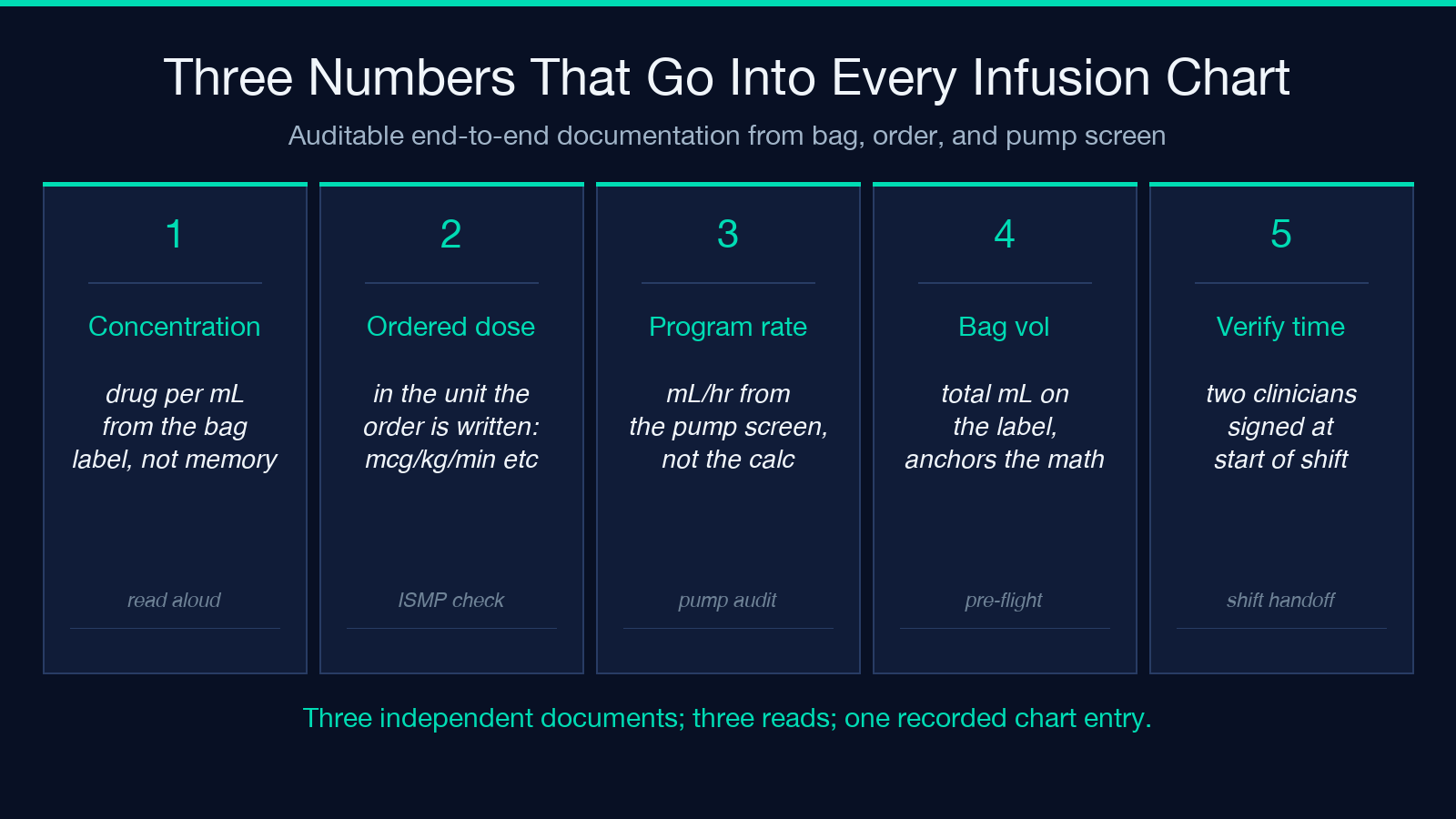
After every pump start, three numbers go into the chart so the next clinician can verify the setup without reconstructing it from scratch: concentration (drug per mL, read from the bag label not from memory), ordered dose (in the unit the order is written — mcg/kg/min, units/hr, etc., read from the order not from the pump screen), and programmed rate (mL/hr, read from the pump screen not from the calculator output). A chart that contains all three numbers from a documented double-check is auditable end-to-end. Run a sanity check on a weight you have not used before — pick a body weight outside the typical 60-100 kg adult range, run the same dopamine example, and confirm the rate scales linearly. A weight that produces a non-linear rate is a hint that one of the unit conversions is being applied twice; the calculator’s outputs should always be linear in weight and in dose.
The Takeaway
Three numbers define every weight-based infusion: drug amount in the bag, total volume, prescribed dose per kilogram per minute. Concentration is what converts between drug mass and fluid volume. The calculator owns the unit conversion; the institutional double-check protocol owns the safety. Concentration read from the bag, dose read from the order, rate read from the pump — three separate documents, three independent confirmations, one recorded chart entry. Run the calculation, run it again with a fresh entry, document both.
Explore more clinical and dosing calculators at elysiatools.com/en/tools.
