
A two-line prescription — kcal/kg/day and g/kg/day — turns a 200-kcal question into a four-number answer you can hang on the pump in under a minute. Most bedside calculators ask the clinician to back-derive the math from total calories, then translate again to mL/hr, then check protein adequacy by hand against the formula’s g/L. That three-step chain is where the errors creep in: a unit mix-up between actual and ideal body weight at the kcal/kg band, a formula density chosen from habit rather than the patient’s volume tolerance, and a starting rate that ignores the rate-ramp window the pump will actually use. The Enteral Nutrition Target Calculator collapses all three steps into one pass — body weight, two per-kg bands, two formula parameters — and outputs the daily volume, the protein grams, and the starting mL/hr you can write on the chart without re-checking your arithmetic.
The band table itself is the load-bearing piece, and it is the place where most calculators quietly disagree with the published guidelines. ASPEN/SCCM (McClave 2016) and ESPEN (Singer 2019) define separate kcal/kg and g/kg targets for the same patient category, and the targets shift across the ICU stay — permissive underfeeding on day 1–3 (12–18 kcal/kg), then a climb to 25–30 kcal/kg once the patient is metabolically catching up. A calculator that only takes a single total-calorie input forces the clinician to pick which guideline is right before the input is even entered, and the choice is rarely documented.
The Two Bands That Drive Every Other Number
The first decision the calculator asks for is the kcal/kg/day band, and the second is the g/kg/day band. Both are categorical shortcuts that fold the patient’s clinical context into a single multiplier.
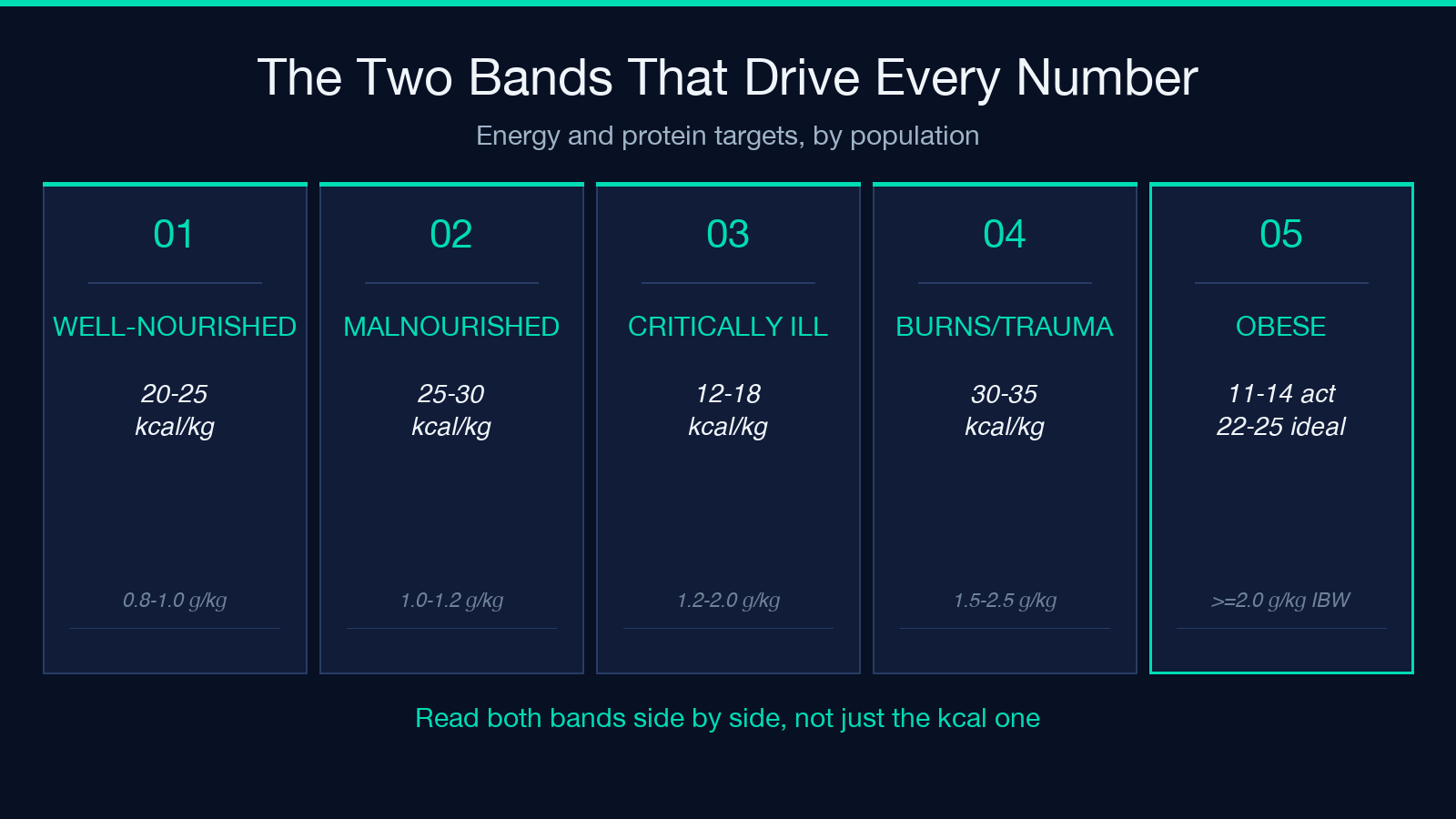
Energy (kcal/kg/day), by population:
– Well-nourished, stable: 20–25 – Malnourished, post-surgical: 25–30 – Critically ill, day 1–3: 12–18 (permissive underfeeding) – Recovery / ward: 25–30 – Major burns / trauma: 30–35 – Obese (>120% IBW): 11–14 actual, or 22–25 ideal
Protein (g/kg/day), by population:
– Maintenance: 0.8–1.0 – Acute illness: 1.0–1.2 – Critically ill: 1.2–2.0 – Burns / trauma: 1.5–2.5 – Obese: ≥2.0 g/kg ideal
Picking the right band is the part that no calculator can automate, because the same patient can move between bands over a single ICU admission. What a calculator can do is make the choice visible: the input field stores the band, not the derived total, so the chart reader can audit the clinical reasoning when the patient is re-assessed at hour twelve.
The interaction with body weight is the second place errors hide. For most patients, actual body weight is the right denominator. For obese patients (>120% ideal) and fluid-overloaded patients, the calculator accepts a weight_basis selector — actual, ideal, or adjusted — and the kcal/kg band is read against the chosen basis. A 110-kg, 170-cm patient on the “well-nourished 20–25” band using actual weight gets 2,200–2,750 kcal/day; the same patient using ideal body weight (≈68 kg by Devine) on the “obese 22–25” ideal band gets 1,496–1,700 kcal/day. Those two numbers differ by 700 kcal and represent different clinical strategies, not different arithmetic.
Translating Total Calories to Pump Rate
Once the band and weight are fixed, the daily energy target is a multiplication. The next step is product selection — formula kcal density — which converts the daily target into daily volume.
The standard formula densities are 1.0, 1.2, 1.5, and 2.0 kcal/mL. For a 1,800-kcal/day target on a 1.0 kcal/mL polymeric formula, the daily volume is 1,800 mL. On a 2.0 kcal/mL concentrated formula, the same 1,800 kcal target compresses to 900 mL — half the volume, which matters when the patient is fluid-restricted or has delayed gastric emptying.
The starting pump rate is the volume divided by 24 hours. The calculator exposes this directly: a 1,800-mL daily volume → 75 mL/hr starting rate. The pump can be ramped up over 8–24 hours depending on tolerance, but the starting rate is what the chart needs first, and the calculator is explicit about that distinction.
Two formulas are worth flagging because they do not behave like the others. A 1.5 kcal/mL formula is the typical compromise for patients who need a moderate volume restriction but tolerate polymeric protein loads. A 2.0 kcal/mL formula is dense enough that the protein density per liter matters more than the volume math — if the formula carries 60 g protein per liter, the same 900 mL gives 54 g of protein, which lands the obese-2.0-g/kg target for a 70-kg ideal-weight patient almost exactly. The protein calculation is not free.
Protein Adequacy Is the Hidden Constraint
A kcal target that lines up with the published band does not guarantee the protein target also lines up. That decoupling is the second thing the calculator surfaces.
The protein adequacy check is formula protein (g/L) × volume (L). For a 1.0 kcal/mL formula at 40 g protein per liter and 1,800 mL daily volume, the patient gets 72 g of protein. Against a 70-kg patient on the “critically ill 1.2–2.0 g/kg” band, 72 g is 1.03 g/kg — at the low end. The same 1,800 kcal on a 1.5 kcal/mL formula with 60 g protein per liter gives 1,200 mL × 60 g/L = 72 g again, but on a 70-kg patient the g/kg ratio is identical because volume collapsed by the same factor that protein density rose.
Where the decoupling shows up is when the formula is chosen first for kcal density and only second for protein content. A 2.0 kcal/mL formula at 40 g/L gives only 0.8 g/kg for a 100-kg patient on a 2,000-mL volume — under the maintenance 0.8–1.0 band, and well under the 1.2 g/kg target for any acute illness. The clinical move is to either step up to a higher-protein formula (60 g/L or 80 g/L) or accept that protein supplementation will be needed enterally or parenterally to close the gap.
The calculator outputs all three numbers — daily kcal, daily protein grams, and starting rate — in the same row, and the protein adequacy against the chosen g/kg band is implicit in the comparison. The clinician’s job is to read both bands back-to-back, not just the kcal one.
Worked Example: A 70-kg Post-Op Day-1 Patient
Walk the calculator end-to-end on a single patient to make the four numbers concrete.
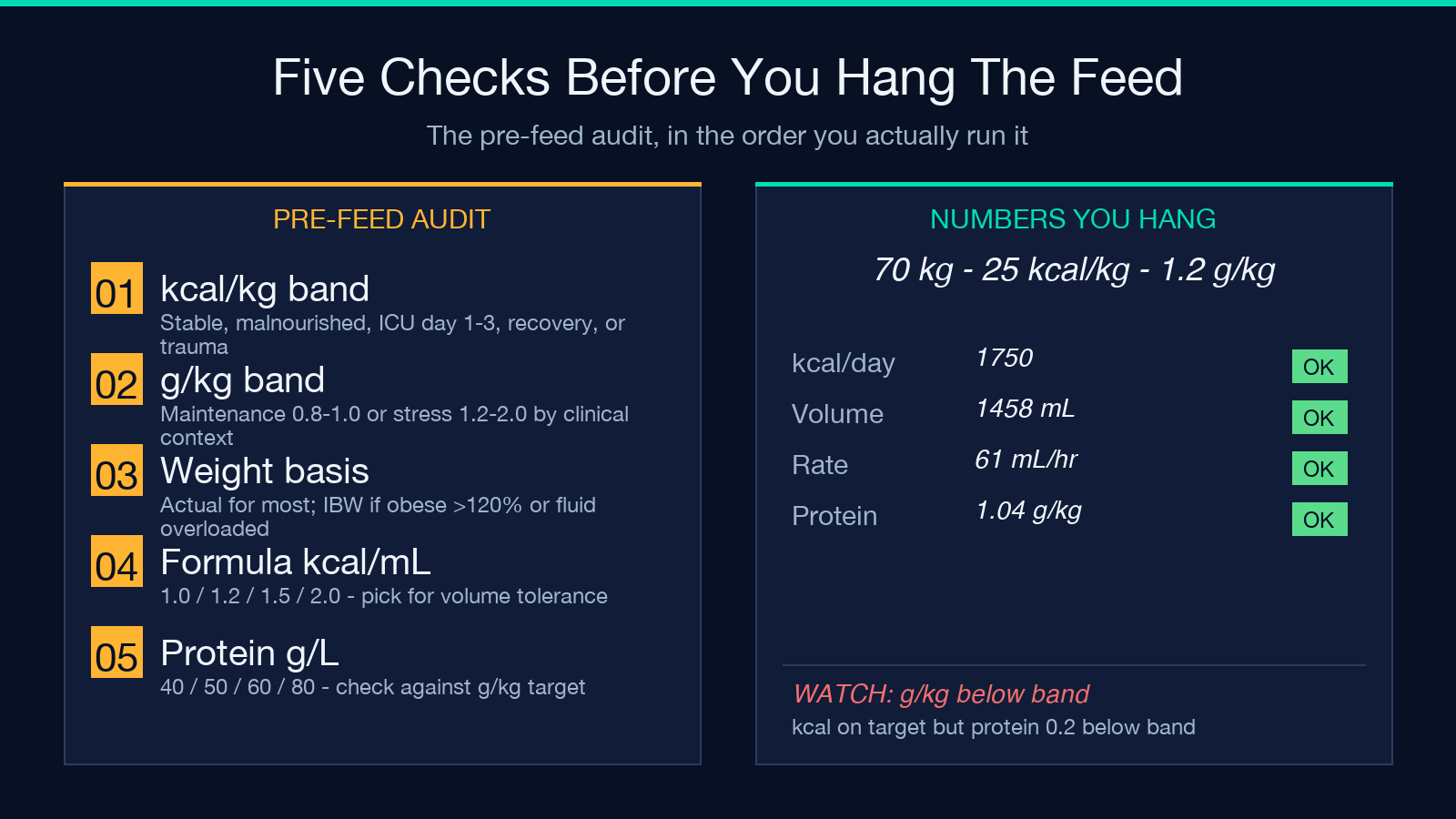
Patient: 70 kg actual weight, post-op day 1 from an abdominal procedure, well-nourished pre-op, no fluid overload.
– kcal/kg band: well-nourished stable → 20–25 kcal/kg/day. Pick 25 for a goal dose. – g/kg band: acute illness (post-op) → 1.0–1.2 g/kg/day. Pick 1.2 g/kg. – Body weight: 70 kg (actual). – Formula: 1.2 kcal/mL polymeric, 50 g protein per liter.
Output:
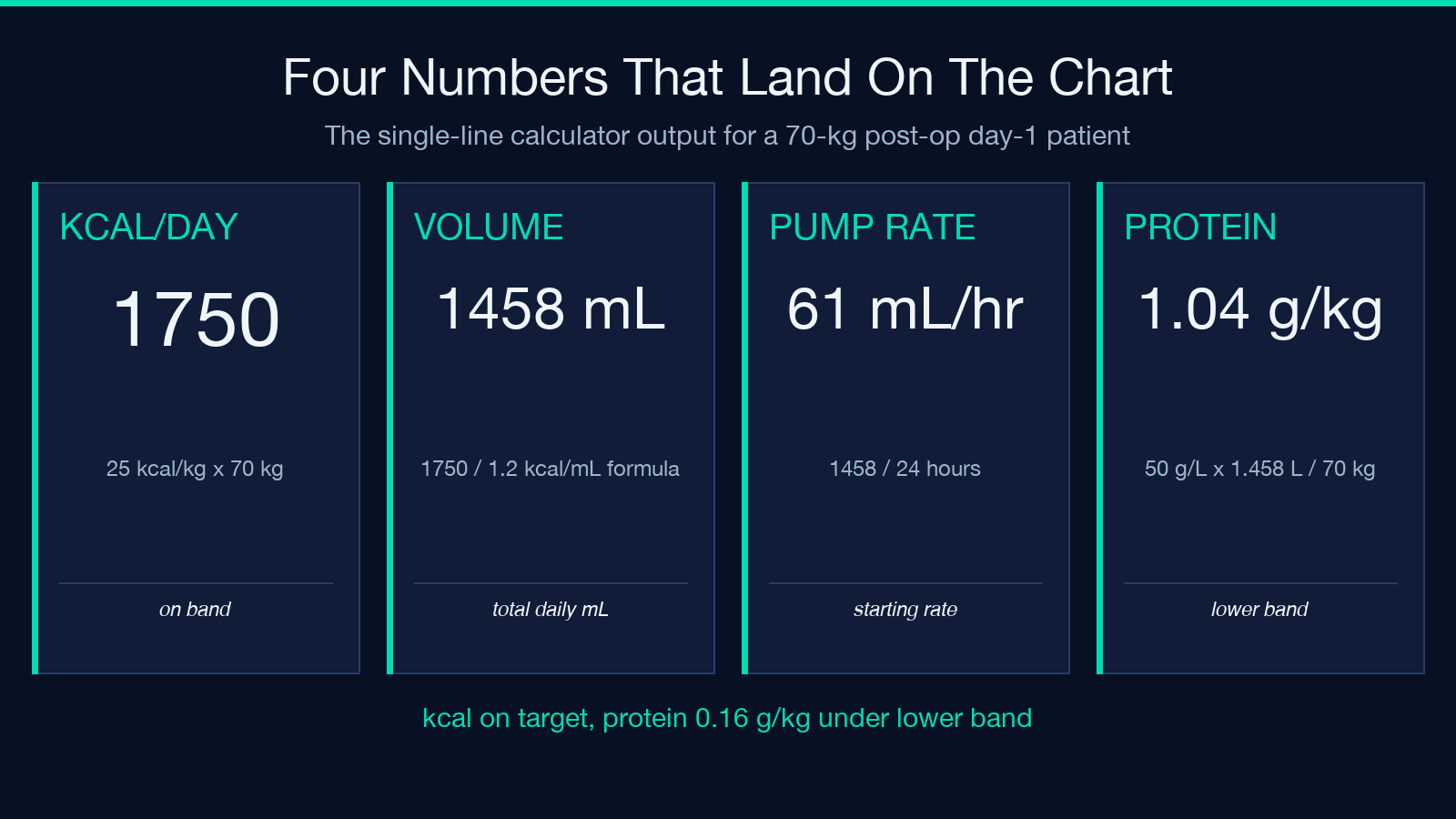
– Daily energy target: 25 × 70 = 1,750 kcal/day. – Daily volume: 1,750 / 1.2 = 1,458 mL/day. – Starting pump rate: 1,458 / 24 = 60.8 mL/hr (round to 61 mL/hr). – Daily protein delivered: (50 g/L) × (1.458 L) = 72.9 g/day → 1.04 g/kg — at the low end of the acute-illness 1.0–1.2 g/kg band.
The borderline protein adequacy is the signal here. The kcal target lands at 25 kcal/kg, the protein lands at 1.04 g/kg — both within their bands, but neither at the upper end. The next clinical move is to advance the formula toward one with higher protein density (60 g/L or 80 g/L) on day 2, or supplement with modular protein to land at 1.2 g/kg. The calculator surfaces both numbers; the clinical decision sits on top.
Caveats That Override the Bands
Three situations override the standard band table, and the calculator exposes selectors for each.
Obesity (>120% IBW). The kcal/kg band switches to 11–14 actual or 22–25 ideal. The protein band switches to ≥2.0 g/kg ideal. Both numbers move in the same direction (using ideal weight compresses the denominator), but the kcal-per-kg target is lower for obesity while the protein-per-kg target is higher — a counterintuitive pairing that is the published standard.
Fluid overload. The body weight (kg) input can be set to an adjusted weight (e.g. dry weight from a recent pre-admission clinic visit) rather than the bed-scale weight, which can swing 5–15 kg on a diuresing patient. The kcal/kg band does not change; the denominator does. This is where two clinicians reviewing the same chart will arrive at different numbers without realizing they used different weights.
Permissive underfeeding (day 1–3 critical illness). The 12–18 kcal/kg band is not a typo. Early critical illness has an inability to use substrate, and forcing full target calories on day 1–3 has been tested in multiple trials (PermiT, TARGET, EPaNIC) without improving outcomes and with a signal toward harm. The calculator accepts the 12–18 band as a deliberate clinical choice, not a derangement of the calculator.
These three caveats are the most common audit findings when a chart reviewer compares the prescribed calories to the documented clinical context.
When to Re-Run the Calculation
The calculation is a snapshot, not a contract. Three events trigger a re-run.
First, when the patient moves between ICU and ward — the band changes (permissive underfeeding → recovery 25–30 kcal/kg), and the rate may need to climb or compress.
Second, when the formula is switched — for intolerance, for fluid restriction, for step-down to a more cost-effective polymeric. Each switch re-runs the volume and the protein calculation, and a formula change at constant kcal target can swing protein adequacy across its band boundary.
Third, when the weight is reassessed — diuresis, fluid resuscitation, or a new bed-scale weight. The kcal/kg band reads against the new weight, and the answer moves.
The calculator is fast enough (a single multiplication per output) that re-running it is cheaper than remembering the previous result. The audit trail matters more than the cached answer.
Picking This Calculator Over a Spreadsheet
A spreadsheet can do the same arithmetic, but a spreadsheet does not encode the band table. The band table is the load-bearing piece: it is where the published guidelines live, where the obesity/permissive/fluid-overload caveats branch, and where the chart audit will look first. A spreadsheet with hard-coded 25 kcal/kg × 70 kg = 1,750 kcal hides the band — and hides the clinical reasoning that picked the band.
The calculator forces the band into the input row, makes the band visible on the chart, and pairs the kcal band with the protein band in the same view. For bedside use, that pairing is what catches the borderline cases (kcal on target, protein 0.1 g/kg below the lower band) that a single-number calculator misses.
For audit use, the input row is the documentation: a chart reviewer can verify the clinical reasoning without reverse-engineering the arithmetic. For education, the band table is the teaching surface: residents learn the band, not the multiplication.
The calculator is one of several on the Elysia Tools Health collection for clinical math where the published guideline depends on a categorical input, not a continuous one. Other hand-wavy-format tools in the same family follow the same input pattern: categorical band → per-kg multiplier → formula-specific translation → final volume.
The Cross-Tool Pattern: Band-Input Calculators
A handful of clinical calculators share this band-input shape: a categorical selector collapses to a per-kg multiplier, the multiplier lands on a published daily target, and the target translates to a final clinical action. Enteral nutrition is the protein + energy version; others apply the same pattern to different bands.
The Anion Gap Calculator on Elysia Tools uses the same pattern for a different ICU calculation: a categorical context selector (the patient’s acid-base context) feeds a published-bands lookup, which feeds a single arithmetic step and a clinical interpretation row. The Caprini Score tool uses a similar categorical-then-arithmetic shape, but in the opposite direction: categorical risk factors accumulate into a summed score that resolves to a categorical risk band — same pattern, reversed direction.
For a parallel worked sample of the kcal-to-volume chain against real formula densities, see the sample collection for clinical calculators on Elysia Tools. The full directory of clinical-math calculators that follow this band-input pattern is at the Elysia Tools Health category index.
