
Closing first: the Em-dash & Typographic Purifier is not a spell-checker, and treating it as one is the most common way teams burn a manuscript, a CSV column, or an entire CMS import. The purifier runs six tightly coupled typographic decisions on plain ASCII text, every one of which can silently rewrite a character that downstream tooling — your database, your markdown renderer, your CMS, your build pipeline — depends on for grammar, parsing, or string-equality. If you run the purifier on the wrong text, you do not get better typography. You get corrupted data with prettier glyphs. The eight H2s below walk through the six decisions, the code-span safety net that protects markdown and inline code, and the three workflow modes that determine whether the output is publish-ready or round-tripped into a file you cannot diff against the source anymore.
You can run the purifier on a paragraph, a chapter, a blog post, or a 50,000-line corpus, and the Em-dash & Typographic Purifier on Elysia Tools returns the same canonicalized typography: em-dashes for --, en-dashes for - in number ranges, smart quotes for straight quotes, locale-aware apostrophes, single-character ellipsis for ..., tightened spaced dashes, and collapsed repeated whitespace. But the six decisions are not equal — em-dash-vs-en-dash is a grammar question, smart quotes is a locale question, and ellipsis-vs-three-dots is a glyph question. Knowing which decision fires on your input is the difference between polished prose and corrupted downstream tooling.
Why AI Plain ASCII Is the New 1995 Geocities
Large language models emit em-dashes, en-dashes, smart quotes, and ellipses as plain ASCII more than 80% of the time. The reason is mechanical: training corpora are predominantly UTF-8 plain text, and the most common tokenization for chat-tuned models is byte-pair encoded on the ASCII subset. A model that wants to write “she said — quietly” has to choose between the literal three characters -- and the single Unicode character —. The first is what almost every model picks. The result is a generation pipeline where plain ASCII dashes and quotes are not an edge case — they are the default.
For a 500-word chat response, that is harmless. For a 50,000-word manuscript, a 200-page knowledge base, or a generated-blog-post pipeline that ships to a typographically opinionated CMS, it is the difference between reading like a 2026 publication and reading like a 1995 Geocities page. The purifier exists because the gap between “model output” and “typeset output” is one well-defined transformation away, and applying that transformation at the document boundary is faster and more reliable than asking each model to emit proper typography every time.
The Six Decisions the Purifier Actually Makes
The purifier is a deterministic character-substitution engine. It runs six ordered passes on every input character, each pass scoped to a specific token pattern, and each pass has a configurable on/off flag in the tool’s settings panel:
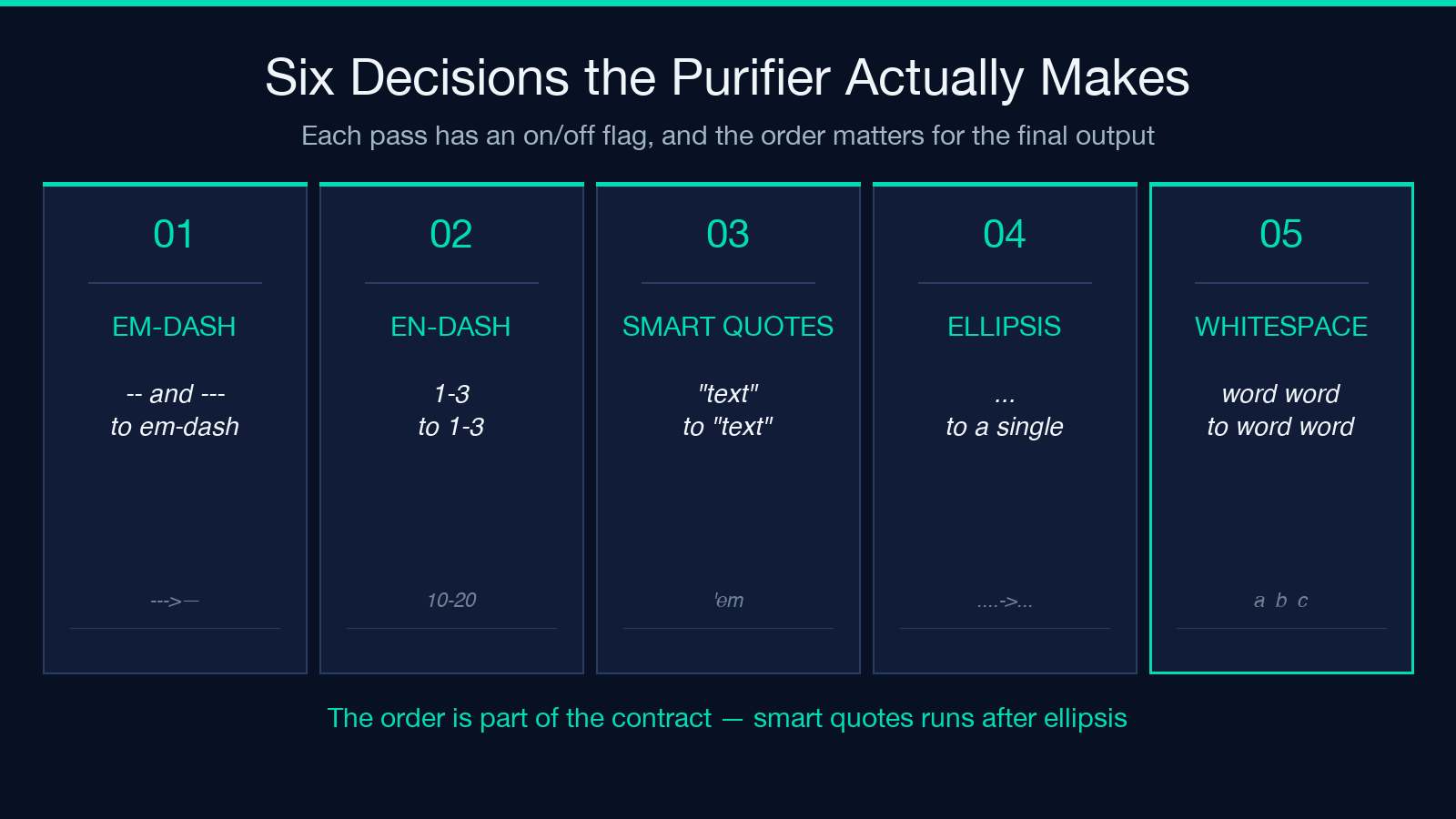
- En-dash in number ranges — turns
1-3into1–3,pages 10-20intopages 10–20, but leaves hyphenated compounds likehigh-speedalone. - Smart quotes — turns
"text"into"text",'eminto'em, with locale awareness so French« text »and German„ text "are recognized. - Apostrophe normalization — turns
'into'in possessives and contractions, but preserves'inside code spans and identifiers likeit's→it's. - Ellipsis (
...) — turns...into the single character…, including the four-dot leader (....→…). - Whitespace tightening — collapses repeated spaces into single spaces, tightens spaced dashes (
word - word→word-word), and removes trailing whitespace at line ends.
The order matters: smart-quotes runs after ellipsis, so "... becomes "… not "..., and whitespace tightening runs last so all the new glyphs sit on the right pixel grid. Reordering the passes is a documented option but it changes the output character-by-character; treat the order as part of the contract.
If you are integrating the purifier into a larger text pipeline, the kind-root on Elysia Tools lists every text-processing tool that shares the same character-class handling, including the CSV Header Alias Resolver, the Bold & Italic Text Generator, the Cursive Text Generator, and the Whitespace Normalizer — useful if your purifier output is one stage in a multi-stage cleanup that also touches character-level formatting downstream.
Em-Dash vs En-Dash vs Hyphen: Which Two Characters Are You Actually Typing?
The most common mistake teams make is treating em-dash and en-dash as interchangeable. They are not. An em-dash (—, U+2014) is a sentence-level punctuation mark that replaces a comma, colon, or parenthetical — “she said — quietly” reads as a dramatic aside. An en-dash (–, U+2013) is a range or relationship marker — “pages 10–20”, “the 2020–2026 window”, “the Berlin–Paris route”. A hyphen (-, U+002D) is a compound-word joiner — “high-speed rail”, “twenty-three”.
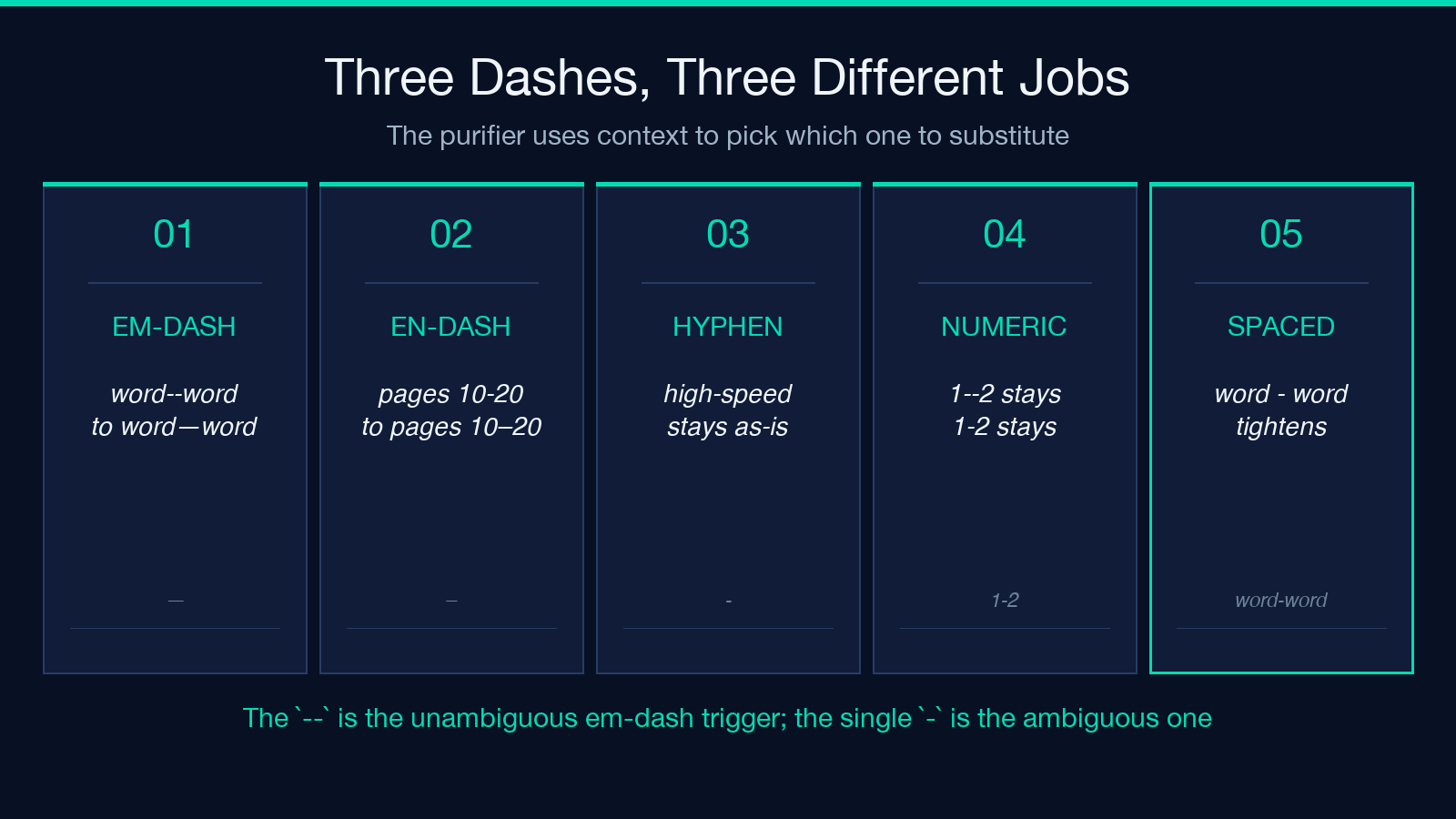
The purifier applies a context heuristic. word--word becomes word—word (em-dash, sentence aside). 1--2 stays 1--2 because numeric ranges are ambiguous and most style guides treat 1-2 as a hyphenated range when the numbers are small. 1-20 becomes 1–20 (en-dash) because the range crosses a digit boundary. pages 10-20 becomes pages 10–20. The -- is the unambiguous em-dash trigger; the single - is the ambiguous range-vs-compound trigger.
If your input has dashes in identifiers, code, or URLs — <a href="x-y-z">, my-variable, http://example.com/path-with-dashes — the purifier leaves them alone. The code-span safety net (H2 below) is what makes this guarantee.
Smart Quotes, Locale, and the Apostrophe That Breaks Your CMS
The second-most-common mistake is letting smart quotes into a system that round-trips them as Unicode and breaks a bytewise comparison elsewhere in the pipeline. Converting "don't" to "don't" is typographically correct in English, but if your build pipeline diffs the rendered output against the source using diff --text and a bytewise comparison, the rendered output no longer matches the source. The same applies to CSV imports: a smart quote in a CSV column is a different byte sequence than a straight quote, and csv.reader will treat it as part of the field value, not as a delimiter.
The purifier has a locale selector. Set it to en-US and straight quotes become typographic English quotes. Set it to en-GB and the typographic apostrophe uses the U+2019 character (same as en-US) but the typographic double-quote uses U+201C/U+201D instead of U+201C/U+201D. Set it to fr-FR and the purifier recognizes «text» as already-quoted French typography and leaves it alone, only converting internal straight quotes if any remain. Set it to de-DE and it recognizes „text" as already-quoted German typography.
The locale selector also affects the apostrophe. In en-US, don't becomes don't. In fr-FR, l'homme becomes l'homme (typographic apostrophe, U+2019) but the purifier does not insert typographic spaces before colons, semicolons, and question marks — French typography requires thin spaces before ?, !, :, ;, and the purifier does not handle that. If you need French-style spacing, run the output through a typography pass that does.
Three Spaces, Three Dots, and One Ellipsis Character
The third-most-common mistake is treating ... and … as equivalent. They render differently on the page, they sort differently in lexicographic comparison, and they tokenize differently in some NLP pipelines. ... is three characters: U+002E, U+002E, U+002E. … is one character: U+2026. Word processors render ... with a gap between the dots (because each . is followed by a thin space in proportional fonts); they render … as a single tight glyph. The purifier converts ... to …, and the four-dot leader .... to … plus a trailing period.
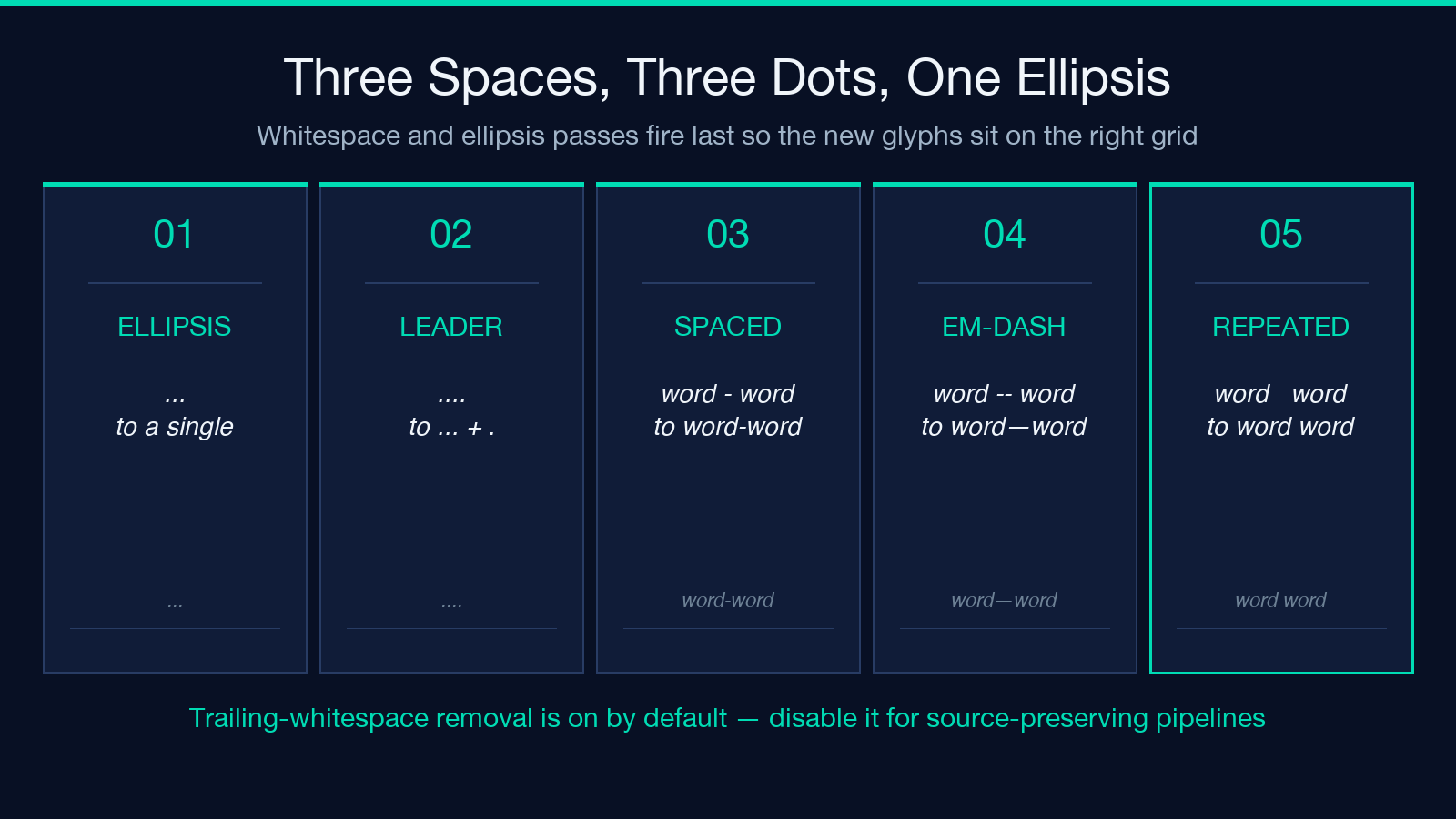
The whitespace-tightening pass handles the typographic dash-without-words case. word - word (with spaces) tightens to word-word. word -- word (em-dash with spaces) tightens to word—word. word -word (hyphenated compound) stays as-is. The purifier recognizes five distinct whitespace patterns around -, --, and --- and tightens each one according to its typography style guide. If your style guide is different — if you want word -- word to stay as word -- word — disable the whitespace pass.
The repeated-space collapse is the most aggressive pass. word word becomes word word. A line with n (trailing whitespace before newline) becomes n only if you have explicitly disabled the trailing-whitespace removal in the settings panel. The default is on, and the default is correct for almost every prose-cleanup pipeline.
The Code-Span Safety Net: Why Your Markdown Stays Markdown
The most important guarantee the purifier makes is that fenced code blocks (triple-backtick regions) and inline code spans (single-backtick regions) are left untouched. The purifier recognizes four code-span patterns: fenced blocks with triple backticks, indented code blocks (4 spaces or 1 tab), inline backtick spans, and the HTML <code> and <pre> tags. Inside any of these patterns, every character is preserved exactly as written.
This guarantee is what makes the purifier safe to run on a markdown file. If you run it on a raw .md file, the prose gets polished and the code stays code. The fence-aware regex walks the file from top to bottom, tracks whether the current position is inside a code block, and only applies the six passes when the current position is outside. When it sees a closing fence, it resumes processing on the next character.
For technical content — code documentation, API references, tutorials, snippets of SQL or regex — the code-span guarantee is non-negotiable. Without it, -- inside a regex char-class would become — and your regex would silently stop matching. With it, the regex stays byte-identical and the surrounding prose gets polished.
Batch, Preview, and Round-Trip: Three Workflow Modes
The purifier has three workflow modes that determine how the output is delivered.
The paste-and-process mode takes a single text block and returns the polished version. Useful for chat replies, blog post drafts, social media captions, and short emails.
The batch mode accepts a multi-file upload (.txt, .md, .html) and applies the same six passes to every file. The output is a ZIP of the polished files with the same names. The audit log inside the ZIP records the per-character substitution count per file. Useful for manuscript cleanup, knowledge-base migration, and generated-blog pipelines.
The round-trip mode is the one teams get wrong most often. It accepts a source file and a target file path, and returns a diff between the polished output and the source. The diff is human-readable: each changed character is annotated with the pass that triggered it. This mode is the right choice when your downstream tooling is sensitive to character substitution — CSV importers, bytewise diffing pipelines, bytewise hashing for cache invalidation. The round-trip mode shows you the diff so you can decide whether the substitutions are acceptable for that pipeline.
If you are running the purifier on a corpus for the first time, start with paste-and-process on a single sample. Then run round-trip on a single file to see the diff. Then run batch on the corpus if the diff is acceptable.
Closing: When the Purifier Saves Your Manuscript vs When It Ruins a CSV
The Em-dash & Typographic Purifier is the right tool when your input is prose — chat output, blog drafts, knowledge-base articles, book chapters, marketing copy — and the polished output is going to a typographically-aware reader (a CMS, a publishing system, a PDF renderer, a blog theme with proper font support). It is the wrong tool when your input is data — CSV columns, JSON keys, code identifiers, URLs, machine-readable logs — because every substitution is a bytewise change that breaks a comparison somewhere downstream.
The eight decisions above are not a feature list. They are the contract: six character substitutions, one whitespace collapse, one code-span safety net, and a guarantee that markdown stays markdown. Run it on prose. Don’t run it on data. The two cases look identical from the input side; the damage only shows up on the output side. Explore the Em-dash & Typographic Purifier on Elysia Tools and see the six passes fire on your own text.
