
Phone numbers look universal, but their formatting rules are not. Pick a single 11-digit raw string and you can format it fifteen different ways — every country on the format list wants a different placement for spaces, hyphens, and parentheses. That is exactly why the Phone Number Formatter at Elysia Tools exists: it takes a single input and chooses the right national style for you, with separators inserted in the canonical place. Get the format wrong and your CSV column full of digits looks sloppy; get it right and downstream SMS gateways, contact-import wizards, and dialer UIs all behave.
This field guide walks through the fifteen country formats, the four normalization rules that quietly decide whether a stored number parses correctly, and three failure modes that turn a clean format into a routing bug.
Why national phone formats exist at all
The ITU-T E.123 recommendation defines a few international conventions for grouping digits with spaces, and E.164 caps the entire addressable number space at fifteen digits including country code. National formats sit underneath that envelope — they decide where the visual breaks go when a human reads the number on a label or in an SMS thread. China wants 138-1234-5678, Germany wants 138 12345678 (no break inside the subscriber block), and France splits the subscriber into paired groups of two: 138 12 34 56 78. Same digits, three different shapes.
When you store phone numbers in a database column, you almost always store the raw digit string without separators. Separators are presentation; digits are the data. The formatter’s job is purely the presentational step — it takes a raw string like 13812345678 and emits the human-readable shape for whichever country you select.
The Phone Number Formatter covers fifteen formats in one dropdown. Open the tool, paste the raw digits, pick the country, and the output is the canonical national shape with the right separator placement.
The five separator rules that vary by country
Look across the fifteen formats and a clear taxonomy of separator rules emerges.
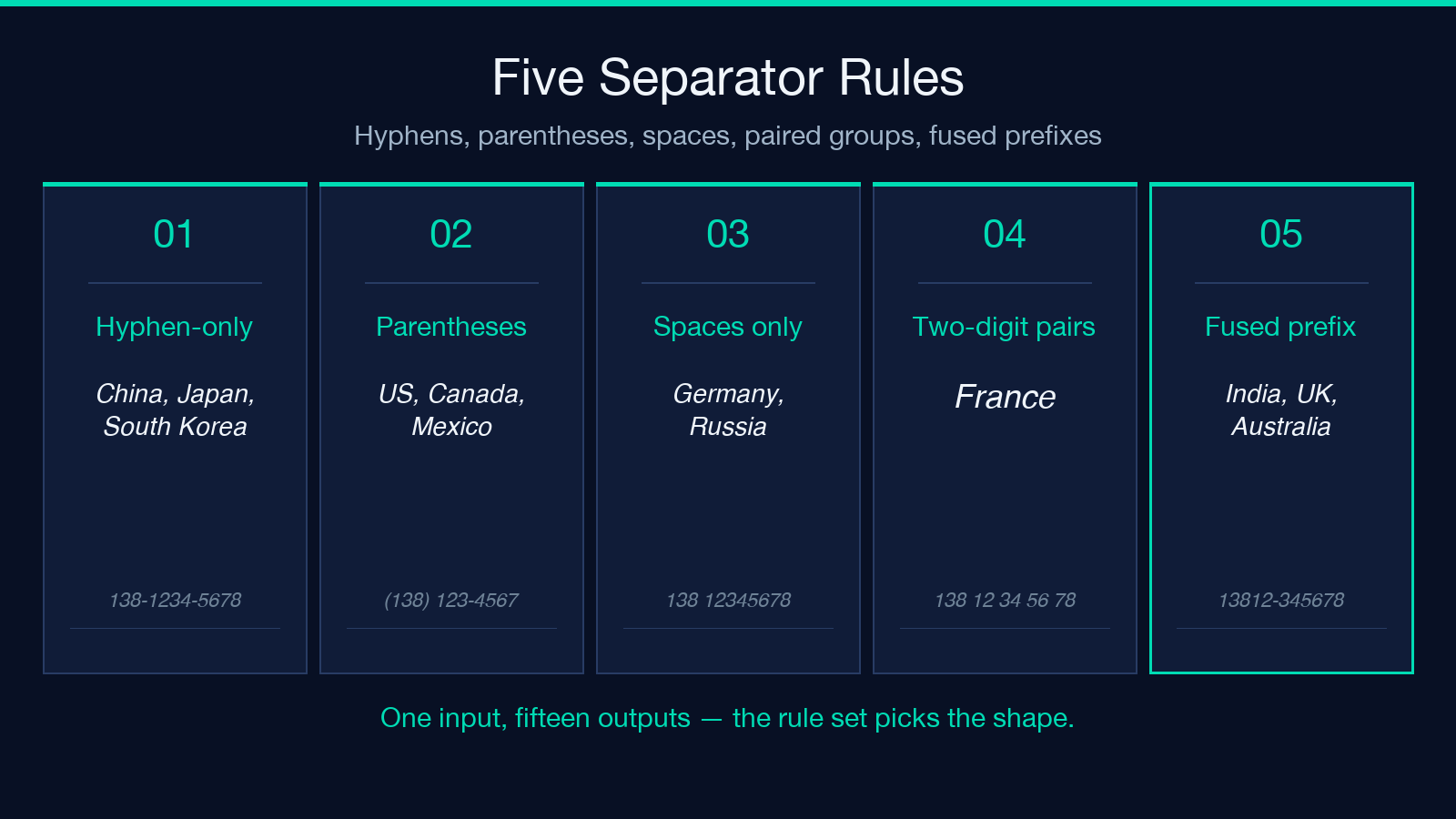
- Hyphen-only group — China, Japan, and South Korea format mobile numbers with hyphens separating a three-digit prefix from a four-digit and a four-digit tail. China and Japan use the same shape (
138-1234-5678); South Korea adds a leading zero to mark a domestic call (010-1234-5678). - Parentheses around the area code — The United States, Canada, and Mexico all wrap the three-digit area code in parentheses and follow it with a space and the seven-digit subscriber (
(138) 123-4567). - Pure spaces, no breaks inside the subscriber — Germany writes
138 12345678and Russia writes(138) 123-45-67. The space goes between the area code and the subscriber, but inside the subscriber the digits run together or break on a fixed midpoint. - Two-digit paired groups — France is the clearest case:
138 12 34 56 78. Every pair of digits inside the subscriber gets its own space. - Country-specific fused prefix — India keeps the trunk zero visible and groups the subscriber into
13812-345678(five then five). Australia writes1381 234 567(four then three) and the UK writes0138 123 4567(four then three then four, with a leading zero).
The same raw string yields fifteen different outputs from the Elysia Tools formatter, and the rule set is what determines each one.
The four normalization rules you must apply before formatting
A clean format depends on a clean input. Four rules quietly decide whether downstream callers can parse what you produce.
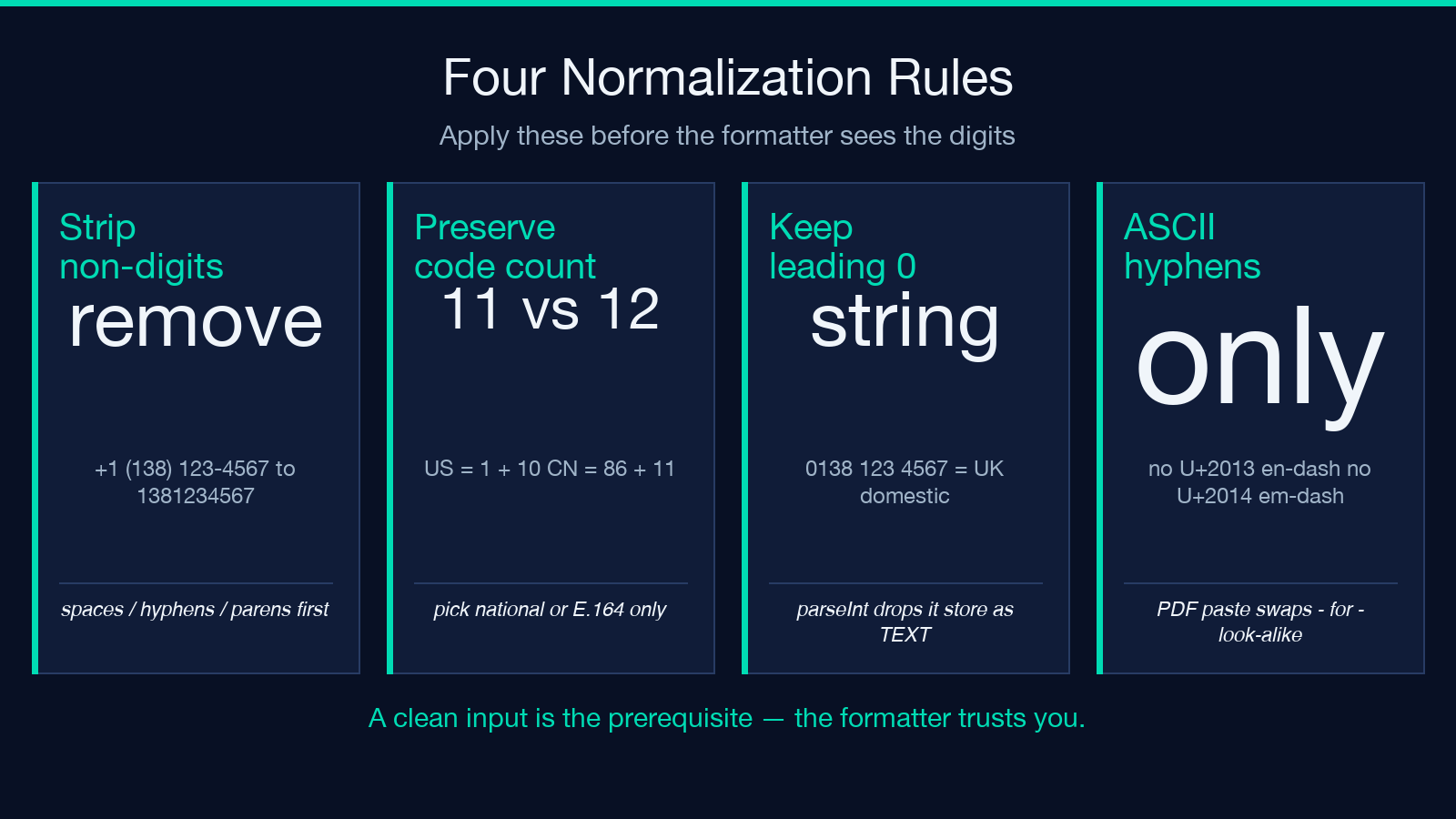
- Strip everything but digits first — Spaces, hyphens, parentheses, and leading
+are all presentation. Before you format, run areplace(/[^d]/g, '')pass. Otherwise the formatter sees+1 (138) 123-4567, fails to recognize the country code, and outputs the raw string with a leading+in the wrong place. - Preserve the country code digit-count contract — A US number with country code is eleven digits (
1+ ten). A China mobile number is eleven digits with no leading country code in domestic form, but86+ eleven when international. If you store them in the same column you have to decide whether the column holds the national or the E.164 form — pick one and stick to it. - Keep leading zeros intact — The UK (
0138 123 4567) and South Korea (010-1234-5678) both use a leading0to indicate a domestic call. JavaScript’sparseIntand many databaseINTEGERcasts silently drop that zero. Store the number as a string, never as an integer. - Use ASCII hyphens, not en-dashes or em-dashes — A copy-paste from a word processor can replace the hyphen in
138-1234-5678with–(U+2013) or—(U+2014). A regex like^(d{3})-–—-–—$has to accept all three forms or your validator fails. Better: enforce ASCII at input.
These four rules apply whether you format programmatically with a script or use a tool. The Phone Number Formatter assumes the input is a raw digit string; clean it first and the output is guaranteed canonical.
Three failure modes that survive a clean format
Even with clean inputs and the right country selected, three failure modes will quietly corrupt downstream routing.
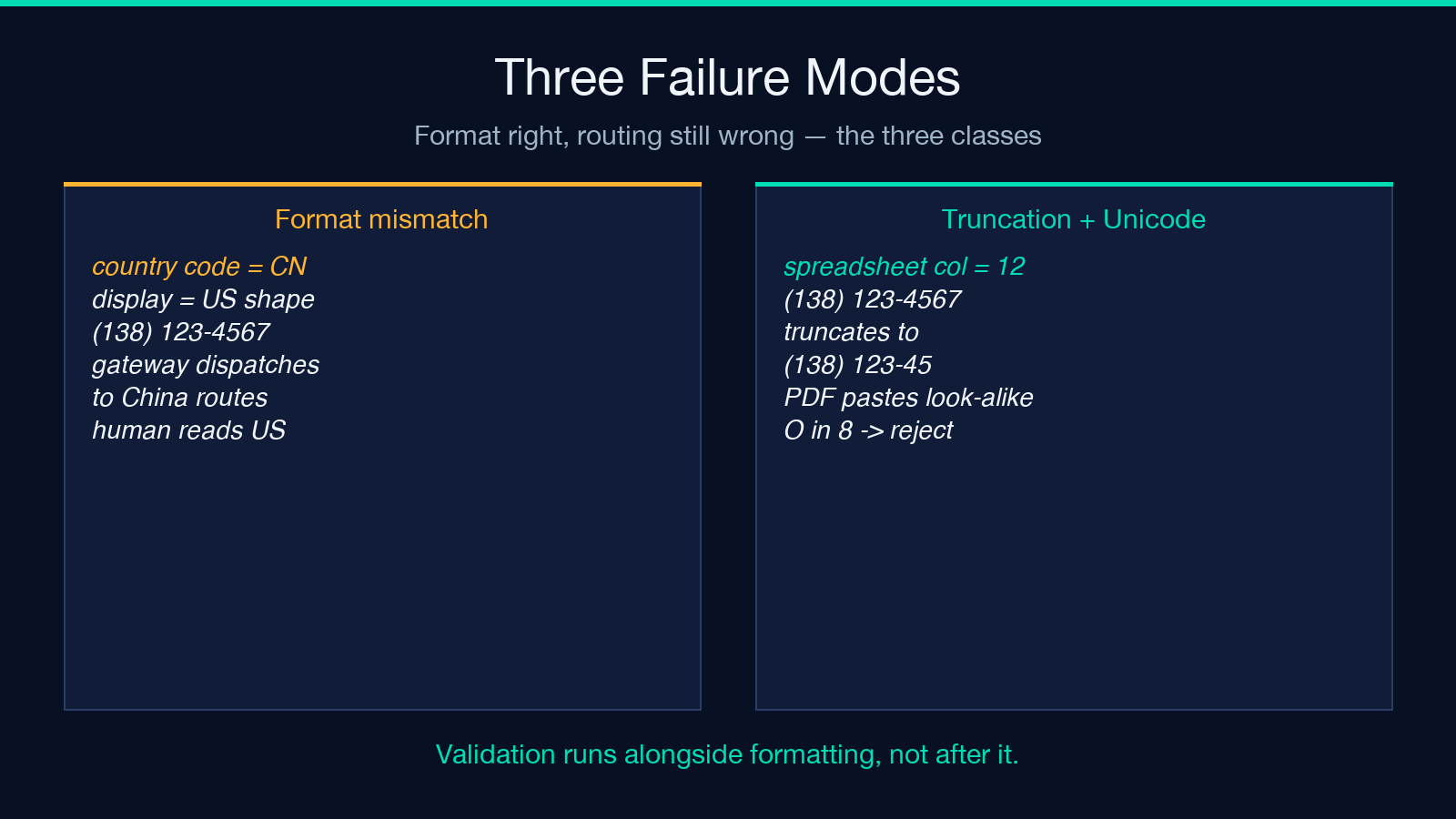
- Format mismatch with stored country — You format a number as US
(138) 123-4567but the row’s country code column saysCN. An SMS gateway that looks at the country code column dispatches to China routes; the human-readable format looks American. Audit both fields on every import. - Truncation on copy from a spreadsheet — A CSV column with
Phone Numberset to width 12 silently truncates(138) 123-4567(14 chars) to(138) 123-45. The number renders fine when the column is wide enough; tighten the column and the digits disappear from the right side. - Unicode look-alikes in the input — A number pasted from a PDF sometimes contains a Cyrillic
о(U+043E) inside what looks like8. The format looks correct but every gateway rejects the call. Run a normalization pass that strips everything outside[0-9 +*#]at input.
A formatter that gets the separator placement right still cannot save you from these three classes of input defect. Validation runs alongside formatting, not after it.
Where formatter output meets a CRM or contact import
Most CRM import wizards accept a single column of phone numbers and try to auto-detect the country. They rarely agree with each other. Salesforce, HubSpot, and Zoho each use slightly different heuristics for figuring out whether (138) 123-4567 is US or somewhere else. The reliable path is to format first, then import — when every number in the column has the same canonical shape, the import wizard’s auto-detector collapses to one decision and you can correct it before upload.
If you need to keep national and E.164 forms side by side, the cleanest pattern is two columns: phone_display (the formatted national shape) and phone_e164 (the plus-prefixed international form). SMS gateways read phone_e164; humans read phone_display. The Elysia Tools formatter outputs only the display form, but a second pass that prefixes the country code and strips spaces gives you the E.164 sibling.
Picking the right country when the user did not
Most input forms do not collect a country; they collect a phone number and assume the submitter’s locale. That assumption fails the moment a Chinese user with a US address submits their number. Three mitigations, in order of robustness:
- Geo-IP hint at the form layer — Pre-select the country dropdown from the visitor’s IP country. Wrong about 10 percent of the time for VPN users, but a strong default.
- Accept both forms and let the user correct — Let the visitor type the number in any format; show the canonical national form beside the input and offer a “change country” link.
- Always store E.164, format on render — If the input pipeline accepts E.164-only, you can re-format on every render without ambiguity.
The simplest version of the third pattern — strip the input to digits, prepend the country code, and route everything through a single formatter — eliminates the locale guessing entirely. The Phone Number Formatter sits at the end of that pipeline.
Quick reference: the fifteen country formats at a glance
For a one-screen reference, here is the canonical national shape for every country the formatter covers:
- CN — China:
138-1234-5678— hyphen-separated three/four/four. - US — United States:
(138) 123-4567— parentheses around the area code. - JP — Japan:
138-1234-5678— same shape as China, no leading zero. - KR — South Korea:
010-1234-5678— domestic trunk zero, hyphen-separated. - GB — United Kingdom:
0138 123 4567— leading zero, four-three-four spaces. - DE — Germany:
138 12345678— space between area code and subscriber. - FR — France:
138 12 34 56 78— two-digit pairs inside the subscriber. - IN — India:
13812-345678— five-five with hyphen between. - BR — Brazil:
(138) 1234-5678— parentheses plus four-digit subscriber. - RU — Russia:
(138) 123-45-67— parentheses, two-digit tail. - AU — Australia:
1381 234 567— four-three space-separated. - IT — Italy:
(138) 1234-5678— parentheses plus four-digit subscriber. - ES — Spain:
(138) 123 45 67— parentheses plus space-grouped tail. - MX — Mexico:
(138) 1234-5678— same shape as Brazil and Italy. - CA — Canada:
(138) 123-4567— same shape as the United States.
When two countries produce identical shapes (US/CA, CN/JP, BR/IT/MX), the difference is the country code prefix and the numbering-plan authority that decides which digits are assignable. The visual format collapses; the routing does not.
What the tool does not do — and what to use instead
The formatter is presentation-only. It does not validate that the digits form a real, assigned number (that is the carrier’s database, not a regex’s). It does not detect mobile vs. landline (that requires a numbering-plan lookup). It does not handle extensions (the x1234 or ext. 1234 suffix — strip those before formatting). It does not format emergency numbers (911, 119, 112) — those are three-digit strings and any attempt to break them into a national format will mangle them.
For those jobs, you want a phone-number library like libphonenumber on the backend, not a presentation formatter. Use the formatter for the human-readable column in your exports and the library for the routing decisions.
Open the Phone Number Formatter at Elysia Tools and run a single raw digit string through all fifteen formats; the output column is the entire separator-placement taxonomy for the most common national conventions. The rest of the phone-number pipeline — input cleaning, E.164 conversion, validation — sits outside the formatter and earns its own pass in any production workflow.
Explore more single-purpose text tools at elysiatools.com.
