You paste a color into a stylesheet and the browser renders it. That part works. The part that does not work is the moment something downstream decides to validate that color string — a CI lint check, a design-token importer, a Figma plugin, a built-in custom-property processor, or a junior developer eyeballing the diff. The string #FFF is technically valid. The string #FFFFFF is also technically valid. The string rgb(255,255,255) with no leading hash and lowercase function name is also technically valid. The string rgba(255,255,255,1) with a trailing alpha of exactly 1 is technically valid. None of them are the same thing — and most linters only check one or two of them. The result is a stylesheet that ships with three different forms of white in it, a brand color that drifts 8 RGB units from its design-token definition, and a QA ticket that nobody can reproduce because the bug only happens when the order of CSS imports changes.
The Color Code Validator is a single-input checker that decides whether a color string you paste actually parses as one of the five real CSS color formats — and tells you which one. It does not pick a favorite format, does not normalize hex to lowercase, does not silently round 257 down to 255. It either accepts the string and names the format, or it rejects it and names the reason. That small distinction is what makes the rest of this article worth writing.
Why five formats is the actual problem
CSS has had five textual color formats since around 2018, and most validation scripts still only know three of them. The legacy trio is well-served: #RGB, #RRGGBB, and the rgb(r,g,b) function. The two newer formats — rgba(r,g,b,a) with its required alpha channel and hsl(h,s%,l%) with its mandatory percent signs — trip up every regex written before 2018. And the alpha variant hsla(h,s%,l%,a) trips up every regex written before 2020. The result is a quiet inconsistency: a codebase that appears to validate colors but does not validate the colors it actually uses.
The practical failure mode is a CSS variable that the validator says is fine and the browser agrees is fine, but the design-token pipeline rejects it because the alpha value 0.5 was written as .5 instead of 0.5. The validator said the string was syntactically valid; the pipeline said the string was semantically valid; the browser said the string was both. Three green lights, one bug. The fix is to have a single tool that understands all five formats AND the CSS-spec edge cases for each one.
What the validator actually catches

The five formats are not five isolated regexes. They share channels (8-bit vs percentage in rgb()), share syntax quirks (the leading hash in hex is mandatory but the function name in rgb() is case-insensitive), and share a single canonical constraint: every number must fit its range. rgb(256,0,0) looks like a typo of rgb(255,0,0) but is technically a different string — and a strict validator rejects it. The validator returns four pieces of information per input:
- Format detected. One of:
hex-short,hex-long,rgb,rgba,hsl,hsla, orinvalid. - Parse status. Whether every channel value is in range, every percent sign is present where required, and the function call has the right number of arguments.
- Specific reason on failure. Not just “invalid” — the validator names which channel is out of range, which separator is wrong, or which expected token is missing.
- Normalized form on success. The same color rewritten in the canonical
#RRGGBBform, so downstream code does not have to handle five input shapes.
The named-reason output is what separates this from a try/catch around a CSS parser. A try/catch tells you whether the string parsed; the validator tells you why it did not. That difference is small until you are debugging a CI failure with 200 rejected color strings and you need to triage them by reason. Counting failures by format and channel is the only way to find the systematic bug — the one designer who keeps pasting hsl(360,100%,50%) thinking the hue goes to 400.
The six input traps that always slip through
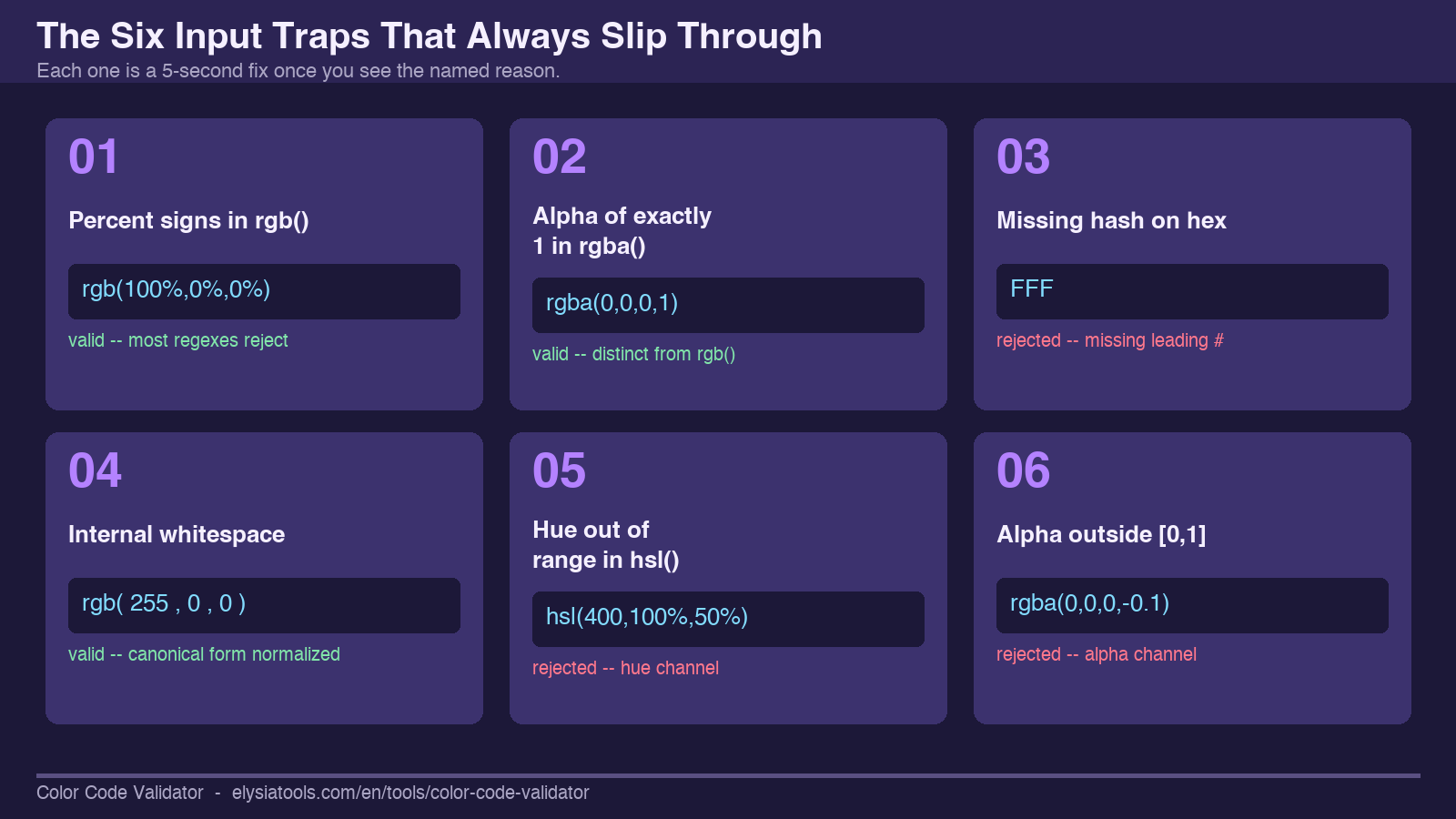
Every team that hand-validates colors eventually builds a list. Here is the canonical list, in order of how often each one slips into a real codebase:
- Percent signs in
rgb().rgb(100%,0%,0%)is valid CSS but rejected by most pre-2018 regexes. The validator accepts it and returns the equivalent#FF0000. - Alpha of exactly 1 in
rgba().rgba(0,0,0,1)is technically the same asrgb(0,0,0)but a strict validator treats them as distinct inputs — useful when you are scanning for accidental alpha-channel proliferation. - Missing hash on hex.
FFF(no leading hash) is a common paste error from word processors that strip the#. The validator names the missing-hash reason explicitly. - Whitespace tolerance.
rgb( 255 , 0 , 0 )with internal spaces is valid CSS but invalid according to several strict linters. The validator accepts both forms and flags the discrepancy as a normalization note, not an error. - Hue out of range in
hsl().hsl(400,100%,50%)is a real paste error. The validator rejects it and names the hue as the offending channel. - Alpha value out of
[0,1]inrgba()/hsla().rgba(0,0,0,1.5)andrgba(0,0,0,-0.1)are both common paste errors. The validator rejects both and names the alpha channel.
Each of these is a five-second fix once you see the named reason. Without the named reason, each is a twenty-minute debugging session that ends in a Slack thread.
How a single-input validator beats a regex pack
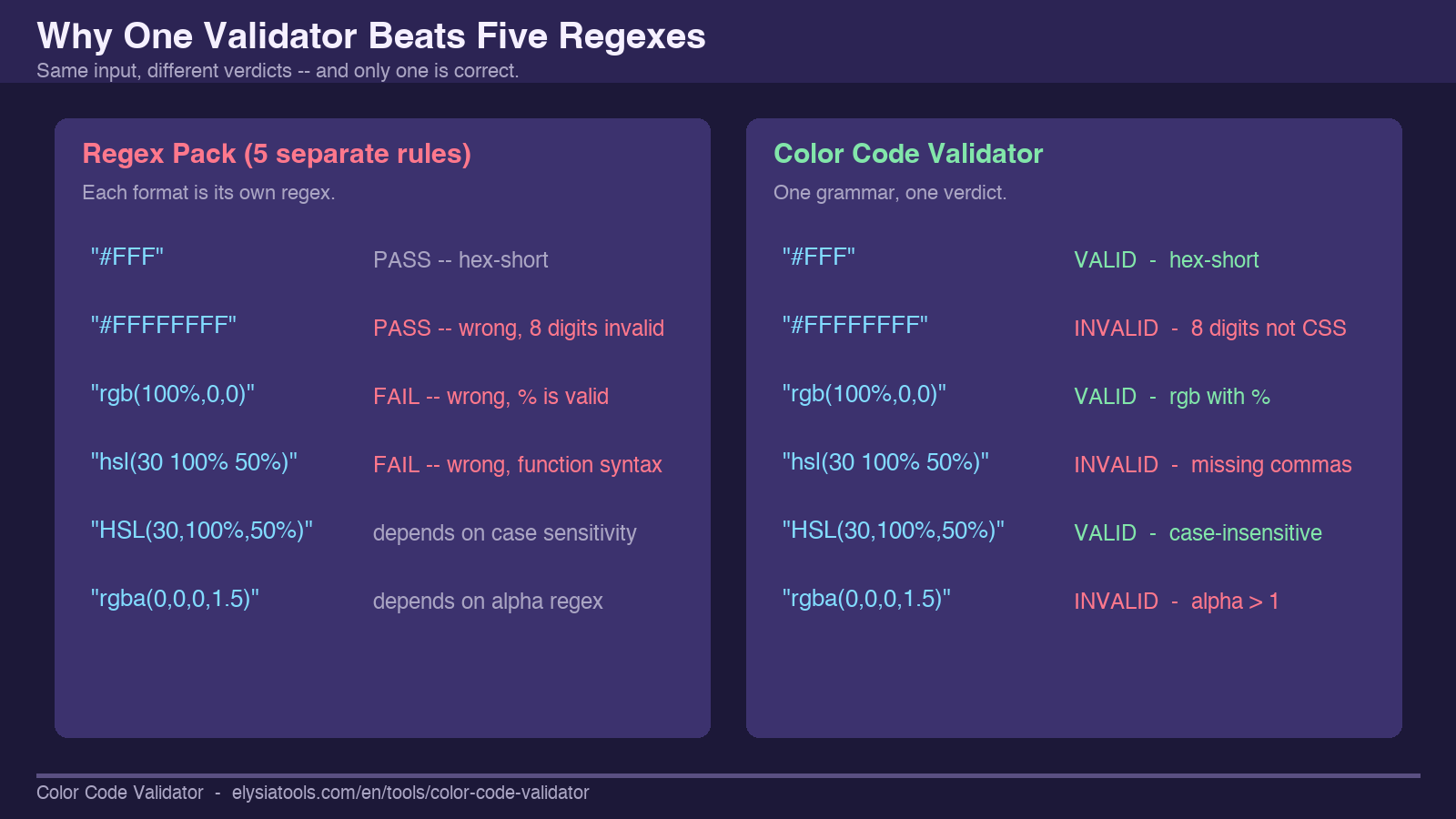
The argument for a dedicated validator over a regex collection is not that the regexes are hard to write — they are not, for any one format. The argument is that the interaction between formats is hard. A string like hsl(0, 100%, 50%) with extra spaces and uppercase function name passes a strict hsl regex but fails a strict rgb regex, which is what you want. A string like #FFFFFFFF with eight hex digits is invalid CSS (the alpha-on-hex form was added later and is a separate format) but passes every pre-2020 hex regex. The validator returns one verdict per string, based on the full grammar, instead of five regexes racing each other to claim the input.
The interaction problem compounds when you have multiple input sources. A design-token JSON file gives you #RRGGBB. A Figma plugin export gives you rgba(). A legacy stylesheet gives you rgb(). A newer theme file gives you hsl(). All four files need to land in the same build pipeline. A regex pack with five rules will accept them all but normalize them inconsistently. A single-input validator normalizes them all to one canonical form — #RRGGBB by default — so the downstream pipeline only has to handle one shape.
Where the validator fits in your build
The validator is not a runtime dependency and not a build step on the critical path. It is a checker — something you run when something looks wrong, or when you are about to merge a stylesheet change, or when a junior developer is asking why their color is “different but the same.” For an interactive use case, paste a string, get a verdict, move on. For a batch use case, the same single-input loop scales to a CI lint by feeding it every string in a stylesheet and counting failures by reason.
The validator is also a teaching tool. When you point it at #FFFFFF, it tells you the format is hex-long and the normalized form is #FFFFFF (no change — it was already canonical). When you point it at RGB(255,255,255), it tells you the format is rgb and the normalized form is #FFFFFF — the same color, but the validator just saved you from a function-name case-sensitivity bug downstream. When you point it at hsla(0, 100%, 50%, 0.5), it tells you the format is hsla and the normalized form is #FF0000 with the alpha dropped — because the canonical form is six hex digits and alpha needs its own channel. That explicit normalization is the kind of thing a regex pack silently does wrong.
You can try the validator with the standard test corpus at the Color Code samples page — it walks through each of the six input traps above with the exact string that triggers them and the exact reason the validator returns. That sample page is the fastest way to learn the output shape before wiring the validator into a build step.
What the validator does not do
The validator does not check color contrast. That is a different problem — you give it two colors and it computes their WCAG contrast ratio. The color-code validator only checks one color at a time and only checks the string’s syntactic validity against the CSS spec. It will not warn you that #FFFF00 (yellow) on #FFFFFF (white) fails every WCAG threshold; it will only confirm both strings parse.
The validator also does not check color naming. red is a valid CSS color keyword but it is also a string the validator treats as a syntax error — the validator only handles the five textual color formats that take numeric channels. Named colors are a separate code path in every CSS engine and most lint pipelines either skip them entirely or handle them with a different tool. If your stylesheet relies on named colors, you need a second validator that knows the keyword list.
Finally, the validator does not normalize hex case. #FFFFFF and #ffffff are both valid and both return hex-long, but the normalized form is whatever case you pasted. This is intentional — silently lowercasing hex can hide paste errors that you would otherwise catch in a diff. If you need case normalization, do it in your build step, not in the validator.
Closing
A color-code validator that only knows three formats is not a validator — it is a regex that does not know about the other two formats. The Color Code Validator handles all five CSS textual color formats, returns a named reason on failure, and normalizes successful inputs to a single canonical form. It is the smallest tool that closes the format-coverage gap and the largest tool that fits inside a CI lint. Paste a string, get a verdict, move on. The full sample set is at Elysia Tools samples, and the validator itself is at Elysia Tools.
Explore more tools at elysiatools.com.