You published a correlation coefficient last Tuesday. It looked reasonable: a clean number between -1 and 1, a p-value under 0.05, a tidy row in your dashboard. Three weeks later, a colleague asked a follow-up question, and the entire analysis unraveled in front of you. The data hadn’t changed. The number was the same. But it was wrong anyway — not wrong in the “we calculated it badly” sense, but wrong in the “we never checked whether this coefficient meant what we thought it meant” sense.
Correlation coefficients are the most over-interpreted statistic in data work. People publish r = 0.87 on a chart and read it as proof of a relationship. The math is fine. The interpretation usually isn’t. A correlation is a single number summarizing a 2D scatter plot, and the things that can make that number misleading are not exotic — they’re the everyday realities of the data underneath it.
This is a field guide to those realities. The tool we’re using is the Correlation Analyzer, which can compute Pearson, Spearman, and Kendall coefficients, generate the correlation matrix, run significance tests, and produce the heatmap and scatter plot matrix you actually need to interpret the number. But the tool is only half the story. The other half is knowing which of its three methods to pick, and which assumptions to verify before you trust the output.
Why a clean r value can still be a lie
The most common failure mode of correlation analysis is not a math error. It’s a category error — you asked the right question of the wrong statistic. Pearson’s r answers one specific question: how tightly do these two variables cluster around a straight line? Anything that isn’t a straight line is invisible to it. A perfect U-shape gives r = 0. A monotonic curve that’s strongly nonlinear gives r = 0.4 when the real relationship is much stronger.
The second-most-common failure mode is the outlier that flips the sign of r. One point in the upper-right corner of the scatter plot can drag a real correlation of 0.3 up to 0.9. Remove that point and the relationship disappears. Many published “strong correlations” have exactly one influential observation doing all the work.
The third is the missing-data trap. Listwise deletion shrinks n silently. If 30% of your rows have a missing value in one column, you might be computing r on a quarter of the dataset you actually intended to analyze. Imputation can change r by 0.2 or more.
Pearson, Spearman, Kendall: pick by shape, not by name
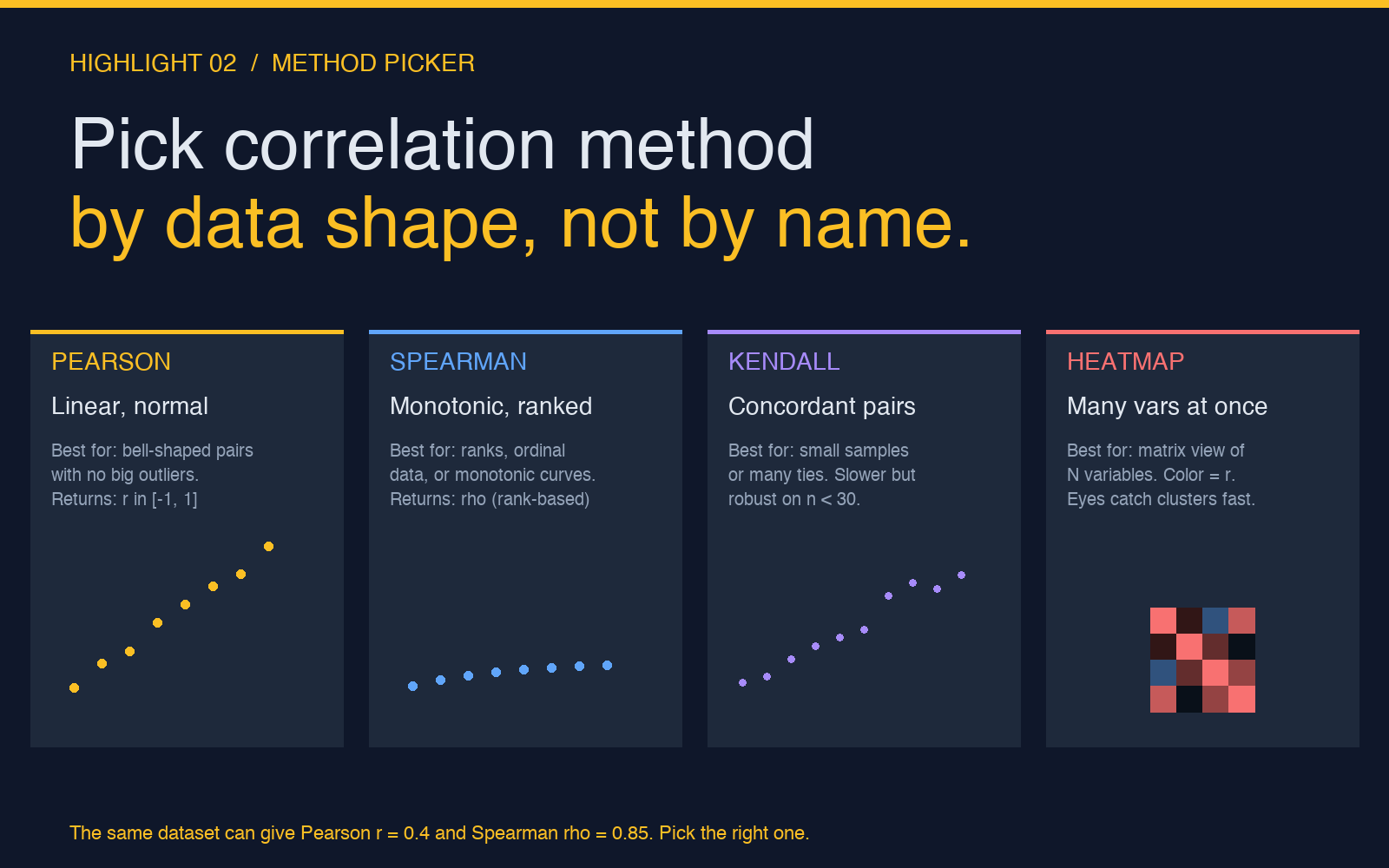
If you remember nothing else, remember this: pick the correlation method by the shape of your data, not by the name of the statistic. Pearson is for linear, normal-ish, outlier-clean pairs. Spearman is for anything monotonic — including ranks, ordinal scales, and curved relationships where the rank order is preserved. Kendall is for small samples or data with many ties, where it’s both slower and more honest than Spearman.
The Correlation Analyzer computes all three. The right workflow is to compute Pearson first, then Spearman, then look at the difference. If the two coefficients are within 0.1 of each other, your data is roughly linear and Pearson is fine. If Spearman is much higher, your data is monotonic but curved — Pearson is understating the relationship and Spearman is the honest number.
The matrix view is what you reach for when you have more than two variables. A 10-by-10 heatmap catches clusters of related variables in seconds. The scatter plot matrix catches the pairs that look correlated in the matrix but have obviously curved shapes when you plot them — those pairs need Spearman, not Pearson.
Pick the correlation method by data shape, not by name
The four-tile method picker is the easiest way to internalize when to use which. Pearson for linear-and-normal pairs, Spearman for anything monotonic (including ranks and ordinal data), Kendall for small samples or many ties, and the heatmap view for matrix-scale analysis. The same dataset can give Pearson r = 0.4 and Spearman rho = 0.85. The difference isn’t noise — it’s the shape of the relationship telling you which statistic is honest.
The three Pearson assumptions that quietly fail
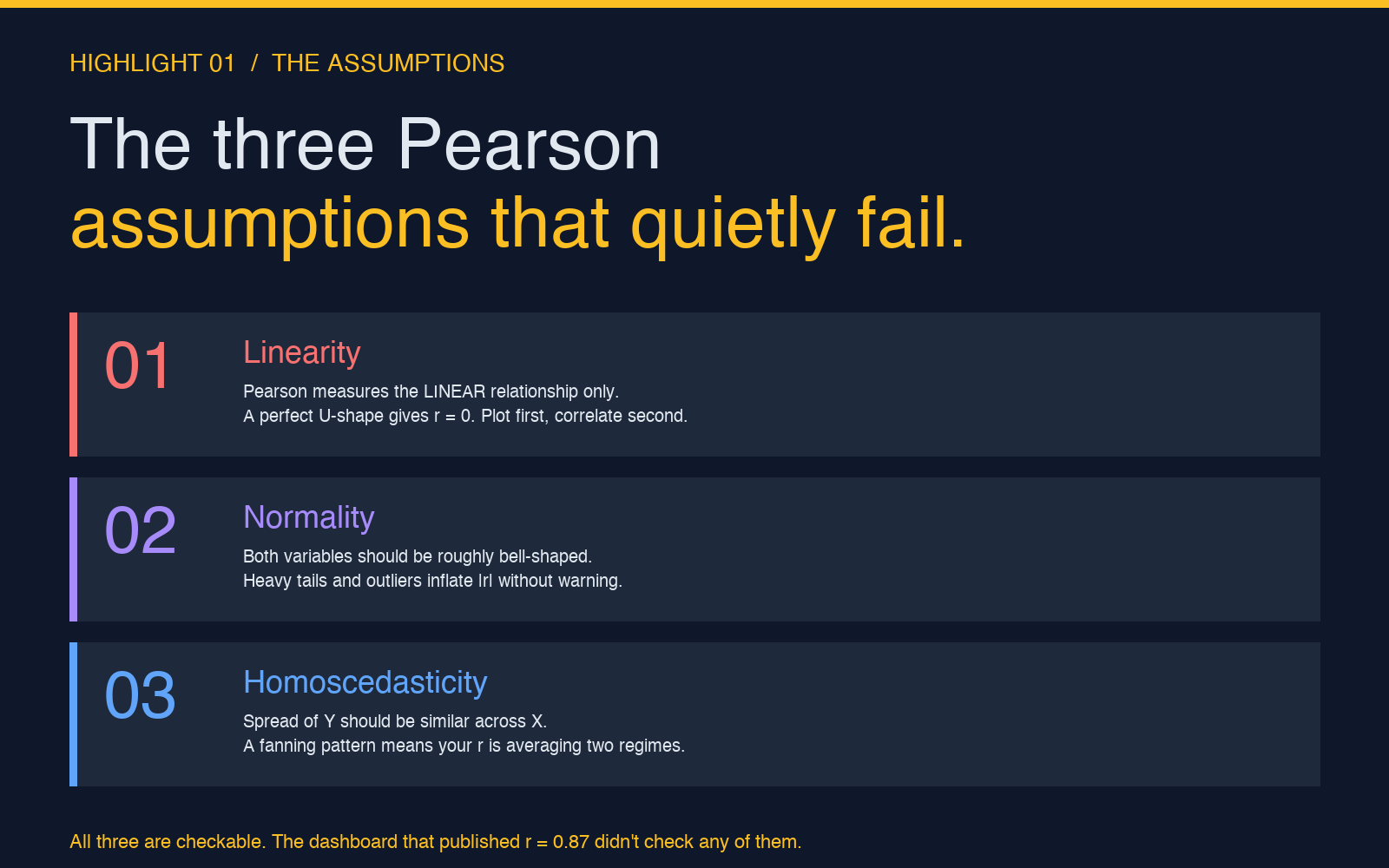
Pearson’s r is the default, and the default makes three assumptions about your data that almost no one checks. The assumptions are well-known in textbooks and almost universally skipped in practice. The reason the assumptions matter is that Pearson is sensitive to their violation in ways that don’t show up in the coefficient itself — you get a number, you get a p-value, and you have no signal that either is misleading. The three assumptions are linearity, normality, and homoscedasticity. Each one is checkable in 30 seconds with a plot or a quick test. Each one breaking changes what r actually means.
- Linearity. Pearson measures only the linear component of the relationship. A perfect U-shape gives r = 0. The scatter plot is the check — if the cloud curves, switch to Spearman. The Correlation Analyzer‘s scatter plot matrix is the fastest way to scan a dozen pairs at once.
- Normality. Both variables should be roughly bell-shaped. Heavy tails and outliers inflate |r| without warning. The coefficient doesn’t carry a flag for “this was driven by one extreme point.” A histogram or a quick eyeball of the distribution is the check.
- Homoscedasticity. The spread of Y should be similar across the range of X. A fanning pattern — where Y is tightly clustered on the left and spreads out on the right — means your r is averaging two different regimes. Stratify the data and recompute, or switch to a rank-based method.
All three are checkable. The dashboard that published r = 0.87 didn’t check any of them.
P-value tells you if r is real, not if r matters
This is the single most important conceptual point in correlation analysis, and the one that causes the most downstream confusion. The p-value answers exactly one question: if there were no relationship between these variables in the population, what is the probability of observing a correlation at least this large in a random sample of this size? That’s it. It does not answer “is r important?”, “is r useful?”, “should I act on r?”, or any other question about practical significance.
A correlation of r = 0.05 with n = 10,000 has p < 0.001 — highly significant in the statistical sense, meaningless in the practical sense. The relationship explains 0.25% of the variance. You can publish the p-value honestly; you cannot publish r = 0.05 as evidence of a meaningful relationship without misleading the reader.
The right framing is “the relationship explains r-squared of the variance.” For r = 0.87, that’s 76% — a strong relationship. For r = 0.30, it’s 9% — a relationship that exists but explains very little of what you’re seeing. The p-value tells you the relationship isn’t sampling noise; the r-squared tells you whether it’s worth your time.
The five-step correlation pre-flight
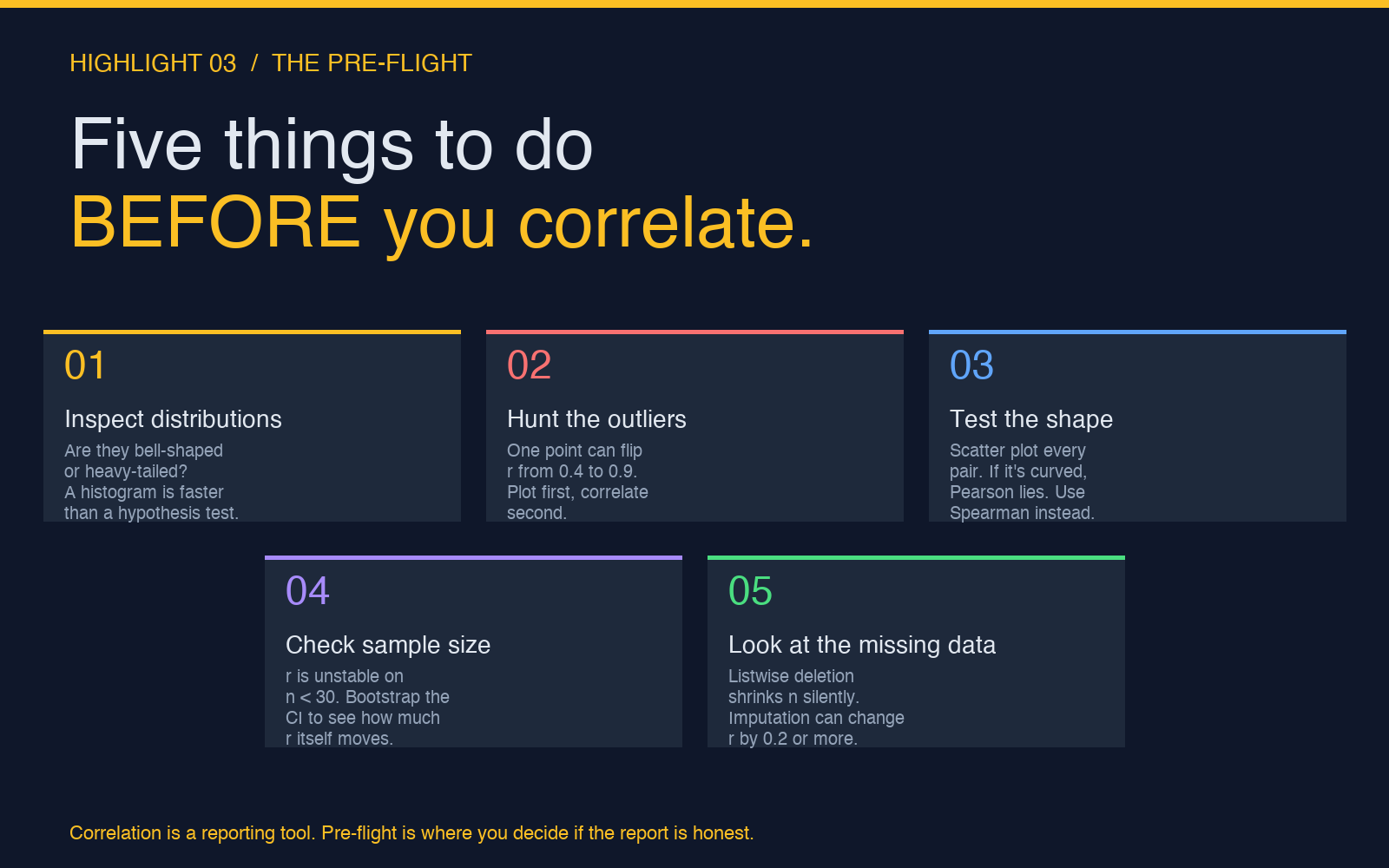
The pre-flight is the part of correlation analysis that nobody writes blog posts about and everybody should. These five checks take ten minutes and prevent the kind of mistake that surfaces three weeks later in a meeting. The order matters — start with the cheap checks (distributions, outliers, shape), escalate to the slower ones (sample size, missing data) only if the cheap checks pass.
- Inspect the distributions. Are they bell-shaped or heavy-tailed? A histogram is faster than a hypothesis test for this question. If the shape is severely skewed, consider Spearman or a transformation.
- Hunt the outliers. One point can flip r from 0.4 to 0.9. The Outlier Detector runs IQR, Z-score, and modified Z-score in one pass — it’s the cleanest way to flag the points that need a closer look before they dominate the coefficient.
- Test the shape. Scatter plot every pair. If it’s curved, Pearson lies and Spearman is the honest statistic. If it’s fanning, stratify or switch methods.
- Check sample size. r is unstable on n < 30. Bootstrap the confidence interval to see how much r itself moves under resampling — a wide CI on a “clean” r is a sign that the dataset is too small to support the claim you’re about to make.
- Look at the missing data. Listwise deletion shrinks n silently. The Dataset Quality Profiler is the fastest way to see exactly how many rows each column is losing and what the missing-data pattern looks like before you commit to a deletion strategy.
Correlation is a reporting tool. The pre-flight is where you decide if the report is honest.
From r to a model: when correlation is enough
Correlation is a summary, not a model. It tells you two variables move together; it doesn’t tell you why, doesn’t give you a prediction formula, and doesn’t let you plug in a new X to estimate Y. The moment you need to predict — “if advertising spend goes up by 10%, what does revenue do?” — you’ve outgrown r and you need regression.
The handoff is clean: correlation tells you whether the relationship is worth modeling, regression tells you what the model actually is. A high r with no theoretical story is a hint, not an answer. A high r with a theory behind it is the input that makes regression worth running. Run the Regression Analyzer on the same pair once you’ve verified the assumptions, and you’ll get the slope, the intercept, the prediction interval, and the residual diagnostics in one pass.
For multi-variable problems, the correlation matrix is the starting point but never the ending point. A correlation matrix tells you which pairs move together; it doesn’t tell you which variables are confounders, which are mediators, and which are independent predictors. The matrix is the map. Regression — particularly multiple regression with careful variable selection — is the territory.
Putting it together
A trustworthy correlation analysis is mostly pre-flight. Plot the data. Check the shape. Flag the outliers. Verify the assumptions. Compute the coefficient with the method that matches the shape. Report the confidence interval, not just the point estimate. And if the question is “what happens when X changes”, reach for regression instead.
The Correlation Analyzer handles the computational side — Pearson, Spearman, Kendall, the matrix, the heatmap, the scatter plot matrix, the significance tests, the confidence intervals. The interpretative side is on you. A correlation coefficient is honest exactly to the degree that you’ve checked the assumptions behind it.
For the standardizing step before correlation, the Z-Score Standardizer turns each variable into mean-0, std-1 form — useful when the two variables are on completely different scales and you want to compare their standardized relationship directly. For the uncertainty around r itself, pair the analysis with a Confidence Interval Calculator on the bootstrapped distribution to see how much the coefficient actually moves under resampling.
Explore the broader toolkit at elysiatools.com — the data-analysis category has eighteen tools covering everything from normality testing to seasonal index calculation, all designed to plug into the same pre-flight workflow.