
Most developers read cron expressions by squinting at the asterisks and praying nothing breaks. Five short fields encode every detail of a recurring schedule — when it runs, how often, which days, and in what dialect — yet the syntax has quietly fractured into three incompatible dialects, one classic OR-semantics gotcha, and a year field most engineers never expect. If you have ever shipped a job that fired twice on the 1st, or silently skipped a Monday, the cause is almost always in those five stars. This guide walks through the dialect zoo, the field-by-field grammar, and how the Cron Expression Explainer decodes any schedule — including Quartz, 6-part, and the deterministic English description that catches the day-of-month vs day-of-week trap before it ships.
The five fields, left to right
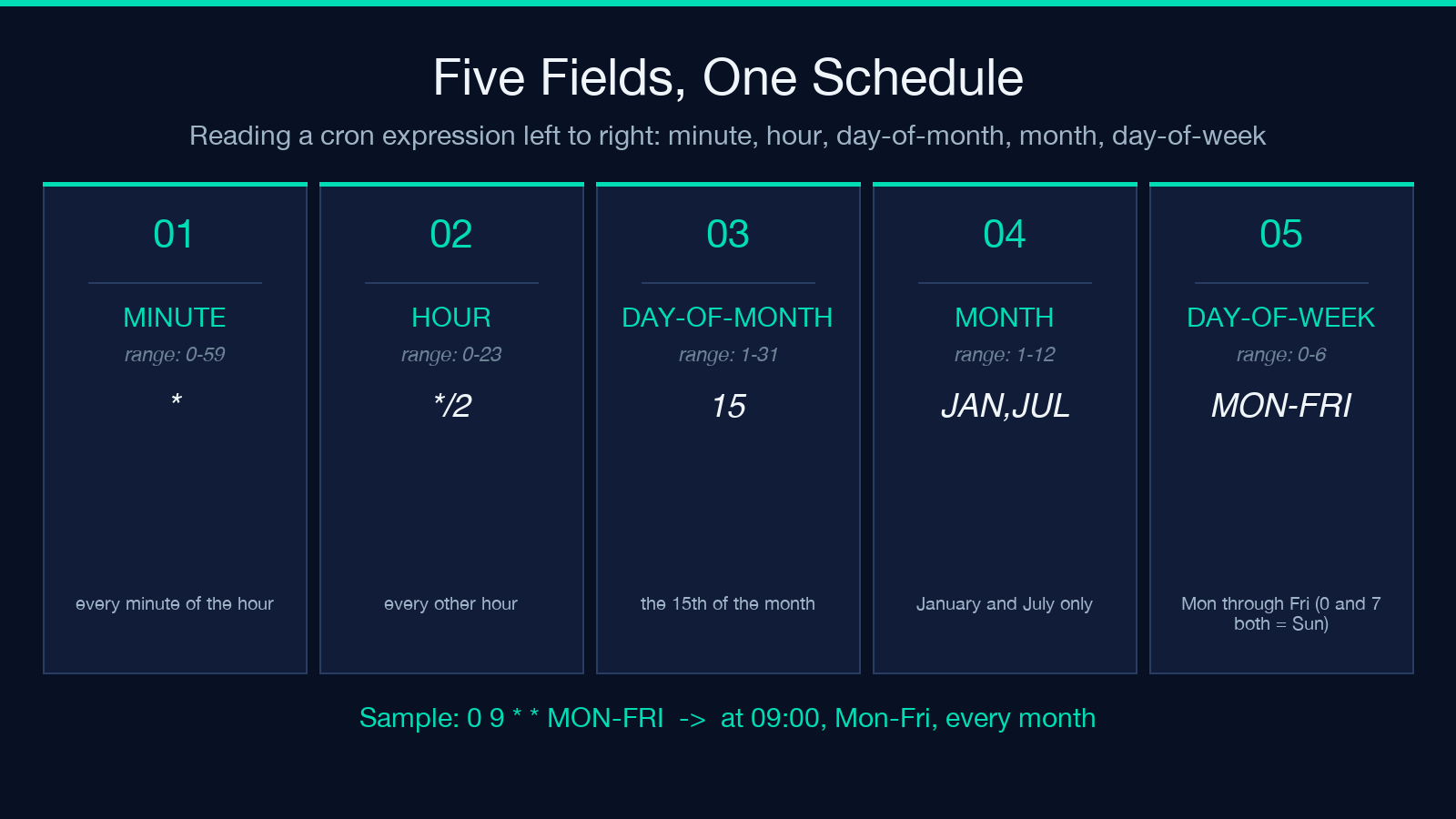
A standard 5-part cron expression reads as minute hour day-of-month month day-of-week. Each field accepts a small grammar that stays consistent across dialects: * for every value, 1-5 for ranges, 1,3,5 for lists, */15 for steps, and the named aliases JAN or MON where it makes sense. Day-of-week uses 0-6 with both 0 and 7 meaning Sunday (a Quartz holdover the tool normalizes for you).
The first two fields pin down the clock face. The third and fifth pin down which days fire. The middle field quietly decides which months participate. A common reading mistake is to scan only the time portion — the schedule lives in the date fields just as much. Paste a cron into the Cron Expression Explainer and the field-by-field breakdown is the first thing it prints, so you never have to manually diff MON-FRI against 1-5 again.
Three dialects, three rules
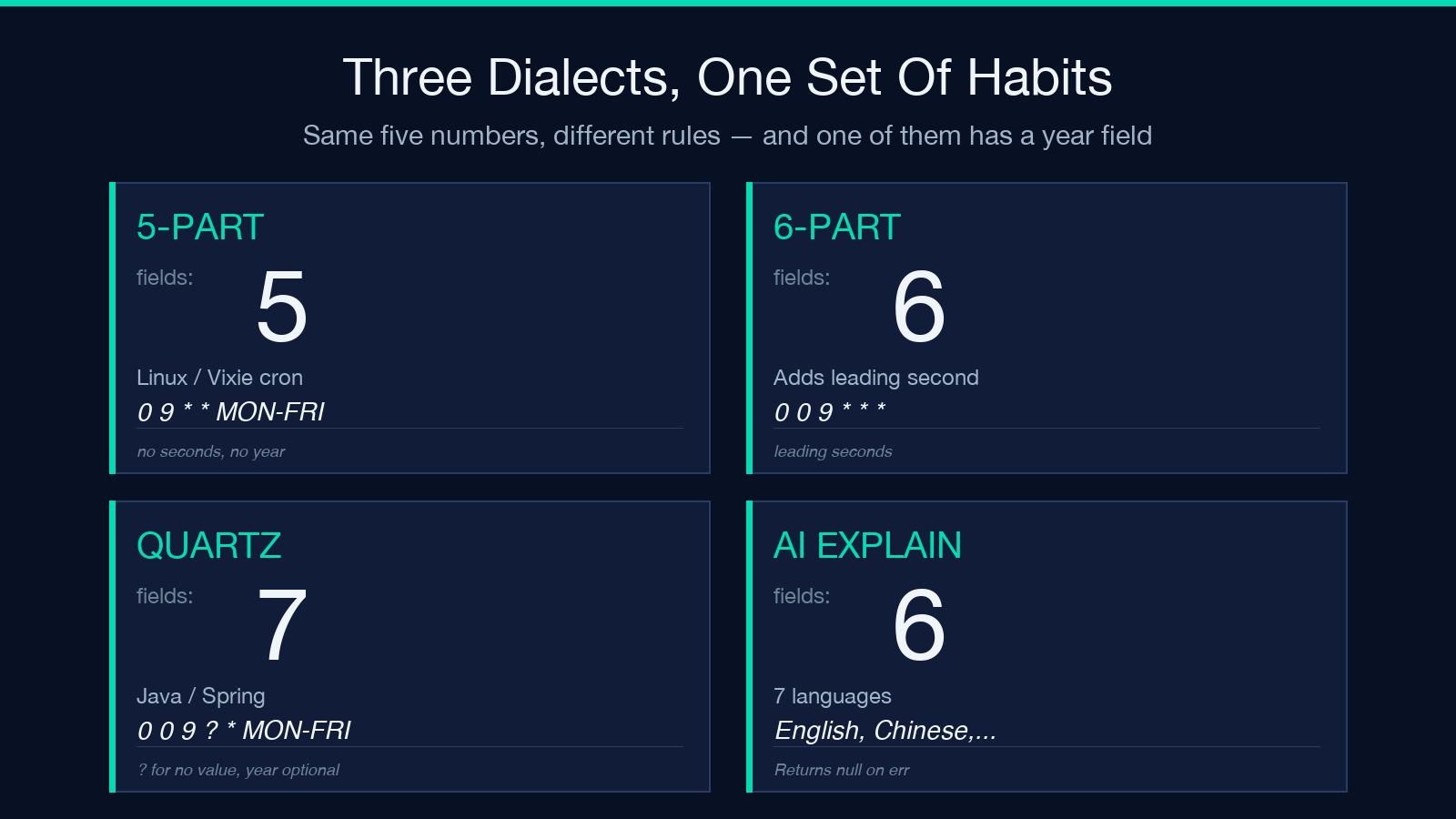
The 5-part Linux/Vixie form is what crontab understands on every Unix box. The 6-part form adds a leading second field for sub-minute scheduling — useful for Quartz-adjacent infrastructure or any system that needs */10 * * * * *. Quartz (Java, Spring) goes further: it accepts ? as “no value” for either day-of-month or day-of-week (you must pick one when constraining days), and supports an optional trailing year field. Same five-or-six numbers, very different rules — and the wrong dialect silently changes when the job fires.
- 5-part — minute, hour, day-of-month, month, day-of-week. The default everywhere Linux runs.
- 6-part — adds leading seconds. Required for
*/10 * * * * *style schedules. - Quartz — uses
?for no-value in day fields; year is optional at the end.
The classic OR gotcha
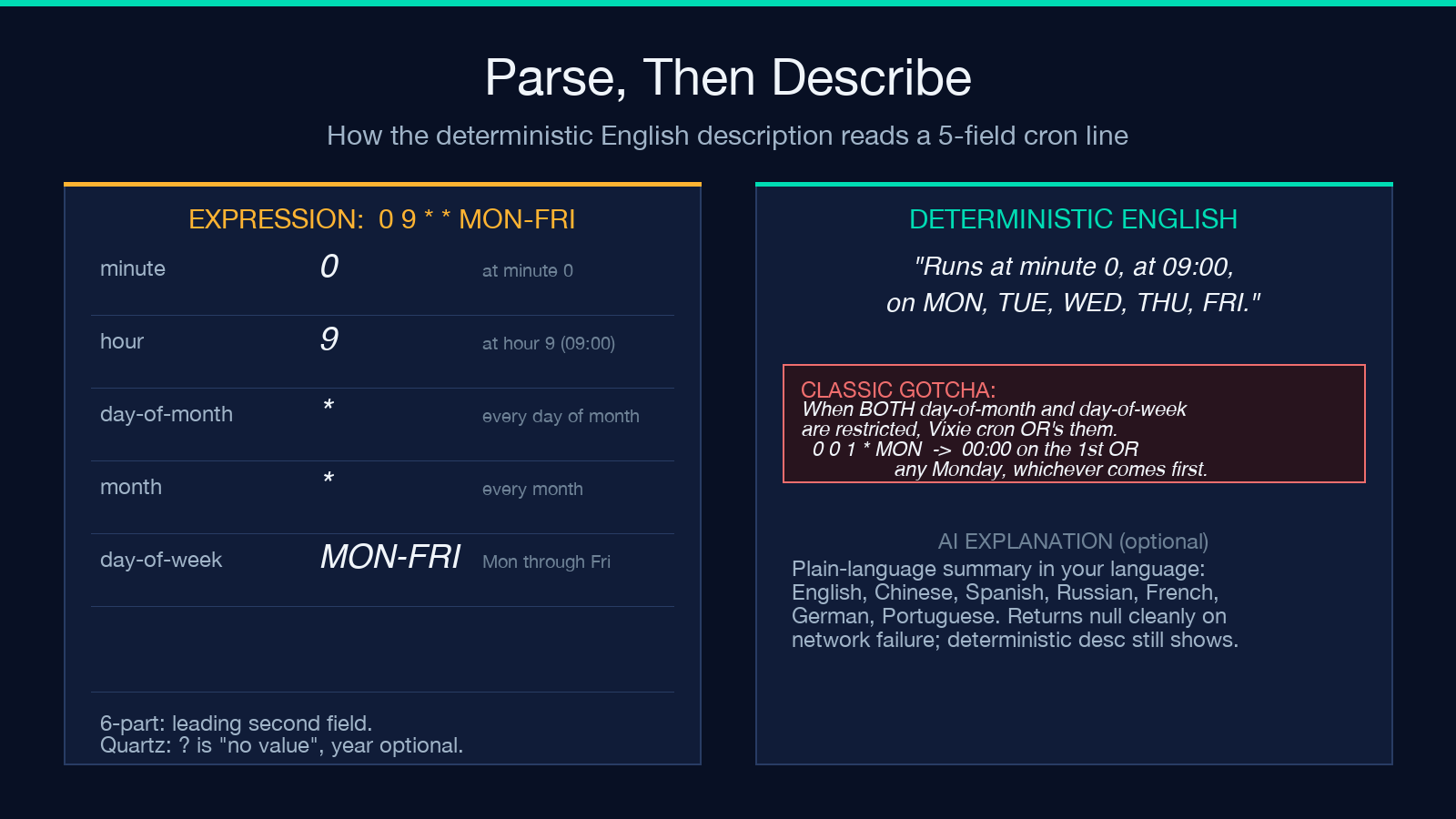
When both day-of-month and day-of-week are restricted, Vixie cron does not AND them — it ORs them. So 0 0 1 * MON fires at midnight on the 1st of every month and on every Monday morning, whichever comes first, never the intersection. This is not a bug in your server; it is the spec. Many teams have only learned this after a job ran twice in one week. The deterministic English description the Cron Expression Explainer prints calls this out explicitly — the description text reads “on day-of-month 1 OR on MON” rather than silently implying an intersection.
Next runs in any IANA timezone
The third job of any serious cron explainer is to enumerate when the schedule will actually fire. This sounds trivial until you sit in America/New_York and watch a job that was supposed to run at 09:00 EST silently slip an hour when DST kicks in. The tool computes the next N occurrences in the IANA timezone you specify, including the local time, the UTC equivalent, and a “from now” delta — with proper DST handling so a job scheduled for 02:30 on a spring-forward night is correctly skipped, not run twice or never. Up to 50 future runs can be listed at once, which is enough to plan a whole quarter’s worth of batch windows at a glance.
Deterministic English, plus optional AI explanation
The deterministic description above is built from the parsed fields with no LLM involved — it is the same output every run, with no network round-trip. Above that, the tool offers an optional AI explanation in seven languages (English, Chinese, Spanish, Russian, French, German, Portuguese) that calls out subtleties in plain prose: how often it fires, at what time, and any gotcha worth flagging. If the AI call fails or returns nothing, the deterministic description is still on screen — the network failure is not a blank page. The model used is deepseek/deepseek-v4-flash, constrained to a 2-4 sentence output that cannot contradict the deterministic description.
How it handles DST and edge cases
Three edge cases trip up most cron parsers. First, the day-of-week 0 vs 7 ambiguity — Quartz lets you write either, and the tool normalizes both to Sunday. Second, the day-of-month vs day-of-week OR semantics described above, which is the one that bites teams in production. Third, the spring-forward gap and fall-back overlap in any non-UTC timezone — the tool uses Luxon’s IANA database and skips non-existent local times rather than silently shifting the schedule. These are the details that make the difference between a cron that survives a DST transition and one that runs at 01:30 twice on a single November night.
Practical uses
If you write cron schedules by hand, the tool is a second pair of eyes before you commit. If you read them in code review, paste the expression in, get the deterministic description, and verify both the time-of-day and the day constraints match the ticket. If you are migrating from crontab to Quartz (or back), the dialect toggle and the year field toggle show exactly which rules change. And if you need to explain a schedule to a non-engineer on Slack, the AI explanation in your shared language is the version that actually gets read.
The bottom line
A cron expression is a small, dense language with three dialects, one OR-semantics trap, and DST to worry about. The fastest way to read any schedule correctly is to never read it raw — let a parser produce a deterministic English description, an AI-explanation in your language, and a list of the next N fire times in your timezone. The Cron Expression Explainer does all three in one paste, fully client-side for the deterministic parts, with the AI explanation as an optional layer on top. Paste the expression, get the description, ship the schedule.
Explore more developer tools at elysiatools.com.
