
The Five Forms of ISO 8601 You Will Actually Meet, and How to Tell Them Apart
A date string walks into your system. It looks like a date. The JSON parser is happy. The database is happy. The calendar invite is happy. Then three days later someone in another time zone opens the file and it is suddenly a different day, and now nobody is happy. Most of those incidents trace back to a single root cause: the writer and the reader assumed different ISO 8601 forms.
ISO 8601 is not a single format. It is a family of formats, all spelled out in the same standard, all technically “ISO 8601”. The reader needs to know which one the writer meant, and the writer needs to know which one is safe to emit. This guide walks through the five forms you will actually meet in production logs, calendar files, log shippers, and HTTP headers — and shows how a small tool can save you the hour you would otherwise spend re-reading RFC 3339 at 2am.
If you want to skip ahead and just convert between them, the ISO 8601 Converter does all five in one pass — including Unix timestamps — and shows you every variant side by side so you can copy the one you actually want.
What “ISO 8601” really means, in five shapes
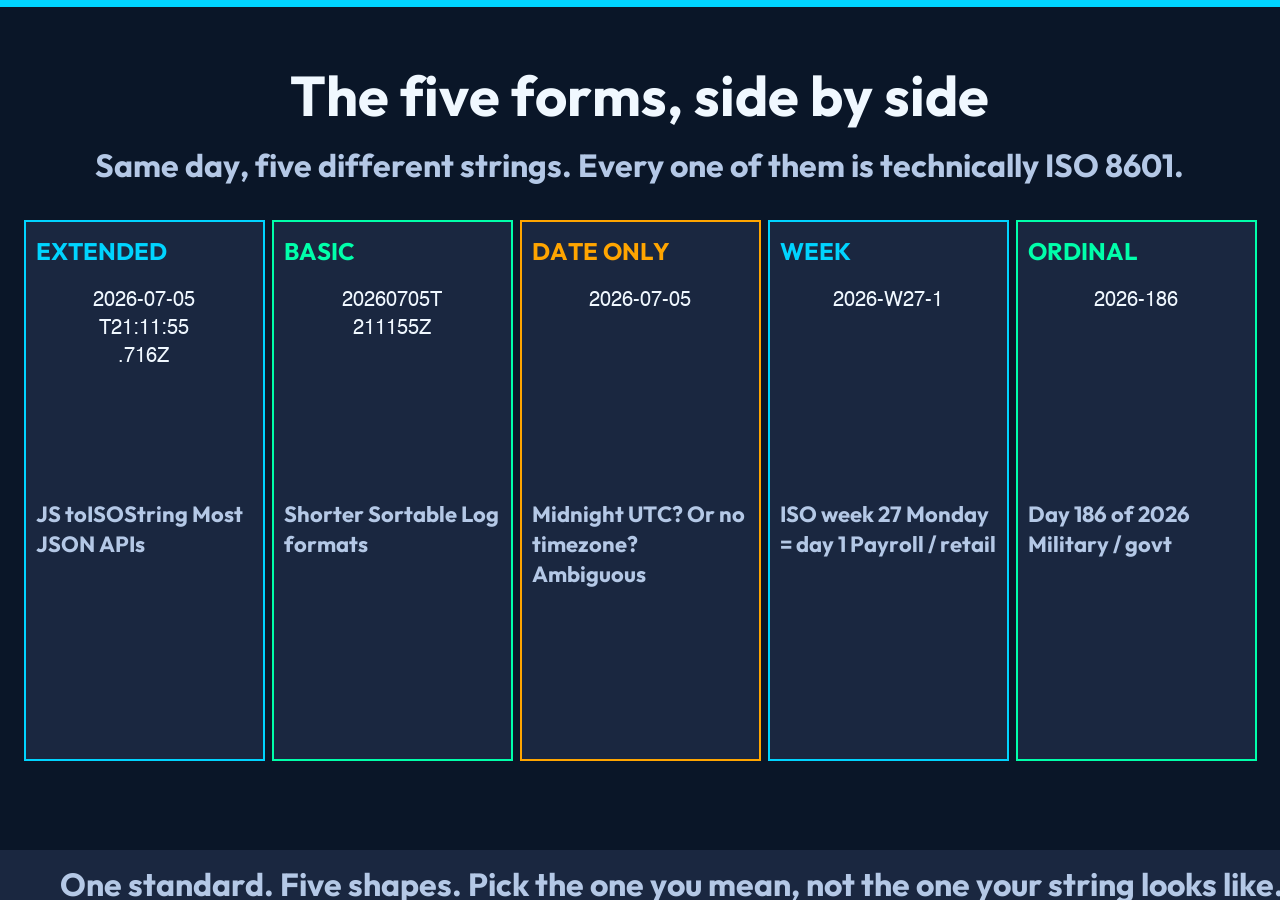
The standard describes a calendar date as YYYY-MM-DD, a time as hh:mm:ss, and lets you combine them with a T separator. From those three primitives you get the five shapes that show up in real systems:
1. Extended — 2026-07-05T21:11:55.716Z. The most common one, what JavaScript’s Date.prototype.toISOString() returns, what most JSON APIs emit. Hyphens, colons, a T, an optional fractional second, an optional Z (or offset like +02:00).
2. Basic — 20260705T211155Z. The same data, but with every separator stripped. Shorter, easier to sort lexicographically. You will see this in fixed-width log formats and some financial feeds.
3. Date only — 2026-07-05. No time component. A whole calendar day. Interpret it as midnight UTC at your own risk — some readers do, some readers treat it as a date object with no timezone at all.
4. Week — 2026-W27-1. ISO weeks numbered 01 to 53, with Monday as day 1. Used heavily in European manufacturing, payroll, and anything that talks about “week 27 of 2026” as a single thing.
5. Ordinal — 2026-186. Day 186 of the year. You will see this in military, aviation, and some government datasets. 186 is July 5 in 2026 — yes, exactly the same day as the other examples.
The trap: every one of those is “ISO 8601”. If your code accepts the string, validates it, and hands it to a date library, the library will quietly do its best with whichever shape it parsed. That quiet best-effort is where bugs live.
The trap of the trailing Z
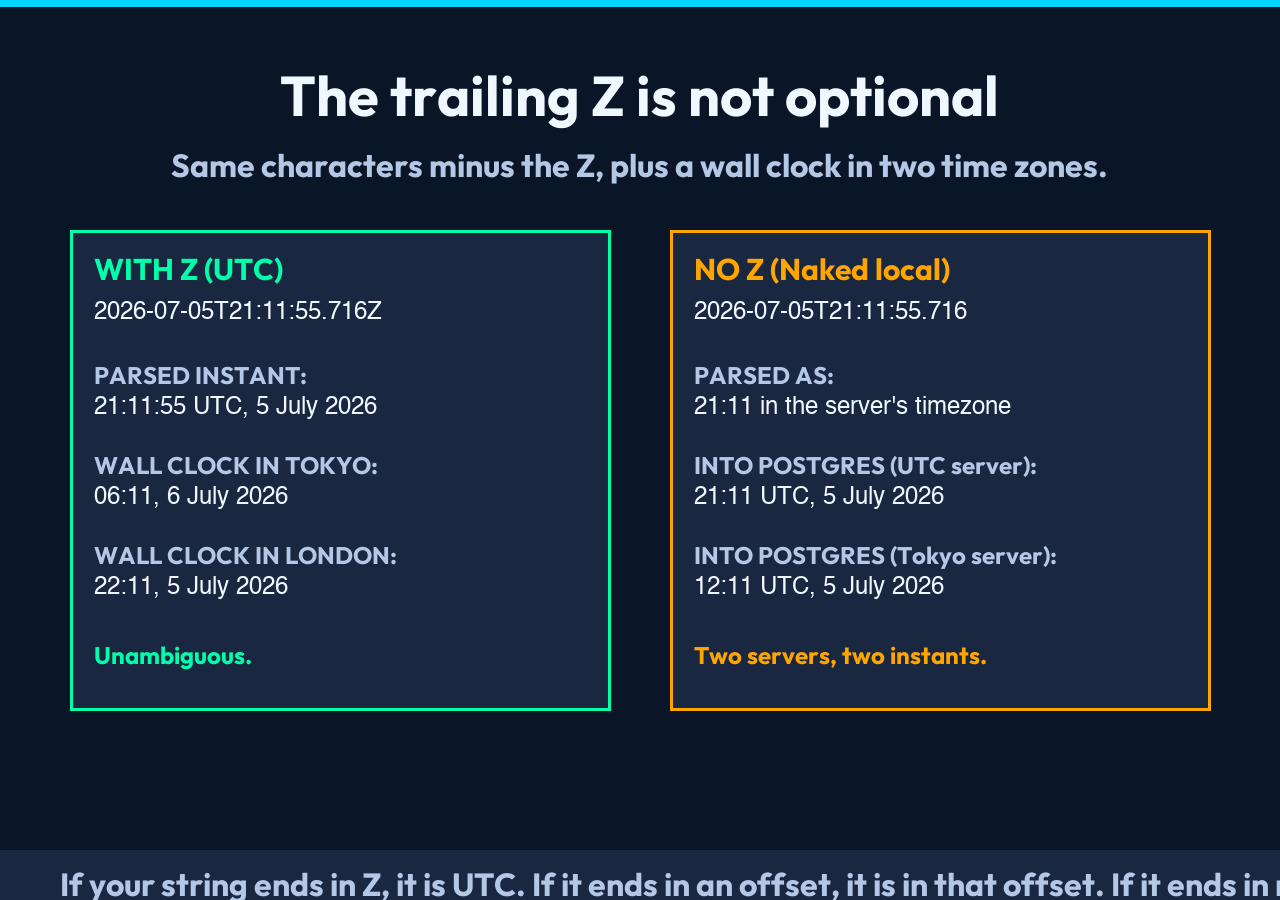
The Z at the end of 2026-07-05T21:11:55.716Z means “UTC, no daylight saving, no offset gymnastics”. It is not a typo. It is not optional. It is the difference between “this event happened at 9:11pm in London” and “this event happened at 9:11pm in Tokyo”.
A common failure: an API returns timestamps with Z to mean “this is UTC, please convert”. A database column stores them as TIMESTAMP WITHOUT TIME ZONE, which on most engines (PostgreSQL included) silently reinterprets the string in the server’s session timezone. The same string is now two different instants depending on whether you read it from the wire or query it from the database. The ISO 8601 Converter lets you paste in a string and a target timezone, and it shows you the wall-clock time in that zone alongside the UTC instant — so you can see, at a glance, whether your string and your column are talking about the same moment.
Rule of thumb: if your string ends in Z, it is UTC. If it ends in +02:00 or -05:00, it is in that offset. If it ends in nothing, all bets are off — you have to know what the writer meant.
What “validate” really checks
Most “is this an ISO 8601 string?” checks are not validating what you think. A regex like four-digit year, two-digit month and day, then T and hh:mm:ss, with optional Z will accept 2026-13-45T99:99:99Z and call it a date. The string is well-formed; the date is nonsense. February 30th sails through. Month 13 sails through. So does 2026-02-30T00:00:00Z — there is no February 30th, but your regex does not know that.
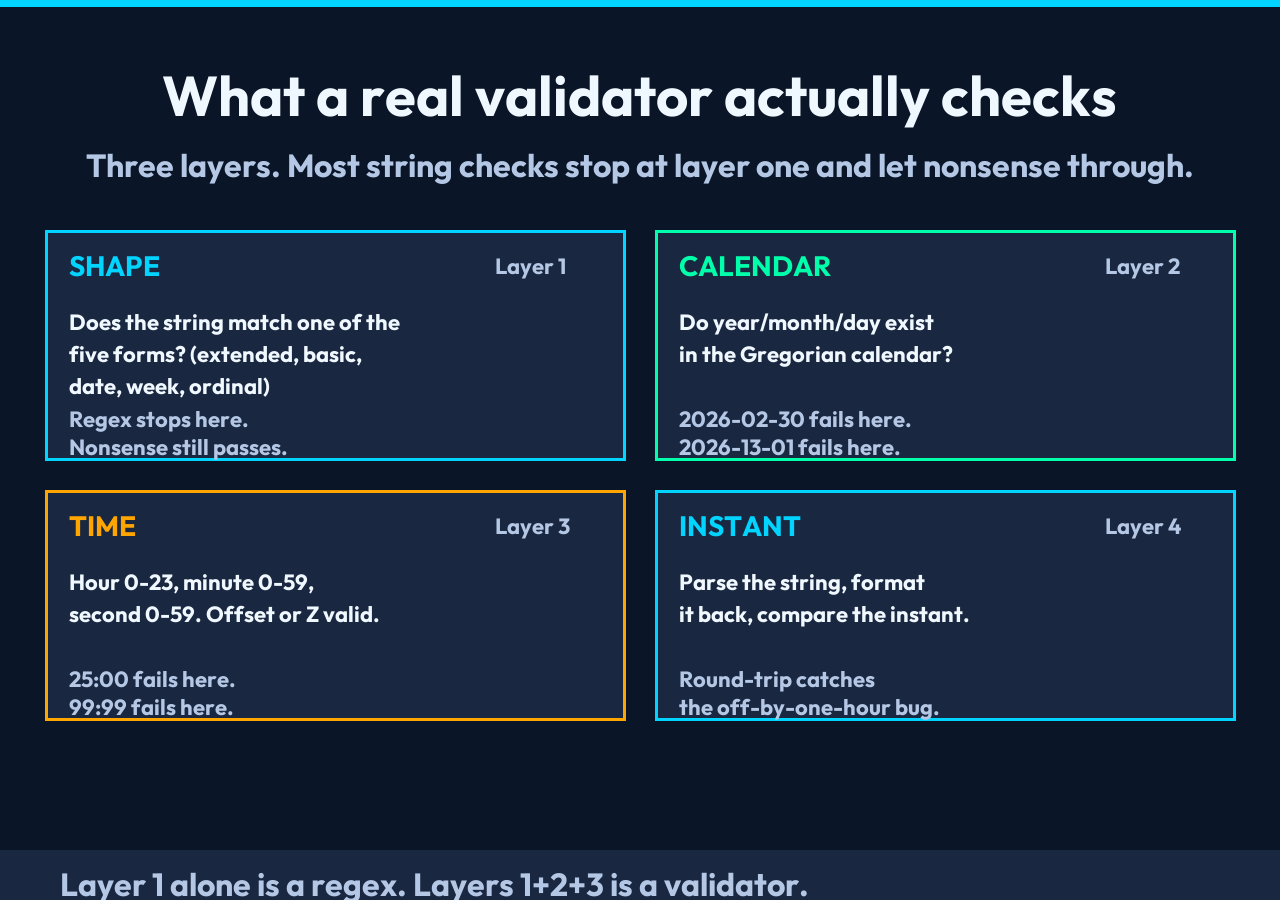
A real ISO 8601 validator needs to do three things:
– Shape: does the string match one of the five forms above?
– Calendar: do the year, month, and day actually exist in the Gregorian calendar?
– Time (if present): are the hour, minute, and second in range, and is the offset or Z valid?
The converter’s validate operation runs all three. It catches 2026-02-30 as invalid. It catches 2026-13-01 as invalid. It catches 2026-07-05T25:00:00Z as invalid. And it tells you which form the string matched, so you can fix the bug upstream instead of guessing.
Round-tripping: how a string becomes a timestamp, and back
A timestamp is not a string. It is an instant in time, counted from a fixed origin (Unix time counts seconds from 1970-01-01T00:00:00Z). The string is just a way of writing that instant down. The conversion has two steps:
1. Parse: read the string, extract year/month/day/hour/minute/second/offset, compute the instant.
2. Format: take the instant, write it back out in whatever shape the next system expects.
Both steps can fail, and they fail differently. A parser that accepts 2026-07-05 as a date-only string will usually return midnight UTC, but a parser that accepts 2026-07-05T21:11:55.716Z will return the exact instant. The same tool can return different instants from strings that look almost identical, and that is why a sanity check before storage is worth the five seconds it takes.
The converter emits both the human-readable parse result and the Unix timestamp in the same output. That is the cheapest way to catch a round-trip bug: parse the string, format it back to ISO, parse it again, and confirm you got the same Unix timestamp both times. If you did not, your format and your parse were not actually inverses.
Week and ordinal dates — the two you forget exist
Most developers learn the extended form and stop. Then they hit a dataset that uses week dates (2026-W27-1) and have to look up the syntax. Then they hit ordinal dates (2026-186) and look it up again. Both are in the same standard; both are valid ISO 8601; both break parsers that only know the extended form.
ISO week dates are useful when “week 27 of 2026” is the unit you actually care about — payroll, retail reporting, manufacturing batches. ISO ordinal dates are useful when you want to talk about a day without revealing the month — common in government datasets and military formats. Both are sortable as strings (2026-W27-1 sorts before 2026-W27-2; 2026-186 sorts before 2026-187) which is sometimes the whole reason they exist.
If you only ever emit and consume the extended form, you can ignore these. The moment a vendor sends you a file in week or ordinal form, you cannot.
A small checklist before you ship a date field
When you are emitting, storing, or accepting an ISO 8601 string, four questions catch most of the bugs:
1. Does the string end in Z or an offset? If not, you have an ambiguity. Pick one and stick to it.
2. Is the timezone explicit at every boundary? Parsers, databases, and JSON serializers each have their own default. None of them agree.
3. Are you storing the instant, or the string? Storing strings is fine if you always re-parse on read; storing instants is fine if you always format on write. Mixing the two is where the off-by-one-hour bug comes from.
4. Does your validator reject calendar nonsense? 2026-02-30 should fail. If it does not, the validator is a regex, not a validator.
The ISO 8601 Converter is built around this checklist — every output shows you the UTC instant, the wall-clock time in your chosen timezone, and the Unix timestamp, so you can confirm the four points above without opening a date library REPL.
Closing thought
ISO 8601 looks simple because the standard is well-written. The complexity is not in the syntax; it is in the assumptions that syntax carries. The fix is not a stricter regex. The fix is seeing all five forms side by side, in one output, and confirming your string matches the form you meant.
Explore more tools at elysiatools.com.
