
Why Your Markdown Links Break in Production (And How to Catch Them Without Going Online)
Your README looks fine in the editor. You click https://example.com in the preview, the page loads, the table-of-contents anchor scrolls correctly. Then you ship it to GitHub Pages, point your CI pipeline at it, and discover that three internal anchors point at headings that renamed themselves last sprint, one reference link silently lost its definition block, and an internal docs/api.md link is rendering as plain text because the heading you anchored to got refactored from ## API to ## API Reference.
Markdown link rot is the worst kind of rot: it doesn’t show up in CI, it doesn’t show up in the local preview, and it doesn’t show up until a reader clicks. Every link checker on the planet either (a) makes a real HTTP request — fine for a blog with 10 links, fatal for a monorepo with 4,000 — or (b) catches only one of the seven actual failure modes your links can have. A static lint pass that hits every link shape (inline, reference, anchor, mailto, protocol-relative, relative) in one pass without hitting the network is the missing tool. Elysia Tools ships exactly that.
The seven failure modes nobody catches
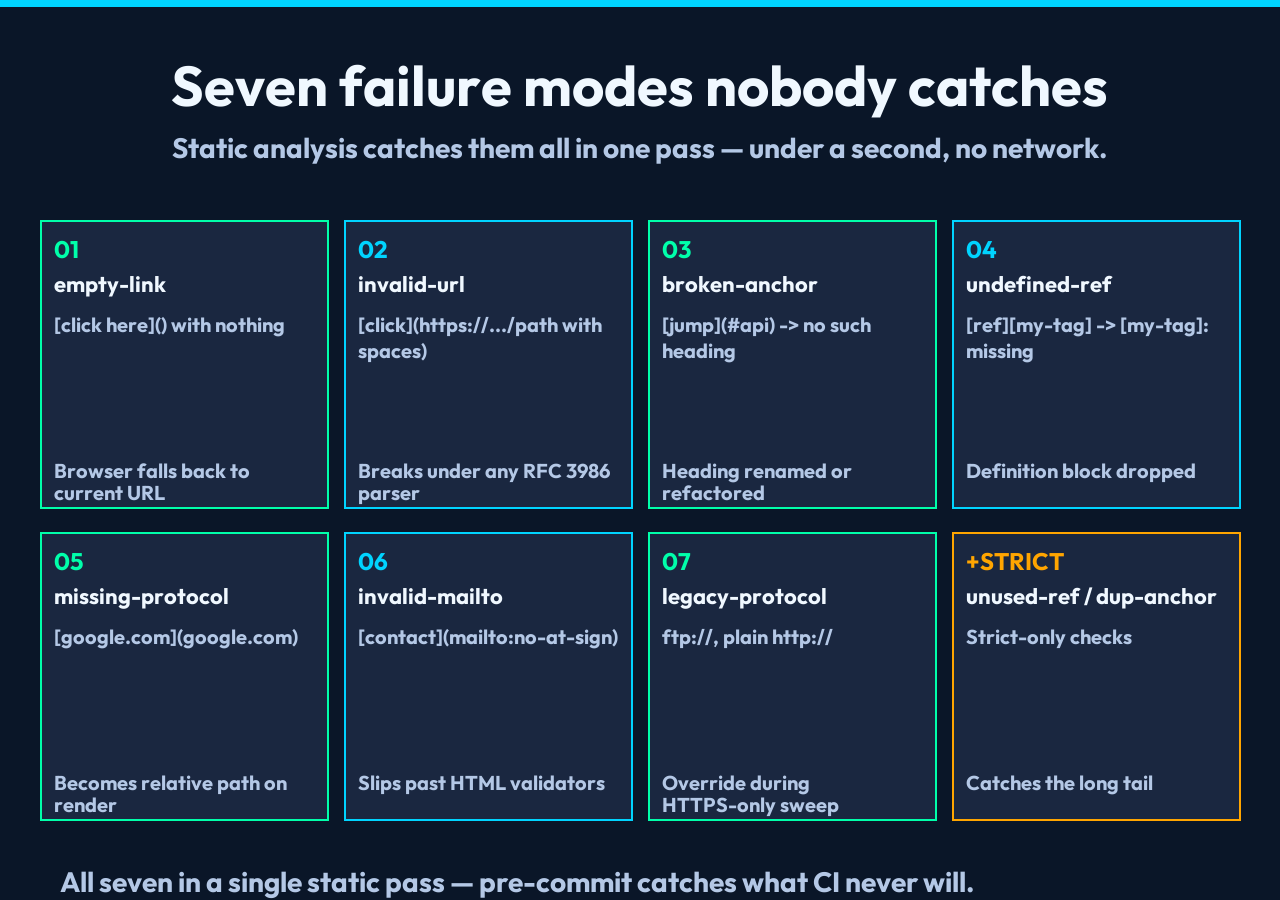
A Markdown link is not a string — it is a piece of syntax with a specific shape and a small set of ways it can go wrong. Most checkers look for one or two of them. The seven that actually break in production are these.
Empty link is the [click here]() form, with nothing after the colon. Browsers fall back to the current URL, which usually means a self-link the reader did not expect.
Unescaped spaces in URL looks like click. It looks valid and breaks the moment any tool that respects RFC 3986 touches it.
Broken anchor is jump when no heading with slug api exists — because the heading was renamed, deleted, or transformed into ## Api whose slug is api only after one renderer’s specific algorithm.
Undefined reference is a reference-style link like [ref][my-tag] somewhere, with the corresponding [my-tag]: https://... definition block dropped during a copy-paste.
Missing protocol is google.com. It looks right in a Markdown viewer and becomes a relative path on the rendered page.
Invalid mailto is contact. It slips past HTML validators because the field is technically a mailto: URL.
Legacy protocol covers ftp:// and plain http:// from a 2010 post that nobody reviewed when the team switched to HTTPS-everywhere.
Open the checker at markdown-link-checker, paste your Markdown, set Check Level to Strict, and you get all seven back as a line-numbered report in under a second — no network, no timeout, no rate limit. Run it in pre-commit and you’ll fix the broken anchors before they reach main.
What the report actually looks like
The Text Report mode groups issues by severity icon (🔴 error, 🟡 warning, 🟢 info) and stacks each one with its rule name. A real report from a README that was just about to ship looks like this:
📊 Link Check Report
━━━━━━━━━━━━━━━━━━━━━
Total links: 47  ✅ Valid: 41  🔴 Errors: 4  🟡 Warnings: 2  🟢 Info: 0

🔴 L12: empty-link — Empty link — [API docs]()
🔴 L34: invalid-url — URL contains unescaped spaces — guide
🔴 L88: broken-anchor — Broken anchor — no heading with slug "configurtion"
🔴 L92: undefined-ref — Reference link used but never defined — [RFC][rfc-7231]
🟡 L51: missing-protocol — Missing protocol — did you mean https://google.com?
🟡 L142: dup-anchor — Anchor "#installation" targeted by 3 links
Four real errors and two warnings, sorted by line number, ready for sed -i or PR comment. The Strict mode adds three more categories — unused reference (you defined [rfc-7231]: ... but stopped referencing it), duplicate anchor targets (three different ## Installation headings created a slug collision), and legacy-protocol (the old http:// post that should be HTTPS). For new codebases the Basic level (format + broken anchor) is enough; for any doc that survives past a year, run it on Strict.
You can swap to JSON report and pipe the same data into a CI check that fails the build on any 🔴 error — the response shape includes totalLinks, valid, errors, warnings, infos, and the per-issue lineNum, rule, severity, and url.
The rules run in this order
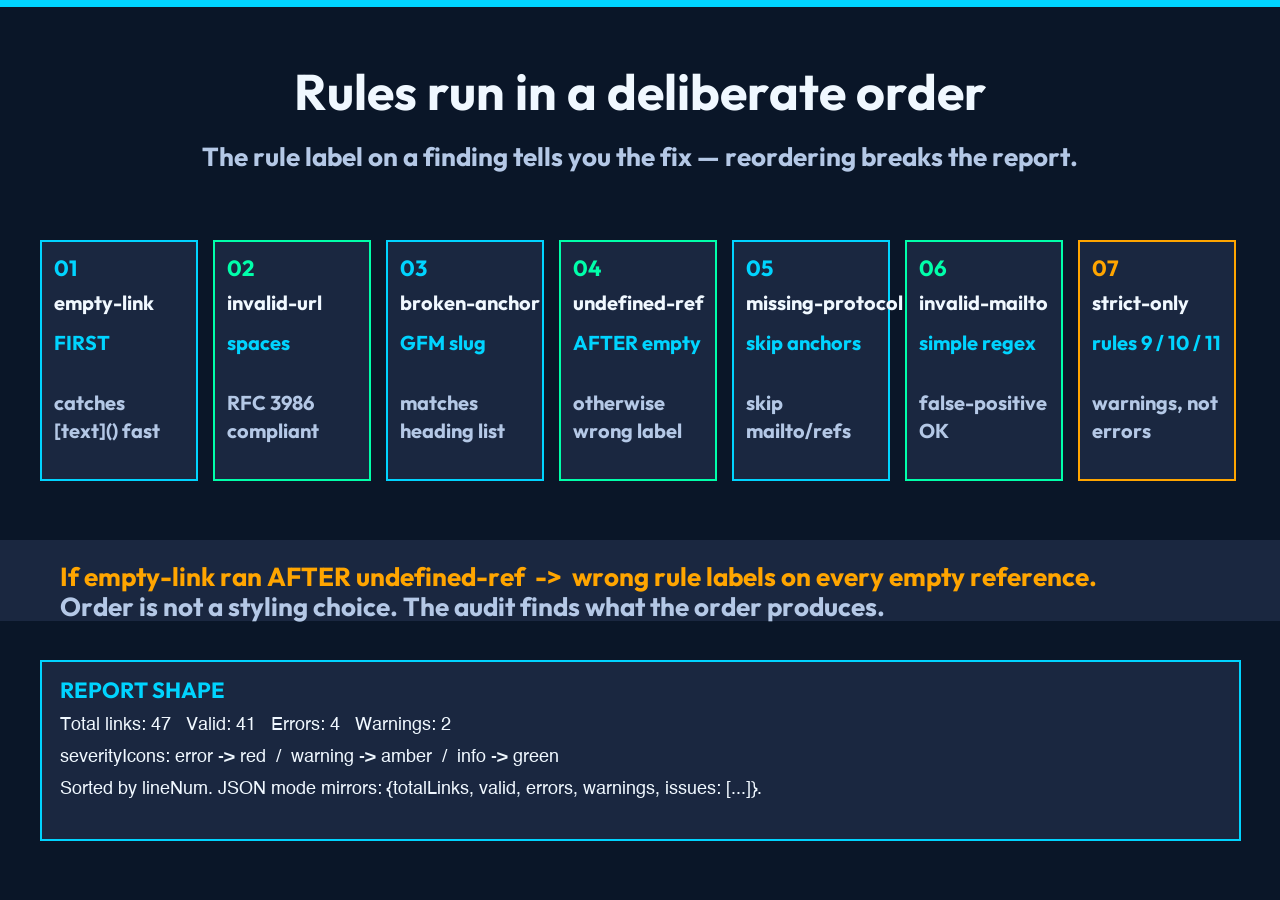
The checker’s implementation walks each link and applies the rules in a deliberate sequence so the report is the one you actually want.
Empty link is checked first for inline-style links. Reference-style links with an empty URL get a different rule (undefined-ref, rule 4) because that is almost always the more interesting finding.
Unescaped spaces uses the same space-character regex that WordPress and Pandoc use when normalizing URLs during export.
Broken anchor is a hash-prefix check — #anchor URLs are matched against the slugs derived from your headings via the standard GitHub-flavored-Markdown algorithm (lowercase, spaces to dashes, strip non-alphanumerics). The algorithm is the same one markdown-link-extractor uses, so if one tool says the anchor exists, the other will not contradict it.
Undefined reference fires when the link is reference-style with a missing or empty definition block. The reference’s line number is the use-site, not the (non-existent) definition.
Missing protocol skips anchors, mailto: links, reference-style unresolved links (rule 4 catches those), and protocol-relative URLs like //cdn.example.com/lib.js. Everything else gets the warning.
Invalid mailto parses the part after mailto: and applies the simplest viable email regex — [non-space]@[non-space].[non-space]. False positives are louder than false negatives here, on purpose.
Strict-only: legacy protocol, strict-only: unused reference definitions, strict-only: duplicate anchor targets. None of these are errors in any reasonable sense; they are warnings/information that almost always mean refactoring is overdue.
The order matters. If missing-protocol ran before broken-anchor you’d get spurious warnings on every internal doc link whose target heading got renamed. If empty-link ran before undefined-ref you’d get the wrong rule label on every empty reference-style pattern. The post-fix report is the artifact you ship to your team — getting the rule labels right matters more than the line count.
Two passes you cannot skip
The fastest way to get to a clean Markdown codebase is to run the tool twice — the second pass almost always catches something the first missed.
Pass 1 (Basic). Catches format errors and broken anchors. This is the “did I break anything obvious” pass. Run it on every commit that touches a Markdown file, even typos in code blocks, because the tool counts links inside code fences too (correctly, since the rendered page will too).
Pass 2 (Strict). Run on the entire docs/, README.md, and CONTRIBUTING.md corpus before each release. The strict-only rules (unused-ref, dup-anchor, legacy-protocol) are the kind of thing nobody notices during a busy sprint because the page still renders — five years later, a reader types #installation into the address bar and lands on the wrong section.
A reasonable automation layout: pre-commit hook runs Basic on staged files, CI runs Strict on the full *.md glob, and release checklist runs Strict on docs/ with --report-format=json and stores the artifact alongside the build log.
Where this fits in the Markdown tooling stack
The checker is the validation step in a typical pipeline: author with a linter that runs on save (markdown-linter for style), bundle multi-file docs into a single deliverable (markdown-merger when shipping a release), format tables when GitHub’s pipe-table renderer gets weird (markdown-table-generator), and validate every link before commit (this tool). The four together cover the full lifecycle without any of them making a network request.
If you are converting from another format — HTML to Markdown, CSV to Markdown, Excel to Markdown — the convertor’s output should pass through the checker before being committed, because converted Markdown is a famous source of javascript: URLs, mailtos with spaces, and anchors that point at heading slugs that the converter generated differently than GitHub would. Pointing any converter’s output at the validator before commit is the cheapest insurance against format-migration link rot.
When to run it (a one-page cheat sheet)
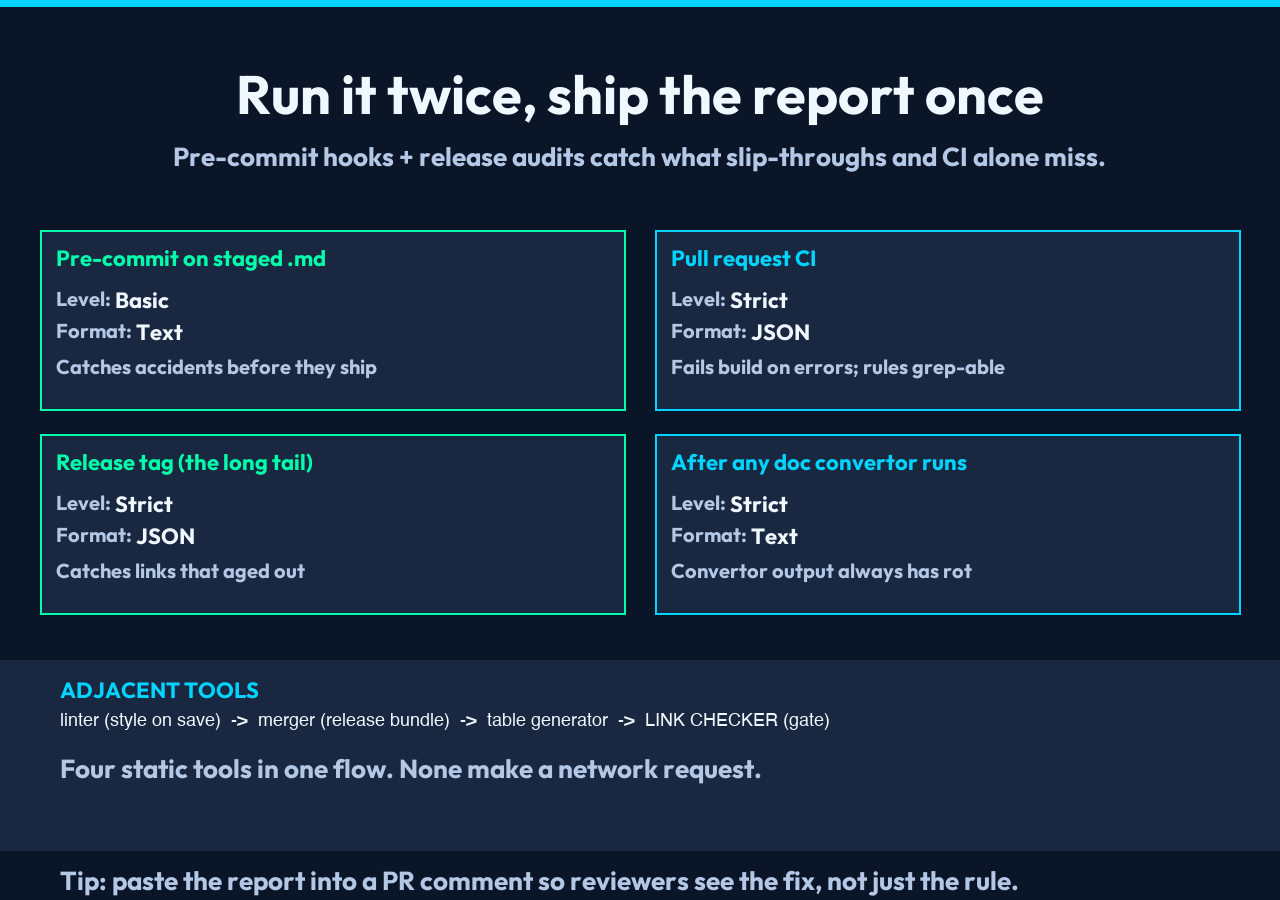
| Trigger | Level | Format | Why |
|---|---|---|---|
Pre-commit on staged .md | Basic | Text | Blocks accidental renames from shipping |
| Pull request CI | Strict | JSON | Fails build on errors; JSON makes the rules grep-able |
| Release tag | Strict | JSON | Catches links that aged out between releases |
| After any doc generator runs | Strict | Text | Convertor output almost always has stale anchors |
| Quarterly docs/ audit | Strict | JSON + saved artifact | Tracks the long tail of legacy protocols |
For ad-hoc checks (you wrote a new post, you want to make sure the anchors work), open the tool directly, paste, run. No login, no upload, no rate limit.
Wrap-up
Markdown link rot is one of the few software-quality problems that is fully preventable with a 200ms offline check — and most teams never bother, because the standard tools either ping the network (too slow for monorepos) or only catch the obvious subset (missing the seven failure modes above). Static, network-free, seven-rule Basic plus three-rule Strict, with a JSON mode for CI: this is what every team needs and almost nobody has built. Bookmark it, wire it into pre-commit, and your readers will never click a broken link again.
Explore the rest of the Markdown toolkit — merger, preview, table generator, linter — and the Markdown Link Checker itself, all in one place.
