
Most fertilizer bags print three numbers like 10-10-10, but the bag itself is never a single chemical — it is a blend of urea, DAP, potash, and filler mixed in the right ratio. The Fertilizer N-P-K Blend Calculator solves that blending problem for you: enter your target analysis, list the base fertilizers you actually have on hand, and the tool returns the exact kilograms of each plus a parts ratio that scales to any batch size.
What “N-P-K on the bag” actually means
Every commercial fertilizer label prints three percentages in the form N-P-K. They are always in the %N — %P₂O₅ — %K₂O convention, no matter the country or brand, so a 10-10-10 label means a 100 kg bag contains 10 kg of nitrogen, 10 kg of phosphate expressed as P₂O₅, and 10 kg of potash expressed as K₂O. The numbers are nutrient guarantees, not ingredient weights — the rest of the bag is some combination of other fertilizer salts plus inert filler or carrier material.
This matters because the percentages don’t add up to anything you can directly weigh out. A 10-10-10 target is not “10 kg of three different powders”; it is “10 kg N + 10 kg P₂O₅ + 10 kg K₂O, with whatever inert mass is needed to hit the total batch weight you specified.” A practical blend almost always includes filler because no combination of pure single-nutrient bases fills 100% of the bag while also delivering each nutrient at the target percentage.
Why a calculator, not a guess
Three pure-ish base fertilizers cover most lawn, garden, and small-farm blends:
– Urea at 46-0-0 is the cheapest nitrogen source.
– DAP (diammonium phosphate) at 18-46-0 contributes both N and P.
– Muriate of potash at 0-0-60 delivers almost all the K.
For the classic 10-10-10 target, mixing these three by hand means solving three simultaneous equations in three unknowns every time you change the batch weight. The blend for 1 kg is not the same as the blend for 100 kg, and a small error in any one number pushes the achieved analysis off-target by several percent. The N-P-K blend calculator solves that system as a least-squares problem and prints the answer in both kilograms and a parts ratio, so you can scale by eye or by spreadsheet.
A worked example: 10-10-10 from three bases
Target 10-10-10, batch 100 kg, base fertilizers:
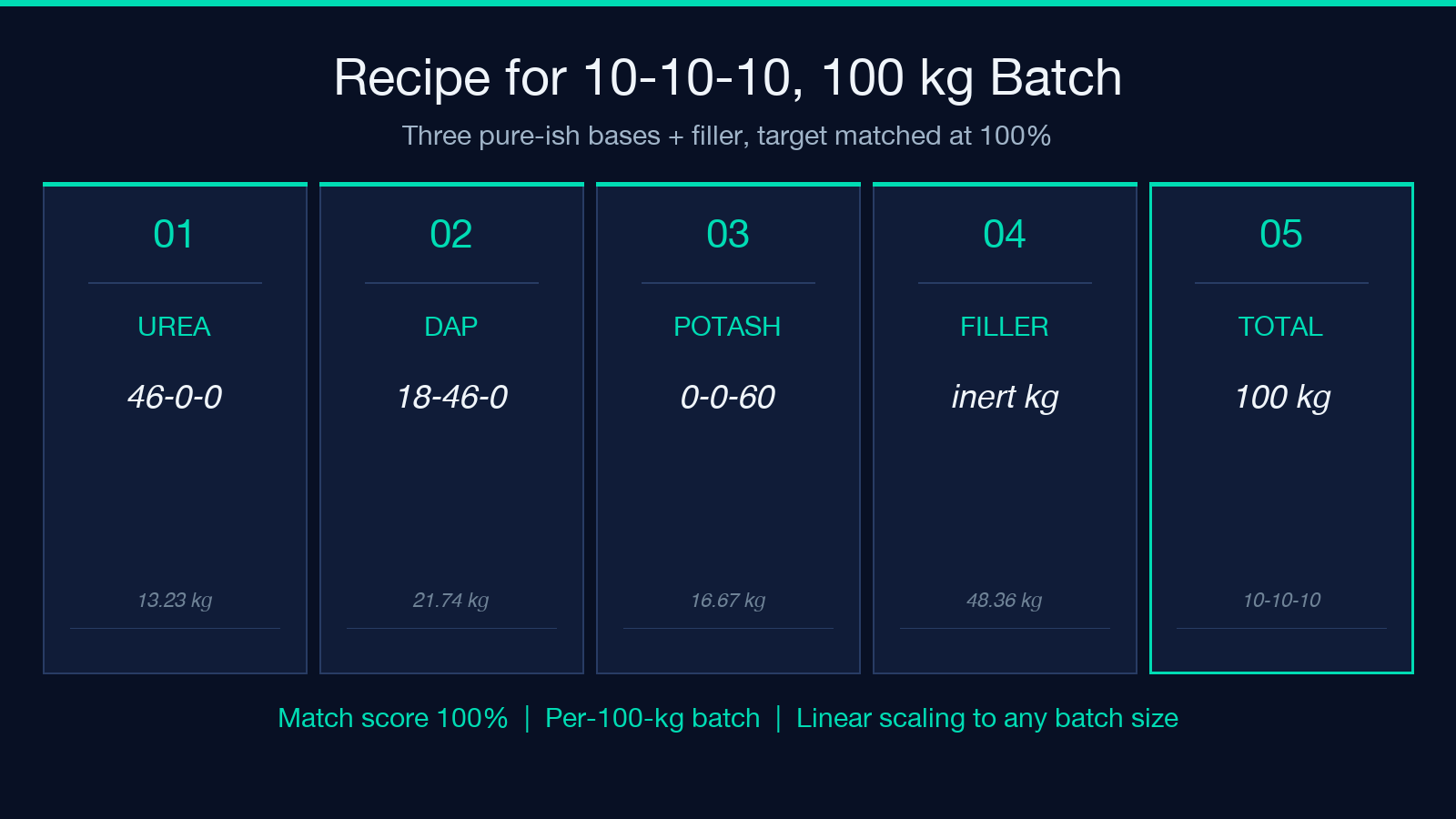
– Urea = 46-0-0 – DAP = 18-46-0 – Muriate of potash = 0-0-60
The tool reports a match score of 100% and a recipe of:
– 13.23 kg urea
– 21.74 kg DAP
– 16.67 kg muriate of potash
– 48.36 kg filler
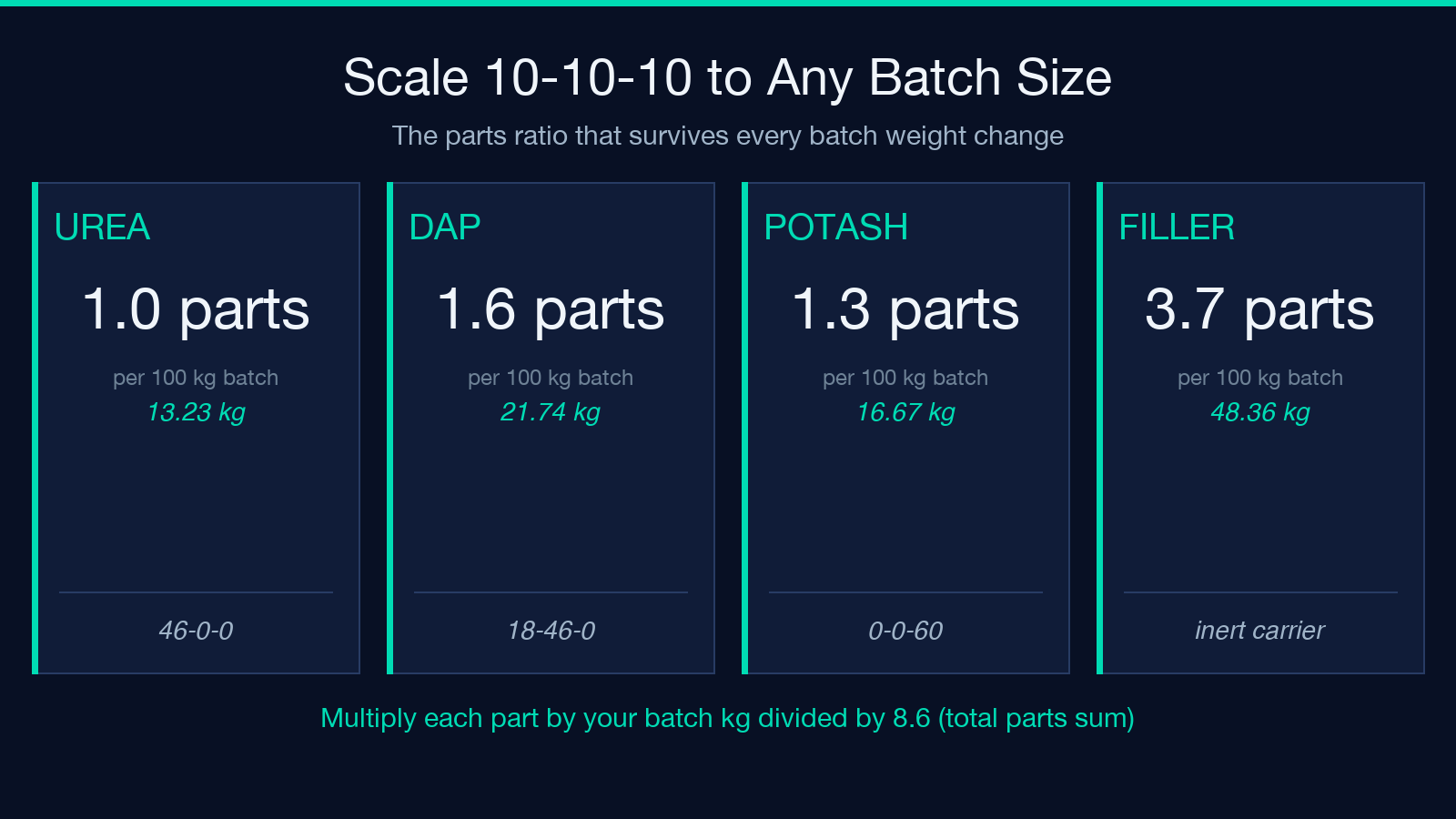
Three nutrient salts sum to 51.64 kg of active material; the remaining 48.36 kg is inert carrier (sand, prilled limestone, or whatever neutral mass is on hand). The achieved N-P-K is 10.00-10.00-10.00 within rounding. The parts ratio is roughly 1.0 : 1.6 : 1.3 : 3.7 (urea : DAP : potash : filler), which is the format to scale to any other batch size — multiply each part by your total-batch target divided by the part-sum.
When the exact target is unreachable
The tool will not silently produce garbage. If you try to hit 10-30-20 with only MAP, urea, and sulfate of potash, the exact target exceeds what those bases can deliver without overshooting the batch weight — there isn’t enough K₂O to fill 20% of the bag. The tool returns the closest reachable analysis instead, with a diagnostic note explaining the constraint.
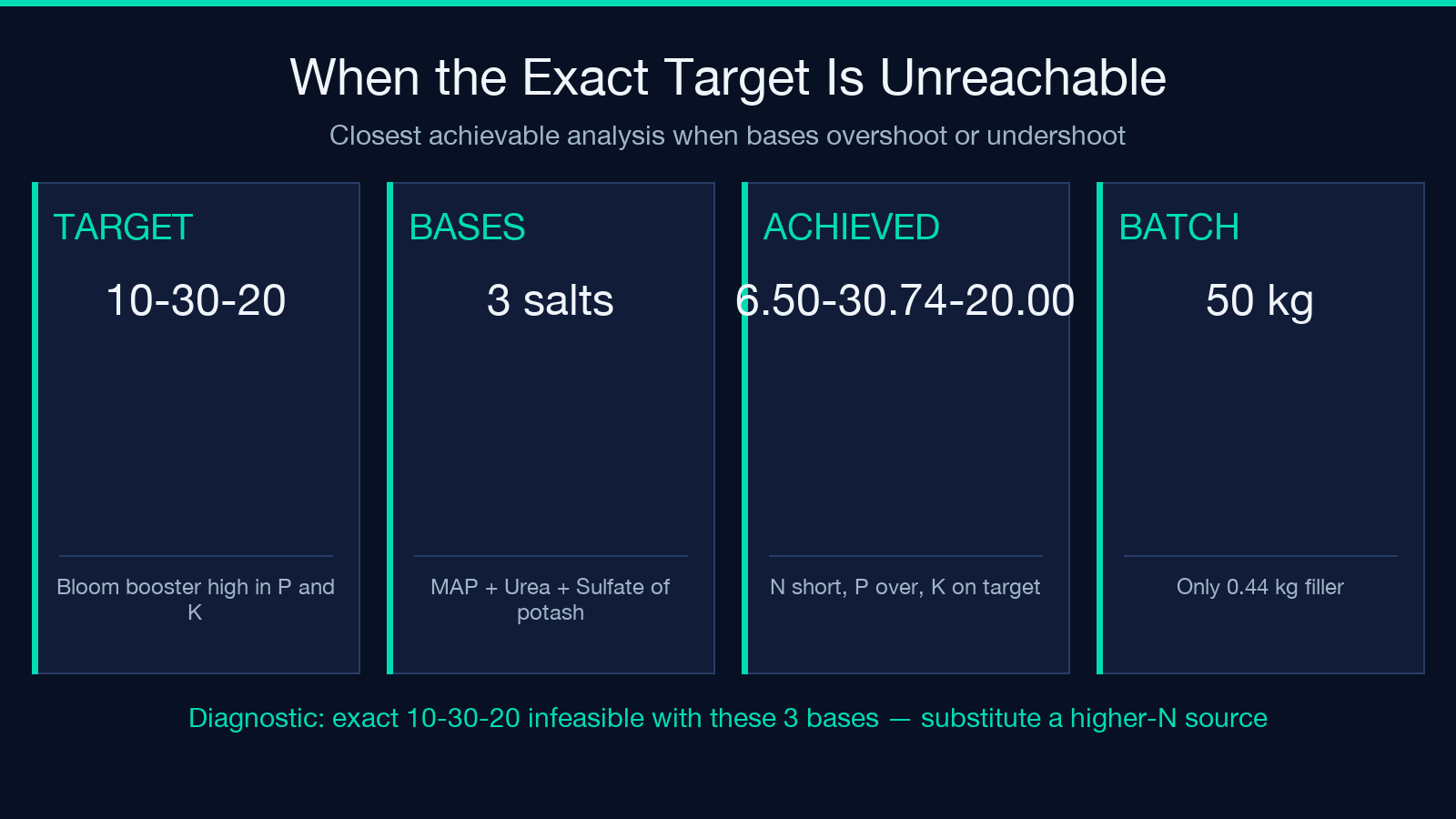
For a 10-30-20 target with MAP = 11-52-0, Urea = 46-0-0, Sulfate of potash = 0-0-50, 50 kg batch, the achievable analysis lands at about 6.50-30.74-20.00 — phosphate is over-delivered because MAP carries more P than the target needs, but N is short. To actually reach 10-30-20 you would need to add either more urea (which pushes N up but doesn’t fix the K₂O shortfall) or substitute ammonium nitrate for the urea source. The diagnostic surfaces this immediately rather than letting you mix a batch that is silently 35% off on nitrogen.
How to read the diagnostic notes
Three flags appear in the result panel and each means something different:
– “Exact match reachable” — the requested N-P-K is solvable; the blend ingredients add up without filler overshoot.
– “Closest achievable” — the target is infeasible with the bases given; the recipe shows the nearest reachable analysis.
– “Multiple solutions” — different base combinations can hit the same target; the tool picks the lowest-filler option by default, but you can swap bases manually and re-run.
If a batch requires more than ~50% filler, that is usually a signal you are missing a base. For instance, hitting a high-K target with only urea and DAP needs almost everything else to be potash, which is fine if you have it. If you don’t, the diagnostic will say so.
Custom analyses and reference bases
The tool ships with twelve common commercial fertilizers as a copy-paste reference table — urea, DAP, MAP, TSP, muriate of potash, SOP, ammonium nitrate, ammonium sulfate, potassium nitrate, calcium nitrate, magnesium sulfate, and urea-ammonium nitrate solution. Most garden centers and farm-supply stores stock at least eight of those. For anything more exotic, you can declare a custom analysis on the same line: MyLocalBrand = 14-7-21 works the same as Urea = 46-0-0.
This is useful when a label uses a slightly different convention (some brands print P as P instead of P₂O₅ — convert by 2.29 before entering). It also covers organic and mineral blends like blood meal = 12-0-0 or bone meal = 4-12-0, which play the same role as their synthetic equivalents.
Scaling to any batch size
The kg recipe scales linearly with batch weight: a 50 kg batch needs half the kg of every ingredient in the 100 kg recipe. The parts ratio is more useful when the batch size changes frequently — gardeners often mix in 5, 10, or 25 kg lots, and a parts ratio of 1.0 : 1.6 : 1.3 : 3.7 for 10-10-10 can be multiplied by any scalar without recomputation. The tool returns both numbers so you can use whichever fits the workflow.
One pitfall: the filler component does not scale infinitely low. Below ~1 kg total batch, the rounding errors in the nutrient percentages become comparable to the batch mass itself, so the achieved analysis drifts even though the kg values look correct. For tiny batches (under ~5 kg), consider pre-mixing a larger master batch and dispensing from that.
When not to use a blend calculator
A blend calculator is the right tool when you have a target analysis and a list of base fertilizers. It is not the right tool when:
– You only have one base and want to know its analysis (read the bag). – You need a slow-release profile (most calculators assume instant-release salts; controlled-release coatings change the effective analysis over time). – Your target is set by soil-test recommendations rather than a bag label (convert lbs/acre or kg/ha to a target N-P-K first, then blend).
For soil-test-driven targets, the workflow is: convert the recommendation to a target analysis → blend to that analysis → apply at the rate the soil test specified. The blend calculator handles the middle step. If you want to explore similar utility tools for related mixing problems — solution dilutions, batch dilutions, percentage-to-ratio conversions — the Elysia Tools utilities hub collects them.
The hardest part of small-scale fertilizer blending is not the chemistry — it is that the numbers on the bag are guarantees, not ingredient lists, and the conversion from guarantee to ingredient requires solving a small system of equations every time the batch size changes. A blend calculator turns a 10-minute manual calculation into a 10-second paste-and-read. For most gardeners and small-scale growers, that is the difference between “I think this is close enough” and “this batch is exactly 10-10-10.” When you actually do care about exact analysis — seedling mixes, foliar feeds, hydroponic stock solutions — the match-score column tells you, in one number, whether your blend got there.
