
You can paste any Tailwind class into a bracket and the parser still has to guess which CSS property you meant. Arbitrary values are the escape hatch Tailwind built for the moment when the design tokens end and the one-off value begins, and almost every team ends up using them in production more than they admit. The Tailwind Arbitrary Value Playground is a no-runtime playground that takes a class like w-[calc(100vh-4rem)] or [mask-type:luminance], recognizes three bracket shapes plus two overload-friendly variants, and emits the exact CSS rule with a live preview tile. It is offline, it does not execute Tailwind, and it does the disambiguation work your editor will not do for you.
The Three Shapes You Will Actually Use
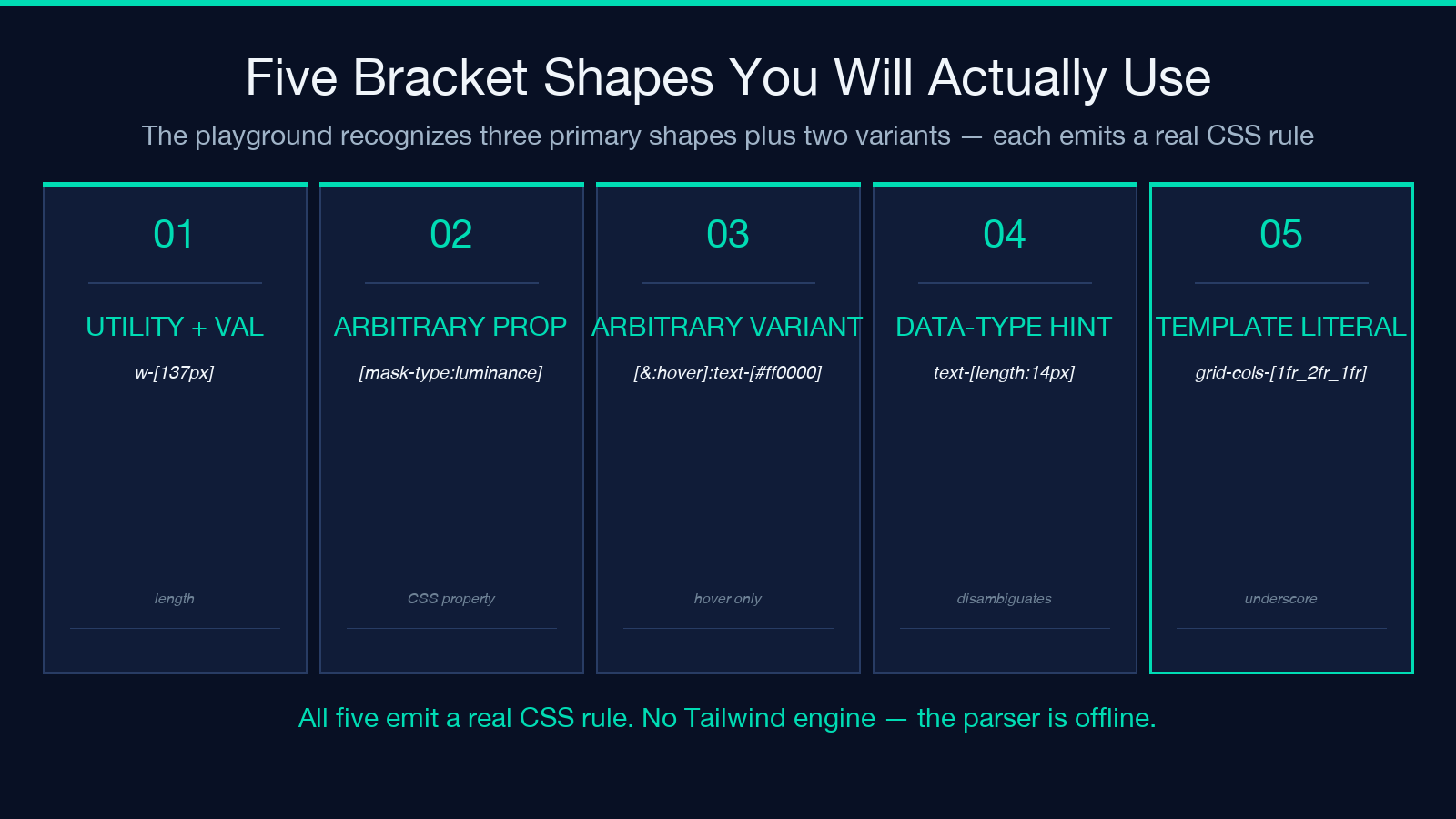
Every Tailwind arbitrary-value class is one of three shapes, and they parse differently. The first is utility + value — the most common form, where a static utility like w- or text- or bg- carries a custom value inside the brackets, as in w-[137px], text-[#bada55], or rounded-[14px]. The second is an arbitrary CSS property — a bare [property:value] with no leading utility, used for CSS properties Tailwind does not expose as utilities, like [mask-type:luminance] or [scroll-snap-type:y_mandatory]. The third is the arbitrary variant — a selector wrapped in brackets that produces a custom :hover, :focus, or media-query scope, as in [&:hover]:text-[#ff0000].
A static utility class outside brackets is listed by the playground but cannot be expanded, because there is no Tailwind engine to evaluate the prefix. The bracket syntax is the only line the offline parser is willing to cross. If you find yourself writing w-100vh-4rem with no brackets, the parser will not see an arbitrary value at all — Tailwind throws “class not found” and your CSS does not apply.
Why the Same Prefix Produces Four Different CSS Properties
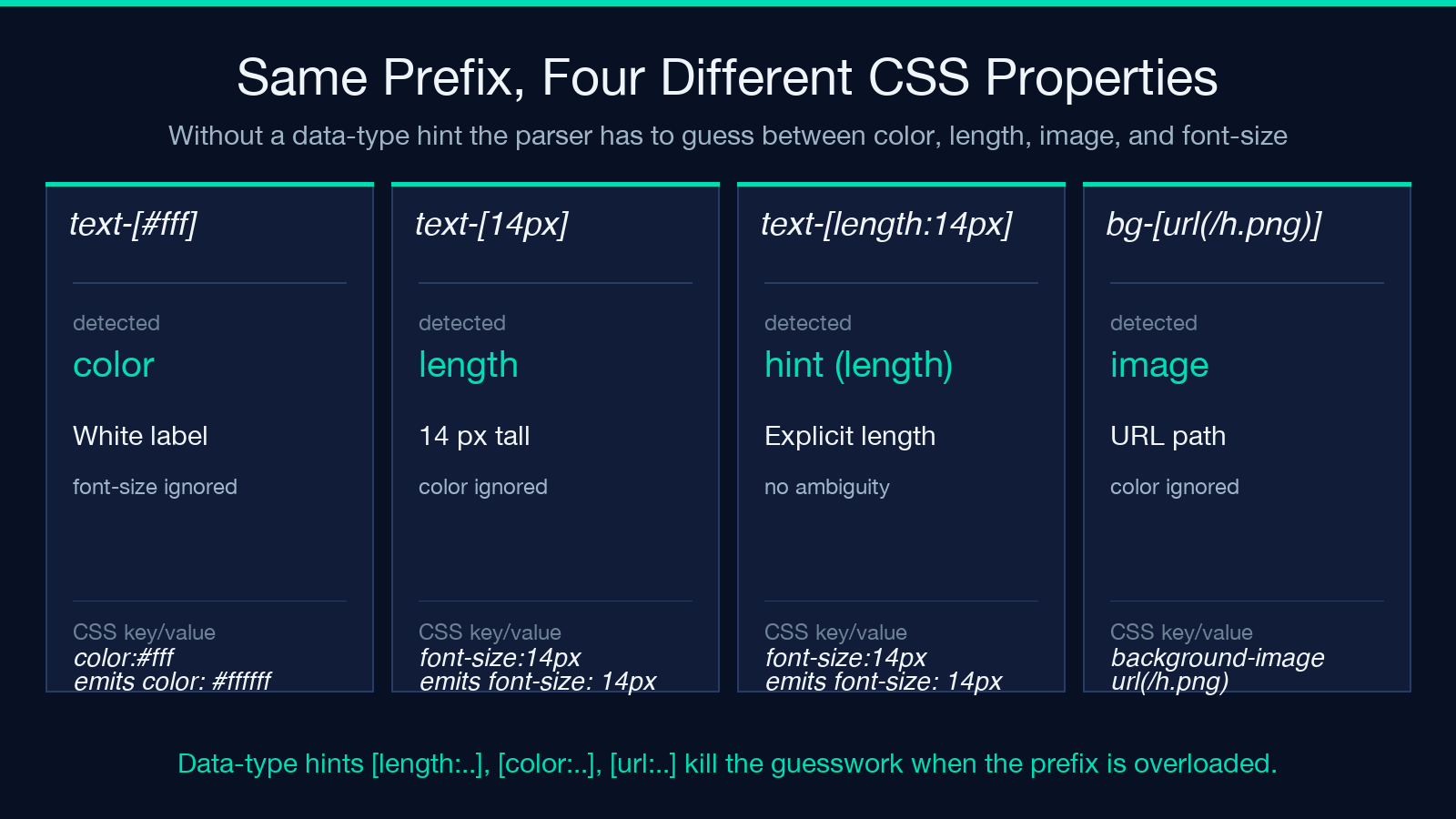
This is the silent bug in arbitrary-value chains that nobody catches until a code review. The prefix text- can mean color or font-size; the prefix bg- can mean background-color or background-image; the prefix border- can mean border-color, border-width, border-style, or border-radius. Without a data-type hint, the parser has to guess — and the default guess is wrong often enough to matter.
The fix is the data-type hint, written as text-[length:14px], text-[color:var(--brand)], or bg-[url(/hero.png)]. The parser uses the hint to disambiguate utilities whose prefix is overloaded, then ignores the hint when generating the CSS rule. The downside is verbosity: text-[length:14px] is longer than text-[14px], but the hint kills the guesswork and prevents the silent-misroute bug. The Tailwind Arbitrary Value Playground recognizes both forms and surfaces the detected data type on every class, so you see immediately whether the parser will treat your text-[#fff] as a color or a font-size.
What the Parser Actually Emits
For w-[137px], the playground emits a CSS rule that expands to .demo { width: 137px; } in expanded output or the equivalent one-line form in compressed output. For [mask-type:luminance], the rule is the bare property — .demo { mask-type: luminance; }. For [&:hover]:text-[#ff0000], the playground wraps the inner rule in a :hover scope: .demo:hover { color: #ff0000; }. For grid-cols-[1fr_2fr_1fr], the underscores collapse to spaces and Tailwind emits grid-template-columns: 1fr 2fr 1fr;.
The data-type hint that the playground surfaces is the length:, color:, url:, or percentage: segment in the bracket. When the playground reports hint (length) for text-[length:14px], the parser has decided this is a font-size measurement and emitted font-size: 14px;. When it reports length for the bare text-[14px], the result is the same CSS rule — but only because the prefix text- defaults to length when no hint is given. The same class with the prefix bg- would default to color.
Static Classes and the Bracket Boundary
The playground refuses to expand anything outside brackets. A class like flex or items-center or rounded-lg cannot be evaluated without a full Tailwind engine, because their CSS rule depends on the theme tokens — --tw-radius, --tw-spacing, and the design-system scale. The playground focuses exclusively on the escape hatch, the bracket syntax that bypasses the token scale entirely. This is a deliberate scope decision: a tool that tried to expand static classes would need to either ship the Tailwind runtime or maintain a parallel token database, and both paths end with the tool falling out of sync with the real Tailwind output.
The same boundary is why you cannot use w-[calc(100vh-4rem)] and w-1/2 in the same chain without watching the parser carefully. The first is a bracket syntax the playground handles; the second is a static class the playground lists but does not expand. In production code both work because Tailwind’s runtime does its own evaluation. In the playground, the bracket handles its own translation and the static class is acknowledged but skipped. The renderer will still draw the preview for both, because the preview layer treats the bracket value as raw CSS and renders it without consulting the design system.
Why an Offline Parser Is the Right Tool
The first version of any arbitrary-value playground tends to be a server-side renderer that runs Tailwind under the hood. The result is a slow loop, a build pipeline that breaks every time Tailwind ships a minor, and a dependency on node_modules running in production. The offline parser used by the Tailwind Arbitrary Value Playground is a different approach — a regex-driven translator that recognizes the bracket shapes, parses the value with a minimal CSS-shape detector, and emits the rule directly. No node process, no Tailwind version, no rebuild.
The trade-off is lossiness. Anything that depends on the design token scale — custom breakpoints, theme overrides, plugin-injected utilities — falls outside the parser’s scope, because the parser does not know what your theme contains. For bracket-syntax work specifically, the offline parser matches what Tailwind 3+ does at compile time, because Tailwind itself emits these classes by string substitution rather than runtime evaluation. The playground is a faithful translator of the bracket escape hatch and nothing else.
The Five-Question Audit You Run on Every Chain
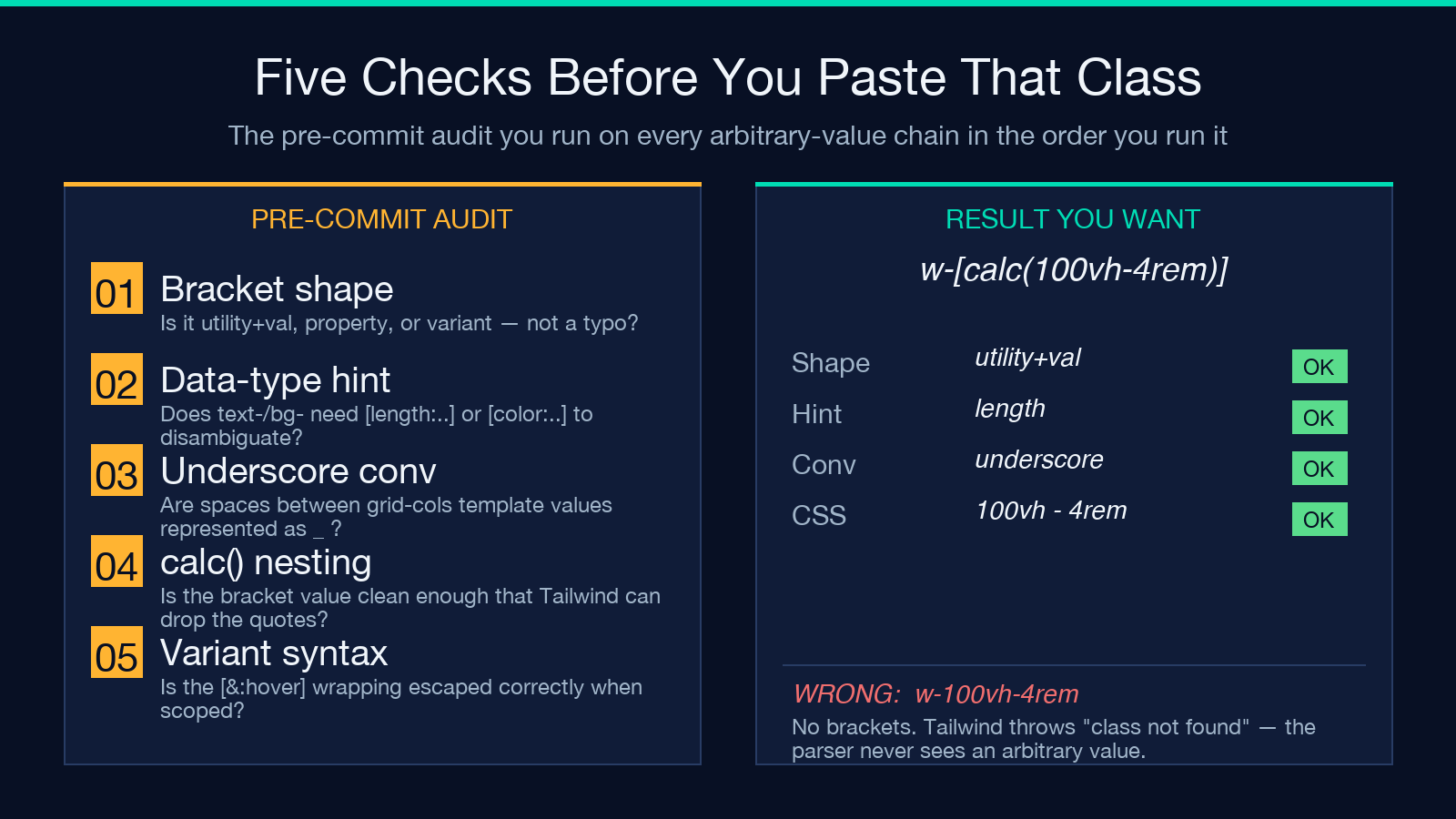
Before you commit any arbitrary-value class, run five checks. One — is it a recognized bracket shape, or have you accidentally written a static class with no brackets? Two — does the prefix need a data-type hint, or are you relying on the parser’s default guess? Three — are the spaces in your template literal represented as underscores? Four — is the bracket value clean enough that Tailwind can drop the ' ' quotes? Five — is the [&:selector] wrapping escaped correctly when you are in a scoped CSS context like a CSS module?
The five-question audit is the same one the playground uses to flag uncertain parses. A class flagged as hint (length) passed check one (recognized shape), two (hint present), three (no underscore ambiguity), four (clean value), and five (no variant scoping). A class flagged as just length without the hint passed one and three and four, but failed two silently — the parser made the right choice by accident, not by design. The audit exists to catch the accidental choice before the CSS reaches production.
When to Reach for the Playground vs the Editor
Two heuristics. Reach for the playground when the value is non-trivial — anything with calc(), any CSS variable, any data-type hint, any arbitrary property or variant. The editor will autocomplete the bracket syntax; it will not flag a misused prefix or a missing underscore. Reach for the editor when the class is a static utility or a templated bracket you have already validated — the playground is the audit tool, not the daily driver. The pattern that emerges in code review is that a chain of three or more arbitrary-value classes gets pasted into the playground first, the audit reports are skimmed, then the chain lands in the PR.
The bracket syntax is one of the few parts of Tailwind that is testable without the runtime. The rule-emission logic is deterministic, the data-type routing is rule-based, and the only moving parts are the parser’s three shapes. If you find yourself debugging a layout where the wrong CSS property is being applied, a five-second pass through the playground will tell you whether the parser is at fault or your chain is misrouted. It is the fastest verification tool for the bracket escape hatch, and it does not need a build step.
Beyond Brackets: Where the Playground Stops
One honest limit. The playground handles the bracket escape hatch, not the rest of Tailwind. Design-token utilities like bg-brand-500, theme plugins like @apply from custom presets, and the responsive breakpoint machinery all sit outside the bracket parser. If your chain mixes theme colors with bracket values, the playground will list the theme utility but cannot tell you what color brand-500 resolves to without the Tailwind config.
That trade-off is acceptable for two reasons. The first is that the bracket syntax is where most production surprises live — the misrouted text-, the silently dropped calc(), the underscore-vs-space ambiguity. The second is that the playground is meant to be the audit tool, not the compiler; the runtime it replaces is not Tailwind’s full engine, only the bracket-shape translator. Run the bracket chain through the playground, then let the real Tailwind build handle the theme tokens. The split is clean and the escape hatch is the part worth a dedicated tool. For adjacent design work, the Elysia Tools design category has more options worth a look — including Figma Tokens Export, which actually does export the theme tokens the playground refuses to evaluate.
