
Morse code is not merely a character substitution. The letters matter, but a usable signal also depends on the pauses between elements, letters, and words. That is why a translator that can turn SOS into ... --- ... is only half finished until you can hear whether the rhythm still makes sense. The Morse Code Translator on Elysia Tools puts encoding, decoding, timing, and live playback in one compact browser workflow.
Translation is the easy half
At the text layer, International Morse Code assigns a sequence of dits and dahs to letters, digits, and common punctuation. Encoding replaces each supported character with that sequence; decoding reverses the mapping. The tool supports both directions and follows the International Morse Code conventions described by ITU-R M.1677.
But a table lookup does not explain how the message sounds. A human listener does not see punctuation between signals. They distinguish a dit from a dah by duration, then use silence to decide whether the next sound belongs to the same character, the next character, or the next word. The useful mental model is therefore not “letters become symbols.” It is “letters become timed events.”
That distinction matters whenever you move from a printed study sheet to radio practice, an accessibility demo, or a classroom exercise. A correct string can still be difficult to recognize if its spacing is wrong.
One space, three units, seven units
The visible format uses one space between characters and a slash between words. For example, the source’s real greeting example decodes .... . .-.. .-.. --- / .-- --- .-. .-.. -.. as HELLO WORLD. The slash is a readable stand-in for a longer silent gap; it is not itself transmitted as a tone.
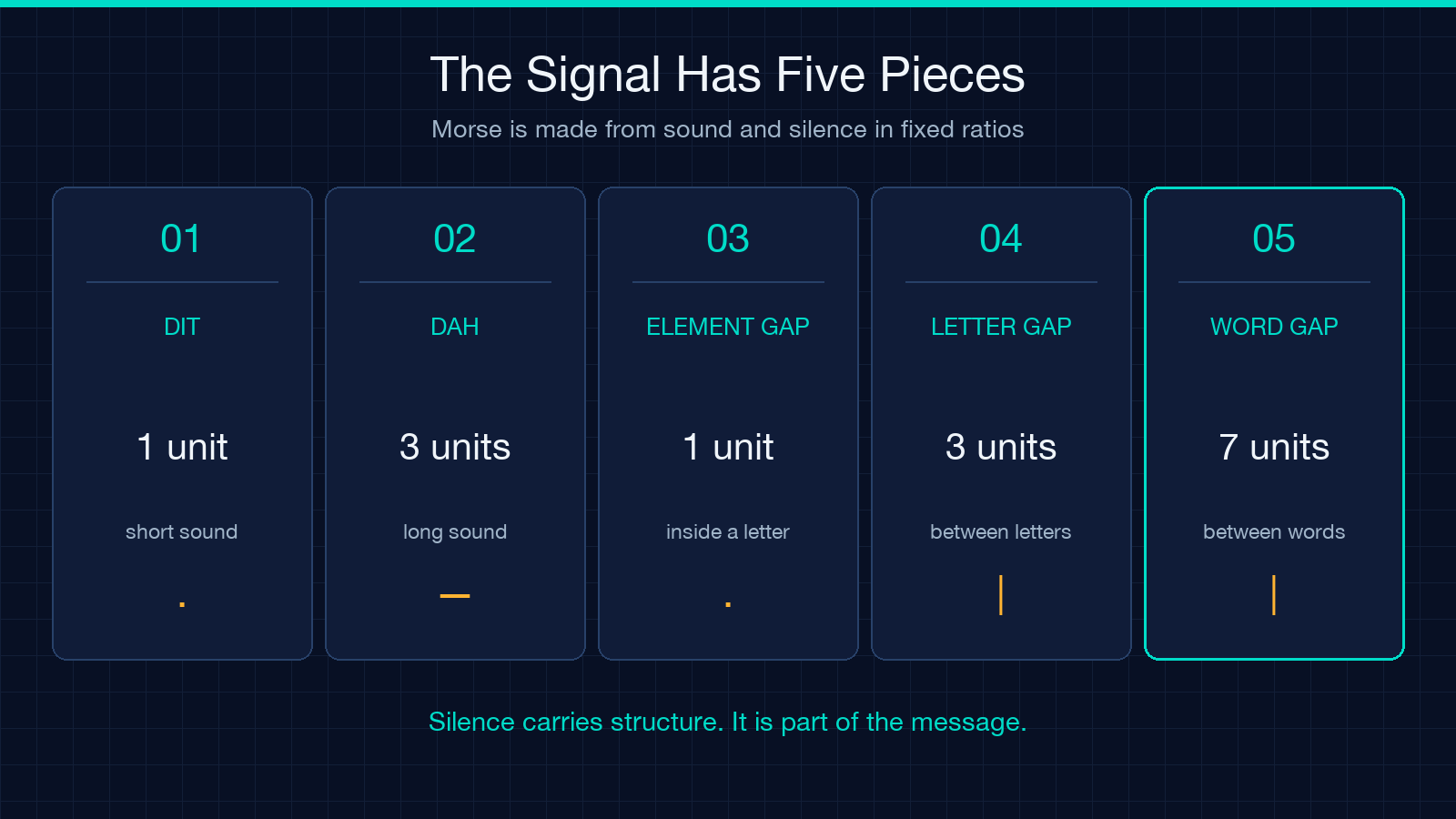
Standard timing is built from one unit. A dit lasts one unit, while a dah lasts three. Silence inside one character lasts one unit, the gap between characters lasts three, and the gap between words lasts seven. Those ratios are the grammar of the sound.
This is why copying a line of dots and dashes without its separators is destructive. The tones may survive, but the boundaries disappear. Preserve a single space between characters and use / or a gap of at least three spaces between words when preparing input for the translator.
WPM has a physical duration
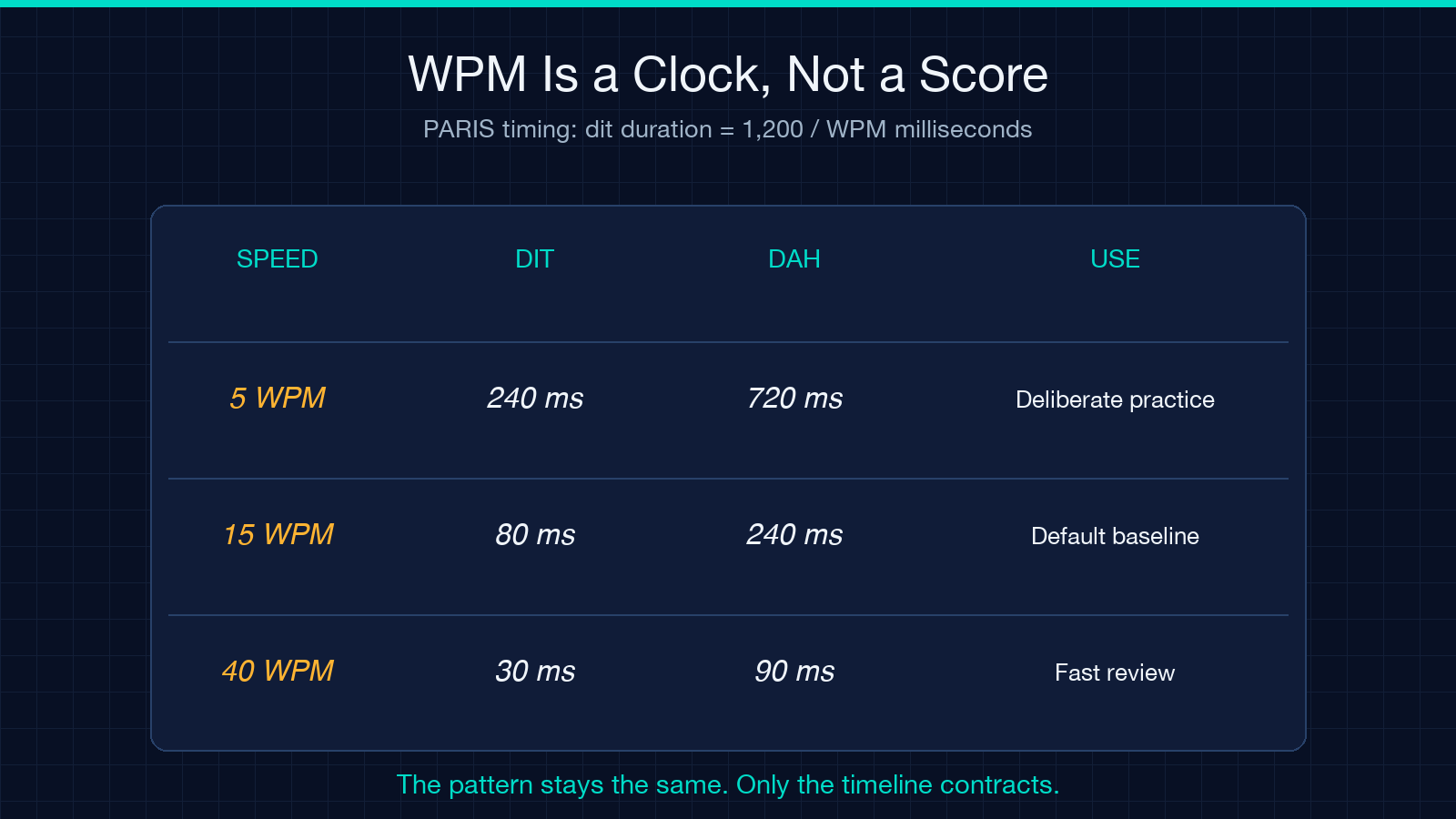
Words per minute sounds like a productivity metric, but here it controls the length of every timing unit. The tool uses the PARIS standard formula: dit duration in milliseconds equals 1,200 divided by WPM. At the default 15 WPM, a dit lasts 80 milliseconds and a dah lasts 240 milliseconds. At 5 WPM, the same dit stretches to 240 milliseconds; at 40 WPM, it contracts to 30.
The available range is 5 to 40 WPM, which is broad enough for deliberate beginner practice and much faster review. Changing the speed does not alter ... --- .... It changes how long each element and gap occupies the timeline.
Start slower than your reading ambition suggests. Recognition depends on hearing a character as one rhythmic shape, not counting individual marks. Increase speed only when the pattern arrives as a unit. Speed is not proof of understanding; clean rhythm is.
600 Hz changes pitch, not language
The default playback tone is 600 Hz, with an adjustable range from 200 to 1,200 Hz. Frequency changes pitch. It does not change the encoded character, the WPM calculation, or any of the spacing ratios.
That separation is useful in practice. Choose a comfortable pitch first, then tune speed independently. A higher tone is not a faster signal, and a lower tone is not a longer dah. The browser synthesizes the signal through the Web Audio API, while a visual dot flashes with each sounding element so you can compare what you hear with the timing.
For a quick baseline, keep 600 Hz and 15 WPM. If the tone feels harsh, lower the frequency without touching WPM. If the rhythm is too compressed, lower WPM without changing pitch. One control affects the ear’s tonal comfort; the other affects the language’s temporal shape.
A two-minute encode-decode test
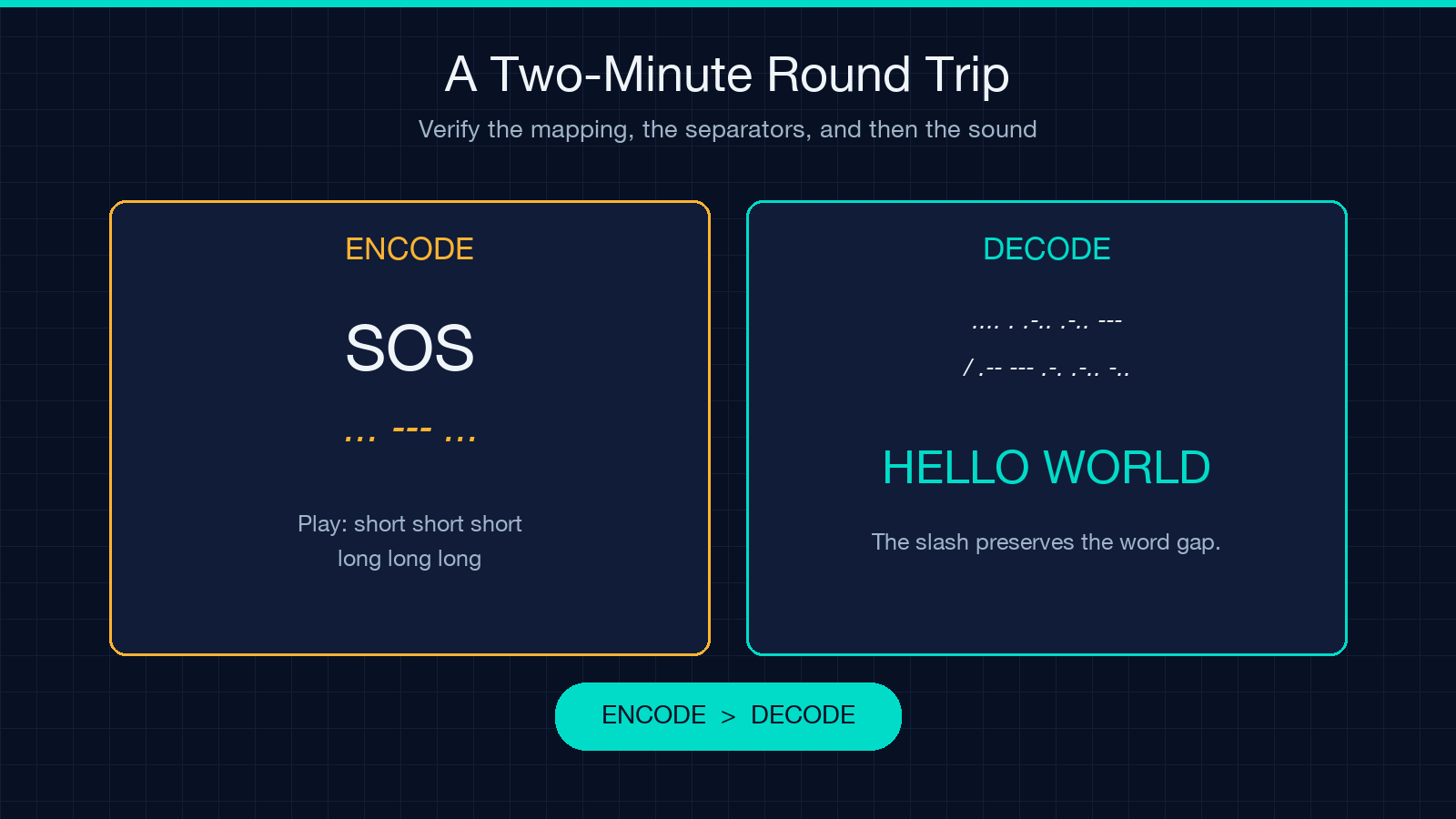
Use a round trip rather than trusting one direction. First enter SOS, select Encode, and confirm the result is ... --- .... Play it once. You should hear three short elements, three long elements, and three short elements, with letter gaps separating the groups.
Next paste the full greeting .... . .-.. .-.. --- / .-- --- .-. .-.. -.., switch to Decode, and confirm that it returns HELLO WORLD. This second example tests character spacing and the word separator, not just three famous letters.
Finally, encode a short sentence of your own, copy the result, and decode that output in a fresh pass. If the original text returns, the text mapping and separators agree. Then listen. The live playback workflow adds the test the clipboard cannot: whether those valid marks form recognizable timing.
What auto-detect can and cannot infer
Auto-detect chooses a direction from the shape of the input. If the content is mostly dots, dashes, spaces, and slashes, it treats the input as Morse and decodes it; otherwise it encodes ordinary text. This is convenient for obvious cases, especially a pasted message or a normal sentence.
It is still a heuristic, not mind reading. An unusual fragment made largely from punctuation can be ambiguous. When the result surprises you, select Encode or Decode explicitly and run the same input again. Direction is a user intent; punctuation density is only evidence.
Unsupported characters are not silently discarded. CJK characters, emoji, and other symbols without a mapping are marked in brackets such as [char]. That visible failure is valuable because it preserves the location of the problem. The text field accepts up to 10,000 characters, but short test segments make unknown symbols and spacing mistakes easier to isolate.
Where a browser tool belongs
This translator is strongest as a learning and inspection surface: paste text, see both representations, hear the signal, adjust WPM and pitch, and copy the output. It is also useful for checking a message before moving it into radio software, a microcontroller sketch, or a lesson plan.
It is not a substitute for verifying the operational rules of a real communications service. Prosigns, procedural traffic, channel conditions, and training conventions add context beyond plain text translation. The tool focuses on everyday two-way conversion plus a quick listen rather than a full waveform or spectrum workshop.
That focus is an advantage. A small interface makes the four important variables visible: input, direction, WPM, and frequency. Use it to learn what each variable changes before hiding the same logic inside automation. You can find this and other focused browser utilities at elysiatools.com.
The signal only works when the gaps do
Morse becomes understandable when marks and silence form one system. Keep the mapping accurate, preserve character and word boundaries, separate speed from pitch, and verify a message in both directions before you trust it. Then listen once more. The final check is not whether the dots and dashes look plausible on screen; it is whether a listener can hear the intended groups without reconstructing your spacing by guesswork. In Morse, silence is not empty time. It carries the boundaries that turn a stream of sound back into language.
