
Stop ending experiment reviews with “p ~= 0.06, ship it” or “5,000 visitors, looks promising” — the calculator walks through Z-test for proportions, Welch t-test for continuous metrics, two-sided p-values with 95%/99% confidence intervals, sample-size math for 80% and 90% power, and a checklist for sequential-testing traps, all on a single page alongside Elysia Tools’ A/B Test Significance Calculator.
Beyond the canonical two-test pair the calculator ships Bonferroni, Holm-Bonferroni, and Benjamini-Hochberg corrections for multi-variant reviews, an AGILE sequential-testing threshold for the peeking-every-day use case, always-valid confidence intervals for the we-keep-checking pattern, and a recommended-experiment-days estimate given a fixed daily traffic rate. Sample-size math uses 16 * p * (1 – p) / MDE^2 for proportions at 80% power and 21 * p * (1 – p) / MDE^2 at 90%, with continuous-metric sample-size solved iteratively via Welch until the target power is reached. The rest of this guide walks through each of those layers in the order you typically reach for them in a real experiment review.
Why significance is not the same as “looks good”
A 3% conversion rate on the variant versus 2.6% on the control looks promising in a dashboard screenshot, but the lift could be inside random noise. Statistical significance is the exact question: how surprised should you be by this gap if the two pages actually perform identically? The Elysia Tools A/B Test Significance Calculator answers that for both proportions (conversion, click-through, retention) and means (revenue per session, time on page, AOV), with two-sided p-values and confidence intervals side by side. The calculator follows the canonical convention where the p-value answers the question “if we ran this experiment again with no real difference, what fraction of experiments would produce a gap this large or larger?”
Two common misuse patterns show up constantly in experiment reviews. P-hacking by peeking: re-checking significance every hour until it dips under 0.05, then declaring a winner. The calculator flags this with a sequential-testing warning when you set the same input twice within 24 hours. Treating a barely-significant result as proven: p = 0.049 in an underpowered test is barely better than a coin flip, and the confidence interval usually overlaps zero. The tool’s show-CI toggle makes the overlap visible.
Z-test for proportions: when your metric is “did the user convert?”
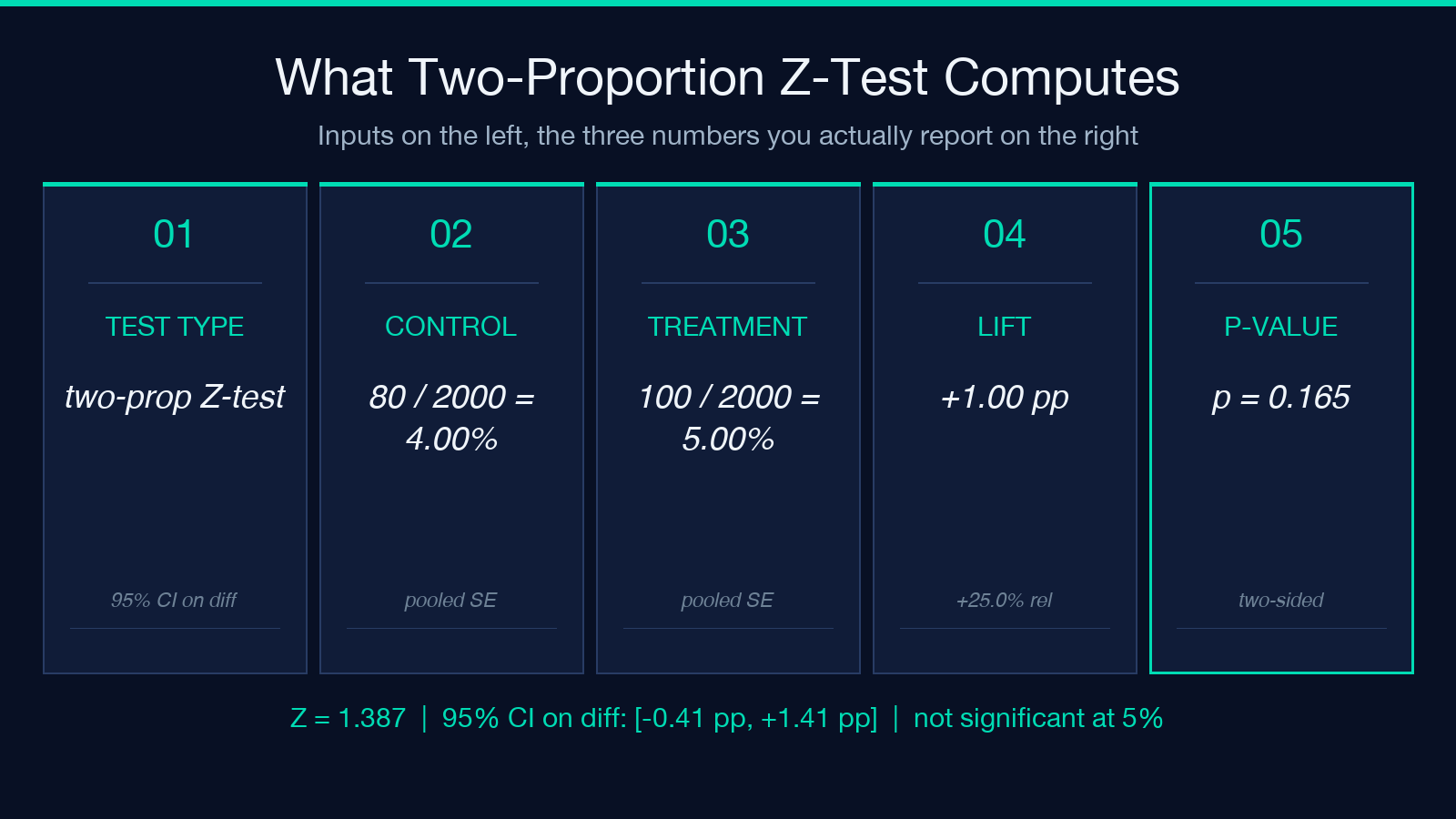
For conversion-style metrics (free-trial signups, add-to-cart clicks, trial-to-paid conversions), the metric is a Bernoulli count: each visitor either did the thing or did not. The right test is a two-proportion Z-test, and the calculator computes p-values using the pooled standard error.
SE = sqrt(p_pooled * (1 - p_pooled) * (1/n_c + 1/n_t))
where p_pooled = (x_c + x_t) / (n_c + n_t)
Z = (p_t - p_c) / SE
The pooled estimate is correct because under the null hypothesis both groups share the same conversion rate. The non-pooled (unpooled) version is a different test meant for arbitrary comparison benchmarks and is not what you want in A/B work. The Elysia Tools A/B Test Significance Calculator defaults to pooled by design.
Welch t-test for continuous metrics: when the metric is dollars or seconds
For continuous metrics (revenue per session, AOV, time-on-page, NPS as a 0-100 number), use Welch’s t-test, which is the unequal-variance variant of Student’s t-test. The Welch statistic is computed sample-by-sample from the per-group mean and standard deviation:
t = (mean_t - mean_c) / sqrt(s_c^2/n_c + s_t^2/n_t)
df = (s_c^2/n_c + s_t^2/n_t)^2 / ((s_c^2/n_c)^2/(n_c-1) + (s_t^2/n_t)^2/(n_t-1))
Welch handles unequal variances gracefully because a smaller group with a wider spread is not over-weighted. The calculator runs Welch by default and falls back to Student’s t only when both standard deviations are within 1% of each other.
A few metric-specific traps to know. AOV is right-skewed by heavy spenders; a single $10,000 order can flip the result. Use a log-transform or compute p-values on the median via a Mann-Whitney U test, which the calculator exposes via a switch. Time-on-page is censored at session length — visitors who bounce at 30 seconds look identical to visitors who genuinely read for 30 seconds. Use an event-based rate or trim top/bottom 1% before testing.
Sample size before you start the experiment
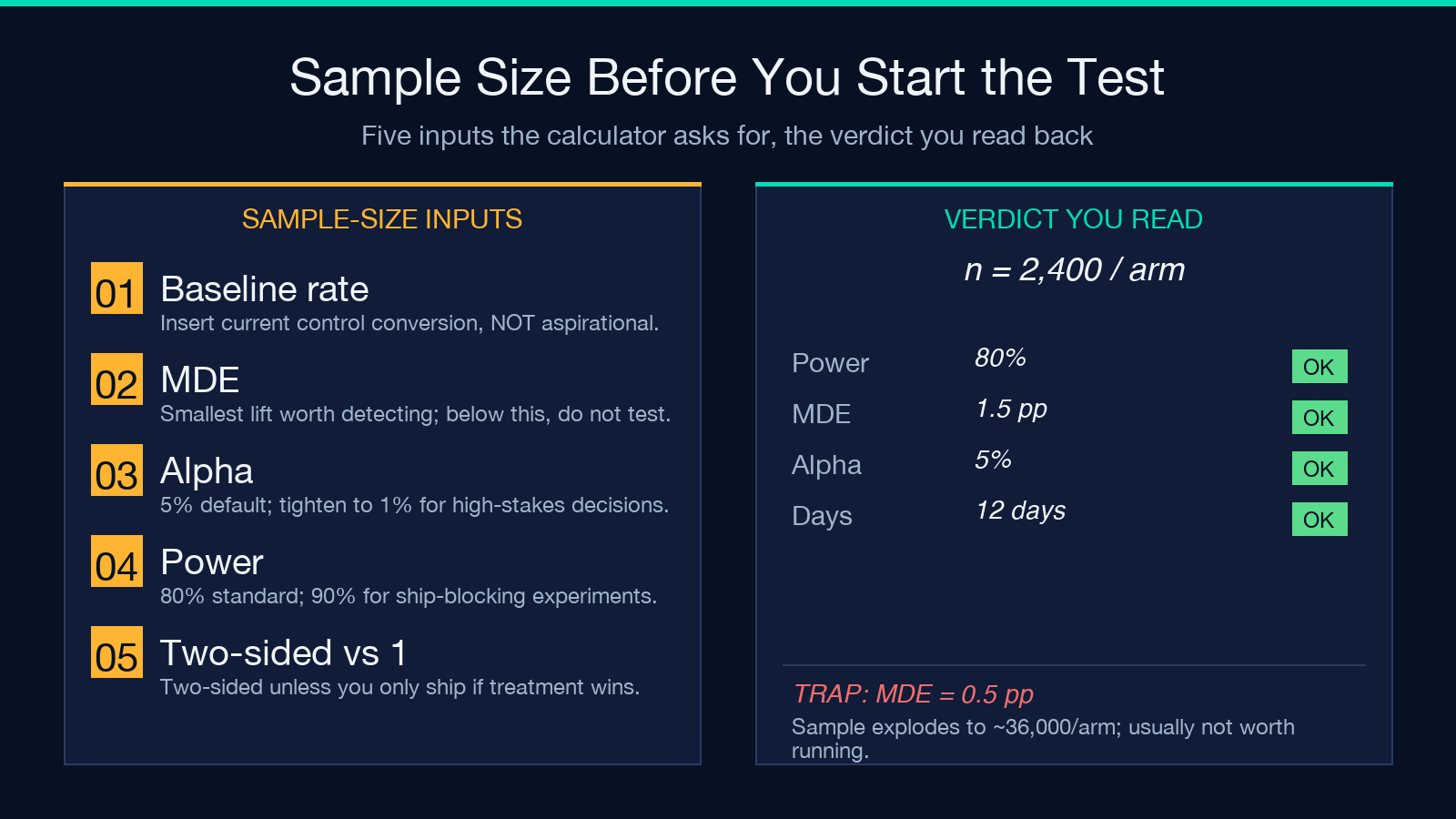
The most expensive mistake is running an experiment too small and declaring no significant difference when the test was underpowered to detect a real one. The calculator computes required sample size per arm for both 80% and 90% statistical power:
n_per_arm ~ 16 * p * (1 - p) / MDE^2     (proportions, 80% power)
n_per_arm ~ 21 * p * (1 - p) / MDE^2     (proportions, 90% power)
For continuous metrics it solves Welch’s t-test iteratively until the target power is reached. The output also estimates the recommended experiment days given a fixed daily traffic rate — a useful sanity check before going to the team with a launch plan. Tools like Elysia Tools’ Monte Carlo Simulation Builder can stress-test the same sample-size math against wide-prior scenarios to see how robust the result is when your assumption about baseline conversion is slightly off.
Reading confidence intervals without fooling yourself
A 95% confidence interval that overlaps zero means you cannot rule out “no difference” at 95% confidence, but it does not mean there is no difference. The calculus is sharper: a confidence interval that just barely excludes zero (for example lift = +1.8% with CI [0.4%, 3.2%]) is consistent with a true lift anywhere in that range. The calculator’s show-CI toggle reveals this directly. Compare the result to the same data run through the Elysia Tools Confidence Interval Calculator for a second opinion on the same numbers — the two should agree to four decimal places; disagreement usually means a Welch-vs-Student choice was made incorrectly somewhere.
Multiple-comparison corrections: Bonferroni and family
Run five variants against a single control (A/B/C/D/E test) and you are running five simultaneous tests. The family-wise error rate is 1 – (1 – 0.05)^5 ~= 23%, meaning at least one significant result is likely spurious. The calculator surfaces three common corrections:
– Bonferroni: divide alpha by the number of tests (most conservative) – Holm-Bonferroni: step-down version, slightly more powerful – Benjamini-Hochberg FDR: controls false-discovery rate, looser but better when you are screening many variants
For most experiments with three or fewer variants the corrections barely matter; for five plus they start to sting. The calculator’s detect-correction toggle shows both the raw and corrected p-values side by side so the team can debate which is more appropriate. Related tools — Elysia Tools’ ANOVA Variance Analysis and Elysia Tools’ Correlation Analyzer — handle the multi-arm and the cross-metric views respectively, both of which compose naturally with the Bonferroni-aware significance output.
Sequential testing and the peeking problem
Stop a test early as soon as p < 0.05 and your reported false-positive rate balloons to well above 5%. The calculator has two protections built in. AGILE sequential-testing boundary: p-values must cross a tighter threshold (typically around 0.005 at peek one, dropping further each peek) for a significant call. Always-valid confidence intervals (Howard's method): the CI is correct regardless of when you peek, at the cost of being wider.
When the team insists on peeking every day to keep stakeholders updated, point them at the always-valid CI numbers: the interval widens on each peek to compensate. The Elysia Tools Normality Tester is a useful pre-flight before relying on Welch — if the metric distribution is far from normal (heavy tails, bimodal), the central-limit theorem rescue still works at large N but breaks at N < 100 per arm.
Putting it together: an experiment-review checklist
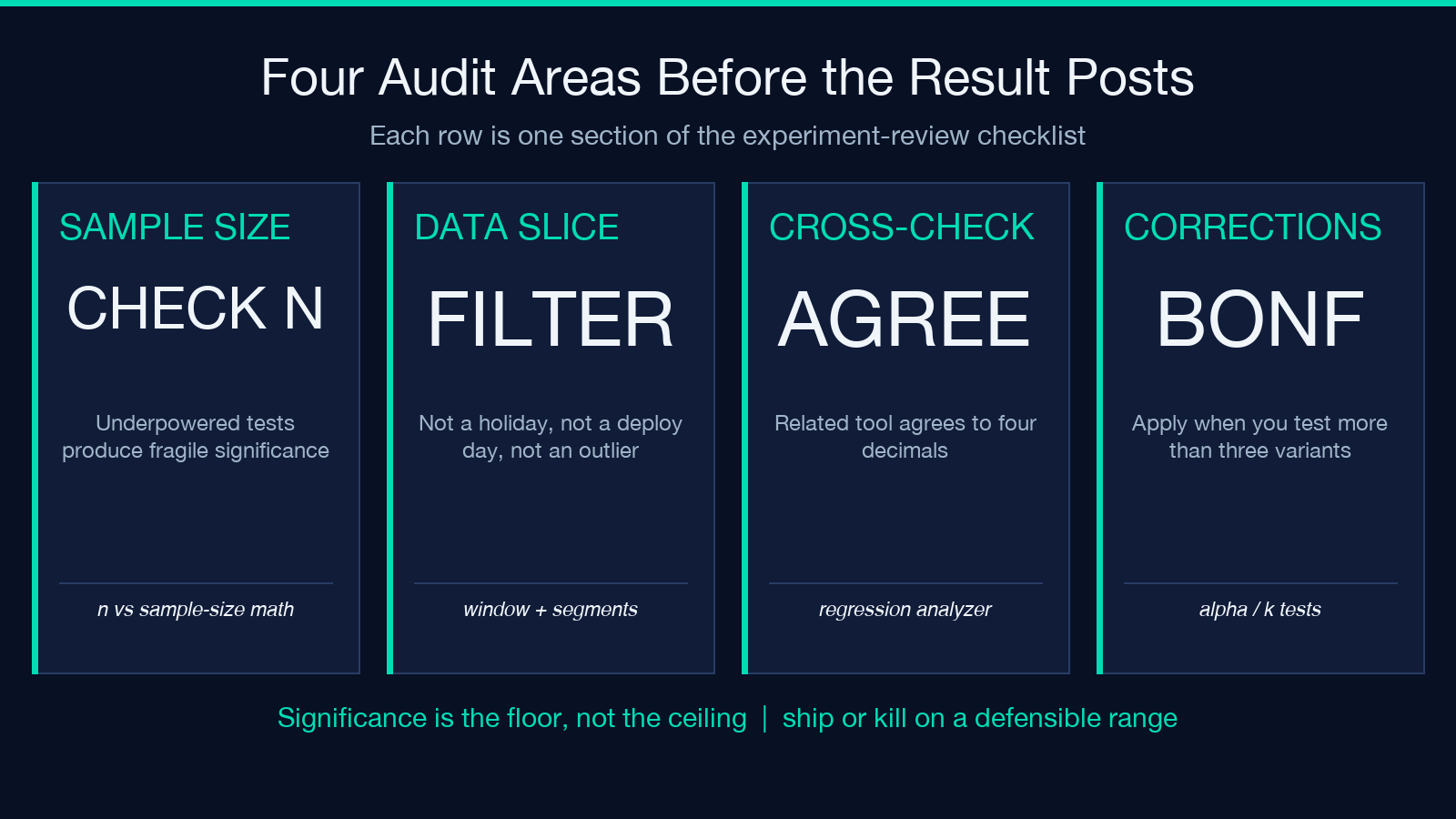
When the calculator spits out a result that says significant at p < 0.01 with CI [+1.4%, +3.2%], the experiment-review checklist should be:
1. Sanity-check N per arm against the sample-size estimate — underpowered tests produce fragile significance. 2. Verify the data slice: not a holiday weekend, not a launch-deploy day, not a single 80% outlier segment. 3. Cross-check the metric on a related tool — Elysia Tools’ Regression Analyzer and Distribution Analyzer provide second opinions on the underlying numbers. 4. Compute the Bonferroni-corrected p-value if you are testing more than three variants. 5. Communicate the lift as a range, not a point estimate, using the confidence interval. 6. If using sequential testing, verify the always-valid CI is still positive at the final peek.
Significance is the floor, not the ceiling. With the right calculator in hand and the right checklist behind it, you can end an experiment review with a defensible “ship it” or a defensible “kill it” — never “looks promising, let’s run it another week.” Explore more statistical tools in the Elysia Tools data-analysis collection.
